
AP98275 - Cables for Computers and Peripherals APC - Free user manual and instructions
Find the device manual for free AP98275 APC in PDF.


| Product Type | UPS Signalling Bundle |
| Brand | APC by Schneider Electric |
| Model | AP98275 |
| Compatible IBM Systems | AS/400 Models 9402, 9404, 9406; IBMi Power Series 5, 6, 7 |
| Compatible UPS Devices | Smart-UPS (SU, SUA, SURT, SURTD, SURTA, SUM, SMX), Symmetra LX, Symmetra RM |
| Contents | Three communication cables (940-0031, 940-0006, 940-0274) and one dongle (940-3000) |
| Cable 940-0031 | 9-pin male cable |
| Cable 940-0006 | 15-pin male cable |
| Cable 940-0274 | 9-pin male to female cable |
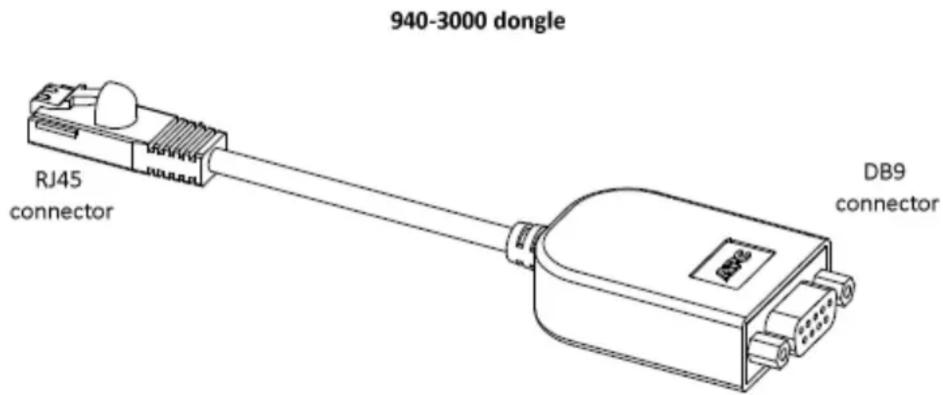
| Dongle 940-3000 | RJ45 to 9-pin female dongle |
| Primary Function | Enables communication between IBM servers and APC UPS for unattended shutdown |
| Installation | Connect appropriate cable (and dongle if needed) between IBM system and UPS |
| Monitoring Options | Native IBM UPS monitoring or APC PowerChute Network Shutdown software |
| System Requirements | One of the listed IBM systems and a compatible APC UPS |
| Cable Selection | Depends on IBM server model and UPS type (see manual table) |
| Feature Codes | IBM feature codes f/c 1827, 3930 may be required for some setups |
| Connectivity | DB9, RJ45, 15-pin connectors |
| Warranty and Support | Customer support at www.apc.com/support |
| Additional Resources | IBM hardware information center and APC compatibility charts |
| Use Case | Data centers and server rooms with IBM Power Systems |
Frequently Asked Questions - AP98275 APC
User questions about AP98275 APC
0 question about this device. Answer the ones you know or ask your own.
Ask a new question about this device
Download the instructions for your Cables for Computers and Peripherals in PDF format for free! Find your manual AP98275 - APC and take your electronic device back in hand. On this page are published all the documents necessary for the use of your device. AP98275 by APC.
USER MANUAL AP98275 APC
AP98275: UPS Signalling Bundle for IBM AS/400 & IBMi (IBM Power Systems)
Overview
What is the AP98275 Signalling Bundle?
This bundle enables IBM servers (AS/400 & IBMi systems) to communicate with Smart-UPS and Symmetra UPS devices from APC by Schneider Electric.
It consists of:
- communication cables: 940-0031 (9-pin male cable), 940-0006 (15-pin male cable), 940-0274 (9-pin male to female cable),
• and a dongle connector, 940-3000 (RJ45 to 9-pin female dongle).
Use one of the supplied cables (with, in some instances, the dongle) to directly connect your IBM AS/400 or IBMi system with your UPS device. This facilitates unattended shutdowns and avoids potential system corruption.

In previous APC by Schneider Electric bundles, the cables above came separately. This new bundle combines the cables with the new dongle to offer a single solution to all the connectivity issues. See "Which cable should you use?".
Why use the AP98275 Signalling Bundle?
The installation of a stand-alone UPS without using this bundle provides protection against brief power outages, brownouts, and other power line transients.
However, to protect your system from corruption that is caused by extended power outages, you must use this bundle. Then, your IBM system's built-in UPS Monitoring function can check the UPS status, alert you about power problems, and automatically shut down the system.
System Requirements for AP98275
One of these IBM systems, (see also "Which cable should you use?"):
• An IBM AS/400 Model 9402, 9404, or 9406
• IBMi system, power series 5, 6, 7
Any of the APC by Schneider Electric UPS range of UPS device types below.
The Smart-UPS devices are listed by prefix, e.g. SURT.
SU SUA
SURT SURTD SURTA
SUM SMX
SMT Symmetra LX Symmetra RM
Installing the AP98275
Which cable should you use?
Each combination of an IBM system and a UPS device needs a cable (and in some cases a dongle) from the AP98275 bundle. The table below lists the supported combinations in rows:
| IBM Server Model | UPS Device and Appropriate Cable in AP98275 | |
| SURTD, SMT, SMX | SU, SUA, SURT, SURTA, SUM, Symmetra LX, Symmetra RM | |
| IBM AS/400 older 9402, 9404 models | 940-0006 and 940-3000 (dongle) | 940-0006 |
| newer 9402, all 9406 models | 940-0031 and 940-3000 (dongle) | 940-0031 |
| IBMi: power series 5, 6 | 940-0274 and 940-3000 (dongle) | 940-0274 |
| power series 7 with RJ45 port | 940-0274 with f/c ^1 3930 and 940-3000 (dongle) | 940-0274 with f/c ^1 3930 |
| power series 7 with DB9M port | 940-0274 and 940-3000 (dongle) | 940-0274 (no f/c required) |
| power series with no on-box UPS communication support | 940-0031(with f/c ^1 1827, f/c 3930 depending on the server), and 940-3000 (dongle), as well as an IBM expansion drawer such as 5877 or 5802 ^2 | 940-0031 (with f/c ^1 1827, f/c 3930 depending on the server), as well as an IBM expansion drawer such as 5877 or 5802 ^2 |
^1 f/c is an IBM term meaning feature code, e.g., the f/c 1827 is the IBM feature code 1827 service processor communications port to UPS cable
^2 An IBM link that provides information on expansion drawer and scenarios on where to use the item: http://pic.dhe.ibm.com/infocenter/powersys/v3r1m5/index.jsp?topic=/areab/areabfc5802.htm.
Installation Steps
- Attach your IBM system to the UPS device using the IBM power cord.
- Choose and attach the correct communication cable for your system, see "Which cable should you use?"
- If your UPS needs the dongle (940-3000), attach the RJ45 connection on the dongle to your UPS port. Attach the DB9 connection (female) on the dongle to the correct AP98275 communication cable and attach the other end of the cable to your IBM system.
- Your IBM system should register that a UPS has been attached. If it does not and the instructions in this document have been followed correctly, you should contact IBM.
Setting Up Monitoring and Shutdown
Options in Monitoring and Shutting Down
This AP98275 signalling bundle can be used in conjunction with monitoring/ shutdown solutions.
- IBM systems have native monitoring/ shutdown functionality which you can use.
- On other systems, for example Windows, an alternative is to use the PowerChute Network Shutdown software from APC by Schneider Electric and create a command file to shut down your IBM system machine over the network.
This command file can be executed by any other PowerChute Network Shutdown client installed on a supported operating system (see www.apc.com/wp/?um=200). You are responsible for creating this command file.
Useful Links
Extensive information on UPS connections for IBM Power Systems hardware is in the hardware information center at the following URL:
http://publib.boulder.ibm.com/infocenter/systems/scope/hw/index.jsp
PowerChute Network Shutdown Operating System, Processor, JRE and Browser Compatibility Chart: www.apc.com/wp/?um=200.
Customer support and the knowledge base for APC by Schneider Electric products at: www.apc.com/support.
Customer support and warranty information is available at the APC Web site, www.apc.com.
© 2012 APC by Schneider Electric. APC, the APC logo, and TRADEMARK NAMES are owned by Schneider Electric Industries S.A.S., American Power Conversion Corporation, or their affiliated companies. All other trademarks are property of their respective owners.
- AP98275: UPS Signalling Bundle for IBM AS/400 & IBMi (IBM Power Systems)
- Overview
- What is the AP98275 Signalling Bundle?
- Why use the AP98275 Signalling Bundle?
- System Requirements for AP98275
- Installing the AP98275
- Which cable should you use?
- Installation Steps
- Setting Up Monitoring and Shutdown
- Options in Monitoring and Shutting Down
- Useful Links
Brand : APC
Model : AP98275
Category : Cables for Computers and Peripherals