
VAPPEBY 605.173.83 - Pregnant IKEA - Free user manual and instructions
Find the device manual for free VAPPEBY 605.173.83 IKEA in PDF.


| Product Type | Bluetooth Speaker |
| Model Name | VAPPEBY 20 gen3 |
| Type Number | E2036 |
| Dimensions (without handle) | 199 x 199 x 80 mm |
| Weight (without battery) | 1.5 kg |
| Input Power | 100-240 VAC, 50/60 Hz |
| Rated Power Consumption | 36.0 W |
| Standby Power Consumption | < 0.2 W |
| Bluetooth Version | 5.0 |
| Wireless Range (unobstructed) | Approximately 10 m |
| Operating Frequency | 2400 - 2483.5 MHz |
| Battery Playtime (at 50% volume) | Approximately 25 h (depends on content) |
| Auto-off Timer | 20 minutes (can be disabled) |
| Operating Temperature | 0 °C to 40 °C |
| Operating Humidity | 0 to 95% RH |
| Audio Input | 3.5 mm 3-pole AUX (AUDIO IN) |
| Spotify Tap | Resume and change music with Power button |
| Stereo Pairing | Pair two identical speakers for left/right channels |
| Battery Type (sold separately) | ICBL14.4-36-A1, 2600 mAh, 37.44 Wh, Li-Ion rechargeable |
| Battery Charging Input | DC 16.8 V, 2.0 A |
| Battery Output | DC 14.4 V, 3.1 A |
| Care Instructions | Wipe with moist cloth; do not use abrasive cleaners or solvents |
| Safety Warning | Indoor use only; keep 5 mm clearance for ventilation; do not expose to liquids |
Frequently Asked Questions - VAPPEBY 605.173.83 IKEA
User questions about VAPPEBY 605.173.83 IKEA
0 question about this device. Answer the ones you know or ask your own.
Ask a new question about this device
Download the instructions for your Pregnant in PDF format for free! Find your manual VAPPEBY 605.173.83 - IKEA and take your electronic device back in hand. On this page are published all the documents necessary for the use of your device. VAPPEBY 605.173.83 by IKEA.
USER MANUAL VAPPEBY 605.173.83 IKEA
natural_image
Line drawing of a rectangular electronic device with two circular components and a handle (no text or symbols)
natural_image
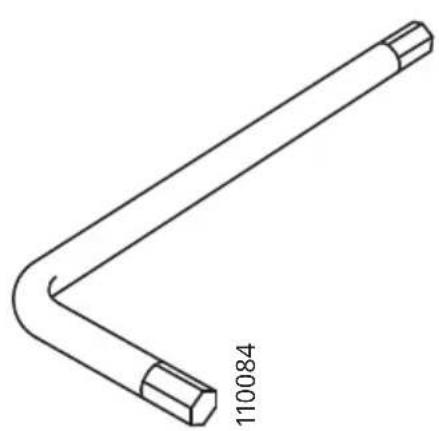
Line drawing of a bent pipe or rod with a hexagonal end, labeled '110084' at the base (no other text or symbols)1x
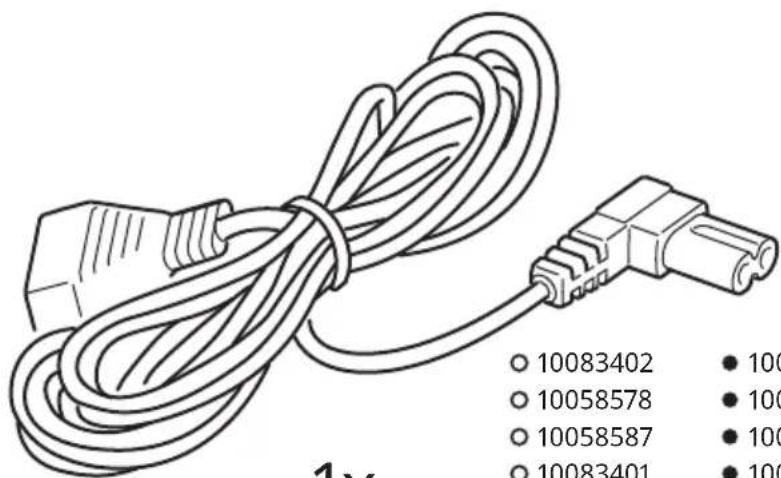
1x
○ 10083402
10083399
10058578
10058573
○ 10058587
10058582
○ 10083401
10083398
○ 10058580
10058574
○ 10058579
10058583
○ 10058576
10058575
○ 10058589
10058577
○ 10084045
10084044
natural_image
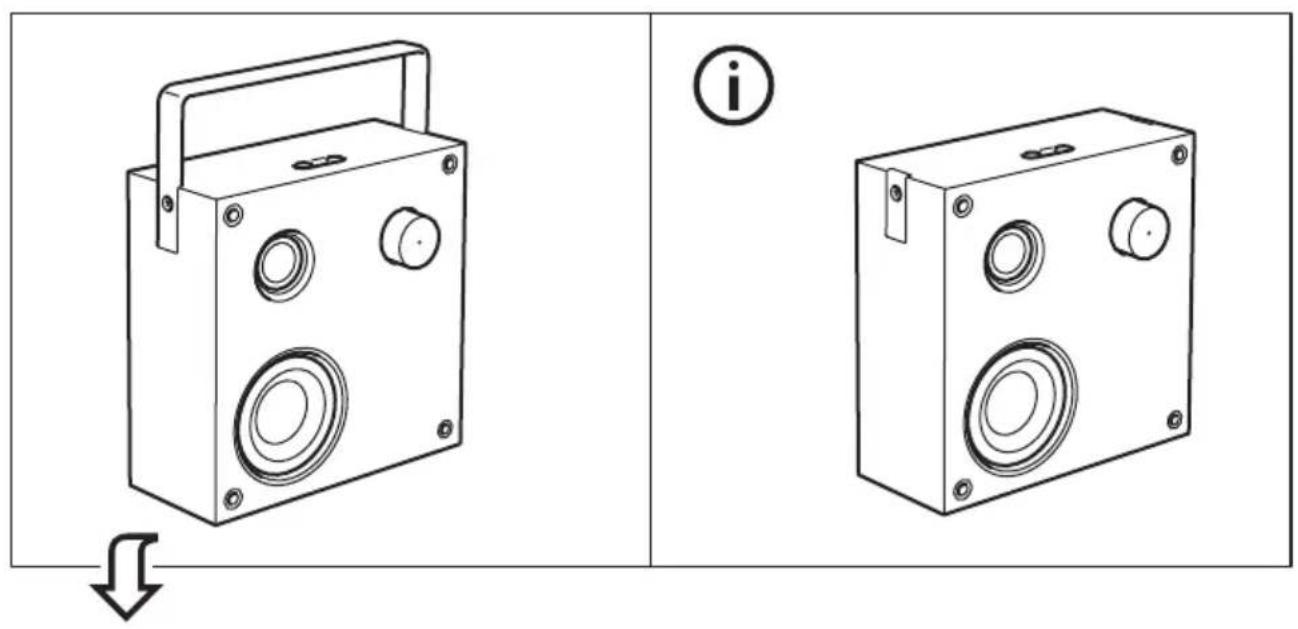
Technical line drawing of two portable electronic devices with circular ports and a handle, shown from different angles (no text or symbols)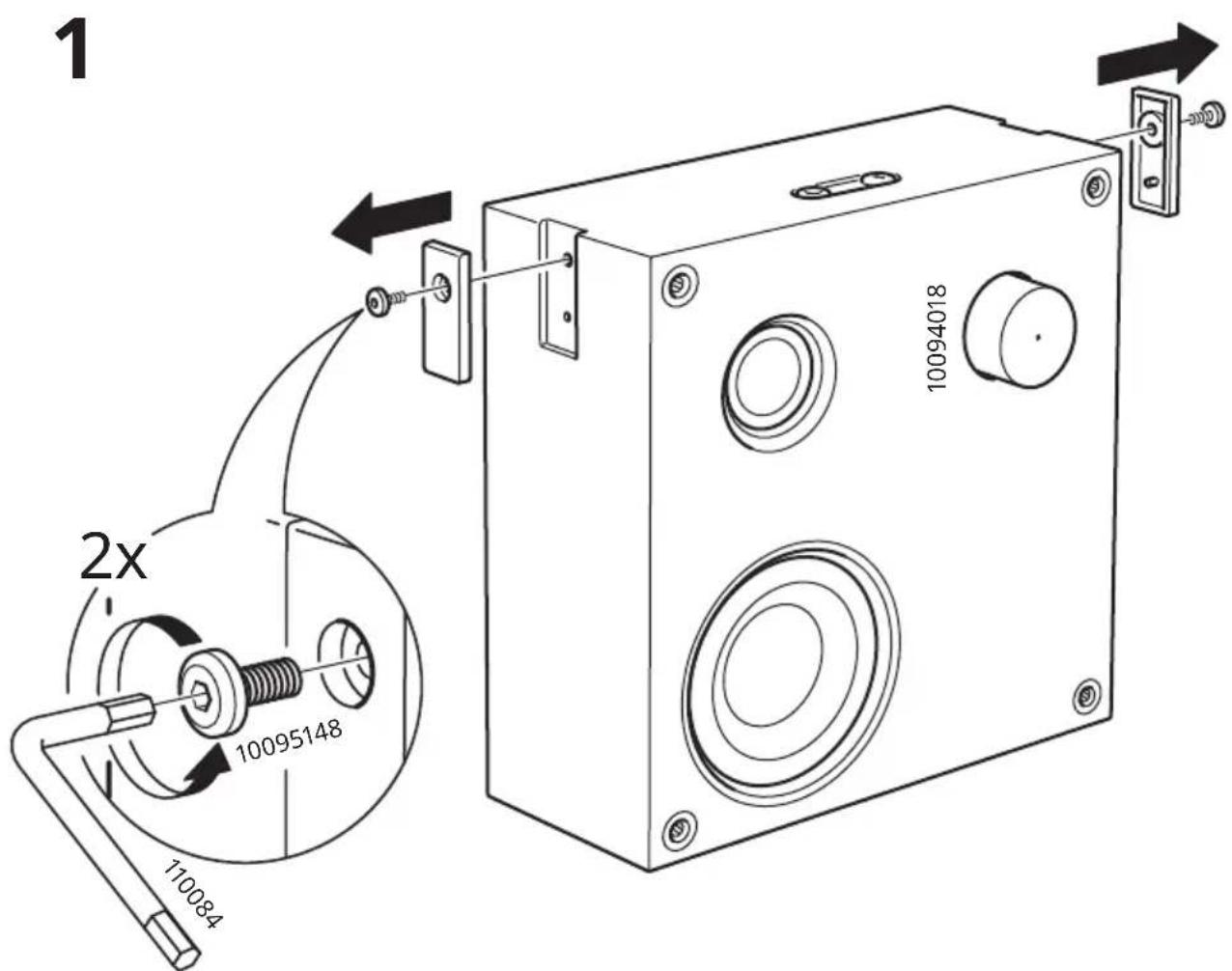
i
natural_image
Line drawing of a portable electronic device with two circular buttons and a handle, showing no text or symbols.i
i
English 10
Español 15
Portugues 20
中文 25
繁中 30
한국어 35
日本語 40
Bahasa Indonesia 45
Bahasa Malaysia 50
55
Inu 60
Tiếng Việt 65
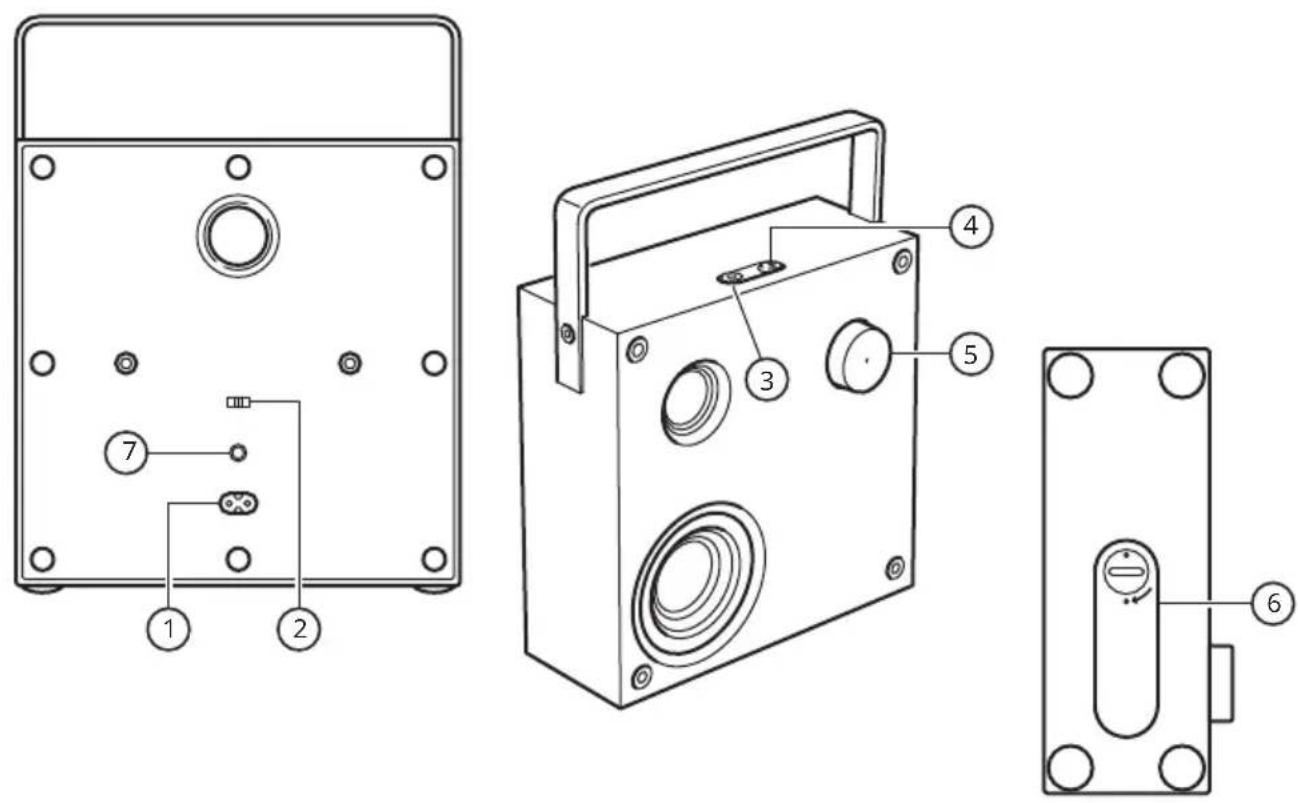
English
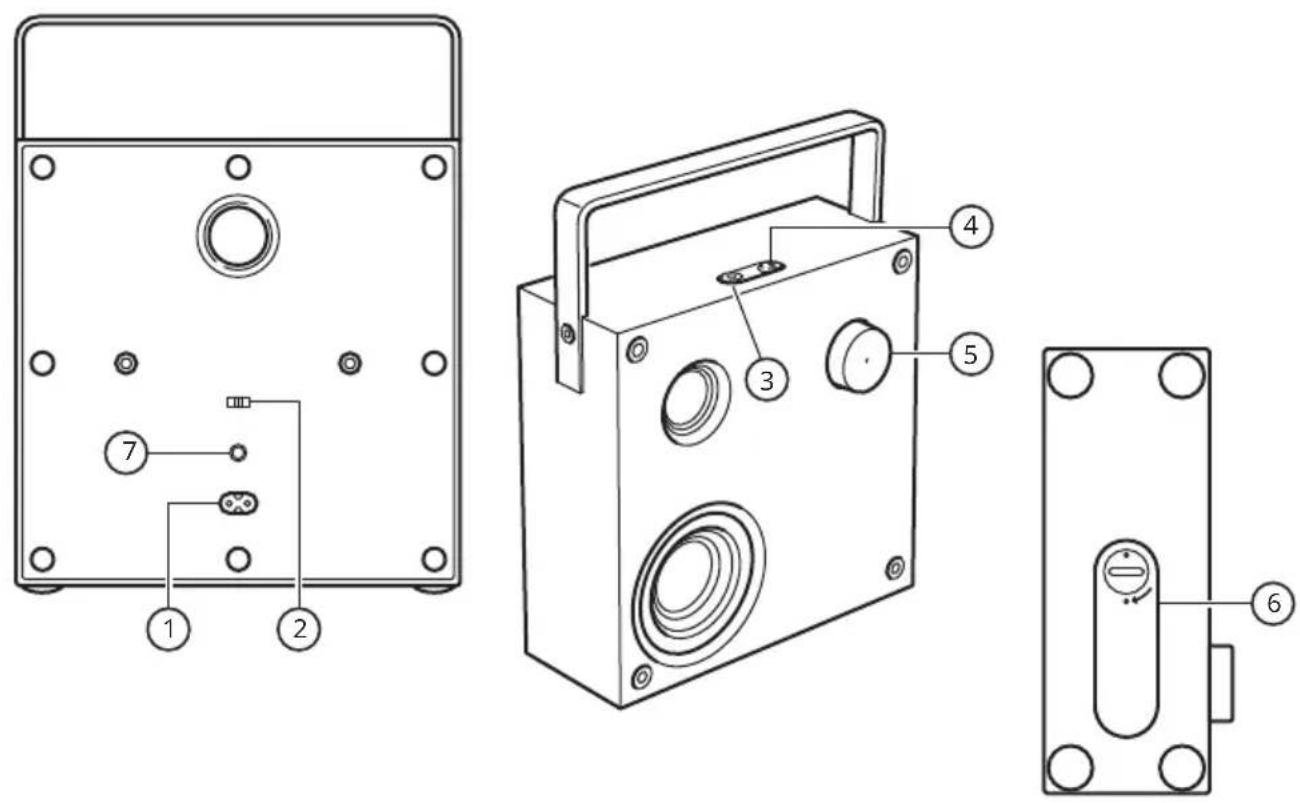
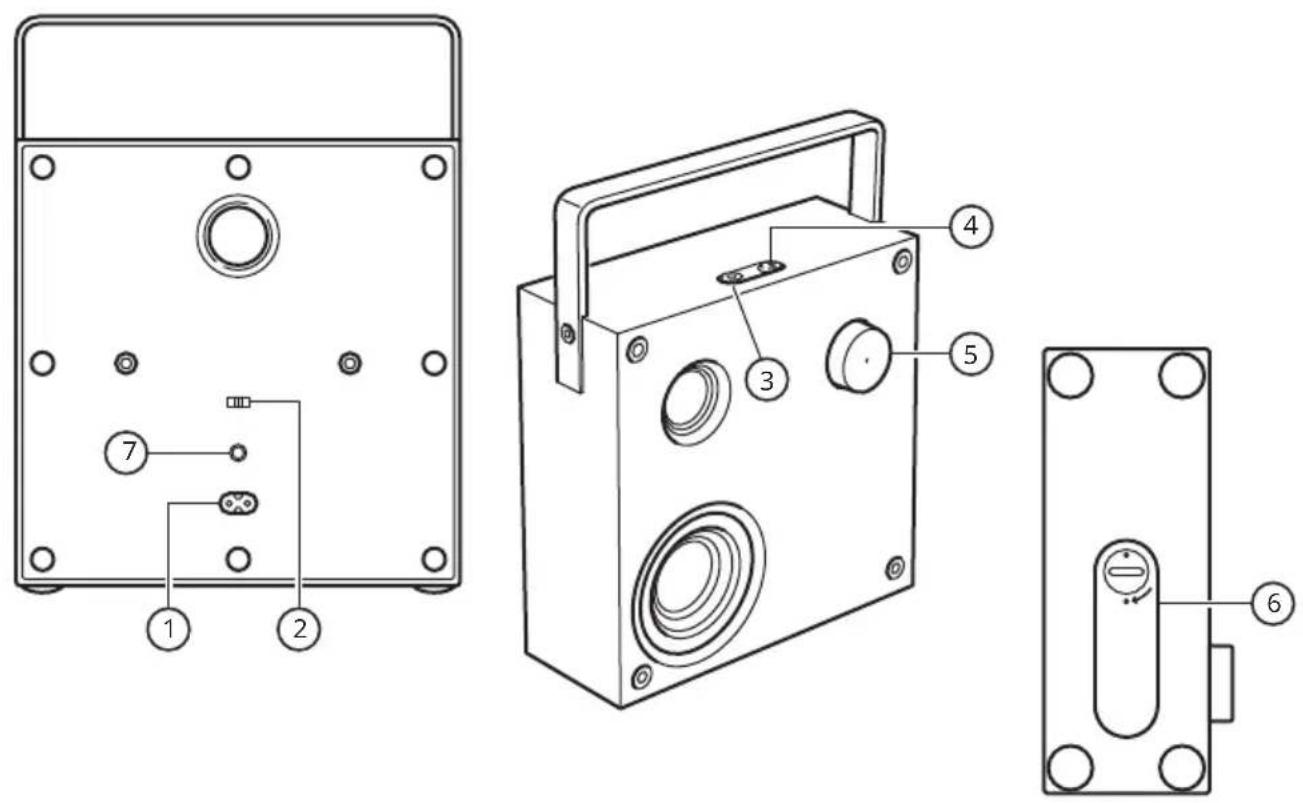
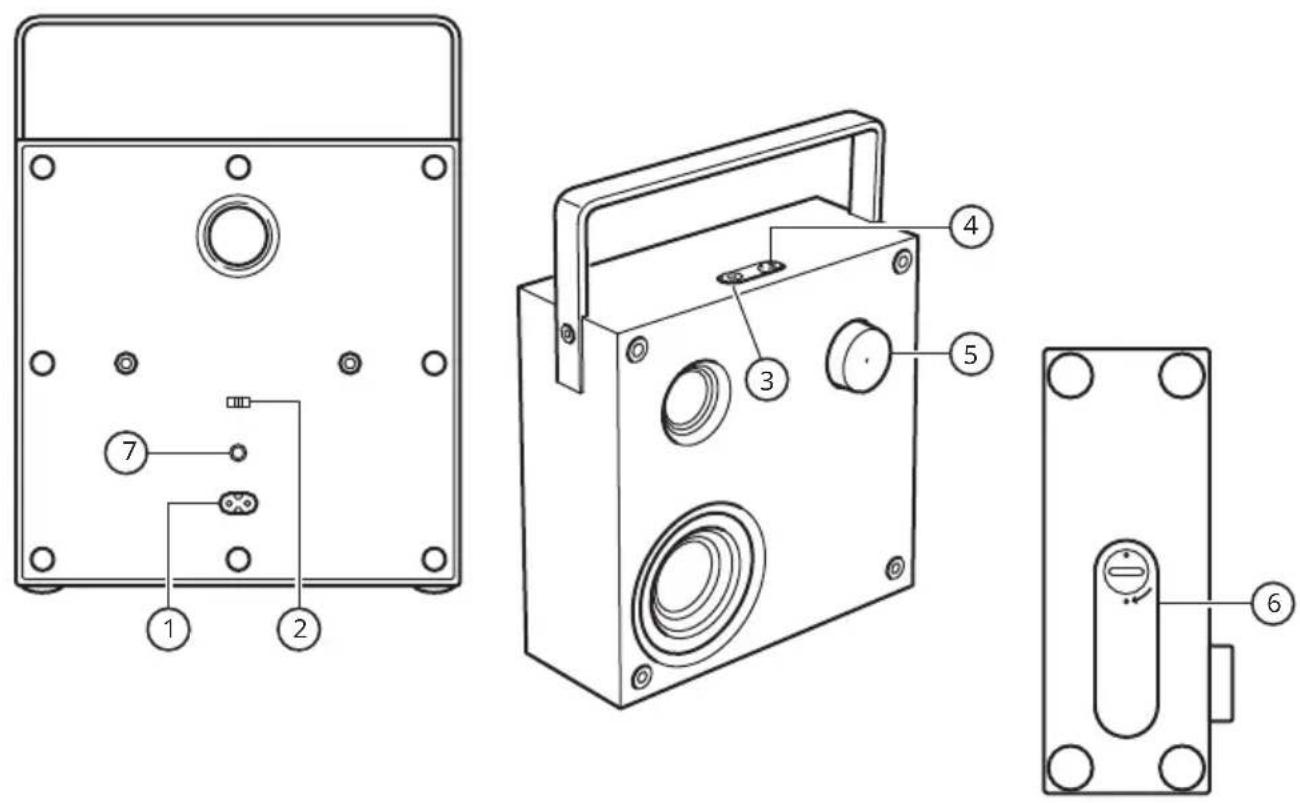
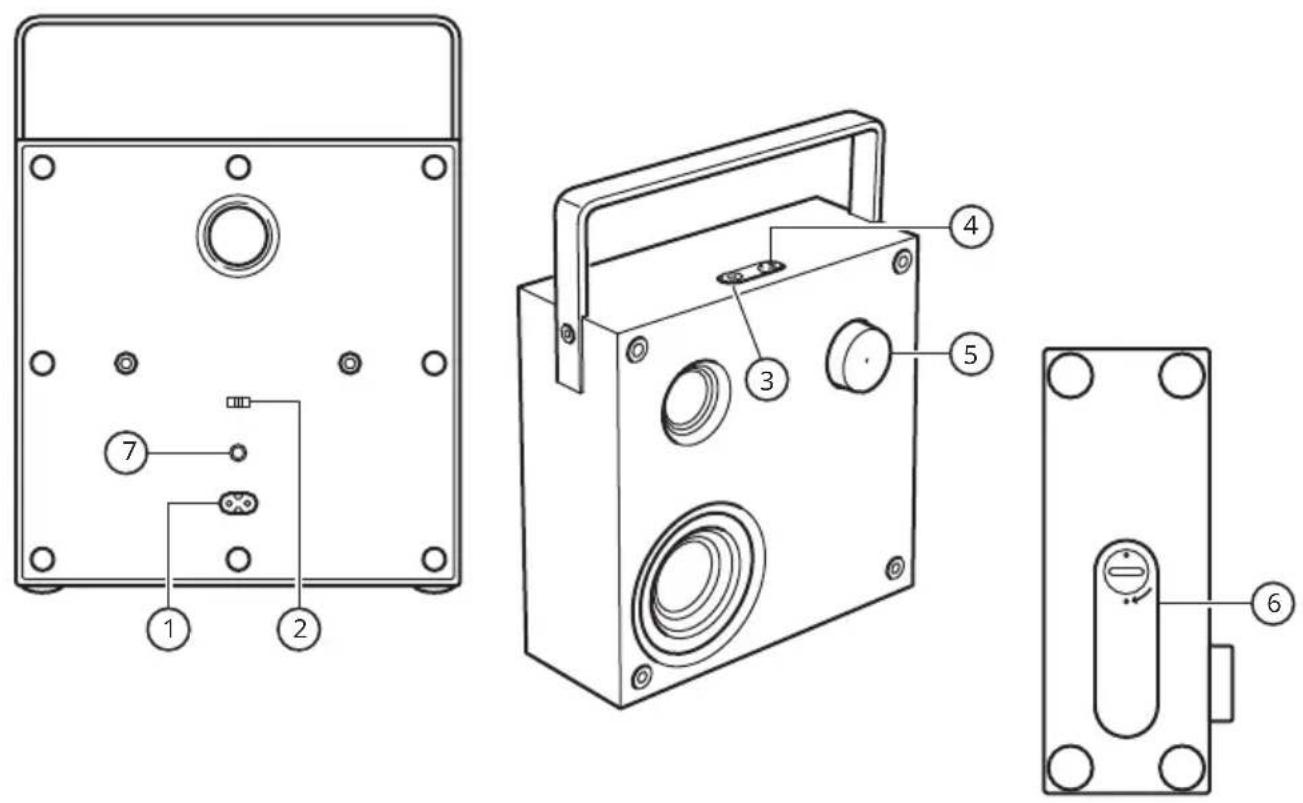
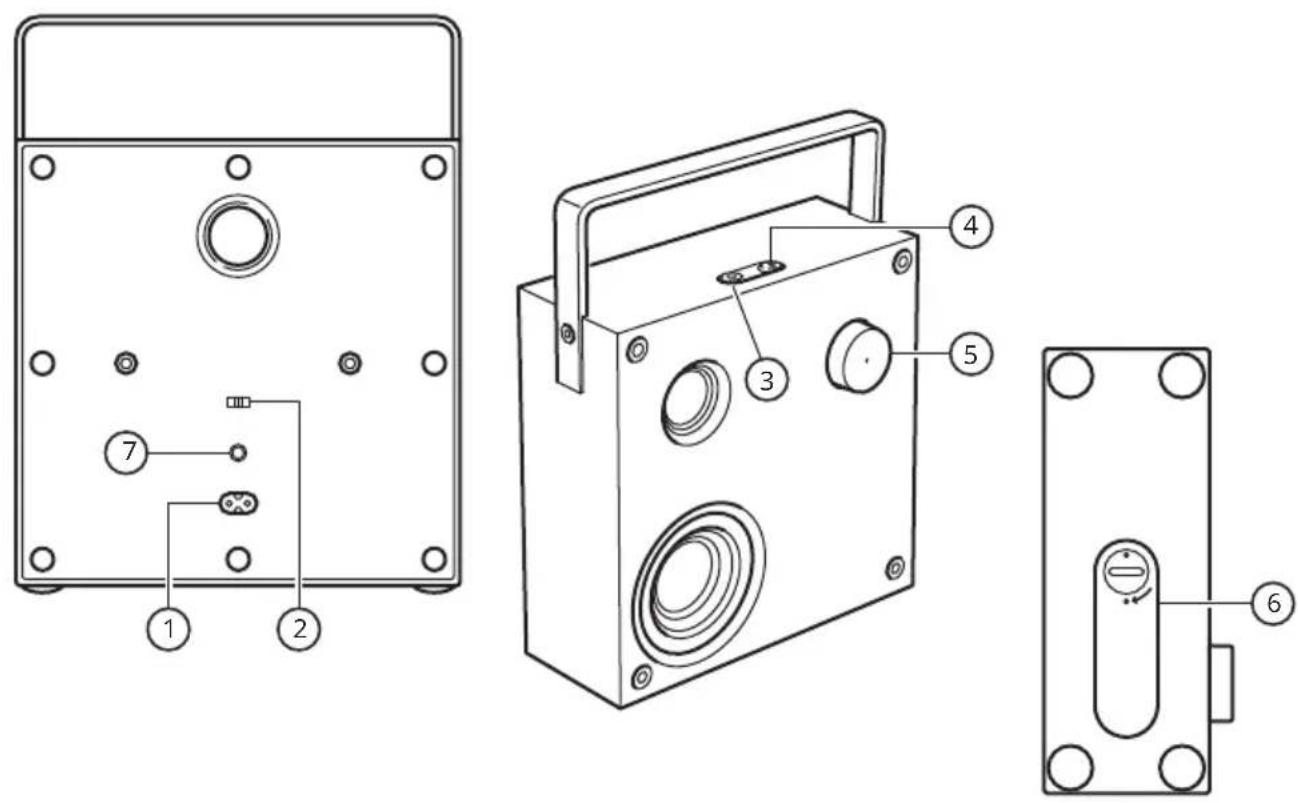
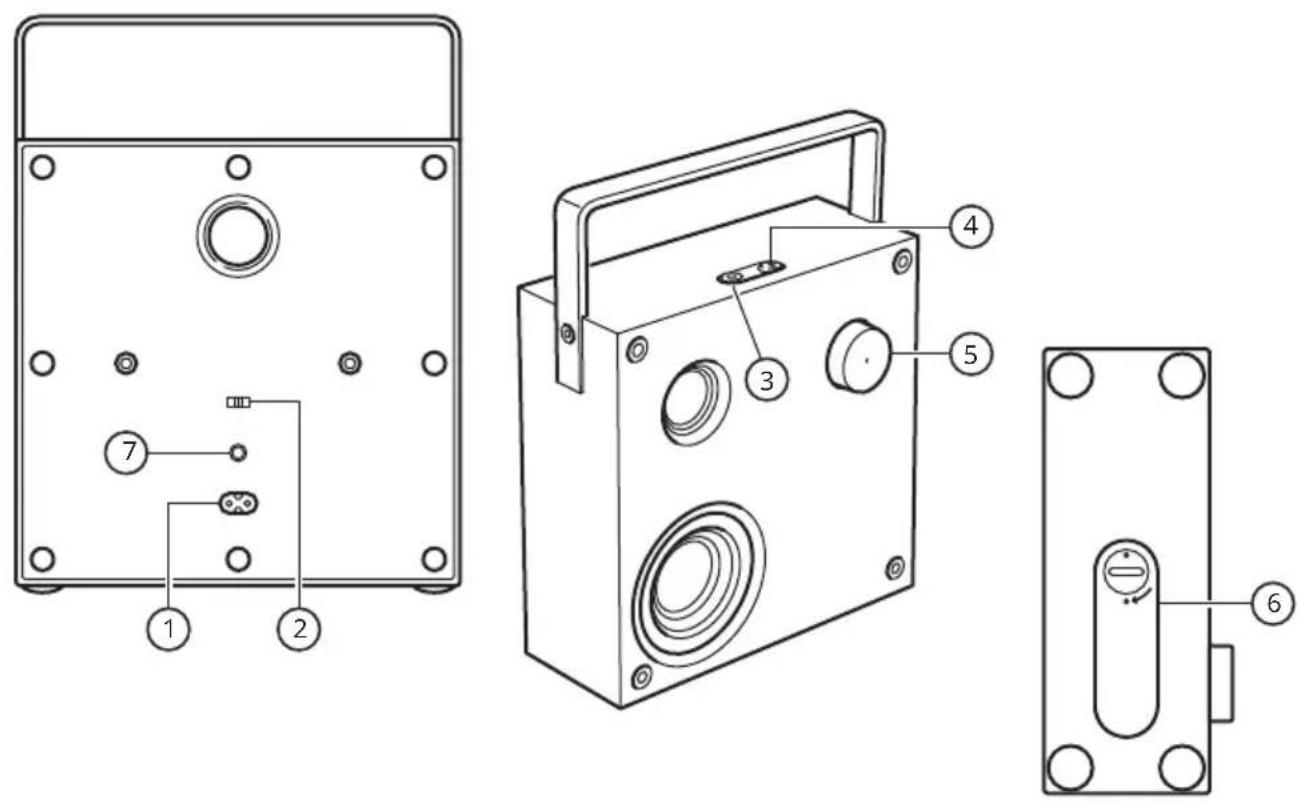
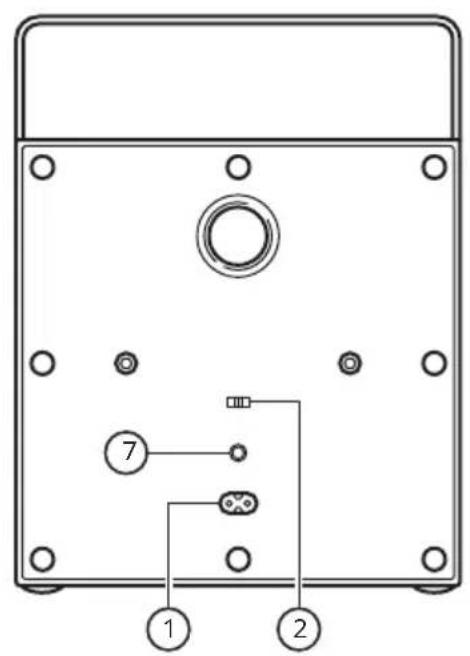
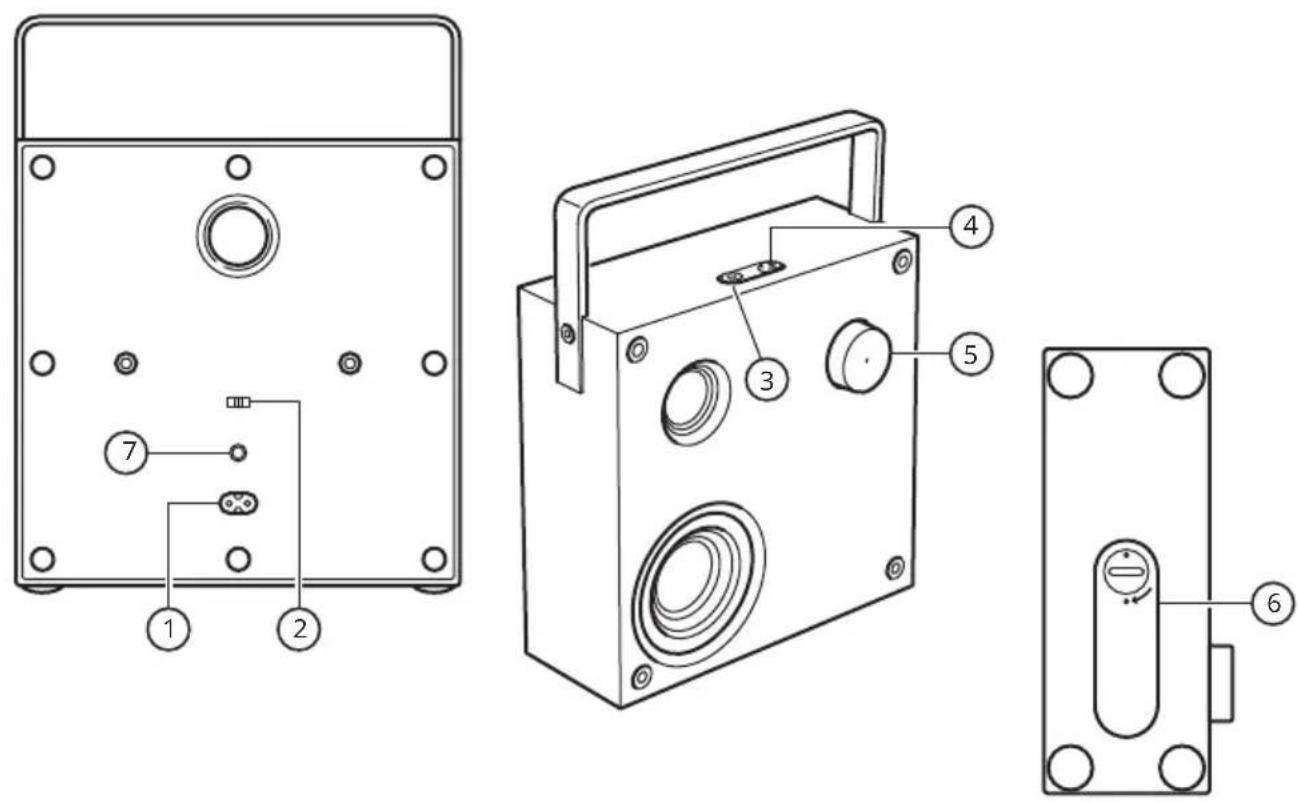
- AC IN connector.
- Enable/disable auto-off switch.
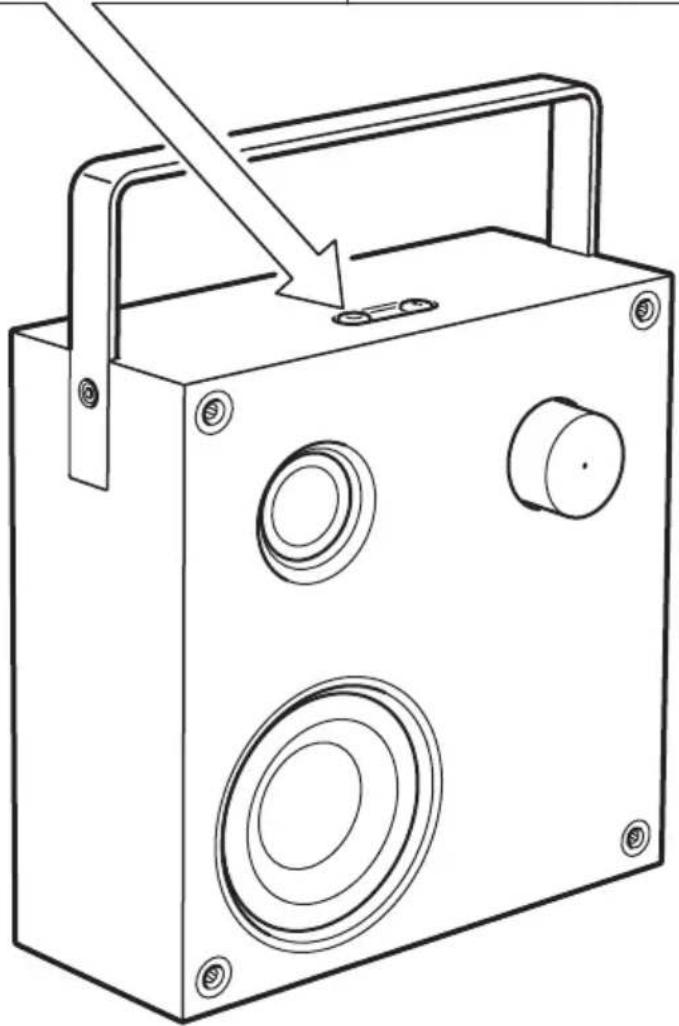
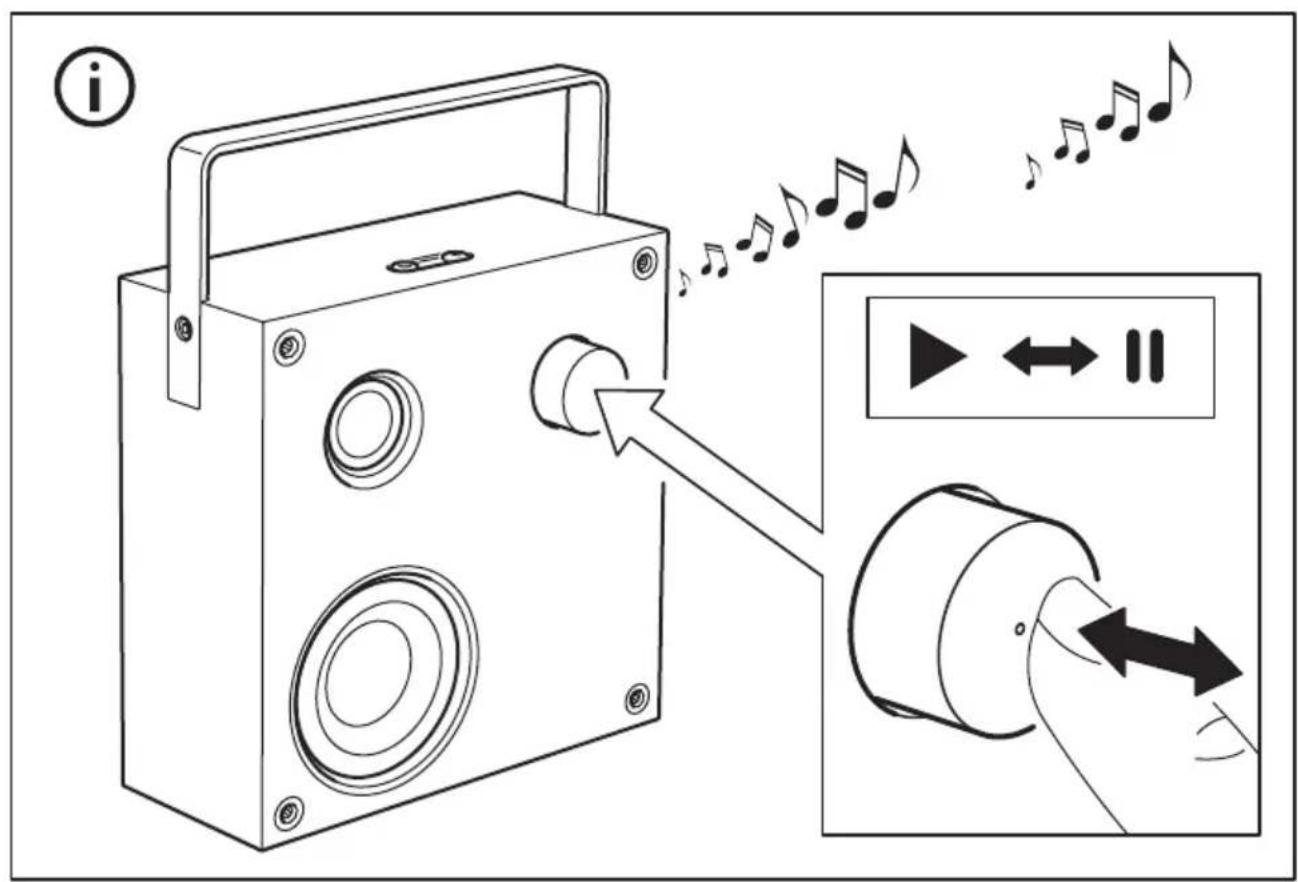
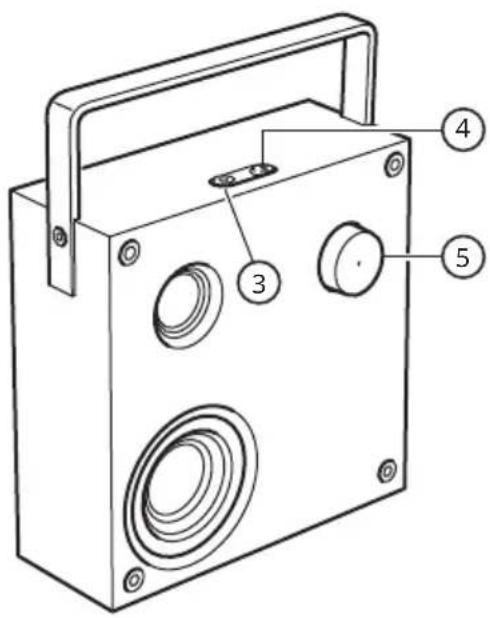
- Power button and Spotify Tap.
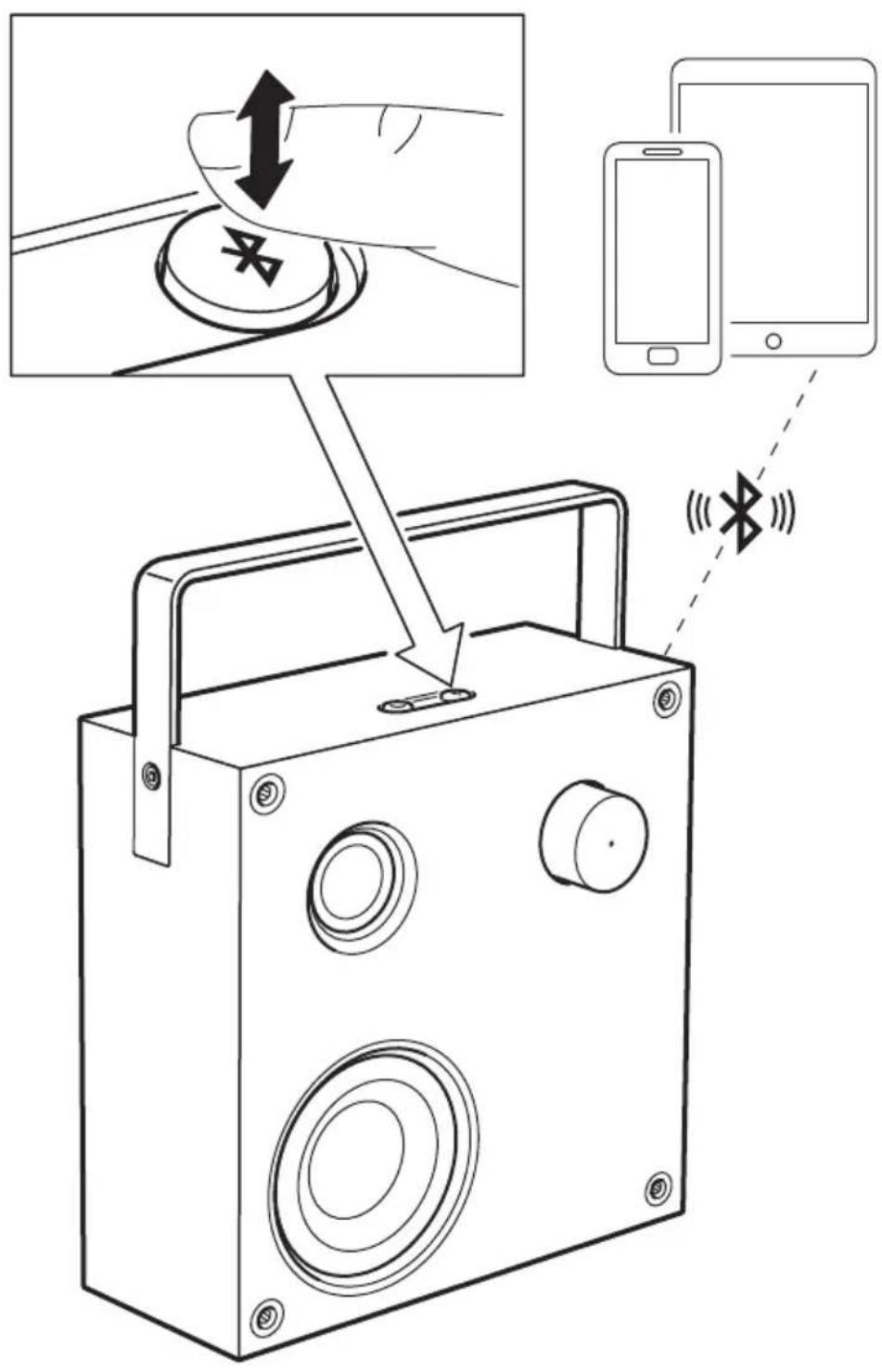
- Bluetooth pairing button.
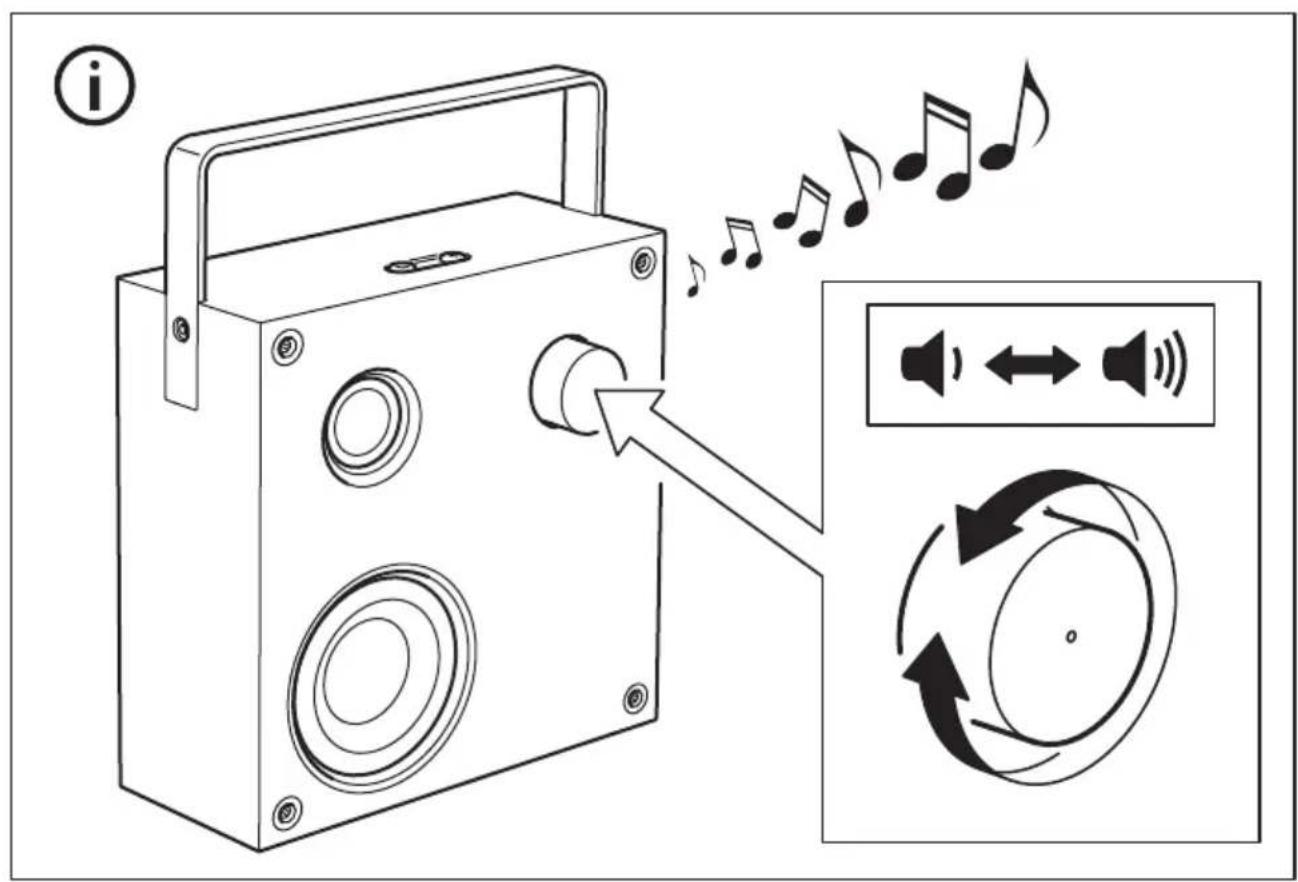
- Volume control and LED status light.
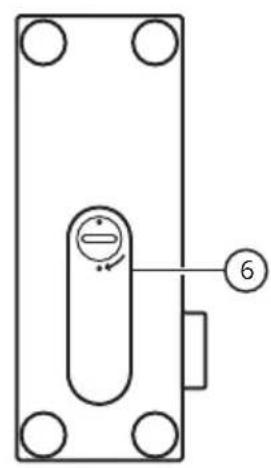
- Battery compartment lid (battery sold separately).
- AUDIO IN connector.
LED status (5)
Flashing white: Bluetooth is pairing.
Steady white: Paired to a device.
Flashing red: Low battery.
Steady red: Charging (when speaker is off).
Getting started:
- Connect mains cord into AC IN (1) connector.
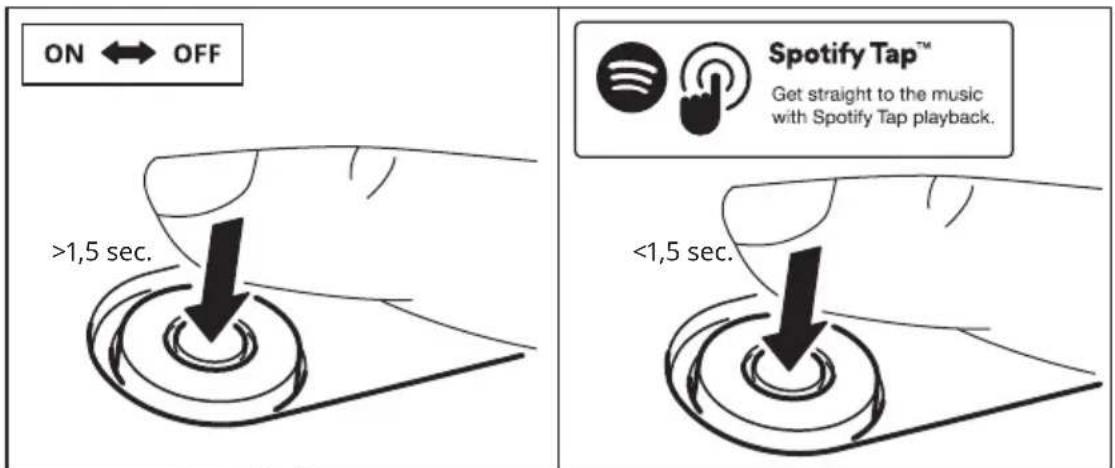
- Long press on the ON/OFF button (3) to turn the speaker ON. VAPPEBY 20 starts to search for paired devices. If a paired device is found, the LED will change from blinking to a steady light and the speaker is ready to use.
- If no device is found, the LED continues to blink and enters pairing mode automatically. Go to the Bluetooth settings of your mobile device and connect to VAPPEBY 20 gen3. The LED should now stop blinking and your speaker is ready to use.
Adjusting the volume
Turn the knob (5) left to decrease or turn it right to increase volume level.
Using Spotify Tap™
Spotify Tap ^™ allows you resume and change music directly from your Bluetooth speaker with the press of a button.
If you have an iOS device:
Go to the App Store and download the Spotify app. You will be able to create an account or log in if you already have one.
If you have an Android device:
Go to the Google Play Store and download the Spotify app. You will be able to create an account or log in if you already have one.
First use
- Make sure your device is paired via Bluetooth to your VAPPEBY speakers.
- Make sure the Spotify mobile app is open. This will only be needed upon the first use.
- Press the Power button (3) to start music. The LED indicator should blink twice.
From now on, whenever you quickly press the Power button (3), the music resumes anytime your device is paired and in range.
Changing music
Press the Power button (3) again to change what's playing to a recommended track.
Play music from external source:
Connect a portable audio device to the AUDIO IN (7) jack on the rear panel. The speaker automatically detects the external input and disables Bluetooth functionality. Use a 3.5mm 3-pole audio cable for this feature.
Use speaker throughout the home:
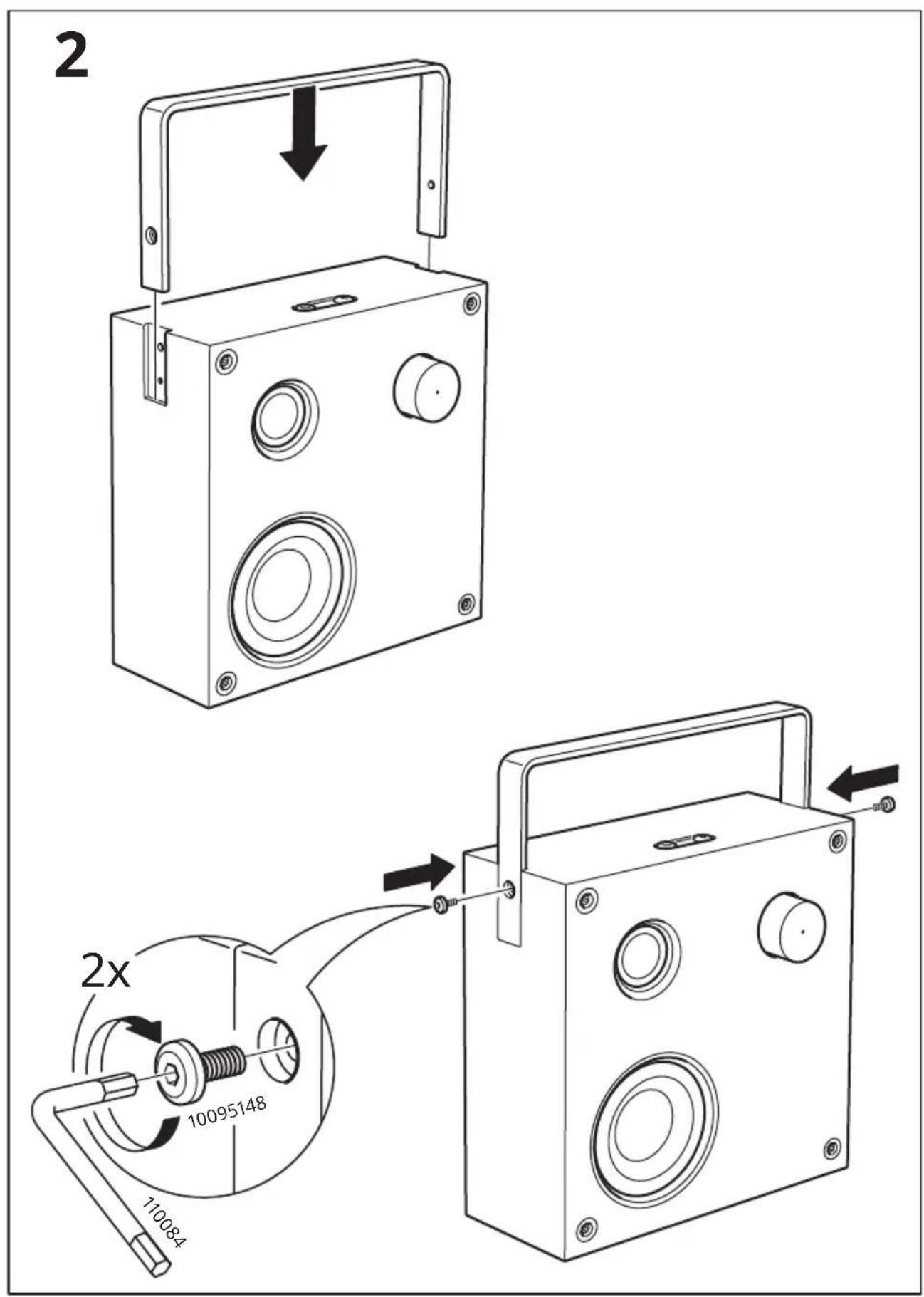
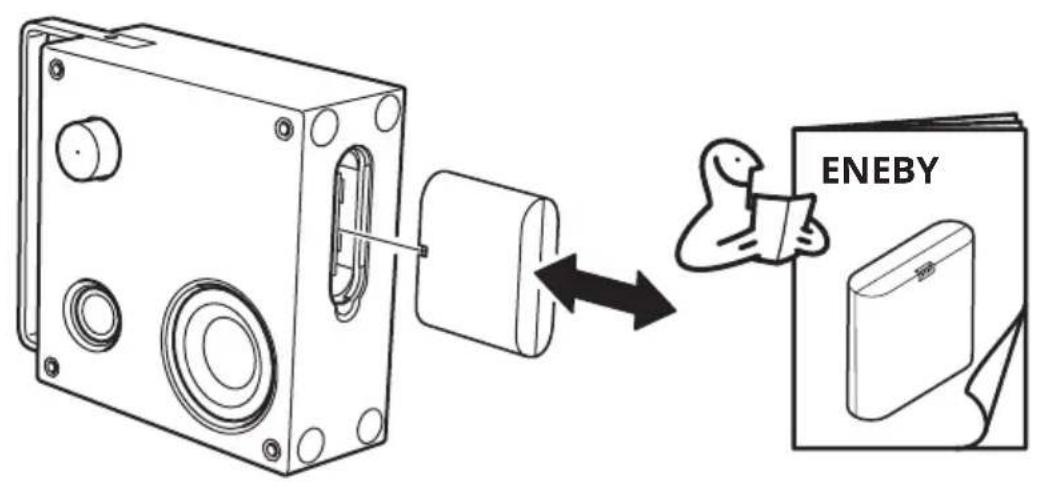
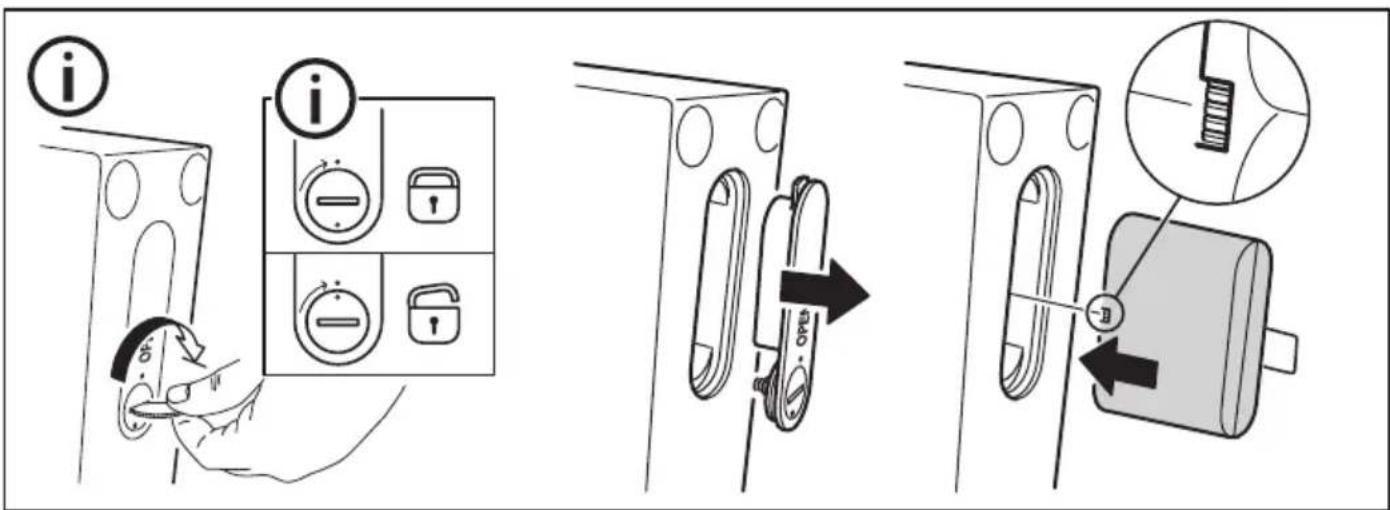
VAPPEBY 20 has the possibility to be portable. ENEBY battery pack is sold separately.
- To insert the battery, open the compartment lid (6) and insert the battery in the correct position.
- The battery charges in the product when a mains cord is connected and the speaker is turned on.
- When the battery is low, a red LED in the knob (5) will flash. During charging, the red LED stays on without flashing.
CAUTION:
Risk of explosion if battery is replaced by an incorrect type.
Replace only with the same or equivalent type.
| Other settings: | |
| Unpair Bluetooth devices | Press and hold the Bluetooth pairing button (4) for ≥1.5 s. The speaker will release the Bluetooth connection to the phone and start searching for another device to pair with. The LED will change from steady light to flashing. |
| Set up a stereo pair You can | pair two identical VAPPEBY 20 gen3 speakers to create a stereo experience. In this configuration, one speaker serves as the left channel and the other serves as the right channel.1. Factory reset both speakers2. Both speakers automatically enter Bluetooth pairing mode (LED quick flash).3. Press twice on the Bluetooth button (4) on one of the speakers (master) to initiate stereo pairing (LED slow flash).4. Successful pairing is confirmed by a system sound.5. Pair the master speaker to your source device.To disconnect a stereo pair, factory reset both speakers. |
| Enable/Disable the auto-off function | Move the switch (2) to position “20” to enable auto-off. The speaker will turn off automatically after 20 minutes if no music is played. Move the switch (2) to position “∞” to disable the auto-off function. |
| Factory reset Press and hold | the volume knob (5) for 5 seconds. A confirmation sound will be played. |
Safety and important notice
WARNING:
- Risk of overheating! Never install the product in a confined space. Always leave a space of at least 5 mm around the product for ventilation. Ensure curtains or other objects never cover the ventilation slots on the product.
- Never place the product or batteries near open flames or other heat sources, including direct sunlight.
- Only use this product indoors. The apparatus shall not be exposed to dripping or splashing, and no objects filled with liquids, such as vases, shall be placed on the apparatus.
- Never place this product on other electrical equipment.
- The mains plug or an appliance coupler is to be used as a disconnect device, the disconnect device shall remain readily operable.
- If the supply cord is damaged, replace it with a new cord set which is type-approved for your country.
- No open flame sources, such as lit candles should be placed on the apparatus.
- Batteries (battery pack or batteries installed) shall not be exposed to excessive heat such as sunshine, fire or similar.
IMPORTANT!
- The speaker is for indoor use only and can be used in temperatures ranging from 0 °C to 40 °C.
- Do not leave the speaker in direct sunlight or near any heat source, as it may overheat.
- Do not subject the speaker to wet, moist or excessively dusty environments, as this may cause damage.
- The range between the speaker and the receiver is measured in open air.
- Different building materials and placement of the units can affect the wireless connectivity range.
- Too high volume can damage your hearing.
- Do not touch the acoustic components.
- Do not use the product as a shelf or stand.
Care instructions
To clean the speaker, wipe with a moist cloth. Never submerge the speaker in water.
Note!
Never use abrasive cleaners or chemical solvents as this can damage the product.
Product servicing
Do not attempt to repair this product yourself, as opening or removing covers may expose you to dangerous voltage points or other risks.
Save these instructions for future use.
Troubleshooting
| Problem Tip | |
| Cannot use Bluetooth: Make sure 3 | 5 mm connector is not plugged into AUDIO IN jack on rear panel. |
| Make sure your phone, tablet or other media device supports Bluetooth. | |
| Make sure to connect to the IKEA device called VAPPEBY 20 gen3. | |
| Make sure your phone, tablet or other media device is paired and that its Bluetooth is turned on. | |
| Make sure no other Bluetooth devices in the room are paired. If so, turn off the Bluetooth function of the device(s). | |
| Poor sound quality when playing via Bluetooth: | If Bluetooth reception is poor, move the device closer to the speaker or remove any obstacles between the device and the speaker.Note:Bluetooth reception will normally operate at a distance of up to 6-8 m in conditions with an unobstructed path. When objects, furniture or walls are in between, Bluetooth reception will be reduced. When the device is placed in pockets of clothes or in a bag, Bluetooth reception can be reduced. |
| Poor sound quality when playing via AUDIO IN input: | Make sure your phone, tablet or other media device is not at maximum volume, if so, turn down the volume. |
Manufacturer: IKEA of Sweden AB
Address: Box 702, SE-343 81 Älmhult, SWEDEN

Bluetooth®
The Bluetooth® word mark and logos are registered trademarks owned by Bluetooth SIG, Inc. and any use of such marks by IKEA is under license. Other trademarks and trade names are those of their respective owners.


Spotify Tap™ Get straight to the music with Spotify Tap playback.
Spotify Tap ^™ is a trademark owned by Spotify and any use of such marks by IKEA is under license. All other Spotify trademarks, service marks, trade names, logos, domain names, and any other features of the Spotify brand are the sole property of Spotify or its licensors.

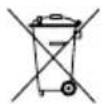
The crossed-out wheeled bin symbol indicates that the item should be disposed of separately from household waste. The item should be handed in for recycling in accordance with local environmental regulations for waste disposal. By separating a marked item from household waste, you will help reduce the volume of waste sent to incinerators or land-fill and minimize any potential negative impact on human health and the environment. For more information, please contact your IKEA store.
Technical data
| Model Name: VAPPEBY 20 gen3 | |
| Type number: E2036 | |
| Input: 100-240VAC 50/60Hz | |
| Standby Power Consumption: <0.2 W | |
| Rated Power Consumption: 36.0 W | |
| Operating temperatures: 0 °C to 40 °C | |
| Operating humidity: 0 to 95% RH | |
| Dimensions (mm): 199x199x80 (without handle) | |
| Weight: 1.5kg (without battery) | |
| Battery playtime at 50% volume: Approximately 25 h | (depends on content) |
| Auto-off: 20 min | |
| Bluetooth Version: V 5.0 | |
| Wireless range (unobstructed): Approximately 10 m | |
| Operating frequency: 2400 - 2483.5 MHz |
How to use ENEBY battery pack (battery sold separately):
GOOD TO KNOW
- It is normal for the battery to become hot during charging and it will gradually cool down after charging.
- Charging time may vary depending on remaining charge, battery age and ambient temperature.
- Battery storage temperature: -20°C to 25°C.
- Charger operation temperature: 0^ to 45^ .
- Disconnect the battery from the power outlet before cleaning or when it is not used.
- Battery should not be left discharged for a longer period.
- Battery should not be charged while in contact with flammable material like textiles.
- This battery can only be used with IKEA products.
CAUTION
- Do not modify, disassemble, open, drop, crush, puncture, or shred battery.
- Do not expose the battery to rain or water.
- Risk of fires and burns. Do not open, crush, heat above 140°F (60°C), or incinerate.
- Keep battery away from open flame or sunlight to prevent heat build-up.
- Keep battery away from high voltage devices.
- This product is not a toy, keep away from children. Ensure that all persons who use this product read and follow these warnings and instructions.
- Do not short-circuit the battery or its cells.
- In the event of a cell leaking, do not allow the liquid to come in contact with the skin or eyes.
CARE INSTRUCTION
To clean the unit, wipe with a soft cloth moistened with a little mild detergent. Use another soft dry cloth to wipe dry.
NOTE!
Never use abrasive cleaners or chemical solvents since this can damage the product.
Product servicing
Do not attempt to repair this product yourself, as opening or removing covers may expose you to dangerous voltage points or other risks.
TECHNICAL DATA
Type: ICBL14.4-36-A1
Capacity: 2600mAh/37.4Wh
Input: DC 16.8V, 2.0A
Output: DC 14.4V, 3.1A
For indoor use only
Rechargeable Li-Ion battery cell inside.
This device conforms to UL STD. 2054
Español
Portugues
Spotify Tap™ Get straight to the music with Spotify Tap playback.
中文
繁中
Spotify Tap™ Get straight to the music with Spotify Tap playback.
한국어
제조업체: IKEA of Sweden AB
주소: Box 702, SE-343 81 Älmhult, SWEDEN

Bluetooth®
Spotify Tap™ Get straight to the music with Spotify Tap playback.
日本語
Spotify Tap™ Get straight to the music with Spotify Tap playback.
Bahasa Indonesia
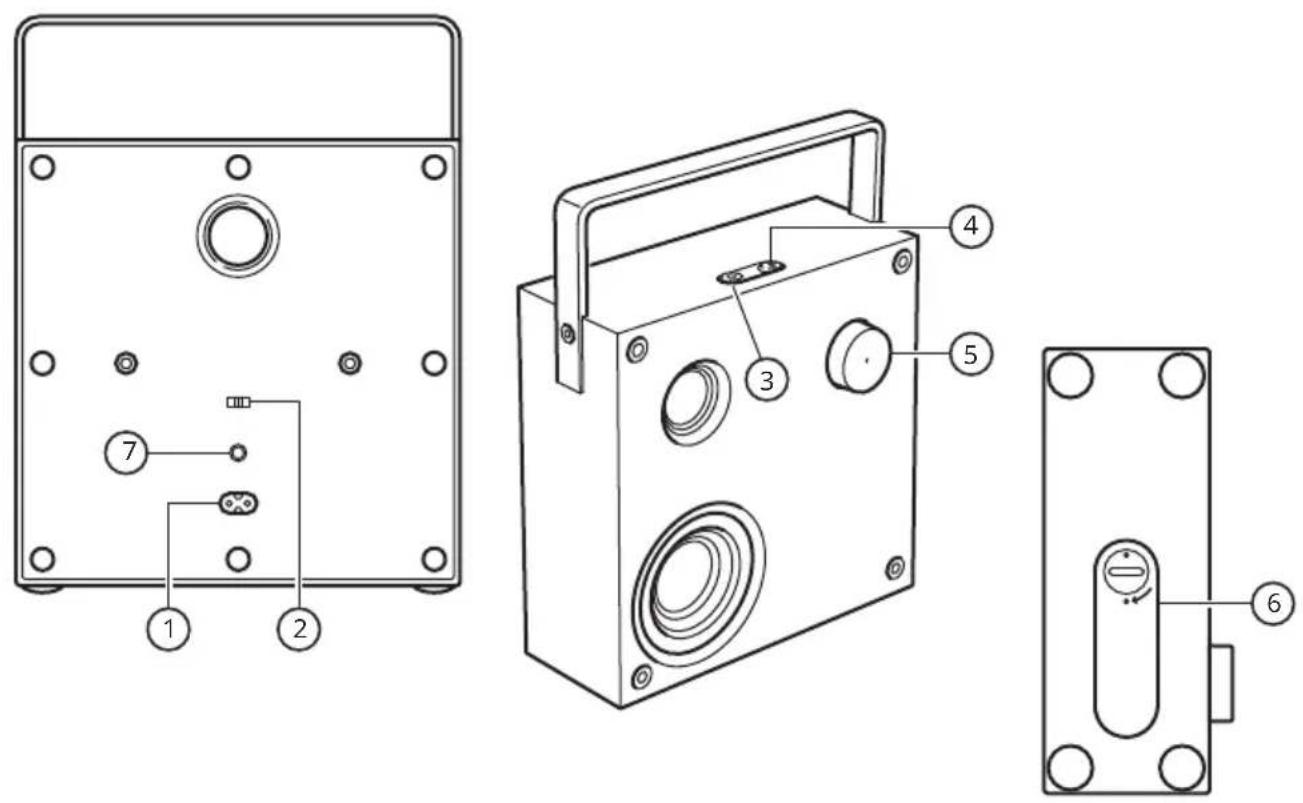
- konektor AC IN.
- Aktifkan/nonaktifkan sakelar mati otomatis.
- Tombol daya dan Spotify Tap.
- Tombol penyandingan Bluetooth.
- Kontrol volume dan lampu status LED.
- Tutup kompartemen baterai (baterai dijual terpisah).
- Konektor AUDIO IN.
Status LED (5)
Berkedip putih: Bluetooth dipasangkan.
Spotify Tap™ Get straight to the music with Spotify Tap playback.
Tipe: ICBL14.4-36-A1
Kapasitas: 2600mAh/37.4Wh
Input: DC 16.8V, 2.0A
Output: DC 14.4V, 3.1A
Bahasa Malaysia
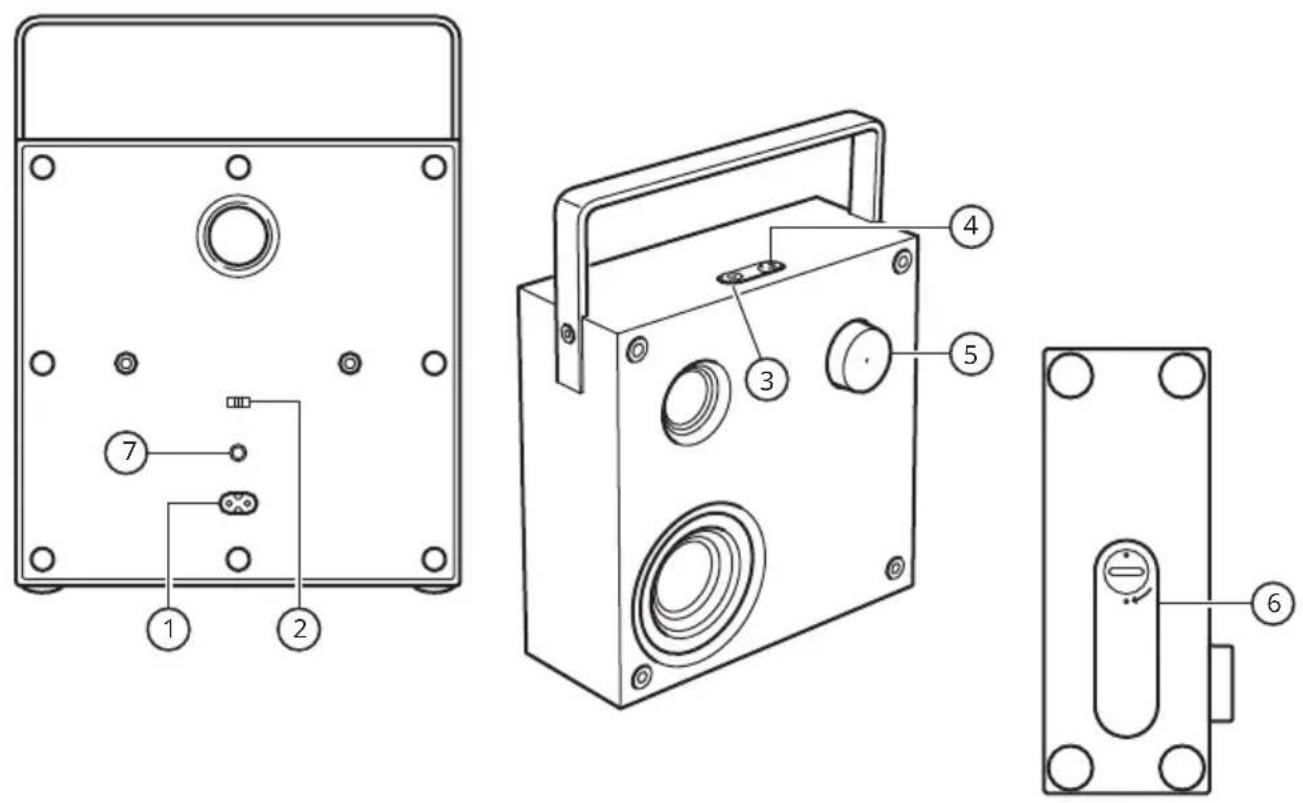
- Penyambung AC IN.
- Suis automatik tutup pemboleh/lumpuh.
- Butang kuasa dan Spotify Tap.
- Butang berpasangan Bluetooth.
- Kawalan bahana dan cahaya status LED.
- Penutup kompartmen bateri (bateri dijual berasingan).
- Penyambung AUDIO IN
Penunjuk status LED (5)
Putih berkelip-kelip: Bluetooth berpasangan.
Spotify Tap™ Get straight to the music with Spotify Tap playback.
natural_image
Pure electrical circuit lines without any symbols(LED (5 حالة
Spotify Tap™ Get straight to the music with Spotify Tap playback
Spotify Tap™ Get straight to the music with Spotify Tap playback.
Tiếng Việt
Spotify Tap™ Get straight to the music with Spotify Tap playback.
Công suất: 2600mAh/37.4Wh
Complies with
IMDA Standards
DA106634
- English
- Getting started:
- Adjusting the volume
- Using Spotify Tap™
- If you have an iOS device:
- If you have an Android device:
- First use
- Changing music
- Play music from external source:
- Use speaker throughout the home:
- CAUTION:
- Safety and important notice
- WARNING:
- IMPORTANT!
- Care instructions
- Note!
- Product servicing
- Bluetooth®
- How to use ENEBY battery pack (battery sold separately):
- GOOD TO KNOW
- CAUTION
- CARE INSTRUCTION
- TECHNICAL DATA
- For indoor use only
- Rechargeable Li-Ion battery cell inside.
- Español
- Portugues
- 中文
- 繁中
- 한국어
- 日本語
- Bahasa Indonesia
- Bahasa Malaysia
- Tiếng Việt
Brand : IKEA
Model : VAPPEBY 605.173.83
Category : Pregnant