
VAPPEBY 805.152.84 - Loudspeaker IKEA - Free user manual and instructions
Find the device manual for free VAPPEBY 805.152.84 IKEA in PDF.


| Product Type | Portable Bluetooth Speaker with Lamp |
| Model Name | VAPPEBY 805.152.84 |
| Type Number | E2004 |
| Battery Capacity | 7.2V DC, 3300 mAh, 23.76 Wh, Li-ion |
| Input for Charging | 5.0V DC, 2.0A, 10W USB Type-C |
| Estimated Play Time (50% volume, 50% brightness) | 11 - 13 hours |
| Bluetooth Version | Not specified |
| Operating Frequency | 2400-2483.5 MHz |
| Radio Output Power | 1 dBm (EIRP) |
| Bandwidth | 1 MHz |
| Decorative Light | 20 lm, 2700K |
| IP Class | IP65 (protected against moisture and water) |
| Operating Temperature | 0°C to 45°C |
| Storage Temperature | -20°C to 25°C |
| Operating Humidity | 0 to 95% RH |
| Speaker Controls | Dial for Play/Pause/Volume, Power button with Spotify Tap, Bluetooth Pairing button |
| Lamp Controls | Lamp Switch button (3 presses: 100%, 50%, off) |
| Bluetooth Pairing | Long press Bluetooth button; LED flashes white; name: VAPPEBY |
| Auto-Off Time | 5 minutes if not paired; 20 minutes if paired but no music |
| Spotify Tap Support | Yes, via Power button (quick press to resume, press again to change track) |
| Charging Indication | Solid red when charging (speaker off); flashing red for low battery |
| Bluetooth Indication | Flashing white: pairing; solid white: paired |
| Cleaning Instructions | Wipe with soft moistened cloth, then dry with soft cloth. No abrasive cleaners or solvents. |
| Safety Warnings | Do not disassemble or repair; keep away from children; avoid confined spaces; maintain 5mm ventilation gap |
| Manufacturer | IKEA of Sweden AB, Box 702, SE-343 81 Älmhult, SWEDEN |
Frequently Asked Questions - VAPPEBY 805.152.84 IKEA
User questions about VAPPEBY 805.152.84 IKEA
0 question about this device. Answer the ones you know or ask your own.
Ask a new question about this device
Download the instructions for your Loudspeaker in PDF format for free! Find your manual VAPPEBY 805.152.84 - IKEA and take your electronic device back in hand. On this page are published all the documents necessary for the use of your device. VAPPEBY 805.152.84 by IKEA.
USER MANUAL VAPPEBY 805.152.84 IKEA
natural_image
Line drawing of a portable kitchen appliance with handle and control buttons (no text or symbols)
Design and Quality
IKEA of Sweden
i
i

1

i

i

i


English 10
Español 14
Português 18
中文 22
繁中 26
한국어 30
日本語 34
Bahasa Indonesia 38
Bahasa Malaysia 42
عربي 46
Inu 50
Tiếng Việt 54
10Englis
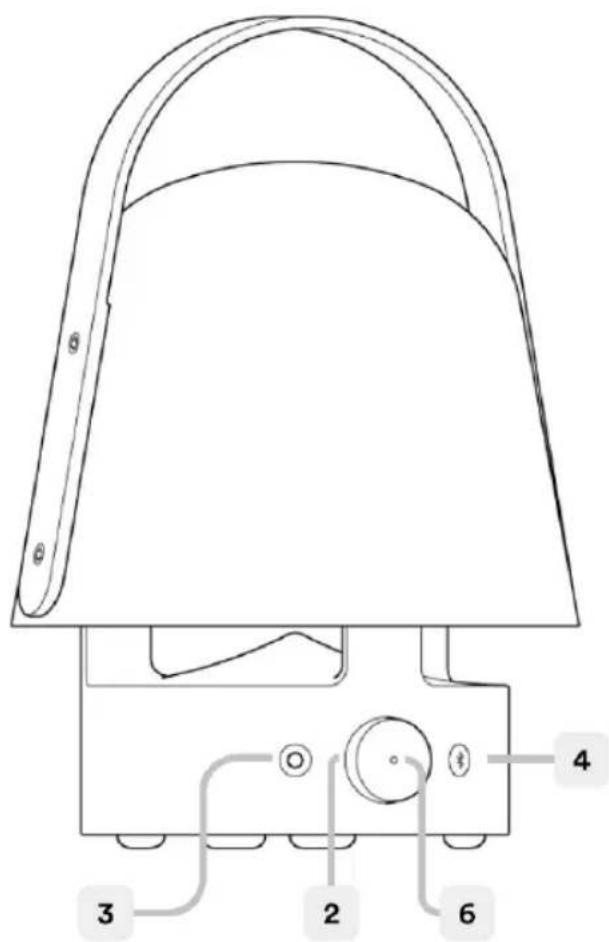
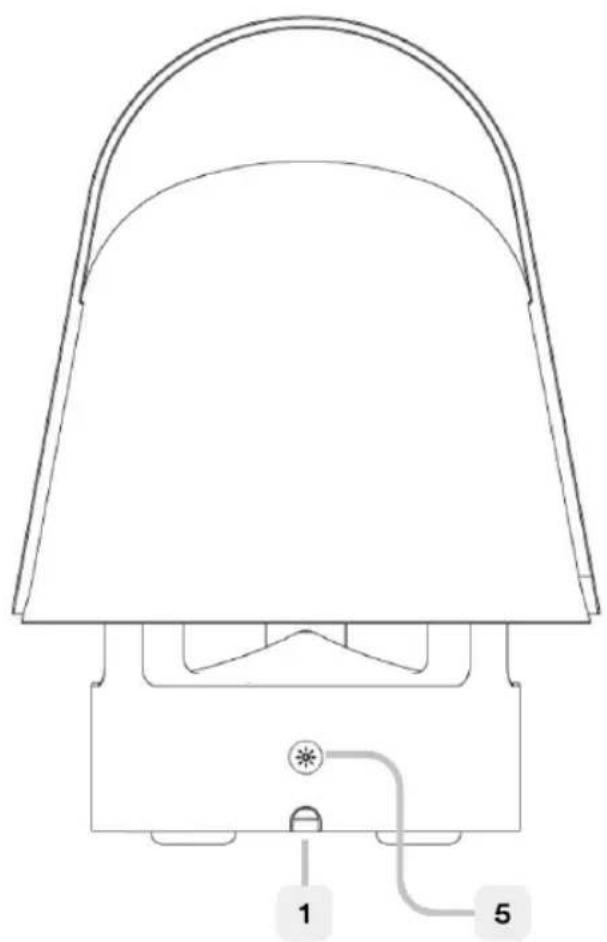
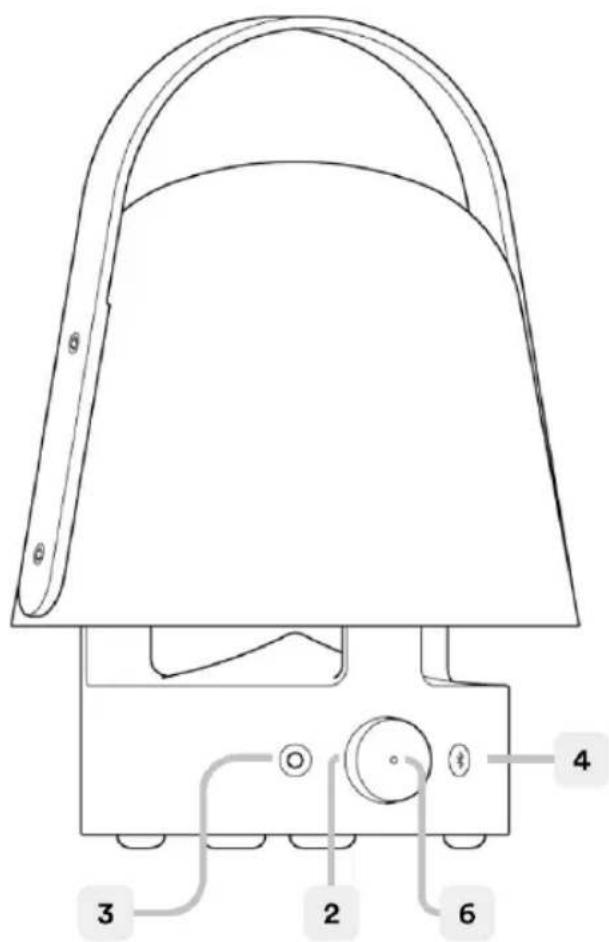
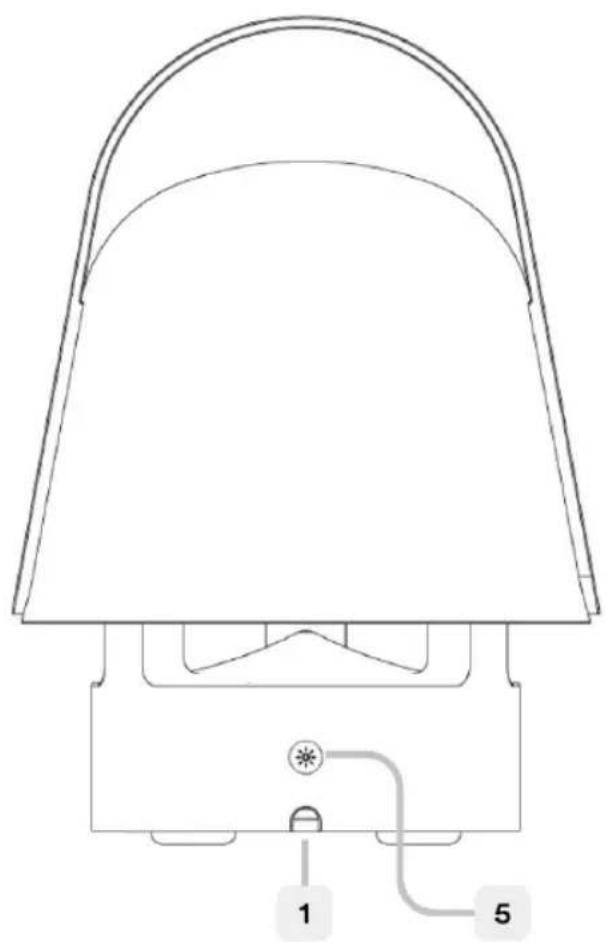
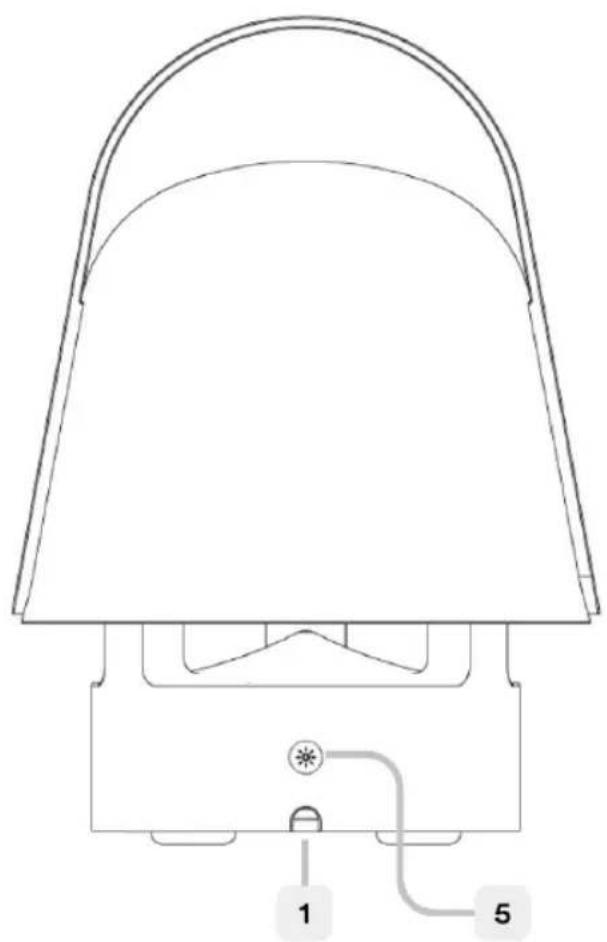
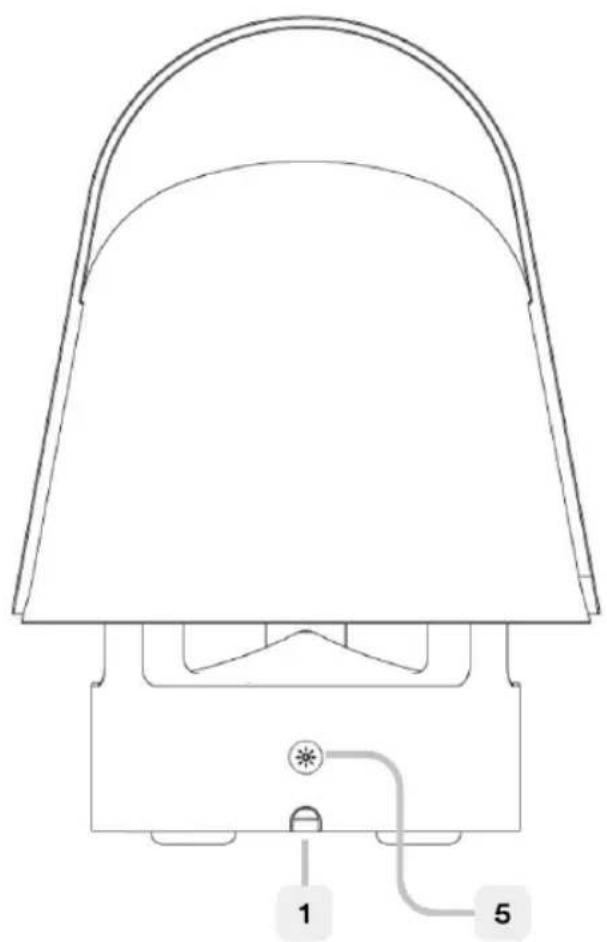
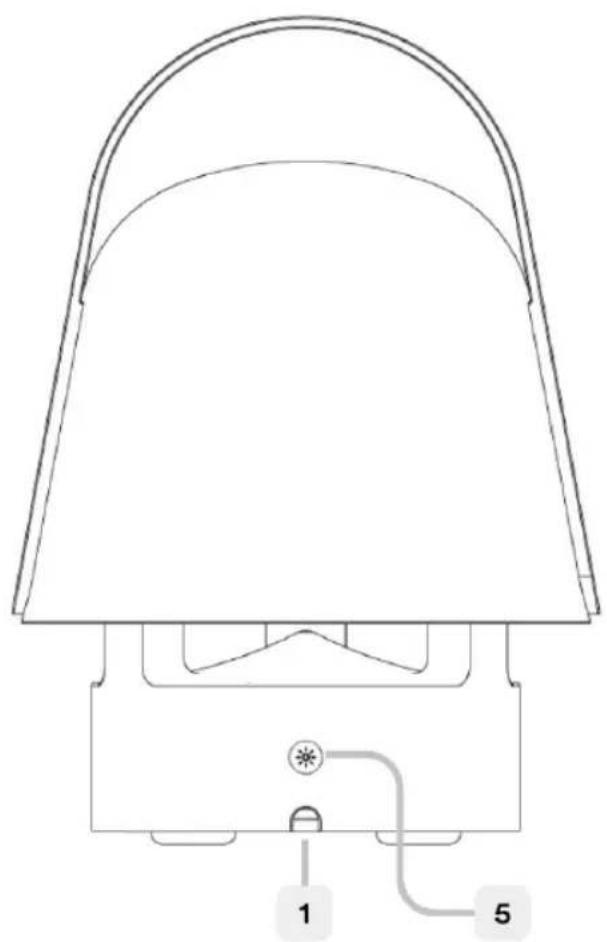
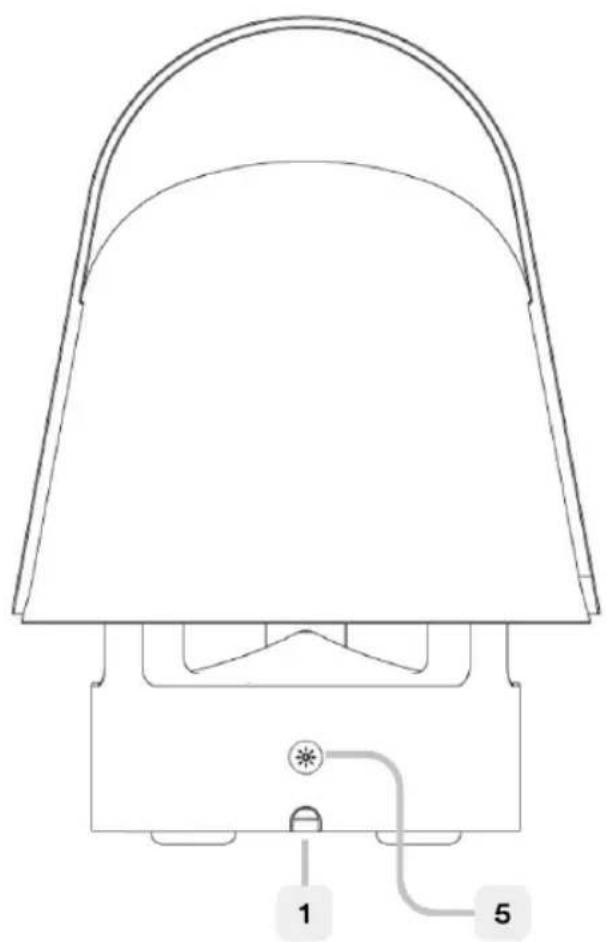
- USB-C port for charging.
- Dial for Play/Pause/Volume.
- Speaker Power On button and Spotify Tap™
- Bluetooth Pairing button.
- Lamp Switch button.
- LED status light
LED status
Flashing white: Bluetooth is pairing.
Solid white: Paired to a device.
Flashing red: Low battery.
Solid red: Charging (when speaker is off)
Getting started
Use the USB-C port (1) for charging your product before the first use and whenever the LED is blinking red to indicate low battery. When charging, the LED is solid red when the speaker is off.
Recommended power supply:
5.0V DC, 2.0A, USB-C (Not included)
Lamp functions

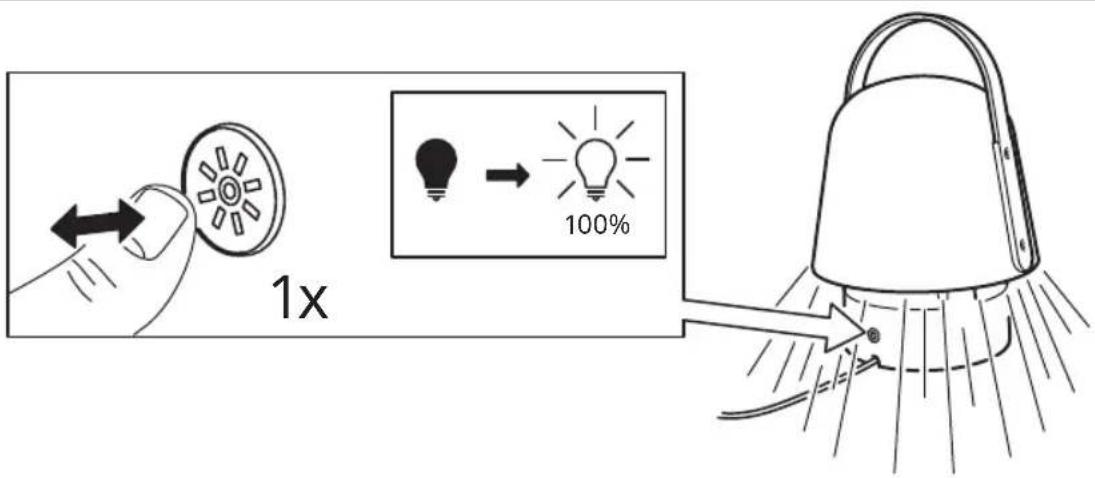
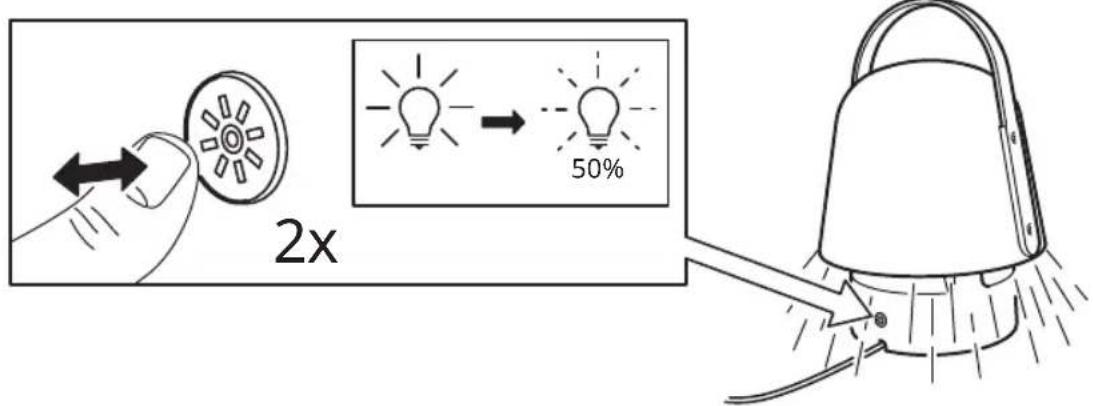
Turning ON/OFF. Press the Lamp switch (5) once to turn it on at 100% brightness. Press again to dimm light to 50% and a third time to TURN OFF.
Speaker functions

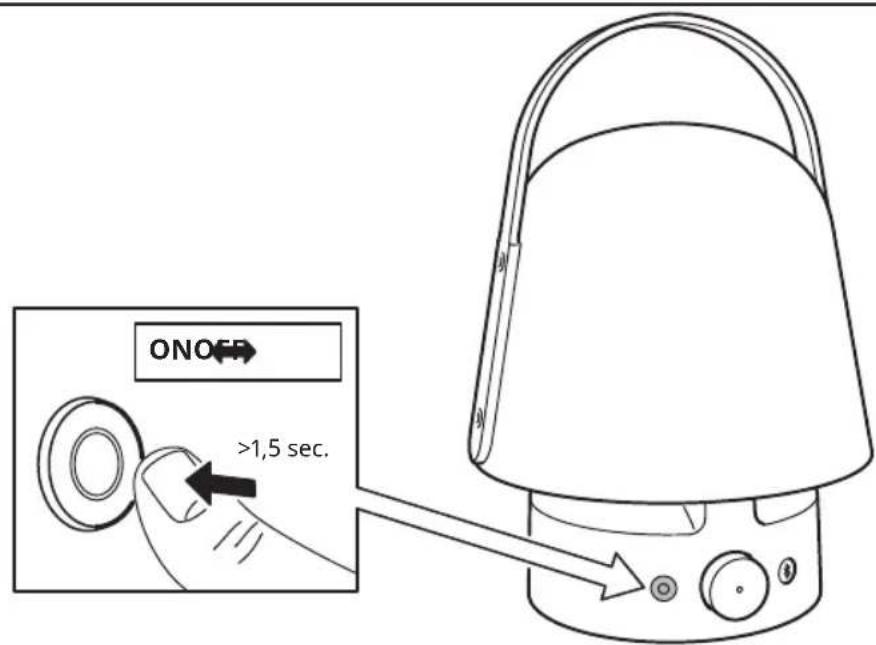
Turning ON/OFF. A short press on the Power button (3) will TURN ON your speaker. A long press on the Power button if you wish to TURN OFF the speaker.

Play/Pause. Press the dial (2) to play or pause music.
Volume. Rotate the dial (2) clockwise to increase volume and anti-clockwise to reduce volume.

Bluetooth pairing. Press and hold (long press) to start pairing mode. The LED will start blinking. Open Bluetooth settings on your device, the speaker should be listed as VAPPEBY.
Auto-off. If the speaker is not paired to any device, it will turn off automatically after 5 minutes. In case the speaker is paired but no music is playing, it will turn off automatically y after 20 minutes.
Using Spotify Tap™
Spotify Tap ^™ let's you resume and change music directly from your Bluetooth speaker with the press of one button.
If you have an iOS device:
Go to the App Store and download the Spotify app. You will be able to create an account or login if you already have one.
If you have an Android device:
Go to the Google Play Store and download the Spotify app. You will be able to create an account or login if you already have one.
First use
Make sure your device is paired via Bluetooth to your VAPPEBY speakers.
Make sure the Spotify mobile app is open. This will only be needed on the first use.
Press the Power button (3) to start music. The LED indicator should blink twice.
From now on, whenever you quick press the Power button (3), the music resume anytime your device is paired and in range.
Changing music
Press again the Power button (3) to change what's playing to a recommended track.
Good to know
- Suitable for outdoor use, since it is protected against moisture and water according to IP65
• Devices may get warm during charging; this is completely normal and they will gradually cool down again after they are fully charged. - Charging time may vary based on the device's battery capacity, charge level, the age of the battery and the temperature in the surrounding area.
- Storage temperature: -20^ to 25^ (-4°F to 77°F).
- Unplug the product from the power supply before cleaning and when it is not in use.
It is normal for the battery to become hot during charging and it will gradually cool down after charging. - Battery should not be left discharged for a longer period.
- Battery should not be charged while in contact with flammable material like textiles.
WARNING:
- Never install the product in a confined space.
• Always leave a space of at least 5 mm around the product for ventilation. - Children should be supervised to ensure they do not play with the product.
- Do not modify, disassemble, open, drop, crush, puncture, or shred battery.
- Do not expose the battery to rain or water.
- Risk of fires and burns. Do not open, crush, heat above 140^ (60°C), or incinerate.
- Keep battery away from open flame or sunlight to prevent heat build-up.
- Keep battery away from high voltage devices.
- This product is not a toy, keep away from children. Ensure that all persons who use this product read and follow these warnings and instructions.
- Do not short-circuit the battery or its cells. In the event of a cell leaking, do not allow the liquid to come in contact with the skin or eyes.
Save these instructions for future use.
Care instructions
To clean the product, wipe with a soft moistened cloth. Use another soft, dry cloth to wipe dry.
Note!
Never use abrasive cleaners or chemical solvents as this can damage the product.
Product servicing
Do not attempt to repair this product yourself, as opening or removing covers may expose you to dangerous voltage points or other risks.
RF exposure information
This device complies with RF exposure regulations.
The minimum user separation distance shall be at least 20 cm.
Technical data
Model Name: VAPPEBY
Type Number: E2004
Battery capacity: 7.2V DC, 3300 mAh, 23.76 Wh, Li-ion
Input: 5.0V DC, 2.0A, 10W USB Type-C
Estimated battery play time at
50% Volume and Bluetooth mode:
-50% display brightness: 11 - 13 h
Operating temperatures: 0°C to 45°C (32°F to 113°F)
Operating humidity: 0 to 95%RH
Operating Frequency: 2400-2483.5 MHz
Radio output power: 1 dBm (EIRP)
Bandwidth: 1 MHz
Decorative light: 20lm, 2700K
IP Class: IP65
Manufacturer: IKEA of Sweden AB
Address: Box 702, SE-343 81 Älmhult, SWEDEN

Bluetooth®
The Bluetooth® word mark and logos are registered trademarks owned by Bluetooth SIG, Inc. and any use of such marks by IKEA is under license. Other trademarks and trade names are those of their respective owners.
Spotify Tap™ is a trademark owned by Spotify and any use of such marks by IKEA is under license. All other Spotify trademarks, service marks, trade names, logos, domain names, and any other features of the Spotify brand are the sole property of Spotify or its licensors.

The crossed-out wheeled bin symbol indicates that the item should be disposed of separately from household waste. The item should be handed in for recycling in accordance with local environmental regulations for waste disposal. By separating a marked item from household waste, you will help reduce the volume of waste sent to incinerators or land-fill and minimize any potential negative impact on human health and the environment. For more information, please contact your IKEA store.
14Españ

5,0 V CC, 2,0 A, USB-C (no incluido)
Entrada: 5,0 V CC, 2,0 A, USB-C de 10 W

Potência: 5,0 V CC, 2,0 A, 10 W USB Tipo C

Get straight to the music with Spotify Tap playback.
Spotify Tap™ Get straight to the music with Spotify Tap playback.
Spotify Tap™ Get straight to the music with Spotify Tap playback.

- Port USB-C untuk pengecasan.
- Dail untuk Main/Jeda/Kelantangan.
- Butang menghidupkan pembesar suara dan Spotify Tap™
- Butang berpasangan Bluetooth.
- Butang suis lampu.
- Lampu status LED.
Status LED
Spotify Tap™ Get straight to the music with Spotify Tap playback.
Spotify Tap™ Get straight to the music with Spotify Tap playback
Spotify Tap™ Get straight to the music with Spotify Tap playback.


- Getting started
- Recommended power supply:
- Lamp functions
- Speaker functions
- Using Spotify Tap™
- If you have an iOS device:
- If you have an Android device:
- First use
- Changing music
- Good to know
- WARNING:
- Care instructions
- Note!
- Product servicing
- RF exposure information
- Technical data
- Estimated battery play time at
- Bluetooth®
- Status LED
Brand : IKEA
Model : VAPPEBY 805.152.84
Category : Loudspeaker