
DBX300Q - Loudspeaker ESX - Free user manual and instructions
Find the device manual for free DBX300Q ESX in PDF.


| Product Type | Portable Bluetooth Speaker |
| Brand | ESX |
| Model | DBX300Q |
| Dimensions (W x H x D) | 200 x 100 x 100 mm |
| Weight | 500 g |
| Power Source | Rechargeable Li-ion battery via USB-C |
| Battery Life | Up to 10 hours at moderate volume |
| Bluetooth Version | 5.0 |
| Wireless Range | Up to 10 meters |
| Speaker Type | Full-range stereo |
| Output Power | 2 x 5W RMS |
| Frequency Response | 80 Hz – 20 kHz |
| Impedance | 4 ohms |
| Controls | Power, Volume, Play/Pause, Bluetooth pairing |
| Additional Functions | FM radio, AUX input, Micro SD card slot |
| Water Resistance | IPX5 (splash-proof) |
| Charging Time | Approximately 3 hours |
| Material | ABS plastic with fabric grille |
| Accessories Included | USB-C charging cable, AUX cable, user manual |
| Maintenance & Cleaning | Wipe with a soft, dry cloth; do not use harsh chemicals |
| Safety Warnings | Keep away from water; do not disassemble; use only provided charger |
| Spare Parts & Repairability | Contact ESX support for battery and speaker replacements; limited user-serviceable parts |
| Certifications | CE, RoHS |
Frequently Asked Questions - DBX300Q ESX
User questions about DBX300Q ESX
0 question about this device. Answer the ones you know or ask your own.
Ask a new question about this device
Download the instructions for your Loudspeaker in PDF format for free! Find your manual DBX300Q - ESX and take your electronic device back in hand. On this page are published all the documents necessary for the use of your device. DBX300Q by ESX.
USER MANUAL DBX300Q ESX
natural_image
Abstract logo design featuring stylized 'S' and X shapes with a registered trademark symbol (no text or numbers present)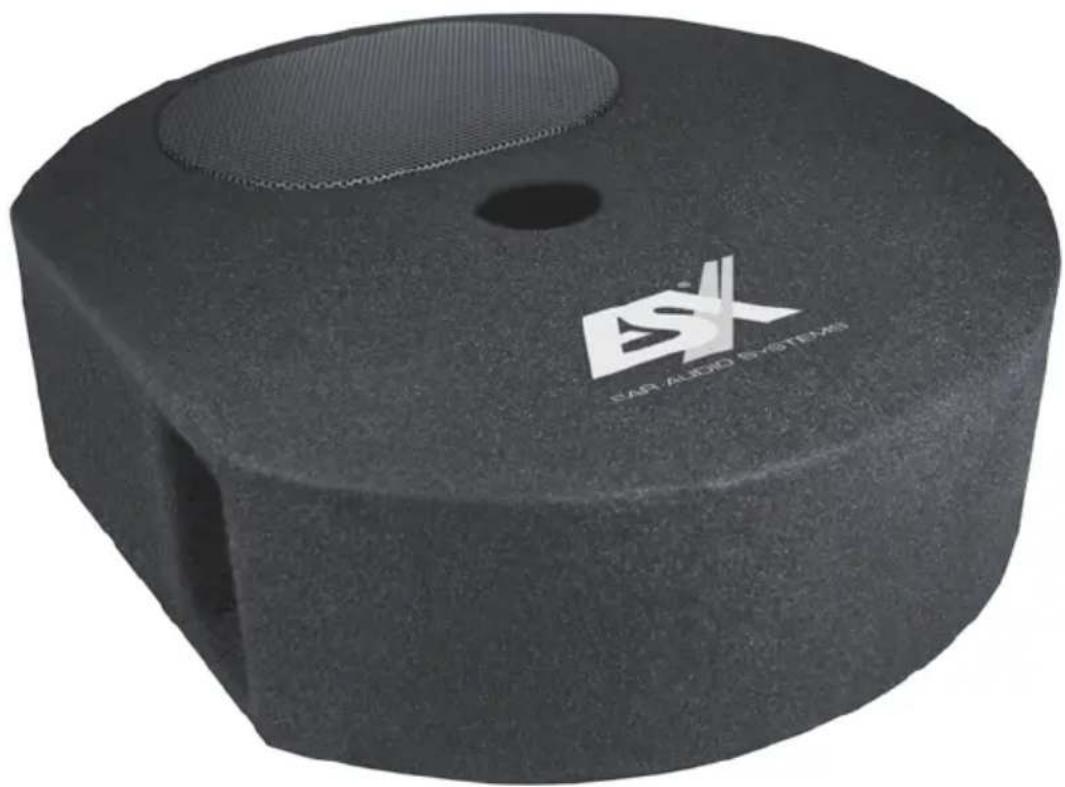
natural_image
Black cylindrical electronic device with a mesh grille and 'CAR ALBID SYSTEMS' branding on its body (no other text or symbols visible)DBX300Q
SUBWOOFER BOX FOR SPARE WHEEL RECESS
WICHTIGE HINWEISE
Choose a suitable location for your soundsystem, that neither the driver's field of vision nor the security of the inmates will be affected. This stands also for airbag-zones and safety belts. The permanent temperature of the location should not be lower than 5°C and not higher than 50°C. Protect the device from moisture and humidity.
Ensure that your subwoofer enclosure will not get loose during the drive and hurt someone in the passenger cabin. It is recommended, that you mount the subwoofer enclosure with suitable belts or any other mounting solutions in the trunk area.
Please observe not to damage any serial components of your vehicle (airbags, wires, gastank etc.) during the installation of your soundsystem by drilling or any other operations.
Never screw or mount any other devices (amps, caps etc.) onto the subwoofer enclosure, this may cause damage to the electricity.
For your personal concerns you should choose a appropriate sound level for the subwoofer enclosure, that neither the roadworthy of the driver nor his concentration will be disturbed, that he is able to notice possible traffic noises and acoustical warning signals.
Modern car audio soundsystems provide very high acoustic pressure beyond the 100 dB mark. Please observe in this case, that permanent use of high sound levels may cause damage to your ability of hearing.
Please ensure by any means the correct polarity of all connections. Faulty installed and connected devices may get damage the vehicle and the device permanently.
Please check in any case the operation guide or wiring manual of your amplifier which you'd like to use for the soundsystem.
Never connect the speaker terminals with the 12 Volt power supply, otherwise the speakers may get damaged.
POWER RATING
ESX subwoofer enclosures are designed for high bass levels. Anyhow it is possible, that unsatisfying sound characteristics could be caused by too low or too high amplifier power. In certain circumstances this even can cause a damage to the loudspeakers.
It is recommended to choose rather a more powerful amplifier (ca. 15-20% more Watts RMS than the max. RMS power rating of the woofer) and to use the amplifier not at the maximum output level (low distortion factor, good sound characteristics). A weaker amplifier at the maximum level causes worse sound characteristics due to the higher distortion factor.
Never crank up the output volume of your amplifier to the maximum level or run the amplifier into the clipping range. If the sound is distorted and not clean, turn back the level until the distortions disappear.
ESX subwoofer enclosures have no integrated limiter or clipper, which is limiting the level upwards. Overamplified bass peaks leads inevitably to a burn out of the voice coil of the woofer. A burn out of the voice coil, caused by clipping/overamping is not covered by the usual warranty.
SPECIFICATIONS
Subwoofer 15 x 23 cm (6 x 9") with Dual Voice Coil (∅ 38,8 mm)
Power Rating 200 Watts RMS 400 Watts max.
Impedance 2 + 2 Ohms
Frequency Range 30 - 300 Hz
Dimensions 500 (∅) x 150 (H) mm
INTERCONNECTION WITH QUICKCONNECT
Required:
- Compatible ESX amplifier such as XE6440-DSP:
- QuickConnect cable such as: QC120, length 120 cm QC300, length 300 cm QC500, length 500 cm
Recommended amplifier power:
• 140 to 220 Watts RMS total at 4 or 2 + 2 Ohms
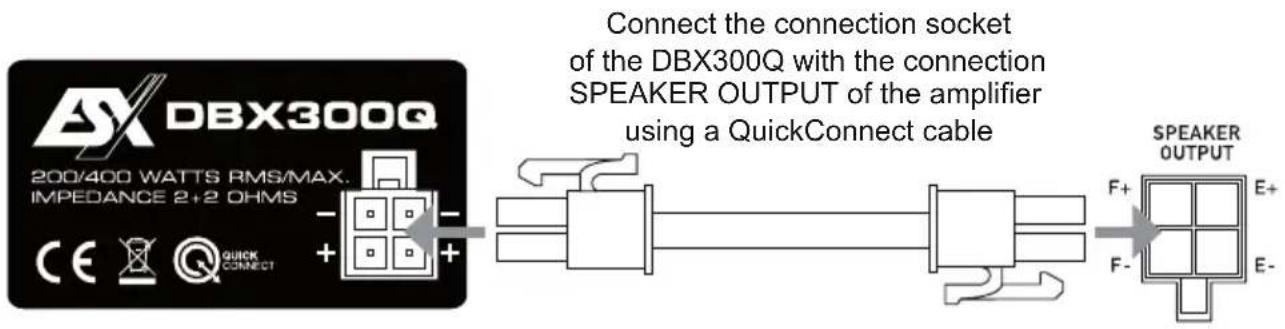
WARNING: Use the QUICKCONNECT interconnection and the spring terminal connections never at the same time!
INTERCONNECTION WITH SPRING TERMINALS
Operation with one amplifier
serial 4 Ohms
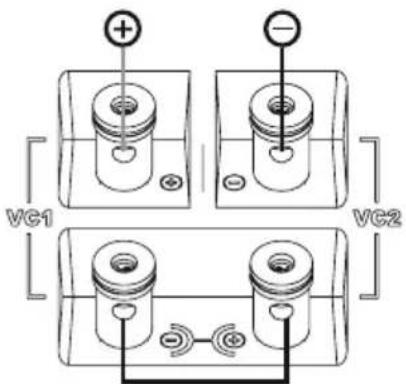
Connect amplifier at VC1 + and VC2 -
140 - 220 Watt RMS, 4 Ohms
Connect VC1 - with VC2 +
Operation with two amplifier
standard 2 + 2 Ohms
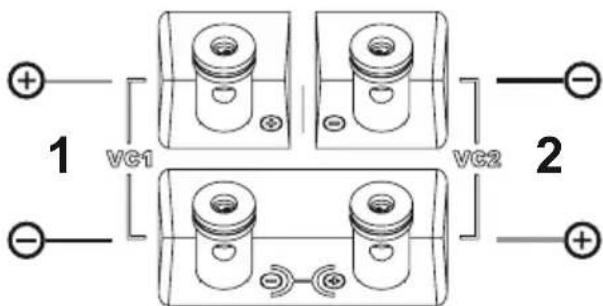
Connect amplifier 1 at VC1
70 - 110 Watt RMS, 2 Ohms
Connect amplifier 2 at VC2
70 - 110 Watt RMS, 2 Ohms
WARNING:
Please ensure that the connection of the cables
have the correct polarity as marked.

natural_image
Abstract geometric logo design with stylized letter 'S' and registered trademark symbol (no text or numbers present)
Audio Design GmbH
Am Breilingsweg 3 · D-76709 Kronau/Germany
Tel. +49 7253 - 9465-0 · Fax +49 7253 - 946510
www.audiodesign.de
©2018 Audio Design GmbH, All Rights Reserved
Brand : ESX
Model : DBX300Q
Category : Loudspeaker