IDEAL IPG10 - Cooker Eldom - Free user manual and instructions
Find the device manual for free IDEAL IPG10 Eldom in PDF.


| Product Type | Freestanding Cooker |
| Brand | Eldom |
| Model | IDEAL IPG10 |
| Energy Type | Electric (assumed) |
| Dimensions (approx.) | 60 cm (W) x 60 cm (D) x 85 cm (H) |
| Weight (approx.) | 45 kg |
| Oven Capacity | 70 liters |
| Number of Hob Burners | 4 (assumed) |
| Hob Type | Ceramic or Radiant (assumed) |
| Oven Functions | Conventional, Grill, Fan-assisted |
| Oven Cleaning | Manual cleaning with enamel interior |
| Control Type | Knobs and buttons |
| Timer | Yes, with alarm |
| Safety Features | Child lock, automatic shut-off, heat indicator |
| Energy Efficiency Class | A (assumed) |
| Power Supply | 220-240V, 50/60Hz, 3.5 kW (approx.) |
| Accessories Included | Oven grill pan, drip tray, baking tray |
| Spare Parts Availability | Through Eldom official service centers |
| Warranty | 2 years (standard) |
Frequently Asked Questions - IDEAL IPG10 Eldom
User questions about IDEAL IPG10 Eldom
0 question about this device. Answer the ones you know or ask your own.
Ask a new question about this device
Download the instructions for your Cooker in PDF format for free! Find your manual IDEAL IPG10 - Eldom and take your electronic device back in hand. On this page are published all the documents necessary for the use of your device. IDEAL IPG10 by Eldom.
USER MANUAL IDEAL IPG10 Eldom
natural_image
White portable electric stove with black lid and 'ideal' label, no visible text or symbols on bodyOBSŁUGA
- Please acquaint precisely with whole of this instruction before the blender for the first time,
- Before operating the appliance, read the user manual thoroughly
- Plug in the connecting cable to a grounded electrical outlet
- Ensure that a limited number of receivers are connected to one current circuit
- If an extension cord is used, it should be grounded and placed in a safe manner
- The appliance is intended for household use only
- Use only in rooms with good ventilation
- Keep an eye on the operating appliance, especially when there are children nearby. Before leaving - the room with the appliance, switch it off.
- If the appliance is not working, unplug it
- Before unplugging, set the thermostat (1) in the position „OFF“
- Do not use in open air. The cooker can be used under the roof where it is protected against rain and wind
- The device can be used by children aged 8 and older and by persons with limited physical, sensory or mental capabilities, or persons without sufficient experience and knowledge only under supervision or if previously instructed on the safe use of the appliance and the possible risks. Children shall not play with the appliance. Cleaning and maintenance that are the responsibility of the user shall not be carried out by children without supervision. Protect the appliance and the power cord against children under 8 years old.
- Make sure that children do not play with the equipment,
- Never place products directly on the heating plate (2). It poses the risk of serious burning and damage of the appliance
- Do not use the appliance near curtains, blinds or other inflammable material
-
Do not place the appliance in a corner of a room or directly next to the wall. The space of at least 5 cm from the sides of the appliance should be provided
-
To ensure free and safe access to the appliance, place it at a proper height
- The cooker can be only positioned on a level, stable and high-temperature resistant surface. No items of inflammable material can be placed above the appliance
- do not touch the housing and the heating plate of the operating appliance (risk of serious burning), and when the appliance is no longer used, wait until it cools down completely
- do not move the appliance during its operation, do not place the power supply cable over the cooker, do not use for heating rooms, do not use the cooker without dishes with products
- place dishes with products on the heating plate in acentral position
- use only metal and ovenproof dishes with flat and stable bottoms
- if the power cable is damaged, it must be replaced in the Manufacturer's Service in order to avoid hazard
- repairs of the equipment can only be performed by an authorized servicing point. Any modernizations or the use of non-original spare parts or elements of the appliance is prohibited and may cause a serious hazard to the user
- The company Eldom Sp. z o. o. shall bear no responsibility for any possible damages resulting from the improper usage of the appliance
ENVIRONMENT PROTECTION
- the device is made of materials that can be reused or recycled
- it should be handed to the special collection point, that deals with collection and recycling of electronic and electric devices,
• only intended for household use, - it cannot be used for commercial purposes
- the warranty loses validity in case of inappropriate use,
WARRANTY
CLEANING AND MAINTENANCE
Before cleaning, unplug the appliance and wait until it cools down completely.
- Do not immerse the appliance in water or wash it in a dish-washer machine.
- All surfaces can be cleaned only by wiping them with a soft, damp cloth with the addition of gentle cleaning agents.
- Do not use abrasive agents.
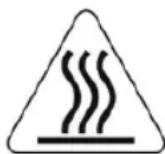
This symbol warns against the high temperature of the surface of the appliance.
ideal
INSTRUCTION MANUAL
ELECTRIC COOKER IPG10
EN
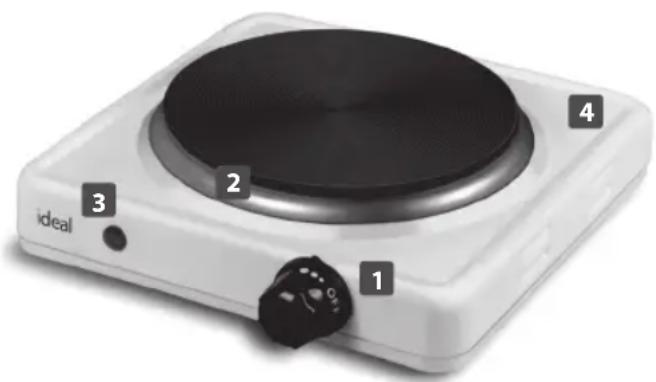
GENERAL DESCRIPTION
- Thermostat
- Heating plate
- Controllight
- Housing
TECHNICAL DATA
- power: 1000W
- supply voltage: 230V \~ 50Hz
USING THE APPLIANCE
Before operating and plugging in the appliance, set the thermostat (1) in the position "OFF" (the appliance switched off).
Position the appliance on a level, dry, stable and high-temperature resistant surface. The housing (4) heats up considerably when operated. Thus, the space of at least 5 cm from the sides of the device should be provided.
To ensure free and safe access to the appliance, place it at a proper height.
- plug in the appliance
- place a dish with products on the heating plate (2)
- switch on the appliance selecting the working temperature of the thermostat (1)
Thermostat enables smooth adjustment of the temperature.
Settings 1-3 correspond to the lower temperature proper for heating meals.
Settings 4 - 5 - high temperature intended for cooking. Operation of the appliance is signalled by the control light (3).
When the appliance is no longer used, set the thermostat (1) in the position "OFF" and unplug the appliance.
During the first activation of the appliance, a specific smell can be emitted from the heating elements and the insulation. It is a normal occurrence.
In order to ensure safety and high efficiency of the operation, use only dishes with flat bottoms and of a proper diameter which guarantee stability and good contact of the dish with the heating plate.
BEZPEČNOSTNÍ DOPORUČENÍ
OBSLUHA
BEDIENUNG
РАБОТА УСТРОЙСТВА
OBSLUHA
HASZNÁLAT
FUNCIONAMIENTO
natural_image
Blank white image with no visible content, text, or symbols.
natural_image
A single horizontal black line on a white background (no text or symbols)
natural_image
Blank white image with no visible content, text, or symbols.
natural_image
A plain horizontal black line on a white background (no text or symbols)
natural_image
A single horizontal gray line on a white background (no text or symbols)
natural_image
Blank white image with no visible content, text, or symbols.
natural_image
A single horizontal gray line on a white background (no text or symbols)
natural_image
A single horizontal gray line on a white background (no text or symbols)
natural_image
Blank white image with no visible content, text, or symbols.
natural_image
A single horizontal gray line on a white background (no text or symbols)
natural_image
A plain horizontal black line on a white background (no text or symbols)
natural_image
Blank white image with no visible content, text, or symbols.
natural_image
A single horizontal black line on a white background (no text or symbols)
natural_image
A plain horizontal line on a white background (no text or symbols)
natural_image
Blank white image with no visible content, text, or symbols.
natural_image
A single horizontal gray line on a white background (no text or symbols)
natural_image
A plain horizontal gray line on a white background (no text or symbols)
natural_image
Blank white image with no visible content, text, or symbols.
natural_image
A single horizontal gray line on a white background (no text or symbols)
natural_image
A plain horizontal gray line on a white background (no text or symbols)
natural_image
Blank white image with no visible content, text, or symbols.
natural_image
A single horizontal gray line on a white background (no text or symbols)
natural_image
Pure horizontal line without any text, numbers, or symbols
natural_image
Blank white image with no visible content, text, or symbols.
natural_image
A single horizontal black line on a white background (no text or symbols)
natural_image
Completely blank white image with no visible content, text, or symbols.
natural_image
Completely blank white image with no visible content, text, or symbols.
natural_image
A single horizontal black line on a white background (no text or symbols)
natural_image
Blank white image with no visible content, text, or symbols.
natural_image
Pure horizontal line without any text, numbers, or symbols
natural_image
A single horizontal gray line on a white background (no text or symbols)
natural_image
Blank white image with no visible content, text, or symbols.
natural_image
A single horizontal gray line on a white background (no text or symbols)
natural_image
A single horizontal gray line on a white background (no text or symbols)
natural_image
Blank white image with no visible content, text, or symbols.
natural_image
A single horizontal gray line on a white background (no text or symbols)
natural_image
A single horizontal black line on a white background (no text or symbols)
natural_image
Blank white image with no visible content, text, or symbols.
natural_image
A plain horizontal gray line on a white background (no text or symbols)
natural_image
A plain horizontal line on a white background (no text or symbols)
natural_image
Blank white image with no visible content, text, or symbols.
natural_image
Blank white image with no visible content, text, or symbols.
natural_image
Blank white image with no visible content, text, or symbols.
natural_image
Blank white image with no visible content, text, or symbols.
natural_image
Blank white image with no visible content, text, or symbols.
natural_image
Blank white image with no visible content, text, or symbols.ideal
ideal
KARTA GWARANCYJNA
WAŻNA Z DOWODEM ZAKUPU
KUCHENKA ELEKTRYCZNA IPG10

- OBSŁUGA
- ENVIRONMENT PROTECTION
- WARRANTY
- CLEANING AND MAINTENANCE
- This symbol warns against the high temperature of the surface of the appliance.
- ideal
- INSTRUCTION MANUAL
- ELECTRIC COOKER IPG10
- EN
- GENERAL DESCRIPTION
- TECHNICAL DATA
- USING THE APPLIANCE
- BEZPEČNOSTNÍ DOPORUČENÍ
- OBSLUHA
- BEDIENUNG
- РАБОТА УСТРОЙСТВА
- HASZNÁLAT
- FUNCIONAMIENTO
- KARTA GWARANCYJNA
- KUCHENKA ELEKTRYCZNA IPG10
Brand : Eldom
Model : IDEAL IPG10
Category : Cooker