
1992-1 - Measurement Hazet - Free user manual and instructions
Find the device manual for free 1992-1 Hazet in PDF.


| Product Type | Portable Thermal Camera |
| Brand | Hazet |
| Model | 1992-1 |
| Temperature Measurement Range | -20°C to 550°C |
| Accuracy | ±2°C or ±2% (ambient 15°C to 35°C, object above 0°C) |
| IR Detector | High-sensitivity, high-performance sensor |
| Laser Class | Class 1, 650 nm, <1 mW, IEC60825-1:2014 |
| Protection Class | IP54 |
| Operating Temperature | -10°C to 50°C |
| Operating Humidity | ≤95% |
| Power Supply | Built-in rechargeable battery, USB 5V/2A charger (not included) |
| Battery Charging Time | At least 8 hours for first charge |
| Storage Temperature | Below -10°C or above +50°C not recommended |
| Interfaces | USB, microSD slot, tripod mount |
| Included Accessories | USB cable, wrist strap, instructions, microSD card |
| Main Functions | Live View, snapshot, temperature measurement, laser pointer, image export |
| Emissivity Settings | Adjustable, reference table provided |
| Spare Parts | Only use manufacturer's original spare parts |
| Disposal | Electronic waste, recycle components, do not dispose with household waste |
| Intended Use | Industrial, construction, automotive; not for medical applications |
| Warranty | Void if modified or used improperly |
Frequently Asked Questions - 1992-1 Hazet
User questions about 1992-1 Hazet
0 question about this device. Answer the ones you know or ask your own.
Ask a new question about this device
Download the instructions for your Measurement in PDF format for free! Find your manual 1992-1 - Hazet and take your electronic device back in hand. On this page are published all the documents necessary for the use of your device. 1992-1 by Hazet.
USER MANUAL 1992-1 Hazet
Operating Instructions

Thermal Camera
Instrukcja obsługi

natural_image
Hazel 1992-1 digital thermometer device with black and blue casing (no visible text or symbols on device body)1992-1
Inhalt
natural_image
Product photo of a medical imaging device with a black cable and connected tubing, alongside a specification card (no visible text or symbols on the device itself)Tragbare Wärmebildkamera 1992-1 (×1)
USB-Kabel (×1)
natural_image
Close-up of a blue and black handheld device with a circular orange button on the nose (no text or symbols visible)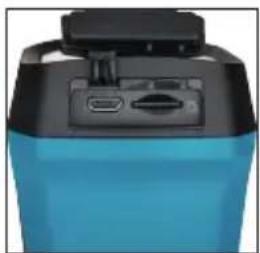
natural_image
Close-up of a blue and black electronic device with ports and a top handle (no visible text or symbols)natural_image
Close-up of a blue and black fitness device with a black top handle and two ports (no visible text or symbols)-
General information....17
-
Explanation of symbols......17
-
Owner's liability....18
-
Intended use.....18
-
Dangers that may arise from the device ..19-21
-
Introduction......22
6.1 Included in delivery....22
6.2 Product presentation....22
- Design....23
7.1 Dimensions....23
7.2 Interfaces....24
- BASIC OPERATION....25-26
8.1 Charging the device....25
8.2 Image analysis....25
8.3 Formatting the microSD card .....26
8.4 Taking snapshots....26
8.5 Displaying snapshots....26
8.6 Exporting a file....26
- Main configurations....27
9.1 Temperature measurement .....27
9.2 Further configurations .....27
-
System information....27
-
Appendix......28
11.1 Reference for general material emissivity ....28
11.2 Frequently asked questions (FAQ).....28
- Spare parts 29
- Disposal 29
Warning about the laser light
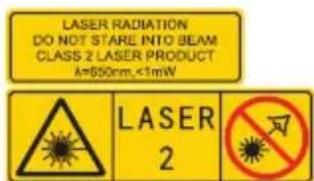
Warning: The laser radiation emitted by the device may cause eye injuries, skin burns or ignition of flammable sub-
stances. Make sure that no one is looking directly into the laser light. Before activating the auxiliary light function, make sure that there are no people or flammable substances in front of the laser lens. The wavelength is 650 nm and the power is less than 1 mW. The laser complies with the IEC60825-1:2014 standard.
Manufacturer's address:
Please make sure that the user of this tool carefully reads these operating instructions and fully understands all the information provided before using the tool for the first time.
- These operating instructions contain important advice that is necessary for the safe and trouble-free operation of your HAZET thermal camera.
- Intended use of the thermal camera requires adherence to all the safety precautions and other information in these operating instructions.
- For this reason, always keep these operating instructions together with your HAZET thermal camera.
- This thermal camera has been developed for specific applications. HAZET emphasises that any modification to the tool and/or use in a way that does not correspond to its intended application is strictly forbidden.
- HAZET will not be liable for any injuries to persons or damage to property resulting from improper application, misuse of the tool or disregard for the safety instructions.
- Furthermore, the general safety regulations and regulations for the prevention of accidents in the application area of the thermal camera must be observed and respected.
2. Explanation of symbols
ATTENTION: Pay strict attention to these symbols!
READ THE OPERATING INSTRUCTIONS!

The owner of this tool is obliged to observe the operating instructions and instruct any users of this tool according to the operating instructions.
NOTE!

This symbol indicates advice that is helpful when using the tool.
WARNING!

This symbol indicates important descriptions, dangerous conditions, safety risks and safety advice.
CAUTION!

This symbol indicates advice which, if disregarded, results in damage, malfunction and/or functional failure of the tool.
QUALIFIED PERSONNEL!

The tool may only be used by qualified personnel. Handling by non-qualified people may lead to injuries to persons or damage to the tool or workpiece.
3. Owner's liability
This thermal camera was developed and manufactured according to the technical norms and standards valid at the time and is considered to be operationally reliable. Nevertheless, the thermal camera may present a danger when it is not used as intended or used in an inappropriate way by non-qualified personnel. Every person who is assigned to work on or with the thermal camera must therefore have read and understood the operating instructions before starting work.
• Always keep the operating instructions close to the thermal camera.
- Modifications of any kind or any additions or modifications to the thermal camera are prohibited.
- All specified installation values or setting ranges must be observed.
4. Intended use
Operational reliability is only guaranteed if the device is used as intended in accordance with the information provided in the operating instructions. In addition to the safety precautions in these operating instructions, the general safety regulations, regulations for the prevention of accidents and regulations for environmental protection that are valid for the application area of the thermal camera must be observed and respected. Use and maintenance of the thermal camera must always comply with relevant local and national regulations.
- The thermal camera may only be used if it is in good working order.
- This thermal camera must not be used for medical applications.
- The thermal camera is not waterproof.
- Never use the thermal camera at temperatures below -10^ or above +50^ , only in this temperature range is the function guaranteed.
- Do not subject the thermal camera to shocks or impacts.
- The proper functioning of the thermal camera is only guaranteed with original spare parts.
- To avoid soiling and damage, the thermal camera should be stored in the storage case.
- Do not remove the SD card during operation, otherwise there is a risk of data loss.
- Incorrect use of the thermal camera or use that fails to comply with the safety precautions can result in serious injury.
- Any deviation from the intended use and/or any misapplication of the device is not permitted and will be considered as improper use.
- Any claims against the manufacturer and/or its authorised agents resulting from damage caused by improper use of the device are invalid.
- Any personal injury or material losses caused by improper use are the sole responsibility of the owner.
EU Declaration of Conformity
CE This product and – if applicable – the accessories supplied with it are marked with "CE" and thus comply with the applicable harmonised European standards listed under the Radio Equipment Directive 2014/53/EU, the EMC Directive 2014/30/EU and the RoHS Directive 2011/65/EU.
2012/19/EU (Waste Electrical and Electronic Equipment Directive):

Products marked with this symbol must not be disposed of with household waste within the European Union. For correct recycling,
return this product to your local dealer or dispose of it at one of the collection points. For more information see: www.recyclethis.info.
2006/66/EC (Battery Directive):

This product contains a battery which must not be disposed of with household waste within the European Union. See product
documentation for specific instructions on batteries. The battery is marked with this symbol, which may also contain the letters Cd for cadmium, Pb for lead or Hg for mercury. For correct recycling, return the battery to your local dealer or dispose of it at one of the collection points. For more information see: www.recyclethis.info.
Laws and regulations
- The product must be used in strict compliance with local electrical safety regulations.
Transportation
- When transporting the device, keep it in its original or comparable packaging.
- After unpacking, keep all packing material for future use. In the event of a fault, you must return the device to HAZET in the original packaging. If transported without the original packaging, the device may be damaged and we accept no responsibility.
- Do not drop the product and avoid violent impacts. Keep the device away from magnetic interference.
Battery
- The integrated battery must not be dismantled. If necessary, contact the manufacturer for repair.
- When storing the battery for a long time, make sure that it is fully charged every six months to ensure its lifespan. Otherwise, damage may occur.
- Make sure that the plug is properly inserted into the socket.
- When the device is switched off and the RTC battery is full, the time settings can be stored for 15 days.
- When using the device for the first time, switch it on and charge the RTC battery and the lithium battery for at least 8 hours.
- For this, use a USB power supply unit 5 V / 2 A (not included in delivery).
- It is certified according to UL2054.
5. Dangers that may arise from the device
Before each use, check the HAZET thermal camera for full functionality. Do not use the thermal camera if its functionality cannot be ensured or if damage is detected. If the thermal camera is used when it is not in full working order, there is risk of severe injuries to persons and damage to property. Electrical energy may cause serious injuries to persons. The following fundamental safety instructions must be observed and adhered to in order to avoid electric shock, injuries or fire:
- The connecting cables and housing must not be damaged. Tools that have been dropped or damaged must be checked by qualified personnel before being used again.
- Never use tools with a defective on/off switch. Any tools that cannot be switched on or off with the On/Off switch are dangerous and must be repaired.
- The cables must not touch hot or sharp parts or become damaged in any other way. The cables must be laid in such a way that they do not present a tripping hazard.
- Do not expose the thermal camera to water or other liquids. Dangerous voltage discharges may occur.
- Do not disassemble/open the thermal camera yourself. Any improper assembly can impair its functionality and cause a fire, an electrical shock and/or injuries.
- All service or repair work must be carried out by qualified personnel only. Only use original spare parts so as to guarantee its long-term operational safety.
- Safety devices and/or cover parts may not be removed.
- Only use the thermal camera within the prescribed places, and governed under the current regulations relating to the working environment and to electrical systems.
- For safety reasons, any modification to the HAZET thermal camera is strictly forbidden. Any modification of the device will result in immediate exclusion from express or implied warranty and liability.

Keep electric tools out of the hands of children.
Unattended tools could be used by unauthorised persons and could cause injury to them or to other persons.

Do not use the device in an explosive atmosphere.
Electric tools can cause sparks or ignite combustible materials. Never operate tools in proximity to combustible substances like petrol, naphtha, detergents, etc. Work in well-cleaned and well-ventilated areas only. Keep combustible materials out of the work area.
Application environment
- Make sure that the operating environment meets the requirements of the device. The operating temperature of the device is -10 °C to 50 °C and the operating humidity must not exceed 95 %.
- DO NOT expose the device to high electromagnetic radiation or dusty environments.
- DO NOT point the lens at the sun or any other bright light source.
- When using a laser device, make sure that the lens of the device is not exposed to the laser beam. Otherwise it could burn out.
- The device is suitable for indoor and outdoor use, but must not be used in humid environments.
• The protection class is IP 54.
• The degree of pollution is 2.
6 Introduction
6.1 Included in delivery
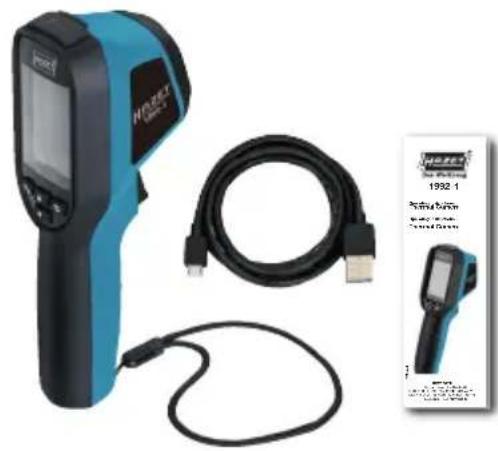
natural_image
Product photo of a medical imaging device with a black cable and connected tubing, alongside a small inset image of the device labeled '1992-1'.Portable thermal camera 1992-1 (×1)
USB cable (×1)
Wrist strap (x1)
Instructions (×1)

Note: The portable thermal camera includes a rechargeable battery and a microSD card.
6.2 Product presentation
The portable thermal camera 1992-1 produces thermal images of objects. It supports temperature measurement and snapshots. The integrated high-sensitivity IR detector and high-performance sensor detect temperature changes and measure the temperature in real time. The temperature measuring range is -20 °C to 550 °C with an accuracy of ±2 °C or ±2 % at an ambient temperature of 15 °C to 35 °C and an object temperature above 0 °C.
With it, users can find risky areas and reduce property damage. The device supports Live View, recording, etc.
The portable thermal camera is very user-friendly thanks to its ergonomic design. The device is mainly used in various industries, such as the construction industry, the automotive industry, etc.
7 Design
7.1 Dimensions
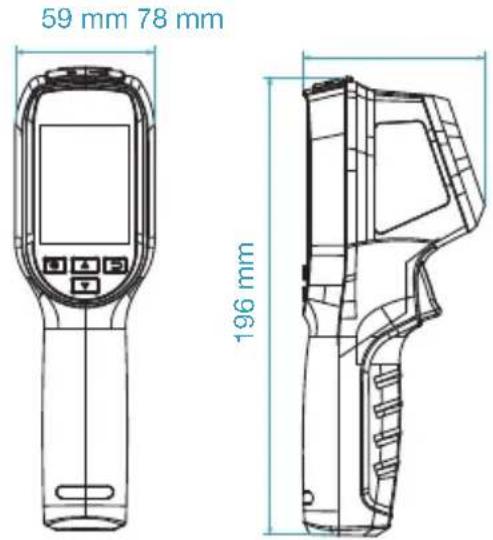
Dimensions may vary depending on the camera model.
7.2 Interfaces
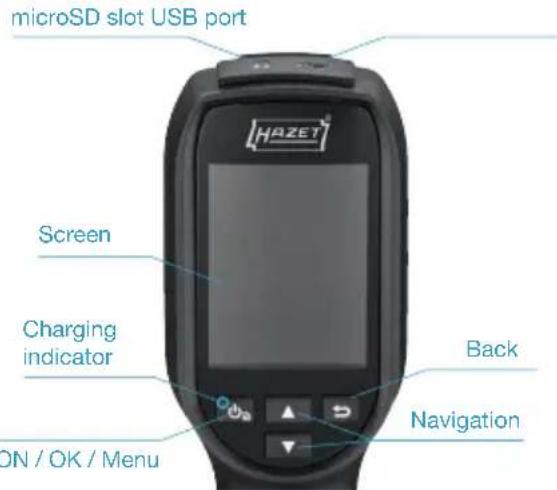
| Press and hold:Switch on and offPress: Display menu or confirm operation | |
| Exit menu or return to the previous menu. | |
| Navigation buttonPress ▼ ▲to select the setting.Press the □ button to confirm |
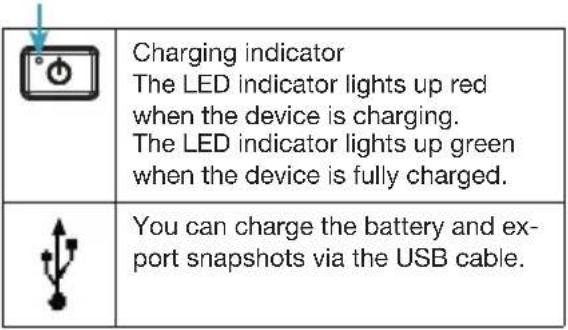 |
7.2 Interfaces
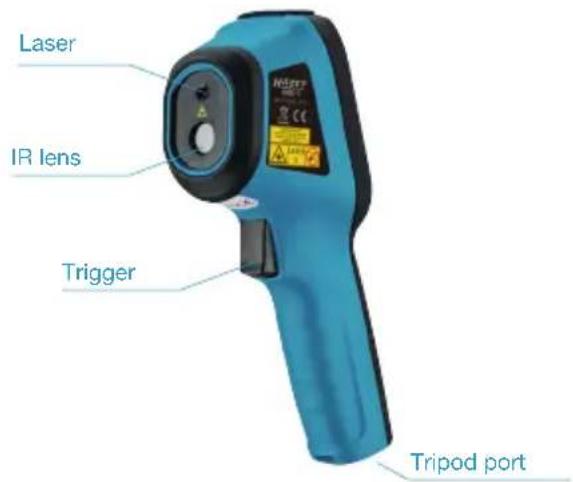
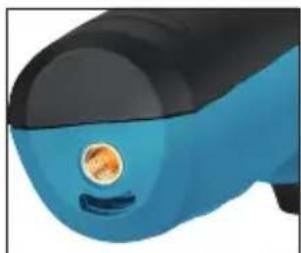
natural_image
Close-up of a blue and black handheld device with a circular orange button (no text or symbols visible)Tripod port USB port
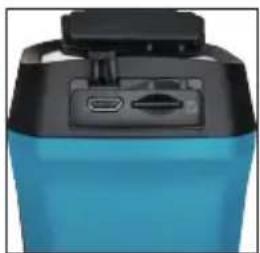
natural_image
Close-up of a blue and black electronic device casing with ports (no visible text or symbols)/microSD slot
Trigger
Press the trigger to take photos. When the laser function is on, press the trigger to turn the laser light on or off.

Note:
The warning sign is located under the laser and on the left side of the device.
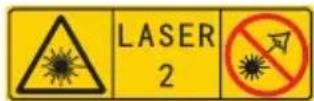
Warning:
The laser radiation emitted by the device may cause
eye injuries, skin burns or ignition of flammable substances. Make sure that no one is looking directly into the laser light. Before activating the auxiliary light function, make sure that there are no people or flammable substances in front of the laser lens. The wavelength is 650 nm and the power is less than 1 mW. The laser complies with the IEC60825-1:2014 standard.
8 BASIC OPERATION
8.1 Charging the device
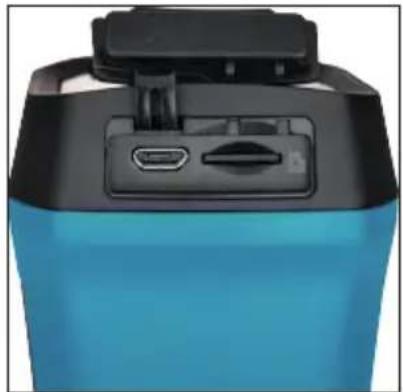
natural_image
Close-up of a blue and black electronic device casing with a black top handle and two ports (no visible text or symbols)USB port / microSD slot
Steps:
- Open the top cover of the camera.
- Connect the thermal camera to a suitable USB power supply unit (5 V / 2 A) using the enclosed USB cable.

Note:
When charging the device for the first time, charge it for at least 8 hours while it is switched on.
- The built-in battery that powers the device's real time clock (RTC) may discharge if the device is not used for a long period of time. We recommend charging the RTC battery to keep the device's clock working properly.
- To fully charge the RTC battery, the following conditions must be met:
a) The lithium batteries must be in the device.
b) The device must be switched on for at least 8 hours.
8.2 Image analysis
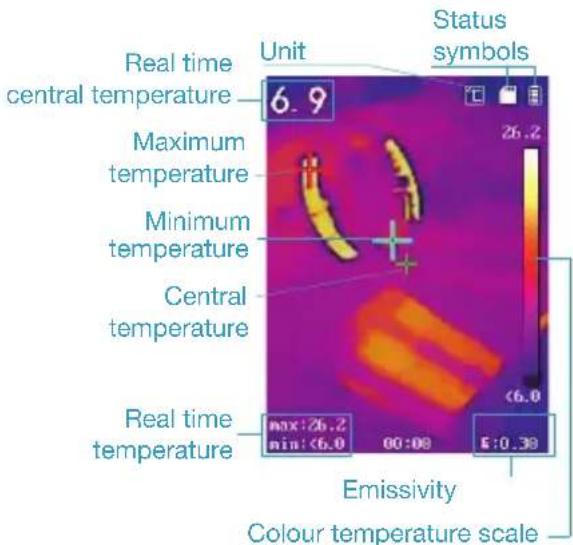
8.3 Formatting the microSD card
Before you start:
Before use, make sure that the microSD card is properly installed.
Steps:
- In Live View, press to display the menu bar.
- Use /☐ to select the option for microSD formatting.
- Pressthe button and select OK to start formatting the SD card.

Note:
Format the microSD card before using it for the first time.
8.4 Taking snapshots
Steps:
- In Live View, press the trigger to take a snapshot. Live View freezes and the device displays the snapshot with temperature information.
- Press to save the image and press the button to cancel.


Note:
You cannot record anything when the device is connected to a PC.
8.5 Displaying snapshots
Steps:
- To view the snapshots you have taken, go to Menu > Picture.
- Press to display the selected image and press 🔍 to toggle between images.
3.(Optional)Press to delete the picture-in-picture view.
8.6 Exporting a file
Purpose:
Connect the handheld thermal camera to your PC via the USB cable and you can export the snapshots you have taken.
Steps:
- Open the cover of the USB cable port.
- Connect the camera to your PC via the USB cable and open the recognised data medium.
- Select and copy the snapshots to the PC and view the files.
- Disconnect the device from your PC.

Note:
The driver is installed automatically the first time you connect.
During the driver installation, do not disconnect the USB connection on the PC or remove the microSD card. Otherwise there is a risk of damage to the device.
9 Main configurations
9.1 Temperature measurement
Purpose:
The thermometry (temperature measurement) function provides the real-time temperature of the scene and displays it on the left of your screen. The thermometry function is switched on by default.
The thermometry settings affect the accuracy of the temperature measurement.
Steps:
1 In Live View, press 📷 to display the menu bar.
2 Use ☐ to select the desired setting bar.
3Press to enter the settings dialogue.
Emissivity: Set the emissivity of your target as the effectiveness in emitting energy as thermal radiation.

Note:
For emissivity values, please refer to
6.1 Reference for general material emissivity.
Temperature:
Set the average temperature of the environment. Distance (m/ft): Set the shortest distance between the target and the device.
Note: The recommended temperature measuring distance is 0.2 to 2 m with a target size of 80 × 80 mm.
Rule: Select Hotspot, Coldspot to display the maximum temperature, minimum temperature in Live View.
4Use /☐ to select the desired settings, then press ☐ to activate.
5 If necessary, press ▲ / ▼ to increase / decrease the setting values. Press and hold the ▲ / ▼ button to quickly change the value.
6 Press the button to save and quit.
9.2 Further configurations
Here is an example of setting the laser light function.
Steps:
1 In Live View, press 📋 to display the menu bar.
2Use □ / □ select the Laser option.
3 Switch the laser light function on / off with
4 Press the button to save and quit.
5 In Live View, pull the trigger to turn on the laser light; release the trigger to turn off the laser light.

Note: Using the steps above, other settings such as temperature measu-
ring range, unit, pallets, etc. can also be configured.
10 System information
To view the device information, go to Menu > Info: Model, version number, FPGA version number, serial number, capacity, etc. You can also set the switch-off time, date and time in the menu.
11 Appendix
11.1 Reference for general material emissivity
| Material Emissivity | |
| Human skin 0.98 | |
| Circuit board 0.91 | |
| Cement concrete 0.95 | |
| Ceramic 0.92 | |
| Rubber 0.95 | |
| Colour 0.93 | |
| Wood 0.85 | |
| Asphalt 0.96 | |
| Brick 0.95 | |
| Sand 0.90 | |
| Soil 0.92 | |
| Cotton 0.98 | |
| Cardboard 0.90 | |
| White paper 0.90 | |
| Water 0.96 |
11.2 Frequently asked questions (FAQ)
Q: The charging indicator flashes red.
A: Check the points below.
- Check that the device is charged with a suitable USB power supply unit (5 V / 2 A).
- Disconnect the battery once and reconnect it.
- Make sure that the ambient temperature is above 0 °C.
Q: Video or recording fails.
A: Check the points below:
- Check if the device is connected to your PC and the recording function is not available.
- Check if the memory space is full.
- Check if the device has a low battery level.
Q: The PC cannot identify the camera.
A: Check that the device is connected to your PC via the standard USB cable.
F: The camera cannot be operated or does not respond.
A: Press and hold the 📷 button to restart the camera
12. Spare parts
- Only use the manufacturer's original spare parts.
- Unsuitable or defective spare parts may cause damage, malfunction or total failure of the thermal camera.
- The use of non-approved spare parts will void all warranty, service and liability claims as well as all claims for compensation against the manufacturer or its agents, distributors and sales representatives.
13. Disposal
- For disposal, clean the device and disassemble it according to the regulations for work safety and environmental protection. Please recycle components.
- Electrical devices do not belong in household waste and must be disposed of at suitable collection points Electronic waste, electronic components, lubrication and other auxiliary materials must be treated as hazardous waste and may only be disposed of by authorised specialists!
Reducing environmental pollution and preserving the environment are at the heart of our activities!
HAZET – environmental protection is of fundamental importance to us.
Spis treści
natural_image
Product photo of a medical imaging device with a black cable and connected tubing, alongside a small inset image of a device labeled '1992-1' (no visible text on device body)natural_image
Close-up of a blue and black handheld device with a circular orange button (no text or symbols visible)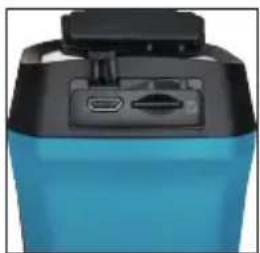
natural_image
Close-up of a blue and black electronic device with a black top and control panel (no visible text or symbols)natural_image
Close-up of a blue and black fitness device with a black top handle and two ports (no visible text or symbols)natural_image
Person using a thermal imaging device in front of industrial equipment (no visible text or symbols)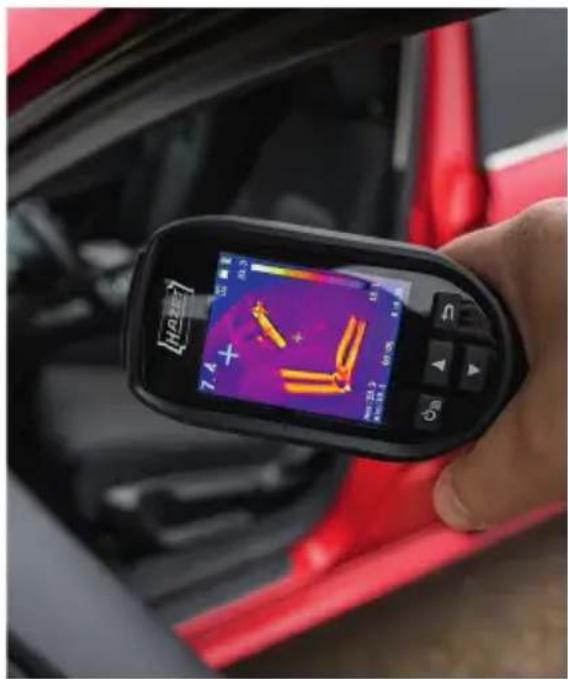
natural_image
Close-up of a hand holding a handheld device displaying thermal imaging of a car's license plate (no visible text or symbols on the device screen)1992-1 DE/EN/PL III. 04.2022 Ho/114
HAZET-WERK
- Thermal Camera
- Inhalt
- Warning about the laser light
- Manufacturer's address:
- Explanation of symbols
- READ THE OPERATING INSTRUCTIONS!
- NOTE!
- WARNING!
- CAUTION!
- QUALIFIED PERSONNEL!
- Owner's liability
- Intended use
- EU Declaration of Conformity
- 2012/19/EU (Waste Electrical and Electronic Equipment Directive):
- 2006/66/EC (Battery Directive):
- Laws and regulations
- Transportation
- Battery
- Dangers that may arise from the device
- Keep electric tools out of the hands of children.
- Do not use the device in an explosive atmosphere.
- Application environment
- Introduction
- Included in delivery
- Product presentation
- Design
- Dimensions
- Interfaces
- Trigger
- Note:
- Warning:
- BASIC OPERATION
- Charging the device
- Steps:
- Image analysis
- Formatting the microSD card
- Before you start:
- Taking snapshots
- Displaying snapshots
- Exporting a file
- Purpose:
- Main configurations
- Temperature measurement
- Temperature:
- Further configurations
- System information
- Appendix
- Reference for general material emissivity
- Frequently asked questions (FAQ)
- Q: The charging indicator flashes red.
- Q: Video or recording fails.
- Q: The PC cannot identify the camera.
- F: The camera cannot be operated or does not respond.
- Spare parts
- Disposal
- Spis treści
- HAZET-WERK
Brand : Hazet
Model : 1992-1
Category : Measurement