CMP-100 - Measurement Sonel - Free user manual and instructions
Find the device manual for free CMP-100 Sonel in PDF.


| Product Type | Clamp Meter (AC/DC True RMS) |
| Model | CMP-100 |
| Brand | Sonel |
| Measurement Functions | AC/DC Voltage, AC/DC Current, Resistance, Continuity, Frequency, Capacitance, Temperature, Diode Test |
| AC Current Range | 0.1 A to 600 A (True RMS) |
| DC Current Range | 0.1 A to 600 A |
| AC Voltage Range | 0.1 V to 600 V (True RMS) |
| DC Voltage Range | 0.1 V to 600 V |
| Resistance Range | 0.1 Ω to 40 MΩ |
| Capacitance Range | 1 nF to 4000 μF |
| Frequency Range | 10 Hz to 10 MHz |
| Jaw Opening | 40 mm (approx.) |
| Display | 4000 counts, LCD with backlight |
| Safety Rating | CAT III 600V, CAT IV 300V |
| Power Supply | 2 x AAA batteries (1.5V) |
| Battery Life | Approximately 200 hours (typical) |
| Auto Power Off | Yes (after 15 minutes of inactivity) |
| Dimensions | 230 x 80 x 40 mm (approx.) |
| Weight | 300 g (including batteries) |
| Operating Temperature | 0°C to 40°C |
| Storage Temperature | -20°C to 60°C |
| Humidity | <80% RH (non-condensing) |
| Cleaning | Wipe with a dry, soft cloth. Do not use solvents or abrasives. |
| Maintenance | Calibrate annually. Replace batteries when low battery indicator appears. |
| Spare Parts / Repairability | Contact Sonel service center for replacement batteries, test leads, and calibration. |
Frequently Asked Questions - CMP-100 Sonel
User questions about CMP-100 Sonel
0 question about this device. Answer the ones you know or ask your own.
Ask a new question about this device
Download the instructions for your Measurement in PDF format for free! Find your manual CMP-100 - Sonel and take your electronic device back in hand. On this page are published all the documents necessary for the use of your device. CMP-100 by Sonel.
USER MANUAL CMP-100 Sonel
natural_image
Illustration of a handheld electrical clamp meter with orange and gray casing (no text or symbols)
INSTRUKCJA OBSŁUGI 1
USER MANUAL 22
MANUAL DE USO 43
LEAKAGE CURRENT DIGITAL CLAMP METER
CMP-100
CE
Version 1.00 16.04.2024
CMP-100 True RMS meter is intended for measuring alternating current.
The most important features of CMP-100 include:
- low-pass filter,
- manual range setting,
- PEAK function for displaying peak values,
- HOLD function used to maintain the read-pot on the meter screen,
- backlighting of measurement functions and buttons,
• built-in flashlight for lighting the measurement location, - AUTO-OFF function,
- 4-digit display (read-out 6000).
CONTENTS
1 Introduction.... 25
2 Safety 26
2.1 General rules....26
2.2 Safety symbols....27
3 Preparing the meter for operation.... 28
4 Functional description 29
4.1 Measuring functions ......29
4.2 Display 31
5 Measurements.... 32
5.1 Current measurement....32
5.2 Leakage current measurement....33
5.2.1 Leakage current measurement in 1-phase system .....33
5.2.2 Leakage current measurement in 3-phase system .....34
6 Special features 35
6.1 Button REL 🙏 – backlighting of functions and buttons ......35
6.2 LPF button – low-pass filter 35
6.3 PEAK button – peak value measurement ..... 35
6.4 Button HOLD 36
6.4.1 HOLD function 36
6.4.2 Flashlight function 36
6.5 Auto-Off....36
7 Replacing the batteries 37
8 Maintenance and care 38
9 Storage 39
10 Dismantling and disposal 39
11 Technical data.... 40
11.1 Basic data....40
11.2 Operating data 41
12 Manufacturer 42
1 Introduction
Thank you for purchasing Sonel multimeter. CMP-100 meter is a modern, easy and safe measuring device. Please acquaint yourself with this manual in order to avoid measuring errors and prevent possible problems in operation of the meter.
This manual contains three types of warnings. They are presented as a framed text describing the possible risks for the user and the device. Texts ⚠ WARNING describe situations, which may endanger user's life or health, when instructions are not followed. Texts ⚠ CAUTION! begin a description of a situation, which may result in device damage, when instructions are not followed. Indication of possible problems is preceded by symbol .
WARNING
- CMP-100 meter is designed to measure the current. Any application that differs from those specified in the present manual may result in a damage to the device and constitute a source of danger for the user.
- CMP-100 meter must be operated only by appropriately qualified personnel with relevant certificates authorising the personnel to perform works on electric systems. Unauthorized use of the meter may result in its damage and may be a source of serious hazard to the user.
- Before operating the device, read thoroughly this manual and observe the safety regulations and guidelines provided by the producer. Failure to follow instructions specified in this manual may result in a damage to the device and be a source of serious hazard to the user.
2 Safety
2.1 General rules
In order to provide conditions for correct operation and the correctness of the obtained results, the following recommendations must be observed:
- before using the meter read carefully this manual,
- the meter should be operated only by qualified persons that have passed health and safety training,
- do not exceed the maximum limits of the input signal,
- If during the measurement symbol OL appears on the screen, it indicates that the measured value exceeds the measurement range,
- It is unacceptable to operate:
⇒ a damaged meter which is completely or partially out of order,
⇒ a meter stored for an excessive period of time in disadvantageous conditions (e.g. excessive humidity).
- repairs may be carried out only by an authorised service point.
WARNING
- Never start the measurements if you have wet or damp hands.
- Do not perform measurements in explosive atmosphere (e.g. in the presence of flammable gases, vapours, dusts, etc.). Using the meter in such conditions may result in sparking and cause an explosion.
| The limit values of the input signal | |
| Function | The maximum input value |
| A AC | 120 A DC/AC |
2.2 Safety symbols

This symbol located near another symbol or terminal, indicates that the user should read the further information contained in the manual.

This symbol located near the terminal, indicates that in normal use there is a possibility of dangerous voltages.
Protection class II – double insulation
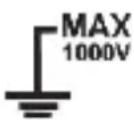
Terminals with this marking cannot be connected to a circuit where the voltage to ground exceeds the maximum safe voltage of the device.
3 Preparing the meter for operation
After purchasing the meter, check whether the content of the package is complete.
Before performing the measurement:
- make sure that the battery level is sufficient for measurements,
- check whether the meter casing is not damaged,
- when the meter is not in use, set the function switch in OFF position.
The device has the AUTO-OFF function triggered after 15 minutes of user inactivity. To turn the meter on again, set the function switch to OFF position and then set it at the desired function.
When using the meter, be sure to turn off the meter before removing the back cover to replace the batteries.
WARNING
Do not use the meter if the cover of battery compartment is removed.
4 Functional description
4.1 Measuring functions
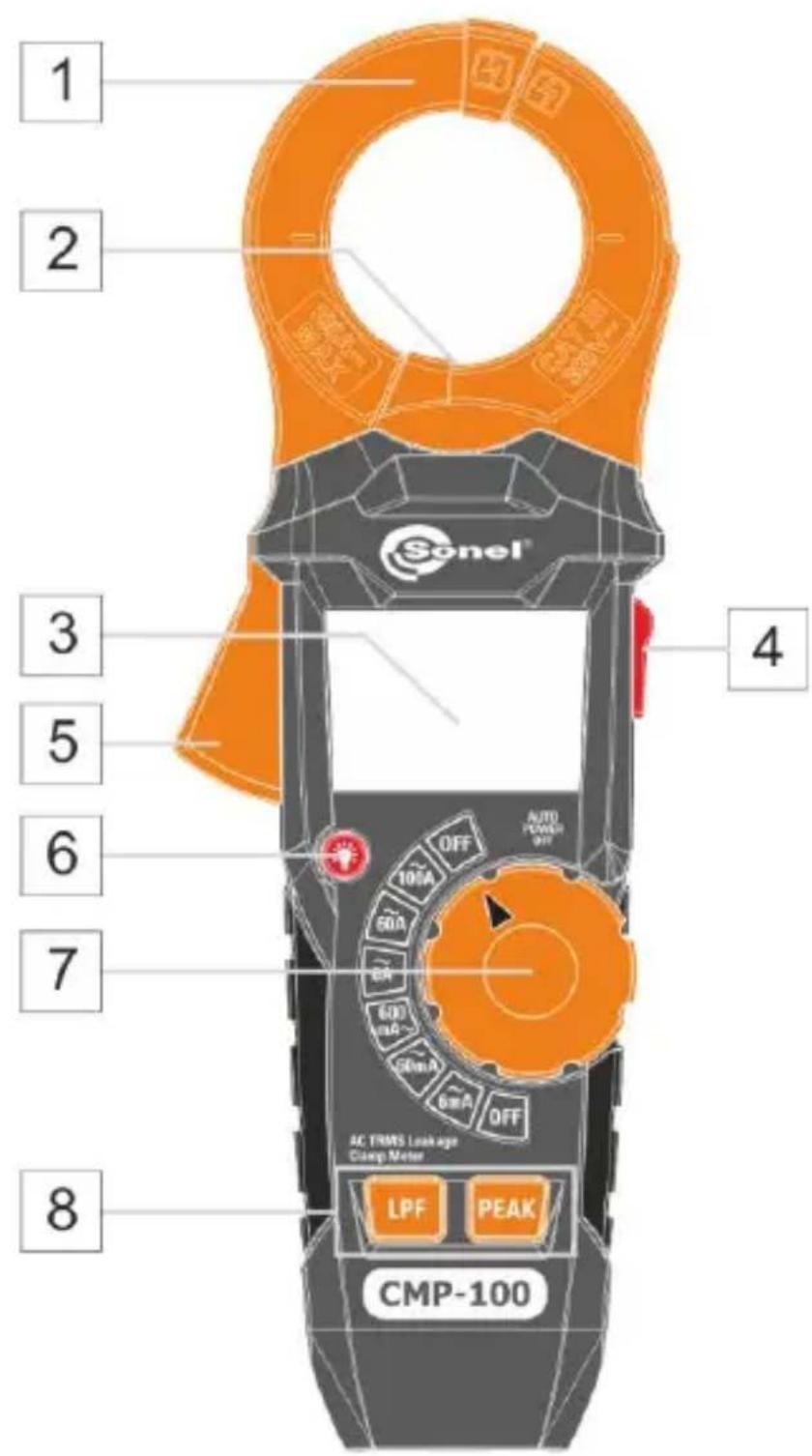
1 Current clamp
2 Flashlight
3 LCD display
4 Button HOLD /
- HOLD mode – freezing the measurement results on the display (press briefly)
- flashlight mode (press and hold)
5 Clamp-opening trigger
6 Button
Backlighting of measurement functions and buttons (press briefly)
7 Rotary switch
Function selection:
• selection of measuring range
- OFF – the meter is switched off
8 Function buttons
- LPF button Low-pass filter (press briefly)
- PEAK button Displays peak value of the measured signal (press briefly)
4.2 Display
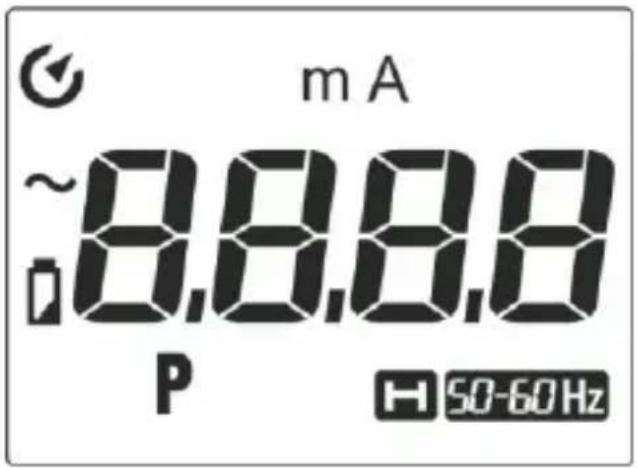

Auto-off mode
m
The prefix of multiple measurement unit
A
Current measurement
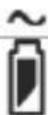
Alternating signal
P
Low battery
H
Peak value
50-60 Hz
HOLD function activated
Low-pass filter enabled
OL
Exceeded measurement range
5 Measurements
The content of this chapter should be thoroughly read and understood since it describes methods of measurements and basic principles of interpreting measurement results.
5.1 Current measurement
To perform the current measurement:
- set the rotary switch at the appropriate measuring range,
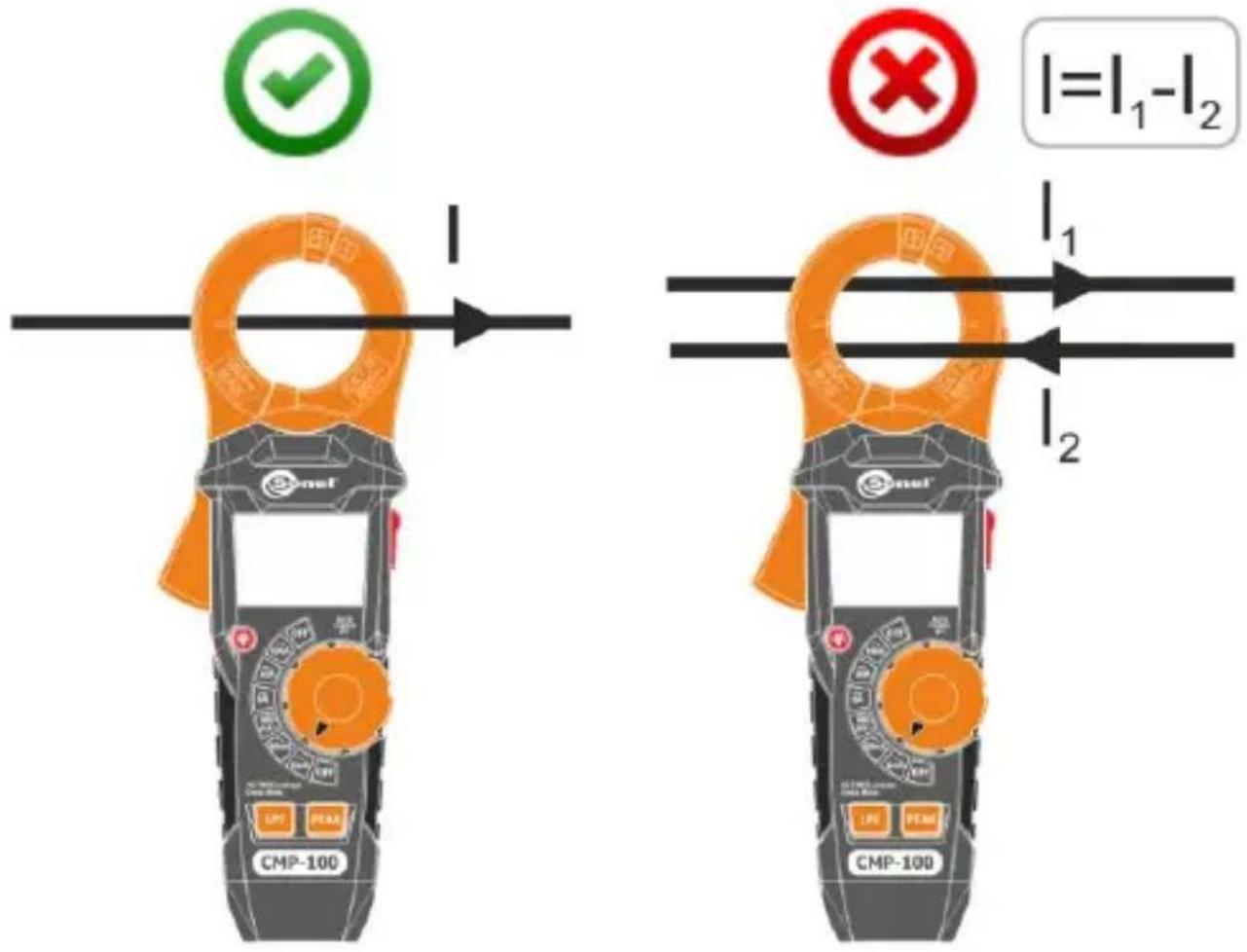
- use the clamp-opening trigger and attach the clamps on the tested conduit. Only one conduit must be within the testing range of the clamps,
- read the measurement result on the display.
5.2 Leakage current measurement
To perform the current measurement:
- set the rotary switch at the appropriate measuring range,
- use the clamp-opening trigger and attach the clamps on the tested conduit. Only one conduit must be within the testing range of the clamps,
- read the measurement result on the display.
5.2.1 Leakage current measurement in 1-phase system
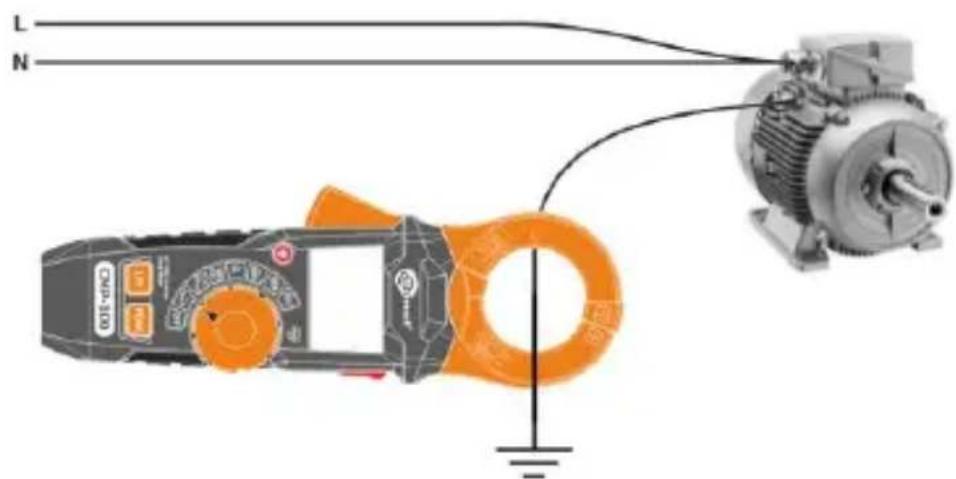
Leakage current measurement – direct method
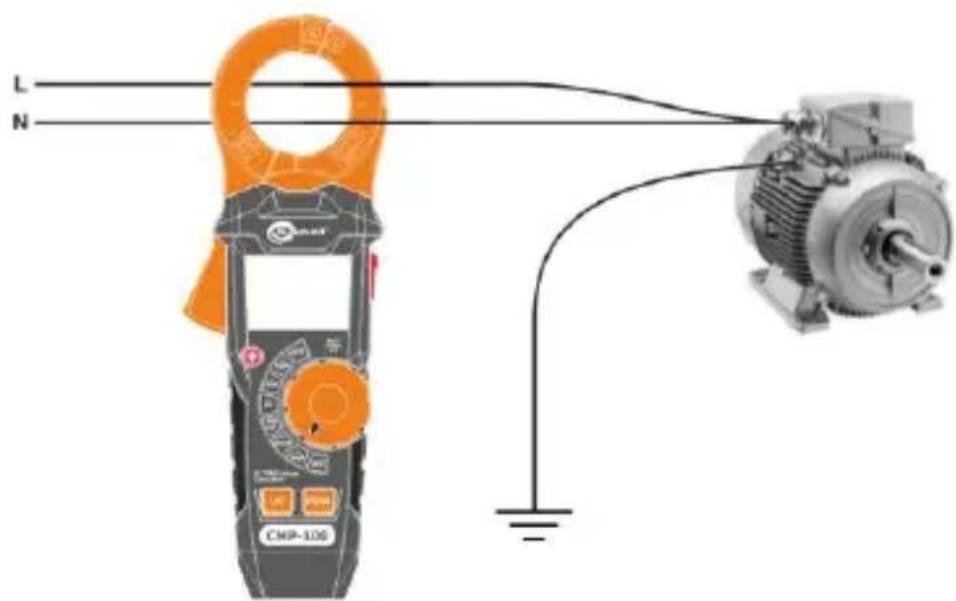
Leakage current measurement – indirect method
5.2.2 Leakage current measurement in 3-phase system
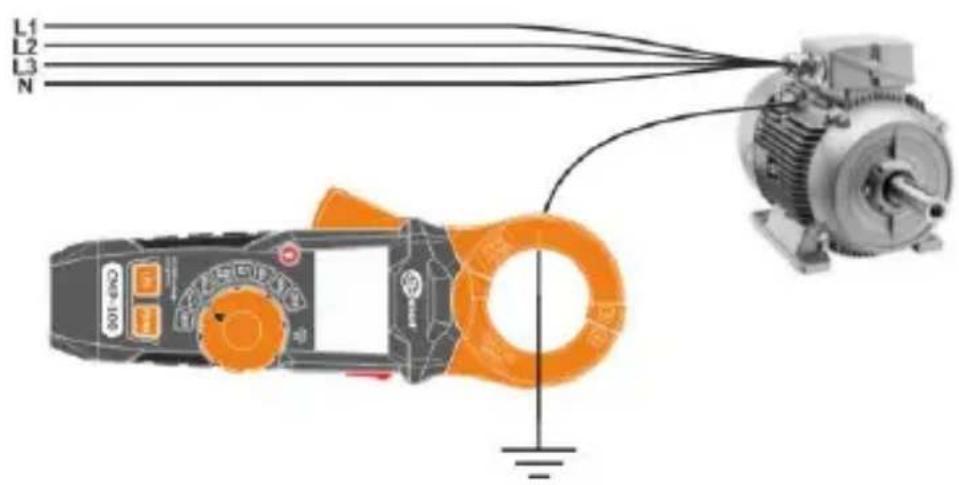
Leakage current measurement – direct method
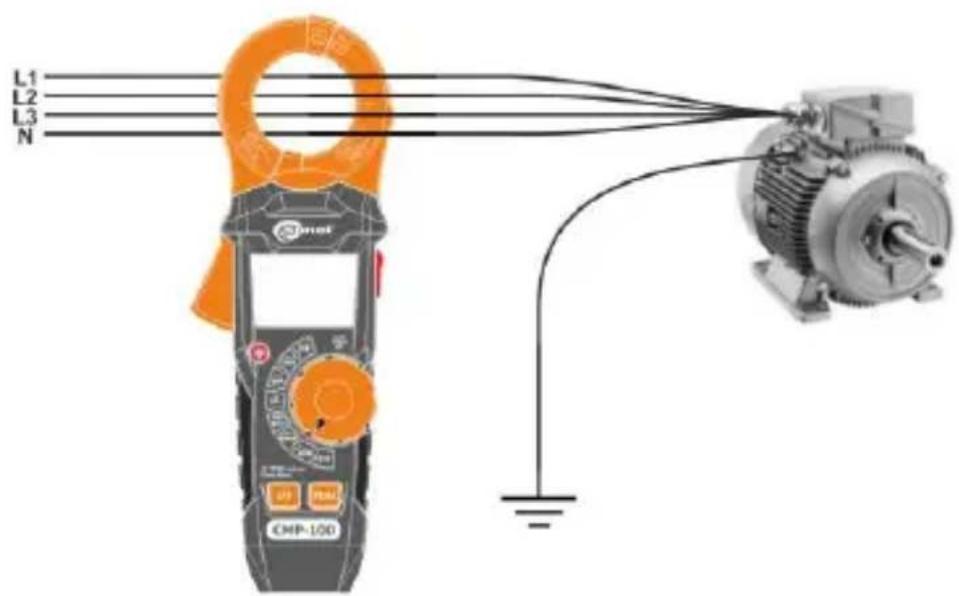
Leakage current measurement – indirect method
6 Special features
6.1 Button REL - backlighting of functions and buttons
Press the button to enable or disable the backlighting of the measurement function symbols and buttons.
6.2 LPF button – low-pass filter
The low-pass filter minimizes signals with frequencies above the cut-off frequency, reducing their effect on the measurement result.
⇒ To activate the mode, press briefly the LPF button.
⇒ To disable the mode, press and hold the LPF button.
6.3 PEAK button – peak value measurement
PEAK function allows user to record very short alternating current surges.
The meter will update the display each time a lower negative, or higher positive peak occurs.
⇒ To activate the mode, press briefly the PEAK button.
⇒ To disable the mode, press and hold the PEAK button.

Running PEAK before that may cause overrange symbols to appear.
6.4 Button HOLD

6.4.1 HOLD function
This function is used to 'freeze' the measurement result on the display. To do this, briefly press HOLD button. When the function is enabled, the display shows symbol H.
To return to the normal operation mode of the device, press HOLD button again.
6.4.2 Flashlight function
Briefly press HOLD, to turn on or off the flashlight mode.
6.5 Auto-Off
The meter automatically shuts off after 15 minutes of user inactivity. Symbol in the display indicates activated function.
Auto-off function may be temporarily disabled. For this purpose:
- set the rotary switch at OFF position,
- press and hold LPF button,
- set the rotary switch at the desired measuring range,
- release LPF button. When the automatic shutdown is deactivated, the display does not show

Each pass of the rotary switch through "OFF" position with non-pressed LPF button, will activate again the Auto-Off function.
7 Replacing the batteries
WARNING
To avoid electric shock, do not use the meter if the battery compartment cover is not in place or is not properly fastened.
CMP-100 is powered by three LR03 AAA 1.5 V batteries. It is recommended to use alkaline batteries.
To replace the batteries:
- set the rotational function selector at OFF,
- turn the fixing screw of the compartment cover to the position:
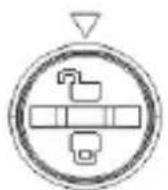
- remove the cover,
- remove the batteries and insert a new ones, observing the polarity,
- put on the cover and turn the fixing screw to the position:
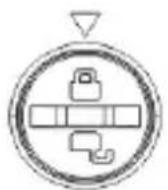

- While performing the measurements with the low battery symbol displayed, the user must be aware of additional measurement uncertainties or unstable operation of the device.
- If the meter does not work properly, check the batteries in order to ensure that they are in proper condition and properly installed in the device.
8 Maintenance and care
The digital multimeter has been designed for many years of reliable use, provided that the following recommendations are observed for its maintenance and care:
- THE METER MUST BE DRY. Wipe the dampened meter.
- THE METER MUST BE USED AND STORED IN NORMAL TEMPERATURES. Extreme temperatures may shorten the life of electronic components and distort or melt plastic parts.
- THE METER MUST BE HANDLED CAREFULLY AND GENTLY. Dropping the meter may damage its electronic elements or the housing.
- THE METER MUST BE KEPT CLEAN. From time to time wipe the housing with a damp cloth. DO NOT use chemicals, solvents or detergents.
- USE ONLY NEW BATTERIES OF RECOMMENDED SIZE AND TYPE. Remove the old or discharged batteries from the meter to avoid leakage and damage.
- IF THE METER IS TO BE STORED FOR LONGER THAN 60 DAYS, remove the batteries and keep them separately.

The electronic system of the meter does not require maintenance.
9 Storage
During the storage of the device, the following recommendations must be observed:
- make sure that the meter and accessories are dry,
- when the device is to be stored for longer time, remove the batteries.
10 Dismantling and disposal
Worn-out electric and electronic equipment should be gathered selectively, i.e. it must not be placed with waste of another kind.
Worn-out electronic equipment should be sent to a collection point in accordance with the law of waste electrical and electronic equipment.
Before the equipment is sent to a collection point, do not dismantle any elements.
Observe local regulations concerning disposal of packages, waste batteries and accumulators.
11 Technical data
11.1 Basic data
⇒ "m.v." means a standard measured value.
True RMS measurement for AC current
| Range | Resolution | Accuracy for f = 50 Hz...60 Hz (all waveforms) | Accuracy for f = 60 Hz...1 kHz (sine waveforms) |
| 6.000 mA | 0.001 mA | ± (1.5% m.v. + 8 digits) | ± (3.5% m.v. + 8 digits) |
| 60.00 mA | 0.01 mA | ± (3.0% m.v. + 8 digits) | |
| 600.0 mA | 0.1 mA | ± (1.0% m.v. + 5 digits) | ± (3.0% m.v. + 5 digits) |
| 6.000 A | 0.001 A | ||
| 60.00 A | 0.01 A | ||
| 100.0 A | 0.1 A | ± (1.0% m.v. + 8 digits) | ± (3.0% m.v. + 8 digits) |
- All AC voltage ranges are specified from 5% to 100% of range
• Frequency range: 50 Hz...1000 Hz
• Overload protection: 120 A
AC current measurement (True RMS) the low-pass filter
| Range | Resolution | Accuracy for f = 50...60 Hz |
| 6.000 mA | 0.001 mA | ± (2.0% m.v. + 8 digits) |
| 60.00 mA | 0.01 mA | ± (1.5% m.v. + 8 digits) |
| 600.0 mA | 0.1 mA | |
| 6.000 A | 0.001 A | |
| 60.00 A | 0.01 A | |
| 100.0 A | 0.1 A |
- All AC current ranges are specified from 5% to 100% of range
• Frequency range: 50 Hz...60 Hz
• Overload protection: 120 A
11.2 Operating data
a) measurement category according to IEC 61010-1 ..... CAT III 300 V (II 600 V)
b) type of insulation ....double, Class II
c) housing type ....double-composite
d) degree of housing protection acc. to EN 60529....IP30
e) pollution degree....2
f) opening of measurement clamp.... 32 mm (1.26")
g) power supply of the meter.... 3 x AAA 1.5 V battery
h) indication for range exceeding ....OL symbol
i) low battery indication ....symbol
j) measurement rate 5 measurements per second
k) crest factor....<3
I) PEAK function
- response time ....<50 ms
- accuracy.... 10% m.v. + 10 digits
m) AC read-out......True RMS
n) frequency bandwidth
- current of 0.000 mA...10 A....50...1000 Hz
- current of 10 A...60 A....50...400 Hz
- current of 60 A...100 A....50...60 Hz
o) display...... 4 digit LCD with backlit, 6000 counts with function indicators
p) dimensions 234 x 82 x 46 mm
q) meter weight....357 g
r) meter weight without batteries....321 g
s) operating temperature....+5..+40°C
t) operating humidity .... <80% for temp. ≤31°C .... decreasing linearly to 50% at temp. 40°C
u) storage temperature ....-20..+60°C
v) storage humidity ....<80%
w) drop test....2 m
x) maximum operating altitude 2000 m
y) Auto-Off function 15 min
z) compliance with the requirements of the following standards....EN 61326-1, EN 61326-2
IEC 61010-1, EN 61010-02-032
RoHS 2011/65/EU, (EU) 2015/863
aa) quality standard ....ISO 9001
12 Manufacturer
The provider of guarantee and post-guarantee services is:
SONEL S.A.
Wokulskiego 11
58-100 Świdnica
Poland
tel. +48 74 884 10 53 (Customer Service)
e-mail: customerservice@sonel.com
web page: www.sonel.com

CAUTION!
Service repairs must be performed only by the manufacturer

MANUAL DE USO
PINZA DIGITAL PARA MEDIR CORRIENTES DE FUGA
CMP-100
CE
- LEAKAGE CURRENT DIGITAL CLAMP METER
- CONTENTS
- Introduction
- WARNING
- Safety
- General rules
- Safety symbols
- Preparing the meter for operation
- Functional description
- Measuring functions
- Display
- Measurements
- Current measurement
- Leakage current measurement
- Leakage current measurement in 1-phase system
- Leakage current measurement in 3-phase system
- Special features
- Button REL - backlighting of functions and buttons
- LPF button – low-pass filter
- PEAK button – peak value measurement
- Button HOLD
- HOLD function
- Flashlight function
- Auto-Off
- Replacing the batteries
- Maintenance and care
- Storage
- Dismantling and disposal
- Technical data
- Basic data
- Operating data
- Manufacturer
- SONEL S.A.
- CAUTION!
- MANUAL DE USO
- PINZA DIGITAL PARA MEDIR CORRIENTES DE FUGA
Brand : Sonel
Model : CMP-100
Category : Measurement