BC100TU2166F - Fan Be Cool - Free user manual and instructions
Find the device manual for free BC100TU2166F Be Cool in PDF.


| Product Type | Tower Fan |
| Brand | Be Cool |
| Model | BC100TU2166F |
| Height | 100 cm |
| Weight | 3.6 kg |
| Rated Voltage | 220-240 V |
| Frequency | 50/60 Hz |
| Power Input | 65 W |
| Maximum Airflow | 11.93 m³/min |
| Fan Sound Power Level | 63.13 dB(A) |
| Standby Power Consumption | 0.80 W |
| Number of Speeds | 3 (Low, Medium, High) |
| Oscillation | Yes (Swing function) |
| Timer | 1 to 8 hours |
| Sleep Mode | Yes (simulates natural wind) |
| Ionizer | Yes |
| Remote Control | Yes (includes 2x AAA batteries) |
| Control Panel | On unit and remote control |
| Display | LED with speed, timer, swing, sleep, and ionizer indicators |
| Assembly Required | Yes (base assembly with screws) |
| Cleaning Method | Soft cloth with warm soapy water; do not immerse |
| Storage | Cool, dry, clean environment |
| Warranty | 2 years (valid in Austria only) |
Frequently Asked Questions - BC100TU2166F Be Cool
User questions about BC100TU2166F Be Cool
0 question about this device. Answer the ones you know or ask your own.
Ask a new question about this device
Download the instructions for your Fan in PDF format for free! Find your manual BC100TU2166F - Be Cool and take your electronic device back in hand. On this page are published all the documents necessary for the use of your device. BC100TU2166F by Be Cool.
USER MANUAL BC100TU2166F Be Cool
natural_image
Modern vertical wooden fan with a black base and ventilation grille (no text or symbols visible)HERZLICHEN GLÜCKWUNSCH!
natural_image
Four identical line drawings of a mechanical device with a central rod and base, shown from different angles (no text or symbols)HINWEIS
natural_image
Technical line drawing of a mobile phone casing with internal components and battery pack (no text or symbols)HINWEIS
line
| Time (S) | Sleep Mode | | -------- | ---------- | | 0 | High | | 5 | Mid | | 10 | Low | | 15 | High | | 20 | Mid | | 25 | Low | | 30 | High | | 35 | Mid | | 40 | Low | | 45 | High | | 50 | Mid | | 55 | Low | | 60 | High | | 65 | Mid | | 70 | Low | | 75 | High | | 80 | Mid |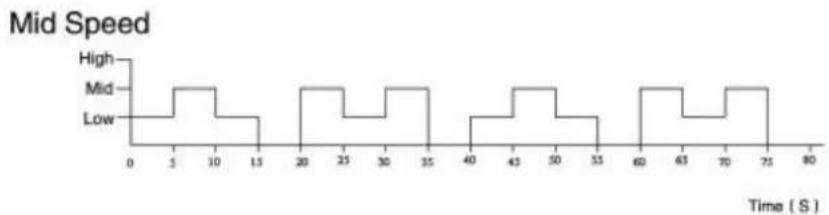
line
| Time (s) | High | Mid | Low | | -------- | ---- | --- | --- | | 0 | | | | | 5 | | | | | 10 | | | | | 15 | | | | | 20 | | | | | 25 | | | | | 30 | | | | | 35 | | | | | 40 | | | | | 45 | | | | | 50 | | | | | 55 | | | | | 60 | | | | | 65 | | | | | 70 | | | | | 75 | | | | | 80 | | | |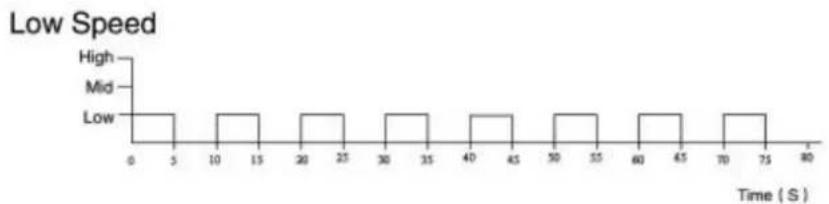
bar
Low Speed | Time (S) | Frequency | |---|---| | 0-5 | High | | 10-15 | Mid | | 20-25 | Low | | 25-30 | Mid | | 30-35 | Low | | 35-40 | Mid | | 40-45 | Low | | 45-50 | Mid | | 50-55 | Low | | 55-60 | Mid | | 60-65 | Low | | 65-70 | Mid | | 70-75 | Low | | 75-80 | Low |BE COOL

TIMER:
| Important information on safety, location and electrical connection | 11 – 12 |
| Recycling, Disposal and Declaration of Conformity | 12 – 13 |
| Scope of delivery | 13 |
| Technical description | 13 |
| Commissioning | 14 |
| Setting the functions | 15 – 17 |
| Cleaning instructions | 18 |
| Technical instructions | 18 |
| Warranty | 19 |
PLEASE READ THIS INSTRUCTION MANUAL CAREFULLY BEFORE STARTING INSTALLATION, OPERATION OR MAINTENANCE. PROTECT YOURSELF AND OTHERS BY FOLLOWING THE SAFETY INSTRUCTIONS. FAILURE TO FOLLOW THE INSTRUCTIONS MAY LEAD TO INJURY OR DAMAGE TO PERSONS AND/OR PROPERTY AND/OR INVALIDATE THE WARRANTY!
IMPORTANT INFORMATION ON SAFETY, LOCATION AND ELETRICAL CONNECTION.

- Use this device exclusively in accordance with the guidelines in the instruction manual. Any use other than that recommended by the manufacturer, may result in fire, electrical shock or injury to persons.
- Remove the packaging and ensure the device is not damaged. In case of any doubt do not use the device and contact the service point or your dealer.
- Keep children away from packaging materials. There is a risk of choking if swallowed!
- If the power cable is damaged it must be replaced by the manufacturer or an authorised service point, in order to avoid all potential risks.
- Check whether current type and grid voltage match the specifications on the device's type plate before plugging the device in.
- The electrical plug socket, into which the device is connected, must not be defective or loose, must be suitable for the required current load and, above all, must be properly earthed.
- Avoid the use of an extension cable, as this may overheat and cause a fire.
- It is strictly forbidden to modify the properties of this device in any form or manner and you must only use replacement parts or accessories recommended by the manufacturer (failure to do so will invalidate the warranty and guarantee).
- If the device has a defect, switch it off and contact your dealer or the customer hotline.
- For any possible repairs to the device and the mains plug or power cable you must always refer exclusively to the customer service points recommended by the manufacturer. You can view our
BE COOL
customer service points online at www.becool.at.
-
Children under the age of 8 and persons with limited physical, psychological, sensory or mental abilities and lack of experience and knowledge may only use this device under appropriate supervision and if comprehensively briefed on the safe use of the device and the associated hazards.
-
Do not use the device without supervision. Always switch the device off when leaving the room.
-
Children must not be allowed to play with the device.
-
Do not twist or kink the power cable.
-
Do not use the device with wet hands.
-
Do not use the device outdoors.
-
Never use the device in rooms in which gas, oil or sulphur are present.
-
Do not use the device in the proximity of water or strong moisture, e.g. in damp cellars, close to pools, bathtubs or showers. Make sure no water can enter the device.
-
Do not place any objects on the device.
-
Place the device on a stable and level subsurface.
-
Never cover the device.
-
Never put fingers, pens or other items into the device and make sure that air in- and outlets are never blocked.
-
Always switch the device off before pulling the power plug.
-
Do not pull on the power cable to unplug the device. Always pull on the plug to unplug the device.
-
Do not touch the plug with wet hands to avoid electrical shocks.
-
Pull the plug if you are not using the device, if you want to clean it, if it has to be serviced or if it is moved from one location to another.
-
Keep the device in good shape by cleaning and maintaining it. If you have any questions regarding maintenance you can contact the manufacturer's authorized customer hotline / service point.
-
Keep and store the device at a safe and dry place out of reach for children when you are not using it.

RECYCLING
The device's packaging materials can be recycled. It is therefore recommended to dispose of them through sorted waste collection.
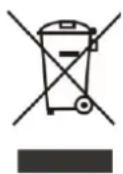
DISPOSAL
The “crossed-out bin” symbol indicates that electrical and electronic devices (WEEE) must be disposed of separately. Electrical and electronic devices can contain hazardous substances and environmental pollutants. Therefore do not dispose of them in unsorted residual waste but at a designated collection point for electrical and electronic devices. You will thus contribute to resource and environmental protection.
For more information please contact your dealer or the local authorities.

DECLARATION OF CONFORMITY

We hereby confirm that this item complies with the basic requirements, regulations and directives of the EU.
You can view the detailed Declaration of Conformity by clicking on the following link:
www.becool.at/downloads
Subject to errors and technical changes.
SCOPE OF DELIVERY
The BECOOL cooler comes with:
- 1x tower fan
- 1x remote control
- 1x base (2-piece)
- 2x AAA batteries
- 2x screws
- 1x operating manual
TECHNICAL DESCRIPTION
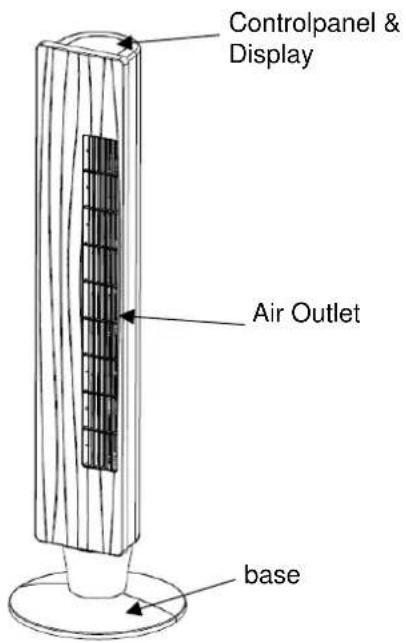
COMMISSIONING
BEFORE USING THE APPLIANCE FOR THE FIRST TIME
Unpacking the Appliance
-
Open the carton and take out the appliance.
-
Remove all packaging from the appliance.
-
Unwind the mains cable completely and make sure not to damage it.
ASSEMBLY
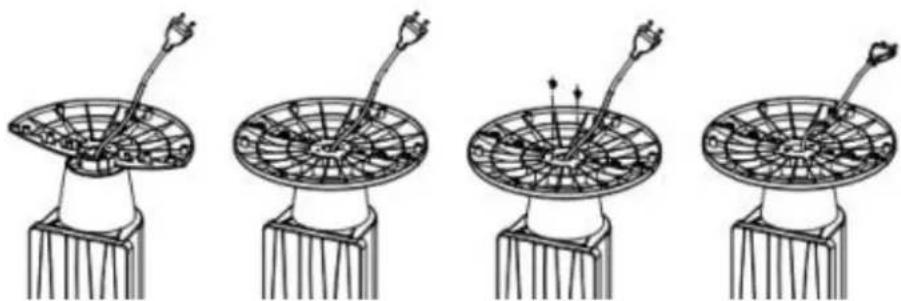
Please proceed as follows for the assembly:
- Place one side of the base on the fan housing.
- Now plug the second part of the base into the other, making sure that the power cord is in the opening provided in the middle. Now press the feet together.
- Attach the base to the fan housing using the screws provided.
- Guide the cable through the tension lock in the stand and fix it in the recesses provided.
natural_image
Four identical line drawings of a satellite dish with a central antenna, shown from different angles (no text or symbols)NOTE
Turn the fan upside down at step 3 to facilitate mounting the stand.
INSTALLATION
Please note the following points for installation
- Place the device on a flat and dry surface (no use in wet rooms).
- The distance to walls or other objects must be at least 50 cm.
- Before using the device, make sure that both the air inlet and the air outlet are free of obstacles and not blocked.
- Insert the plug into a standard 220 \~ 240V socket.

SETTING THE FUNCTIONS
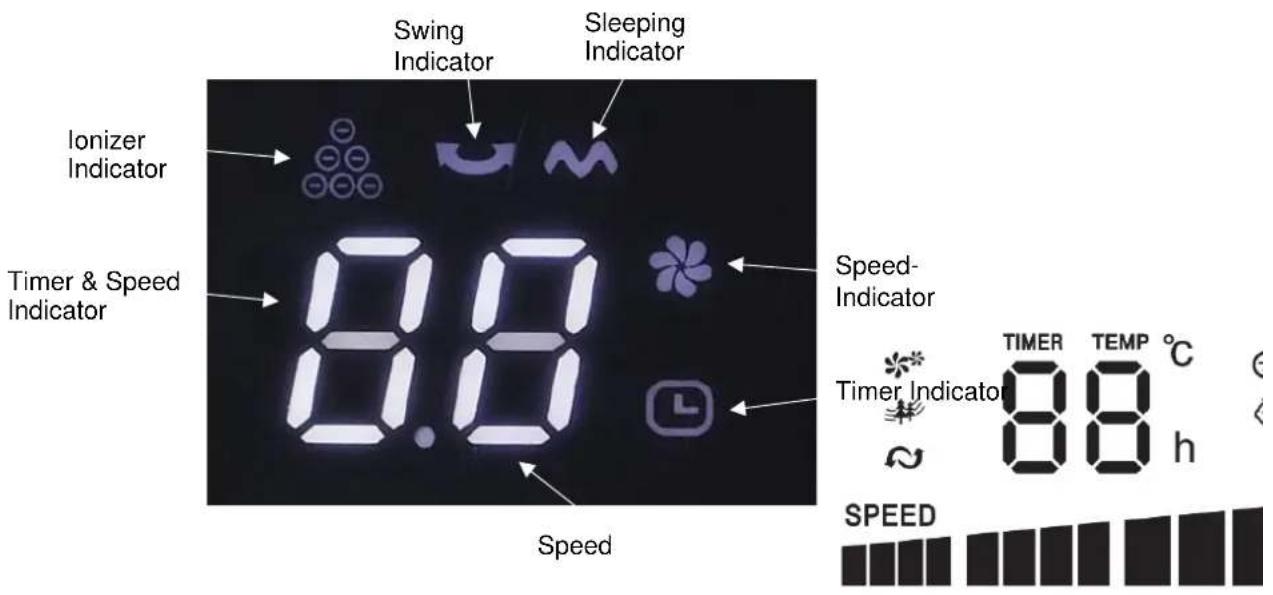
DISPLAY
When setting the functions, the respective symbols light up on the display:
REMOTE CONTROL
Please follow the steps below to make it operate correctly:
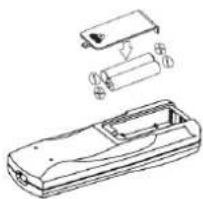
1. Preparing the remote control – inserting or replacing batteries
Please follow these instructions:
- Remove the cover on the back of the remote control.
- Now insert the Typ R03 "AAA" 1,5V batteries Observe the information on the inside of the battery compartment to properly insert the batteries.
- Now put the cover back onto the remote control.
natural_image
Technical line drawing of a device casing with internal components and exploded view (no text or symbols)NOTE
If the remote control has to be replaced or disposed of, you must take the batteries out and dispose of them in accordance with the applicable regulations! Also remove the batteries in case you won't use the remote control for a longer period of time to avoid corrosion damage.
If you have to replace batteries always replace them with the same type and charge status.
SETTING THE FUNCTIONS
The control panel of the appliance has the same buttons as on the remote control, so all functions can be set directly on the appliance as well as by using the remote control.

ON/OFF:
• To turn on the fan, use the ⏻ - button.

SPEED:
The tower fan has three different speed settings.
- Use the /SPEED-button, until the desired speed setting lights up on the display:
○ Low speed: “1” is shown on the display
○ Medium speed: “2” is shown on the display
○ High speed: “3” is shown on the display

SLEEPING MODE:
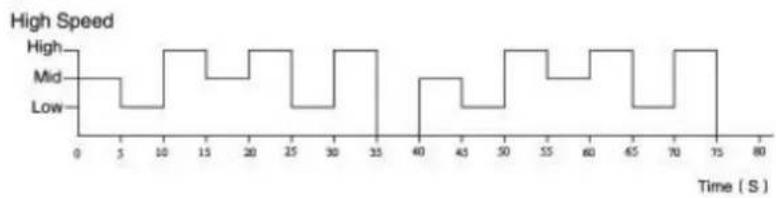
The fan has a sleep mode, in which the device automatically simulates the swelling of the natural wind.
• Use the 📌/MODE-button, to switch the function on.
- Now select on of the three speed levels (low, medium, high) by pressing the /SPEED-button.
- The device now runs in the following rhythm at the respective speed level.

Sleep Mode
line
| Time (S) | High Speed | Mid Speed | Low Speed | | -------- | ---------- | --------- | --------- | | 0 | 0 | 0 | 0 | | 5 | 0 | 0 | 0 | | 10 | 1 | 0 | 0 | | 15 | 1 | 0 | 0 | | 20 | 1 | 0 | 0 | | 25 | 1 | 0 | 0 | | 30 | 1 | 0 | 0 | | 35 | 1 | 0 | 0 | | 40 | 1 | 0 | 0 | | 45 | 1 | 0 | 0 | | 50 | 1 | 0 | 0 | | 55 | 1 | 0 | 0 | | 60 | 1 | 0 | 0 | | 65 | 1 | 0 | 0 | | 70 | 1 | 0 | 0 | | 75 | 1 | 0 | 0 | | 80 | 0 | 0 | 0 |Mid Speed
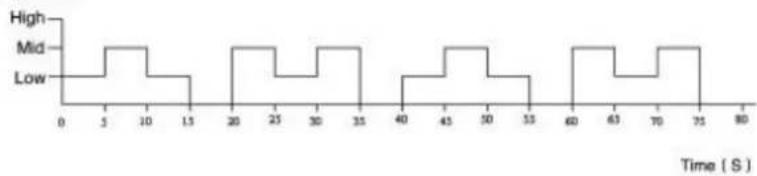
line
| Time (S) | High | Mid | Low | | -------- | ---- | --- | --- | | 0 | | | | | 5 | | | | | 10 | | | | | 15 | | | | | 20 | | | | | 25 | | | | | 30 | | | | | 35 | | | | | 40 | | | | | 45 | | | | | 50 | | | | | 55 | | | | | 60 | | | | | 65 | | | | | 70 | | | | | 75 | | | | | 80 | | | |Low Speed
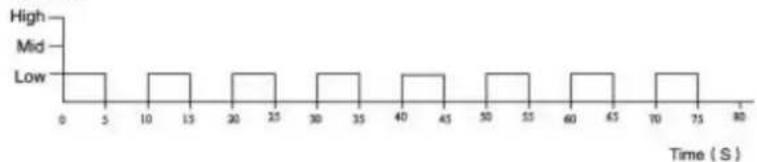
line
| Time (S) | Value | |---|---| | 0 | High | | 5 | Mid | | 10 | Low | | 15 | Mid | | 20 | Mid | | 25 | Mid | | 30 | Mid | | 35 | Mid | | 40 | Mid | | 45 | Mid | | 50 | Mid | | 55 | Mid | | 60 | Mid | | 65 | Mid | | 70 | Mid | | 75 | Mid | | 80 | Low |BE COOL

TIMER:
This feature allows you to turn off the device on a scheduled basis. Here you can select an operating time of 1 to 8 hours.
- Press the ⏻/TIMER-buttons repeatedly until the desired time appears on the display.
• The ⏻ indicator will light up, when the timer is set.

SWING
- Pressing the 🤒/OSC- buttons starts or stops the swing- function.
NOTE
With this function, the blown air is distributed to the left and right. This allows you to achieve a horizontal air distribution in the room.

ION:
The fan is equipped with an ionizer. This distributes ionized air into the rooms and removes static electricity.
To start the ionizer function please proceed as follows:
- Remote control Press the ION- button.
NOTE
The resulting atoms and molecules promote the chemical degradation process and can be used for odor removal and disinfection of the air

DISPLAY LIGHT:
Press the /LAMP- button to switch the display lighting off or on.
CLEANING TIPS
- Caution! Allow the unit to come to a complete stop before cleaning and disconnect it from the socket.
- Use a soft cloth to clean. Should be dirt or not easily removable dirt, use warm soapy water.
- Do not use solvents or abrasives (thinner), metal utensils or hard brushes for cleaning, as they may damage the plastic housing.
- Do not immerse the fan in water or other liquids. Do not allow water to drip onto or into the motor housing of the fan.
- Thoroughly dry all components before storing them.
- Store the device in a cool, dry and clean environment.
- Keep the device out of the reach of children and animals.
| Technical information | |||
| Rated voltage | 220-240V | ||
| Frequency | 50/60Hz | ||
| Rated input power | 65W | ||
| Height | 100cm | ||
| Weight | 3.6kg | ||
| Name | Symbol | Value | Unit |
| Maximum volume flow | F | 11,93 | m^3/min |
| Fan power Input | P | 62,3 | W |
| Service value | SV | 0,19 | (m^3/min)/W |
| Fan sound power level | LWA | 63,13 | dB(A) |
| Consumption in standby mode | PSB | 0,80 | W |
| Contact address for further information and service line: | Schuss Home Electronic GmbHScheringgasse 3, A-1140 ViennaTel: +43 (1) 97 0 21 – 0Service line: +43 (1) 97 0 21 – 544www.becool.atCommercial register no.: 236974 t /Commercial register court: Vienna | ||
WARRANTY
By purchasing a Be Cool quality product you have acquired an innovative, long lasting and reliable item.
For this BE COOL device we grant a warranty of 2 years from the date of purchase, valid in Austria only.
In the unlikely event that service work is required on your device in this period we warrant free repair (spare parts and labour) or (subject to Schuss's decision) to replace the product. In the event that neither repair nor exchange make sense from an economical perspective we reserve the right to issue a credit based on current value.
When dealing with air conditioning devices you should always contact the customer hotline first (see label on the device or the title page of the instruction manual), in case of fans contact your dealer or us directly. Please note that repair not performed by the authorised workshop in Austria immediately renders this warranty void.
This warranty does not include:
• Repair of replacement of parts due to normal wear
- Damage due to non-compliance with the instruction manual
• Devices that are used commercially – even in part
• Devices damaged by external forces (falling, impact, cracking, improper use etc.) as well as aesthetic wear
• Devices that have been used improperly
• Devices that were not opened by our authorised workshop.
- Unfulfilled customer expectations.
- Damage caused by force majeure, water, lightning and overvoltage.
- Devices on which type denomination and/or serial number on the device have been erased, rendered illegible or removed.
- Service work not performed by our authorised workshops, transport costs to an authorised workshop or us and back as well as associated risks.
Please note that within the warranty period we charge a flat rate of 60 € (indexed as per consumer price index 2015, June 2020) in case of operating errors or if no fault can be found.
The total warranty period of 2 years is not extended if warranty service is performed (repair or device replacement).
The 2 year warranty is only valid if the original invoice (must contain name and address of the dealer as well as full device name) and the respective warranty certificate are produced, on which the device type and serial number (can be found on the box and the device's rear or bottom) are to be noted! Only the statutory warranty coverage applies if the warranty certificate cannot be produced!
Please note that the statutory warranty coverage is not altered by this warranty and that it applies in full regardless.
Schuss Home Electronic GmbH and its vicarious agents are only liable for damages in case of gross negligence or intent. Liability for loss of profit, expected but not incurred savings, consequential damages and damages from third party claims is excluded in any case. Damages to or for recorded data are always excluded from the liability for damages.
Congratulations on your choice. We hope you will enjoy using your BE COOL device!
ADDRESS
BE COOL Vertrieb
Schuss Home Electronic GmbH
Scheringgasse 3
A-1140 Vienna (Austria)
Tel.: +43 (0)1/ 970 21
Type designation:
Serial number:
Together with the device, this warranty certificate must be handed to the authorised workshop or dealer you bought the device from in the event of a warranty claim!
- HINWEIS
- BE COOL
- TIMER:
- IMPORTANT INFORMATION ON SAFETY, LOCATION AND ELETRICAL CONNECTION.
- RECYCLING
- DISPOSAL
- DECLARATION OF CONFORMITY
- SCOPE OF DELIVERY
- TECHNICAL DESCRIPTION
- COMMISSIONING
- BEFORE USING THE APPLIANCE FOR THE FIRST TIME
- Unpacking the Appliance
- ASSEMBLY
- NOTE
- INSTALLATION
- SETTING THE FUNCTIONS
- DISPLAY
- REMOTE CONTROL
- Preparing the remote control – inserting or replacing batteries
- ON/OFF:
- SPEED:
- SLEEPING MODE:
- SWING
- ION:
- DISPLAY LIGHT:
- CLEANING TIPS
- WARRANTY
- For this BE COOL device we grant a warranty of 2 years from the date of purchase, valid in Austria only.
- This warranty does not include:
- ADDRESS
Brand : Be Cool
Model : BC100TU2166F
Category : Fan