
FS 410 - Fan ECG - Free user manual and instructions
Find the device manual for free FS 410 ECG in PDF.


| Product Type | Pedestal fan (also usable as table fan) |
| Fan Diameter | 40 cm |
| Power Supply | 220–240 V~ 50/60 Hz |
| Power Consumption | 65 W |
| Speed Settings | 3 (Low, Medium, High) |
| Modes | Normal, NATURAL (simulated natural breeze), SLEEP (gradual speed reduction) |
| Timer | 1, 2, 4, 8 hours |
| Oscillation Range | Adjustable: 60°, 90°, 180°, 360° |
| Tilt Adjustment | Manual, up to 90° |
| Remote Control | Included, CR2032 battery (3 V) |
| Noise Level | 62 dB |
| Dual Use | Can be used as pedestal fan or table fan by removing the column |
| Control Panel | Buttons with LED indicators (ON/OFF, SPEED, TIME, ANGLE); MODE button on remote only |
| Safety Features | Do not immerse in water; keep away from children; automatic shut-off after timer |
| Cleaning | Wipe with soft dry cloth; vacuum grilles; do not use solvents |
| Warranty | Void if tampered or repaired by unauthorized service |
Frequently Asked Questions - FS 410 ECG
User questions about FS 410 ECG
0 question about this device. Answer the ones you know or ask your own.
Ask a new question about this device
Download the instructions for your Fan in PDF format for free! Find your manual FS 410 - ECG and take your electronic device back in hand. On this page are published all the documents necessary for the use of your device. FS 410 by ECG.
USER MANUAL FS 410 ECG
natural_image
White outdoor fan with a clear blade and circular grille, mounted on a stand (no visible text or symbols)FS 410 2in1
CZ
STOJANOVÝ VENTILÁTOR
NÁVOD K OBSLUZE
SK
STOJANOVÝ VENTILÁTOR
NÁVOD NA OBSLUHU
DE
STANDVENTILATOR
BEDIENUNGSANLEITUNG
GB
PEDESTAL FAN
INSTRUCTION MANUAL
Do not immerse in water! – Neponořovat do vody!
natural_image
Technical illustration of a mechanical device and its corresponding circular component (no text or symbols)Obrázek 3
natural_image
Technical line drawing of a propeller and fan assembly (no text or symbols)Obrázek 5 Obrázek 6
natural_image
Technical line drawing of a four-blade fan with a propeller, no text or symbols present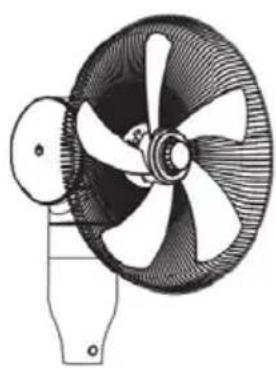
natural_image
Technical line drawing of a four-blade fan with blades and mounting base (no text or symbols)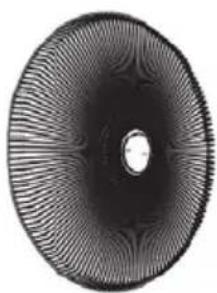
natural_image
Circular abstract pattern with radial gradient and central dot (no text or symbols)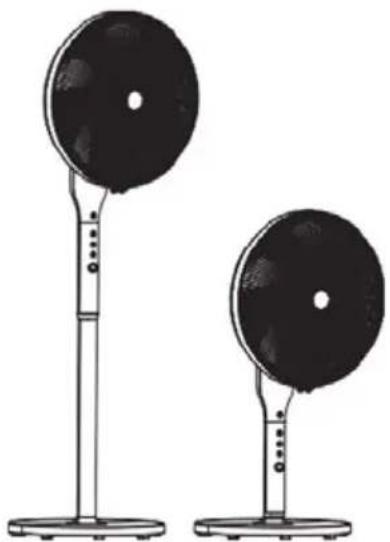
natural_image
Two black circular objects on stands, one larger and one smaller, with no visible text or symbols.natural_image
Diagram of a device housing with a separate component, showing internal structure and an arrow indicating direction (no text or symbols)Do not immerse in water! – Neponárat do vody!
NEBEZPEČENSTVO PRE DETI:
natural_image
Illustration of five different types of household air conditioners, including a fan, fan blade, disc, and standing platform (no text or symbols present)natural_image
Technical line drawing of a mechanical component with a separate view showing internal structure (no text or symbols)natural_image
Technical line drawing of a four-blade fan with propeller and base mount (no text or symbols)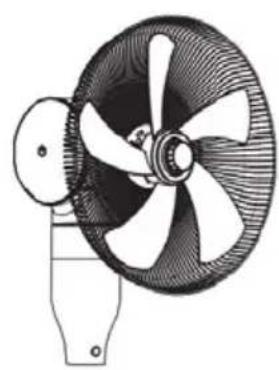
natural_image
Technical line drawing of a four-blade fan with blades and mounting base (no text or symbols)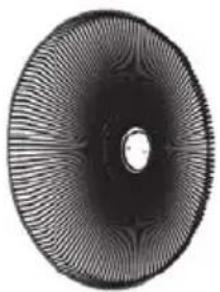
natural_image
Circular abstract pattern with radial gradient and central dot (no text or symbols)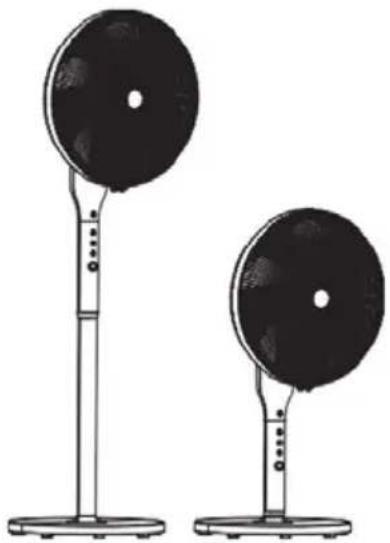
natural_image
Two black circular objects mounted on stands, no text or symbols visibleline
| State | Time (s) | | -------- | -------- | | Hoch | 6S | | Mittel | 6S | | Niedrig | 6S | | Stopp | 3S |
line
| State | Time (s) | | -------- | -------- | | Hoch | 6S | | Mittel | 6S | | Niedrig | 12S | | Stopp | 6S |
line
| State | Time (s) | | -------- | -------- | | Hoch | 6S | | Mittel | 6S | | Niedrig | 3S | | Stopp | 3S |natural_image
Technical line drawing of a mechanical component with a separate view showing internal structure (no text or symbols)Read carefully and save for future use!
Warning: The safety measures and instructions, contained in this manual, do not include all conditions and situations possible. The user must understand that common sense, caution and care are factors that cannot be integrated into any product. Therefore, these factors shall be ensured by the user/s using and operating this appliance. We are not liable for damages caused during shipping, by incorrect use, voltage fluctuation or the modification or adjustment of any part of the appliance. To protect against a risk of fire or electric shock, basic precautions shall be taken while using electrical appliances, including the following:
- Make sure the voltage in your outlet corresponds to the voltage provided on the appliance label and that the socket is properly grounded. The outlet must be installed in accordance with applicable electrical codes according to EN.
-
Never use the appliance if the power cable is damaged, if the appliance fell or does not operate properly. All repairs, including cord replacements, must be carried out at a professional service centre! Do not remove the protective covers from the appliance; there is a risk of electric shock!
-
Protect the device from a direct contact with water and other liquids to prevent an injury by electric shock.
-
Do not use the appliance outdoors or in wet environments or touch the power cord or the appliance with wet hands. There is a risk of electric shock.
As well, do not use the turned on appliance:
- close to bathtub, shower or a pool - danger of electric shock,
- in close proximity to places where heat collects (range, heating), or close to open flame - danger of fire,
- in rooms where are stored flammable or explosive materials – danger of fire,
-
in industrial environment,
-
directly under an electrical socket,
-
on direct sunlight.
-
Pay special attention when using the fan near children!
- Place the fan away from of other objects in order to ensure the free air circulation necessary for proper operation. Never cover the fan openings!
- Do not use this fan with a programmer, a time switch, a separate remote control system, or any other device that automatically switches the fan off, as there is a risk of fire if the fan is covered or incorrectly positioned.
- Do not use the appliance in the immediate vicinity of places where heat collects (near the range, heater, etc.).
- Never place the fan on soft surfaces such as a bed, a sofa, etc. It must be placed on a stable and level surface.
- If the appliance emits an unusual odor or smoke, disconnect it immediately and visit the appliance service center.
- Do not switch the appliance on or off by plugging in or pulling out the power supply plug. Always switch off the fan using the main switch first, then pull the power cord out of the outlet.
- We recommend not leaving the fan plugged in the socket unattended. Disconnect the cord from the electrical outlet prior to any maintenance. Do not remove the power cord from the outlet by yanking the cord. Unplug the power cord from the outlet by grasping the plug.
In the following cases, always disconnect from the electrical socket:
- when assembling or dismantling,
- before moving it,
-
before cleaning.
-
Do not allow the power cord to touch hot surfaces or run the cord over sharp edges.
- Do not stick your fingers or some objects in the fan openings.
-
Use the fan only according to instructions in this manual. The manufacturer is not liable for any damage caused by the improper use of this appliance.
-
The appliance is designed for internal and domestic use only.
- This appliance may be used by children 8 years of age or older and persons with reduced physical, sensory or mental capabilities or lack of experience and knowledge if supervised or instructed to use the appliance in a safe way and understand the potential hazards. Children may not play with the appliance. User cleaning and maintenance must not be performed by unsupervised children. Make sure that the power cable or extension cord can not be accidentally pulled out of the socket during operation. Only carry the appliance by holding the body of the fan. The appliance must not be used without a properly installed base.
Do not immerse in water!
DANGER TO CHILDREN: Children must not play with the packaging material. Do not let the children play with plastic bags. Risk of suffocation.
FAN PROPERTIES
- Dual use:
stand alone fan table fan - Timer function 1, 2, 4, 8 hours
- Remote controller
- Three speed settings: low, medium, high
• Mode settings: normal, NATURAL and SLEEP
• Control panel with buttons and LED lights - Rotation settings: 360^ oscillation, adjustable swivel range 60, 90, 180 and 360.
- Manually adjustable tilt up to 90^ .
- Sound alarm when switching on and off.
DESCRIPTION (page 2)
A Fan
- Fan head
- Front grille
- Blades safety nut
- Grille connection frame with clamp
- Fan blade
- Rear grille safety nut
- Rear grille
B Control panel and remote controller
BUTTONS (on the panel match the buttons on the remote controller, except for the MODE button)
- Motor with horizontal tilt joint
- Body with control panel
- Safety screw of the fan body
- Column for floor fan version
- Base
-
L-screw of the base with nut (on the bottom of the base)
-
MODE - setting the fan mode (only on the controller)
-
TIME - timer
-
ANGLE – horizontal oscillation
-
ON/OFF – turning the fan on/off
-
SPEED – turning on the fan and setting the fan speed
ASSEMBLY
Warning: The fan may only be used if it is properly and completely assembled, including the support base and protective grille.
-
Open the package and pull out all the components - the fan, the operating instructions, the remote controller and other accessories. Make sure that the packaging is complete and undamaged.
-
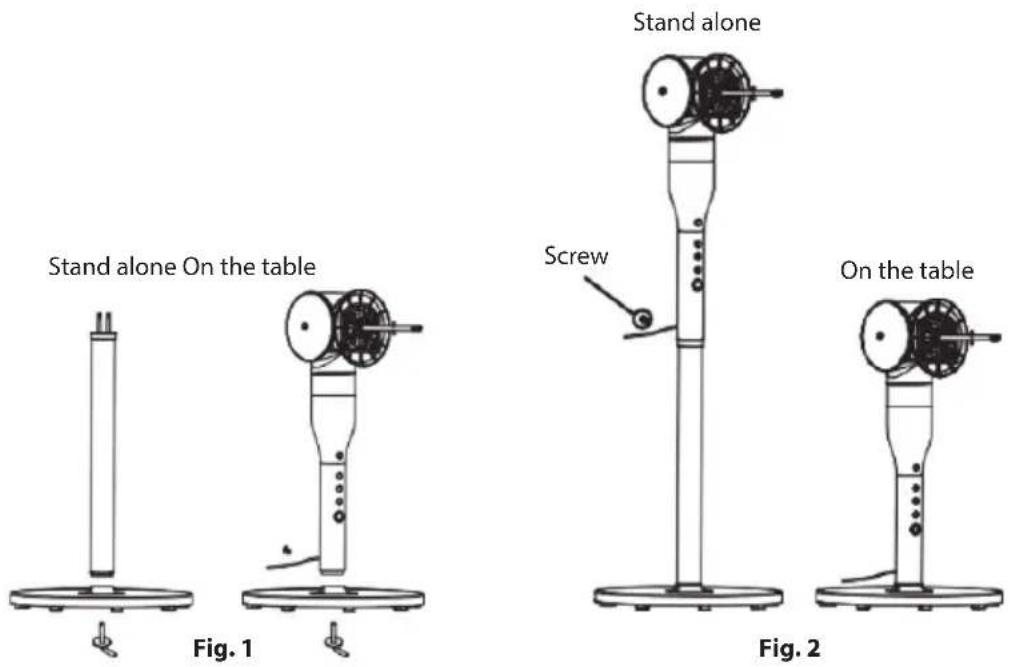
The fan can be used as stand alone or on the table. If you want to use the fan as a table fan, when installing mount only the body on the base with control panel without the column. For more information and assembly instructions read below.
Insert the column into the base and tighten it with the L-screw (see figure 1 on the left). Attach the body with the motor to the column and secure it with the locking screw (see figure 2 on the left).
Insert the body with the motor directly into the base and tighten it with the L-screw (see figure 1 on the right).
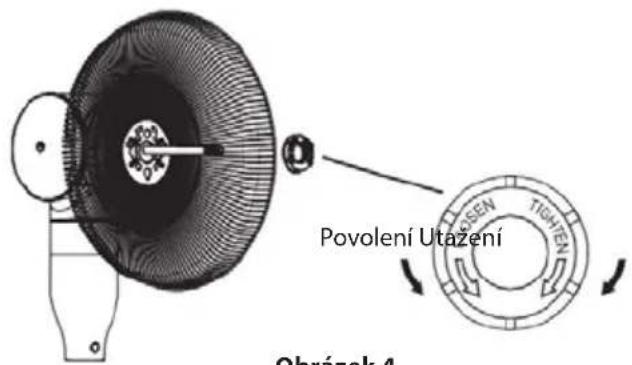
- Install the rear grille on the motor head. The openings in the grille must fit into the pins on the motor unit. Fasten it using the locking nut of the rear grille (see figures 3 and 4).
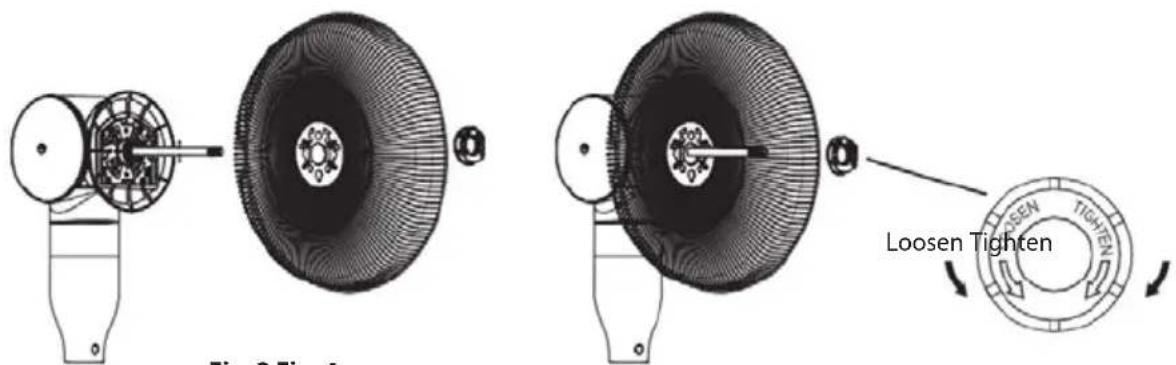
Fig. 3 Fig. 4
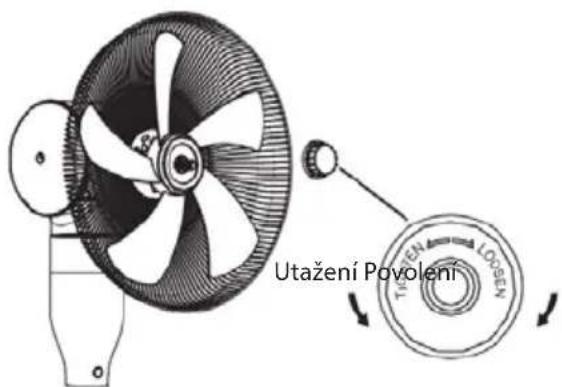
- Insert the blade unit onto the shaft and tighten it firmly using the blades locking nut (see figures 5 and 6).
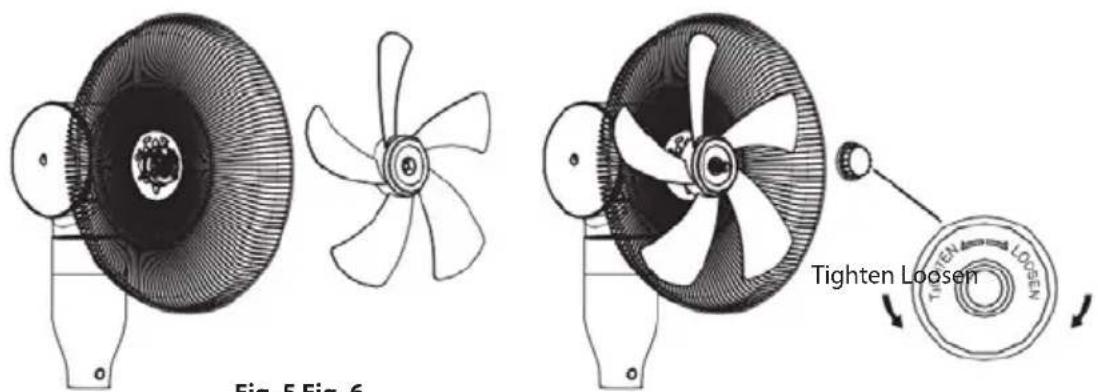
Fig. 5 Fig. 6
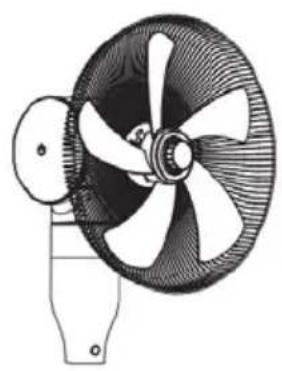
- Remove the locking screw from the lock on the connecting frame and release the clamp. Connect the front and rear grille using the frame. Snap the clamp so that the tabs fit between the grille wires and secure it with the included screw (see figures 7 and 8).
- Once the assembly is complete, you can plug the fan into the socket and follow the operating instructions (see figure 9).
natural_image
Technical line drawing of a four-blade fan with a propeller, no text or symbols present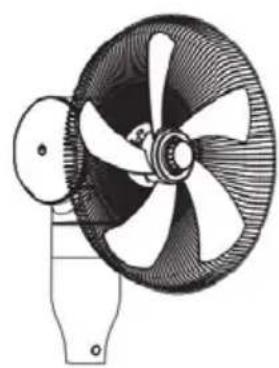
natural_image
Technical line drawing of a four-blade fan with a propeller, mounted on a base (no text or symbols)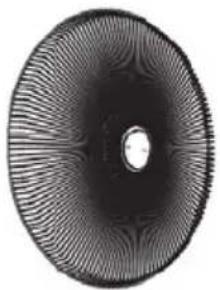
natural_image
Circular abstract pattern with radial gradient and central hole (no text or symbols)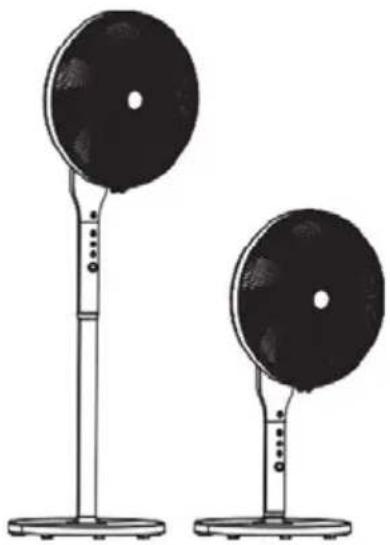
natural_image
Two black circular objects on stands, one larger and one smaller, with no visible text or symbols.Fan on/off and the ON/OFF button
When the fan is connected to the power supply, a beep sounds (two beeps). The device is now in the standby mode. Press the ON/OFF button to put the unit into operation. Press this button to switch off the fan during operation.
Note: You can preset the timer in the stanby mode.
If the fan is turned on for the first time, it will start in the default mode and with a low speed setting. The relevant indicator lights up. Thanks to the memory function, the fan will run in the mode in which it was switched off when used next. The same applies for the speed setting. The fan will always start running at the medium speed, after 3 seconds it will change to the previous setting. This function does not apply for the NATURAL mode, SLEEP and timer mode.
SPEED button
Use this button to adjust the rotation speed of the blades. Each press of the button switches the speed by one degree in the following order: low → medium → high. The relevant indicator lights up.
TIME button
The TIME button is used to select one of the 4 timer settings in the following order: 1 hr → 2 hr → 4 hr → 8 hr → Off. The relevant indicator lights up.
After the set time has elapsed, the fan automatically shuts off. Turning off the appliance will not be signaled by any audio signal.
When turned on again, the fan will start in the same mode as it was set before shutting down (except for the NATURAL and SLEEPmodes).
Note: You can set the timer if the fan is in the standby mode (only plugged in the power supply). The countdown starts when you press the button ON/OFF.
Setting the oscillation and horizontal tilt
Adjustment of the oscillation with the ANGLE button
Use this button to adjust the horizontal oscillation. Fan rotation can be set at 60, 90, 180 or 360 degrees by pressing this button repeatedly. Pressing the button again shuts off the rotation. The set horizontal oscillation mode will be indicated by the relevant LED.
You can also turn off the rotation in any setting by pressing and holding the ANGLE button for at least 3 seconds.
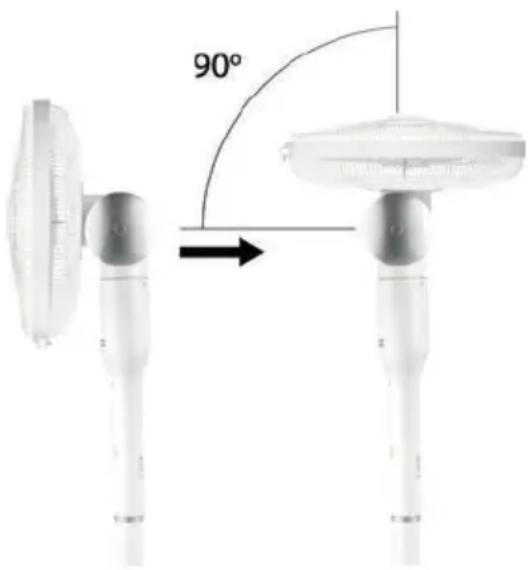
You can tilt the fan manually up to 90^ , see the figure on the right. Grasp the fan head and carefully tilt it to the desired angle. The tilting direction is indicated on the joint of the motor.
MODE button
This button is used to set the fan mode and is only available on the remote control.
You can choose between the ventilation modes, Normal, NATURAL and SLEEP using the mode setting button.
The mode settings are indicated by the lights lit above the individual icons on the control panel.
In normal mode, the device runs according to the current setting and constant fan speed.
In NATURAL mode, the speed change according to the following diagram:

line
| Time | Signal Level | |------|--------------| | 6S | High | | 6S | Medium | | 6S | Low | | 3S | Low | | 6S | Medium | | 12S | High | | 6S | Medium | | 6S | Low | | 6S | Low | | 6S | Medium | | 6S | Low | | 3S | Low | | 12S | High | | 6S | High |
line
| State | Time (s) | |-------|----------| | High | 6 | | Medium| 6 | | Low | 12 | | Stop | 6 |
line
| Time | Signal | |------|--------| | 6S | High | | 6S | Medium | | 6S | Low | | 3S | High | | 12S | High | | 12S | Low | | 3S | High | | 6S | High | | 15S | Low | | 3S | High | | 6S | High | | 6S | Low | | 6S | High |Program SLEEP is a combination of the NATURAL mode and gradual reduction of the fan speed.
- When you set high speed, the fan will run in the first 30 minutes in NATURAL mode at high speed. It will reduce speed after 30 minutes to medium and after next 30 mintes the fan moves to low speed in the NATURAL mode, where it remains until shutoff.
- When you set medium speed, the fan will run the first 30 minutes in the NATURAL mode at medium speed. In the next 30 minutes it switches to low rpm in the NATURAL mode where it remains until shutoff.
- When setting a low speed, the SLEEP mode is the same as the NATURAL mode at low rpm.
Note: In the NATURAL and SLEEP modes, the speed level will not be signalled by the relevant control light.
Remote controller
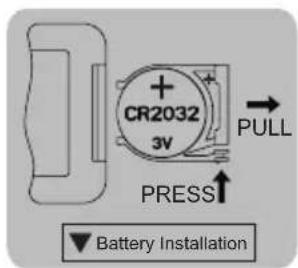
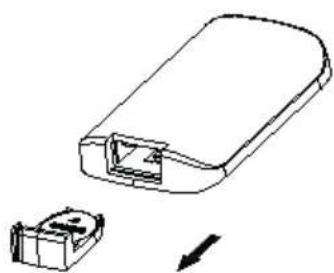
You must insert a button battery (CR2032, 3 V), which is included in the package, into the remote controller. Open the cover and insert the battery into the remote controller, see figure. Keep proper polarity of the battery. If you will not use the appliance for a long time, remove the battery from the remote controller.
If the battery is discharged, replace it with a new one of the same type.
natural_image
Diagram of a device housing with an arrow indicating a component detail (no text or symbols present)Note: When using the remote controller, aim it at the sensor located on the device.
If there are obstacles between the remote controller and sensor, the signal transmission might not occur.
CLEANING AND MAINTENANCE
- Before cleaning pull out the plug of the power cord from the outlet!
- Use soft, dry cloth for cleaning. Do not use solvent, thinners or other aggressive solvent containing cleaners.
• Make sure that no liquid enters the device. -
Protect the appliance from water and high humidity!
-
Do not immerse the fan into water!
- In the event of a malfunction or an unusual odor, unplug the appliance from the power supply and have it checked by an authorized service center.
- You can use vacuum cleaner with a dust nozzle to clean the grilles.
- Check it once a week and using a vacuum cleaner clean the back grill of the fan.
- We recommend to keep the packaging for possible transportation or storage of the fan.
Fan storage
- If the fan is not used for long time, it is necessary to protect it from dust and moisture. We recommend that you store it in its original packaging.
- Store the appliance in a dry, cool place after packing it.
Fan repairs
In case of malfunction or unusual odor, unplug the appliance and have it checked in an authorized service centre.
TECHNICAL PARAMETERS
| Fan diameter 40 cm | |
| Nominal voltage 220–240 V~ 50/60 Hz | |
| Nominal input power 65 W | |
| Remote controller Button battery (CR2032 -3V, included) | |
| Noise level 62 dB | |
WARRANTY: The following situations void the warranty:
Incorrect or inappropriate handling of the device, failure to observe the safety precautions that apply to the appliance, use of force, alteration or repair by a party other than an authorized service center.
Components subject to normal wear and tear are not covered under the warranty.
USE AND DISPOSAL OF WASTE
Wrapping paper and corrugated paperboard – deliver to scrapyard. Packing foil, PE bags, plastic elements – throw into plastic recycling containers.
DISPOSAL OF PRODUCTS AT THE END OF LIFETIME
Disposal of electric and electronic equipment (valid in EU member countries and other European countries with an implemented recycling system)
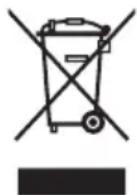
The represented symbol on the product or package means the product shall not be treated as domestic waste. Hand over the product to the specified location for recycling electric and electronic equipment. Prevent negative impacts on human health and the environment by properly recycling your product. Recycling contributes to preserving natural resources. For more information on the recycling of this product, refer to your local authority, domestic waste processing organization or store, where you purchased the product.
08/05
This product complies with EU directives on electromagnetic compatibility and electrical safety.
The operating instructions are available at www.ecg-electro.eu
Changes of text and technical parameters reserved.

www.ecg-electro.eu
CZ
K+B Progres, a.s.
U Expertu 91 tel.: +420 272 122 111
250 69 Klíčany e-mail: ECG@kbexpert.cz
SK
Distribútor pre SR: K+B Progres, a. s., organizacná zložka
Mlynské Nivy 71
821 05 Bratislava e-mail: ECG@kbexpert.cz
DE
- FS 410 2in1
- Do not immerse in water! – Neponořovat do vody!
- Do not immerse in water! – Neponárat do vody!
- NEBEZPEČENSTVO PRE DETI:
- Read carefully and save for future use!
- Do not immerse in water!
- FAN PROPERTIES
- DESCRIPTION (page 2)
- A Fan
- B Control panel and remote controller
- ASSEMBLY
- Fan on/off and the ON/OFF button
- SPEED button
- TIME button
- Setting the oscillation and horizontal tilt
- Adjustment of the oscillation with the ANGLE button
- MODE button
- Remote controller
- CLEANING AND MAINTENANCE
- Fan storage
- Fan repairs
- TECHNICAL PARAMETERS
- USE AND DISPOSAL OF WASTE
- DISPOSAL OF PRODUCTS AT THE END OF LIFETIME
- www.ecg-electro.eu
- CZ
- SK
- DE
Brand : ECG
Model : FS 410
Category : Fan