AT-AVA-EX70-KIT - Audio/video extender Atlona - Free user manual and instructions
Find the device manual for free AT-AVA-EX70-KIT Atlona in PDF.


| Product Type | HDBaseT Extender Kit (Transmitter + Receiver) |
| Model | AT-AVA-EX70-KIT (based on AT-AVA-EX100CE-BP-KIT) |
| Video Support | 4K/UHD 60Hz 4:2:0, 1080p |
| Maximum Distance (4K) | 330 ft (100 m) over CAT6/6a/7; 295 ft (90 m) over CAT5e |
| Maximum Distance (1080p) | 330 ft (100 m) over CAT5e/6/6a/7 |
| Audio Support | Embedded multi-channel audio, ARC via HDMI |
| Ethernet Pass-Through | 100Base-T |
| Control Pass-Through | RS-232, IR |
| Power | 48V DC via included power supply; bidirectional remote power (power either end) |
| Power Consumption | Not specified; powered by 48V DC adapter |
| HDBaseT Test | Built-in cable test with LED indicators (green, yellow, red) |
| Firmware Update | Via micro-USB on transmitter; drag-and-drop .bin file |
| Connectors (TX) | HDMI IN, HDBaseT OUT, LAN, RS-232 (3-pin), IR IN/OUT, DC 48V, micro-USB (FW) |
| Connectors (RX) | HDMI OUT, HDBaseT IN, LAN, RS-232 (3-pin), IR IN/OUT, DC 48V |
| Package Contents | TX, RX, 48V power supply, IEC cable, captive screw connectors (2-pin, 3-pin x2, 4-pin, 5-pin), IR emitter, mounting brackets (4), screws (8), installation guide |
| Mounting | Surface mount with included brackets; inverted for under-table |
| Warranty | Limited 10 years for products purchased after June 1, 2013 (electronics), Lifetime for cables |
| Compliance | HDMI, HDBaseT |
| Series | Avance™ Series |
Frequently Asked Questions - AT-AVA-EX70-KIT Atlona
User questions about AT-AVA-EX70-KIT Atlona
0 question about this device. Answer the ones you know or ask your own.
Ask a new question about this device
Download the instructions for your Audio/video extender in PDF format for free! Find your manual AT-AVA-EX70-KIT - Atlona and take your electronic device back in hand. On this page are published all the documents necessary for the use of your device. AT-AVA-EX70-KIT by Atlona.
USER MANUAL AT-AVA-EX70-KIT Atlona
4K/UHD HDMI Extender Kit with Ethernet, Control, and Bidirectional Remote Power
AT-AVA-EX100CE-BP-KIT
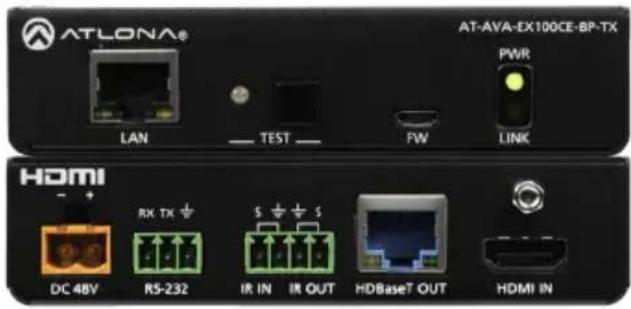
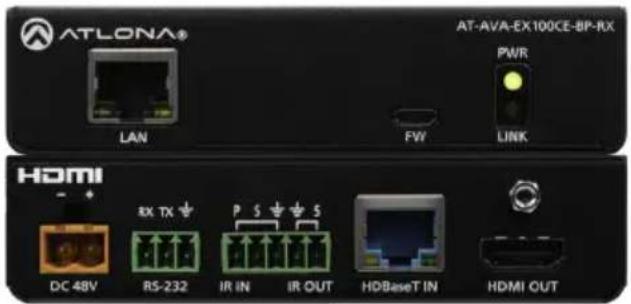
The Atlona AT-AVA-EX100CE-BP-KIT is an Avance™ Series HDBaseT transmitter and receiver set that supports Ethernet, control pass-through, and bidirectional remote power capabilities. The kit transmits 4K/UHD 60Hz 4:2:0 video up to 330 feet (100 meters). In addition to video with embedded multi-channel audio, 100Base-T Ethernet data, RS-232 and IR control signals, and remote powering by either the transmitter or the receiver are supported on the single CAT6A/7 cable. Integrated HDBaseT link status testing allows quick verification of cable, termination, and link quality. HDMI clock stretching and EDID filtering are included to ensure the integrity of video transmission as well as compatibility with the widest array of sources and display devices. ARC is available on the HDMI connections to minimize cabling in audio return applications. Compact enclosures and included brackets allow the transmitter and receiver endpoints to be surface mounted in furniture or behind a display. The AT-AVA-EX100CE-BP-KIT delivers a cost-effective solution for extension of video, audio, Ethernet, control, and bidirectional power at resolutions up to 4K/UHD.
Package Contents
1 x AT-AVA-EX100CE-BP-TX
1 x AT-AVA-EX100CE-BP-RX
1 x 2-pin captive screw connector
2 x 3-pin captive screw connector
1 x 4-pin captive screw connector
1 x 5-pin captive screw connector
1 x IR emitter
4 x Mounting brackets
8 x Mounting screws
1 x 48V DC power supply
1 x IEC cable
1 x Installation Guide

IMPORTANT: Visit https://atlona.com/product/AT-AVA-EX100CE-BP-KIT for the latest firmware updates and Installation Guide.
Panel Descriptions
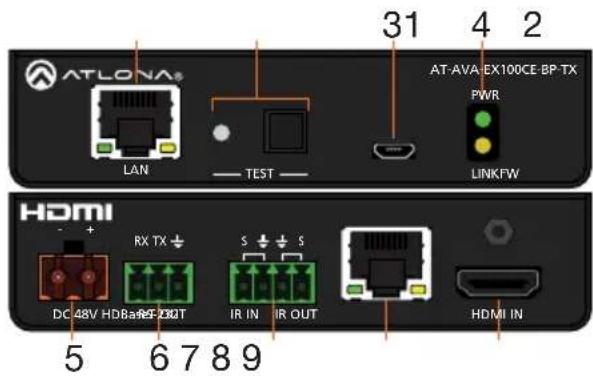
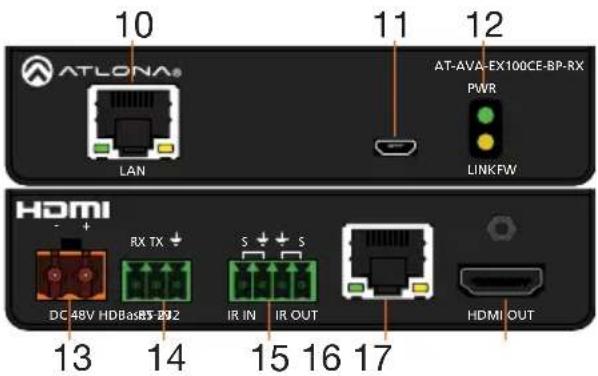
1 LAN
Connect an Ethernet cable from this port to a Local Area Network (LAN) or source for pass through.
2 TEST
Quick and easy test for category cables. Use the button to start the test and the LED to determine pass or fail.
3 FW
Connect a micro-USB to USB-A type cable from this port to a computer, to update the firmware.
4 POWER and LINK LEDs
The power LED will illuminate green when receiving power. The link LED will glow yellow when signal is being sent/received between the transmitter and the receiver.
5 DC 48V \*Optional\*
Connect the included power supply to either this port or the power port on the receiver.
6 RS-232
Bidirectional control port, used for pass through of commands to or from the receiver.
7 IR IN/OUT
Connect a 3rd party controller to the IR IN port or an IR emitter to the IR OUT port.
8 HDBaseT OUT
Connect an HDBaseT cable from this port to the HDBaseT IN port on the receiver.
9 HDMI IN
Connect an HDMI cable from a source to this port. e.g. HDR BluRay Player
10 LAN
Connect an Ethernet cable from this port to a Local Area Network (LAN) or display for pass through.
11 FW
Not used at this time.
12 POWER and LINK LEDs
The power LED will illuminate green when receiving power. The link LED will glow yellow when signal is being sent/received between the transmitter and the receiver.
13 DC 48V \*Optional\*
Connect the included power supply to either this port or the power port on the transmitter.
14 RS-232
Bidirectional control port, used for pass through of commands to or from the transmitter.
15 IR IN/OUT
Connect an IR receiver to the IR IN port or an IR emitter to the IR OUT port.
16 HDBaseT IN
Connect an HDBaseT cable from this port to the HDBaseT OUT port on the transmitter.
17 HDMI OUT
Connect an HDMI cable from this port to an HDMI display.
HDBaseT LED Descriptions
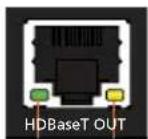
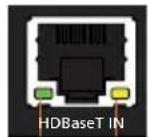
b ba a
a Green LED
When a category cable is connected and receiving signal this LED will be illuminated. If no cable or signal is being received, the LED will be off.
b Yellow LED
This LED displays the status of the HDBaseT firmware. When the LED is blinking slowly, the firmware is good. If the LED is blinking rapidly or off, there is no firmware or the firmware has been corrupted.
RS-232
A 3-pin captive screw connector for RS-232 has been included.

natural_image
Green 3D model of a mechanical connector or terminal block (no text or symbols visible)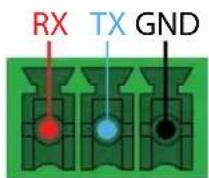
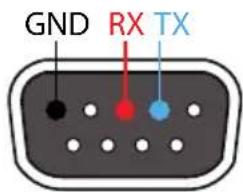
Pin out will be determined by the RS-232 cable and connect as RX (receive), TX (transmit) and ± (Ground).
IR
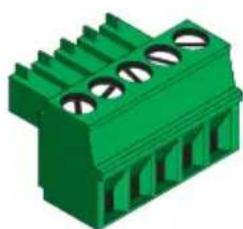
Two captive screw connectors for IR have been included. A 4-pin connector for the transmitter and a 3-pin connector for the receiver.

natural_image
Green 3D component with three circular slots and vertical connectors (no text or symbols)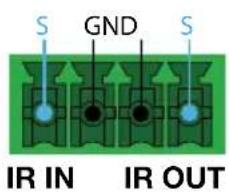
IR IN is connected by a ground and signal wire. Use with 3rd party control systems. For easy termination, Atlona recommends using the 2 meter IR cable AT-LC-CS-IR-2M (purchasable through atlona.com).
IR OUT is connected by a ground and signal wire. Use the included IR emitter with this port.
natural_image
Green 3D electronic component with multiple slots and mounting holes (no text or symbols visible)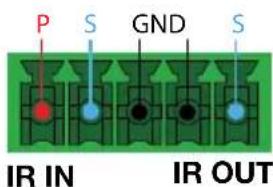
IR IN is connected by a power, ground, and signal wire. Use a 12V IR receiver with it (e.g. AT-IR-CS-RX purchasable through atlona.com).
IR OUT is connected by a ground and signal wire. Use the included IR emitter with this port.
Power
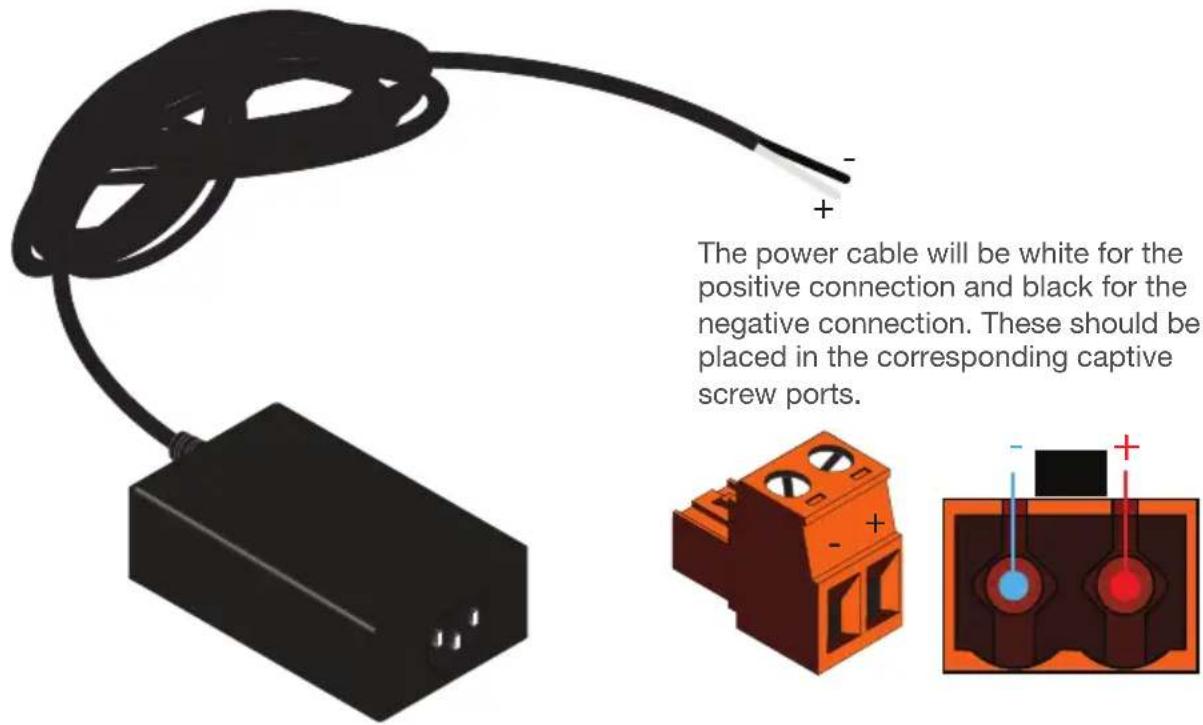
A 2-pin captive screw connector for the power supply has been included.
Mounting Instructions
The AT-AVA-EX100CE-BP-KIT includes two mounting brackets and four mounting screws each, which can be used to attach the units to any flat surface.
-
Position one of the mounting brackets, as shown below, aligning the holes on the side of the enclosure with one set of holes on the mounting bracket.
-
Use the enclosure screws to secure the mounting bracket to the enclosure.
-
Repeat the above steps to attach the second mounting bracket to the opposite side of the unit.
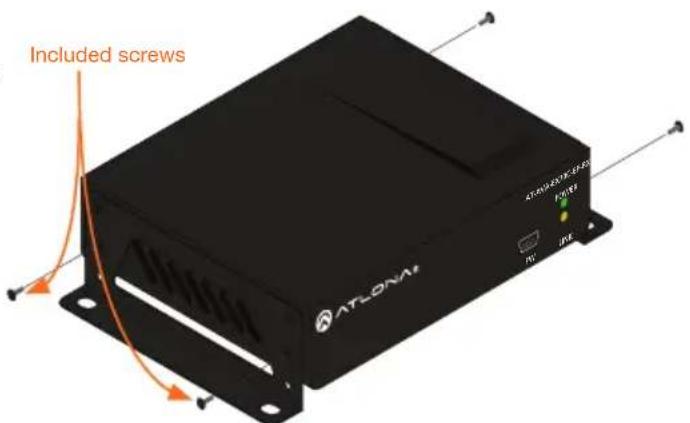
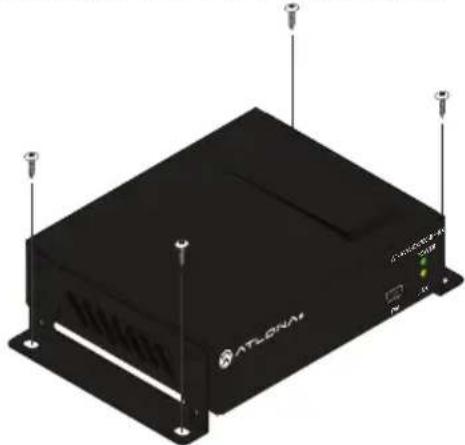
- Mount the unit using the oval-shaped holes, on each mounting bracket. If using a drywall surface, a #6 drywall screw is recommended.

NOTE: Mounting brackets can also be inverted to mount the unit under a table or other flat surface.
natural_image
Exterior view of a black ATLONAM device with ventilation slots and ports (no readable text or symbols)Installation
- Connect a source to the HDMI IN port on the transmitter.
- Connect a display to the HDMI OUT port on the receiver.
- Connect an HDBaseT cable, from the HDBaseT OUT port on the transmitter, to the HDBaseT IN port on the receiver.
- *Optional* Connect a 3rd party controller to the transmitter using either the 3-pin RS-232 or the 2-pin IR IN ports.
- *Optional* Connect an IR receiver to the IR IN port of the receiver.
- *Optional* Connect an IR emitter to the IR OUT port of the transmitter or receiver.
- *Optional* Connect a network switch (if the receiver is not connected) or source to the LAN port of the transmitter, for IP control, system configuration, or Ethernet routing.
- *Optional* Connect a network switch (if the transmitter is not connected) or display to the LAN port of the receiver, for IP control, system configuration, or Ethernet routing.
- Connect the included 48V power supply into the transmitter or receiver.
- Connect power supply to an AC outlet.
Cable Recommendation Guidelines
Refer to the tables below for recommended cabling when using Altona products with HDBaseT. The green bars indicate the signal quality when using each type of cable. Higher-quality signals are represented by more bars.
| Core Shielding CAT5e CAT6 CAT6a CAT7 | |||||
| Solid UTP (unshielded) N/A | |||||
| STP (shielded) | |||||
| Performance Rating (MHz) | 350 | 500 | 600 | 800 | |

IMPORTANT: It is recommended to use UTP6A (https://atlona.com/product/utp6a/) and STP6X (https://atlona.com/product/stp6x/) if a stranded/patch cable is needed. These cables have been tested and approved to work with these extenders for full functionality.
| Cable* | Max. Distance @ 4K | Max. Distance @ 1080p |
| CAT5e | 295 feet (90 meters) | 330 feet (100 meters) |
| CAT6/6a/7 | 330 feet (100 meters) | 330 feet (100 meters) |
*Atlona recommends TIA/EIA 568-B termination for optimal performance.
TEST
The transmitter has the ability to test the HDBaseT cable quality through the front panel. Press the test button on the front panel of the transmitter to start the test, the LED will display the testing results.
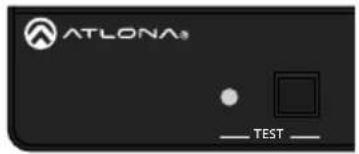

Button:
- Blue Blinking: The test is running properly and the button will blink 10 times during the testing process.
- Red Light: There is no signal for the test to check.
LED:
- No Light: There is no HDBaseT cable plugged in.
- Blinking: There is no HDBaseT signal coming through.
• Solid Green: The HDBaseT cable is good. - Solid Yellow: One or two HDBaseT pairs are not working, reterminate the cable.
- Solid Red: Multiple pairs are not working. Reterminate the cable and if the LED turns yellow or red again, replace the cable.
Updating Firmware
-
Download the firmware .zip file from the firmware tab located at https://atlona.com/product/AT-AVA-EX100CE-BP-KIT.
-
Unzip the .bin file to an easy to locate area of the local PC.
-
Connect the transmitter's FW micro USB port to a PC using a micro USB to USB A cable (purchased separately).
-
The PC should automatically detect the unit and display the autorun options. Select the view files in folder option. A new window will open.
-
If there are any files inside the folder, delete them, otherwise drag and drop the .bin file into the folder. While the firmware loads to the unit, the green power LED on the front panel will flash. This process can take up to 5 minutes to complete.
-
Once the green LED goes solid, disconnect the unit from the PC. The firmware update is finished.

NOTE: Only the transmitter will be used for updating firmware. The receiver will be updated once it has been connected to the transmitter if it is not connected at the time of the firmware update.
Atlona, Inc. ("Atlona") Limited Product Warranty
Coverage
Atlona warrants its products will substantially perform to their published specifications and will be free from defects in materials and workmanship under normal use, conditions and service.
Under its Limited Product Warranty, Atlona, at its sole discretion, will either:
- repair or facilitate the repair of defective products within a reasonable period of time, restore products to their proper operating condition and return defective products free of any charge for necessary parts, labor and shipping.
OR
- replace and return, free of charge, any defective products with direct replacement or with similar products deemed by Atlona to perform substantially the same function as the original products.
OR
- refund the pro-rated value based on the remaining term of the warranty period, not to exceed MSRP, in cases where products are beyond repair and/or no direct or substantially similar replacement products exist.
Repair, replacement or refund of Atlona products is the purchaser's exclusive remedy and Atlona liability does not extend to any other damages, incidental, consequential or otherwise.
This Limited Product Warranty extends to the original end-user purchaser of Atlona products and is non-transferrable to any subsequent purchaser(s) or owner(s) of these products.
Coverage Periods
Atlona Limited Product Warranty Period begins on the date of purchase by the end-purchaser. The date contained on the end-purchaser 's sales or delivery receipt is the proof purchase date.
Atlona, Inc. ("Atlona") Limited Product Warranty Cont.
Limited Product Warranty Terms – New Products
• 10 years from proof of purchase date for hardware/electronics products purchased on or after June 1, 2013.
- 3 years from proof of purchase date for hardware/electronics products purchased before June 1, 2013.
• Lifetime Limited Product Warranty for all cable products.
Limited Product Warranty Terms – Refurbished (B-Stock) Products and Discontinued Products
- 3 years from proof of purchase date for all Refurbished (B-Stock) and Discontinued hardware and electronic products purchased on or after June 1, 2013.
Remedy
Atlona recommends that end-purchasers contact their authorized Atlona dealer or reseller from whom they purchased their products. Atlona can also be contacted directly. Visit www.atlona.com for Atlona's contact information and hours of operation. Atlona requires that a dated sales or delivery receipt from an authorized dealer, reseller or end-purchaser is provided before Atlona extends its warranty services. Additionally, a return merchandise authorization (RMA) and/or case number, is required to be obtained from Atlona in advance of returns.
Atlona requires that products returned are properly packed, preferably in the original carton, for shipping. Cartons not bearing a return authorization or case number will be refused. Atlona, at its sole discretion, reserves the right to reject any products received without advanced authorization. Authorizations can be requested by calling 1-877-536-3976 (US toll free) or 1-408-962-0515 (US/international) or via Atlona's website at www.atlona.com.
Exclusions
This Limited Product Warranty excludes:
- Damage, deterioration or malfunction caused by any alteration, modification, improper use, neglect, improper packaging or shipping (such claims must be presented to the carrier), lightning, power surges, or other acts of nature.
- Damage, deterioration or malfunction resulting from the installation or removal of this product from any installation, any unauthorized tampering with this product, any repairs attempted by anyone unauthorized by Atlona to make such repairs, or any other cause which does not relate directly to a defect in materials and/or workmanship of this product.
• Equipment enclosures, cables, power supplies, batteries, LCD displays, and any accessories used in conjunction with the product(s). - Products purchased from unauthorized distributors, dealers, resellers, auction websites and similar unauthorized channels of distribution.
Atlona, Inc. ("Atlona") Limited Product Warranty Cont.
Disclaimers
This Limited Product Warranty does not imply that the electronic components contained within Atlona's products will not become obsolete nor does it imply Atlona products or their electronic components will remain compatible with any other current product, technology or any future products or technologies in which Atlona's products may be used in conjunction with. Atlona, at its sole discretion, reserves the right not to extend its warranty offering in instances arising outside its normal course of business including, but not limited to, damage inflicted to its products from acts of god.
Limitation on Liability
The maximum liability of Atlona under this limited product warranty shall not exceed the original Atlona MSRP for its products. To the maximum extent permitted by law, Atlona is not responsible for the direct, special, incidental or consequential damages resulting from any breach of warranty or condition, or under any other legal theory. Some countries, districts or states do not allow the exclusion or limitation of relief, special, incidental, consequential or indirect damages, or the limitation of liability to specified amounts, so the above limitations or exclusions may not apply to you.
Exclusive Remedy
To the maximum extent permitted by law, this limited product warranty and the remedies set forth above are exclusive and in lieu of all other warranties, remedies and conditions, whether oral or written, express or implied. To the maximum extent permitted by law, Atlona specifically disclaims all implied warranties, including, without limitation, warranties of merchantability and fitness for a particular purpose. If Atlona cannot lawfully disclaim or exclude implied warranties under applicable law, then all implied warranties covering its products including warranties of merchantability and fitness for a particular purpose, shall provide to its products under applicable law. If any product to which this limited warranty applies is a “Consumer Product” under the Magnuson-Moss Warranty Act (15 U.S.C.A. §2301, ET SEQ.) or other applicable law, the foregoing disclaimer of implied warranties shall not apply, and all implied warranties on its products, including warranties of merchantability and fitness for the particular purpose, shall apply as provided under applicable law.
Other Conditions
Atlona's Limited Product Warranty offering gives legal rights, and other rights may apply and vary from country to country or state to state. This limited warranty is void if (i) the label bearing the serial number of products have been removed or defaced, (ii) products are not purchased from an authorized Atlona dealer or reseller. A comprehensive list of Atlona's authorized distributors, dealers and resellers can be found at www.atlona.com.
Notes
Notes
English Declaration of Conformity
The English version can be found under the resources tab at:
https://atlona.com/product/at-ava-ex100ce-bp-kit/.

Chinese Declaration of Conformity 中国RoHS合格声明
由SKU列出於:
https://atlona.com/about-us/china-rohs/.


The terms HDMI, HDMI High-Definition Multimedia Interface, and the HDMI Logo are trademarks or registered trademarks of HDMI licensing Administrator, Inc.

ATLONA.
a Payout company
Toll free US International
atlona.com • 877.536.3976 • 41.43.508.4321
- 4K/UHD HDMI Extender Kit with Ethernet, Control, and Bidirectional Remote Power
- Package Contents
- Panel Descriptions
- LAN
- TEST
- FW
- POWER and LINK LEDs
- DC 48V \*Optional\*
- RS-232
- IR IN/OUT
- HDBaseT OUT
- HDMI IN
- LAN
- FW
- POWER and LINK LEDs
- DC 48V \*Optional\*
- RS-232
- IR IN/OUT
- HDBaseT IN
- HDMI OUT
- HDBaseT LED Descriptions
- a Green LED
- b Yellow LED
- RS-232
- IR
- Power
- Mounting Instructions
- Installation
- Cable Recommendation Guidelines
- TEST
- Button:
- LED:
- Updating Firmware
- Atlona, Inc. ("Atlona") Limited Product Warranty
- Coverage
- OR
- Coverage Periods
- Atlona, Inc. ("Atlona") Limited Product Warranty Cont.
- Limited Product Warranty Terms – New Products
- Limited Product Warranty Terms – Refurbished (B-Stock) Products and Discontinued Products
- Remedy
- Exclusions
- Disclaimers
- Limitation on Liability
- Exclusive Remedy
- Other Conditions
- English Declaration of Conformity
- Chinese Declaration of Conformity 中国RoHS合格声明
Brand : Atlona
Model : AT-AVA-EX70-KIT
Category : Audio/video extender