AT-HDVS-TX-WP - Audio/video extender Atlona - Free user manual and instructions
Find the device manual for free AT-HDVS-TX-WP Atlona in PDF.


| Product Type | Wall plate HDMI extender transmitter |
| Brand | Atlona |
| Model | AT-HDVS-TX-WP |
| Dimensions (H x W x D) | 4.17 x 4.17 x 1.65 in (106 x 106 x 42 mm) |
| Weight | 0.55 lb (250 g) |
| Power Source | PoE (Power over Ethernet) or external 5V DC, 1A power supply |
| Max Resolution | 4K@60Hz (4:4:4), 1080p@60Hz |
| HDCP Support | HDCP 2.2 and 1.4 |
| Transmission Distance | Up to 330 ft (100 m) over CAT6a/7 cable |
| Primary Functions | Transmits HDMI signal via HDBaseT; supports IR, RS-232, and Ethernet pass-through |
| EDID Management | Built-in EDID emulation and learning |
| Input Connector | 1x HDMI (Type A female) |
| Output Connector | 1x RJ-45 (HDBaseT) |
| Additional Ports | 1x IR emitter, 1x IR receiver, 1x RS-232 (3.5mm), 1x Ethernet (pass-through) |
| Housing Material | Metal and plastic |
| Operating Temperature | 32°F to 104°F (0°C to 40°C) |
| Maintenance & Cleaning | Wipe with a dry, soft cloth; do not use liquid or abrasive cleaners |
| Safety Precautions | Install in a dry, well-ventilated area; avoid exposure to moisture or extreme temperatures |
| Spare Parts & Repairability | No user-serviceable parts; contact Atlona support for repairs or replacements |
Frequently Asked Questions - AT-HDVS-TX-WP Atlona
User questions about AT-HDVS-TX-WP Atlona
0 question about this device. Answer the ones you know or ask your own.
Ask a new question about this device
Download the instructions for your Audio/video extender in PDF format for free! Find your manual AT-HDVS-TX-WP - Atlona and take your electronic device back in hand. On this page are published all the documents necessary for the use of your device. AT-HDVS-TX-WP by Atlona.
USER MANUAL AT-HDVS-TX-WP Atlona
Atlona HDMI and VGA/audio to HDBaseT Transmitter Wall Plate
AT-HDVS-TX-WP
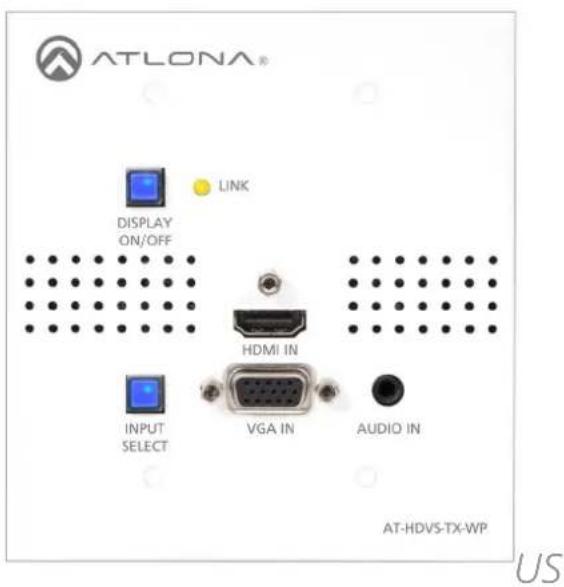
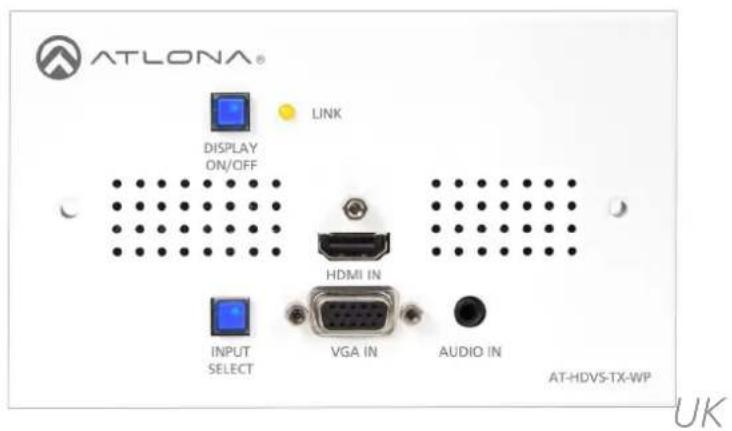
User Manual
Table of Contents
- Introduction 3
- Package Contents 3
- Features
- Panel Descriptions 4
- Face Plate change 4
- Installation 5
- Connection 6
- Specifications 7
- Safety Information 8
- Warranty 9
- Atlona Product Registration 10
Introduction
Atlona HDVS transmitter wall plate was designed to smooth the transition from analog to digital displays in schools and businesses, allowing advanced HDMI display devices to be used with both HDMI sources and the many VGA computers still in use. HDBaseT and power over category cable (PoCc™) allow signal and power over a single category cable, with RS-232 control capability.
Used in a simple system with the Atlona HDVS-RX, this wall plate can be located up to 230 feet (70 meters) away from the display, turn the projector on / off and is connected with a single cable. No power supply is required at the wall plate.
Package Contents
- 1 x AT-HDVS-TX-WP
- 2 x Wall plate covers (US & UK)
- 4 x Screws (US #6)
- 2 x Screws (UK 3.5mm)
- 1 x User manual
Features
• HDMI and VGA/analog audio inputs
• Auto-switching for easy input managing
- Extends resolutions of 1080p or 1920x1200 up to 230 feet (70 meters)*
- Custom wall plate configurations available (Call Atlona for details)
- Embeds analog audio onto HDBaseT output when using VGA input
- Firmware upgrade via USB for easy field service
Features when used with HDVS-RX
- PoCc (Power over Category cable), receive power from the receiver
• RS-232 display control
• 2-channel, balanced, analog audio to drive amplifiers (Ex. AT-PA100-G2)
Panel Description
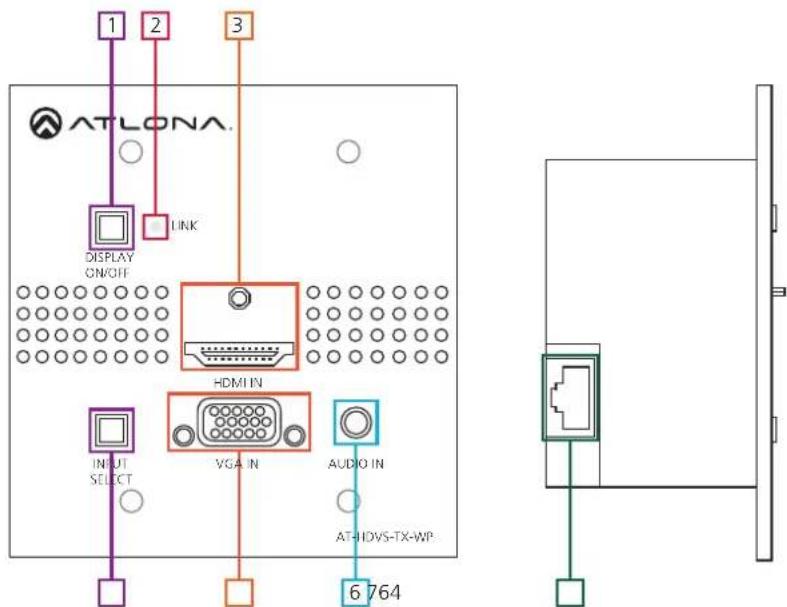
- DISPLAY ON/OFF button: Controls display through RS-232 when used with compatible receivers (Ex. AT-HDVS-RX) - Button will illuminate when the display is off
Note: If DISPLAY ON/OFF button is held for 3 seconds the unit will reset
-
LINK LED: Illuminates when receiving power/signal from compatible receivers (ex. AT-HDVS-RX)
-
HDMI IN: Connect HDMI source here
-
INPUT SELECT button: Use to switch between VGA and HDMI source Button will illuminate blue for HDMI Button will illuminate red for VGA
-
VGA IN: Connect VGA source here
-
AUDIO IN: Connect analog audio here (for use with VGA input only)
-
RJ45 port: Connect compatible HDBaseT receiver (ex. AT-HDVS-RX) here
US and UK Face Plate Change
When switching the product between US and UK face plates, three layers of screws will need to be removed.
First Layer
The first set of screws that need removal are the locking screws for the HDMI and VGA ports. There are 3 total to remove.
The top white face plate can be removed once those have been taken out.
Second Layer
The second set of screws to remove are in the grey tabs attached to the wall plate back box. Remove all 4.
The back box can be removed now.
Third Layer
The third set of screws for removal are at the bottom of the PCB boards. Place the grey face plate down and remove the 4 screws from the corner edges. The grey plate is removable now.
Replace the grey and the white face plates with the correct regional face plate starting at layer 3 until layer one has been replaced.
Wall Plate Installation
The HDVS-TX-WP will fit in any 2 Gang (US & UK) electrical box or mud ring (that is at least 40mm deep).
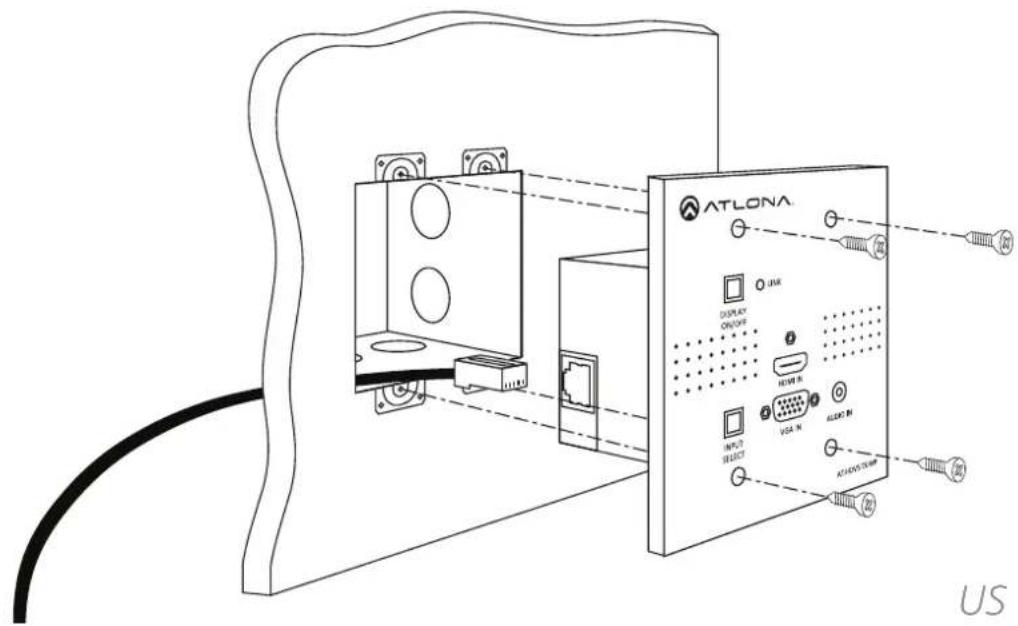
When installing the US version, use the four shorter screws. Thread the screws through the face plate into the back box (as shown above).
Note: Be sure to plug the CAT cable into the back of the wall plate before full installation
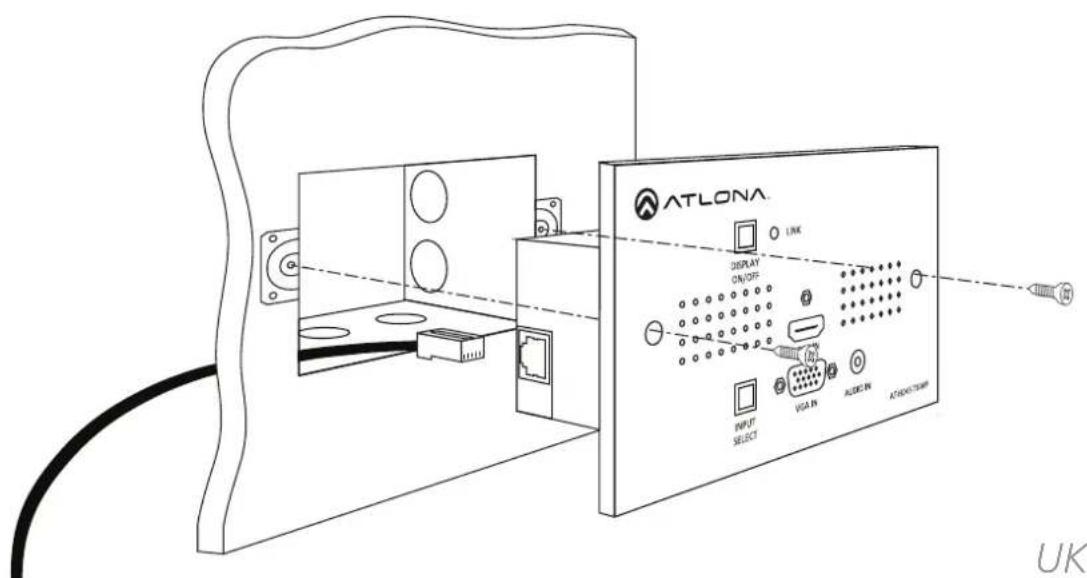
The UK wall plate screws will be the longer than the US screws. Thread the screws through the two holes in the UK wall plate and into the back box (as shown above).
Note: Be sure to plug the CAT cable into the back of the wall plate before full installation
Control Software
Control software and instructions for ease of use can be found on the AT-HDVS-TX-WP webpage on atlona.com (can only be used with compatible receivers - AT-HDVS-RX)
URL: http://www.atlona.com/HDVS-TX-WP.html (instructions/software found under the "Downloads" tab)
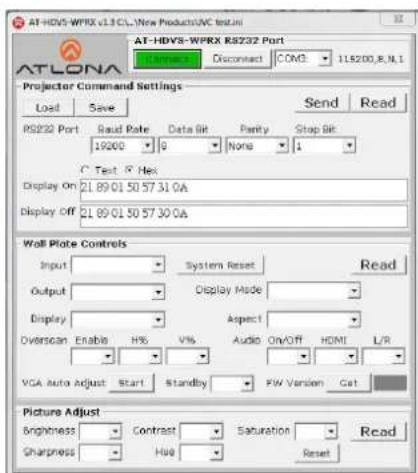
Set Up
RS-232 control is easiest when used with the HDVS-RX receiver.
However when used with appropriate power supply and HDBaseT receiver with RS-232 capabilities, the display power button can be used to transmit the following commands:
Projector On/Off
WP_Display[a]\$CR [a] ? , On , Off Display On/Off control
To change inputs, the HDVS-TX-WP should receive these commands:
WP_Input[a]\$CR [a] ? , Hdmi , Vga Select input source (HDVS-TX-WP)
The port settings for the control device are:
115200 bps, 8 bit data length, No parity bit, 1 bit stop-bit, No flow control.
Connection and Installation
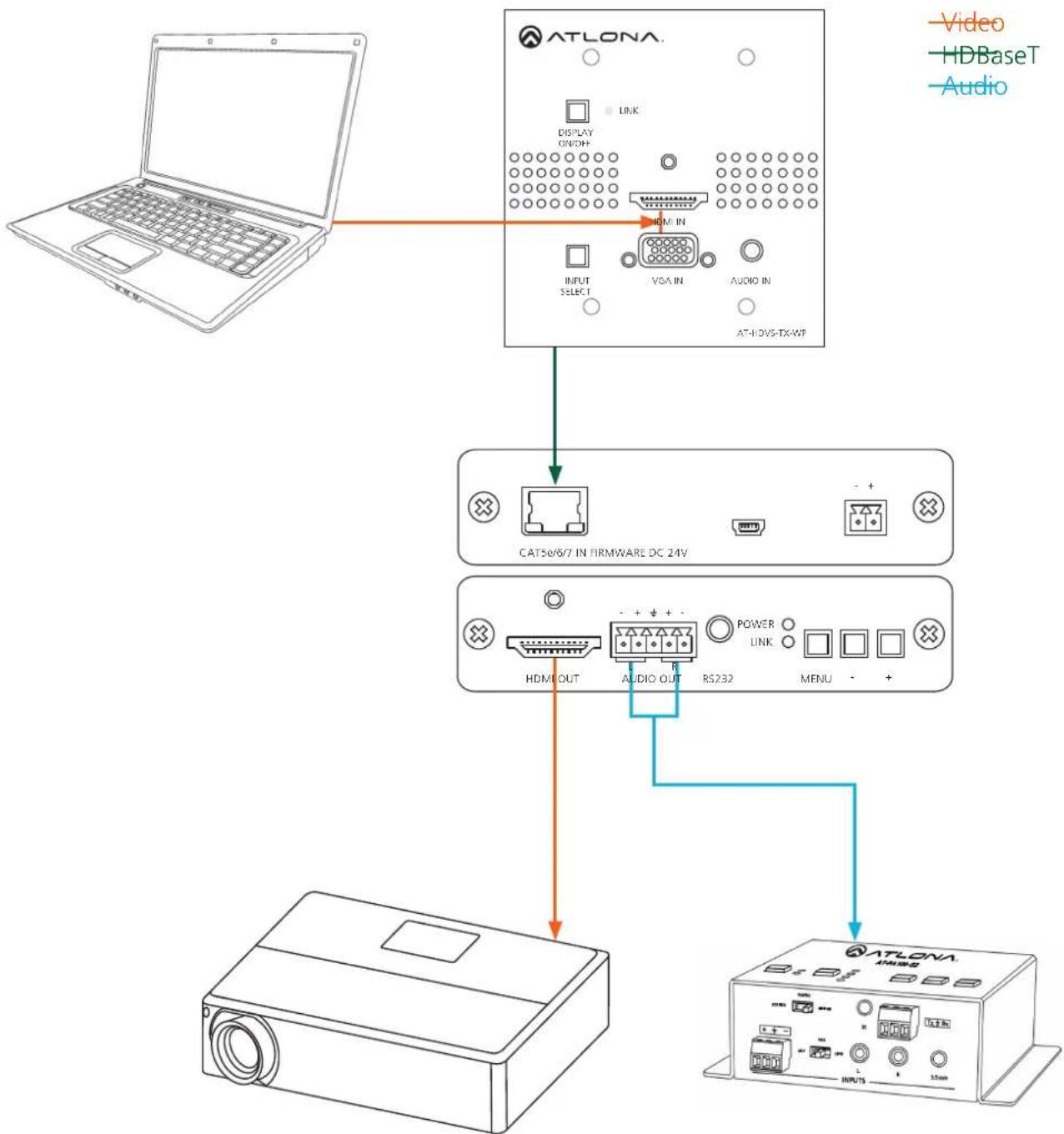
flowchart
graph TD
    A["Laptop"] --> B["ATLONA"]
    B --> C["DH/IN"]
    C --> D["VGA/IN"]
    D --> E["AUDIO/IN"]
    E --> F["ATLONA-TX-WP"]
    B --> G["CAT50/6/7 IN FIRMWARE DC 24V"]
    G --> H["HDMI OUT"]
    H --> I["+ + + -"]
    I --> J["RS232"]
    J --> K["MENU"]
    K --> L["ATLONA"]
    style A fill:#f9f,stroke:#333
    style B fill:#ccf,stroke:#333
    style C fill:#cfc,stroke:#333
    style D fill:#fcc,stroke:#333
    style E fill:#cff,stroke:#333
    style F fill:#ffc,stroke:#333
    style G fill:#fcf,stroke:#333
    style H fill:#cff,stroke:#333
    style I fill:#ffc,stroke:#333
    style J fill:#cff,stroke:#333
    style K fill:#ffc,stroke:#333
    style L fill:#cff,stroke:#333
Specifications
| Bandwidth 6.75Gbps | ||
| PortsVideo inputVideo outputAudio inputFirmware update | 1 x HDMI, 1 x VGA1 x HDBaseT1 x 3.5mm1 x Mini USB | |
| Power Consumption 17 | 2W (paired with HDVS-RX) | |
| Audio Passes 2Ch PCM | ||
| Resolution Video: up to | 1080pVESA: up to 1920x1200 | |
| Distance 230ft @ 1080p | over CAT6a/7197ft @ 1080p over CAT5e/6 | |
| Dimensions | 2 Gang (US & UK) | |
| Weight | 0.73 lbs0.33 kg | |
| Temperature Operating | 32°F to 104°F0°C to 40°C | Storage-4°F to 140°F20°C to 60°C |
| Certifications CE, FCC, RoHS, cULus for power supplies | ||
Safety Information
Safeguards

To reduce the risk of electric shock, do not expose this product to rain or moisture

If the wall plug does not fit into your local power socket, hire an electrician to replace your obsolete socket.

Do not modify the wall plug. Doing so will void the warranty and safety features.
This equipment should be installed near the socket outlet and the device should be easily accessible in the case it requires disconnection.
Precautions
FCC regulations state that any unauthorized changes or modifications to this equipment, not expressly approved by the manufacturer, could void the user's authority to operate this equipment.
Operate this product using only the included external power supply. Use of other power supplies could impair performance, damage the product, or cause fires.
In the event of an electrostatic discharge this device may automatically turn off. If this occurs, unplug the device and plug it back in.
Protect and route power cords so they will not be stepped on or pinched by anything placed on or against them. Be especially careful of plug-ins or cord exit points from this product.
Avoid excessive humidity, sudden temperature changes or temperature extremes.
Keep this product away from wet locations such as bathtubs, sinks, laundries, wet basements, fish tanks, and swimming pools.
Use only accessories recommended by Atlona to avoid fire, shock, or other hazards.
Unplug the product before cleaning. Use a damp cloth for cleaning and not cleaning fluid or aerosols. Such products could enter the unit and cause damage, fire, or electric shock. Some substances may also mar the finish of the product.
Never open, remove unit panels, or make any adjustments not described in this manual. Attempting to do so could expose you to dangerous electrical shock or other hazards. It may also cause damage to your AT-HDVS-TX-WP. Opening the product will void the warranty.
Do not attempt to service the unit. Disconnect the product and contact your authorized Atlona reseller or contact Atlona directly.
Warranty
Limited Warranty
Atlona Technologies warrants that (a) its products (AT-HDVS-TX-WP) will perform substantially in accordance with the accompanying written materials for a period of 3 years from the date of receipt and (b) that the product will be free from defects in materials and workmanship under normal use and service for a period of 3 years. In the event applicable law imposes any implied warranties, the implied warranty period is limited to 3 years from the date of receipt. Some jurisdictions do not allow such limitations on duration of an implied warranty, so the above limitation may not apply to customers that fall within those areas.
Customer Remedies
Atlona Technologies' and its suppliers' entire liability and Customer's exclusive remedy shall be, at Atlona Technologies' decision, either return of the price paid for the product, repair, or replacement of the product that does not meet this Limited Warranty and which is returned to Atlona Technologies with a copy of the Customer's receipt. This Limited Warranty is void if failure of the product has resulted from accident, abuse, misapplication, or natural occurrence. In example but not limited to: power surges (electrical storms, local power outage), dropping the product (or items on the product), contact with fluids, and physical misconduct (i.e. kicking or punching). Any replacement product will be warranted for the remainder of the original warranty period.
No other warranties
To the maximum extent permitted by applicable law, Atlona Technologies and its suppliers disclaim all other warranties, either expressed or implied, including, but not limited to, implied warranties of merchantability and fitness for a particular purpose, with regard to the product and any related written materials. This Limited Warranty gives customer specific legal rights. Customers may have other rights depending on the jurisdiction.
No liability for damages
To the maximum extent permitted by applicable law, in no event shall Atlona Technologies or its suppliers be liable for any damages arising out of the use of or inability to use this product, even if Atlona Technologies has been advised of the possibility of such damages. Such damages include but are not limited to: special, incidental, consequential, or indirect damages for personal injury, loss of business profits, business interruption, loss of business information, or any other pecuniary loss. Atlona Technologies' and its suppliers' entire liability under any provision of this agreement shall be limited to the amount actually paid by you for the product. Some Jurisdictions do not allow the exclusion or limitation of liability for consequential or incidental damage. The above limitations may not apply to you in such jurisdictional cases.
Atlona Product Registration
Thank you for purchasing this Atlona product. - We hope you enjoy it and will take an extra few moments to register your new purchase.
Registration creates an ownership record if your product is lost or stolen and helps ensure you'll receive notification of performance issues and firmware updates.
At Atlona we respect and protect your privacy, assuring you that your registration information is completely secure. Atlona product registration is completely voluntary and failure to register will not diminish your limited warranty rights.
To register go to: http://www.atlona.com/registration
- Atlona HDMI and VGA/audio to HDBaseT Transmitter Wall Plate
- Table of Contents
- Introduction
- Package Contents
- Features
- Features when used with HDVS-RX
- Panel Description
- Note: If DISPLAY ON/OFF button is held for 3 seconds the unit will reset
- US and UK Face Plate Change
- First Layer
- Second Layer
- Third Layer
- Wall Plate Installation
- Control Software
- Set Up
- Safety Information
- Safeguards
- Precautions
- Warranty
- Limited Warranty
- Customer Remedies
- No other warranties
- No liability for damages
- Atlona Product Registration
Brand : Atlona
Model : AT-HDVS-TX-WP
Category : Audio/video extender