
DF-AF2830C - Fan Clas Ohlson - Free user manual and instructions
Find the device manual for free DF-AF2830C Clas Ohlson in PDF.


| Product Type | Air Cooler (Fan, Cooler, Humidifier) |
| Brand | Clas Ohlson |
| Model | DF-AF2830C |
| Power Supply | 220-240 V AC, 50 Hz |
| Power Consumption | 65 W |
| Fan Power Input | 49.0 W |
| Max Fan Flow Rate | 5.50 m³/min |
| Service Value | 0.11 (m³/min)/W |
| Standby Power Consumption | 0.30 W |
| Fan Sound Power Level | 57.9 dB(A) |
| Max Air Velocity | 5.07 m/s |
| Dimensions (H × W × D) | 797 × 322 × 325 mm |
| Weight | 6.5 kg |
| Remote Control Battery | 1 × CR2032 (included) |
| Functions | Fan, Cooler, Humidifier, Oscillation |
| Timer Settings | 1, 2, 4, or 8 hours |
| Modes | Normal, Nature, Sleep |
| Speed Settings | High, Medium, Low, Silent |
| Filter Type | Washable dust filter and water filter |
| Safety Features | Auto shut-off when water reservoir removed; must be used upright; child safety warnings |
Frequently Asked Questions - DF-AF2830C Clas Ohlson
User questions about DF-AF2830C Clas Ohlson
0 question about this device. Answer the ones you know or ask your own.
Ask a new question about this device
Download the instructions for your Fan in PDF format for free! Find your manual DF-AF2830C - Clas Ohlson and take your electronic device back in hand. On this page are published all the documents necessary for the use of your device. DF-AF2830C by Clas Ohlson.
USER MANUAL DF-AF2830C Clas Ohlson
natural_image
Exterior view of a modern electric air purifier with control panel and ventilation grille (no visible text or symbols)Art.no
36-8105
Model
DF-AF2830C
Ver. 20190114
clas ohlson
Air Cooler
Art. no 36-8105 Model DF-AF2830C
Please read the entire instruction manual before using the product and then save it for future reference. We reserve the right for any errors in text or images and any necessary changes made to technical data. In the event of technical problems or other queries, please contact our Customer Services (see address details on the back).
Safety
- This product should only be connected to a 220–240 V AC, 50 Hz wall socket.
- Make sure that the wall socket that is used is easily accessible, since this is the only way to completely disconnect the product from the electrical system.
- Do not use an extension lead to connect the air cooler to a wall socket.
- The product may be used by children of 8 years and above and by persons with reduced physical, sensory or mental capability or lack of experience and knowledge provided they have been given supervision or instruction concerning use of the product in a safe way and understand the hazards involved.
- The product may be used by persons with reduced physical, sensory or mental capabilities or persons with a lack of experience or knowledge which could jeopardise their safety, provided they have been instructed in the safe operation of the product and understand the hazards involved.
- Never leave children unsupervised in the vicinity of the product.
- Never let children play with the product.
- Cleaning and user maintenance must not be performed by children without adult supervision.
- If the mains lead has been damaged, it must only be replaced by the manufacturer, authorised service facility or qualified tradesman.
- Place the product where there is no risk of people tripping over its mains lead.
- Never lay the mains lead over hot surfaces, sharp edges or corners.
- The product should be placed on a firm, level surface capable of supporting its weight.
- Always unplug the product from the wall socket when it is not in use. Always grip the plug when unplugging, never pull the mains lead.
- Make sure that the product is not in contact with any items of furniture or other objects when it is operating.
- Never poke your fingers or foreign objects through the grille while the fan is operating. Never let children play with the product.
- Ensure that no long hair or lightweight fabrics are sucked into the cooler when it is operating.
- Never use the product if the mains lead, plug or any other part is damaged or does not work properly.
- The product is intended for indoor use only.
-
The product is only intended for normal domestic use and only in the manner described in this instruction manual.
-
The product is only intended for indoor use in a dry, clean environment. Do not use it in the bathroom. Never position the product in such a way that it might fall into water or other liquid.
- Do not place the product close to a window where it could be exposed to long periods of direct sunlight.
- Never place the product where it could come into contact with hot surfaces.
- The product must only be used standing upright on its wheels. It must never be used in any other position.
- Never use the product where flammable substances are used or stored. Never use the product in places where explosive gases or substances are stored.
- Always unplug the product from the wall socket before service, maintenance or when it is not in use.
- Never attempt to repair or modify the product in any way. All repairs should only be carried out by qualified service technicians.
- Do not EVER PLACE the battery in your mouth, it should not be swallowed as it could cause a chemical burn.
- The product contains a button cell battery. If the battery is swallowed, within just two hours it can lead to severe internal burns and even be fatal.
- Keep new and used batteries out of the reach of children.
- Do not use the product and keep it out of the reach of children if the battery compartment cover is in any way damaged or malfunctioning.
- If you suspect that a battery has been swallowed or has entered the body in another way, seek medical assistance immediately.
- Batteries contain substances which are dangerous for the environment. The batteries must be removed before the product is recycled.
- Batteries should be recycled and placed in specific containers which are intended for batteries.
- High levels of humidity can encourage the growth of biological organisms.
- Do not allow the area around the product to get damp or wet. Reduce the power on the product if you detect humidity. If you cannot lower the power, use the product infrequently and only on specific occasions. Do not let absorbent material such as carpets and curtains get damp.
- Always unplug the product from the power point before cleaning it and when you are filling the water tank.
- Never leave water standing in the tank when the product is not in use.
- Wipe off the product, empty and clean the water tank before you put it away for storage. Make sure that the product is completely dry before storing it.
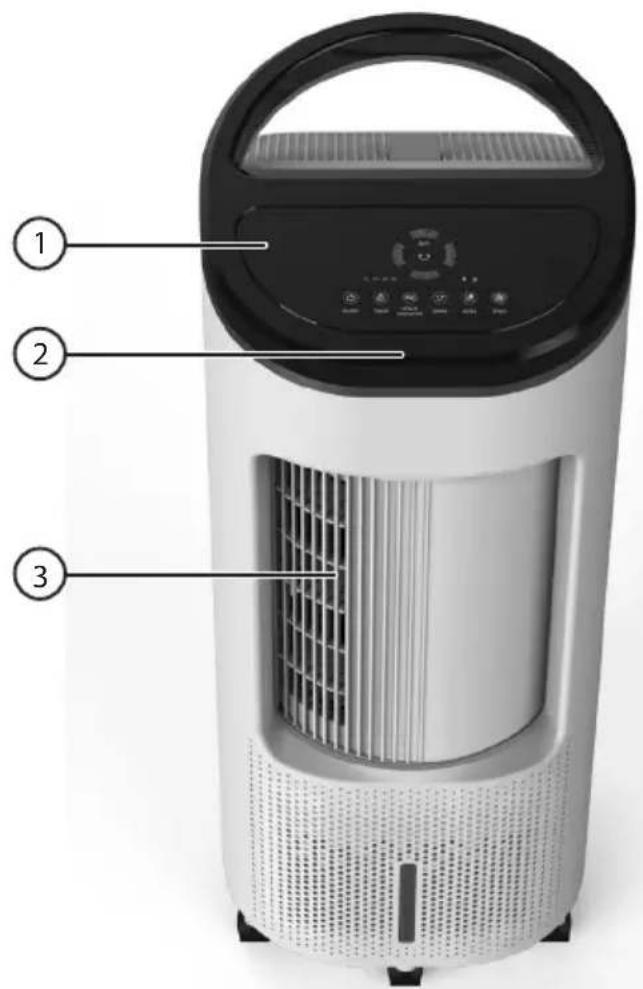
Product description
- Control panel
- IR remote control receiver
- Air outlet
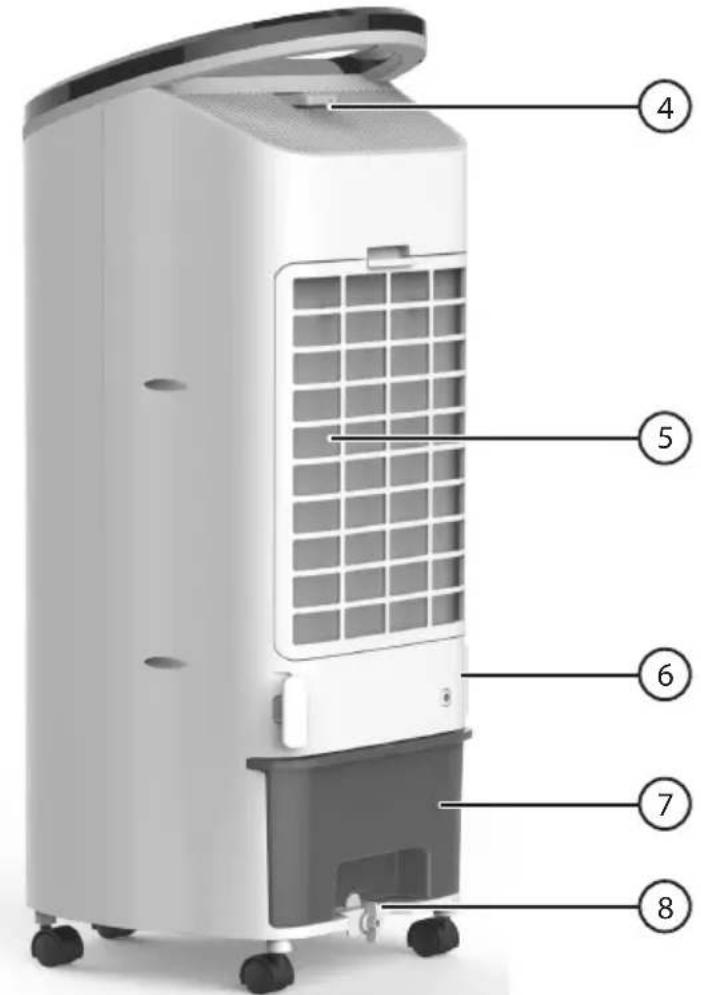
- Remote control
- Air inlet
- Mains lead holder
- Water reservoir
- Water reservoir locking knob
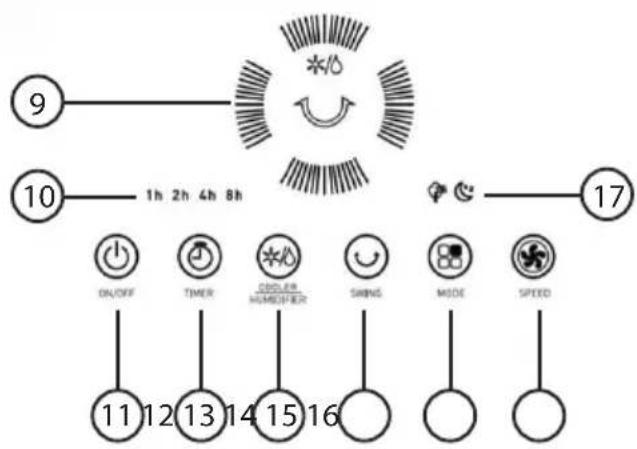
Display
- Indicators for fan speed, cooler/humidifier function and oscillation.
- Timer indication.
- [ON/OFF] On/off switch.
- [TIMER] Timer control to select how long the fan is to run before it automatically shuts off. 1, 2, 4 or 8 hours.
- [COOLER/HUMIDIFIER] Selector button for cooler function or humidifier function.
- [SWING] Oscillation on/off.
flowchart
graph TD
    A["9"] --> B["1h 2h 4h 8h"]
    C["10"] --> D["1h 2h 4h 8h"]
    E["17"] --> F["1h 2h 4h 8h"]
    G["ON/OFF"] --> H["11"]
    I["TIMER"] --> J["12"]
    K["CODLER HOMEISTER"] --> L["13"]
    M["SWINGS"] --> N["14"]
    O["MODE"] --> P["15"]
    Q["SPEED"] --> R["16"]
-
[MODE] Mode selection: Normal, Nature or Sleep.
-
Normal: constant fan speed.
- Nature: in nature mode the fan speed will vary according to a fixed pattern and depending on the fan speed selected. The fan alternates between: low, medium and high.
- If the high fan speed has been selected, the fan speed will follow the pattern shown in the diagram below:

line
| Time (seconds) | High | Medium | Low | | -------------- | ---- | ------ | --- | | 6 | 1 | 0 | 0 | | 6 | 1 | 0 | 0 | | 6 | 1 | 0 | 0 | | 3 | 0 | 0 | 0 | | 6 | 1 | 0 | 0 | | 12 | 1 | 0 | 0 | | 6 | 1 | 0 | 0 | | 6 | 1 | 0 | 0 | | 6 | 1 | 0 | 0 | | 3 | 0 | 0 | 0 | | 12 | 1 | 0 | 0 | | 6 | 1 | 0 | 0 |- If the medium fan speed setting has been selected, the fan speed will follow the pattern shown in the diagram below:

line
| Time (seconds) | Value | | -------------- | ----- | | 6 | High | | 6 | Medium| | 6 | Low | | 12 | High | | 12 | Medium| | 12 | Low | | 6 | High | | 6 | Medium| | 6 | Low | | 3 | High | | 3 | Medium| | 3 | Low | | 6 | High | | 6 | Medium| | 6 | Low | | 6 | Low | | 3 | High | | 3 | Medium| | 3 | Low | | 6 | High | | 6 | Medium| | 6 | Low | | 6 | Low |- If the low fan speed setting has been selected, the fan speed will follow the pattern shown in the diagram below:

line
| Time (seconds) | Value | | -------------- | ----- | | 6 | High | | 6 | Medium| | 6 | Low | | 3 | High | | 12 | Medium| | 12 | Low | | 6 | High | | 12 | Medium| | 3 | High | | 6 | Medium| | 6 | Low | | 6 | High |- Sleep: the fan will follow the same pattern as in the nature mode but with the difference that it will reduce speed successively at 30-minute intervals.
- If you select the sleep mode and the high fan speed, the fan will follow the pattern for high fan speed as shown above for 30 minutes, then change to the medium speed pattern for 30 minutes, then the low speed pattern for 30 minutes until it turns off.
-
If you select the sleep mode and the medium fan speed, the fan will follow the pattern for the medium fan speed as shown above for 30 minutes, then change to the low speed pattern for 30 minutes and then turn off.
-
[SPEED] Speed setting: High, Medium, Low or Silent
-
Indicators for the "Nature" and "Sleep" modes
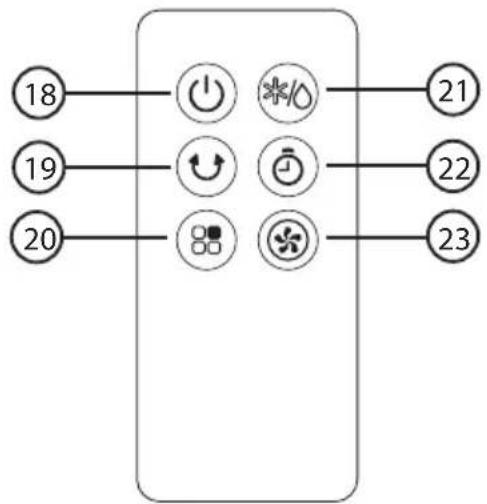
Remote control
- [ON/OFF] On/off switch.
- [SWING] Oscillation on/off.
- [MODE] Mode selection: Normal, Nature or Sleep.
- [ COOLER/HUMIDIFIER ] Selector button for cooler function or humidifier function.
- [TIMER] Timer control to select how long the fan is to run before it automatically shuts off.
- [SPEED] Speed setting: High, Medium,
- Low or Silent
flowchart
graph TD
    A["18"] --> B["Power Icon"]
    C["19"] --> D["Refresh Icon"]
    E["20"] --> F["Alarm Icon"]
    B --> G["*%"]
    D --> H["Switch Icon"]
    F --> I["Spin Icon"]
    G --> J["21"]
    H --> K["22"]
    I --> L["23"]
Remote control battery
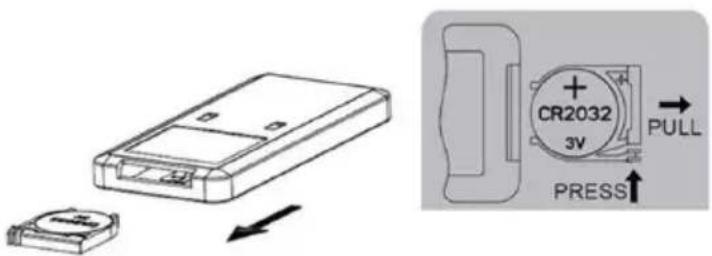
- To change the battery, open the battery drawer by pressing in the spring catch and pulling the drawer out from the remote control. Follow the markings on the back of the remote control.
- Insert a new battery (CR2032). Make sure that the positive (+) terminal is facing upwards, towards you. Note the polarity markings on the back of the remote control and in the battery drawer to ensure correct insertion.
- Slide the battery drawer back into the remote control.
Instructions for use
i
- Make sure that the wall socket that is used is easily accessible, since this is the only way to completely disconnect the air cooler from the electrical system. Unless the wall socket is switched off, the air cooler will still be conducting electricity even if it is switched off using the on/off switch on the control panel so long as it is plugged in. It is not disconnected from the mains power supply using the [ON/OFF] button. Always unplug the product from the power point when it is not in use.
- If the air cooler should fall over when it has water in the reservoir, there is a risk of it causing an electric shock and it must not be used.
- Switch the air cooler on by pressing the [ON/OFF] button on the control panel or the remote control and make any necessary settings using the controls on the control panel or remote control as described above.
Filling the water reservoir

Make sure that the water level in the reservoir does not exceed the maximum mark.
In order for the air cooler to be able to cool and humidify the air, the water reservoir must be filled with cold water in addition to ice or freezer blocks. If the water reservoir is removed when the air cooler is switched on, the air cooler will automatically switch off. When the water reservoir is replaced, the air cooler will need to be switched on again if you want it to continue operating. The air cooler cannot be switched on if the water reservoir is not fitted correctly.
- Switch the air cooler off and unplug it from the wall socket.
- Undo the water reservoir locking knob (8).
- Pull out the water reservoir and fill it with water and ice or freezer blocks.
- Slide the water reservoir back in and lock it in place.
Care and maintenance
- Always unplug the mains lead from the wall socket before cleaning the cooler or filling the water reservoir.
- Clean the exterior of the air cooler using a lightly moistened cloth. Use only mild cleaning agents, never solvents or corrosive chemicals.
- Always unplug the air cooler and make sure that the water reservoir is clean and dry before storing the cooler in a dry, dust-free environment out of children's reach whenever it is not to be used for an extended period.
Cleaning the filter
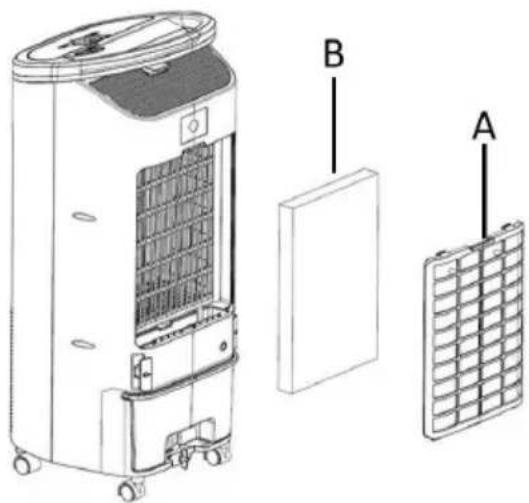
- Press down the spring catches on the dust filter (A) and remove it.
- Remove the water filter (B).
- Vacuum clean the dust filter.
- Soak the water filter in warm soapy water for a short while. Rinse the filter in clean water. Refit the filters in reversed order.
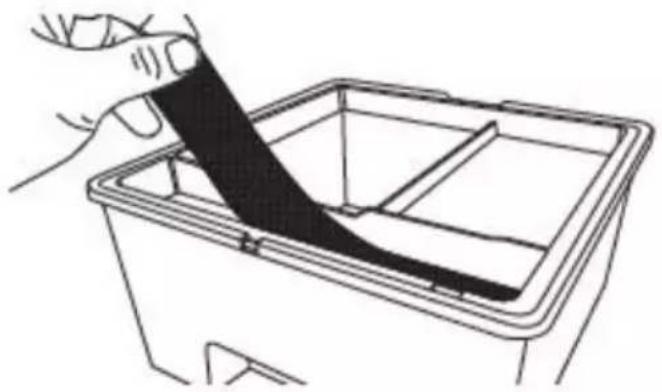
- The filter in the water reservoir can be rinsed with warm water if necessary.
natural_image
Line drawing of a hand holding a black cable inside a rectangular container (no text or symbols)Responsible disposal
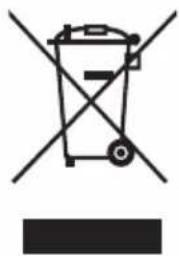
This symbol indicates that the product should not be disposed of with general household waste. This applies throughout the entire EU. In order to prevent any harm to the environment or health hazards caused by incorrect waste disposal, the product must be handed in for recycling so that the material can be disposed of in a responsible manner. When recycling your product, take it to your local collection facility or contact the place of purchase. They will ensure that the product is disposed of in an environmentally sound manner.
natural_image
Symbol of a trash bin with crossed lines indicating no waste or restriction, and a solid rectangle below (no text or labels)Specifications
Power supply 220-240 V AC, 50 Hz
Remote control battery 1 × CR2032 (included)
Power 65 W
Size 322 × 325 × 797 mm
Weight 6.5 kg
| Description Symbol Value Unit | |||
| Max fan flow rate F 5.50 m3/min | |||
| Fan power input P | 49.0 W | ||
| Service Value | SV | 0.11 (m3/min)/W | |
| Standby power consumption | PSB | 0.30 W | |
| Fan sound power level | LWA | 57.9 | dB(A) |
| Maximum air velocity | c 5.07 m/s | ||
| Measurement standard for Service Value | (EU) No 206/2012 + (EU) 2016/2282EN 50564:2011EN ISO 5801:2017EN 60704-1:2010+A11:2012EN 60704-2-7:2020 | ||
Luftkylare
Art.nr 36-8105 Modell DF-AF2830C
Display
line
| Tid (sekunder) | Value | | -------------- | ----- | | 6 | High | | 6 | Medium| | 6 | Low | | 3 | High | | 6 | Medium| | 12 | High | | 6 | Medium| | 6 | Low | | 6 | High | | 3 | High | | 12 | Medium| | 6 | High |line
| Tid (sekunder) | Value | | -------------- | ----- | | 6 | Low | | 6 | High | | 6 | Low | | 3 | Low | | 12 | High | | 12 | Low | | 6 | High | | 12 | Low | | 3 | Low | | 6 | High | | 6 | Low | | 6 | High |natural_image
Line drawing of a hand holding a black cable inside a rectangular container (no text or symbols)Avfallshantering
natural_image
Symbol of a trash bin crossed out by two crossed lines, with no text or labels present.Specifikationer
Nätanslutning 220–240 V AC, 50 Hz
Skjerm
line
| Tid (sekunder) | Høy | Medium | Lav | | -------------- | --- | ------ | --- | | 6 | 1 | 0 | 0 | | 6 | 0 | 1 | 0 | | 6 | 0 | 0 | 1 | | 3 | 0 | 0 | 0 | | 6 | 1 | 0 | 0 | | 12 | 1 | 0 | 0 | | 6 | 0 | 1 | 0 | | 6 | 0 | 0 | 1 | | 6 | 0 | 1 | 0 | | 3 | 0 | 0 | 1 | | 12 | 0 | 1 | 0 | | 6 | 1 | 0 | 1 |- Hvis viftehastighet middels er valgt, varieres viftehastigheten som vist i diagrammet nedenfor:

line
| Tid (sekunder) | Høy | Medium | Lav | | -------------- | --- | ------ | --- | | 6 | 1 | 0 | 0 | | 5 | 1 | 0 | 0 | | 4 | 1 | 0 | 0 | | 3 | 1 | 0 | 0 | | 2 | 1 | 0 | 0 | | 1 | 1 | 0 | 0 | | 0 | 1 | 0 | 0 | | 1 | 1 | 0 | 0 | | 2 | 1 | 0 | 0 | | 3 | 1 | 0 | 0 | | 4 | 1 | 0 | 0 | | 5 | 1 | 0 | 0 | | 6 | 1 | 0 | 0 | | 7 | 1 | 0 | 0 | | 8 | 1 | 0 | 0 | | 9 | 1 | 0 | 0 | | 10 | 1 | 0 | 0 | | 11 | 1 | 0 | 0 | | 12 | 1 | 0 | 0 | | 13 | 1 | 0 | 0 | | 14 | 1 | 0 | 0 | | 15 | 1 | 0 | 0 | | 16 | 1 | 0 | 0 | | 17 | 1 | 0 | 0 | | 18 | 1 | 0 | 0 | | 19 | 1 | 0 | 0 | | 20 | 1 | 0 | 0 | | 21 | 1 | 0 | 0 | | 22 | 1 | 0 | 0 | | 23 | 1 | 0 | 0 | | 24 | 1 | 0 | 0 | | 25 | 1 | 0 | 0 | | 26 | 1 | 0 | 0 | | 27 | 1 | 0 | 0 | | 28 | 1 | 0 | 0 | | 29 | 1 | 0 | 0 | | 30 | 1 | 0 | 0 | | | | | | | | | | | | | | | | | | | | | | | | | | | | | | | | | | | | | | | | | | | | | | | | | | | | | | | | | | | | | | | | | |- Hvis viftehastighet lav er valgt, varieres viftehastigheten som vist i diagrammet nedenfor:
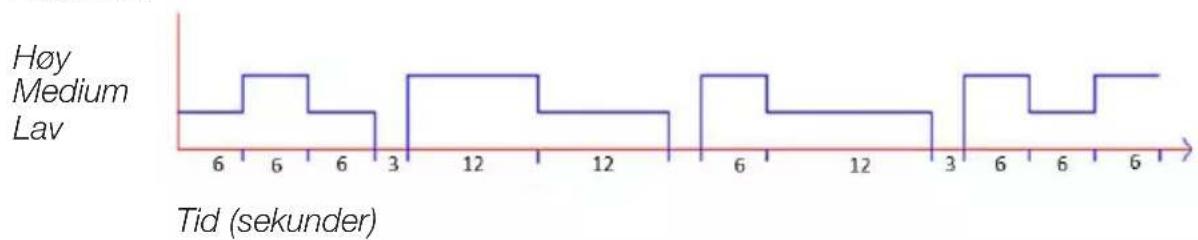
line
| Tid (sekunder) | Value | | -------------- | ----- | | 6 | Low | | 6 | High | | 6 | Low | | 3 | Low | | 12 | High | | 12 | Low | | 6 | High | | 12 | Low | | 3 | Low | | 6 | High | | 6 | Low | | 6 | High |natural_image
Line drawing of a hand holding a black cable inside a rectangular container (no text or symbols)Avfallshändtering
natural_image
Symbol of a trash bin crossed with a diagonal line and a horizontal bar below (no text or labels)Spesifikasjoner
Nettspenning 220–240 V AC, 50 Hz
Batteri fjernkontroll 1 × CR2032 (medfølger)
Effekt 65 W
Mål 322 × 325 × 797 mm
Vekt 6,5 kg
| Beskrivelse Symbol Verdi Enhet | |||
| Maks luftstrøm F 5,50 m^3/min | |||
| Viftens effekt inn | P | 49,0 W | |
| Driftsverdi | SV | 0,11 ( m^3/min )/W | |
| Effektforbruk i standby-modus | PSB | 0,30 W | |
| Viftens lydeffektnivå | LWA | 57,9 dB(A) | |
| Maks lufthastighet | c 5,07 m/s | ||
| Standard som er benyttet for måling av driftsverdi | (EU) No 206/2012 + (EU) 2016/2282EN 50564:2011EN ISO 5801:2017EN 60704-1:2010+A11:2012EN 60704-2-7:2020 | ||
Ilmanjäähdytin
Tuotenro 36-8105 Malli DF-AF2830C
Näyttö
natural_image
Line drawing of a hand holding a black cable inside a rectangular container (no text or symbols)Kierrättäminen
natural_image
Symbol of a trash bin crossed with no visible text or labelsTekniset tiedot
Display
natural_image
Line drawing of a hand holding a black cable inside a rectangular container (no text or symbols)natural_image
Symbol of a trash bin crossed with no visible text or labelsTechnische Daten
Postal Clas Ohlson Ltd, Aquilla House (First floor),
1 Becketts Wharf, Lower Teddington Road,
Hampton Wick, Kingston Upon Thames, KT1 4ER
Deutschland
Kundenservice Hotline: 040 2999 78111
E-Mail: kundenservice@clasohlson.de
Homepage
www.clasohlson.de
Postanschrift Clas Ohlson GmbH, Valentinskamp 88
20355 Hamburg


- Air Cooler
- Art. no 36-8105 Model DF-AF2830C
- Safety
- Product description
- Display
- Remote control
- Remote control battery
- Instructions for use
- i
- Filling the water reservoir
- Care and maintenance
- Cleaning the filter
- Responsible disposal
- Specifications
- Luftkylare
- Avfallshantering
- Specifikationer
- Skjerm
- Avfallshändtering
- Spesifikasjoner
- Ilmanjäähdytin
- Näyttö
- Kierrättäminen
- Tekniset tiedot
- Technische Daten
- Deutschland
Brand : Clas Ohlson
Model : DF-AF2830C
Category : Fan