
DVI 2 1 PN - Cooktop ROSIERES - Free user manual and instructions
Find the device manual for free DVI 2 1 PN ROSIERES in PDF.



| Product type | Induction hob |
| Brand | ROSIERES |
| Model | DVI 2 1 PN |
| Installation type | Built-in |
| Number of burners | 2 |
| Left front burner | Induction 2200 W (Booster 3000 W) |
| Right rear burner | Induction 1400 W |
| Power supply | 230 V ~ 16 A |
| Maximum power | 3.6 kW |
| Power cable | H05RR-F (replacement by after-sales service) |
| Surface material | Vitroceramic |
| Power levels | 1 to 9 |
| Booster function | Yes (on 2200 W burner) |
| Programmable timer | Yes, from 1 to 99 minutes |
| Child lock | Yes |
| Residual heat indicator | Yes (display 'H') |
| Automatic safety shut-off | Yes (depending on power level) |
| Pan recognition | Yes |
| Supplied accessories | Fixing brackets, seal, screws |
| Recommended cleaning | Damp cloth, vinegar, glass scraper |
| Safety | Auto shut-off, lock, overheat protection |
Frequently Asked Questions - DVI 2 1 PN ROSIERES
User questions about DVI 2 1 PN ROSIERES
0 question about this device. Answer the ones you know or ask your own.
Ask a new question about this device
Download the instructions for your Cooktop in PDF format for free! Find your manual DVI 2 1 PN - ROSIERES and take your electronic device back in hand. On this page are published all the documents necessary for the use of your device. DVI 2 1 PN by ROSIERES.
USER MANUAL DVI 2 1 PN ROSIERES
Application joint (Fig.3)
CE Appareil conforme aux directives europeennes 89/336/CEE, 93/68/CEE, 73/23/CEE et modifications successives.
| MODELS | PC DVI 2/1 PN |
| Voltage | 230V |
| Current | 16 |
| Induction plate 2200W /Booster 3000W | 1 |
| Induction plate 1400W | 1 |
| Max power W | 3.6KW |
1.Installation (Fig 1)
Installation is the buyer's responsibility. The manufacturer accepts no liability for this service. Any action that the manufacturer has to take due to an erroneous installation will not be covered by the guarantee.
The flush-mounted cook tops are designed for installation in work tops made of all kinds of material, providing they can withstand a temperature of 100^ , and are between 25 and 40mm thick. If the cook top is installed in a position so that the side of a kitchen unit comes up against its left-hand or right-hand side, the distance between the vertical panel and the edge of the cook top must always be at least 150mm . The distance between the back wall and the edge of the cook top must be at least 55mm . A partition made of insulating material (wood or the like) must be inserted between the cook top and the space below. This partition must be at least 25mm from the underside of the cook top tray.
Fixing the cook top to the unit (Fig 2)
The cook top is fixed to the unit by means of the brackets and accessories provided. Holes are provided in the bottom of the tray so that you can attach the screws (C) that hold the brackets (B) in place.
Applying the seal (Fig 3)
Important - The figure shows how the seal must be attached all around the perimeter.
This cook top has been designed for non-professional, domestic use.
Coupling two or more Domino cook tops (Fig 4)
Cut out the work top to allow for the flush mounting of two or more Domino cook tops.
First of all, place the steel supporting element (E) provided in the package in position, then insert the cook top (G) as illustrated in the figure below. Insert the second cook top (F) in the remaining space.
Together with the seal on the two Domino cook tops, the steel support will ensure that the top is watertight.
The Domino cook tops are fixed to the work top using the kit of brackets provided.
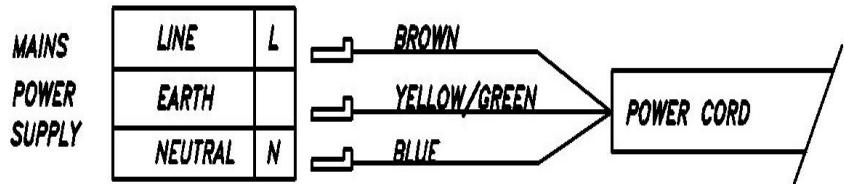
2. Electric connections
Check the details given on the nameplate situated on the underside of the cook top, then make sure that the rated mains voltage and power available are suitable for its operation.
Before making the electric connections, check the efficiency of the earthing system. Earthing of the cook top is compulsory by law. The manufacturer will accept no liability for any personal injury or damage to property deriving from failure to comply with this requirement.
For models without a plug, fit a standard plug capable of withstanding the specified load on the power cord. The cord's earthing conductor is colored yellow and green. The plug must be accessible.
If you prefer to make a fixed connection to the mains, insert an all-pole circuit breaker with a breaking gap of at least 3mm between the cook top and the mains.
To connect the cook top power cord, loosen and remove the cover on the terminal block in order to access the contacts inside. Make the connection, blocking the cord in place with the cable clamp provided and then close the terminal block cover again immediately.
If you have to change the cord, the earthing (yellow / green) conductor must always be 10 ~mm longer than the line conductors.
Use only rubber cable type H05RR-F.
DECLARATION OF CONFORMITY. In the parts destined to come into contact with foodstuffs, this appliance is in accordance with the requirements of the EC directive 89/109 transposed in the Italian Legislative Decree N° 108 of 25/01/92.
CE Appliance conforming to the European directives 89/336/EEC, 93/68/EEC, 73/23/EEC and subsequent revisions.
INSTRUCTIONS FOR USE
Important: Before cooking with the appliance for the first time, it is important to clean the cook top.
The induction cooking method rapidly transfers the energy needed for cooking directly to the pan, so the cook top surface remains cold but the pan heats up. The result is a fast, cost-effective and accurate cooking method.
This type of cook top can be used with enameled steel or stainless steel pans; it is not suitable for use with glass, ceramic or aluminium pans (unless a special magnetic base plate is used).
Any pan with a bottom that is not perfectly flat is unsuitable and may damage the cook top.
CERAMIC GLASS COOK TOP WITH TOUCH CONTROLS
3. Description of the controls (Fig 5)
-
On/off key (ON/OFF)
-
Decimal point on setting display
-
Safety lock key
-
Booster key
-
Safety lock pilot light
-
"Less" key Timer programming
-
"Less" key
-
"More" key Timer programming
-
"More" key
11.Timer programming displays
-
Setting display (residual heat)
-
Timer programming pilot light
Touch controls
All operations are performed by means of touch controls (infrared sensors) situated on the front of the cook top.
Every action is confirmed by an acoustic signal.
4. Locking the cook top functions (Fig 6)
The whole appliance can be locked using the safety lock key (2), in order to prevent any unintentional use. The function also serves as a child safety device. A pilot light (3) indicates that the safety lock function has been enabled.
It will still be enabled when the cook top is turned on again.
As long as the safety lock function is enabled, any action on the keys has no effect.
5. Turning on and off (Fig 7)
Touch the on/off button.(1)
The control is enabled: the setting level indicators (6) read "0".
The next step must be carried out within 10 seconds, otherwise the appliance goes off automatically.
Turning on the burner (Fig 8)
After touching the on/off key (1), a burner must be selected within 10 seconds as follows:
Touch the "Plus" (5) and "minus" (4) keys for the burner required.
Adjust the setting from 1 to 9 by means of the "+" and "-" keys (5/4).
The "+" and "-" keys have a repeat function: pressing and holding one of these keys induces an increase or decrease in the setting value of one unit.
If the selected cooking zone will be switched ON by means of the MINUS key(4), the cooking zone starts at the maximum setting "9". When setting "0" is reached, there will be no further setting changed.
If no pan are detected or if an aluminium pan is detected, the power level flashes on the heater display. After 30 seconds the power levels return to 0.
Turning off the burner (Fig 8)
1.The burner must be on.
2. Bring the setting down to "0" by means of the "- " key (4). After 3 seconds, the burner goes off automatically.
3. If the cooking zone is "hot" "0" is displayed alternatively with "H"
Turning off the burner instantly:
- The burner concerned must be on.
2.If you touch the "+" and "-" keys (5-4) simultaneously, the burner goes off immediately. - If the cooking zone is "hot" "0" is displayed alternatively with "H".
Residual heat indicator (Fig 9)
As long as the temperature of the burner remains high enough to cause injury, the display corresponding to the burner shows the "H" symbol (residual heat) alternatively with "0" symbol. This indication only disappears when there is no longer any danger (at 60^ ).
To save energy, turn off the burner in advance, in order to exploit the residual heat.
The residual heat indicator "H" is lost in the event of a mains power cut lasting more than 3 seconds.
Turning off the cook top (Fiq 10)
The cook top can be turned off at any time by means of the on/off key (1).
The display shows a "H" as long as the temperature remains above 60^ .
6. Safety cut-out
If one or more burners are accidentally left on, the control automatically turns them off after a certain time has elapsed. The table below indicates the time interval, which depends on the power level setting.
| Level | Time limit (hours) |
| 1 | 10 |
| 2 | 5 |
| 3 – 4 | 4 |
| 5 – 6 | 3 |
| 7 – 8 | 2 |
| 9 | 1 |
| P | 10 min. |
If the safety cut-out has tripped, the symbol "H" is displayed.
To avoid the automatic cut-out being tripped, simply touch the burner selection key or the "+" or "-" keys before the time runs out.
7. Booster functions(Fig 11)
The "booster" function for the 210mm burner is enabled by touching the "Booster" key (8) regardless of the selected power level. When this function is enabled, the display shows the letter P.If the power delivered to the other 145mm burner exceeds 600W , this is automatically reduced to 600W . The corresponding indicator begins to display the new lower power setting and the previous power setting alternately.
8. System temperature control
A temperature sensor situated inside the cook top's cooling unit constantly measures the temperature of the generator's electronic circuits. In the event of these circuits overheating, the system reacts as follows:
The display related to the induction plates shows the power levels alternatively with the symbol "c".
The overheating of the circuits definitely indicates an anomaly and means that the cook top has not been installed properly, or the openings for air circulation are not large enough
9. Pan sensor
Each burner is complete with its own sensor for detecting the presence of a pan.
The system is fine-adjusted to recognize the presence of a pan that, according to the scale of the EN standards, is one size smaller than the nominal diameter of the burner.
If no pan are detected or if an aluminium pan is detected, the power level flashes on the heater display. After 30 seconds the power levels return to 0.
If the power level symbol flashes also when a pan is actually on the burner, this generally means that the size or shape of the pan concerned is unsuitable. In this case, check whether the type of pan is suitable for induction cooking (see the pan manufacturer's trademark or instructions).
10. System self test
When the system is connected to the power supply (during installation or after a power cut), a self-test message appears for 1 second on the displays relating to the burner power settings.
If a different code appears or the display remains blank, this means there is a problem with the power supply or some malfunction in the system. In this case, it is best to check the installation again.
FAULT CODES MESSAGES
| CODE | DEVICE | FAULT | AUTOMATIC ACTION |
| F - 1 | Heater temperature sensor (heater) | Short circuited | The corresponding heater turns off. The +/- keys are locked |
| F - 2 | Heater temperature sensor (heater) | Open circuited | The corresponding heater turns off. The +/- keys are locked |
| F - 3 (on two different displays) | Power temperature sensor (induction generator) | Short circuited | The two corresponding heaters turn off. The related +/- keys are locked |
| F - 4 (on two different displays) | Power temperature sensor (induction generator) | Open circuited | The two corresponding heaters turn off. The related +/- keys are locked |
| F - 5 (on two different displays) | Touch control wiring | Loss of communication between Tc and generator | All the heaters are switched off. The related +/- keys are locked |
| F - 9 (on two different displays) | Induction generator | Overcurrent | The two corresponding heaters turn off. The related +/- keys are locked |
| c | Induction generator | Overheating | - |
11.Timer (Fig 12)
The control device can also have an incorporated timer, which can be assigned to one of the cooking zones.
- Touch the "Plus" (10) and key of the timer. The timer display(12) will show "00", the other displays "t".
(If the timer is selected by the "minus" key (11), the starting time would be "99" - maximum value). - After setting the timer, a burner must be selected within 10 seconds. Select a cooKing zone with the "Plus" key (5). The pilot light (12) relating to the burner concerned comes on.
- Select the required time from 1 to 99 minutes with the keys "+" e "-(10/11).
- Select the required power setting (from 1 to 9) with the keys "+"e-" (5/4).
The timer will be assigned to that area: Once countdown is complete the area will switch off automatically.
Once countdown is complete an acoustic signal will sound for 30^
If you touch the "+" and "-" keys (10-11) of the timer simultaneously, it goes off immediately.
CLEANING AND MAINTENANCE
A few cooking tips
Use only saucepans and frying pans with a sturdy, preferably thick bottom. This is particularly important when preparing food requiring high cooking temperatures, such as fried foods. If the bottom of the pan is not perfectly flat, the food takes longer to cook and uses up more energy. The best heat transfer is obtained when the saucepan and burner are the same size.
You can also use Pyrex and porcelain pans on the burners, providing the bottom of the pan is smooth. Refer to the instructions of the pan manufacturer on this point.
Any spillages from the pans should be wiped away immediately.
Important notes
Warning: the burner surface becomes red hot when in use, so it is always advisable to keep children well away from the cook top.
Avoid dropping any hard object on the cook top surface. In some conditions, the material is sensitive to mechanical loading. The shock of a sharp or pointed object can damage the cooking surface. In the event of any breakage, cracking or other damage being accidentally caused to the ceramic top, it is essential to stop using the cook top immediately and contact customer care.
Ceramic glass cook tops must never be used as a work surface. Do not us aluminum pan. Do not prepare food wrapped in aluminium foil or packaged in plastic. Never use the burner without a saucepan on it. Never place flammable, explosive or deformable objects in the vicinity of the cook top.
Fats and oils can catch fire if they are overheated: that is why foods requiring the use of fat or oil, e.g. French fries, must always be supervised while they are cooking.
Moreover, it is essential to make sure that the power cords and plugs of any other domestic appliances attached to sockets near the cook top can never come into contact with the hot cook top surfaces. No part of the power supply cable must reach an ambient temperature which is over 50^ .
If damaged, the cable must be replaced with one supplied by the technical assistance service.
WARNING: If the surface is cracked, switch off the appliance to avoid the possibility of electric shock.
If the glass surface breaks, unplug the device from the mains supply in order to avoid getting an electric shock.
The cook top must never be cleaned with steam or other such cleaning devices.
It is essential to clean the cook top - once it has cooled down - every time it has been used. Even the smallest food scraps would burn the next time it is used. Use only the recommended detergents. Wire wool, abrasive pads and powders will cause scratching. Oven-cleaning products are unsuitable because they are corrosive.
Mild soiling can be removed with the aid of a damp cloth or with hot soda. Any traces of detergent must be removed with cold water and the surfaces must then be accurately dried. Any signs of water that cannot be removed with boiling water can be eliminated with vinegar and lemon juice, or with a scale-remover fluid. If any of these detergents comes into contact with the cook top frame, it must be cleaned off immediately with a wet cloth, to avoid damaging the seal.
Any tenacious dirt can easily be removed with the aid of a glass scraper. The scraper handle must not be made of plastic because it could become stuck to the hot surfaces. Pay attention while using to scraper: it can cause injury.
Sugar and foods containing caramelized sugar must be removed immediately from the hot burner.
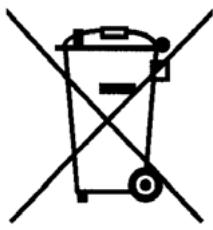

This appliance is marked according to the European directive 2002/96/EC on Waste Electrical and Electronic Equipment (WEEE).
By ensuring this product is disposed of correctly, you will help prevent potential negative consequences for the environment and human health, which could otherwise be caused by inappropriate waste handling of this product.
The symbol on the product indicates that this product may not be treated as household waste. Instead it shall be handed over to the applicable collection point for the recycling of electrical and electronic equipment
Disposal must be carried out in accordance with local environmental regulations for waste disposal.
For more detailed information about treatment, recovery and recycling of this product, please contact your local city office, your household waste disposal service or the shop where you purchased the product.
Before calling in the technician:
- if the cook top does not work, we recommend you first make sure that the plug is fitted properly in the power socket.
If you cannot find any reason for the malfunction:
- turn off the appliance and do not manhandle it. Call in the technical support service.
The appliance comes with a guarantee certificate that entitles you to use the technical support service.
The guarantee must be duly completed, kept in a safe place, and exhibited to the authorized technician in case of need, together with the fiscally valid document issued by the retailer at the time of purchase (delivery bill, invoice, cash register receipt, etc.) indicating the name of the retailer, the date of delivery, details for identifying the product and the purchase price.
(F)Application joint
(GB)Applying the seal
- Application joint (Fig.3)
- 1.Installation (Fig 1)
- Fixing the cook top to the unit (Fig 2)
- Applying the seal (Fig 3)
- Coupling two or more Domino cook tops (Fig 4)
- Electric connections
- CERAMIC GLASS COOK TOP WITH TOUCH CONTROLS
- Description of the controls (Fig 5)
- Touch controls
- Locking the cook top functions (Fig 6)
- It will still be enabled when the cook top is turned on again.
- Turning on and off (Fig 7)
- Turning on the burner (Fig 8)
- Turning off the burner (Fig 8)
- Turning off the burner instantly:
- Residual heat indicator (Fig 9)
- Turning off the cook top (Fiq 10)
- Safety cut-out
- Booster functions(Fig 11)
- System temperature control
- Pan sensor
- System self test
- 11.Timer (Fig 12)
- CLEANING AND MAINTENANCE
- A few cooking tips
- Important notes
- The cook top must never be cleaned with steam or other such cleaning devices.
Brand : ROSIERES
Model : DVI 2 1 PN
Category : Cooktop