Vital Trainer 7780 90000 - Scale Eta - Free user manual and instructions
Find the device manual for free Vital Trainer 7780 90000 Eta in PDF.


| Product Type | Digital Body Composition Scale |
| Brand | Eta |
| Model | Vital Trainer 7780 90000 |
| Dimensions | Approximately 30 x 30 x 2.5 cm |
| Weight | Approximately 1.8 kg |
| Power Supply | 2 x AAA batteries (not included) |
| Weight Capacity | 180 kg / 396 lbs |
| Measurement Units | kg / lb / st |
| Body Fat Measurement | Yes, via BIA technology |
| BMI Calculation | Yes |
| Hydration Level | Yes |
| Muscle Mass | Yes |
| Bone Mass | Yes |
| User Memory | Up to 10 users |
| Auto-Calibration | Yes |
| Auto-Off | Yes, after 15 seconds of inactivity |
| Display | Large LCD screen with blue backlight |
| Non-Slip Surface | Yes, anti-slip feet and platform |
| Cleaning | Wipe with a soft damp cloth; do not use abrasive cleaners |
| Spare Parts | Available from Eta service centers |
| Repairability | Repair possible by authorized Eta technicians |
Frequently Asked Questions - Vital Trainer 7780 90000 Eta
User questions about Vital Trainer 7780 90000 Eta
0 question about this device. Answer the ones you know or ask your own.
Ask a new question about this device
Download the instructions for your Scale in PDF format for free! Find your manual Vital Trainer 7780 90000 - Eta and take your electronic device back in hand. On this page are published all the documents necessary for the use of your device. Vital Trainer 7780 90000 by Eta.
USER MANUAL Vital Trainer 7780 90000 Eta
2) VÁŽENÍ S ANALÝZOU A S POUŽITÍM VITAL APLIKACE
2.1 První kroky

natural_image
Vital Body Plus logo with abstract green and teal design (no text or symbols beyond the logo itself)Poznámky
natural_image
Illustration of a black boots on a mat with a downward arrow indicating motion or pressure (no text or symbols)2) VÁŽENIE S ANALÝZOU A S POUŽITÍM VITAL APLIKÁCIE
2.1 Prvé kroky
natural_image
Vital Body Plus logo with abstract green and teal design (no text or symbols beyond the brand name)Poznámky
natural_image
Silhouette of a pair of boots on a mat with a downward arrow indicating compression or force (no text or symbols)VÁŽI IHNEĐ: na váhu sa stačí postavit' - automaticky dôjde k zapnutiu a zváženiu
Analytic bathroom scale with a Smart application
eta 7780
INSTRUCTIONS FOR USE
Dear customer, thank you for purchasing our product. Please read the operating instructions carefully before putting the appliance into operation and keep these instructions including the warranty, the receipt and, if possible, the box with the internal packing.
I. SAFETY WARNING

- Consider the instructions for use as a part of the appliance and pass them on to any other user of the appliance.
- The appliance is intended for use in households only and for similar use! It is not intended for use in health-care facilities and for commercial use!
- This appliance can be used by children aged from 8 years and above and persons with reduced physical, sensory or mental capabilities or lack of experience and knowledge if they have been given supervision or instruction concerning use of the appliance in a safe way and understand the hazards involved. Children shall not play with the appliance. Cleaning and user maintenance shall not be made by children without supervision.
- Never use the appliance if it malfunctions, if it fell to the ground and got damaged or if it fell into water. In these cases bring the appliance to a specialised service to have the safety and functions of the device checked.
- We recommend: Do not step onto the scale with wet feet or on wet surface of the scale, there is a risk of slipping.
- Never immerse the scale into water (even their parts)!
- Keep in mind that the data read from this scale are approximate and inaccurate in comparison to results of actual medicinal analyses. The exact determination of biometrical characteristics can be done only by a doctor via medical methods.
- Do not use during pregnancy.
- Do not stand on the edge of the scales!
- Do not use the fat analysis feature on this scale if you are using one of the following devices: pace maker, electrocardiograph and/or other medical device implanted in the body or device used as support.
- If the scale was stored in lower temperatures, let it adjust to the room temperature.
- Use the scale in a horizontal position only and at places where they cannot knock over, in sufficient distance from heat sources (e.g. stove, fireplace, heat radiators), sources of increased air humidity (e.g. sauna, bathroom, swimming pool) and equipment with strong electromagnetic field (e.g. microwave oven, radio, mobile phone).
- Protect the personal scale from dust, chemicals, excessive humidity, toiletries, liquid cosmetic preparations, intensive temperature changes and do not expose them to direct sunlight.
- Weigh yourself without clothing and footwear, before meals and always at the same time of day.
- Do not place the scale on uneven surface or on surface covered with carpet. Unstable or soft surface under the scale can have negative effect on precision of weighing.
– In handling the scale, make sure injury of persons or damage of the appliance is prevented.
- Do not overload the appliance weight greater than the maximum weight capacity! This prevents damage to the appliance.
- Handle the scale with care. Do not throw them or jump on them. The scale is durable, but improper handling can destroy their electronic sensors.
- Do not disassemble the scale and do not take any parts out.
- Do not put any objects on the surface of the scale during storing, they could be damaged.
- If you do not intend to use the scale for a long time, remove batteries from them.
- Do not use rechargeable accumulators.
- If the battery is leaking, remove it immediately; it can damage the scale.
- Dispose of a discharged batteries in a suitable way (see par. VIII. ENVIRONMENTAL PROTECTION).
- Keep batteries and scale out of reach of children and incapacitated people.
A person, who would swallow the batteries, must seek medical help immediately.
- Never use the appliance for any other purpose than for that described in these instructions for use!
- All text in other languages and pictures shown on the packaging, or the product itself, are translated and explained at the end of this language mutation.
- WARNING: There is a risk of injury in case of incorrect use (not in accordance with the manual) of the appliance.
- The producer is not responsible for damage caused by improper use of the appliance (e.g. breaking the board, etc.) and its guarantee does not cover the appliance in the case of failure to comply with the safety warnings above.
Important notes:
1) This scale requires you to weigh yourself barefoot for the reason of correct conductivity during the body fat analysis.
2) Do not place the scale on an uneven surface or a surface covered with a carpet.
3) Excessive drinking, eating, exercising, health conditions, used medicaments, women's menstruation cycle etc. influence the results of the analysis.
4) Here must not be a contact between feet, calves or thighs. Otherwise the measur ment could be inaccurate.
5) Due to the inherent differences between people, the instructions and the application are for information purposes only.
Wireless connectivity and compatibility
- ETA can in no way be held liable for any accidental, indirect or subsequent damage, data loss or any other loss incurred as a result of information leakage during communication through BLUETOOTH, Wifi technology.
- 100% successful wireless communication cannot be guaranteed with all Smart devices. Devices have to be compatible with BLUETOOTH specifications set forth by the company Bluetooth SIG, Inc., and their compliance with the specifications has to be certified. However, given the variety of devices available in the market, even if a device is in compliance with the specifications, there might be cases when the character or specifications of the given Smart device do not allow connectivity, or hinder connectivity in any way. This is not a reason to make a warranty claim.
- Radio waves transmitted by devices may interfere with operation of medical equipment. Such interference may cause a failure. Therefore, do not use the device in the following places:
– in hospitals, trains, planes, petrol stations and in areas where flammable gases may be present.
– in the vicinity of automatic doors or fire detectors.
The application is owned and operated by a third party (hereinafter the “Subject”) different from HP TRONIC Zlín, Ltd. (hereinafter the „Seller“). No personal information is transmitted between the Subject and the Seller. When registering for the application, the customer transfers the personal data directly to the Subject, which becomes the personal data controller. The Application and the associated privacy policy are governed by the Rules of the Subject.
Remark
VITAL BODY PLUS application is completely different from the older VITAL BODY and is not compatible with the older scale ETA778090000. Therefore, if you have an older version of this type, the new application will not work on it. You can find a new VITAL BODY PLUS compatible scale for example in retail outlets ETA.
II. GENERAL INFORMATION
You have bought an appliance which at a first glance looks and behaves like a regular bathroom scale. However, if you connect the scale via Bluetooth to any Smart device with the Android or iOS operating system and the VITAL BODY PLUS application, the scale becomes a multi-purpose modern assistant which can be used to monitor and analyse various body characteristics.
After the scale is paired with the Smart device, the VITAL BODY PLUS app starts displaying the measurement results in real time.
Features of VITAL BODY PLUS application
– large number of unique functions and analysis options
– following the pairing with the scales, it is able to analyse, comment on, and store the measured data – it altogether concerns more than 18 different bodily characteristics (e.g. visceral fat, body fat, subcutaneous fat, body water, muscle mass, evaluation of the body shape, degree of obesity, bones, BMI or information on recommended optimum weight
- allows you to see your progress in terms of the individual values measured in time (also in the form of a graph)
– all data are stored and backed up automatically in cloud storage allowing the access via a personal account.
- possibility of quick use intended for visitors even without registration (so-called visitor mode)
- application enables storage or sharing of results within 4 basic modes/comparisons
– possibility to synchronize data with the applications of the third parties (Google Fit; Apple Health, Fitbit)
- automatic pairing after logging into an account on a different smart device
– theoretical information including inquiry and answer section directly in the application
– memory for up to 8 persons (the following data can be stored: sex, age, height, name, own photograph and desired target weight)
– automatic recognition of users
– more than 15 language versions
– different units of measure for weight (kg/lb/st)
- possibility to determine and monitor the goal (related to the required weight) within the time period of one's own choice
– function reminding you to weigh yourself (so-called alarm clock)
- child's weight mode
– intended for Android and iOS (can be downloaded from Apple Store / Google Play for free)
In the application itself you will find a brief information about the character of the defined parameter, including a graphical representation of whether the measured parameter is in the standard or somehow out of the way. The results are indicative only.
In this manual, the pictures of the application, including the texts listed, are for illustration purposes only. The application requires an active internet connection.
III. PREPARATION FOR USE
Remove all the packing material and take the scale out. Remove all possible adhesion foils, stick-on labels or paper from the scale. Open the battery cover on the bottom of the scale, insert the battery with the correct polarity and close the cover in the opposite direction. Place the scale on flat, stable and dry surface.
Scale display
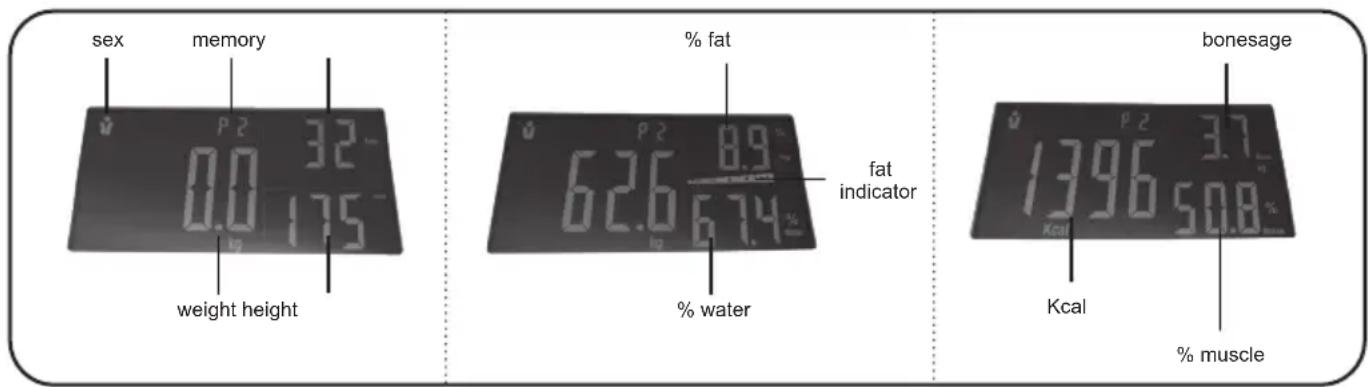
Weight and height units
The scale features a unit switch - "UNIT" - situated at the bottom of the scale which can be used to change the units between kg - lb - st. Weight units can also be changed in the application.
$$ \mathrm{kg} = \text { kilogram } 1 \mathrm{kg} = 2. 2 \mathrm{lb} $$
$$ \mathrm{lb} = \text { pound (British weight unit) } 1 \mathrm{lb} = 0. 4 5 4 \mathrm{kg} $$
$$ \mathrm{st} = \text { stone (American weight unit) } 1 \mathrm{st} = 6, 3 5 6 \mathrm{kg} $$
$$ \text { Inch } = \text { inches } 1 \ln = 2, 5 4 \mathrm{cm} $$
Replacing batteries
Open the battery cover on the bottom of the scale. Insert a battery with the right polarity and close the cover. Use AAA batteries (4 pcs) for this appliance. If you are not using the appliance for some time, take the batteries out!
Notes
- Do not combine various types of batteries. Do not even combine used and new batteries together.
- Batteries not intended for this purpose must not be charged.
- Remove the batteries if you will not be using the appliance for a long time.
- The supply terminals must not be short-circuited.
IV. INSTRUCTIONS FOR USE
Your scale is fine electronic equipment. One of the things that are most difficult to weigh is human body as it is always in motion. If you want to obtain reliable results, always try to step with your feet at the same place on the scale and stand still. If possible, weigh yourself at the same time of a day (preferably in the morning) to obtain comparable results. Remember that excessive clothes can increase your weight as well as eating and drinking before weighing. Short-term weight fluctuation is generally attributed to loss of liquids.
1) STANDARD WEIGHT MEASUREMENT
Without the use of the VITAL BODY PLUS app in the Smart device, the scale can provide basic weight measurements as any other scale.
a) Gently step on the scale, then the scale will be automatically turned on. Stand evenly on the scale without moving and wait until your weight shown on display.
b) Switch on the scale by tapping on the board of the scale with your foot and wait till "0.0" appears on the display. When "0.0" appears on the scale, step on them and stand still.
- After a moment, the measured weight flashes and the value remains displayed for 7 seconds. Then the scale are switched off automatically.
Note
- The scale is switched on automatically if you do not step on it within approx. 30 seconds after „0.0“ is displayed.
- We recommend using the scale from about 8 kg of the subject.
2) WEIGHT MEASUREMENT WITH AN ANALYSIS AND USE OF THE VITAL APP
2.1 First steps
Before first use, download the VITAL BODY PLUS application to your Smart device for free. You can find the application in the Apple Store or Google Play database, or to speed up the process, you can use the following QR codes:


natural_image
Vital Body Plus logo with abstract green and blue design (no text or symbols beyond the logo)Note
- If the QR code is not active, find the application manually by name.
- For english version of the application, you must have English as a system language in the smart device.
2.2 Account registration
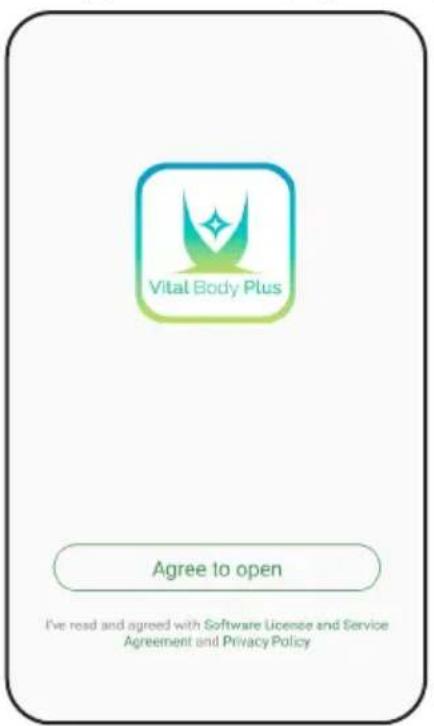
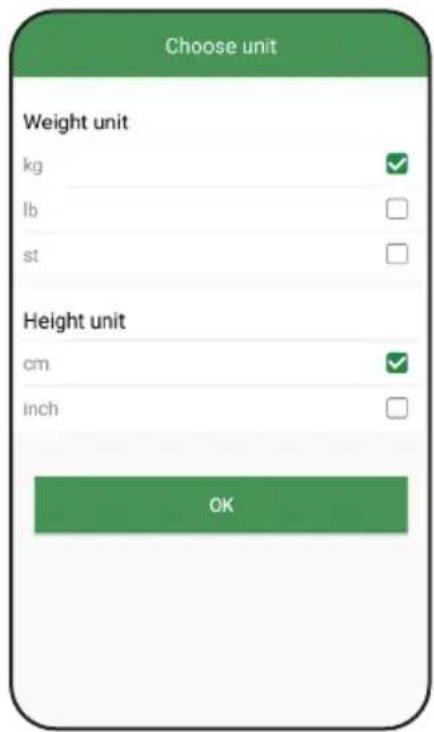
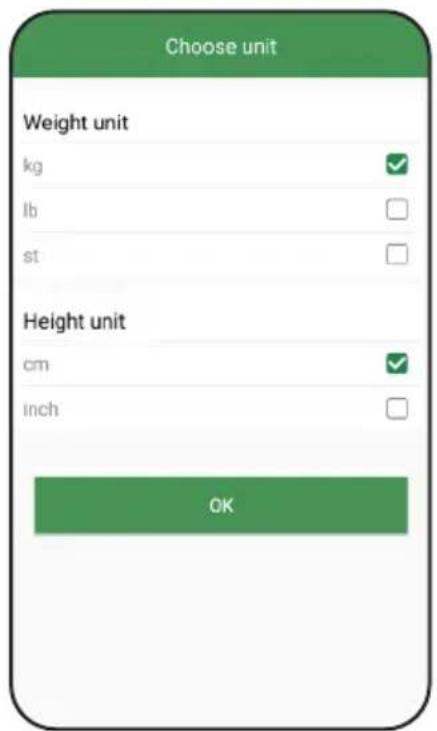
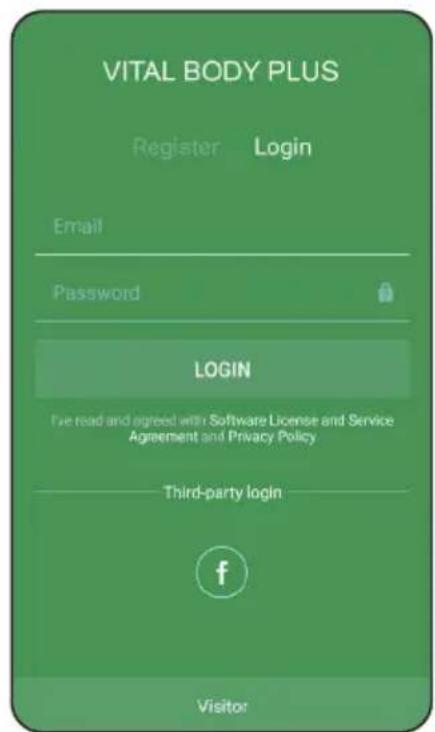
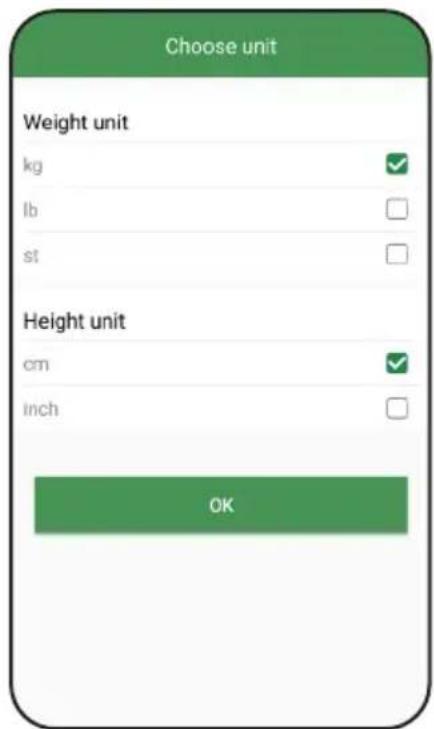
Turn on VITAL BODY PLUS. The first time you run it, the application will require you to agree to the license terms and privacy policy or ask for consent to receive notifications (I.). You must confirm your agreement with the license terms and conditions by clicking on the consent icon to continue. Then the preferred weight and height units will appear (II.). Select your selection and confirm (you can change it later).
(1.)
(II.)
(III.)
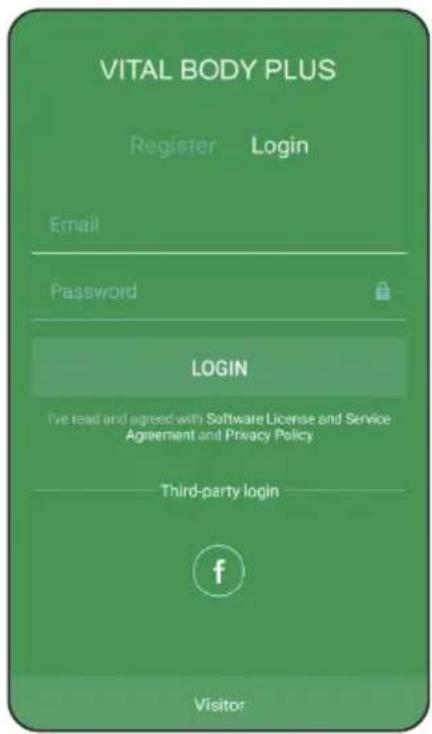
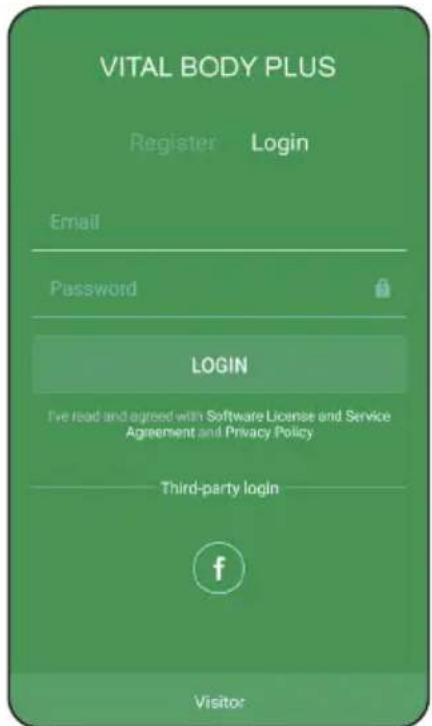
You will then be offered a login screen (III.), where it will be possible to:
a) Enter the application in mode "guest" – it works in a limited mode where you can only enter your height, age and gender. However, the scale will analyse your body, but all other functions (setting options including saving and sharing results) will be inaccessible.
b) Register a new account – use the email address and password to create an account to use the app and weight. Under this address and password, you can access your data and weighing history from any compatible device. Therefore, write down the input data and save it.
c) Log in to the existing account
d) Sign in with a social network account (Facebook)
Remarks
- If you are using VPN on your phone, please turn it off to sign in and register. This will avoid any problems with logging into the server. Some other features of the application may be affected by using of VPN. If you have a problem with them, disable it to work with the application.
- If you lose your password, you can click the lock icon with a question mark.
2.3 First setting up of your profile and access
After the first login to the account, you need to set the default user profile and / or allow the required accesses / permissions. The points below can be requested / displayed in different order depending on the device and its operating system.
- Personal profile set up – create a primary profile where you can set a basic profile physical characteristics. You can also use the option to insert / create your own photo by clicking the camera icon. At the same time, choose the weight target you want to achieve. Confirm your entry
- Enable location access – some devices (especially higher versions of Android) can access the device's location, enable it, and activate your phone settings.
- Enable camera and storage access – for the proper function of all application components it is necessary to grant this permission.
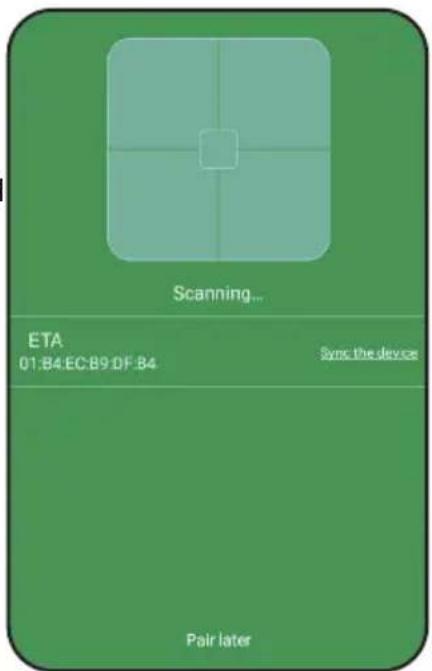
- Bluetooth activation - If you do not have Bluetooth enabled, the app can now prompt you to do so. (IV.)
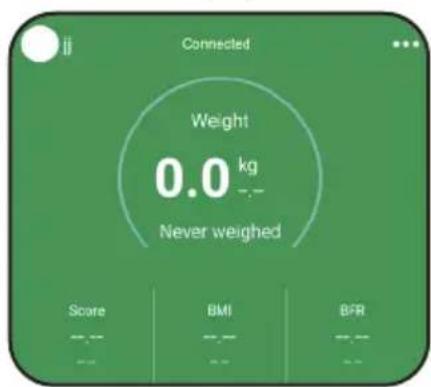
- Scale pairing – VITAL BODY PLUS features an advanced pairing system. The app itself scans the scales within range of the smart device. If everything is started correctly and set, the weight name will appear (IV.). Then click on the searched name field to pair the device. If you do not want to pair your device for any reason, click „pair later“.
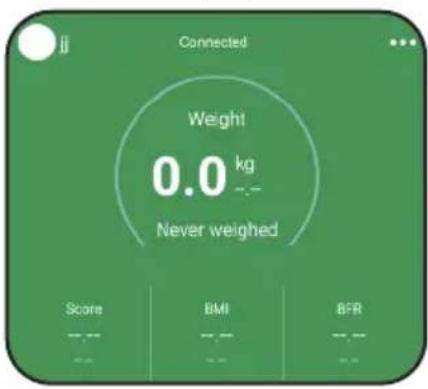
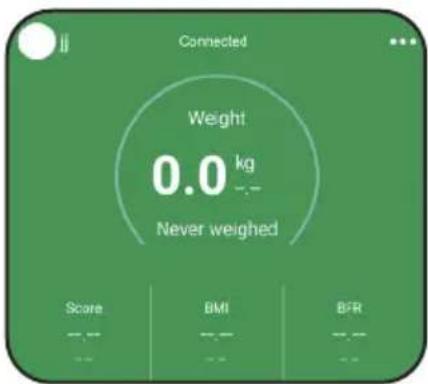
The application can find and pair the scale even if it is nearby and off. If paired successfully, the top left of the home screen displays information that the device is connected (V.).
(V.)
- Synchronization of
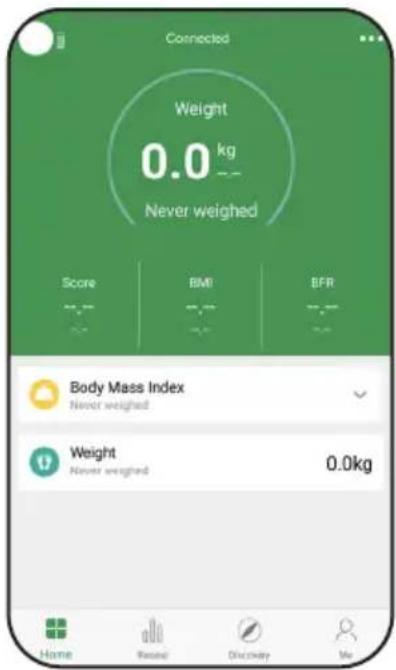
third-party applications – the application will offer you the ability to connect VITAL BODY PLUS to other applications depending on your operating system. This is either Health Kit for Apple or Google Fit for Androids. In addition, you can also sync with Fitbit. You can confirm or skip synchronization and return to it later in the menu. After all the above steps, the application is ready for operation. The Home screen appears VI.).
2.4 Scale initialization (calibration)
This process needs to be repeated whenever you move the scale.
a) Step up on the centre of the weighing scale which turns it on and then step down.
b) "0.0" will appear.
c) Wait till it switches off automatically. The scale is now ready for an analysis.
If the devices do not communicate
From time to time, pairing with the Smart device might fail. If this is the case, try one of the following steps, or a combination thereof:
1) Place the devices as close as possible to each other (approx. 50 - 100 cm)
2) Make sure that the system is not disturbed by another el. appliance! (Eg. remote control TV, etc.)!
3) Make sure that the scale is not paired with another device in the vicinity. Before pairing with another device, make sure to cancel the pairing with the current device.
4) Restart the scale (as per instructions in section 2.4 "Scale initialization").
5) Restart the VITAL BODY PLUS application, or switch it off and on in the system.
6) Restart the entire Smart device.
7) Try the application with another device.
- For more advice and support:
directly into the app in the question and answer section (FAQ)
Note:
- Make sure that you have Bluetooth activated in your Smart device with permanent visibility for other devices.
- When you have your device in a case, try to remove it from the case.
- If you are unable to pair the application even after trying all the tips in the manual and the application itself, and the scale will not respond to any other compatible Smart device, claim the weighing scale.
2.5 Weight measurement and data analysis
a) Turn on the VITAL BODY PLUS application (or activate the Bluetooth function at the same time).
b) Stand bare-footed in the middle of the weighting platform. Stand still so that the scale can accurately measure your characteristics.
c) The scale will start measuring your body weight; once the displayed value stabilises, the fat indicator will shortly appear on the display, and the scale and application will show the measurement results.
d) Step aside; the weight measurement will remain on the screen for a while and then disappear automatically.
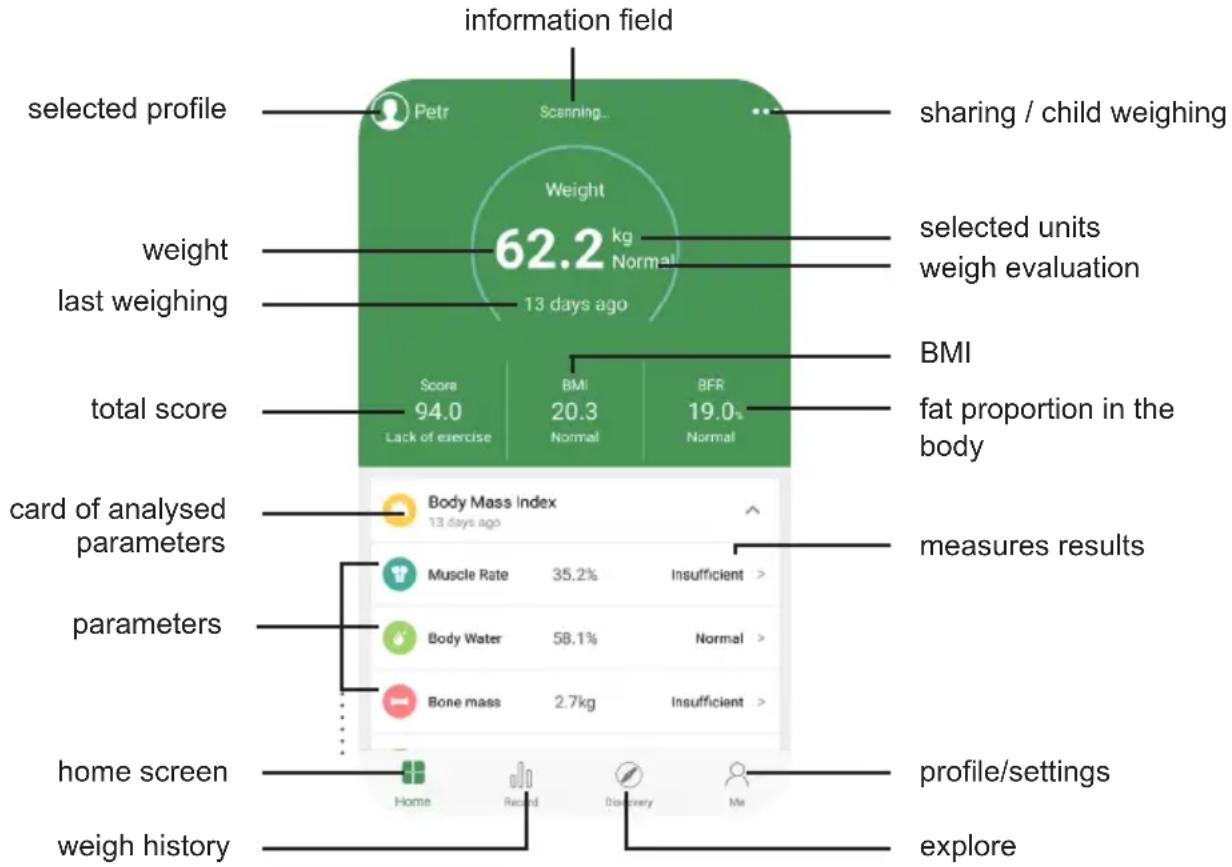
e) The results are automatically saved in the application under your selected profile. You can view the results directly in the application, including a graphical evaluation of the measured values.
other
| Metric | Value | | --- | --- | | Weight | 62.2 kg | | Score | 94.0 | | BMI | 20.3 | | BFR | 19.0 | | Body Mass Index | 13 days ago | | Muscle Rate | 35.2% | | Insufficient > | | Body Water | 58.1% | | Normal > | | Bone mass | 2.7kg | | Insufficient > | | home screen | Home | | Reelad | Record | | Discovery | Me | | profile/settings | explore | | sharing / child weighing | shared / child weighing | | selected units weigh evaluation | selected units weigh evaluation | | total score | lack of exercise | | fat proportion in the body | fat proportion in the body |2.6 Work with the VITAL BODY PLUS application
The basis for orientation in the application is the bottom bar: Home - History - Information - Settings
1) Home - Home screen with basic interface for weighing and viewing analysis results. It allows you to switch profiles you created, as well as a quick transition to sharing results, or a baby weighing feature.
2) History - Provides graphical representation of results over time. It is possible to preview for individual days, weeks, months or years. After clicking on the icon of the measured quantity (water, fat, muscles ...) its graphical trend will be shown for the selected time interval. In the upper right corner, you can see the option to change the chart type - columns and curves, or the result sharing feature, or results sharing.
Note
- The results in this section will always appear for the currently selected user.
- Each weighing is automatically stored in the measurement history. If your weight is different than usual, the app will notify you or allow you to switch your account to another person, or you can cancel the result by pressing the cross in the top left corner.
- You can delete weighing in the weighing history by clicking on that column (curve point). All you must do is to swipe your finger to the left to reveal the deletion possibility.
3) Information – contains information about the weighing and some parameters.
4) Settings – basic item for setting various parameters and properties of the application.
a) Profile – displays the currently selected user profile. Click on it to change it.
b) User administration – selection and addition of users.
c) Weighing reminder – possibility to set weighing reminder.
d) Units – weight and height units can be changed.
e) My Devices – Here you can add or unpair and re-pair the scale in case of trouble.
f) Languages – select your preferred application language.
g) Questions and Answers – Questions that may interest you in terms of control applications, measurement results, or troubleshooting.
h) Google Fit / Health kit – Used to synchronize with third-party account applications. If you use these applications, you can share selected data with them from VITAL BODY PLUS. Google Fit from the ETA application gets weight data, Health kit up to 5 body parameters.
I) Fitbit – if you own some Fitbit devices and use their apps, you can share selected data (3 body parameters) with it from VITAL BODY PLUS.
J) Logout – allows you to unsubscribe an active account user.
Remark
- Working with the application is intuitive and it won't take you long to control it. Experiment, discover and enjoy the possibilities.
V. TROUBLESHOOTING OF POSSIBLE PROBLEMS
If you have problems with weight:
- Check whether the battery is inserted properly.
- Check whether the scale is on a flat floor and they do not touch the wall.
- If nothing appears on the scale when you want to switch them on by tapping on them or if „Lo“ appears only, replace the batteries.
- If „O - Ld“ appears on the display, the scale was overloaded.
- If unusual signs are displayed, remove the insert the battery again.
- If signs appear, such as if the display is flashing or if there is a faulty sign, try to move the scale away from the influence of a source of interference or ensure switching off the source for the time of using the scale.
VI. STORING
After using the scale, put it into the horizontal position (not vertically), out of reach of children and incapacitated people (see par. I. SAFETY WARNINGS).
VII. MAINTENANCE
Do not use coarse and aggressive cleaning agents (e.g. sharp objects, scrapers, diluting agents or other solvents). Clean the board by wiping with a soft wet cloth.
Make sure that water does not get inside the appliance.
More extensive maintenance or maintenance requiring intervention in the inner parts of the appliance must be carried out by a professional service! Failure to comply with the instructions of the manufacturer will lead to expiration of the right to guarantee repair!
VIII. ENVIRONMENTAL PROTECTION

If the dimensions allow, there are labels of materials used for production of packing, components and accessories as well as their recycling on all parts. The symbols specified on the product or in the accompanying documentation mean that the used electrical or electronic products must not be disposed of together with municipal waste. For proper disposal, hand them over at special collection places where they will be accepted free of charge. Suitable disposal of the product can help to maintain valuable natural resources and to prevent possible negative impacts on the environment and human health, which could be the possible consequences of improper waste disposal. Ask for more details at the local authorities or at a collection site. Fines can be imposed for improper disposal of this type of waste in agreement with the national regulations.
Remove a discharged battery and dispose of it in a suitable and safe way through the special collection networks. Never dispose of the battery by burning!
IX. TECHNICAL DATA
Weighing range max.: 180 kg / 396 lb / 28 st
Discrimination: 0.1 kg
Power supply: 4 x Batteries 1.5 V AAA (included)
Net weight of device: 1.9 kg
Size of the product (mm): 320 x 320 x 25
Protection class of the appliance: III.
Frequency range: 2402 - 2480 MHz
Output power (max): 0 dBm
Bluetooth version: 4.2
Compatible operating systems: Android 4.4; iPhone4S a iOS 8.0
(and higher)
Maximum communication reach: 10 m
(open space without any obstacles and interferences)
Hereby, ETA a.s. declares that the radio equipment type ETA7780 is in compliance with Directive 2014/53/EU. The full text of the EU declaration of conformity is available at the following internet address: http://eta.cz/declaration-of-conformity
The manufacturer reserves the right to change the technical specifications for the respective model. The manufacturer reserves the right to change/update the VITAL BODY PLUS application without prior notice. Due to the character of such changes/updates, some information or procedures in this manual might become obsolete or might be missing.
HOUSEHOLD USE ONLY. DO NOT IMMERSE IN WATER OR OTHER LIQUIDS.
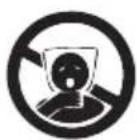

TO AVOID DANGER OF SUFFOCATION, KEEP THIS PLASTIC BAG AWAY FROM BABIES AND CHILDREN. DO NOT USE THIS BAG IN CRIBS, BEDS, CARRIAGES OR PLAYPENS. THIS BAG IS NOT A TOY.
The symbol indicates a WARNING.
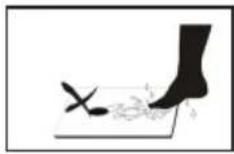
Do not step onto the scale with wet feet or on wet surface of the scale, there is a risk of slipping.
natural_image
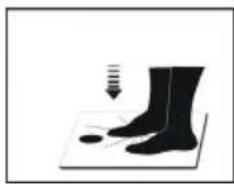
Silhouette of a human foot pressing down on a mat with a circular mark, no text or symbols presentAUTO STEP ON – just step on the scale and stand still, the scale will automatically turn ON and start taking measurements.

natural_image
Vital Body Plus logo with abstract green gradient design and star-like symbol (no text or symbols beyond the logo itself)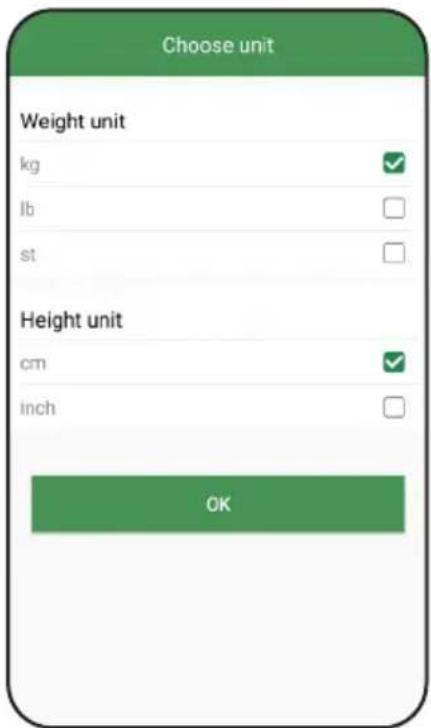
(V.)
natural_image
Illustration of a pair of boots on a mat with a downward arrow indicating compression or force (no text or symbols)
natural_image
Silhouette of a pair of boots on a mat with a downward arrow indicating compression or force (no text or symbols)
natural_image
Vital Body Plus logo with abstract green and blue design (no text or symbols beyond the logo itself)Anmerkungen

(V.)
natural_image
Silhouette of a pair of boots on a mat with a falling object, no text or symbols present- 2) VÁŽENÍ S ANALÝZOU A S POUŽITÍM VITAL APLIKACE
- První kroky
- Poznámky
- 2) VÁŽENIE S ANALÝZOU A S POUŽITÍM VITAL APLIKÁCIE
- Prvé kroky
- Analytic bathroom scale with a Smart application
- eta 7780
- INSTRUCTIONS FOR USE
- SAFETY WARNING
- Important notes:
- Wireless connectivity and compatibility
- Remark
- GENERAL INFORMATION
- Features of VITAL BODY PLUS application
- PREPARATION FOR USE
- Weight and height units
- Replacing batteries
- Notes
- INSTRUCTIONS FOR USE
- 1) STANDARD WEIGHT MEASUREMENT
- Note
- 2) WEIGHT MEASUREMENT WITH AN ANALYSIS AND USE OF THE VITAL APP
- First steps
- Account registration
- You will then be offered a login screen (III.), where it will be possible to:
- Remarks
- First setting up of your profile and access
- - Synchronization of
- Scale initialization (calibration)
- If the devices do not communicate
- - For more advice and support:
- Note:
- Weight measurement and data analysis
- Work with the VITAL BODY PLUS application
- TROUBLESHOOTING OF POSSIBLE PROBLEMS
- STORING
- MAINTENANCE
- ENVIRONMENTAL PROTECTION
- TECHNICAL DATA
- Anmerkungen
Brand : Eta
Model : Vital Trainer 7780 90000
Category : Scale