
MTV6925WH - Microwaves Concept - Free user manual and instructions
Find the device manual for free MTV6925WH Concept in PDF.


| Product Type | Microwave Oven |
| Brand | Concept |
| Model | MTV6925WH |
| Capacity | 20 L |
| Power Output | 800 W |
| Voltage | 230 V, 50 Hz |
| Frequency | 2450 MHz |
| Dimensions (H x W x D) | 260 x 455 x 330 mm |
| Weight | 11 kg |
| Control Type | Touch + Dial |
| Display | LED Digital |
| Functions | Defrost, Auto Cook, Timer, Clock |
| Turntable | Yes, 270 mm diameter |
| Interior Light | Yes |
| Safety Features | Child Lock, Overheat Protection |
| Cleaning | Easy-clean interior coating |
| Spare Parts Available | Turntable, Glass Plate, Fuse |
| Warranty | 2 Years |
Frequently Asked Questions - MTV6925WH Concept
User questions about MTV6925WH Concept
0 question about this device. Answer the ones you know or ask your own.
Ask a new question about this device
Download the instructions for your Microwaves in PDF format for free! Find your manual MTV6925WH - Concept and take your electronic device back in hand. On this page are published all the documents necessary for the use of your device. MTV6925WH by Concept.
USER MANUAL MTV6925WH Concept
Built-in microwave oven

text_image
12:00 Main Comforters Weight Time Driven START Stop Timer End Time Tim STOP TimerMTV 6925WH | MTV 6925BC
CZ SK PL
EN
concept
PodĚKoVáNí
natural_image
Pure mechanical assembly diagram without any text, numbers, or symbolsObr. 2
MoNTáŽ
natural_image
Symbol of a trash bin crossed with no text or labels, accompanied by a black rectangular block below (no readable text or symbols)text_image
1 2 3 4 5 START START/Start/Start Finish/Finish/End Finish/Finish/End STOP/Stop 6 8 ango- draneInštalácia
START/+30Sec./Confirm.
natural_image
Pure mechanical assembly diagram without any text, numbers, or symbolsObr. 2
MoNTáŽ
natural_image
Symbol of a trash bin crossed with a diagonal line, no text or labels presentnatural_image
Pure mechanical assembly diagram without any text, numbers, or symbolsRys. 2
MoNTAZ
natural_image
Symbol of a trash bin crossed out by two crossed lines, with no text or labels present.Thank you for purchasing a Concept product. We hope you will be satisfied with our product throughout its service life.
Please study the entire Operating Manual carefully before you start using the product. Keep the manual in a safe place for future reference. Make sure other people using the product are familiar with these instructions.
| Technical parameters | |
| Voltage 230 V ~ 50 Hz | |
| Power input 1450 W | |
| Microwave power 900 W | |
| Microwave frequency 2450 MHz | |
| Grill power 1000 W | |
| External dimensions 595 mm (w) × | 400 mm (h) × 388 mm (d) |
| Internal dimensions 328 mm (w) × | 206 mm (h) × 368 mm (d) |
| Internal capacity of the oven 25 l | |
| Tray diameter 315 mm | |
| Weight 18,6 kg | |
| Noise level < 62 dB(A) | |
IMPoRTANT SAFETY PRECAUTI oNS:
• Use the unit only as described in this operating manual.
- This appliance is intended to be used in household and similar applications such as: staff kitchen areas in shops, offices and other working environments; by clients in hotels, motels and other residential type environments; farm houses; bed and breakfast type environments.
- This appliance can be used by children aged from 8 years and above and persons with reduced physical, sensory or mental capabilities or lack of experience and knowledge if they have been given supervision or instruction concerning use of the appliance in a safe way and understand the hazards involved.
• Children shall not play with the appliance.
- Cleaning and user maintenance stall not be made by children unless they are older than 8 and supervised.
- Keep the appliance and its cord out of reach of children less than 8 years.
- WARNING: The appliance and its accessible parts become hot during use. Care should be taken to avoid touching heating elements. Children less than 8 years of age shall be kept away unless continuously supervised. surface of a storage cabinet can get hot.
- Remove all the covering and marketing materials from the unit before the first use.
- Make sure the mains voltage matches the value marked on the rating plate.
- Do not leave the unit unattended during operation.
- Make sure to place the unit on a stable heat-resistant surface, out of the reach of other heat sources. This surface shall have a sufficient load capacity to hold the unit with its contents.
- Do not cover the unit's openings. There is a risk of overheating.
- Do not remove the feet.
- Only use dishes designed for microwave ovens (non-metal, no metal prints or decorations). Plastic containers or packages can become heat-deformed or ignite, so watch them during preparation.
• Do not store anything inside the unit. - Never touch the hot surface. Use the handles and buttons.
• Use potholders to handle hot accessories. - Follow the building-in instructions for the unit. Make sure there is a safe distance between the unit and flammable materials, such as furniture, curtains, lace, blankets, paper, clothing etc.!
- Keep the unit clean. Do not let any objects enter the unit through the grille. Contaminants may short out the unit, causing dam-age or fire.
- Do not put oversized food or metal objects inside the oven.
• These could cause a fire. - Never pull the cord to disconnect the plug from the wall outlet; hold the plug instead.
-
The appliance is not intended for and should not be accessible to children or people with reduced capabilities.
-
Persons with limited movement capacity, reduced sensory perception, insufficient mental capacity or those who are unaware of the proper handling should use the product only under the supervision of a responsible, aware person.
• Take extra care when using the unit near children.
• Do not use the appliance as a toy.
• Make sure the power cord does not hang over the working area, to prevent children from reaching it. - The stovetop is intended for interior use only; do not expose it to moisture. Otherwise, a risk of electrical shock may occur.
• Use manufacturer-recommended accessories only.
• Never use the appliance if the supply cord or plug is damaged. - Immediately refer to an authorised service centre for repair.
• Never pull the supply cord or use it to carry the unit. - Keep the stovetop away from any other heat sources such as radiators, ovens etc. Do not expose the unit to direct sunlight or moisture.
• Never operate the appliance with wet hands. - Turn off the unit and disconnect the plug from the mains outlet in case of any failure.
- Do not touch the moving parts during operation of the unit.
- The appliance is intended for domestic use only, not for commercial use.
• The unit is designed solely for cooking, heating or defrosting food. - Do not immerse the power cord, plug, or appliance in water or any other liquid.
- Check the appliance and power cord for damage regularly.
• Never switch on a damaged appliance. - Turn the unit off and let it cool down for at least 30 minutes before cleaning and after use.
- WARNING! A large volume of steam may be released when you open the door. Be careful. There is a risk of scalding!
-
If you see smoke, switch the unit off and disconnect the cable from the socket. Leave the door closed to prevent the possible spreading of fire.
-
Do not use the unit without food in it. The appliance could be damaged.
- When preparing or heating food or drinks for babies, mix it well and check the temperature to prevent scalding.
- Microwave heating can cause delayed boiling; be careful when handling heated liquids.
- Do not use the unit to heat eggs in the shell or whole boiled eggs, as these may explode even after heating is finished.
- Pierce the skin of food (hot dogs, potatoes, fruit etc.) several times before heating.
- Do not use the unit to fry food. Hot oil can damage parts of the unit, or cause skin burns.
- Do not use the unit if the door or packing is damaged. Have the unit repaired in an authorised service centre.
- For the purpose of protection from microwave radiation no unauthorised person is allowed to perform any servicing or repair, e.g. removing the cover that protects against microwave radiation.
- Do not use the unit for preparing or heating food in sealed vessels, as they may explode.
- Do not try to repair the appliance; instead, refer to an authorised service centre.
Failure to follow the manufacturer's instructions may lead to refusal of warranty repair.
GROUNDING INSTRUCTIONS
This appliance has to be grounded. It is equipped with a supply cable with a grounding conductor and grounding plug. It must be connected to a socket that is correctly installed and grounded. In the case of a short circuit this grounding reduces the risk of electric shock. It is recommended to connect the unit to a separate electric circuit. The use of high voltage is dangerous, and any damage to the oven can cause a fire or other emergency.
WARNING!
Incorrect use of the protective conductor can cause the risk of electric shock.
Note: If you have any questions concerning the grounding or electrical connection, contact a qualified electrician or servicing technician. Neither the manufacturer nor the distributor is responsible for injury or damage caused by incorrect electric connection. The conductors in the supply cable are colored as follows:
Green and yellow = ground
Blue = neutral
Brown = live
RADIO INTERFERENCE
Operation of the unit can cause interference with your radio, TV or similar appliances. This can be reduced or eliminated by taking the following measures:
- Clean the door and sealing surfaces of the oven.
- Readjust the receiver antenna of the radio or TV.
- Change the position of the unit in relation to the receiver.
- Place the unit further from the receiver.
- Plug the unit in a different socket to make sure other appliances are connected to different circuits.
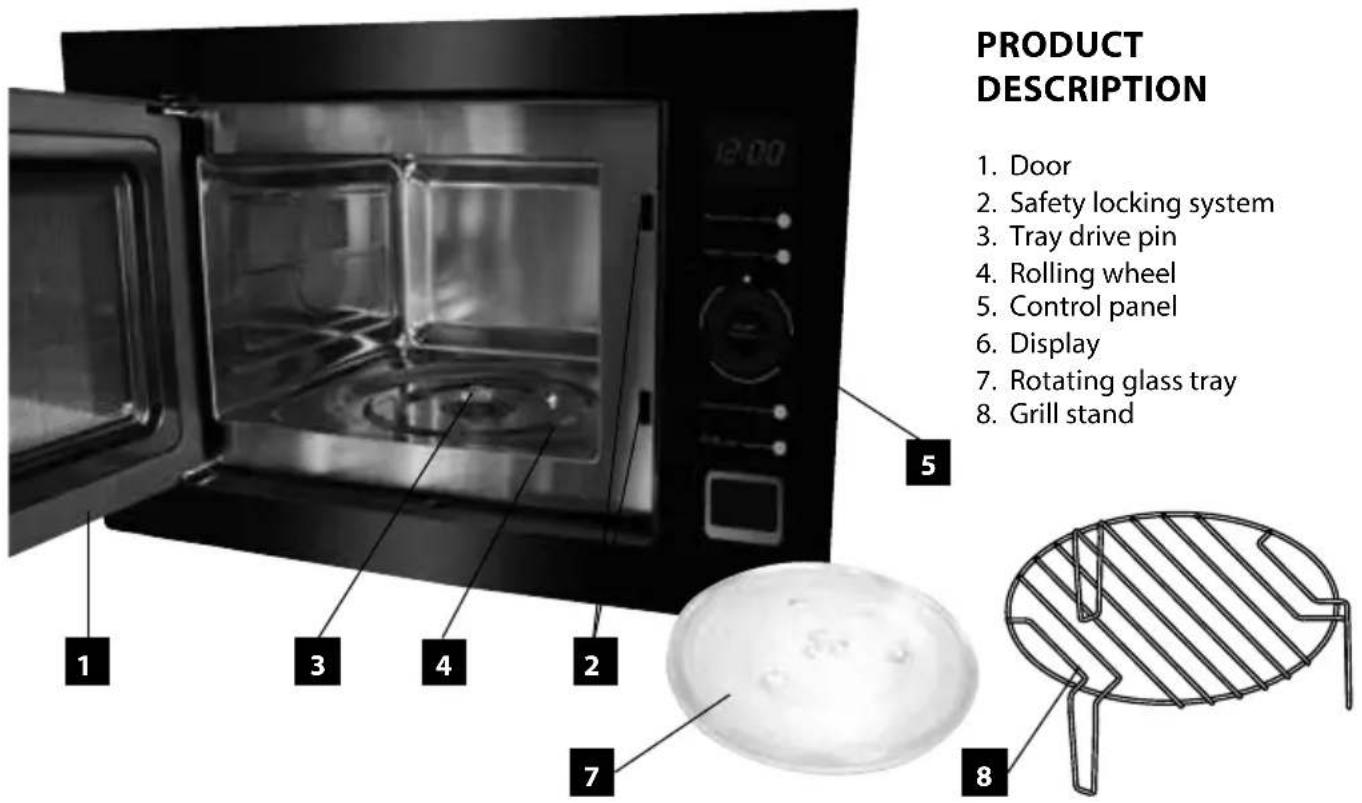
text_image
PRODUCT DESCRIPTION 1. Door 2. Safety locking system 3. Tray drive pin 4. Rolling wheel 5. Control panel 6. Display 7. Rotating glass tray 8. Grill standDESCRIPTION OF THE CONTROL PANEL
- Display
- Cooking type button (Micro./Grill/Combi.)
- Defrost button (Weight/Time Defrost)
- Automatic preset selector
- Clock and countdown setting button (Kitchen Timer/Clock)
- Button for turning-off and resetting (STOP/Clear)
- Button for turning-on and confirmation of selection (START/+30Sec./Confirm)
- Button to open the door
OPERATING INSTRUCTIONS
Installation
- Remove all the covering and marketing materials from the unit before the first use. Do not remove the plastic foil on the inner side of the door.
- Check the appliance and power cord for damage regularly. Never switch on a damaged appliance. There can be none of the following: door askew or damaged, door sealing damaged, broken or damaged hinges or damaged safety closing system.
- Make sure to place the unit on a stable heat-resistant surface, out of the reach of other heat sources. This surface shall have a sufficient load capacity to hold the unit with its contents.
- Follow the installation instructions for the unit. Make sure there is a safe distance between the unit and flammable materials, such as furniture, curtains, lace, blankets, paper, clothing etc.!
- Do not switch the unit on without a properly mounted rolling wheel and rotating glass tray.
- The supply cable plug has to be easily accessible so that it can be disconnected quickly, if need be.
Caution
Prior to using a new unit, wipe the surface and the inside with a wet cloth for hygienic reasons. Wash all the removable parts in warm water with detergent.
WARNING!
Open the door slowly and carefully. When opening the door during operation, or after preparation, a large volume of steam is released, and condensed hot water may drip from the lower door edge. There is a risk of scalding.
Microwave oven cooking principles
Place the food evenly. Place thicker areas at the edges.
Watch the cooking time. Cook for the shortest of the prescribed times, and if necessary, for longer. Over-cooked food can ignite.
Cover the food when cooking. Covers prevent spattering and enable more even heating.
Turn around pieces of food such as chicken or hamburger when cooking. Big pieces, such as roast meat, must be turned more than once.
Move meatballs and similar food from the edge towards the centre and vice versa halfway through the cooking time.
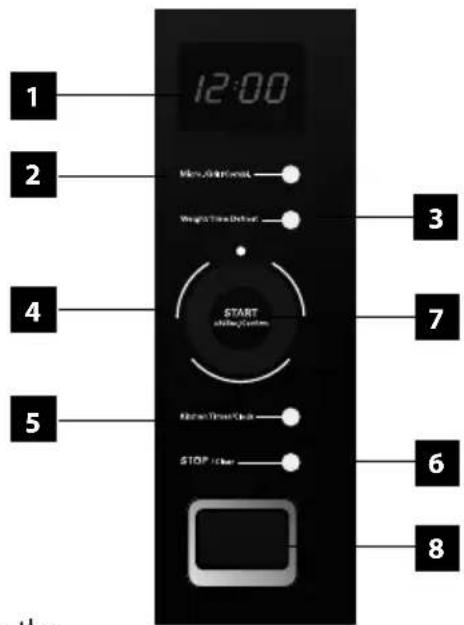
text_image
1 2 3 4 5 START @Play System 6 7 8Selection of dishes
Ideal dishes for microwave ovens are transparent, for microwaves. They allow the energy to penetrate the cover and food. Microwaves can't penetrate metal, which is why metal or metal-decorated dishes should not be used.
Do not use products made of recycled paper in the microwave oven, as these can contain small metal parts that may cause sparks or fire.
We recommend circular or oval dishes rather than square or rectangular ones, as the food in the corners tends to be overcooked.
Overview of certain dishes
Dish type Microwave oven cooking
Heat-resistant glass Yes
Glass not resistant to heat No
Heat-resistant ceramics Yes
Plastic plate suitable for microwave ovens Yes
Kitchen paper Yes
Metal plate No
Metal tray No
Aluminium foil and MT foil packs No
Wooden dishes No
Daytime setting
- Push Kitchen Timer/Clock button (5) twice.
- Turn the selector (4) to set the current hour.
- Push Kitchen Timer/Clock button (5)
- Turn the selector (4) to set the current minutes.
- Push the Kitchen Timer/Clock button (5) to confirm selection. The ":" starts blinking.
Microwave cooking function
- Place the food in the oven and close the door.
- Push button (2) Micro./Grill/Combi.. P100 will be displayed.
- Press the Micro./Grill/Combi.. button (2) repeatedly or turn the selector (4) to set the required power within the range from 100% to 10% (P100, P80, P50, P30, P10).
- Press the START/+30Sec./Confirm button (7) to confirm.
- Turn the selector (4) to set the required time of cooking from 5 seconds to 95 minutes.
- Press the START/+30Sec./Confirm button (7) to turn on the unit.
- If you need to interrupt cooking, e.g. to stir the food, press the STOP/Clear button (6) and open the door. After closing the door press the START/+30Sec./Confirm button (7) to resume cooking.
Note: If you open the door while cooking, the cooking will interrupt automatically. After closing the door press the START/+30Sec./Confirm button (7) to resume cooking.
If you need to extend the time while cooking, press the START/+30Sec./Confirm button (7) as needed.
If you need to stop the current program before the set time has elapsed, press the STOP/Clear button (6).
By pushing the button again, you will reset the program and the time will be displayed.
- You may extend the cooking time by pressing START/+30Sec./Confirm button (7) – each push of the button adds 30 seconds.
- Once the cooking is finished, the appliance turns off and gives an acoustic signal (5 short beeps).
- Open the door and remove the food.
WARNING!
If the food is taken out from the oven before the set cooking time elapses, or if you do not use the oven, always clear the set program.
Grill or Combined Cooking function
For this function use the grill stand and lay the food to be grilled on it.
- Place the food in the oven and close the door.
- Push button (2) Micro./Grill/Combi.. and P100 is displayed.
| Function Microwave cooking Grill | |
| G 0% 100% | |
| C-1 55% 45% | |
| C-2 36% 64% |
-
Press the Micro./Grill/Combi.. button (2) repeatedly or turn the selector (4) to set the required function: G, C-1 or C-2.
-
Press the START/+30Sec./Confirm button (7) to confirm.
-
Turn the TIMER/WEIGHT/AUTO MENU selector (4) to set the required time of cooking from 5 seconds to 95 minutes.
-
Press the START/+30Sec./Confirm button (7) to turn on the unit.
-
About midway through the set time you will hear an acoustic signal (2 short beeps). Applies to the G function only. Press the STOP/Clear button (6) and open the door. Turn the food over to make it roast evenly from both sides. After closing the door press the START/+30Sec./Confirm button (7) to resume cooking.
Note: If you need to extend the time while cooking, press the START/+30Sec./Confirm button (7) as needed (each push of the button adds 30 seconds).
If you need to stop the current program before the set time has elapsed, press the STOP/Clear button (6). By pushing the button again, you will reset the program and the time will be displayed.
-
Once the cooking is finished, the appliance turns off and gives an acoustic signal (5 short beeps).
-
Open the door and remove the food.
WARNING!
If the food is taken out of the oven before the set cooking time elapses, or if you are not using the oven, always clear the set program.
Fast ON function
Option A
- Place the food in the oven and close the door.
- Press the START/+30Sec./Confirm button (7) to turn on the unit for 30 seconds with 100% power.
- You may extend the cooking time up to 95 minutes by pressing START/+30Sec./Confirm button (7) repeatedly – each push of the button adds 30 seconds.
- Once the cooking is finished, the appliance turns off and gives an acoustic signal (5 short beeps).
- Open the door and remove the food.
Option B
-
Place the food in the oven and close the door.
-
Turn the selector (4) counter-clockwise to initiate the time setting function and then turn clockwise or counter-clockwise to select the required cooking time.
- Press the START/+30Sec./Confirm button (7) to turn on the unit with 100% power.
- Once the cooking is finished, the appliance turns off and gives an acoustic signal (5 short beeps).
- Open the door and remove the food.
defrost by weight function
- Place the food in the oven and close the door.
- Activate the defrost by weight function by pressing the Weight/Time Defrost button (3). The display reads dEF1.
- Turn the selector (4) to set the approximate weight of the food to be defrosted (100 - 2000 g).
- Press the START/+30Sec./Confirm button (7) to turn on the unit.
- Press the STOP/Clear button (6) and open the door approximately halfway through the defrosting time. Turn the food over to make sure it defrosts evenly. After closing the door press the START/+30Sec./Confirm button (7) to resume defrosting.
- Once the defrosting is over, the appliance turns off and gives an acoustic signal (5 short beeps).
- Open the door and remove the food.
defrost by time function
- Place the food in the oven and close the door.
- Press the button (3) twice to turn on the time defrosting function. dEF2 will be displayed.
- Turn the selector (4) to set the defrosting time from 5 seconds to 95 minutes.
- Press the START/+30Sec./Confirm button (7) to turn on the unit.
- Press the STOP/Clear button (6) and open the door approximately halfway through the defrosting time. Turn the food over to make sure it defrosts evenly. After closing the door press the START/+30Sec./Confirm button (7) to resume defrosting.
- Once the defrosting is over, the appliance turns off and gives an acoustic signal (5 short beeps).
- Open the door and remove the food
Multistage cooking function
Cooking certain types of food requires several stages (e.g. long, moderate cooking with a short, intensive finish, or defrost and subsequent cooking).
a) 2 phases of cooking
- Place the food in the oven and close the door.
- Push the Micro./Grill/Combi. button (2). P100 will be displayed.
- Turn the selector (4) to set the required power from 100% to 10% (P100, P80, P50, P30, P10).
- Press the START/+30Sec./Confirm button (7) to confirm.
- Turn the selector (4) to set the required time of cooking from 5 seconds to 95 minutes.
- Push the Micro./Grill/Combi. button (2). P100 will be displayed.
- Turn the selector (4) to set the required power from 100% to 10% (P100, P80, P50, P30, P10).
- Press the START/+30Sec./Confirm button (7) to confirm.
- Turn the selector (4) to set the required time of cooking from 5 seconds to 95 minutes.
- Press the START/+30Sec./Confirm button (7) to turn on the unit.
- If you need to interrupt cooking, e.g. to stir the food, press the STOP/Clear button (6) and open the door. After closing the door press the START/+30Sec./Confirm button (7) to resume cooking.
Note: If you need to extend the time while cooking, press the START/+30Sec./Confirm button (7) as needed (each push of the button adds 30 seconds)
If you need to stop the current program before the set time has elapsed, press the STOP/Clear button (6). By pushing the button again, you will reset the program and the time will be displayed.
- A beeping sound (1 beep) will sound at the start of the second stage of cooking.
- Once the cooking is finished, the appliance turns off and gives an acoustic signal (5 short beeps).
- Open the door and remove the food.
b) Defrosting + cooking
- Place the food in the oven and close the door.
- Press the Weight/Time Defrost button (3) twice to turn on the time defrosting function. dEF2 will be displayed.
- Turn the selector (4) to set the defrosting time from 5 seconds to 95 minutes.
- Push the Micro./Grill/Combi. button (2). P100 will be displayed.
- Turn the selector (4) to set the required power from 100% to 10% (P100, P80, P50, P30, P10).
- Press the START/+30Sec./Confirm button (7) to confirm.
- Turn the TIMER/WEIGHT/AUTO MENU selector (4) to set the required time of cooking from 5 seconds to 95 minutes.
- Press the START/+30Sec./Confirm button (7) to turn on the unit.
- Press the STOP/Clear button (6) and open the door approximately halfway through the defrosting time. Turn the food over to make sure it defrosts evenly. After closing the door press the START/+30Sec./Confirm button (7) to resume defrosting.
- If you need to interrupt cooking, e.g. to stir the food, press the STOP/Clear button (6) and open the door. After closing the door press the START/+30Sec./Confirm button (7) to resume cooking.
Note: If you need to extend the time while cooking, press the START/+30Sec./Confirm button (7) as needed (each push of the button adds 30 seconds)
If you need to stop the current program before the set time has elapsed, press the STOP/Clear button (6). By pushing the button again, you will reset the program and the time will be displayed.
- A beeping sound (1 beep) will sound at the start of the second stage of cooking.
- Once the cooking is over, the appliance turns off and gives an acoustic signal (5 short beeps).
- Open the door and remove the food.
Countdown function
- Push the Kitchen Timer/Clock button (5) once. The display reads 00:00
- Turn the selector (4) to set the time from 5 seconds to 95 minutes.
- Press the START/+30Sec./Confirm button (7) to start
- Once the time is over, an acoustic signal sounds (5 short beeps)
Preset programs
The unit offers a total of 8 preset programs.
| Selection Function | Weight Display reading | ||
| A-1 Pizza | preparing pizzas | 200g 200 | |
| 400g 400 | |||
| A-2 Meat | Cooking meat | 250g 250 | |
| 350g 350 | |||
| 450g 450 | |||
| Selection Function Weight Display reading | |||
| A-3 Vegetables | Cooking vegetables | 200 g 200 | |
| 300 g 300 | |||
| 400 g 400 | |||
| A-4 Pasta | Cooking pasta | 50 g (se 450 ml vody) 50 | |
| 100 g (s 800 ml vody) 100 | |||
| A-5 Potatoes | Cooking potatoes | 200 g 200 | |
| 400 g 400 | |||
| 600 g 600 | |||
| A-6 Fish | Cooking fish | 250 g 250 | |
| 350 g 350 | |||
| 450 g 450 | |||
| A-7 Beverage | hot beverage | 1 hrnek (120 ml) 1 | |
| 2 hrnky (240 ml) 2 | |||
| 3 hrnky (360 ml) 3 | |||
| A-8 Popcorn | Preparation popcorn | 50 g 50 | |
| 100 g 100 | |||
- Place the food in the oven and close the door.
- Turn the selector (4) clockwise to select the required program of cooking A-1 through A-8.
- Press the START/+30Sec./Confirm button (7) to confirm.
- Turn the selector (4) to set the approximate weight of the food to be cooked (see the table above).
- Press the START/+30Sec./Confirm button (7) to turn on the unit.
- Once the cooking is over, the appliance turns off automatically and gives an acoustic signal (5 short beeps).
- Open the door and remove the food.
Child lock
- Hold the STOP/Clear button (6) to activate the child lock feature. The control panel buttons are now blocked.
- De-activate the child lock by holding the STOP/Clear button (6) again.
CLEANING AND MAINTENANCE
Clean the unit after each use to prevent the accumulation of grease, burned-on remnants of food, and unpleasant smells.
Turn the unit off, unplug the power cord from the wall outlet, and let the unit cool before cleaning and after use.
Do not immerse the power cord, plug, or appliance in water or any other liquid.
Wash the replaceable parts in tepid water with detergent and rinse in clean water.
Clean the inner and outer surfaces and door sealing with a wet cloth. You can use a liquid cleaning agent. Do not use sponges, steel wool, abrasive cleaners or solvents (gasoline, thinners, etc.). You might damage the protective layer.
You can remove odours from the inside by pouring lemon juice and the skin from a lemon into a microwave bowl filled with water, and leaving the bowl for 5 minutes in the oven while operating. Dry the inside with a soft cloth afterwards.
If you need to replace the inner light bulb, contact the distributor.
If you do not keep the unit clean, the surfaces may be damaged, which may lead to a shorter service life and dangerous situations.
ASSEMBLY AND INSTALLATION
The unit is designed to be in-built in a kitchen set.
The supply cord plug has to be freely accessible even after the installation of the unit!
WARNING!
Install the unit at a maximum height of 85 cm.
The in-built box should not have a back side, for cooling and ventilation purposes.
Keep the minimum dimension of the ventilation hole in the back upper part in the whole width. If there is another box placed above the unit, the ventilation should be arranged for this as well. A so-called ventilation chimney will be created.
Dimensions of the box
Box dimensions for built-in version of the unit, see Fig. 1.
Mounting Accessories
1 pc Front mounting screw
1 pc Fixing plate
2 pcs Plate fixing screw
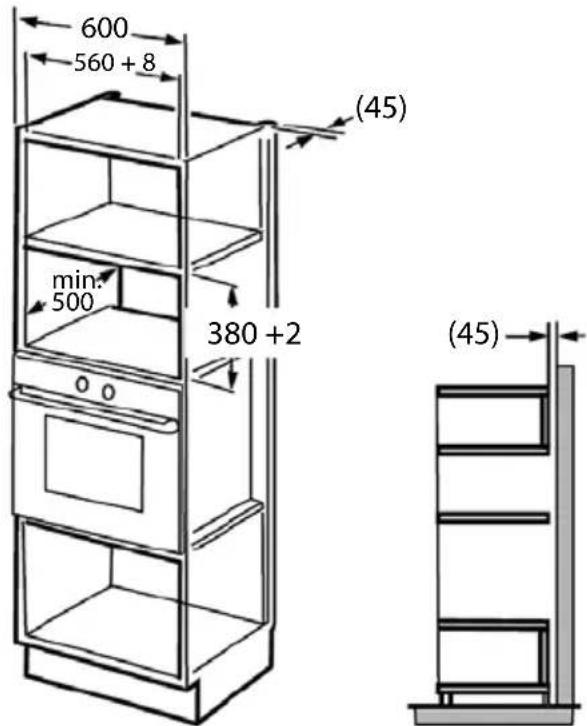
text_image
600 560 + 8 min. 500 380 + 2 (45) (45)Fig. 1
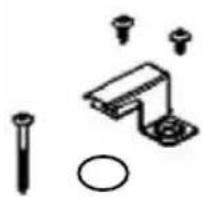
natural_image
Pure mechanical assembly diagram without any text, numbers, or symbolsFig. 2
INSTALLATION
-
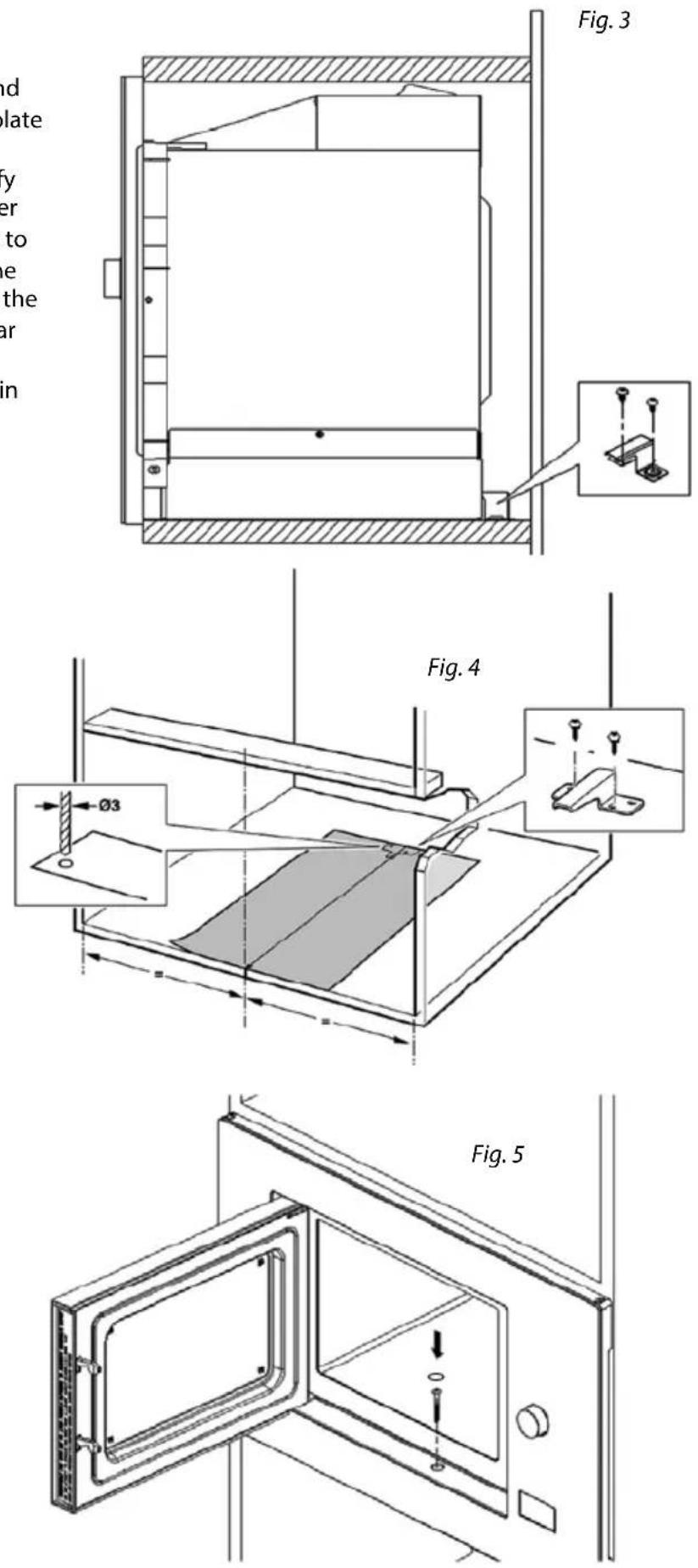
- Follow the instructions in Figures 3 and 4 to secure the oven using the fixing plate and screw in the front section. First use the attached stencil to identify the holes for screws that hold the lower fixing plate. Drill holes and use screws to attach the plate. Slide the oven into the opening and rest it on the stop. Insert the fixing plate into the opening at the rear cover of the oven.
-
Secure the oven with a screw as shown in Figure 5.
TROUBLESHOOTING
| Problem Cause Solution | ||
| The appliance does not work. | The plug has been inserted into the socket incorrectly or insufficiently. | Check the plug connection. |
| The socket is not supplied with electricity. | Check to make sure voltage is present, e.g. by using another appliance. | |
| The oven door is not closed properly. | Check the door. Remove all impurities and foreign objects. | |
| Turning of the tray is noisy. | Dirty wheels of the turning mechanism. | Clean the wheels with a damp cloth. |
REPAIR & MAINTENANCE
Any extensive maintenance or repair that requires access to the inner parts of the product must be performed by an expert service centre.
ENVIRONMENTAL PROTECTION
• Packaging materials and obsolete appliances should be recycled.
• The transport box may be disposed of as sorted waste.
• Polyethylene bags shall be handed over for recycling.
Appliance recycling at the end of its service life:
natural_image
Symbol of a trash bin crossed with a diagonal line, no text or labels presentA symbol on the product or its packaging indicates that this product should not go into household waste. It must be taken to the collection point of an electric and electronic equipment recycling facility. By making sure this product is disposed of properly, you will help prevent the negative effects on the environment and human health that would otherwise result from inappropriate disposal of this product. You can learn more about recycling this product from your local authorities, a household waste disposal service or in the shop where you bought this product.
concept
natural_image
Blank gray image with no visible content, text, or symbolsCZ
Jindřich Valenta – ELKO Valenta Czech Republic
Vysokomýtská 1800, 565 01 Choceň
Tel. +420 465 322 895, Fax: +420 465 473 304
www.my-concept.cz
SK
ELKO Valenta – Slovakia, s.r.o.
Hurbanova 1563/23, 911 01 Trenčín
Tel.: +421 326 583 465, Fax: +421 326 583 466
www.my-concept.sk
PL