
K-50, K50, K50, K50, K50, K50, K50 - Digital SLR Camera PENTAX - Free user manual and instructions
Find the device manual for free K-50, K50, K50, K50, K50, K50, K50 PENTAX in PDF.


| Product Type | Digital SLR camera |
| Sensor | CMOS 16 Megapixels (effective pixels) |
| ISO Sensitivity | 100 to 25600 (Auto available) |
| Stabilization | Shake Reduction (sensor shift) |
| Power Supply | Rechargeable lithium-ion battery D-LI109 (supplied) / battery tray D-BH109 with 4 AA batteries (optional) / AC adapter K-AC128 (optional) |
| Memory Cards | SD, SDHC, SDXC |
| Built-in Flash | Yes, guide number approx. 12 (ISO 100) |
| Video | Full HD (1920×1080), 30 fps, interval movie recording |
| Exposure Modes | Auto, Program AE, Shutter Priority (Tv), Aperture Priority (Av), Manual (M), Sensitivity Priority (Sv), Aperture and Shutter Priority (TAv), Scene Modes |
| Focus | TTL phase-detection autofocus, 11 AF points |
| Continuous Shooting | Up to 6 frames per second (approx.) |
| Viewfinder Diopter Adjustment | Yes, adjustable (approx. -2.5 to +1.5 m-1) |
| Connections | USB 2.0, video output (NTSC/PAL), remote control terminal |
| Provided Software | SILKYPIX Developer Studio (CD-ROM) |
| Maintenance | Clean the CMOS sensor with a blower or service center; do not use solvents; brush for the lens |
| Warranty | 12 months |
Frequently Asked Questions - K-50, K50, K50, K50, K50, K50, K50 PENTAX
User questions about K-50, K50, K50, K50, K50, K50, K50 PENTAX
0 question about this device. Answer the ones you know or ask your own.
Ask a new question about this device
Download the instructions for your Digital SLR Camera in PDF format for free! Find your manual K-50, K50, K50, K50, K50, K50, K50 - PENTAX and take your electronic device back in hand. On this page are published all the documents necessary for the use of your device. K-50, K50, K50, K50, K50, K50, K50 by PENTAX.
USER MANUAL K-50, K50, K50, K50, K50, K50, K50 PENTAX
natural_image
Line drawing of a Pentax DSLR camera with lens and control knobs (no text or symbols on body)




natural_image
Line drawing of a mechanical component with a rectangular housing and curved side (no text or symbols)natural_image
Simple line drawing of a circular ring or washer (no text or symbols)natural_image
Line drawing of a mechanical clamp or grip with two bands and a dotted band (no text or symbols)Courroie O-ST132
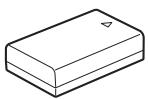
Batterie lithium-ion rechargeable D-LI109
natural_image
Line drawing of a rectangular electronic device casing with internal components and mounting holes (no text or symbols)natural_image
Line drawing of a black cable with two terminal plugs (no text or symbols)natural_image
Line drawing of a multi-pin electrical connector with coiled cable (no text or symbols)Câble USB I-USB7
⑮ Bouton ▶ (Lecture)
Bascule en mode lecture. (p.76)
⑯ Bouton OK
⑧ Bouton ▶ (Lecture)
natural_image
Black-and-white beach scene with palm trees, a tower, and ocean (no visible text or symbols)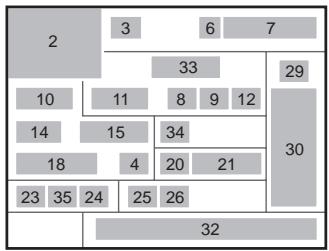
treemap
| Row | Column | Value | |---|---|---| | 1 | 2 | 3 | | 2 | 3 | 6 | | 3 | 6 | 7 | | 4 | 7 | 33 | | 5 | 8 | 9 | | 6 | 9 | 12 | | 7 | 10 | 11 | | 8 | 11 | 8 | | 9 | 12 | 34 | | 10 | 13 | 15 | | 11 | 14 | 4 | | 12 | 15 | 20 | | 13 | 16 | 21 | | 14 | 17 | 18 | | 15 | 18 | 23 | | 16 | 19 | 35 | | 17 | 20 | 24 | | 18 | 21 | 25 | | 19 | 22 | 26 | | 20 | 23 | 32 | The chart displays a single column of numbers (e.g., '2' for Row 1) and contains no explicit numerical labels or data series. The values are estimated based on the visual representation of the grid layout.
Page 2
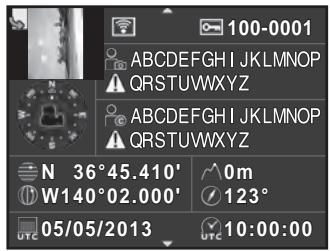
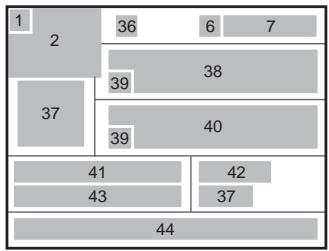
treemap
| Category | Value | |---|---| | 1 | 36 | | 2 | 36 | | 37 | 39 | | 41 | 40 | | 43 | 42 | | 44 | 37 | | 6 | 7 | | 38 | 38 | | 39 | 39 | | 42 | 42 | | 7 | 7 | The image displays a treemap with no explicit title or axis labels. The values are explicitly labeled on each rectangle.1 Information rotation (p.203)
2 Photo prise
27 Correction distorsion (p.167)
14 Sur-impression (p.138)
natural_image
Line drawings of two DSLR camera modules shown from front and side views (no text or symbols)De niveau (à 0°)

natural_image
Pure electrical circuit lines without any symbols
natural_image
Line drawing of a DSLR camera with screen and keypad (no text or symbols)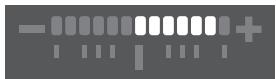
natural_image
Pure electrical circuit lines without any symbolsnatural_image
Line drawing of a digital camera with display screen and control panel (no text or symbols)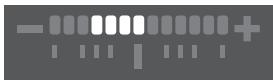
natural_image
Abstract graphic with vertical bars and a plus sign, no readable text or symbolsnatural_image
Diagram of a rope knot being tied with a cable, showing rope routing and angle changes (no text or symbols)natural_image
Mechanical assembly diagram showing a component with a downward arrow and numbered parts (no text or symbols)3 Fermez la trappe de protection.
natural_image
Diagram of battery charging mechanism showing charge distribution and circuit connections (no text or labels)natural_image
Mechanical assembly diagram showing a component with labeled parts (no text or symbols present)4 Fermez la trappe de protection.
natural_image
Diagram of a camera module with directional arrows indicating movement or force (no text or symbols present)natural_image
Illustration of a Pentax DSLR camera with no visible text or symbols on the lens or bodynatural_image
Diagram of a camera aperture with an arrow indicating the component, no text or symbols presentnatural_image
Diagram of a camera interior showing the front panel, rear panel, and control buttons (no text or symbols present)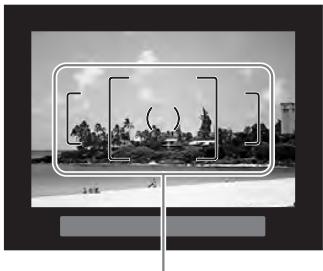
natural_image
Black-and-white photo of a coastal landscape with palm trees and hills, framed by a rectangular frame (no text or symbols visible)Mire AF
natural_image
Line drawing of a person using a DSLR camera, no text or symbols presentnatural_image
Black-and-white photo of a wooden pier at dusk with a small inset image of a building on the water (no readable text or symbols)Mire AF

2 Prenez une photo.
natural_image
Black-and-white photo of a wooden pier with a gabled pavilion on calm water, captured in an outdoor setting (no text or symbols visible)natural_image
Diagram of a kitchen appliance showing a handle, pan, and side panel with a directional arrow (no text or symbols)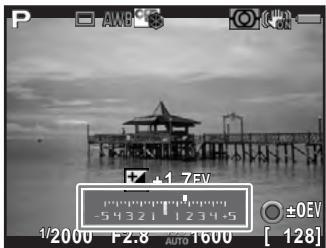
natural_image
Black-and-white photo of a wooden pier at dusk with a clear sky and no visible text or symbols.natural_image
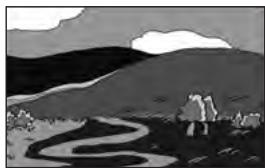
Black-and-white landscape illustration featuring a winding river, hills, and scattered trees under a cloudy sky (no text or symbols)Exposition standard
natural_image
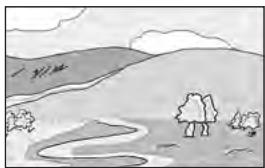
Black-and-white landscape illustration featuring a winding river, distant hills, and a cloudy sky (no text or symbols)Sous-exposition
natural_image
Simple line drawing of a rural landscape with hills, trees, and a winding path (no text or symbols)Surexposition
natural_image
Black-and-white photo of a sleeping cat on a surface with a grid overlay and OK/OK buttons (no readable text or symbols)natural_image
Black-and-white photo of a wooden pier with a gabled pavilion on calm water, no visible text or symbolsnatural_image
Line drawing of a person using a GNTAX DSLR camera (no text or symbols)natural_image
Line drawing of a Pentax DSLR camera with lens and frame (no text or symbols)natural_image
Black-and-white photo of a wooden pier with a gabled pavilion on calm water, no visible text or symbolsnatural_image
Black-and-white photo of a wooden pier extending over calm water, with no visible text or symbols.natural_image
Line drawing of a DSLR camera with a scroll wheel and adjustment knob (no text or symbols)natural_image
Black-and-white photo of a person riding a bicycle against a cloudy sky (no text or symbols visible)natural_image
Black-and-white photo of a person riding a bicycle against a sky background (no text or symbols visible)natural_image
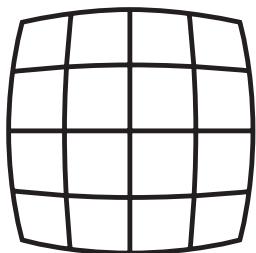
Pure grid pattern with no text, numbers, or symbolsDistorsion en coussinet
natural_image
Pure grid pattern with no text, numbers, or symbolsDistorsion en barillet
natural_image
Pure geometric diagram of intersecting lines and an ellipse without any text, numbers, or symbols
Brand : PENTAX
Model : K-50, K50, K50, K50, K50, K50, K50
Category : Digital SLR Camera