
K500 - Digital SLR Camera PENTAX - Free user manual and instructions
Find the device manual for free K500 PENTAX in PDF.


| Product type | Digital SLR camera (DSLR) |
| Sensor | APS-C format CMOS (23.6 x 15.8 mm) |
| Effective pixels | 16.3 megapixels |
| Stabilization | Sensor shift (Shake Reduction), up to 3.5 stops |
| Viewfinder | Reflex with pentaprism, coverage ≈96%, magnification ≈0.95x |
| Screen | 3.0 inch TFT LCD, 921,000 dots |
| Compatible lenses | DA, DA L, D FA, FA J and lenses with A position on the aperture ring |
| Power supply | Rechargeable lithium-ion battery D‑LI109 or battery tray D‑BH109 (4 AA batteries) |
| Dimensions (body only) | 130 x 97 x 71 mm |
| Weight (body only) | Approx. 590 g |
| Weight (with batteries and card) | Approx. 650 g (with AA lithium batteries and SD memory card) |
| Exposure modes | Auto, P, Av, Tv, M, B, Scene modes (SCN), USER modes |
| Shutter speed | 1/6000 s to 30 s + Bulb (long exposure) |
| ISO sensitivity | 100 – 51,200 (in 1/3 EV steps) |
| Built-in flash | Guide number ≈13 (ISO 100, 100 mm) |
| Video recording | Full HD (1920 x 1080) at 30 fps, MPEG-4 AVC/H.264 format |
| Connections | USB 2.0 (MSC/PTP), composite video output (NTSC/PAL) |
| Memory support | SD, SDHC, SDXC memory cards |
| Maintenance and cleaning | Ultrasonic sensor cleaning; blower for lens; avoid solvents |
| Warranty | 12 months (parts and labor) |
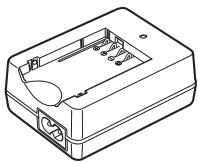
| Supplied accessories | D‑LI109 battery, D‑BC109 charger, power cord, strap, CD-ROM (SILKYPIX), hot shoe cover, eyecup, body cap |
Frequently Asked Questions - K500 PENTAX
User questions about K500 PENTAX
0 question about this device. Answer the ones you know or ask your own.
Ask a new question about this device
Download the instructions for your Digital SLR Camera in PDF format for free! Find your manual K500 - PENTAX and take your electronic device back in hand. On this page are published all the documents necessary for the use of your device. K500 by PENTAX.
USER MANUAL K500 PENTAX
natural_image
Line drawing of a Pentax DSLR camera with lens and adjustment knobs (no text or symbols on body)




flowchart
graph TD
    A["ISO"] --> B["OK"]
    C["WB"] --> B["OK"]
    D["Directional Arrow"] --> B["OK"]
    style B fill:#f9f,stroke:#333
natural_image
Line drawing of a mechanical component with a rectangular housing and curved side (no text or symbols)natural_image
Simple line drawing of a circular ring or washer (no text or symbols)natural_image
Line drawing of a mechanical clamp or grip with two bands and a handle (no text or symbols)Courroie O-ST132
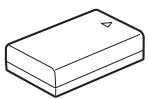
Batterie lithium-ion rechargeable D-LI109*
natural_image
Line drawing of a rectangular electronic device casing with internal components and mounting holes (no text or symbols)natural_image
Coiled black cable with two terminal plugs, no text or symbols visiblenatural_image
Line drawing of a multi-pin electrical connector with coiled cable (no text or symbols)Câble USB I-USB7
⑮ Bouton ▶ (Lecture)
Bascule en mode lecture. (p.74)
⑯ Bouton OK
⑧ Bouton ▶ (Lecture)
natural_image
Black-and-white coastal scene with beach, lighthouse, and trees under cloudy sky (no visible text or symbols)treemap
| Row | Column | Value | |---|---|---| | 1 | 2 | 3 | | 2 | 2 | 4 | | 3 | 5 | 5 | | 4 | 6 | 6 | | 5 | 7 | 7 | | 6 | 8 | 8 | | 7 | 9 | 9 | | 8 | 10 | 11 | | 9 | 11 | 12 | | 10 | 12 | 13 | | 11 | 13 | 13 | | 12 | 14 | 14 | | 13 | 15 | 15 | | 14 | 16 | 16 | | 15 | 17 | 17 | | 16 | 18 | 18 | | 17 | 19 | 19 | | 18 | 20 | 20 | | 19 | 21 | 21 | | 20 | 22 | 22 | | 21 | 23 | 23 | | 22 | 24 | 24 | | 23 | 25 | 25 | | 24 | 26 | 26 | | 25 | 27 | 27 | | 26 | 28 | 28 | | 27 | 29 | 29 | | 28 | 30 | 30 | | 29 | 31 | 31 | | 30 | 32 | 32 | The image contains a single data point (value = -3) and is not included in the table as it is a visual representation rather than a standard chart type. The text '1' appears twice, possibly indicating an initial label or step number.Vidéo
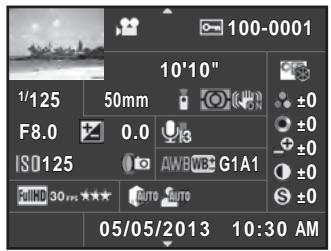
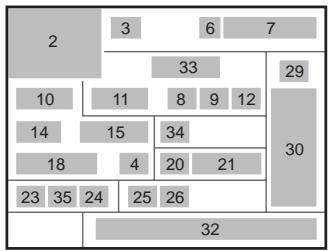
treemap
| Row | Column | Value | |---|---|---| | 1 | 2 | 3 | | 2 | 3 | 6 | | 3 | 6 | 7 | | 4 | 7 | 33 | | 5 | 8 | 9 | | 6 | 9 | 12 | | 7 | 10 | 11 | | 8 | 11 | 8 | | 9 | 12 | 34 | | 10 | 13 | 15 | | 11 | 14 | 4 | | 12 | 15 | 20 | | 13 | 16 | 21 | | 14 | 17 | 18 | | 15 | 18 | 23 | | 16 | 19 | 35 | | 17 | 20 | 24 | | 18 | 21 | 25 | | 19 | 22 | 26 | | 20 | 23 | 32 | The chart displays a single column of numbers (e.g., '2' for Row 1) and contains no explicit numerical labels or data series. The values are estimated based on the visual representation of the grid layout.
Page 2
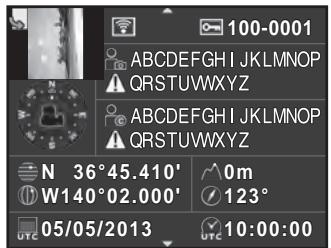
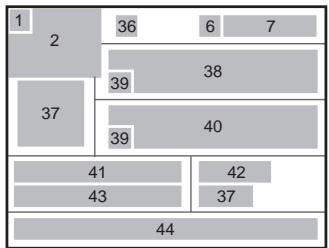
treemap
| Category | Value | |---|---| | 1 | 36 | | 2 | 36 | | 37 | 39 | | 41 | 40 | | 43 | 42 | | 44 | 37 | | 6 | 7 | | 38 | 38 | | 39 | 39 | | 42 | 42 | | 7 | 7 | The image contains only a single data point (value 37) and no other categories or data series present. The labels '1' through '7' appear above the bars, but they are not explicitly labeled on the chart itself.13 Sur-impression (p.134)
natural_image
Diagram of a rope knot being tied with a car, showing rope routing and angle changes (no text or symbols)natural_image
Mechanical assembly diagram showing a component with a downward arrow and numbered label (no text or symbols present)3 Fermez la trappe de protection.
natural_image
Mechanical assembly diagram showing a component with labeled parts (no text or symbols present)4 Fermez la trappe de protection.
natural_image
Diagram of a camera interior showing internal components with arrows indicating direction (no text or symbols)natural_image
Illustration of a Pentax DSLR camera with no visible text or symbols on the lens or bodynatural_image
Diagram of a camera aperture with adjustment knobs and a magnified inset showing the lens (no text or symbols present)natural_image
Diagram of a camera mode dial with bidirectional arrow and plus/minus indicators (no text or symbols)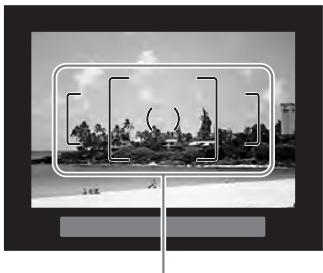
natural_image
Black-and-white photo of a tropical beach scene with palm trees and rocks, framed by a rectangular frame (no text or symbols visible)Mire AF
natural_image
Line drawing of a person holding a DSLR camera, no text or symbols presentnatural_image
Black-and-white photo of a wooden pier at dusk with a small framed structure, captured in an editing interface (no readable text or symbols on the main scene)Mire AF

2 Prenez une photo.
natural_image
Black-and-white photo of a wooden pier with a gabled pavilion on calm water, no visible text or symbolsnatural_image
Diagram of a car interior showing dashboard, search bar, and directional arrows (no text or labels)natural_image
Interior view of a car showing dashboard, seatbelt, and air vent (no text or symbols)natural_image
Black-and-white photo of a wooden pier at dusk with a clear sky and no visible text or symbols.natural_image
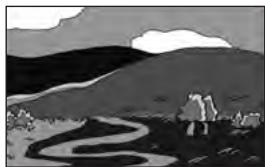
Black-and-white landscape illustration featuring a winding road, hills, and trees under a cloudy sky (no text or symbols)Exposition standard
natural_image
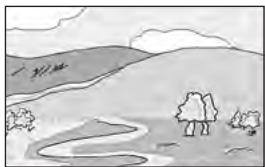
Black-and-white landscape illustration featuring a winding road, hills, and distant clouds (no text or symbols)Sous-exposition
natural_image
Simple line drawing of a rural landscape with hills, trees, and a winding path (no text or symbols)Surexposition
natural_image
Black-and-white photo of a sleeping cat on a beach with a grid overlay and OK/OK buttons (no readable text or symbols)natural_image
Black-and-white photo of a wooden pier with a gabled pavilion on calm water, no visible text or symbolsnatural_image
Line drawing of a person using a GNTAX DSLR camera (no text or symbols)natural_image
Line drawing of a Pentax DSLR camera with lens and frame (no text or symbols)natural_image
Black-and-white photo of a wooden pier with a gabled pavilion by the water, no visible text or symbolsnatural_image
Black-and-white photo of a wooden pier extending over calm water, with no visible text or symbols.natural_image
Line drawing of a PENTAI DSLR camera with no text or symbols on the bodynatural_image
Black-and-white photo of a person riding a bicycle against a sky background (no text or symbols visible)natural_image
Black-and-white photo of a person riding a bicycle against a sky background (no text or symbols visible)natural_image
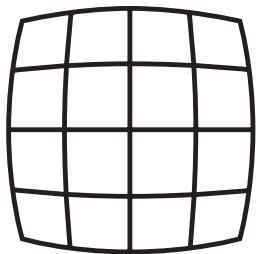
Pure grid pattern with no text, numbers, or symbolsDistorsion en coussinet
natural_image
Pure grid pattern with no text, numbers, or symbolsDistorsion en barillet
natural_image
Pure optical ray diagram showing lens intersecting a screen (no text or labels)
natural_image
Black-and-white photo of a wooden pier with a gabled pavilion by the water, no visible text or symbolsnatural_image
Grid of black-and-white photos showing coastal landscapes and urban areas, including palm trees, beach, skyscrapers, and waterfront (no text or symbols)natural_image
Grid of six grayscale images showing various scenes including a city skyline, airplane, and landscape (no text or symbols)Affichage 4/9/16/36/81 imagettes
natural_image
Grid of black-and-white photos showing coastal scenes including palm trees, beach, city skyline, and watercraft (no text or symbols)natural_image
Four-panel black-and-white photo sequence showing a person performing pull-ups on a pole, with no visible text or symbols in the main image area.natural_image
Four-panel black-and-white photo collage showing beach scenes, a whale leaping out of water, and a coastal cityscape (no text or symbols)natural_image
Black-and-white photo of a wooden pier with a gabled pavilion by the water, no visible text or symbols.natural_image
Line drawing of a DSLR camera connected to a computer monitor via cable (no text or symbols)natural_image
Diagram showing a DSLR camera connected to a device via cable, with no visible text or symbols.$$ L 1 = 1 7 \div 5, 6 = \text { environ } 3 (m) $$
$$ \mathrm{L} 2 = 3 \div 5 = \text {environ} 0, 6 (\mathrm{m}) $$

natural_image
Illustration of a hand using a tool to adjust or install a mechanical component, no text or symbols visible.(Bouton Lecture) 21, 24, 74
◎ (Bouton vert) 21
(Correction IL), bouton 21, 23, 98
😊 Standard 88
Portrait 88, 89
▲ Paysage 88, 89
Macro 88, 89
Batteries rechargeables Ni-MH 50
(Correction IL), bouton 21, 23, 98
INFO (Bouton INFO) .... 21, 24, 25, 31, 194
Info/options programe ...... 236
(Lecture), bouton 21, 24, 74
Live View ......26, 69
MENU (Bouton MENU) 22, 24, 42
Mer & Neige 90
OK (Bouton OK) .....22, 24, 112
Ombre (Balance blancs) .....153
Options interface ......217, 254
Ordinateur 251
Œilleton 58
P
RAW/Fx, bouton .....21, 177
Réglages capture image .....150
For customers in USA
STATEMENT OF FCC COMPLIANCE
This device complies with Part 15 of the FCC Rules. Operation is subject to the following two conditions: (1) This device may not cause harmful interference, and (2) this device must accept any interference received, including interference that may cause undesired operation.
Changes or modifications not approved by the party responsible for compliance could void the user's authority to operate the equipment.
This equipment has been tested and found to comply with the limits for a Class B digital device, pursuant to part 15 of the FCC Rules.
These limits are designed to provide reasonable protection against harmful interference in a residential installation. This equipment generates, uses and can radiate radio frequency energy and, if not installed and used in accordance with the instructions, may cause harmful interference to radio communications. However, there is no guarantee that interference will not occur in a particular installation.
If this equipment does cause harmful interference to radio or television reception, which can be determined by turning the equipment off and on, the user is encouraged to try to correct the interference by one or more of the following measures:
- Reorient or relocate the receiving antenna.
- Increase the separation between the equipment and receiver.
- Connect the equipment into an outlet on a circuit different from that to which the receiver is connected.
* Consult the dealer or an experienced radio/TV technician for help.
For customers in Canada
This Class B digital apparatus complies with Canadian ICES-003.
Perchlorate Material-special handling may apply.
The lithium battery used in this camera contains perchlorate material, which may require special handling.
See www.dtsc.ca.gov/hazardouswaste/perchlorate
Declaration of Conformity
According to 47CFR, Parts 2 and 15 for
Class B Personal Computers and Peripherals
We: PENTAX RICOH IMAGING AMERICAS CORPORATION
Located at: 633 17th Street, Suite 2600 Denver, Colorado 80202 U.S.A. Phone: 800-877-0155 FAX: 303-790-1131
Declare under sole responsibility that the product identified herein complies with 47CFR Parts 2 and 15 of the FCC rules as a Class B digital device. Each product marketed is identical to the representative unit tested and found to be compliant with the standards. Records maintained continue to reflect the equipment being produced can be expected to be within the variation accepted, due to quantity production and testing on the statistical basis as required by 47CFR §2.909. Operation is subject to the following two conditions: (1) This device may not cause harmful interference, and (2) This device must accept any interference received, including interference that may cause undesired operation. The above named party is responsible for ensuring that the equipment complies with the standards of 47CFR §15.101 to §15.109.
Product Name: Digital Camera
Model Number: K-500
Contact person: Customer Service Manager
Date and Place: May, 2013, Colorado
Brand : PENTAX
Model : K500
Category : Digital SLR Camera