
KS2 - Digital SLR Camera PENTAX - Free user manual and instructions
Find the device manual for free KS2 PENTAX in PDF.


| Product type | Digital SLR camera |
| Brand | PENTAX |
| Model | KS2 |
| Dimensions (approx.) | 122 x 101 x 69 mm |
| Weight (with battery and card) | Approx. 618 g |
| Power supply | Rechargeable lithium-ion battery D-LI109 (7.2 V, 1050 mAh) |
| Sensor | APS-C CMOS (23.5 x 15.6 mm), 20 megapixels |
| Viewfinder | Pentaprism optical viewfinder, 100% coverage, 0.95x magnification |
| Screen | 3.0-inch TFT LCD (460,000 dots), tilting |
| Stabilization | In-body image stabilization (SR, sensor shift) |
| Exposure modes | Manual (M), Aperture priority (Av), Shutter priority (Tv), Program (P), Auto Picture, Scenes, Effects |
| Video | Full HD (1920x1080) at 30/25/24 fps, HD (1280x720) at 60/50 fps |
| ISO sensitivity | 100 - 51200 (in 1 EV steps) |
| Focus | Phase detection autofocus (11 points), contrast detection AF (Live View), manual focus |
| Built-in flash | Pop-up flash, guide number 12 (ISO 100/m), manual and automatic modes |
| Recording media | SD, SDHC, SDXC memory card, Eye-Fi, Flucard |
| Connectivity | USB (Micro-B), HDMI (Type D), remote control terminal, optional GPS |
| Maintenance and cleaning | Sensor cleaning by vibration (dust removal system), lens cleaning with soft brush |
| Safety | Observe precautions: avoid shocks, humidity, extreme temperatures, and strong magnetic fields |
| Spare parts and repairability | Interchangeable lenses (K mount), battery, charger, strap, eyecup, cables. Repairs by authorized service |
Frequently Asked Questions - KS2 PENTAX
User questions about KS2 PENTAX
0 question about this device. Answer the ones you know or ask your own.
Ask a new question about this device
Download the instructions for your Digital SLR Camera in PDF format for free! Find your manual KS2 - PENTAX and take your electronic device back in hand. On this page are published all the documents necessary for the use of your device. KS2 by PENTAX.
USER MANUAL KS2 PENTAX
natural_image
Line drawing of a Pentax DSLR camera with lens and frame (no text or symbols on body)Introduction
1
natural_image
Line drawing of a mechanical component with rounded corners and a central slot (no text or symbols)natural_image
Simple black-and-white oval shape with no text or symbolsnatural_image
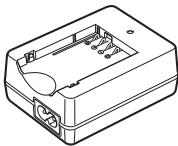
Simple line drawing of a rectangular block with a small triangular notch on top (no text or symbols)Batterie lithium-ion rechargeable D-LI109
natural_image
Line drawing of a rectangular electronic device casing with internal components and mounting holes (no text or symbols)natural_image
Line drawing of a black cord with two terminal plugs (no text or symbols)natural_image
Line drawing of a mechanical clamp or connector with two coiled cables (no text or symbols)Courroie O-ST132

natural_image
Simple line drawing of a circular object with concentric rings (no text or symbols)Guide de démarrage
Réglages capture image 42
① Bouton correction IL (☑/Av)
natural_image
Black-and-white photo of two children with camera bounding boxes highlighting their face, set against a blurred background (no text or symbols)bar
| Row | Column 1 | Column 2 | Column 3 | Column 4 | |---|---|---|---|---| | 1 | 6 | 14 | 8 | 9 | | 2 | 16 | 17 | 21 | 25 | | 3 | 23 | 28 | 28 | 28 | | 4 | 2 | 2 | 2 | 2 | | 5 | 6 | 14 | 8 | 9 | | 6 | 16 | 17 | 21 | 25 | | 7 | 23 | 28 | 28 | 28 | The values for the last row (2) are missing as they are zero. The first row contains the same number of rows (5) and the second row contains the same number of columns (15).natural_image
Black-and-white coastal scene with buildings, palm trees, and a lighthouse under cloudy sky (no visible text or symbols)natural_image
Technical diagram of a mechanical component with directional arrow and control buttons (no text or symbols)natural_image
Diagram of a rope knot with directional arrows indicating motion (no text or symbols)natural_image
Diagram of a Pentium DSLR camera with lens and frame (no text or symbols)Attention
natural_image
Diagram of a mechanical device with an inset showing internal components (no text or symbols)Attention
Mémo
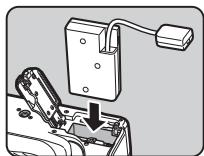
natural_image
Mechanical assembly diagram showing a lever pressing down on a component (no text or symbols visible)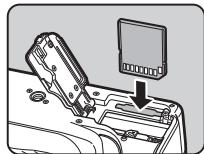
natural_image
Diagram of a device's internal components with an arrow pointing to a component (no text or symbols visible)natural_image
Mechanical component diagram showing a lever mechanism with directional arrows (no text or symbols)Attention
Mémo
natural_image
Illustration of a PERTAR DSLR camera with two arrows indicating direction (no text or symbols on the device itself)natural_image
Line drawing of a person using a DSLR camera (no text or symbols)natural_image
Black-and-white photo of a wooden pier with a gable on calm water, no visible text or symbolsMire AF
natural_image
Black-and-white coastal scene with palm trees, a lighthouse, and ocean (no visible text or symbols)Réglages capture image

natural_image
Black-and-white photo of a wooden pier with a gabled pavilion on calm water, no visible text or symbols2 Tournez.
natural_image
Diagram of a camera with a magnifying glass and control buttons, no text or symbols present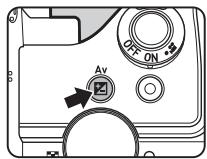
Mémo
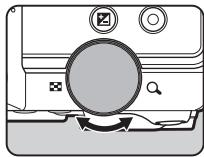
natural_image
Diagram of a camera with a magnifying glass and control buttons, no text or symbols presentnatural_image
Black-and-white photo of a person riding a bicycle, no visible text or symbolsnatural_image
Person riding a bicycle against a sky background, no visible text or symbolsnatural_image
Black and white photo of a dog peeking out of a window with a grid overlay (no text or symbols visible)natural_image
Grid of black-and-white photos including landscapes, cityscapes, and flowers (no text or symbols)natural_image
Grid of black-and-white photos showing landscapes and urban scenes, including a beach, water, and flowers (no text or symbols)natural_image
Four-panel black-and-white photo sequence showing a person in motion, possibly on a pole or bench, with no visible text or symbols.Attention
natural_image
Diagram of a camera module with an attached cable, showing no text or symbolsnatural_image
Black-and-white photo of a dog resting on a wooden structure, no visible text or symbolsnatural_image
Black and white photo of a sleeping dog on a wooden ledge, no visible text or symbolsnatural_image
Black and white photo of a fluffy dog resting on a wooden structure, no visible text or symbolsAmplification des tons
Filtre croquis
Aquarelle
Pastel
Postérisation
Miniature
Doux
Scintillement
Fish-eye
Filtre étirement
Monochrome
http://www.apple.com/quicktime/download/
Index
Symboles
, menu.... 20
,, menu.... 23
▶, menu...... 23
,, menu 24
C, menu 26
mode.... 49
Portrait...... 43
Paysage 43
Macro 43
Affichage LCD 24, 37
Affichage quadrillage...... 21
Correction diffraction ..... 69
Correction distorsion ..... 69
Correction du flash ..... 53
Correction IL.... 48
Correction IL auto 26
Correction moiré.... 79
Live View 11, 21, 40
Logiciel 115
Logiciel fourni 115
Mode lecture...... 41
Mode pr. de vue, menus 20
Mode rafale (mode AF) 55
Mode unique (mode AF) 55
Mode vidéo 49
Réglages capture image 42
Shake Reduction...... 21
Silhouette (SCN)...... 44
Spot (Zone active AF) ..... 56
Superposer zone AF ..... 17
Supprimer 41
Transmission Wi-Fi...... 95
Copyright (c) T.Teranishi.
Copyright (c) TeraTerm Project.
For customers in USA
STATEMENT OF FCC COMPLIANCE
This device complies with Part 15 of the FCC Rules. Operation is subject to the following two conditions: (1) This device may not cause harmful interference, and (2) this device must accept any interference received, including interference that may cause undesired operation.
Changes or modifications not approved by the party responsible for compliance could void the user's authority to operate the equipment.
This equipment has been tested and found to comply with the limits for a Class B digital device, pursuant to part 15 of the FCC Rules.
These limits are designed to provide reasonable protection against harmful interference in a residential installation. This equipment generates, uses and can radiate radio frequency energy and, if not installed and used in accordance with the instructions, may cause harmful interference to radio communications. However, there is no guarantee that interference will not occur in a particular installation.
If this equipment does cause harmful interference to radio or television reception, which can be determined by turning the equipment off and on, the user is encouraged to try to correct the interference by one or more of the following measures:
- Reorient or relocate the receiving antenna.
- Increase the separation between the equipment and receiver.
- Connect the equipment into an outlet on a circuit different from that to which the receiver is connected.
* Consult the dealer or an experienced radio/TV technician for help.
For customers in Canada
This Class B digital apparatus complies with Canadian ICES-003.
Perchlorate Material-special handling may apply.
The lithium battery used in this camera contains perchlorate material, which may require special handling.
See www.dtsc.ca.gov/hazardouswaste/perchlorate
Declaration of Conformity
According to 47CFR, Parts 2 and 15 for
Class B Personal Computers and
Peripherals
We: RICOH IMAGING AMERICAS CORPORATION
Located at: 633 17 ^th Street, Suite 2600 Denver, Colorado 80202 U.S.A. Phone: 800-877-0155 FAX: 303-790-1131
Declare under sole responsibility that the product identified herein complies with 47CFR Parts 2 and 15 of the FCC rules as a Class B digital device. Each product marketed is identical to the representative unit tested and found to be compliant with the standards. Records maintained continue to reflect the equipment being produced can be expected to be within the variation accepted, due to quantity production and testing on the statistical basis as required by 47CFR §2.909. Operation is subject to the following two conditions: (1) This device may not cause harmful interference, and (2) This device must accept any interference received, including interference that may cause undesired operation. The above named party is responsible for ensuring that the equipment complies with the standards of 47CFR §15.101 to §15.109.
Product Name: SLR Digital Camera
Model Number: PENTAX K-S1
Contact person: Customer Service Manager
Date and Place: August, 2014, Colorado
Brand : PENTAX
Model : KS2
Category : Digital SLR Camera