K8500 - Smartwatch Calypso - Free user manual and instructions
Find the device manual for free K8500 Calypso in PDF.


| Product type | Smartwatch |
| Brand | Calypso |
| Model | K8500 |
| Case dimensions | 42 mm diameter, 12 mm thickness |
| Weight | 40 g (without strap) |
| Battery | Rechargeable lithium-ion battery 300 mAh |
| Battery life | Up to 7 days in normal use |
| Water resistance | IP68 (resists water up to 1.5 m for 30 min) |
| Screen | 1.3-inch TFT color, touchscreen |
| Connectivity | Bluetooth 5.0, compatible with iOS and Android |
| Main functions | Activity tracking (steps, calories, distance), heart rate, sleep, notifications, stopwatch, timer, alarm |
| Sensors | Accelerometer, optical heart rate sensor |
| Care and cleaning | Clean with a soft, dry cloth; avoid chemicals |
| Safety | Do not expose to extreme temperatures (0-40 °C); avoid strong shocks |
| Spare parts and repairability | Battery replaceable at authorized center; standard interchangeable strap |
| General information | 2-year warranty; manual available in PDF |
Frequently Asked Questions - K8500 Calypso
User questions about K8500 Calypso
0 question about this device. Answer the ones you know or ask your own.
Ask a new question about this device
Download the instructions for your Smartwatch in PDF format for free! Find your manual K8500 - Calypso and take your electronic device back in hand. On this page are published all the documents necessary for the use of your device. K8500 by Calypso.
USER MANUAL K8500 Calypso
natural_image
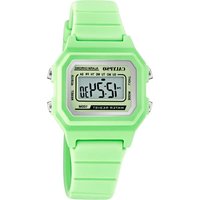
Blue smartwatch with display showing time 14:28 and brand logo (no readable text beyond branding)Thank you for choosing our Calypso Smartime watch. With the help of this manual you will gain a comprehensive understanding of the use and operation of the device.
We reserve the right to amend the contents of this manual without prior notice.
1. Watch Function Description
1.1 Touch button:

A: Press and hold the power button for 3 seconds to turn on the device when the power is off.
B: Press the power button repeatedly to browse the different functions. Press and hold the button to confirm the choice of function.
1.2 Charging instructions:
Please take care when connecting the watch, see hereafter how to connect correctly.

Important: Of the two ends of the watch strap, only one is the USB connection. Do not use the other end as it may damage the watch.
1.1 Standby dial interface
1) By repeatedly pressing the power button you can change functions.
2) Browse the functions and select the desired one by pressing and holding the power button.
1.2 Step counter
The step counter is initiated automatically and gives details of the current number of steps made. All data is reset daily at 00:00.
1.3 Heart rate
To monitor your heart rate, adjust the watch correctly on the wrist (on either hand) and select the heart rate function. Connecting the watch to the Calypso APP will synchronize the heart rate data with the APP in real time.
1.4 Blood pressure
To measure blood pressure, adjust the watch correctly on the wrist (on either hand) and select the blood pressure function. Connecting the watch to the Calypso APP will synchronize the blood pressure data to the APP.
1.5 Multi Sport Mode (walking, running, cycling, mountaineering, swimming, football, basketball, table tennis, badminton, history)
1.5.1 Select the corresponding sports mode; once enabled, the display of information regarding the sports activity appears, maintain the button pressed to pause at any time: press the button to continue the activity tracking; click stop to save the data. The movement record can be viewed in the history.
1.5.2 Activity data will start to be saved only when the distance covered is greater than 200 meters or the motion time is greater than 5 minutes; when the activity condition is not fulfilled a 'data is too little to be saved' alert appears.
1.5.3 After the watch synchs to the Calypso APP, selecting the sports history interface in the Calypso APP will synchronize the movement history data from the watch and you can view the detailed data in the Calypso APP.
1.6 Sleep Monitoring
The Sleep monitoring time runs from 21:00 to 09:00 the next day and the data generated by the watch is sent to the Calypso APP when synchronized.
1.7 Set up
1.7.1 Alarm
The alarm can be set on the Calypso APP which then synchronizes to the watch.
1.7.2 Find mobile phone
Once the watch is paired with the mobile phone via the APP, click 'Find the mobile phone' on the smartwatch and your mobile phone will start ringing.
1.7.3 Stopwatch
Enter the stopwatch function via the power button. Then use the button to start and stop the timing.
1.7.4 Sedentary reminder
Set the start and end time period and sedentary interval (minutes), threshold (steps), click to enter the repeat setting to select the sedentary reminder date (week), when the sedentary time arrives, the wristband vibrates and the sedentary reminder icon appears.
1.7.5 Remote photo
After the smart watch binds to the APP:
1) Click on the Remote Shutter in the app. The watch displays the remote photo icon and the mobile phone automatically initiates the camera. To take a photo with the mobile phone, simply click on the power button.
1.7.6 Music control
Music on the mobile phone can be played, paused and songs can be changed via the watch when the APP is bound with the smartwatch.
1.7.7 About
Here you can consult the Bluetooth name of the smartwatch as well as the Bluetooth address and version number
1.7.8 Restoration of factory settings
Click to restore the factory settings and the smartwatch is restored to the factory settings.
1.7.9 Shutdown
Click the shutdown option to turn off the watch.
1.8 Notifications
Activate notifications in the APP to automatically receive notifications on the smartwatch, which can store up to 8 messages. After that, new ones will substitute older messages.
Press power button to delete all messages.
1-Binding APP
1.1 Application e-store search and download
Android (version 4.4 onwards): Android, google play or others to search 'Calypso' to download.
iOS (version 9 onwards): Search for 'Calypso' download in APP Store to download
-Android phone: 'Calypso'
Once the installation is completed, the following app icon is shown:

-iOS phone: 'Calypso'
Once the installation is completed, the following app icon is shown:
2 Connecting Bluetooth
2.1 Unconnected state: grey

Once the smartwatch is turned on, the Bluetooth is always in search status, and after the APK/APP is on, click 'more' and connect to the device, click 'search' and the corresponding smartwatch device name is selected, so that the smartwatch and the APP can be bound successfully.
Should the watch not be found by the mobile phone, please revise your phone's location settings.
2.2 Binding APP state: blue

Watch time synchronization: once the watch and APP are successfully bound, the watch and mobile phone are synchronized.
2.3 Find device
You can activate the vibrator on your smartwatch from the app by pressing 'more' then 'Find device'. This will allow you to find your smartwatch if you have lost it as long as your smartwatch is still connected to your phone.
2.4 Data synchronization
With the smartwatch successfully bound to the app, health data collected by the watch can be sent to the APP. Turn on the heart rate, sleep, exercise interface, click the selected date, click on the upper right corner icon, you can successfully share the current interface data to QQ, QQmoments, WeChat, WeChat moments, Facebook, Twitter and so on.
2.5 Push message
When the smartwatch is connected to the mobile phone you can activate notifications on your watch from third-party applications. In the APP, go to 'more' - 'App notification settings' to turn on the third-party application you would like to receive notifications from.
2.5.1. Incoming call
By turning on the call notification in personal application, when one or more calls are received on the mobile phone, the watch will simultaneously receive one / more call reminders.
2.5.2.SMS notification
Turn on SMS notification in personal application and when the mobile phone receives one or more SMS, the watch will receive one / more SMS reminder at the same time.
2.5.3. Additional Application Message Notification
The corresponding application message notification switch is opened in the personal application, such as WeChat, QQ, Facebook, Twitter, etc, and when the mobile phone terminal receives one/ more application message notifications, the smartwatch terminal receives one or more corresponding message reminder notifications at the same time.
2.6 Water-drinking reminder
Set the start and end time for the period and frequency (minutes), click enter repeat settings to select the 'drink water' reminder date (week), check the drinking water reminder and save. When the water warning time is reached, the watch vibrates and drinking icon appears.
2.7 Sedentary reminder
Set the time interval from start to end and sedentary interval (minutes), threshold (number of steps), click enter repeat setting to select sedentary reminder date (week), when sedentary time reaches, the end of the smartwatch vibrates and has a sedentary reminder icon.
2.8 Alarm clock reminder
Click the alarm clock reminder for setting to add the alarm time. When the alarm clock time is reached, the
alarm clock icon and time are displayed and the smartwatch vibrates.
2.9 Reminder mode
3 modes for notifying user:
In addition to drink water/alarm clock/sedentary alarm, you may choose how the smartwatch should notify you for other alarms.
Mode 1, only screen ON bright.
Mode 2, only vibration
Mode 3, screen + vibration
2.10 Heart rate test
Set the time period from start to end, check the heart rate detection switch and save it.
2.11 Firmware upgrade
The version of the watch firmware is monitored to verify if the latest version is installed and prompts for updates will appear when there is a new version to keep the watch updated.
2.12 Unbinding
When the watch is bound to the APP, click on the connected device name or left slide to unbind the watch and the APP. The iOS system also needs to ignore the matched device from the smartphone settings.
HOW THE CALYPSO SMARTIME APP WORKS
1. Connecting the watch to the app
In the More menu select +Add device and connect the watch. Once connected, the data from the watch synchronizes with the app. Every time the the app is launched there is an automatic data exchange.
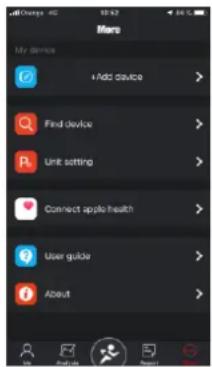
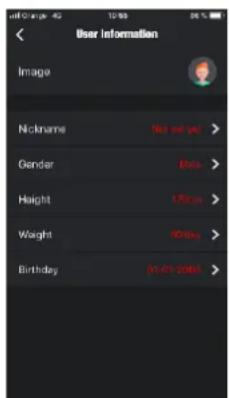
2. The Me menu
2.1 Create your profile
Open the 'Me' menu.
Press the image "Not set yet" to fix avatar.
Fill out all the required information.
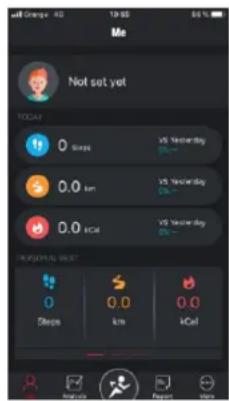

2.2. Today.
Three types of information are displayed here: steps, distance covered y calories burned (vs. yesterday – compared to day before).
2.3 Personal best.
Slide to the left to see three types of indicator: Personal best, Average and Last Week.

bar
| Metric | Value | |--------|-------| | Avg number | 98 | | Total steps | 686 |3. Analysis
3.1 Two options:
Here are the Steps and Sleep menus with details of the last 7 days.
Steps: daily step average & total steps in a week.
Sleep: daily sleep average & total hours of sleep in a week.
- Further data on steps and sleep can be found by expanding the box next to the Sports and Sleep options, with details of the last month, last six months and last year.
Steps - The information given includes average daily steps, total steps, percentage of target completed and total distance covered.
Sleep – here are the details of total time slept, the amount of light and deep sleep time and the average nightly sleep time.
Regular synchronization of the data held on the watch is recommended by tapping the icon at the top left of the app). The icon at the top right allows the sharing of information via social media.
4. Sports
Corresponding to the centre button at the bottom of the screen.
5 sub options: Sports (Walking, Outdoor walking, Indoor running, Rambling, Outdoor running, Half marathon, Marathon), Steps, Sleep, Heart rate, Blood pressure.
4.1. Sports:
Pace, Km/minute, Activity duration, calories burned, elevation change (height in metres covered). Change the sport required by pushing the icon on the top left.

4.2 Steps:
Daily steps covered. Tapping the chequered flag gives the option to fix a step goal, which then appears in centre circle as the overall goal; other information shown here includes daily steps made, and percentage of goal reached. The calories burned, activity time and distance covered are also given.
4.3. Sleep:
Here the daily sleep details can be found. In the centre are the total hours slept and the quality of the sleep. At the screen top previous sleep history can be consulted using the arrows. Towards the bottom of the screen are the hours of deep and light sleep and together with the total duration.
4.4 Heart:
Here you can visualize the results of the last time the heart rate was measured with details of the average, the maximum and the minimum heart rate levels.
4.5. BP:
Shows data on shrinkage, diastolic and pulse blood pressure.

5. Report
5.1. Activity report graph showing hourly step rate.
5.2. Activity report graph showing daily sleep information.
5.3. Heart rate report showing graph with the minimum, the maximum and the average rates.
5.4. Blood pressure report with graph showing shrinkage, diastolic and pulse blood pressure.

line
| Date | Heart rate report | Blood pressure report | |--------|-------------------|----------------------| | 2018 | 60 | 75 | | 2019 | 55 | 85 | | 2020 | 50 | 95 |FREQUENTLY ASKED QUESTIONS
-The watch should not be exposed to prolonged exposure to extreme temperatures (too cold or too hot) which can cause permanent damage.
- Why can't I wear a smartwatch to take a hot bath?
With the difference in the temperature of the bath water and the outside air, water vapor can be generated.
This vapor, in gas form, may enter the watch through the gap in the casing of the watch. When the temperature is lowered, the liquid droplets are re-formed and the circuit inside the watch may be damaged, thus damaging the circuit board and the correct functioning of the watch.
-The watch wont launch or charge.
If you receive the watch and cannot launch it, there may have been a collision during transport. The battery precision board is protected so plug in the watch to charge and activate it.
If the battery charge is too low, or if the watch has not been used for a long time, the watch may not start up. In this case please plug in the data cable and charge it for more than half an hour to activate.
DISCLAMER
The method of capturing the heart rate through an optical sensor used by this Calypso watch does not reach the level of precision and accuracy of a professional medical device, nor can it guarantee the equivalent stable readings. The watch cannot replace a medical device in its function of detecting or diagnosing pathologies, heart or other diseases.
Consequently, with respect to this function, the device is for recreational use only. Multiple factors (including level of skin contact, pigmentation, tattoos, sudden arm movements etc) can alter the accuracy of the data provided by the sensor. Therefore, keep in mind that the actual heart rate may be higher or lower than the reading indicated by the optical sensor at a given time.
If you suspect any anomaly, always consult your doctor and in case of emergency, immediately contact the emergency services in your area.
CALYPSO assumes no responsibility for any claim that may arise from the use and / or interpretation that the user of the device and / or third parties may make of the heart rate information provided by their devices.
WARRANTY INSTRUCTIONS
- The motherboard is guaranteed for two years from the date of purchase. The battery and charger are covered for six months. The strap is not covered by this warranty.
The guarantee covers any problem experienced when the product is used normally if there is a product quality issue caused by manufacturing, material or design defect.
- The warranty does not cover failures caused by personal reasons of the user, for example:
1). Damage caused by the unauthorized disassembly and assembly, modification of watches, etc.
2). A malfunction caused by accidentally dropping during use.
3). Any man-made damage through misuse of a foreign element (such as: hot water, external force shattering, damage to peripheral components, etc.) is not covered by the warranty. - When requesting a warranty repair, a fully filled out warranty card must be provided with the date of purchase and the stamp of the place of purchase.
- In case of doubt please contact the point of sale or a qualified after sales service should a repair be needed.
MANUAL DEL USUARIO K8500
2. Sección Me
2.1 Configurar tu perfil.

2.2. Today.
4.2 En pasos:

2. Sezione "MIO"
bar
| Metric | Avg number | Total steps | | :--- | :--- | :--- | | Sports statistics | 98 | 686 | | Last seven days | | | | Value | 98 | 686 | | ↓ | ↓ | ↓ | | ↓ | ↓ | ↓ | | ↓ | ↓ | ↓ | | ↓ | ↓ | ↓ | | ↓ | ↓ | ↓ | | ↓ | ↓ | ↓ | | ↓ | ↓ | ↓ | | ↓ | ↓ | ↓ | | ↓ | ↓ | ↓ | | ↓ | ↓ | ↓ | | ↓ | ↓ | ↓ | | ↓ | ↓ | ↓ | | ↓ | ↓ | ↓ | | ↓ | ↓ | ↓ | | ↓ | ↓ | ↓ | | | ↓ | ↓ | ↓ | | ↓ | ↓ | ↓ | | ↓ | ↓ | ↓ | | ↓ | ↓ | ↓ | | ↓ | ↓ | ↓ | | ↓ | ↓ | ↓ | | ↓ | ↓ | ↓ | | ↓ | ↓ | ↓ | | ↓ | ↓ | ↓ | | ↓ | ↓ | ↓ | | ↓ | ↓ | ↓ | | ↓ | ↓ | ↓ | | ↓ | ↓ | ↓ | | ↓ | ↓ | ↓ | | ↑ | ↑ | ↑ | | ↑ | ↑ | ↑ | | ↑ | ↑ | ↑ | | ↑ | ↑ | ↑ | | ↑ | ↑ | ↑ | | ↑ | ↑ | ↑ | | ↑ | ↑ | ↑ | | ↑ | ↑ | ↑ | | ↑ | ↑ | ↑ | | ↑ | ↑ | ↑ | | ↑ | ↑ | ↑ | | ↑ | ↑ | ↑ | | ↑ | ↑ | ↑ | | ↑ | ↑ | ↑ | | ↑ | ↑ | ↑ | | | ↑ | ↑ | ↑ | | ↑ | ↑ | ↑ | | ↑ | ↑ | ↑ | | ↑ | ↑ | ↑ | | ↑ | ↑ | ↑ | | ↑ | ↑ | ↑ | | ↑ | ↑ | ↑ | | ↑ | ↑ | ↑ | | ↑ | ↑ | ↑ | | ↑ | ↑ | ↑ | | ↑ | ↑ | ↑ | | ↑ | ↑ | ↑ | | ↑ | ↑ | ↑ | | ↑ | ↑ | ↑ | | ▲ (Top) vs ▲ (Bottom) in the table above the chart. The values are estimated based on the data provided in the code.4.2 PASSI
line
| Month | Heart rate report (%) | Blood pressure report (%) | |-------|------------------------|--------------------------| | Jan | 62 | 14 | | Feb | 61 | 15 | | Mar | 60 | 16 | | Apr | 59 | 17 | | May | 58 | 18 | | Jun | 57 | 19 | | Jul | 56 | 20 | | Aug | 55 | 21 | | Sep | 54 | 22 | | Oct | 53 | 23 | | Nov | 52 | 24 | | Dec | 51 | 25 |Domande Frequenti

2. Menüpunkt ICH
MANUEL D'INSTRUCTION k8500
- Section Me
2.1 Configurer votre profil.
4.2 Les pas :
INSTRUCTIONS DE LA GARANTIE:
- Watch Function Description
- Charging instructions:
- Standby dial interface
- Step counter
- Heart rate
- Blood pressure
- Multi Sport Mode (walking, running, cycling, mountaineering, swimming, football, basketball, table tennis, badminton, history)
- Sleep Monitoring
- Set up
- Alarm
- Find mobile phone
- Stopwatch
- Sedentary reminder
- Remote photo
- Music control
- About
- Restoration of factory settings
- Shutdown
- Notifications
- 1-Binding APP
- Application e-store search and download
- Unconnected state: grey
- Binding APP state: blue
- Find device
- Data synchronization
- Push message
- Incoming call
- 2.5.2.SMS notification
- Additional Application Message Notification
- Water-drinking reminder
- Sedentary reminder
- Alarm clock reminder
- Reminder mode
- Heart rate test
- Firmware upgrade
- Unbinding
- HOW THE CALYPSO SMARTIME APP WORKS
- Connecting the watch to the app
- The Me menu
- Create your profile
- Today.
- Personal best.
- Analysis
- Two options:
- Sports
- Sports:
- Steps:
- Sleep:
- Heart:
- BP:
- Report
- FREQUENTLY ASKED QUESTIONS
- DISCLAMER
- WARRANTY INSTRUCTIONS
- MANUAL DEL USUARIO K8500
- Sección Me
- Configurar tu perfil.
- En pasos:
- Sezione "MIO"
- PASSI
- Domande Frequenti
- Menüpunkt ICH
- MANUEL D'INSTRUCTION k8500
- Les pas :
- INSTRUCTIONS DE LA GARANTIE:
Brand : Calypso
Model : K8500
Category : Smartwatch