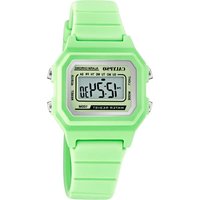
K5786 - Wristwatch Calypso - Free user manual and instructions
Find the device manual for free K5786 Calypso in PDF.


| Product Type | Digital Watch |
| Brand | Calypso |
| Model | K5786 |
| Accuracy | ±30 seconds per month (at normal temperature) |
| Time Display | Hours, minutes, seconds, month, date, day of week, PM indicator |
| Alarm Mode | Daily alarm with 20-second sound |
| Stopwatch | 1/100 second resolution, capacity 23:59'59" |
| Chronograph Functions | Simple start/stop/reset; Lap split time |
| Calendar | Month, date, day of week |
| Date Display Format | Selectable month/date or date/month |
| Time Format | 12-hour or 24-hour selectable |
| Hourly Chime | On/off, beeps every hour when activated |
| Backlight | EL backlight (optional, if S4 button present) |
| Operating Temperature | 10°C to 40°C |
| Battery Type | CR2032, CR2016, CR2012, or CR1620 (3V lithium) |
| Battery Life | Approximately 2-3 years |
| Care Instructions | Clean with soft cloth and water; avoid chemicals, extreme temperatures, strong electric fields, and severe impact |
Frequently Asked Questions - K5786 Calypso
User questions about K5786 Calypso
0 question about this device. Answer the ones you know or ask your own.
Ask a new question about this device
Download the instructions for your Wristwatch in PDF format for free! Find your manual K5786 - Calypso and take your electronic device back in hand. On this page are published all the documents necessary for the use of your device. K5786 by Calypso.
USER MANUAL K5786 Calypso
MANUEL D'INSTRUCTION
BETRIEBSANLEITUNG
MANUAL DE INSTRUÇÕES
- Accuracy at normal temperature: not more than 30 seconds a month.
- Time keeping mode: hours, minutes, seconds, month, date, day of week, "PM" (only available in 12 hour format).
- Alarm Mode: daily alarm.
- Stop watch Mode: Measuring unit: 1/100 of second measuring capacity: 23:59'59"
- Normal operating temperature range:10°C-40°C.
- Battery type: CR2032, CR2016, CR2012, CR1620
HOW TO SET NORMAL TIME/CALENDAR
From the normal time display, press S3 and hold for 3 seconds, the alarm time shows. Press S3 again to set normal time and calendar.
First - seconds will flash-Press S2 to reset to 00 (if seconds in the range of 30 to 59, minutes will add 1; if seconds in the range of 00 to 29, minutes will not be changed.)
- Press S1 - minutes will flash-advance by pressing S2
- Press S1 - hours will flash-advance by pressing S2
- Press S1 - date will flash-advance by pressing S2
- Press S1 - month will flash-advance by pressing S2
- Press S1 - day will flash-advance by pressing S2
While advancing, hold S2 can fasten the process. Press S3 at any stage to return to normal display.
HOW TO USE THE CHRONOGRAPH
From the normal time display, press S3 once to enter chronograph function.
Simple usage:
- Press S1 to start counting
- Press S1 again to stop counting
- Press S2 to reset to zero
- Press S3 to return to normal display (this can be done at any time with the chronograph still running)
Advanced usage (LAP function):
- Press S1 to start counting
- Press S2, first time split T1 (0 to T1) shows. The numbers stop flashing, but chronograph is still counting in fact.
- Press S2 again to continue counting
• Further press S2, the second split time T2 (0 to T2) shows. This operation can be repeated and the splits time can be read: 0 to T3, 0 to T4 etc. - Press S1 to stop the time counting of the chronograph.
- Press S2, the last split time Tn (0 to Tn) shows.
- Press S2 again, the chronograph is reset to zero. Press S3 to return to normal display.
HOW TO SET ALARM TIME
You can set alarm with hours and minutes. When the alarm is on, the alarm(BI-BI) sound for 20 seconds when alarm occur. Press S2 to stop the alarm after it starts sound.
From the normal time display, press S3 and hold for 3 seconds, alarm time shows.
Now-hours will flash, Press S2 to advance
Press S1-minutes will flash, Press S2 to advance
While advancing, hold S2 can fasten the process. Press S3 to return to normal lime display.
ALARM & CHIME ON/OFF
From the normal time display, hold S2 and then press S1 to activate or turn off the alarm and/or chime. When chime is on, the chime signal appears and there is one beep every hour. When alarm is on, the alarm signal appears and it will sound for 20 seconds at the present time.
HOW TO DISPLAY MONTH AND DATE
From the normal time display, hold S1 to read the date. Hold S1 and then press S2, the mode of date display will be change between month/date and date/month format.
HOW TO CHANGE 12/24 HOUR FORMAT
From the normal time display, hold S2 (or S1) and then press S3 to select 12 or 24 hour format.
HOW TO USE EL BACKLIGHT (Optional)
In any mode press S4 button to illuminate the display for about 3 seconds.
Note:
- If the watch is without button S4, this function is not available
- The backlight of the watch employs an electro-luminescent (EL) light, which tends to lose illuminating power alter very long use.
- The illumination provided by backlight may be hard to see when viewed under direct sunlight.
CARE OF YOUR WATCH
- This watch contains electronic components. Never attempt to open the case or remove the back cover.
- Do not operate push buttons below the surface of the water while swimming or diving.
- Should water or condensation appear in the water, have the water checked immediately. Corrosion of electronic parts can occur inside the case.
- Avoid severe impact. The watch is designed to withstand impact under normal use. It is inadvisable to subject it to severe impact or rough usage.
- Avoid exposing the watch to extreme temperature.
- Clean the watch with soft cloth and clean water only. Avoid using chemicals.
- Keep your watch away from the conditions of strong electricfield and static electricity.
CARACTÉRISTIQUES ET SPÉCIFICATIONS



- HOW TO SET NORMAL TIME/CALENDAR
- HOW TO USE THE CHRONOGRAPH
- Simple usage:
- Advanced usage (LAP function):
- HOW TO SET ALARM TIME
- ALARM & CHIME ON/OFF
- HOW TO DISPLAY MONTH AND DATE
- HOW TO CHANGE 12/24 HOUR FORMAT
- HOW TO USE EL BACKLIGHT (Optional)
- Note:
- CARE OF YOUR WATCH
- CARACTÉRISTIQUES ET SPÉCIFICATIONS
Brand : Calypso
Model : K5786
Category : Wristwatch