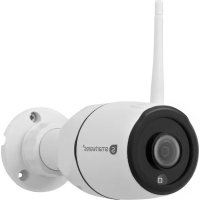
CIP-39940 - Surveillance Camera SMARTWARES - Free user manual and instructions
Find the device manual for free CIP-39940 SMARTWARES in PDF.


Pick your language and provide your email: we'll send you a specifically translated version.
| Product Type | Indoor/Outdoor Surveillance Camera |
| Model | CIP-39940 |
| Brand | SMARTWARES |
| Dimensions (approx.) | 10 cm x 6 cm x 6 cm |
| Weight (approx.) | 200 g |
| Power Supply | DC 5V 1A via USB |
| Video Resolution | 1080p Full HD |
| Night Vision | Yes, up to 10 meters |
| Motion Detection | Yes, with push notifications |
| Two-Way Audio | Yes, built-in microphone and speaker |
| Storage | MicroSD card (up to 128 GB) or Cloud |
| Connectivity | Wi-Fi 802.11 b/g/n 2.4 GHz |
| Viewing Angle | 120° wide-angle |
| Weatherproof Rating | IP65 (suitable for outdoor use) |
| Mobile App | Smartwares Home app (iOS/Android) |
| Mounting | Included bracket and screws |
| Maintenance | Clean lens with soft dry cloth; avoid water ingress |
| Security | Encrypted data transmission; password-protected account |
| Spare Parts & Repairability | Replacement stand and USB cable available; not user-serviceable internally |
| General Information | Operating temperature: -10°C to 50°C; compliance: CE |
Frequently Asked Questions - CIP-39940 SMARTWARES
How do I reset the Smartwares CIP-39940 camera to factory settings?
Press and hold the reset button on the back of the camera for about 10 seconds until you hear a beep. The camera will restart and enter pairing mode.
What should I do if the camera won't connect to Wi-Fi?
Ensure your Wi-Fi is 2.4GHz and you have entered the correct password. Try moving the camera closer to the router or reset it and repeat the setup process using the Smartwares Home app.
Can I use the camera outdoors?
Yes, the CIP-39940 has an IP65 weatherproof rating, meaning it is dust-tight and protected against water jets. However, avoid direct exposure to heavy rain or submersion.
How do I view the camera feed remotely?
Download the Smartwares Home app from the App Store or Google Play. Create an account, add your camera, and you can view live feed, receive alerts, and use two-way audio from anywhere.
What is the field of view?
The camera has a 120° wide-angle lens, allowing you to cover a large area without blind spots.
Does the camera work in complete darkness?
Yes, it has infrared night vision with a range of up to 10 meters. The image will be black and white in low-light conditions.
How do I save recordings?
Insert a microSD card (up to 128 GB) for continuous recording or motion-triggered clips. You can also subscribe to cloud storage for backup.
Why is my camera not detecting motion?
Check that motion detection is enabled in the app settings and that the sensitivity is set appropriately. Ensure the camera is not facing a window or moving objects that may cause false triggers.
Can I share access with other family members?
Yes, in the Smartwares Home app, go to Device Settings -> Share Device, and add the email of the person you want to share with. They can then view the camera feed after creating their own account.
What is the best way to clean the camera?
Use a soft, lint-free cloth slightly dampened with water to gently wipe the lens and housing. Do not use harsh chemicals or abrasive materials. Ensure the camera is unplugged before cleaning.
User questions about CIP-39940 SMARTWARES
0 question about this device. Answer the ones you know or ask your own.
Ask a new question about this device
No questions yet. Be the first to ask one.
Download the instructions for your Surveillance Camera in PDF format for free! Find your manual CIP-39940 - SMARTWARES and take your electronic device back in hand. On this page are published all the documents necessary for the use of your device. CIP-39940 by SMARTWARES.