
OPTIO L40 - Digital Camera PENTAX - Free user manual and instructions
Find the device manual for free OPTIO L40 PENTAX in PDF.


| Product type | Compact digital camera with built-in zoom |
| Effective pixels | 8 megapixels |
| Sensor | 1/2.35-inch CCD, 8.5 total megapixels |
| Lens | Focal length 6.3-18.9mm (35mm equivalent: 36-108mm), aperture f/3.1-f/5.9 |
| Optical / digital zoom | 3x / up to 4x (total 12x) |
| LCD monitor | 2.5-inch color TFT, approx. 150,000 pixels, brightness adjustable |
| ISO sensitivity | Auto, ISO 50-3200 (manual) |
| Shutter speed | 1/2000 sec to 4 sec |
| Built-in flash | Wide: 0.2-8m (ISO Auto), tele: 0.6-4m (ISO Auto) |
| Shooting modes | Auto, Program, Night Scene, Video, Portrait, Landscape, Sport, Pets, etc. |
| Storage media | Built-in memory approx. 21.9MB + SD/SDHC card |
| File formats | JPEG (images), AVI (video), WAVE (audio) |
| Power supply | Rechargeable lithium-ion battery D-LI63, charger D-BC63 (100-240V AC) |
| Battery life | Approx. 220 shots (CIPA standard), 300 min playback |
| Dimensions (W x H x D) | 97.5 x 57.5 x 18 mm |
| Weight | 115 g (without battery and card), 135 g (with battery and card) |
| Connectivity | PC/AV terminal, DC input, USB 2.0 |
| PictBridge | Yes, direct printing without a computer |
| Maintenance and cleaning | Do not use solvents (alcohol, thinner). Clean with a dry, soft cloth. Protect from moisture and dust. |
| Safety | Do not disassemble, avoid shocks and extreme temperatures (0-40°C). Use only the specified battery and charger. |
| Spare parts and repairability | Battery and memory card user-replaceable. Lens non-interchangeable. Repair by authorized PENTAX service center. |
| Warranty | 12 months against manufacturing defects (excluding abnormal use) |
Frequently Asked Questions - OPTIO L40 PENTAX
User questions about OPTIO L40 PENTAX
0 question about this device. Answer the ones you know or ask your own.
Ask a new question about this device
Download the instructions for your Digital Camera in PDF format for free! Find your manual OPTIO L40 - PENTAX and take your electronic device back in hand. On this page are published all the documents necessary for the use of your device. OPTIO L40 by PENTAX.
USER MANUAL OPTIO L40 PENTAX
PENTAX Corporation 2-36-9, Maeno-cho, Itabashi-ku, Tokyo 174-8639, JAPAN (http://www.pentax.co.jp/english)
PENTAX Europe GmbH Julius-Vosseler-Strasse, 104, 22527 Hamburg, GERMANY
(European Headquarters) (HQ - http://www.pentaxeurope.com)
(Germany - http://www.pentax.de)
Hotline: 0180 5 736829 / 0180 5 PENTAX
Austria Hotline: 0820 820 255 (http://www.pentax.at)
PENTAX U.K. Limited PENTAX House,
Heron Drive, Langley, Slough, Berks SL3 8PN, U.K.
(http://www.pentax.co.uk) Hotline: 0870 736 8299
PENTAX France S.A.S. 112 Quai de Bezons - BP 204, 95106 Argenteuil Cedex, FRANCE (http://www.pentax.fr)
Hotline: 0826 103 163 (0,15€ la minute) Fax: 01 30 25 75 76
PENTAX Imaging (Headquarters)
Company 600 12th Street, Suite 300 Golden, Colorado 80401, U.S.A.
A Division of PENTAX (PENTAX Service Department)
of America, Inc. 12000 Zuni Street, Suite 100B
Westminster, Colorado 80234, U.S.A.
(http://www.pentaximaging.com)
PENTAX Canada Inc. 1770 Argentina Road Mississauga, Ontario L5N 3S7, CANADA
(http://www.pentax.ca)

for your
precious moments
Copyright © PENTAX Corporation 2007
FOM 01.07.2007 Printed in Europe
PENTAX™
natural_image
Silver Pentax L40 digital camera with visible lens and control buttons (no text beyond brand name)


natural_image
Illustration of a hand holding a camera with a heart-shaped logo, next to a sitting dog (no text or symbols present)natural_image
Line drawing of a digital camera with lens and screen (no text or symbols)Appareil Optio L40

natural_image
Line drawing of a U-shaped object with a loop handle and clasp (no text or symbols)Courroie O-ST51 (*)

natural_image
Simple line drawing of a circular disc with concentric rings (no text or symbols)natural_image
Line drawing of a USB cable with connectors and connectors (no text or symbols)Câble USB I-USB7 (*)
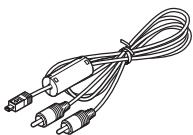
natural_image
Line drawing of a coiled electrical plug with three connectors (no text or symbols)Câble AV I-AVC7 (*)

Batterie lithium-ion rechargeable D-LI63 (*)
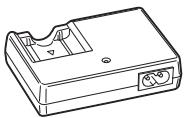
natural_image
Line drawing of a mechanical housing or enclosure with internal components (no text or symbols)natural_image
Coiled black cable with two terminal connectors (no text or symbols visible)natural_image
Black-and-white beach scene with palm trees, a small building, and a coastal landscape under cloudy sky (no readable text or symbols)natural_image
Black-and-white beach scene with palm trees and a distant island, captured in a photo editing interface (no readable text or symbols)natural_image
Black-and-white photo of a snowy landscape with vehicles and trees, no visible text or symbolsnatural_image
Microscopic view of cellular structures under different conditions (no text or symbols visible)Mode
Mode
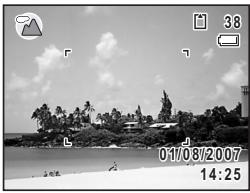
natural_image
Black-and-white beach scene with palm trees, a small island, and a camera interface overlay (no readable text or symbols)
natural_image
Black-and-white photo of a wooden pier by the sea, with no visible text or symbols in the main scene.natural_image
Black-and-white beach scene with palm trees and a distant island, captured in a photo editing interface (no readable text or symbols on the scene itself)
natural_image
Black-and-white beach scene with palm trees, rocks, and a distant island (no visible text or symbols)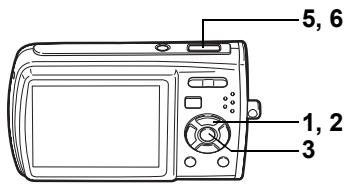

natural_image
Black-and-white photo of three lit candles with decorative patterns, no visible text or symbols
natural_image
Black-and-white portrait of a smiling woman with a face highlighted (no text or symbols visible)natural_image
Black-and-white beach scene with palm trees, rocks, and a lighthouse under cloudy sky (no text or symbols)
natural_image
Black and white photo of a wolf head inside a heart-shaped frame, with menu and OK/OK buttons visible (no readable text or symbols)natural_image
Black-and-white photo of a fluffy dog resting on a wooden ledge, with no visible text or symbols.natural_image
Black-and-white photo of a dog resting on a wooden ledge, with no visible text or symbols in the main image area.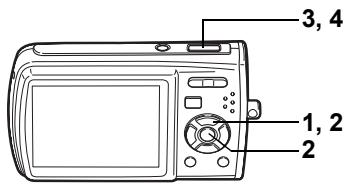

natural_image
Line drawing of a digital camera with control panel and buttons (no text or symbols)
Utilisation du zoom
natural_image
Row of black-and-white icons representing various activities or concepts (no text or symbols)natural_image
Abstract white silhouette on gray background, no text or symbols presentImage correcte
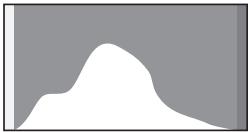
natural_image
Abstract white silhouette of a mountain shape against a gray background (no text or symbols)Image lumineuse
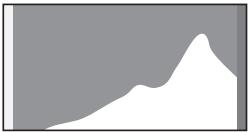
natural_image
Abstract white shape on gray background with no text or symbols


natural_image
Black and white photo of a dolphin leaping out of water, captured within a camera lens (no text or symbols on the image itself)natural_image
Black and white photo of a dolphin leaping out of water, captured in a pool with camera interface overlays (no readable text or symbols)Bouton de navigation (◀) Lecture arrière
Bouton de navigation (▲) Pause
natural_image
Grid of black-and-white beach and beach photos including tropical landscapes, cityscapes, and a boat (no text or symbols)natural_image
Black-and-white beach photo showing a person on the shore with camera control buttons (no readable text or symbols)
natural_image
Black-and-white photo of a wooden pier with a gabled pavilion on calm water, no visible text or symbols.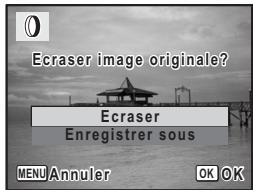
natural_image
Black-and-white photo of a wooden pier with a gabled pavilion on calm water, no visible text or symbols.
natural_image
Black and white photo of a wolf head inside a heart-shaped frame, with menu and OK/OK buttons visible (no readable text or symbols)natural_image
Black-and-white photo of a wooden pier at sea with a digital camera interface overlay (no readable text or symbols on the scene itself)natural_image
Black-and-white beach scene with palm trees and a distant island, captured in a photo editing interface (no readable text or symbols on the scene itself)Comment afficher le menu [✗️ Réglages]
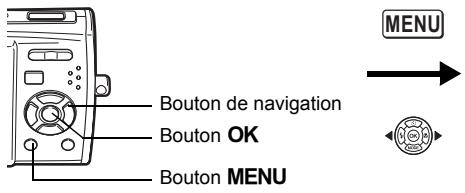
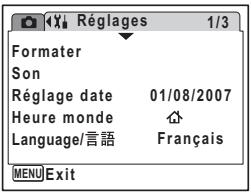
flowchart
graph TD
    A["DCIM"] --> B["100 PENTX"]
    B --> C["Computer Icon"]
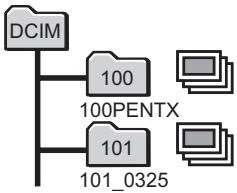
flowchart
graph TD
    A["DCIM"] --> B["100"]
    A --> C["101"]
    B --> D["100PENTX"]
    C --> E["101_0325"]
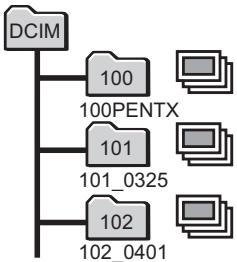
flowchart
graph TD
    A["DCIM"] --> B["100"]
    A --> C["101"]
    A --> D["102"]
    B --> E["100PENTX"]
    C --> F["101_0325"]
    D --> G["102_0401"]
natural_image
Black-and-white beach scene with palm trees and waves, no visible text or symbols
natural_image
Gray and black PETAX device with a strap, no visible text or symbols on the device itself.Étui cuir LC-M1

natural_image
Black leather handbag with strap and tag (no visible text or symbols)Messages
For customers in USA
STATEMENT OF FCC COMPLIANCE
This device complies with Part 15 of the FCC Rules. Operation is subject to the following two conditions: (1) This device may not cause harmful interference, and (2) this device must accept any interference received, including interference that may cause undesired operation.
Changes or modifications not approved by the party responsible for compliance could void the user's authority to operate the equipment. This equipment has been tested and found to comply with the limits for a Class B digital device, pursuant to part 15 of the FCC Rules.
These limits are designed to provide reasonable protection against harmful interference in a residential installation. This equipment generates, uses and can radiate frequency energy and, if not installed and used in accordance with the instructions, may cause harmful interference to radio communications. However, there is no guarantee that interference will not occur in a particular installation.
If this equipment does cause harmful interference to radio or television reception, which can be determined by turning the equipment off and on, the user is encouraged to try to correct the interference by one or more of the following measures:
- Reorient or relocate the receiving antenna.
Increase the separation between the equipment and receiver.
Connect the equipment into an outlet on a circuit different from that to which the receiver is connected.
* Consult the dealer or an experienced radio/TV technician for help.
For customers in Canada
This Class B digital apparatus complies with Canadian ICES-003.
Perchlorate Material-special handling may apply.
The lithium battery used in this camera contains perchlorate material, which may require special handling.
See www.dtsc.ca.gov/hazardouswaste/perchlorate
Declaration of Conformity
According to 47CFR, Parts 2 and 15 for
Class B Personal Computers and Peripherals
We: PENTAX Imaging Company
A Division of PENTAX of America, Inc.
Located at: 600 12 ^th Street, Suite 300
Golden, Colorado 80401 U.S.A.
Phone: 303-799-8000 FAX: 303-790-1131
Declare under sole responsibility that the product identified herein complies with 47CFR Parts 2 and 15 of the FCC rules as a Class B digital device. Each product marketed is identical to the representative unit tested and found to be compliant with the standards. Records maintained continue to reflect the equipment being produced can be expected to be within the variation accepted, due to quantity production and testing on the statistical basis as required by 47CFR §2.909. Operation is subject to the following two conditions: (1) This device may not cause harmful interference, and (2) This device must accept any interference received, including interference that may cause undesired operation. The above named party is responsible for ensuring that the equipment complies with the standards of 47CFR §15.101 to §15.109.
Product Name: PENTAX Digital Still Camera
Model Number: Optio L40
Contact person: Customer Service Manager
Date and Place: August, 2007, Colorado
P Programme ....53, 62
Nocturne 53,68
Vidéo 53
¶ Enregistrement vocal ....53, 143
Paysage 53
Fleur 53
Ton chair naturel .....53, 64
Portrait 53,64
Mer & Neige 53
Mouvements ....53
(《) Digital SR
(anti-flou) 53, 63
Enfants 53
Animaux
Lecture....41, 107, 116, 145, 147
Lumière fluo 當 87
M
Macro 🎨 79
Manuel □ 87
Mémo vocal 146
Mémoire 97
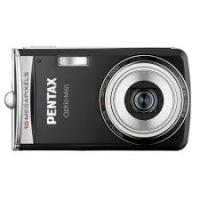
Brand : PENTAX
Model : OPTIO L40
Category : Digital Camera