Optio 550 - Digital Camera PENTAX - Free user manual and instructions
Find the device manual for free Optio 550 PENTAX in PDF.


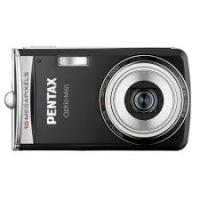
| Product type | Compact digital camera with built-in zoom |
| Brand | PENTAX |
| Model | Optio 550 |
| Effective resolution | 5.0 megapixels |
| Sensor | CCD 1/1.8 inch 5.25 Mpix, primary color filter |
| Lens | 5x optical zoom, f/2.8-4.6, focal length 7.8-39 mm (equiv. 37.5-187.5 mm in 35 mm) |
| Digital zoom | 4x (20x combined with optical zoom) |
| LCD screen | 1.5-inch color TFT (polysilicon, backlight) |
| Viewfinder | Real-image zoom viewfinder, diopter adjustment -3 to +1 m⁻¹ |
| Exposure modes | Program (P), Aperture Priority (Av), Shutter Priority (Tv), Manual (M), Program Results, Video, Panorama, 3D, Digital Filter, User, Voice Recording |
| Scene modes (Program Results) | Landscape, Night Scene, Flower, Portrait, Surf & Snow, Autumn Colors, Sunset, Fireworks, Text |
| ISO sensitivity | Auto, 64, 100, 200, 400 |
| White balance | Auto, Daylight, Shade, Tungsten, Fluorescent (W/N/D), Manual |
| Flash | Auto, forced, red-eye reduction; range: 0.4-5.2 m (wide), 0.15-3.2 m (tele) |
| Video recording | 320×240 pixels, 15 fps, with sound (MOV format) |
| Memory support | SD card / MultiMediaCard |
| File formats | JPEG (Exif 2.2), TIFF, MOV (video), WAV (audio) |
| Power supply | Rechargeable lithium-ion battery D-Li7; AC adapter D-AC7 (optional) |
| Battery life | Approximately 400 photos with LCD on (50% flash); playback approx. 210 min |
| Dimensions | 100 × 59 × 39.5 mm (without accessories) |
| Weight | 205 g (body only), 250 g (with battery and memory card) |
| Included accessories | Li-ion battery D-Li7, charger D-BC7, USB cable, AV cable, 3D viewer, strap, software CD-ROM, manual |
| Care and cleaning | Clean with a soft, dry cloth; use a blower for optics; have it serviced every 1 to 2 years |
| Safety | Do not disassemble, avoid moisture, remove battery if smoke or unusual odor |
| Spare parts and repairability | Contact Pentax after-sales service or an authorized dealer for any repairs |
Frequently Asked Questions - Optio 550 PENTAX
User questions about Optio 550 PENTAX
0 question about this device. Answer the ones you know or ask your own.
Ask a new question about this device
Download the instructions for your Digital Camera in PDF format for free! Find your manual Optio 550 - PENTAX and take your electronic device back in hand. On this page are published all the documents necessary for the use of your device. Optio 550 by PENTAX.
USER MANUAL Optio 550 PENTAX
Lecture/Effacement 89
Lecture/effacement
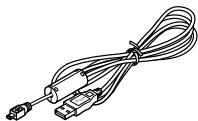
Cable USB I-USB7 (e)
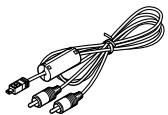
Cable AV I-AVC7 (e)
M Tv Av PICT 3D USEER
Zoom
M Tv Av PICT 3D USEER
M Tv Av PICT 3D USEER
M Tv Av P PICT UUSER
M Tv Av P PICT UUSER
You could also copy the images to a I'aide d'Internet Explorer pour Windows.

For customers in USA STATEMENT OF FCC COMPLIANCE
This device complies with Part 15 of the FCC Rules. Operation is subject to the following two conditions: (1) This device may not cause harmful interference, and (2) this device must accept any interference received, including interference that may cause undesired operation. Changes or modifications not approved by the party responsible for compliance could void the user's authority to operate the equipment. This equipment has been tested and found comply with the limits for a Class B digital device, pursuant to part 15 of the FCC Rules.
These limits are designed to provide reasonable protection against harmful interference in a residential installation. This equipment generates, uses and can radiate frequency energy and, if not installed and used in accordance with the instructions, may cause harmful interference to radio communications. However, there is no guarantee that interference will not occur in a particular installation.
If this equipment does cause harmful interference to radio or television reception, which can be determined by turning the equipment off and on, the user is encouraged to try to correct the interference by one or more of the following measures:
- Reorient or relocate the receiving antenna.
Increase the separation between the equipment and receiver.
Connect the equipment into an outlet on a circuit different from that to which the receiver is connected. - Consult the dealer or an experienced radio/TV technician for help.
For customers in Canada
This Class B digital apparatus meets all requirements of the
Canadian Interference - Causing Equipment Regulations.
The CE Mark is a Directive conformity mark of the European Community.

PENTAX Europe GmbH (European Headquarters)
(Germany - http://www.pentax.de)
PENTAX U.K. Limited Pentax House, Heron Drive, Langley, Slough, Berks SL3 8PN, U.K.
(http://www.pentax.co.uk)
PENTAX France S.A.S. 12/14, rue Jean Poulmarch, 95106 Argenteuil
Cedex, FRANCE
PENTAX Benelux B.V. (for Netherlands)
Spinveld 25, 4815 HR Breda, NETHERLANDS
(http://www.pentax.nl)
(for Belgium & Luxembourg)
Weiveldlaan 3-5, 1930 Zaventem, BELGIUM
(http://www.pentax.be)
PENTAX U.S.A., Inc 35 Inverness Drive East, Englewood, Colorado 80112, U.S.A.
(http://www.pentax.com)
PENTAX Canada Inc. 3131 Universal Drive, Mississauga, Ontario L4X 2E5, CANADA
(http://www.pentaxcanada.ca)
http://www.digital.pentax.co.jp

Brand : PENTAX
Model : Optio 550
Category : Digital Camera