
D-BG1 - Camera Grip PENTAX - Free user manual and instructions
Find the device manual for free D-BG1 PENTAX in PDF.

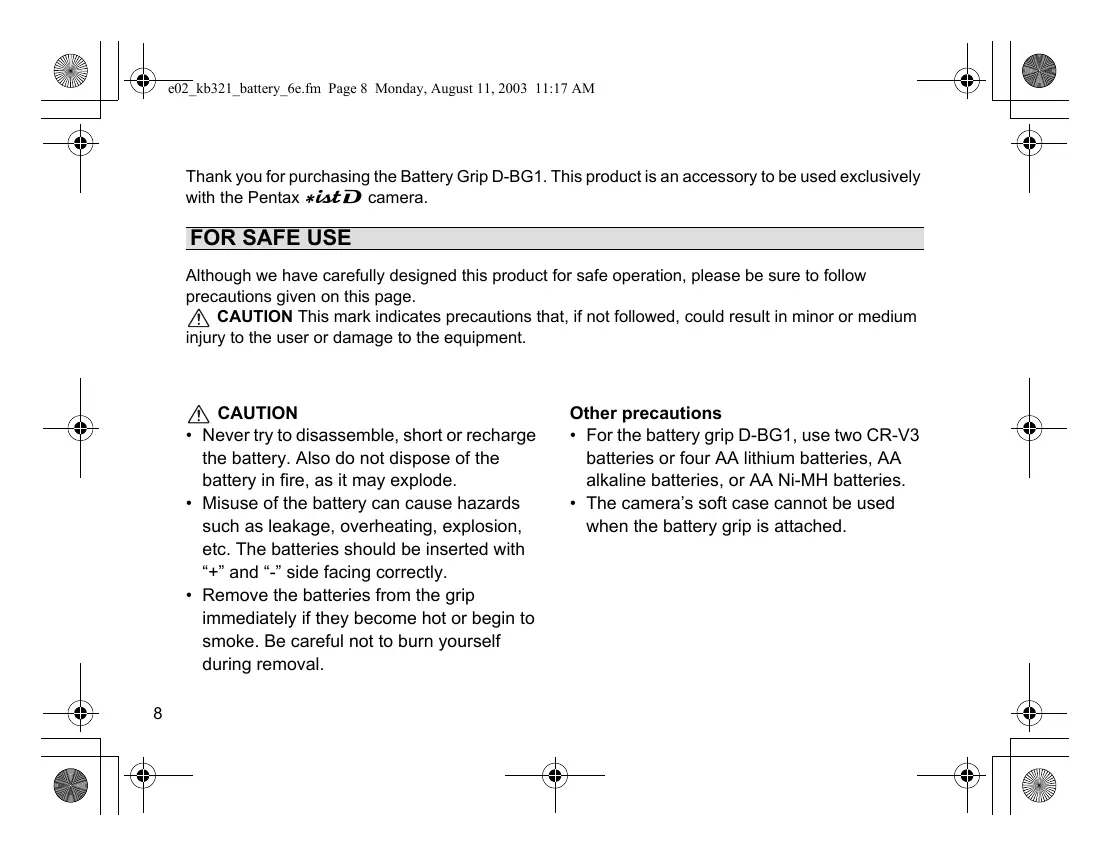


| Product type | Power grip for camera |
| Brand | PENTAX |
| Model | D-BG1 |
| Compatibility | Pentax *istD camera |
| Dimensions | 131 mm (W) x 42 mm (H) x 73 mm (D) |
| Weight | 180 g |
| Power source | Two CR-V3 batteries or four AA batteries (lithium, Ni-MH, alkaline) |
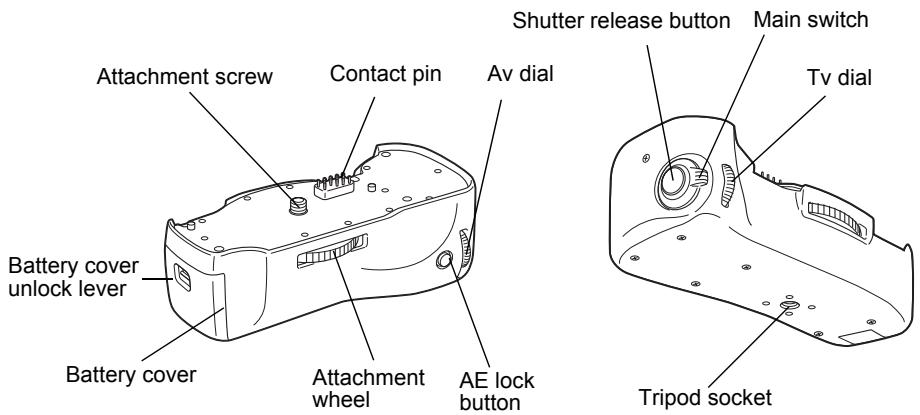
| Main functions | Shutter release, AE lock, Tv and Av dials, main switch, fixing dial, accessory ring |
| Safety | Do not disassemble, short-circuit or recharge batteries; remove immediately if heating or smoking; observe polarity |
| Maintenance and cleaning | Clean with a dry cloth; store in a dry place; remove batteries if not used for a long time |
| Spare parts and repairability | Contact pin cap, battery holder, battery compartment cover; repair by authorized technician |
| Number of shots (CR-V3 at 20°C) | Approx. 800 (without flash), 750 (50% flash), 650 (100% flash) |
| Operating temperature | Operates from 0°C to 40°C (reduced performance in cold weather) |
| Compliance | CE marking |
Frequently Asked Questions - D-BG1 PENTAX
User questions about D-BG1 PENTAX
0 question about this device. Answer the ones you know or ask your own.
Ask a new question about this device
Download the instructions for your Camera Grip in PDF format for free! Find your manual D-BG1 - PENTAX and take your electronic device back in hand. On this page are published all the documents necessary for the use of your device. D-BG1 by PENTAX.
USER MANUAL D-BG1 PENTAX
natural_image
Line drawing of a mechanical device casing with internal components and mounting holes (no text or symbols)| 使用説明書 | 日本語 |
| Operating Manual | English |
| Bedienungsanleitung | Deutsch |
| Mode d'emploi | Français |
| Manual de instrucciones | Español |
| Manuale di Istruzioni | Italiano |
| Handleiding | Nederlands |
| 使用手冊 | 中國語 |
natural_image
Line drawing of a mechanical component with a curved arrow indicating rotation (no text or symbols)natural_image
Line drawing of a mechanical device with no visible text or symbolsnatural_image
Line drawing of a device casing with a mounted sensor or sensor component, shown from two different angles (no text or symbols)natural_image
Line drawing of a digital camera with no visible text or symbolsnatural_image
Line drawing of hands holding a camera lens (no text or symbols)Thank you for purchasing the Battery Grip D-BG1. This product is an accessory to be used exclusively with the Pentax *istD camera.
FOR SAFE USE
Although we have carefully designed this product for safe operation, please be sure to follow precautions given on this page.
CAUTION This mark indicates precautions that, if not followed, could result in minor or medium injury to the user or damage to the equipment.
CAUTION
- Never try to disassemble, short or recharge the battery. Also do not dispose of the battery in fire, as it may explode.
- Misuse of the battery can cause hazards such as leakage, overheating, explosion, etc. The batteries should be inserted with “+” and “-” side facing correctly.
- Remove the batteries from the grip immediately if they become hot or begin to smoke. Be careful not to burn yourself during removal.
Other precautions
- For the battery grip D-BG1, use two CR-V3 batteries or four AA lithium batteries, AA alkaline batteries, or AA Ni-MH batteries.
- The camera's soft case cannot be used when the battery grip is attached.
Use two CR-V3 batteries or four AA lithium batteries, AA alkaline batteries, or AA Ni-MH batteries.
natural_image
Line drawing of a battery casing with a handle and arrow indicating rotation (no text or symbols)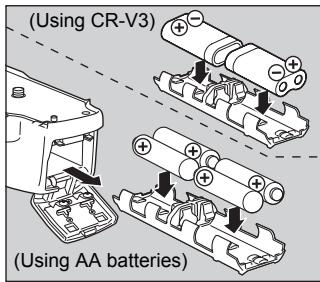
natural_image
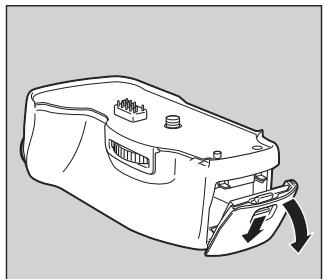
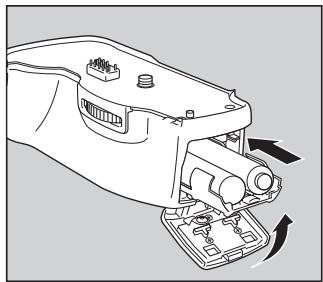
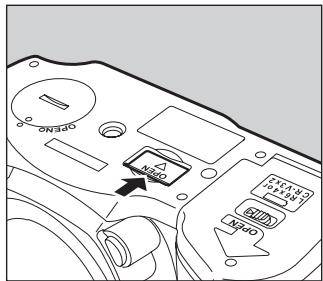
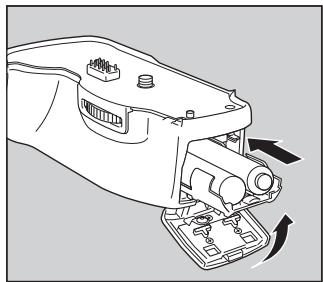
Line drawing of a mechanical device with no visible text or symbols1 Open the battery cover by pulling down the battery cover unlock lever as shown above.
2 Pull out the battery holder from the battery grip, insert the batteries correctly with regard to polarity (+ and -) marked on the batteries and the battery holder.
3 Slide the battery holder into the battery grip, and close the battery cover as shown above.
Memo
- AA lithium batteries, AA alkaline batteries, and the CR-V3 are not rechargeable.
- Refer to page 14 for the number of captures and playback time with a new set of batteries.
- When replacing the batteries, replace all of the batteries at the same time. At that time, do not mix fresh batteries with old ones. Use batteries of the same manufacturer and of the same type when replacing the batteries.
natural_image
Diagram showing a device with a sensor and a separate housing component, no text or symbols present.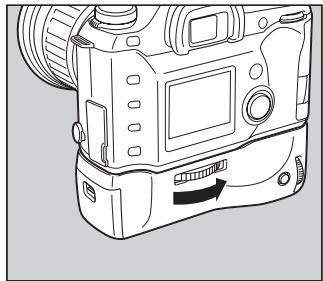
natural_image
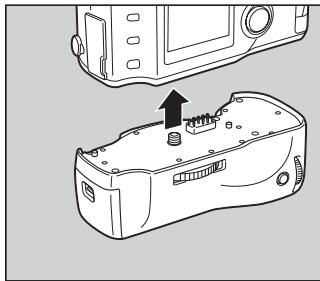
Line drawing of a digital camera with no visible text or symbols1 Open the battery grip connection cover on the camera, and remove the contact pin cap on the battery grip.
2 Attach the battery grip to the camera by fitting the contact pin and Attachment screw of the battery grip to the Battery grip connection terminal and Tripod socket of the camera as shown above.
3 Secure the battery grip by turning the Attachment wheel firmly in the direction of the arrow as shown above.
CAUTION
- Make sure the camera and the battery grip are turned off before attaching.
- Leave the cap on when not using the battery grip. Do not touch the contact pin with the cap off.
TAKING PICTURES WITH THE CAMERA IN THE VERTICAL POSITION
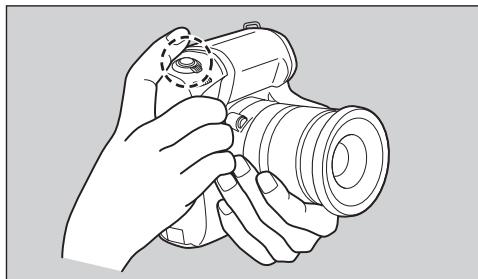
The Shutter release button, AE lock button, Tv dial and Av dial on the battery grip are used when taking pictures with the camera in the vertical position as shown below.
natural_image
Line drawing of a hand holding a camera lens, no text or symbols presentUse the shutter release button when taking pictures with the camera in the vertical position.
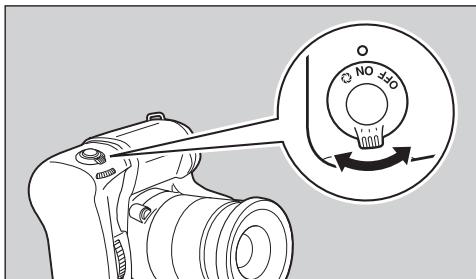
Make sure to turn on the power before attempting to operate any of the buttons or dials on the battery grip. However, the camera can still be operated even if the power of the battery grip is turned off.
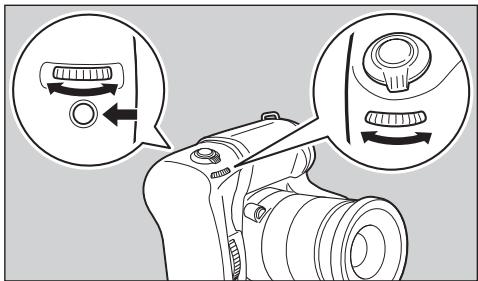
When the AE lock button is pressed, AE lock can be applied in the same manner as camera mode. In addition, by using the Av dial and Tv dial, aperture value and shutter speed can be set, and various menu functions can be performed.
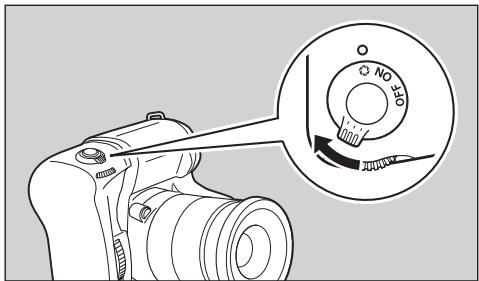
Turn the main switch to 🔒 to check the depth of field.
Memo
If a Tv or Av dial on either the camera or battery grip is not clicked into place, the dials may fail to operate. If the dials on the camera do not operate, then try turning the dials on the battery grip a little. If the dials on the battery grip do not operate, check the dials on the camera.
Camera: \*istD
Batteries: Two CR-V3 Lithium batteries or four AA batteries (Lithium, Ni-MH, Alkaline)
Dimensions: 131 mm (W) × 42 mm (H) × 73 mm (D)
Weight: 180g
Specifications and external dimensions are subject to change without notice.
Number of Captures and Playback Time (with new batteries)
| Batteries(actual temperature) | General photography | Flash photography | Playback time | ||
| 50% usage | 100% usage | ||||
| CR-V3 | (20°C) | Approx. 800 images | Approx. 750 images | Approx. 650 images | Approx. 450 minutes |
| (0°C) | Approx. 550 images | Approx. 500 images | Approx. 450 images | Approx. 350 minutes | |
| AA Lithium | (20°C) | Approx. 750 images | Approx. 650 images | Approx. 600 images | Approx. 350 minutes |
| (0°C) | Approx. 650 images | Approx. 600 images | Approx. 500 images | Approx. 300 minutes | |
| Ni-MH | (20°C) | Approx. 400 images | Approx. 350 images | Approx. 300 images | Approx. 250 minutes |
| (0°C) | Approx. 350 images | Approx. 300 images | Approx. 250 images | Approx. 200 minutes | |
| AA Alkaline | (20°C) | Approx. 100 images | Approx. 90 images | Approx. 70 images | Approx. 100 minutes |
| (0°C) | Not applicable | Not applicable | Not applicable | Approx. 40 minutes | |
- These figures are based on PENTAX measuring conditions. They may vary by the capture mode or shooting conditions.
- Battery performance decreases in low temperatures. In cold environments, it is recommended that you carry extra batteries and keep them warm in your pocket. Battery performance will recover when the surrounding temperature returns to normal.
- We do not recommend the use of AA alkaline batteries except in emergency situations as they may not adequately handle all camera functions.
- When the camera and battery grip both have batteries, the power is drawn from the source with the higher voltage extending overall battery life. Please note that nickel hydride batteries have a lower voltage causing other batteries to be consumed first.
- The camera and battery grip can be used if there is a battery in at least one of them.
- Carry extra batteries with you when traveling overseas, taking pictures in cold environments or taking a lot of pictures.
• See page 22 of the camera operating manual for selecting batteries according to the purpose.
For customers in the USA
STATEMENT OF FCC COMPLIANCE
This device complies with Part 15 of the FCC rules. Operation is subject to the following two conditions: (1) This device may not cause harmful interference, and (2) this device must accept any interference received, including interference that may cause undesired operation.
Changes or modifications not approved by the party responsible for compliance could void the user's authority to operate the equipment.
This equipment has been tested and found to comply with the limits for a Class B digital device, pursuant to part 15 of the FCC Rules.
These limits are designed to provide reasonable protection against harmful interference in a residential installation. This equipment generates, uses and can radiate radio frequency energy and, if not installed and used in accordance with the instructions, may cause harmful interference to radio communications.
However, there is no guarantee that interference will not occur in a particular installation. If this equipment does cause harmful interference to radio or television reception, which can be determined by turning the equipment off and on, the user is encouraged to try to correct the interference by one or more of the following measures:
Reorient or relocate the receiving antenna.
Increase the separation between the equipment and receiver.
Consult the dealer or an experienced radio/TV technician for help.
For customers in Canada
This Class B digital apparatus meets all requirements of the Canadian Interference-Causing Equipment Regulations.
Memo
natural_image
Line drawing of a mechanical component with a curved arrow indicating rotation (no text or symbols)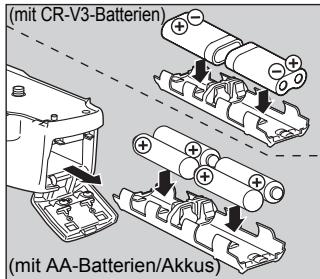
natural_image
Line drawing of a mechanical device with no visible text or symbols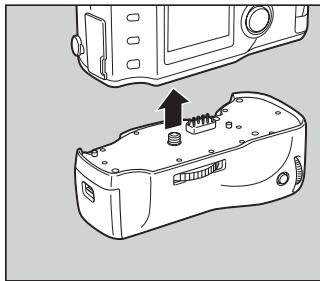
natural_image
Diagram showing a device with a sensor and a separate housing component, no text or symbols present.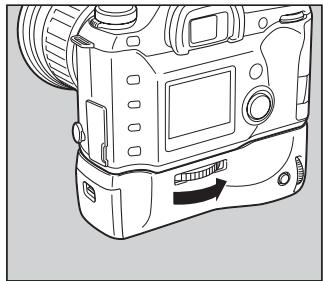
natural_image
Line drawing of a digital camera with no visible text or symbolsnatural_image
Line drawing of a hand holding a camera lens (no text or symbols)natural_image
Line drawing of a mechanical component with a curved arrow indicating rotation (no text or symbols)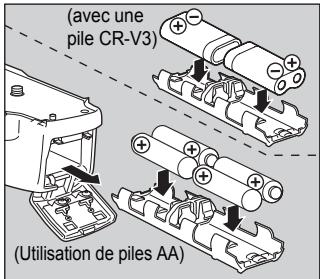
natural_image
Line drawing of a mechanical device with no visible text or symbols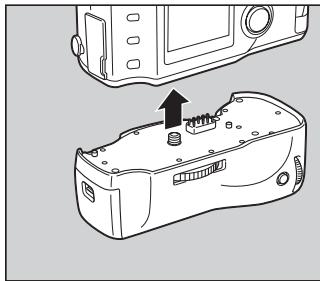
natural_image
Diagram showing a device with a sensor and a separate housing component, no text or symbols present.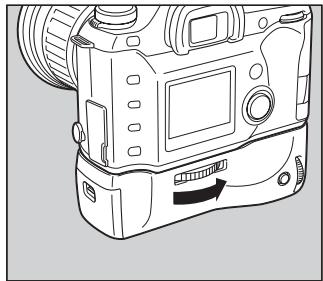
natural_image
Line drawing of a digital camera with no visible text or symbolsnatural_image
Line drawing of hands holding a camera lens (no text or symbols)natural_image
Line drawing of a mechanical component with a curved arrow indicating rotation (no text or symbols)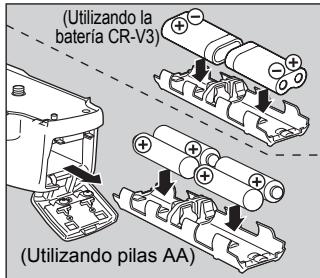
natural_image
Line drawing of a mechanical device with no visible text or symbols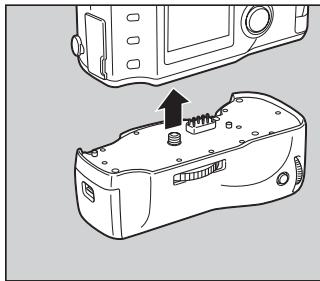
natural_image
Diagram showing a device with a sensor and a separate housing component, no text or symbols present.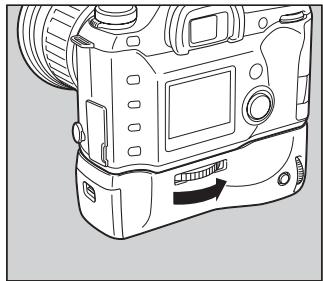
natural_image
Line drawing of a digital camera with no visible text or symbolsnatural_image
Line drawing of a hand holding a camera lens (no text or symbols)natural_image
Line drawing of a mechanical component with a curved arrow indicating rotation (no text or symbols)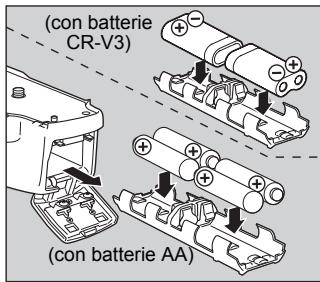
natural_image
Line drawing of a mechanical device with a base and adjustment mechanism (no text or symbols)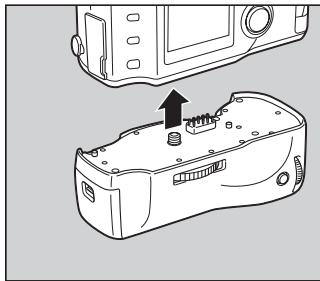
natural_image
Diagram showing a device with a sensor and a separate housing component, no text or symbols present.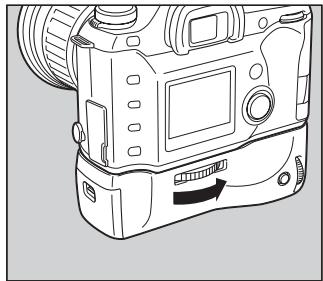
natural_image
Line drawing of a digital camera with no visible text or symbolsnatural_image
Line drawing of a hand holding a camera lens (no text or symbols)natural_image
Line drawing of a mechanical component with a curved arrow indicating rotation (no text or symbols)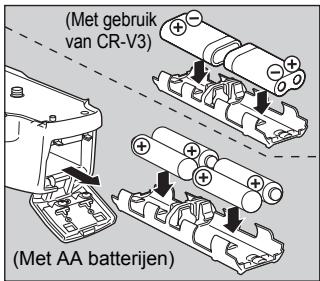
natural_image
Line drawing of a mechanical device with no visible text or symbols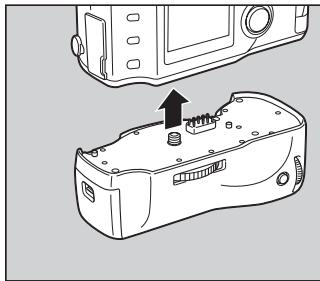
natural_image
Diagram showing a device with a sensor and a separate housing component, no text or symbols present.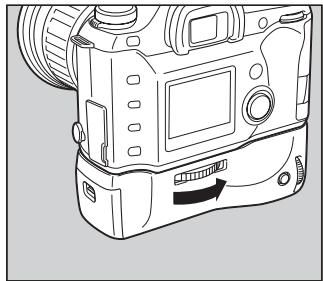
natural_image
Line drawing of a digital camera with no visible text or symbolsnatural_image
Line drawing of a hand holding a camera lens (no text or symbols)natural_image
Line drawing of a mechanical component with a curved arrow indicating rotation (no text or symbols)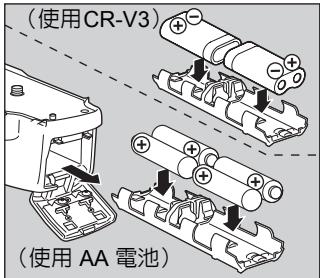
natural_image
Line drawing of a mechanical device with no visible text or symbolsnatural_image
Line drawing of a device casing with a mounted sensor or sensor component, shown from two different angles (no text or symbols present)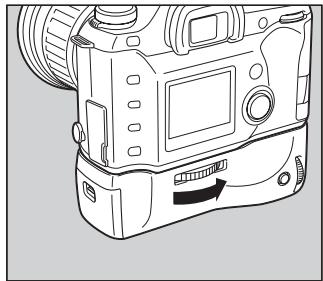
natural_image
Line drawing of a digital camera with no visible text or symbolsnatural_image
Line drawing of a hand holding a camera lens (no text or symbols)for your precious moments
ペンタックス株式会社
PENTAX Europe GmbH (European Headquarters)
Julius-Vosseler-Strasse, 104, 22527 Hamburg, GERMANY
(HQ - http://www.pentaxeurope.com) (Germany - http://www.pentax.de)
PENTAX U.K. Limited Pentax House, Heron Drive, Langley, Slough, Berks SL3 8PN, U.K. (http://www.pentax.co.uk)
PENTAX France S.A.S. 12/14, rue Jean Poulmarch, 95106 Argenteuil Cedex, FRANCE
PENTAX Benelux B.V. (for Netherlands) Spinveld 25, 4815 HR Breda, NETHERLANDS (http://www.pentax.nl)
(for Belgium & Luxembourg) Weiveldlaan 3-5, 1930 Zaventem, BELGIUM (http://www.pentax.be)
The CE Mark is a Directive conformity mark of the European Community.
Brand : PENTAX
Model : D-BG1
Category : Camera Grip