ARCHOS 80 CHILDPAD - Kids Tablet

80 CHILDPAD - Kids Tablet ARCHOS - Free user manual and instructions

Find the device manual for free 80 CHILDPAD ARCHOS in PDF.
📄 146 pages English EN Download 💬 AI Question
Notice ARCHOS 80 CHILDPAD - page 5
Pick your language and provide your email: we'll send you a specifically translated version.

User questions about 80 CHILDPAD ARCHOS

0 question about this device. Answer the ones you know or ask your own.

Ask a new question about this device

The email remains private: it is only used to notify you if someone responds to your question.

No questions yet. Be the first to ask one.

Download the instructions for your Kids Tablet in PDF format for free! Find your manual 80 CHILDPAD - ARCHOS and take your electronic device back in hand. On this page are published all the documents necessary for the use of your device. 80 CHILDPAD by ARCHOS.

USER MANUAL 80 CHILDPAD ARCHOS

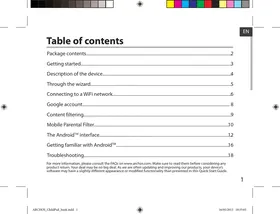
Package contents....2

Getting started....3

Description of the device....4

Through the wizard....5

Connecting to a WiFi network....6

Google account....8

Content filtering....9

Mobile Parental Filter....10

The Android ^TM interface....12

Getting familiar with Android ^TM ....16

Troubleshooting....18

For more information, please consult the FAQs on www.archos.com. Make sure to read them before considering any product return. Your deal may be no big deal. As we are often updating and improving our products, your device's software may have a slightly different appearance or modified functionality than presented in this Quick Start Guide.

Package Content
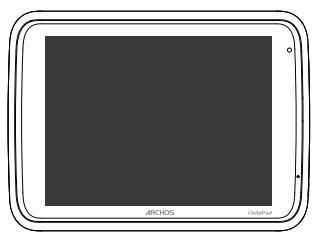
ARCHOS 80 CHILDPAD - Package Content - 1

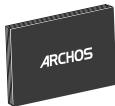
natural_image Front view of a tablet device with rounded corners and a dark screen (no text or symbols visible)

ARCHOS 80 ChildPad

ARCHOS 80 CHILDPAD - Package Content - 2
QSG booklet

ARCHOS 80 CHILDPAD - Package Content - 3
Warranty, legal & safety booklet

ARCHOS 80 CHILDPAD - Package Content - 4

natural_image Black cable with a USB port connector, no text or symbols visible

USB cable

ARCHOS 80 CHILDPAD - Package Content - 5

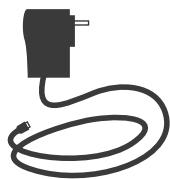
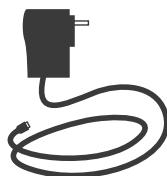
natural_image Simple line drawing of a black plug connected to a coiled cable (no text or symbols)

Charger

2

Getting Started

Charging
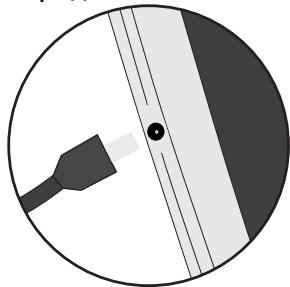
ARCHOS 80 CHILDPAD - Getting Started - 1

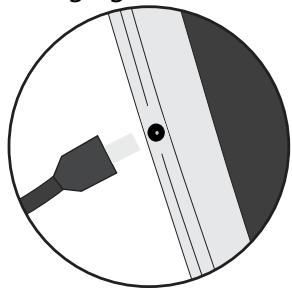
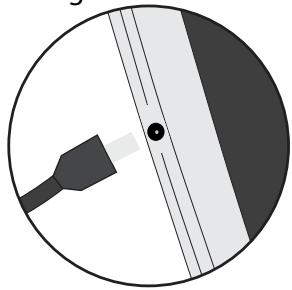
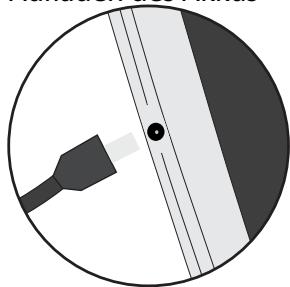
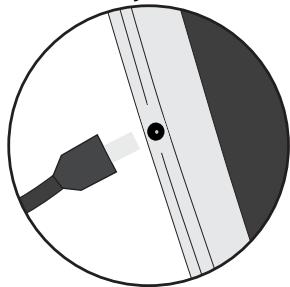
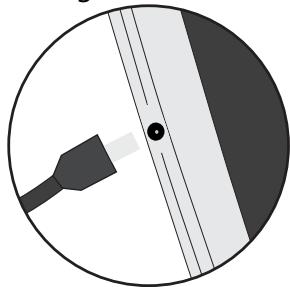
natural_image Circular diagram with a black connector and diagonal lines, no text or symbols present

Connect the supplied power cable to the ARCHOS and to a wall outlet. The ARCHOS device will turn on and start charging.

  • You can use your ARCHOS whilst it charges.
  • Let your device charge completely the first time you use it.
  • Use only the supplied charger.
  • When your device does not turn on or is completely discharged, let it charge for at least 30 minutes.

TIPS:

To receive more complete service, please register your product. From a computer, go to www.archos.com/register.

Description of the device
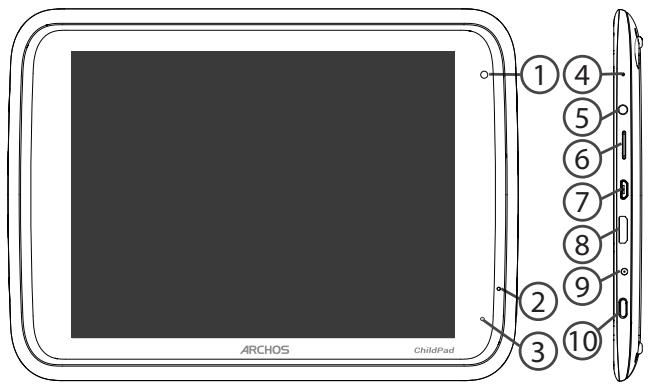
ARCHOS 80 CHILDPAD - Description of the device - 1

text_image ARCHOS ChildPad

Back of the device
ARCHOS 80 CHILDPAD - Description of the device - 2

flowchart
graph TD
    A[" "] --> B["11"]
    style A fill:#fff,stroke:#000
    style B fill:#fff,stroke:#000

① Webcam
② Microphone
③ Charging indicator
④ Reset button

⑤ Headphone jack
⑥ Micro-SD card slot
⑦ Micro-HDMI video output*
⑧ Micro-USB port

⑨ Power connector
⑩ ON/OFF button
⑪ Camera

* With optional Micro-HDMI to HDMI cable.

Through the Wizard

The first time you start up your ARCHOS, the installation wizard will help you set up your device:

  • Language
  • Date & time
  • WiFi connection
  • Location service options
  • 3rd party apps

TIPS:

We recommend that you set up your device in the WiFi zone of the network that you will regularly be using.

Connecting to a WiFi Network

WARNING: Make sure that you are in a WiFi zone.
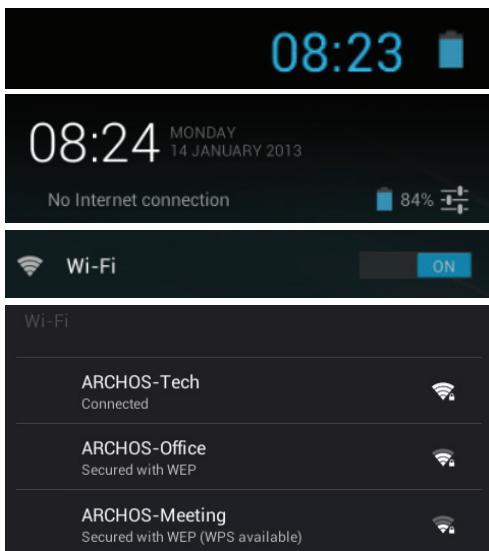
ARCHOS 80 CHILDPAD - Connecting to a WiFi Network - 1

text_image 08:23 08:24 MONDAY 14 JANUARY 2013 No Internet connection 84% Wi-Fi ON Wi-Fi ARCHOS-Tech Connected ARCHOS-Office Secured with WEP ARCHOS-Meeting Secured with WEP (WPS available)

① Touch the time in the status bar. The status dashboard is displayed.
② Touch the time a second time in the status dashboard. The quick settings will be displayed.
③ Slide the WiFi switch to ON positon. Touch Wifi to open the WiFi settings menu.
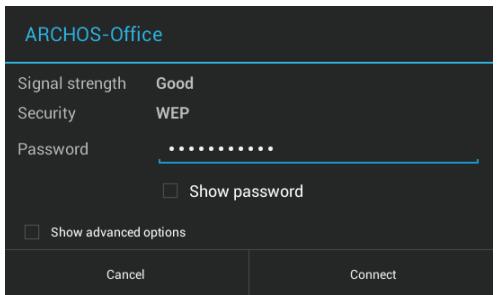
④ The ARCHOS will scan for Wifi networks in range. Touch the name of network you want to connect to.

ARCHOS 80 CHILDPAD - Connecting to a WiFi Network - 2

text_image ARCHOS-Office Signal strength Good Security WEP Password ...... □ Show password □ Show advanced options Cancel Connect

Private networks are shown with a lock icon and will require you to enter your password.

TIPS:

  • When entering a WiFi password, we recommend that you select "Show password" so you can see the characters you are typing.
  • To get the correct WiFi password (or settings) for the network, contact the WiFi network provider.
  • If your WiFi is on and you are in range of a network that you previously connected to, your ARCHOS will automatically attempt to connect to it.

Google account

A Google account is required to take advantage fully from Google apps.

Select the Play store icon ▶. If you have not registered an account, select Existing to add your account and select New to create a new account.

Add a Google Account

Do you want to add an existing account or create a new one?
ARCHOS 80 CHILDPAD - Google account - 1

text_image Existing

To add an existing account

  1. Select Existing.
  2. Enter your account username and password.
    For Google services that you do not want to subscribe to, select Not now.
ARCHOS 80 CHILDPAD - To add an existing account - 1

text_image New

To create an account

  1. Select New.
  2. Enter your name.
  3. Create a username.
  4. Create a password.
    Follow the on-screen instructions. For Google services that you do not want to subscribe to, select Not now.

Content filtering

With your Google account, you can access the Play store.

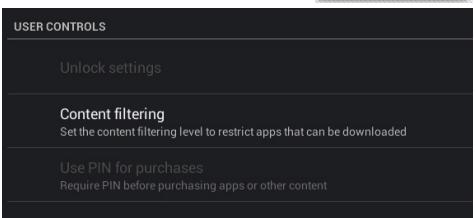
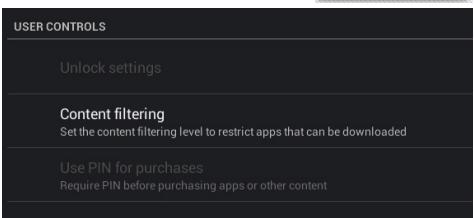
In the Play store, set the content filtering level to restrict apps that can be downloaded.

  1. Select the Play store app 📋.
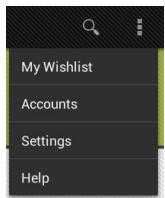
  2. Select the Menu icon in the upper right corner, then select Settings.
  3. In the Settings page, select Content filtering in User controls.
  4. For a highest content filtering, select Everyone.
  5. Select OK. Any sensitive content will not be accessible.
  6. In User controls, select Password to lock the settings.
ARCHOS 80 CHILDPAD - Content filtering - 1

text_image My Wishlist Accounts Settings Help

ARCHOS 80 CHILDPAD - Content filtering - 2

text_image USER CONTROLS Unlock settings Content filtering Set the content filtering level to restrict apps that can be downloaded Use PIN for purchases Require PIN before purchasing apps or other content

Mobile Parental Filter

Through the Mobile Parental Filter app, you can secure the use of the table for children.

  1. Select the Mobile Parental Filter app 📄.
  2. Select a browser to launch the application.

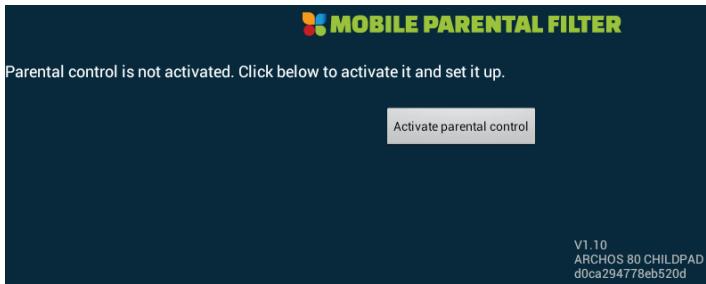
The application page is displayed.
ARCHOS 80 CHILDPAD - Mobile Parental Filter - 1

text_image MOBILE PARENTAL FILTER Parental control is not activated. Click below to activate it and set it up. Activate parental control V1.10 ARCHOS 80 CHILDPAD d0ca294778eb520d

A message notifies you that Parental control is not activated.

  1. Select Activate parental control.
  2. Fill in the required information.

ARCHOS 80 CHILDPAD - Mobile Parental Filter - 2

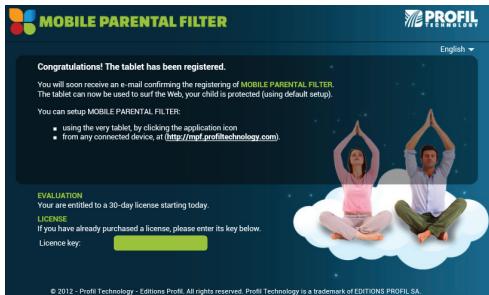
text_image MOBILE PARENTAL FILTER PROFIL PROFEI English Congratulations! The tablet has been registered. You will soon receive an e-mail confirming the registering of MOBILE PARENTAL FILTER. The tablet can now be used to surf the Web, your child is protected (using default setup). You can setup MOBILE PARENTAL FILTER: • using the very tablet, by clicking the application icon • from any connected device, at http://msf.profi/technology.com/ EVALUATION Your are entitled to a 30-day license starting today. LICENSE If you have already purchased a license, please enter its key below. Licence key: © 2012 - Profit Technology - Editions Profil. All rights reserved. Profit Technology is a trademark of EDITIONS PROFIL SA.

Once you are registered, you receive an email of confirmation.

  1. Close the browser.
    The Mobile Parental Filter icon is displayed next to the status bar.
  2. Select it to change filter settings.

ARCHOS 80 CHILDPAD - Mobile Parental Filter - 3

TIP:

You will benefit from a free license for a number of days. After the indicated time, you will need to purchase a license.

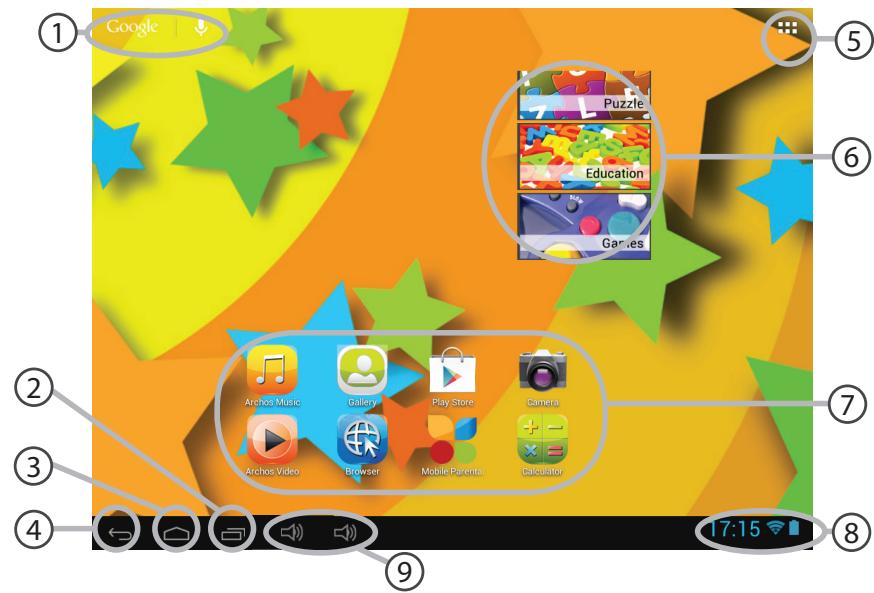
The Android™ Interface
ARCHOS 80 CHILDPAD - TIP: - 1

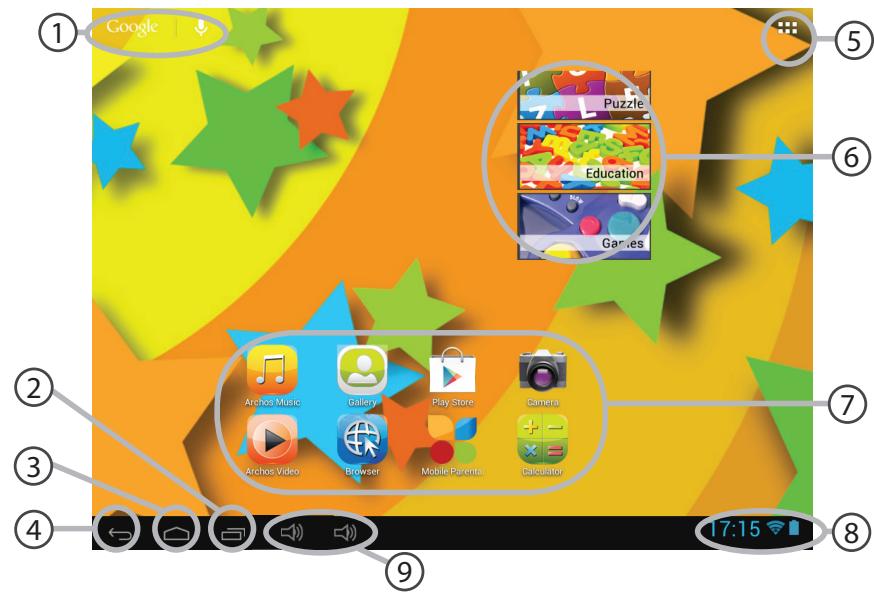
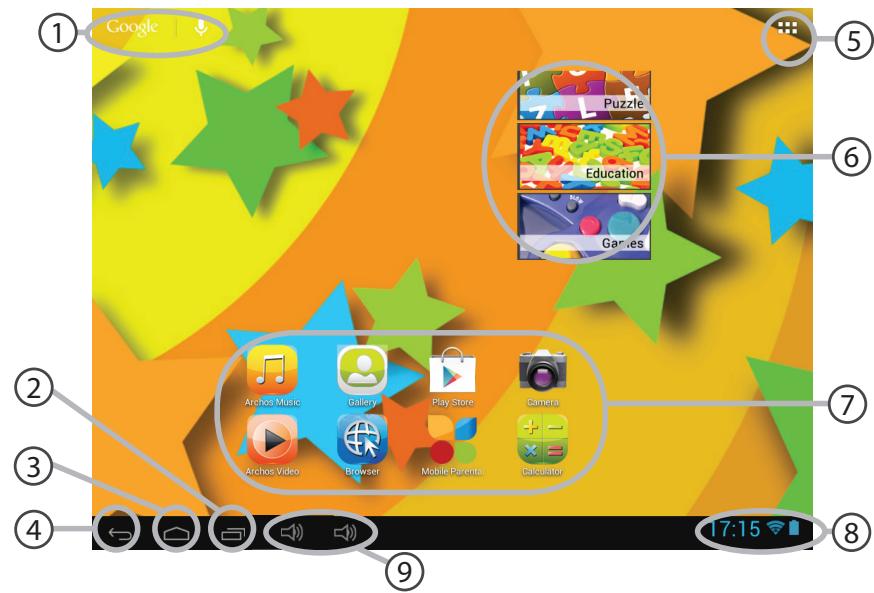
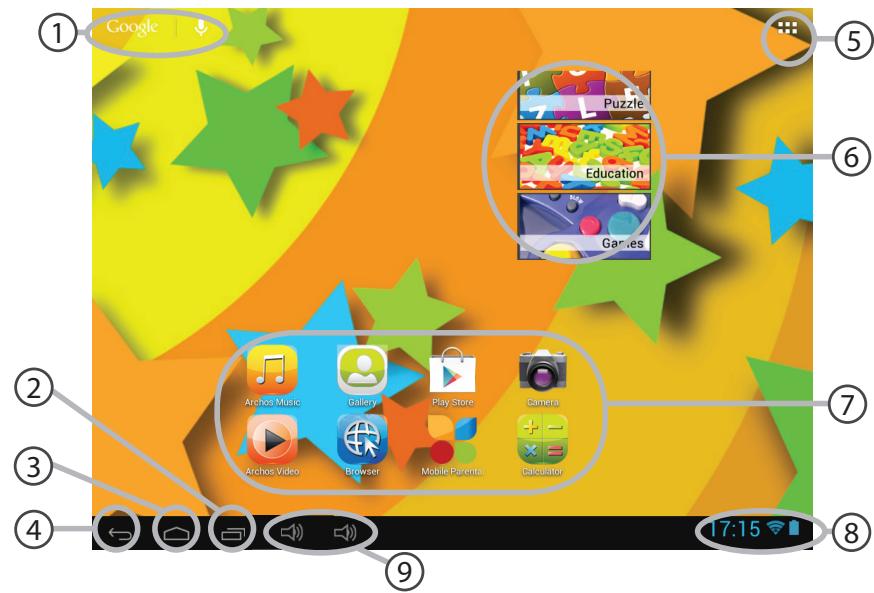
text_image ① Google ② Archos Music Gallery Play Store Camera ③ Archos Video Browser Mobile Parents Calculator ④ ← → ← → 17:15

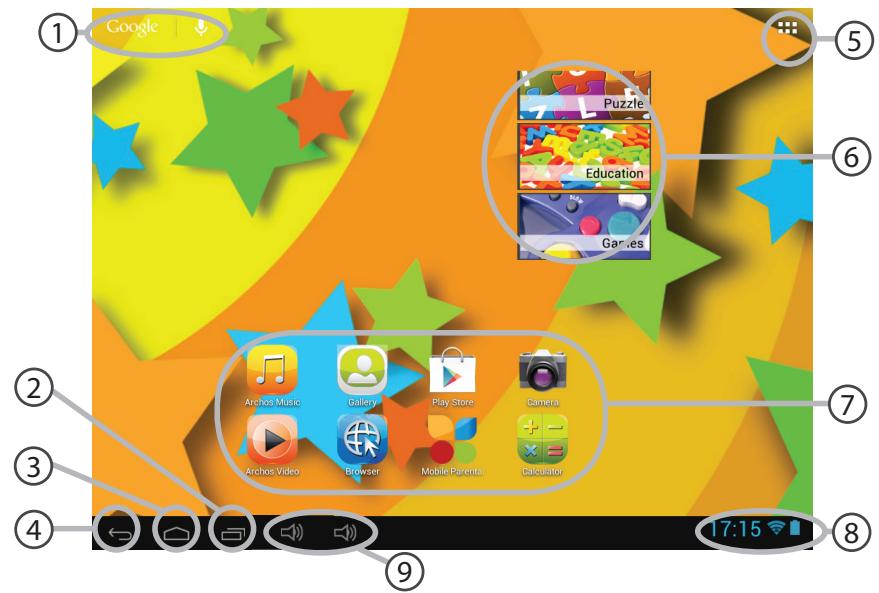
① Google™ Search

Touch "Google" for text search or touch the microphone icon for voice search.

② "Recent apps" button
③ "Home" button
④ "Back" button
⑤ "All Apps" button

Touch this icon to show all the applications and widgets installed on your ARCHOS. All your downloaded applications are here.

⑥ Widget Kids Zone app
⑦ Android™ apps shortcuts

Touch to start an application.
⑧ The status bar
Displays notifications and quick settings.
⑨ The volume buttons

The Android™ Interface
ARCHOS 80 CHILDPAD - The Android™ Interface - 1

text_image Tuesday March 6, 2012 12:17 Archos Public Wifi 97% Airplane mode OFF Wi-Fi ON Auto-rotate screen ON Brief Me News Republic Notifications ON Settings

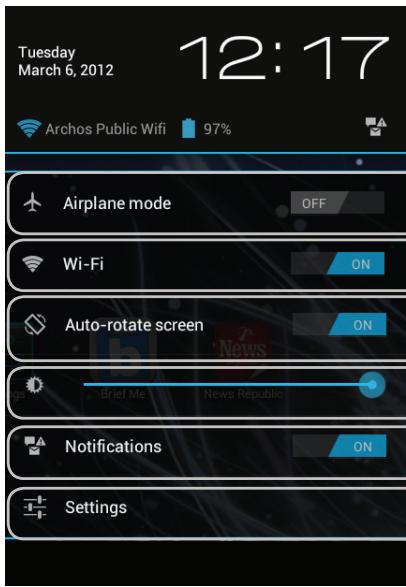
08:05 The Quick settings

To activate/deactivate all wireless connections, especially when flying.

To turn on/off your WiFi connection.

To activate/deactivate automatic screen orientation as you turn your ARCHOS.

To adjust the screen brightness.

To activate/deactivate incoming notifications.

To access all your settings.
ARCHOS 80 CHILDPAD - The Android™ Interface - 2

text_image Archos Mus Gallery

ARCHOS 80 CHILDPAD - The Android™ Interface - 3

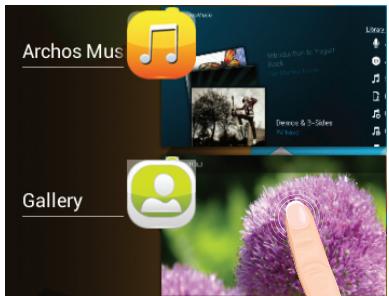
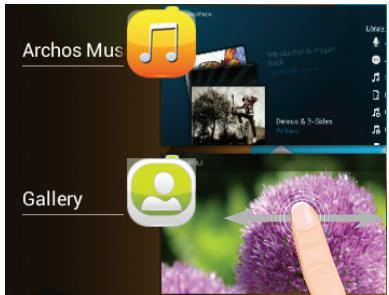
The Recent Apps

Opens a list of thumbnail images of apps you've worked with recently:

Touch: to open an app.
ARCHOS 80 CHILDPAD - The Recent Apps - 1

text_image Archos Mus Gallery

Swipe left or right: to close an app.

Getting familiar with Android™
ARCHOS 80 CHILDPAD - Getting familiar with Android™ - 1

text_image Screenshot of a macOS desktop with icons and bidirectional arrows indicating bidirectional interaction between apps.

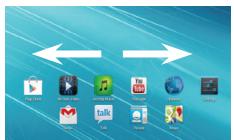
The extended home screen:

Navigate between different home screen panels by swiping left and right.
ARCHOS 80 CHILDPAD - The extended home screen: - 1

text_image Action Music Play Store Gamebox Archos Video Mobile Gamebox Gamebox

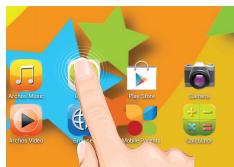
Moving a home screen item:

Touch and hold your finger onto it until the positioning gridlines appear, then slide it to the desired location, and release your finger.
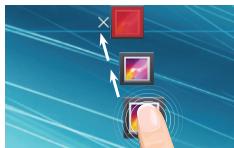
ARCHOS 80 CHILDPAD - Moving a home screen item: - 1

natural_image Illustration of a finger interacting with a touchscreen interface, featuring a red square and a square with a purple flower (no text or symbols)

Removing a home screen item:

Touch and hold it, slide your finger towards the top of the screen and drop it over the Remove icon.
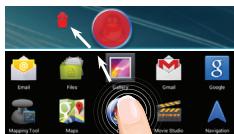
ARCHOS 80 CHILDPAD - Removing a home screen item: - 1

text_image Email Files Search Gmail Google Mapping Tool Maps Move Studio Navigation

Uninstalling an item:

From the All apps screens, touch and hold it, slide your finger towards the top of the screen and drop it over Uninstall bin.

ARCHOS 80 CHILDPAD - Uninstalling an item: - 1

flowchart
graph LR
    A["Maps"] <--> B["Navigation"]

Creating application folders:

Drop one app icon over another on a home screen and the two icons will be combined.
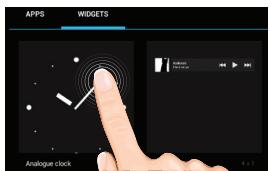
ARCHOS 80 CHILDPAD - Creating application folders: - 1

text_image APPS WIDGETS Analogue clock

Widgets:

Touch the All Apps icon on your home screen. Touch Widgets at the top of the screen. From the main Widgets screen, you can move around widgets just as you do for app icons.
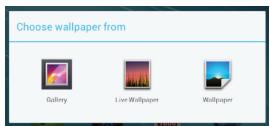
ARCHOS 80 CHILDPAD - Widgets: - 1

text_image Choose wallpaper from Gallery Live Wallpaper Wallpaper

Changing your wallpaper:

Hold your finger on a home screen at an empty location, then choose from the list.

ARCHOS 80 CHILDPAD - Changing your wallpaper: - 1

text_image Security Cheese screen lock None Slide Pattern PIN Password

Locking the touchscreen:

In Settings, scroll down and touch security. Touch Screen lock. Touch the type of lock you would like to use. After you set a lock, a lock screen is displayed whenever your screen wakes up, requesting the pattern, PIN or other specified key.

Troubleshooting

If your device is frozen:

Press the ON/OFF button for 10 seconds.

If your device doesn't turn on:

  1. Charge your device for at least 30 minutes.

  2. Press the ON/OFF button for 10 seconds.

If you want to extend the life of your battery:

Decrease the screen brightness and turn off the wireless connections if not in use.

If your device functioning is too slow:

Close all apps which are not currently used.

If your WiFi reception is too low:

Make sure you are not far from the WiFi hotspot.

Update the firmware of the device: http://www.archos.com/support.

Reset and redefine your connection parameters.

Contact your WiFi connection provider.

Table des matières

natural_image Front view of a tablet device with rounded corners and a dark screen (no text or symbols visible)

ARCHOS 80 ChildPad

natural_image Black cable with a USB port connector, no text or symbols visible

Câble USB

ARCHOS 80 CHILDPAD - Table des matières - 1

natural_image Simple line drawing of a black plug connected to a coiled cable (no text or symbols)

Chargeur

Mise en route

FR

Charger la batterie
ARCHOS 80 CHILDPAD - Mise en route - 1

natural_image Simple circular diagram with a black tool and a white rectangle, no text or symbols present.
flowchart
graph TD
    A[" "] --> B["11"]
    style A fill:#fff,stroke:#000
    style B fill:#fff,stroke:#000
text_image 08:23 08:24 MONDAY 14 JANUARY 2013 No Internet connection 84% Wi-Fi ON Wi-Fi ARCHOS-Tech Connected ARCHOS-Office Secured with WEP ARCHOS-Meeting Secured with WEP (WPS available)
text_image ARCHOS-Office Signal strength Good Security WEP Password ...... Show password Show advanced options Cancel Connect

Do you want to add an existing account or create a new one?
ARCHOS 80 CHILDPAD - Mise en route - 2

text_image Existing
text_image My Wishlist Accounts Settings Help
USER CONTROLS
Unlock settings
Content filtering Set the content filtering level to restrict apps that can be downloaded
Use PIN for purchases Require PIN before purchasing apps or other content

Contrôle Parental

text_image MOBILE PARENTAL FILTER Parental control is not activated. Click below to activate it and set it up. Activate parental control V1.10 ARCHOS 80 CHILDPAD d0ca294778eb520d
text_image MOBILE PARENTAL FILTER PROFIL PROFIL English Congratulations! The tablet has been registered. You will soon receive an e-mail confirming the registering of MOBILE PARENTAL FILTER. The tablet can now be used to surf the Web, your child is protected (using default setup). You can setup MOBILE PARENTAL FILTER: ■ using the very tablet, by clicking the application icon ■ from any connected device, at http://msf.profil.com/ EVALUATION Your are entitled to a 30-day license starting today. LICENSE If you have already purchased a license, please enter its key below. Licence key: © 2012 - Profit Technology - Editions Profil. All rights reserved. Profit Technology is a trademark of EDITIONS PROFIL SA.
text_image Tuesday March 6, 2012 12:17 Archos Public Wifi 97% Airplane mode OFF Wi-Fi ON Auto-rotate screen ON Brief Me News Republic Notifications ON Settings

ARCHOS 80 CHILDPAD - Contrôle Parental - 1

text_image Screenshot of a macOS desktop with icons for music, video, audio, and other apps on a blue background
natural_image Illustration of a finger interacting with a touchscreen interface, featuring a red square and a square with a pink flower (no text or symbols)
text_image APPS WIDGETS Analogue clock

Widgets :

text_image Choose wallpaper from Gallery Live Wallpaper Wallpaper
text_image Security Cheese screen lock None Slide Pattern PIN Password
natural_image Gradient color bar transitioning from black to white (no text or symbols)

ARCHOS 80 CHILDPAD - Widgets : - 1

ARCHOS 80 CHILDPAD - Widgets : - 2

natural_image Color palette bar with eight distinct squares in yellow, magenta, cyan, blue, green, red, black, yellow, pink, cyan, and gray (no text or symbols)
natural_image Front view of a tablet device with rounded corners and a dark screen (no text or symbols visible)

ARCHOS 80 ChiLDPAD

ARCHOS 80 CHILDPAD - Widgets : - 3
Benutzerhandbuch

natural_image Black cable with a connector icon (no text or symbols)

USB Kabel

ARCHOS 80 CHILDPAD - Widgets : - 4

natural_image Simple line drawing of a black plug connected to a coiled cable (no text or symbols)

Ladegerät

Erste Schritte

Aufladen des Akkus
ARCHOS 80 CHILDPAD - Erste Schritte - 1

natural_image Simple circular diagram with a black connector and diagonal lines, no text or symbols present.
flowchart
graph TD
    A[" "] --> B["11"]
    style A fill:#fff,stroke:#000
    style B fill:#fff,stroke:#000
text_image 08:23 08:24 MONDAY 14 JANUARY 2013 No Internet connection 84% Wi-Fi ON Wi-Fi ARCHOS-Tech Connected ARCHOS-Office Secured with WEP ARCHOS-Meeting Secured with WEP (WPS available)
text_image ARCHOS-Office Signal strength Good Security WEP Password ...... Show password Show advanced options Cancel Connect

Do you want to add an existing account or create a new one?
ARCHOS 80 CHILDPAD - Erste Schritte - 2

text_image Existing
text_image My Wishlist Accounts Settings Help
USER CONTROLS
Unlock settings
Content filtering Set the content filtering level to restrict apps that can be downloaded
Use PIN for purchases Require PIN before purchasing apps or other content

Mobile Parental Filter

text_image MOBILE PARENTAL FILTER Parental control is not activated. Click below to activate it and set it up. Activate parental control V1.10 ARCHOS 80 CHILDPAD d0ca294778eb520d
text_image MOBILE PARENTAL FILTER PROFIL PROFEI English Congratulations! The tablet has been registered. You will soon receive an e-mail confirming the registering of MOBILE PARENTAL FILTER. The tablet can now be used to surf the Web, your child is protected (using default setup). You can setup MOBILE PARENTAL FILTER: • using the very tablet, by clicking the application icon • from any connected device, at http://msf.profi/technology.com/ EVALUATION Your are entitled to a 30-day license starting today. LICENSE If you have already purchased a license, please enter its key below. Licence key: © 2012 - Profit Technology - Editions Profil. All rights reserved. Profit Technology is a trademark of EDITIONS PROFIL SA.

DE

natural_image Gradient color bar transitioning from black to white (no text or symbols)

ARCHOS 80 CHILDPAD - Mobile Parental Filter - 1

ARCHOS 80 CHILDPAD - Mobile Parental Filter - 2

natural_image Color palette bar with eight distinct squares in yellow, magenta, cyan, blue, green, red, black, yellow, pink, cyan, and gray (no text or symbols)
text_image Tuesday March 6, 2012 12:17 Archos Public Wifi 97% Airplane mode OFF Wi-Fi ON Auto-rotate screen ON Brief Me News Republic Notifications ON Settings

ARCHOS 80 CHILDPAD - Mobile Parental Filter - 3

text_image File Edit View Insert Tools Help Music Tools Watch Music Settings
natural_image Illustration of a finger interacting with a touchscreen interface, featuring a red square and a square with a purple flower icon (no text or symbols)
text_image Email Files Google Email Google Mapping Tool Maps Move Studio Navigation
text_image APPS WIDGETS Analogue clock

Widgets:

text_image Choose wallpaper from Gallery Live Wallpaper Wallpaper
text_image Security Choose screen lock None Slide Pattern PIN Password

Touchscreen sperren:

natural_image Gradient color bar transitioning from black to white (no text or symbols)

ARCHOS 80 CHILDPAD - Touchscreen sperren: - 1

ARCHOS 80 CHILDPAD - Touchscreen sperren: - 2

natural_image Color palette bar with eight distinct squares in yellow, magenta, cyan, blue, green, red, black, yellow, pink, cyan, and gray (no text or symbols)
natural_image Black cable with a connector icon (no text or symbols)

Cable USB

ARCHOS 80 CHILDPAD - Touchscreen sperren: - 3

natural_image Simple line drawing of a black plug connected to a coiled cable (no text or symbols)

Cargador

natural_image Simple diagram of a connector inserted into a device, showing no text or symbols
flowchart
graph TD
    A[" "] --> B["11"]
    style A fill:#fff,stroke:#000
    style B fill:#fff,stroke:#000
text_image 08:23 08:24 MONDAY 14 JANUARY 2013 No Internet connection 84% Wi-Fi ON Wi-Fi ARCHOS-Tech Connected ARCHOS-Office Secured with WEP ARCHOS-Meeting Secured with WEP (WPS available)
text_image ARCHOS-Office Signal strength Good Security WEP Password ...... Show password Show advanced options Cancel Connect

Do you want to add an existing account or create a new one?
ARCHOS 80 CHILDPAD - Touchscreen sperren: - 4

text_image Existing
text_image My Wishlist Accounts Settings Help

ARCHOS 80 CHILDPAD - Touchscreen sperren: - 5

text_image USER CONTROLS Unlock settings Content filtering Set the content filtering level to restrict apps that can be downloaded Use PIN for purchases Require PIN before purchasing apps or other content

Mobile Parental Filter

text_image MOBILE PARENTAL FILTER Parental control is not activated. Click below to activate it and set it up. Activate parental control V1.10 ARCHOS 80 CHILDPAD d0ca294778eb520d
text_image MOBILE PARENTAL FILTER PROFIL PROFEI English Congratulations! The tablet has been registered. You will soon receive an e-mail confirming the registering of MOBILE PARENTAL FILTER. The tablet can now be used to surf the Web, your child is protected (using default setup). You can setup MOBILE PARENTAL FILTER: • using the very tablet, by clicking the application icon • from any connected device, at http://msf.profi/technology.com/ EVALUATION Your are entitled to a 30-day license starting today. LICENSE If you have already purchased a license, please enter its key below. Licence key: © 2012 - Profit Technology - Editions Profil. All rights reserved. Profit Technology is a trademark of EDITIONS PROFIL SA.
natural_image Gradient color bar transitioning from black to white (no text or symbols)

ARCHOS 80 CHILDPAD - Mobile Parental Filter - 1

ARCHOS 80 CHILDPAD - Mobile Parental Filter - 2

natural_image Color palette bar with eight distinct squares in yellow, magenta, cyan, blue, green, red, black, yellow, pink, cyan, and gray (no text or symbols)
text_image Tuesday March 6, 2012 12:17 Archos Public Wifi 97% Airplane mode OFF Wi-Fi ON Auto-rotate screen ON Brief Me News Republic Notifications ON Settings

ARCHOS 80 CHILDPAD - Mobile Parental Filter - 3

Los ajustes rápidos

text_image File Edit View Insert Tools Help Music Tools Watch Music Settings
natural_image Illustration of a finger interacting with a touchscreen interface, featuring a red square and a square with a purple flower icon (no text or symbols)
text_image Email Files Google Email Google Mapping Tool Maps Move Studio Navigation
text_image APPS WIDGETS Analogue clock

Widgets:

text_image Choose wallpaper from Gallery Live Wallpaper Wallpaper

Cambio del fondo:

text_image Security Choose screen lock None Slide Pattern PIN Password
natural_image Gradient color bar transitioning from black to white (no text or symbols)

ARCHOS 80 CHILDPAD - Cambio del fondo: - 1

ARCHOS 80 CHILDPAD - Cambio del fondo: - 2

natural_image Color palette bar with eight distinct squares in yellow, magenta, cyan, blue, green, red, black, yellow, pink, cyan, and gray (no text or symbols)
natural_image Coiled black cable with a small connector icon (no text or symbols)

Cavo USB

ARCHOS 80 CHILDPAD - Cambio del fondo: - 3

natural_image Simple line drawing of a black plug connected to a coiled cable (no text or symbols)

Caricatore

Avvio

natural_image Simple circular diagram with a black connector and diagonal lines, no text or symbols present.
flowchart
graph TD
    A[" "] --> B["11"]
    style A fill:#fff,stroke:#000
    style B fill:#fff,stroke:#000

① Webcam

⑤ Spinotto cuffie

text_image 08:23 08:24 MONDAY 14 JANUARY 2013 No Internet connection 84% Wi-Fi ON Wi-Fi ARCHOS-Tech Connected ARCHOS-Office Secured with WEP ARCHOS-Meeting Secured with WEP (WPS available)
text_image ARCHOS-Office Signal strength Good Security WEP Password •······························ □ Show password □ Show advanced options Cancel Connect

Do you want to add an existing account or create a new one?
ARCHOS 80 CHILDPAD - Avvio - 1

text_image Existing
text_image My Wishlist Accounts Settings Help
USER CONTROLS
Unlock settings
Content filtering Set the content filtering level to restrict apps that can be downloaded
Use PIN for purchases Require PIN before purchasing apps or other content

Mobile Parental Filter

text_image MOBILE PARENTAL FILTER Parental control is not activated. Click below to activate it and set it up. Activate parental control V1.10 ARCHOS 80 CHILDPAD d0ca294778eb520d
text_image MOBILE PARENTAL FILTER Congratulations! The tablet has been registered. You will soon receive an e-mail confirming the registering of MOBILE PARENTAL FILTER. The tablet can now be used to surf the Web, your child is protected (using default setup). You can setup MOBILE PARENTAL FILTER: • using the very tablet, by clicking the application icon • from any connected device, at http://mpf.profftechnology.com/ EVALUATION Your are entitled to a 30-day license starting today. LICENSE: If you have already purchased a license, please enter its key below. Licence key: © 2012 - Profit Technology - Editions Profil. All rights reserved. Profit Technology is a trademark of EDITIONS PROFIL SA.
natural_image Gradient color bar transitioning from black to white (no text or symbols)

ARCHOS 80 CHILDPAD - Mobile Parental Filter - 1

ARCHOS 80 CHILDPAD - Mobile Parental Filter - 2

natural_image Color palette bar with eight distinct squares in yellow, magenta, cyan, blue, green, red, black, yellow, pink, cyan, and gray (no text or symbols)

Interfaccia Android™
ARCHOS 80 CHILDPAD - Mobile Parental Filter - 3

text_image ① Google ② ③ ④ ⑤ ⑥ Puzzle Education Games Archos Music Gallery Play Store Camera Archos Video Browser Mobile Parents Calculator 17:15

① Google™ Search

text_image Tuesday March 6, 2012 12:17 Archos Public Wifi 97% Airplane mode OFF Wi-Fi ON Auto-rotate screen ON Grief Me News Republic Settings ON

ARCHOS 80 CHILDPAD - Mobile Parental Filter - 4

Impostazioni rapide

text_image Screenshot of a macOS desktop with icons and bidirectional arrows indicating bidirectional interaction between apps.
natural_image Illustration of a finger interacting with a touchscreen interface, featuring a red square and a square with a pink flower (no text or symbols)
text_image APPS WIDGETS Analogue clock

Widget:

text_image Choose wallpaper from Gallery Live Wallpaper Wallpaper
text_image Security Cheese screen lock None Slide Pattern PIN Password

Content filtering....99

Mobile Parental Filter....100

De Android™-Interface....102

natural_image Gradient color bar transitioning from black to white (no text or symbols)

ARCHOS 80 CHILDPAD - Widget: - 1

ARCHOS 80 CHILDPAD - Widget: - 2

natural_image Color palette bar with eight distinct squares in yellow, magenta, cyan, blue, green, red, black, yellow, pink, cyan, and gray (no text or symbols)
natural_image Black cable with a connector icon (no text or symbols)

USB-kabel

ARCHOS 80 CHILDPAD - Widget: - 3

natural_image Simple line drawing of a black plug connected to a coiled cable (no text or symbols)

Lader

Aan de slag

De batterijen laden
ARCHOS 80 CHILDPAD - Aan de slag - 1

natural_image Simple circular diagram with a black connector and diagonal lines, no text or symbols present.
flowchart
graph TD
    A[" "] --> B["11"]
    style A fill:#fff,stroke:#000
    style B fill:#fff,stroke:#000
text_image 08:23 08:24 MONDAY 14 JANUARY 2013 No Internet connection 84% Wi-Fi ON Wi-Fi ARCHOS-Tech Connected ARCHOS-Office Secured with WEP ARCHOS-Meeting Secured with WEP (WPS available)
text_image ARCHOS-Office Signal strength Good Security WEP Password ...... Show password Show advanced options Cancel Connect

Do you want to add an existing account or create a new one?
ARCHOS 80 CHILDPAD - Aan de slag - 2

text_image My Wishlist Accounts Settings Help

USER CONTROLS

Unlock settings

Content filtering

Set the content filtering level to restrict apps that can be downloaded

Use PIN for purchases

Require PIN before purchasing apps or other content

Mobile Parental Filter

text_image MOBILE PARENTAL FILTER Parental control is not activated. Click below to activate it and set it up. Activate parental control V1.10 ARCHOS 80 CHILDPAD d0ca294778eb520d
text_image MOBILE PARENTAL FILTER Congratulations! The tablet has been registered. You will soon receive an e-mail confirming the registering of MOBILE PARENTAL FILTER. The tablet can now be used to surf the Web, your child is protected (using default setup). You can setup MOBILE PARENTAL FILTER: • using the very tablet, by clicking the application icon • from any connected device, at http://mpf.profftechnology.com/ EVALUATION Your are entitled to a 30-day license starting today. LICENSE: If you have already purchased a license, please enter its key below. Licence key: © 2012 - Profit Technology - Editions Profil. All rights reserved. Profit Technology is a trademark of EDITIONS PROFIL SA.

NL

natural_image Gradient color bar transitioning from black to white (no text or symbols)

ARCHOS 80 CHILDPAD - Mobile Parental Filter - 1

ARCHOS 80 CHILDPAD - Mobile Parental Filter - 2

natural_image Color palette bar with eight distinct squares in yellow, magenta, cyan, blue, green, red, black, yellow, pink, cyan, and gray (no text or symbols)

De Android™-Interface
ARCHOS 80 CHILDPAD - Mobile Parental Filter - 3

text_image ① Google ② ③ ④ ⑤ ⑥ Puzzle Education Games Archos Music Gallery Play Store Camera Archos Video Browser Mobile Parents Calculator 17:15

① Google™ Search

text_image Tuesday March 6, 2012 12:17 Archos Public Wifi 97% Airplane mode OFF Wi-Fi ON Auto-rotate screen ON Grief Me News Republic Settings ON

ARCHOS 80 CHILDPAD - Mobile Parental Filter - 4

De Snelinstellingen

text_image File Edit View Insert Tools Help Music Tools Watch Music Settings
natural_image Illustration of a finger interacting with a touchscreen interface, featuring a red square and a square with a purple flower (no text or symbols)
text_image Email Files Google Email Google Mapping Tool Maps Move Studio Navigation
text_image APPS WIDGETS Analogue clock

Widgets:

text_image Choose wallpaper from Gallery Live Wallpaper Wallpaper
text_image Security Choose screen lock None Slide Pattern PIN Password
natural_image Gradient color bar transitioning from black to white (no text or symbols)

ARCHOS 80 CHILDPAD - Widgets: - 1

ARCHOS 80 CHILDPAD - Widgets: - 2

natural_image Color palette bar with eight distinct squares in yellow, magenta, cyan, blue, green, red, black, yellow, pink, cyan, and gray (no text or symbols)
natural_image Illustration of a black cable with a connector (no text or symbols)

Cabo USB

ARCHOS 80 CHILDPAD - Widgets: - 3

natural_image Simple line drawing of a black plug connected to a coiled cable (no text or symbols)

Carregador

110

Início

Carregar a bateria
ARCHOS 80 CHILDPAD - Início - 1

natural_image Simple circular diagram with a black connector and diagonal lines, no text or symbols present.
flowchart
graph TD
    A[" "] --> B["11"]
    style A fill:#fff,stroke:#000
    style B fill:#fff,stroke:#000

① Webcam

text_image 08:23 08:24 MONDAY 14 JANUARY 2013 No Internet connection 84% Wi-Fi ON Wi-Fi ARCHOS-Tech Connected ARCHOS-Office Secured with WEP ARCHOS-Meeting Secured with WEP (WPS available)
text_image ARCHOS-Office Signal strength Good Security WEP Password ...... Show password Show advanced options Cancel Connect

Do you want to add an existing account or create a new one?
ARCHOS 80 CHILDPAD - Início - 2

text_image My Wishlist Accounts Settings Help

PT

USER CONTROLS

Unlock settings

Content filtering

Set the content filtering level to restrict apps that can be downloaded

Use PIN for purchases

Require PIN before purchasing apps or other content

ARCHOS 80 CHILDPAD - Início - 3

Mobile Parental Filter

text_image MOBILE PARENTAL FILTER Parental control is not activated. Click below to activate it and set it up. Activate parental control V1.10 ARCHOS 80 CHILDPAD d0ca294778eb520d
text_image MOBILE PARENTAL FILTER Congratulations! The tablet has been registered. You will soon receive an e-mail confirming the registering of MOBILE PARENTAL FILTER. The tablet can now be used to surf the Web, your child is protected (using default setup). You can setup MOBILE PARENTAL FILTER: • using the very tablet, by clicking the application icon • from any connected device, at http://mpf.profftechnology.com/ EVALUATION Your are entitled to a 30-day license starting today. LICENSE: If you have already purchased a license, please enter its key below. Licence key: © 2012 - Profit Technology - Editions Profil. All rights reserved. Profit Technology is a trademark of EDITIONS PROFIL SA.

PT

natural_image Gradient color bar transitioning from black to white (no text or symbols)

ARCHOS 80 CHILDPAD - Mobile Parental Filter - 1

ARCHOS 80 CHILDPAD - Mobile Parental Filter - 2

natural_image Color palette bar with eight distinct squares in yellow, magenta, cyan, blue, green, red, black, yellow, pink, cyan, and gray (no text or symbols)

A Interface Android™
ARCHOS 80 CHILDPAD - Mobile Parental Filter - 3

text_image ① Google ② ③ ④ ⑤ ⑥ Puzzle Education Games Archos Music Gallery Play Store Camera Archos Video Browser Mobile Parents Calculator 17:15

① Google™ Search

text_image Tuesday March 6, 2012 12:17 Archos Public Wifi 97% Airplane mode OFF Wi-Fi ON Auto-rotate screen ON Grief Me News Republic Settings ON
text_image File Edit View Insert Tools Help Music Tools Watch Music Settings
natural_image Illustration of a finger interacting with a touchscreen interface, featuring a red square and a square with a purple flower (no text or symbols)
text_image Email Files Google Email Google Mapping Tool Maps Move Studio Navigation
text_image APPS WIDGETS Analogue clock

Widgets:

text_image Choose wallpaper from Gallery Live Wallpaper Wallpaper
text_image Security Choose screen lock None Slide Pattern PIN Password

Bloquear o ecrã táctil:

natural_image Gradient color bar transitioning from black to white (no text or symbols)

ARCHOS 80 CHILDPAD - Bloquear o ecrã táctil: - 1

ARCHOS 80 CHILDPAD - Bloquear o ecrã táctil: - 2

natural_image Color palette bar with eight distinct squares in yellow, magenta, cyan, blue, green, red, black, yellow, pink, cyan, and gray (no text or symbols)

Содержимое упаковки

ARCHOS 80 CHILDPAD - Содержимое упаковки - 1
Краткое руководство

natural_image Black cable with a USB port icon, no text or symbols present

Кабель USB

ARCHOS 80 CHILDPAD - Содержимое упаковки - 2

natural_image Simple line drawing of a black plug connected to a coiled cable (no text or symbols)

Зарядное устройство

Начало работы

Зарядка
ARCHOS 80 CHILDPAD - Начало работы - 1

natural_image Simple circular diagram with a black connector and diagonal lines, no text or symbols present.
flowchart
graph TD
    A[" "] --> B["11"]
    style A fill:#fff,stroke:#000
    style B fill:#fff,stroke:#000
text_image 08:23 08:24 MONDAY 14 JANUARY 2013 No Internet connection 84% Wi-Fi ON Wi-Fi ARCHOS-Tech Connected ARCHOS-Office Secured with WEP ARCHOS-Meeting Secured with WEP (WPS available)
text_image ARCHOS-Office Signal strength Good Security WEP Password ...... Show password Show advanced options Cancel Connect

Do you want to add an existing account or create a new one?
text_image My Wishlist Accounts Settings Help

RU

USER CONTROLS

Unlock settings

Content filtering

Set the content filtering level to restrict apps that can be downloaded

Use PIN for purchases

Require PIN before purchasing apps or other content

ARCHOS 80 CHILDPAD - Начало работы - 2

Mobile Parental Filter

text_image MOBILE PARENTAL FILTER Parental control is not activated. Click below to activate it and set it up. Activate parental control V1.10 ARCHOS 80 CHILDPAD d0ca294778eb520d
text_image MOBILE PARENTAL FILTER Congratulations! The tablet has been registered. You will soon receive an e-mail confirming the registering of MOBILE PARENTAL FILTER. The tablet can now be used to surf the Web, your child is protected (using default setup). You can setup MOBILE PARENTAL FILTER: • using the very tablet, by clicking the application icon • from any connected device, at http://mpf.profftechnology.com/ EVALUATION Your are entitled to a 30-day license starting today. LICENSE: If you have already purchased a license, please enter its key below. Licence key: © 2012 - Profit Technology - Editions Profil. All rights reserved. Profit Technology is a trademark of EDITIONS PROFIL SA.

RU

natural_image Gradient color bar transitioning from black to white (no text or symbols)

ARCHOS 80 CHILDPAD - Mobile Parental Filter - 1

ARCHOS 80 CHILDPAD - Mobile Parental Filter - 2

natural_image Color palette bar with eight distinct squares in yellow, magenta, cyan, blue, green, red, black, yellow, pink, cyan, and gray (no text or symbols)

Интерфейс Android™
ARCHOS 80 CHILDPAD - Mobile Parental Filter - 3

text_image ① Google ② ③ ④ ⑤ ⑥ Puzzle Education Games Archos Music Gallery Play Store Camera Archos Video Browser Mobile Parents Calculator 17:15

① Поиск Google™

text_image Tuesday March 6, 2012 12:17 Archos Public Wifi 97% Airplane mode OFF Wi-Fi ON Auto-rotate screen ON Grief Me News Republic Settings ON

ARCHOS 80 CHILDPAD - Mobile Parental Filter - 4

Быстрые настройки

text_image File Edit View Insert Tools Help Music Tools Watch Music Settings
natural_image Illustration of a finger interacting with a touchscreen interface, featuring a red square and a square with a purple flower icon (no text or symbols)
text_image Email Files Google Email Google Mapping Tool Maps Move Studio Navigation
text_image APPS WIDGETS Analogue clock

Виджеты:

text_image Choose wallpaper from Gallery Live Wallpaper Wallpaper

Изменение обоев:

text_image Security Choose screen lock None Slide Pattern PIN Password

National restrictions

This device is intended for home and office use in all EU countries (and other countries following the EU directive 1999/5/EC) without any limitation except for the countries mentioned below:

CountryRestrictionReason/remark
BulgariaNoneGeneral authorization required for outdoor use and public service
FranceOutdoor use limited to 10 mW e.i.r.p. within the band 2454-2483.5 MHzMilitary Radiolocation use. Refarming of the 2.4 GHz band has been ongoing in recent years to allow current relaxed regulation. Full implementation planned 2012
ItalyNoneIf used outside of own premises, general authorization is required.
LuxembourgNoneGeneral authorization required for network and service supply (not for spectrum)
NorwayImplementedThis subsection does not apply for the geographical aera within a radius of 20 km from the centre of Ny-Alesund
Russian FederationNoneOnly for indoor applications

Note: Frequency 2454-2483.5MHZ are restricted to indoor use in France.

Consult the declaration of conformity on http://www.archos.com/products/declaration_conformity.html

Open Source Software Offer

The software bundled with this product includes software files subject to certain open source license requirements. Such open source software files are subject solely to the terms of the relevant open source software license. Such open source software is provided on an "AS IS" basis to the maximum extent permitted by applicable law.

For the open source files contained herein, please access "Open source license" section located at: Settings\About tablet\Legal information on the device for the relevant copyright and licensing terms. You may obtain a copy of Apache License, Version 2.0 at http://www.apache.org/licenses/LICENSE-2.0. You may also obtain a copy of GNU General Public License, Version 2 at the Free Software Foundation, INC, 51 Franklin Street, Fifth Floor, Boston, MA 02110-1301, USA.

Until the date that is three years after our last shipment of this product, you may obtain a copy of the source code corresponding to the binaries for any GPL-Licensed file by contacting ARCHOS customer service at http://www.archos.com and ARCHOS will send you a link to such source code or will provide instructions to get the source on a physical medium.

This offer is valid to anyone in receipt of this information.
Manual assistant
Powered by Anthropic
Waiting for your message
Product information

Brand : ARCHOS

Model : 80 CHILDPAD

Category : Kids Tablet