SMMP90WHX - Mouse Sandstrøm - Free user manual and instructions
Find the device manual for free SMMP90WHX Sandstrøm in PDF.


| Brand | Sandstrøm |
| Model | SMMP90WHX |
| Product Type | Wireless BlueTrace Mouse |
| Connectivity | 2.4 GHz wireless via USB Nano Receiver |
| Sensor Technology | BlueTrace optical sensor |
| Power Source | 1 x AAA battery (included) |
| Battery Life | Approximately 6 months (typical use) |
| Sleep Mode | Activates after 8 minutes of inactivity |
| System Requirements | Windows 2000/XP/Vista/7; 1 available USB port |
| Dimensions (L x W x H) | Approx. 100 x 60 x 30 mm |
| Weight (with battery) | Approx. 70 g |
| Color | White |
| Supported Operating Systems | Microsoft Windows 2000/XP/Vista/7 |
| Included Accessories | Nano receiver, AAA battery, instruction manual |
| Safety Precautions | Do not mix old/new batteries; avoid looking at optical sensor; keep batteries away from children |
| Repairability | No user-serviceable parts; do not attempt repairs |
| Cleaning Instructions | Wipe with a soft, dry cloth |
| Disposal | Dispose of device and batteries in accordance with local regulations |
Frequently Asked Questions - SMMP90WHX Sandstrøm
User questions about SMMP90WHX Sandstrøm
0 question about this device. Answer the ones you know or ask your own.
Ask a new question about this device
Download the instructions for your Mouse in PDF format for free! Find your manual SMMP90WHX - Sandstrøm and take your electronic device back in hand. On this page are published all the documents necessary for the use of your device. SMMP90WHX by Sandstrøm.
USER MANUAL SMMP90WHX Sandstrøm
Wireless Blue Trace Mouse
Instruksjonsmanual
natural_image
Black Sandstrom computer mouse with visible scroll wheel and brand logo (no text on device body)Contents
GB
Unpacking......12
Product Overview......13
System Requirements ...... 14
Install the Battery 14
Connect the USB Nano Receiver 15
Activating the Wireless Mouse ..15
Sleep Mode 16
Hints and Tips...... 16
- Your product complies with CE rules.
- This product has no serviceable parts. Use of controls or adjustments of procedures other than the Quick Start Guide may result in danger.
Wireless Devices:
Before boarding any aircraft or packing a wireless device in luggage that will be checked, remove the batteries from the wireless device.
Wireless devices can transmit radio frequency (RF) energy, whenever batteries are installed and the wireless device is turned on (If it has an On/Off switch).
Battery-Powered Devices:
Improper use of batteries may result in battery fluid leakage, overheating, or explosion.
Released battery fluid is corrosive and may be toxic. It can cause skin and eye burns, and is harmful if swallowed.
To Reduce the Risk of Injury:
- Keep batteries out of the reach of children.
- Do not heat, open, puncture, mutilate, or dispose of batteries in fire.
- Do not mix new and old batteries or batteries of different types.
- Do not allow metal objects to touch the battery terminals on the device; they can become hot and cause burns.
- Never point the optical sensor toward the face, particularly the eyes, to avoid possible injury.
- While the mouse is functioning, optical light is visible to the naked eye.
-
Avoid looking directly into the emitter hole while the mouse is active.
-
Produktet er i samsvar med CE-reglene.
- Dette produktet har ingen servicedeler. Bruk av kontroller eller justeringer av andre typer enn de som er oppgitt i hurtigstartguiden, kan føre til fare.
Trådløse enheter:
Thank you for purchasing your new
Sandstrøm Wireless BlueTrace Mouse.
We recommend that you spend some time reading this instruction manual in order that you fully understand all the operational features it offers.
You will also find some hints and tips to help you resolve any issues.
Read all the safety instructions carefully before use and keep this instruction manual for future reference.
Unpacking
Remove all items from the packaging. Retain the packaging. If you dispose of it please do so according to local regulations.
The following items are included:
- Mouse
- Nano Receiver
- AAA Size Battery
- Instruction Manual
Product Overview

GB
| Mouse Indicator | |
| Power ON LED is on for 3 sec. | |
| During Pairing LED blinks | 3 times. |
| Low Battery Warning LED | blinks 10 times when turned on. |
System Requirements
GB
Operating Systems:
Microsoft® Windows® 2000/ XP/ Vista™ & Windows®7
Hardware:
1 available USB port
Install the Battery
- Press and lift the battery cover.
- Insert one AAA battery.
- Close the battery cover.

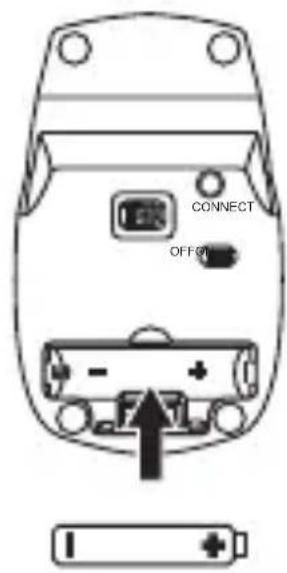

Please ensure the batteries' polarities (+ / -) match the battery compartment's polarities.
Connect the USB Nano Receiver
Plug the Nano Receiver directly into the computer's USB port.
GB

Activating the Wireless Mouse
Switch the ON/OFF button to power on the mouse and then the mouse will automatically connect to the receiver plugged into your computer.


Move the mouse. If the cursor does not react, press the Connect button on the mouse. If the cursor still does not move after 30 seconds, please repeat these instructions.

To save energy, switch the ON/OFF button to the off position to turn off the mouse and disconnect the mouse and the Nano Receiver.
Sleep Mode
If the mouse has not been used for more than 8 minutes, it switches to Sleep Mode. To reactivate it, simply click the button.
Hints and Tips
Mouse Not Working:
- Check that the power switch is in the on position.
- Make sure the Nano Receiver is plugged into a USB port and the computer is on or try the Nano Receiver in a different USB port.
- Check battery installation. Replace battery if needed.
- If mouse performance is slow or intermittent around a wireless network, unplug the Nano Receiver from the USB port and then reinsert it. To reactivate the mouse, switch it on, off and on again using the ON/OFF switch on the bottom of the mouse.
- Repeat the connection procedure. You can also try moving the mouse closer to the Nano Receiver.
- If the mouse is moving erratically change the working surface which the mouse is operating on.

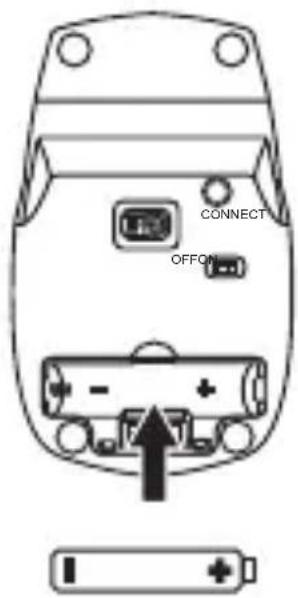

Se till att batteriernas polaritet (+ / -) matchar batterifackets polaritet.
Anslut USB-nanomottagaren
Koppla in nanomottagaren direkt i datorns USB-port.

SE
Aktivera den trådlösa musen


natural_image
Diagram of a computer drive bay with ports and connectors, showing internal layout and a close-up of the outlet (no text or symbols)Langattoman hiiren aktivointi


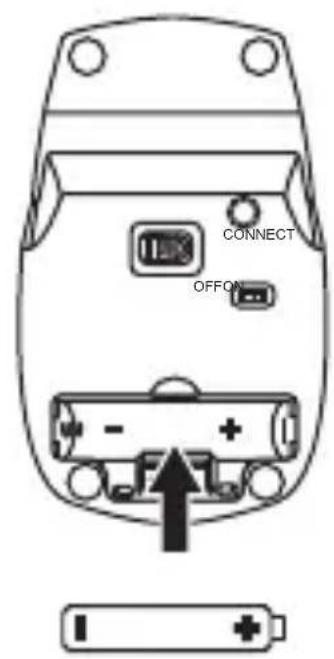

Polarita batérií (+/-) sa musí zhodovat's polaritou v priehradke pre batérie.

This symbol on the product or in the instructions means that your electrical and electronic equipment should be disposed at the end of its life separately from your household waste. There are separate collection systems for recycling in the EU.
For more information, please contact the local authority or your retailer where you purchased the product.
Notes for battery disposal
The batteries used with this product contain chemicals that are harmful to the environment.
To preserve our environment, dispose of used batteries according to your local laws or regulations. Do not dispose of batteries with normal household waste.
For more information, please contact the local authority or your retailer where you purchased the product.
Features and specifications are subject to change without prior notice.
Windows is a registered trademark of Microsoft Corporation in the United States and other countries.
DSG International Sourcing declares that the wireless mouse complies with the essential requirements and other relevant provisions of Directive 1999/5/EC.

Maylands Avenue, Hemel Hempstead, Herts., HP2 7TG, UK
SMMP90BK_WH_BL_RDX-130830V3
- Contents
- Wireless Devices:
- Battery-Powered Devices:
- To Reduce the Risk of Injury:
- Trådløse enheter:
- Thank you for purchasing your new
- Unpacking
- Product Overview
- System Requirements
- GB
- Install the Battery
- Connect the USB Nano Receiver
- Activating the Wireless Mouse
- Sleep Mode
- Hints and Tips
- Mouse Not Working:
- Anslut USB-nanomottagaren
- Aktivera den trådlösa musen
- Langattoman hiiren aktivointi
- Notes for battery disposal
Brand : Sandstrøm
Model : SMMP90WHX
Category : Mouse