STOUCH11 - Mouse Sandstrøm - Free user manual and instructions
Find the device manual for free STOUCH11 Sandstrøm in PDF.


| Product Type | Wireless Optical Mouse |
| Model | STOUCH11 |
| Brand | Sandstrøm |
| Connectivity | 2.4 GHz USB Nano Receiver |
| Dimensions (L x W x H) | 100 x 60 x 35 mm |
| Weight (including batteries) | 100 g |
| Power Source | 2 x AAA Batteries (not included) |
| Battery Life | Up to 12 months (typical usage) |
| Number of Buttons | 5 (Left, Right, Middle, Forward, Back) |
| Scroll Wheel | Yes, with click function |
| Sensor Technology | Optical, 1000 DPI |
| Compatible Operating Systems | Windows, macOS, Linux, Chrome OS |
| Color | Black |
| Materials | ABS Plastic |
| Operating Range | Up to 10 meters |
| Cleaning Instructions | Wipe with a soft, dry cloth. Do not use liquids. |
| Safety Precautions | Keep away from water and extreme temperatures. |
| Spare Parts | Batteries are user-replaceable. No other spare parts available. |
| Repairability | Not designed for user repair. Contact support for issues. |
Frequently Asked Questions - STOUCH11 Sandstrøm
User questions about STOUCH11 Sandstrøm
0 question about this device. Answer the ones you know or ask your own.
Ask a new question about this device
Download the instructions for your Mouse in PDF format for free! Find your manual STOUCH11 - Sandstrøm and take your electronic device back in hand. On this page are published all the documents necessary for the use of your device. STOUCH11 by Sandstrøm.
USER MANUAL STOUCH11 Sandstrøm
Wireless Touch Mouse

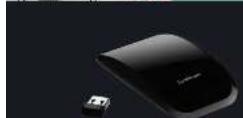
Thank you for purchasing your new Sandstream wireless Touch Mouse. Please check that you have all the items and families yourself with this Quick start guide.
UNPACKING
Remove all packaging from the unit. Retain the packaging. If you dispose of it, please do not use any drug for local regulations.

24.16 187

d1 sb = 1000 sb
Items we missing, or damaged please contact Farmmaster LLC only. Tel: 3544 600 3456 for assistance.
SYSTEM REQUIREMENTS
Operating Systems: Microsoft Windows®2000 XPI Vista® 6 Windows T Hardware: Available to use port
INSTALL THE BATTERIES
Free and fill the battery cover
-
Inser 2 x 644 batteries
-
Close the battery cover
[Unreadable]
[Unreadable]

[Unreadable]
36
[Unreadable]
m = 311
m = 311
1
Please install the activities with the correct policies.
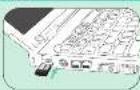
CONNECT THE USB NAND RECEIVER
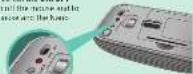
Remove the Nano Receiver from
The results of the best fit
Bancor because the only third year


ACTIVATE THE WIRELESS MOUSE
required, 1960, the Connect button in active the connection between the
marise and the kane: 3000
Note: for energy saving switch the ON/OFF
to the same order of the name and
davonet between the nance and the King
限售期:20

PRODUCT OVERVIEW
touch area
Left Area
F 50:1 A
Runt Ar
conned sullon
CHART
表决结果:同意7票。
表决结果:
Indicator
Hana Reo
m = 311
- Reformation
House Indicator
- HEDLED is on 10 a sec.
PAA ON
(GB/T) 1980-1992
when turn on
- Low Battery Warning
·HEDDROKES
一P1104
Touch Area Touch Area TROUBLESHOOTING SAFETY INSTRUCTIONS
Click (H:108) [E: KF]
* Fuel oil (in €) for the 2013

Click (Horse Cap! Key) Double click
- Salun, 165 mcm/hae - Salun, 165 mcm/hae


Forward
-Have your finger

Backward
• Move your finger

Zoom In
- Size your finger from the
mollis to the past deal

Oran
- Sold your finger on the
51 and after in his
2015
-

8crill
• Different functions depend on your
feature along the scroll area
A. Automatic Small Rollup
Cite ne-Tener on a series of articles.
then hold on the ending position.
B. Scroll Rolling:
The following table is in English:
12.3.2.1(四)第18页
No. 1 and 2 years
East 5011
Super Text Serial Records
Zoom cut
-561. you take
The inner side in the

Rotate clockwise 90
- 1000 yon flogz hwn
A##01 12:17th

Rotate clockwise 90°
- Have you! eq.t from
The following

House Net Working
1. Check that the power station is in the position
2. Make sure the hands receiver is plugged into a use port and the
The first copy of the North Korea in a milli-
4. If mouse performance, a slow or interrupting around a wireless network.
or play the Napi Measler from the USB port and Unicomran U.S. Sales
the OR/Or + b.100 mm on the amount of the waste in re-limited t.
Repeat the connection procedure. You can also try moving the mouse closer to the mouse thickness.
6.2.10.19
S. The first of the results, for example, the result is 0.159 (2018).
Wireless Devices
Before boarding any aircraft or packing a wireless device in luggage
that will be checked, remove the batteries from the wireless device.
Wireless devices can transmit radio frequency (RF) energy, whenever
batteries are installed and the wireless device is turned on CCL, has at
One of the
Battery-Powered Devices:
Improper use of batteries may result in battery fluid leakage.
overresting, or explosion.
Released battery fuel is corrosive and may be toxic. It can cause salt
and eye burns, and is harmful
To Reduce the Risk of Injury:
- Keep batteries out of the reach of children.
- Do not heat, open, puncture, muriate, or dispose of batteries in fire.
- Do not mix new and old balleries of balleries of ciffers and limes.
• Do not click = elated risks (about the best behaviors on the
desire: they can become hot and cause burns.
- Never bring the physical sense toward the eye, partly Jersey the eyes.
a avoid possible injury
- While the mouse is functioning, critical light is visible to the naked eye.
- Avoid locking directly into the emitter hole while the mouse is active.
Features and specifications are subject to change without prior notice.
Windows is a registered trademark of the small corporation in the
United States and other countries
(1) International Service providers that the wire are low-cost and
Use the number of using details to the wire can be performed and mouse complex with the essential requirements and other relevant
1927.03.28
Partmaster
Visit Partnership on us to say for the
____
where and reason is available we can be a real in any
The company is a major company, and the company is a major company.
Kolizna: 10.
(1) 本次股东大会的决议
The image is too blurry to recognize any text content.
The symbol on the product or in the instructions
The 1980s, the first and second political
with the number of the world is 10. The square of
selection systems for receiving the e.g. for more
information, please call for your website:
you're a lot where you purchase the product
DEC Retail Ltd - May and Avenue - Herel Henestead
Herls-HPz, No. England
PK (100% of 100%)