S08DPF10E - Digital photo frame Sandstrøm - Free user manual and instructions
Find the device manual for free S08DPF10E Sandstrøm in PDF.


| Brand | Sandstrøm |
| Model | S08DPF10E |
| Product Type | Digital Photo Frame |
| Display Type | 8" TFT LCD |
| Resolution | 800 x 600 pixels |
| Brightness | 200 cd/m² |
| Contrast Ratio | 400:1 |
| Supported File Formats | JPEG |
| Memory Card Slots | SD, MMC, MS |
| USB Port | USB 2.0 (supports flash drives only) |
| Power Supply | AC 100-240V ~ 0.2A 50/60Hz (adapter included) |
| Dimensions (without stand) | 190 x 150 x 19 mm |
| Weight | 282 g |
| Stand | Detachable, supports landscape and portrait |
| Wall Mountable | Yes (mounting hole on rear) |
| Slideshow Effects | 10 effects (Random, Windows, Jalousie, Fade, Insert, Reel, Brick, Release, 3DMix, Comb) |
| Slideshow Interval | 3s / 5s / 15s / 3min / 5min / 15min / Off |
| Image Size Modes | Auto Fit, Optimal, Full |
| Image Adjustment | Brightness, Contrast, Color, Tint (0-40) |
| Languages | 10 languages (English, French, German, Spanish, Portuguese, Swedish, Dutch, Danish, Finnish, Norwegian) |
| Internal Memory | Preloaded still image for demo |
| Clock/Calendar | Yes, settable |
| Safety Approvals | CE, RoHS (implied) |
Frequently Asked Questions - S08DPF10E Sandstrøm
User questions about S08DPF10E Sandstrøm
0 question about this device. Answer the ones you know or ask your own.
Ask a new question about this device
Download the instructions for your Digital photo frame in PDF format for free! Find your manual S08DPF10E - Sandstrøm and take your electronic device back in hand. On this page are published all the documents necessary for the use of your device. S08DPF10E by Sandstrøm.
USER MANUAL S08DPF10E Sandstrøm
natural_image
Interior scene with a desk, framed pictures and a globe, and a flat-screen TV showing a person relaxing on grass (no visible text or symbols)
natural_image
Person in red clothing lying on a tree in a green forest, viewed through a metallic frame (no text or symbols visible)Instruction Manual
8" Digital Photo Frame
Bruksanvisning
8-tommers digital fotoramme
Instruktionshandbok
8-tums digital fotoram
Käyttöohje
natural_image
Blank black rectangle with no visible text, symbols, or featuresContents
GB NO Innhold
Unpacking the Photo frame 6
Product Overview 7
Preparations 8
Attach the Stand....8
Connecting to the Mains Power .....9
Inserting a Memory Card / USB Flash Disk ...10
Basic Operation 11
Display image 11
Setting 12
Set Image Size 12
Set Slideshow Effect ......13
Set Slideshow Interval ....13
Set Split Slideshow ....13
Rotate....14
Zoom File 14
Delete File 15
Reset Setting 15
Language 16
Brightness / Contrast / Color / Tint .....17
Time 17
Troubleshooting 18
Specifications 19
Safety Warnings 76
Pakke ut fotorammen 20
Produktoversikt 21
Forberedelser 22
Feste stativet 22
Congratulations on the purchase of your new Sandstrøm Digital Photo Frame.
We recommend that you spend some time reading this instruction manual in order that you fully understand all the operational features it offers. You will also find some hints and tips to help you resolve any issues.
Read all the safety instructions carefully before use and keep this instruction manual for future reference.
GB
Unpacking the Photo Frame
Remove all packaging from the unit. Retain the packaging. If you dispose it please do so according to local regulations.
natural_image
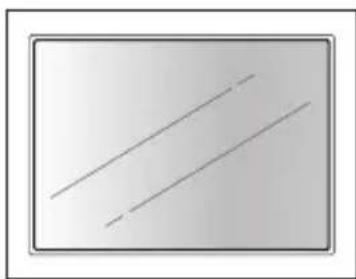
Simple diagram with two diagonal lines inside a rectangular frame (no text or symbols)- Digital Photo Frame

2. Photo Frame Stand (P.N.: 61-DPF-001)

3. Mains Adapter (P.N.: 31-0512#UK)

- Instruction Manual (P.N.: 71-DPF980E-003)
If items are missing or damaged, please contact partmaster (UK only). Tel: 0844 800 3456 for assistance.
Product Overview
Main Unit


GB
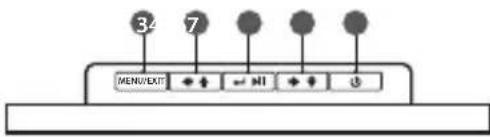
| Name Description | |
| 1 SD/MMC/MS slot □ | • To accommodate SD, MMC, MS cards |
| 2 USB host ♂ | • To accommodate USB devices such as portable USB flash drives or flash memory card readers |
| 3 MENU / EXIT | • To display setting menu• To exit the menu or return to last display |
| 4 ← button | • To move left or up in the menu / thumbnail mode / option settings• To display the previous photo |
| 5 Enter / Play / Pause button ← → | • To confirm a setting or enter next display• To slideshow the photos• To pause the sildeshow |
| 6 ← button | • To move right or down in the menu / thumbnail mode / option settings• To display the next photo |
| 7 Power ↓ button | • Press to turn the photo frame on• Press and hold to turn the photo frame off |
| 8 Wall mounting hole | • For mounting the photo frame on the wall |
| 9 DC-IN socket ➕ ⊖ ⊕ | • To connect to the mains supply |
| 10 Stand receptacle | • To attach the supplied stand |
Preparations
Attaching the Stand
- Take out the stand attached in the package.
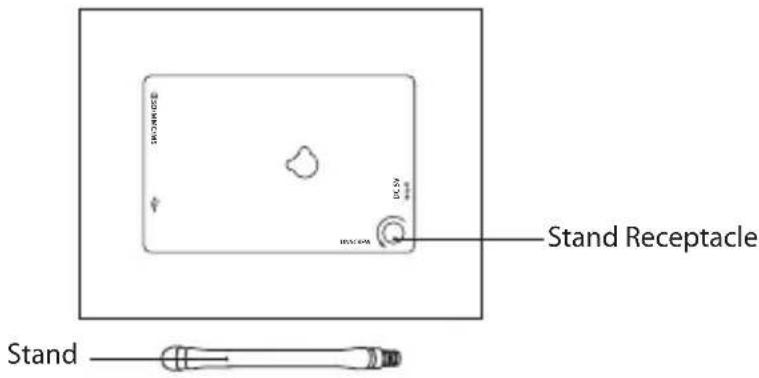
- Screw in the stand into the stand receptacle.

- Now the stand is fixed, you can choose to display your photo frame in a landscape or portrait position.

To take off the stand, unscrew it from its receptacle.
Connecting to the Mains Power
- Connect the supplied mains adapter (5V DC, 1.2A) to the photo frame, and plug in the mains adapter into the mains socket.

GB
- Press the ⏻ button on the photo frame to turn it on.

- The opening screen will appear. The display will automatically switch to calendar in 3 seconds. To turn off press and hold the button.

Inserting a Memory Card / USB Flash Drive
Insert a SD memory card, MMC memory card, or Memory Stick into the slot with its label side facing forward.
GB

- Insert your memory card into the appropriate slot following the orientation marked on the photo frame.

• This unit can play back only one memory card or a USB flash drive at a time.
- This unit does not support any external hard disk and MP3 player connection via the USB 2.0 A-Type port.
• Some of the newer higher capacity cards may not be compatible with this frame.
- Do not insert a micro or mini memory card without an adapter.
- Insert a USB drive into the USB port.

Basic Operation
Display image
After turning on the unit the opening screen will appear, and after 3 seconds automatically switch to calendar display with slideshow image. If no memory card is inserted, a still image in the internal memory is displayed.

GB
Still Image
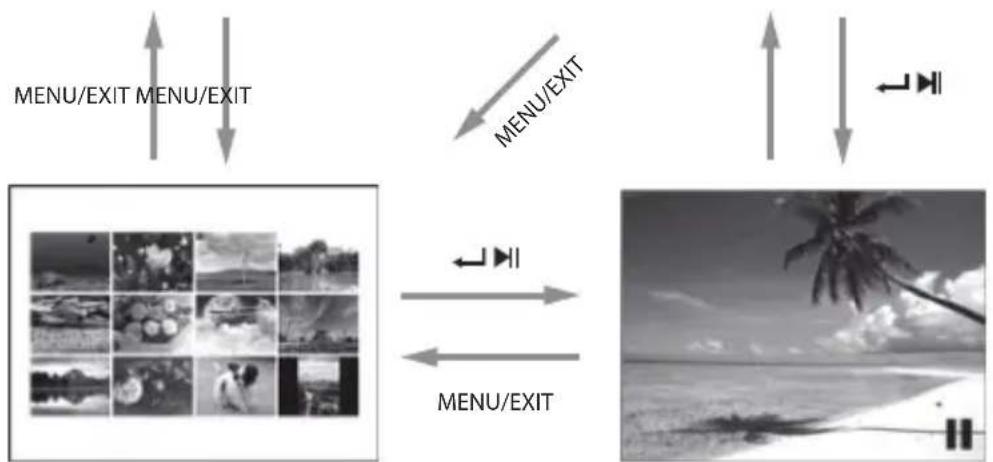
Index Thumbnails (Hold ◆/→↓ to scroll whole page)
Settings
Press and hold the MENU / EXIT button to display the setting menu.
Press the ◀↑↓ buttons to select an item, and then press the / button to enter the setting mode and confirm the setting. Press the MENU / EXIT button to exit to last menu.

When in slideshow, you need to press the ←/ ▶button to still an image, and then you can enter the setting menu.
Set Image size
Press and hold the MENU / EXIT button to display the setting menu. Press the ↗ ↓ button to select image size, then press the ∠ button to select Auto fit / Optimal / Full. The setting will activate when you exit the menu.

Auto Fit
Entire image

Optimal
Original size (default)
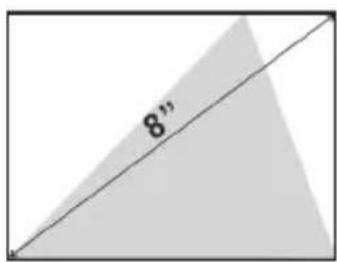
Full
Over whole screen
Set Slideshow Effect
In the menu press the ↕ button to select slideshow effect and then press the ↕/▶button to select one of the 10 effects : Radom, Windows, Jalousie, Fade, Insert, Reel, Brick, Release, 3DMix, Comb.
Set Slideshow Interval
In the menu press the ◀ button to select slideshow interval and then press the ◀/▶ button to set a value from 3 seconds (default), 5 seconds, 15 seconds, 3 minutes, 5 mintues and 15 minutes for the interval between images. Set "off" on single or calendar view mode if no need slideshow is required.

During slideshow, no matter what value (including "Off") you set, there is still no function for
GB
Set Split Slideshow
In the menu press the ↕ button to select split slideshow and then press the / ← ↗ button to select On / Off. Set "On" for slideshow of multiple images. Each screen for at most 4 landscape displays or 2 portrait displays.

natural_image
Collage of black-and-white photos showing a child's face, landscape, car, whale leaping, wind turbines, and hills (no text or symbols)Rotate (Only available on single view mode)
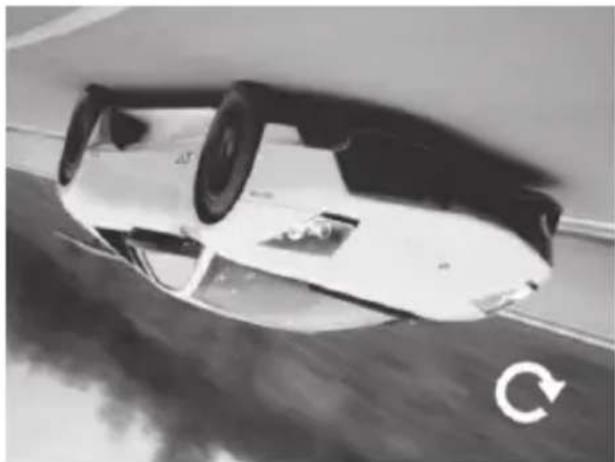
Select "Rotate" in the setting menu, press the ←/ ▶lbutton to rotate the current image 90°clockwise. Press the MENU / EXIT button to exit from rotate mode and return the photo back to its original orientation.
natural_image
Black and white photo of a car under a circular arrow, showing the wheel rim and side profile (no text or symbols)Zoom File (Only available on single view mode)
Select "Zoom" in the setting menu, press the ←/ ▶ button to enlarge the image for total 5 times. Press the ←/ ▶ button or hold the /▲ button to move the viewing area. Press the MENU / EXIT button to exit from rotate mode.

natural_image
Black and white photo of a white sports car with a magnifying glass icon (no visible text or symbols)
natural_image
Black and white photo of a white sports car on a road, kicking up motion with a white arrow indicating speed (no visible text or symbols)Delete File (Only available in thumbnail mode)
Enter "Delete file" menu, select "Yes" and press the ←/ ▶ button to delete the selected image from the thumbnails.
Delete file
Yes
No

natural_image
Grid of black-and-white photos showing various scenes including flowers, a windmill, trees, and a dog (no text or symbols)GB
Reset Setting
Enter "Reset Setting" menu, select "Yes" and press the ←/▶ button to confirm all settings to return to factory defaults except time setting.
Reset Setting
Yes
No

natural_image
Grid of black-and-white photos showing various scenes including flowers, landscapes, and a dog (no text or symbols)
Unplugging the photo frame won't change all the settings but will reset the time to 00:00:00 Jan 1, 2011.
Language
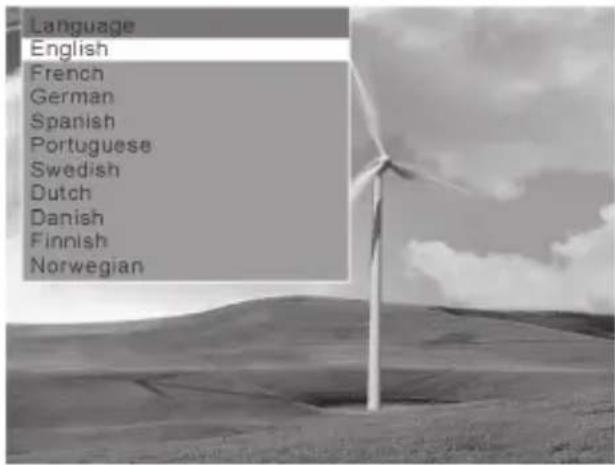
Set the display language on the LCD screen: English (default), French, German, Spanish, Portuguese, Swedish, Dutch, Danish, finnish, Norwegian.
GB
Brightness / Contrast / Colour / Tint
Select the item you want to change and press the √ button to display a bar. Press the ◀ button to adjust the level from 0-40.

natural_image
Underwater scene with dolphins and rocks, no visible text or symbolsTime
Press the ↙ button to highlight the year / month / day / hour / minute / second option you want to set. Press the ↕ button to adjust the digit and then press the ↙/▶ button again to confirm.
Finally select "Save Time" and press the ←/ ▶ button to activate the new time.

Troubleshooting
1. No power
- Check to make sure the mains plug is plugged into the mains socket.
• Make sure there is power in the mains socket.
2. Unable to view photos on the Digital Photo Frame
- Not all JPEG files are compatible. Please open the files in a computer and resave them as JPEG files and then try to playback in the photo frame.
- Check if the memory card is compatible.
3. If the photo display is distorted or cannot display properly
- Go to the main menu, then the SETUP and change the display mode to match your photo (Full / Standard).
4. If photo display seems slow
• Use lower resolution photos.
5. The image is distorted or blurred.
- Resolution of the image is too low. Try playing a file with a higher resolution. Resolution of 800 X 600 pixels is recommended.
6. Cannot detect any external device via the USB 2.0 A-Type port
- This photo frame only support a USB flash drives and it does not support any external hard disks or MP3 player via the USB port.
7. The photo frame does not work properly
- Please switch off the photo frame and on again.
Specifications
| Display 8" Digital TFT LCD Panel | |
| View Area 800 x 600 pixels | |
| Brightness 200 cd/m | 2 |
| Contrast 400 : 1 | |
| Stand Detachable | |
| I / O Ports DC IN / USB 2.0 | |
| Memory Card Slot SD / MMC / MS | |
| Support File Format Photo : JPEG | |
| AC Adapter Input : AC 100–240V ~ 0.2 max. 50/60 Hz | |
| Dimensions Approx. 190 x 150 x 19mm (W x H x D)(without stand) | |
| Net Weight Approx. 282g |
Features and specifications are subject to change without prior notice.
natural_image
Simple diagram with two diagonal lines inside a rectangular frame (no text or symbols)- Digital fotoramme
- Skru stativet inn i stativmottaket.


(Hold ◆◆/→◆ to scroll whole page)
Settings
natural_image
Collage of black-and-white photos showing children's faces, a car, a whale leaping out of water, and a wind turbine in the background (no text or symbols)natural_image
Black and white photo of a car under its roof, showing wheel rim and rearview mirror (no visible text or symbols)Zoom fil (kun tilgjengelig i enkel visningsmodus)
natural_image
Black and white photo of a white sports car with a magnifying glass icon (no visible text or symbols)
natural_image
Black and white photo of a white sports car on a road, showing motion blur and a speed bump (no visible text or symbols)natural_image
Underwater scene with two dolphins and fish, no visible text or symbolsTid
natural_image
Simple diagram with two diagonal lines inside a rectangular frame (no text or symbols)- Digital fotoram
- Instruktionshandbok (Art.nr.: 71-DPF980E-003)
natural_image
Simple diagram with two diagonal lines inside a rectangular frame, no text or symbols present.LCD-monitor


Still Image
Index Thumbnails
(Hold ◆◆/◆◆ to scroll whole page)
Ange
natural_image
Collage of black-and-white photos showing a child, landscape, water drop, wind farm, and person (no text or symbols)natural_image
Black and white photo of a car under a circular frame, showing the wheel and rear suspension (no visible text or symbols)SE
natural_image
Black and white photo of a white sports car with a magnifying glass icon (no visible text or symbols)
natural_image
Black and white photo of a white sports car on a road with motion blur, no visible text or symbolsnatural_image
Grid of black-and-white photos including landscapes, flowers, trees, and a dog, with no visible text or symbols.natural_image
Black-and-white underwater scene with dolphins, rocks, and a horizontal bar labeled 'djuusstyrka' (no other text or symbols)Tid
natural_image
Simple diagram with two diagonal lines inside a rectangular frame (no text or symbols)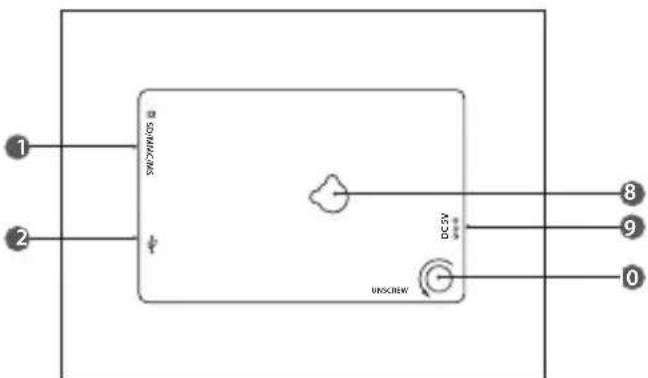
Valmistelut
natural_image
Black-and-white collage showing a baby face, a close-up of a crystal, a distant building with pyramids, and a modern car (no visible text or symbols)
natural_image
Black-and-white photo collage showing a child's face, a close-up of flowers, and a water splash (no text or symbols)
natural_image
Split black-and-white image showing a whale leaping out of water and a wind turbine on a hillside (no text or symbols)natural_image
Black and white photo of a car partially covered in tire, with a circular arrow symbol on the side (no text or symbols on the car itself)FI
natural_image
Black and white photo of a white sports car with a magnifying glass icon (no visible text or symbols)
natural_image
Black and white photo of a white sports car on a road, no visible text or symbolsnatural_image
Grid of black-and-white nature photos including landscapes, flowers, wind turbines, and a dog (no text or symbols)
natural_image
Underwater scene with dolphins and fish, no visible text or symbolsAika
natural_image
Simple diagram with two diagonal lines inside a rectangular frame (no text or symbols)- Digital billedramme
- Brugervejledning (P.N.: 71-DPF980E-003)
natural_image
Black and white photo of a car with visible wheels and a circular arrow symbol (no text or labels)natural_image
Black and white photo of a futuristic sports car with a magnifying glass icon (no visible text or symbols)
natural_image
Black and white photo of a white sports car on a road, with motion blur and a white arrow indicating speed (no visible text or symbols)Slet Fil (kun til rådighed i miniaturetilstand)
Gå til "Slet Fil" menuen, vælg "Ja" og tryk på ←/▶knappen for at slette det valgte billede fra miniaturerne.

Nulstil
natural_image
Underwater scene with two dolphins and a large fish, no visible text or symbolsTid
When using electrical appliances, basic precautions should always be followed, including the following:
- Read all the instructions and retain this instruction manual.
- Ensure that all electrical connections (including the mains adaptor and power cable) are properly made and in accordance with the manufacturer's instructions. Switch off and withdraw the mains adaptor before making or changing connections.
- Consult your dealer if you are ever in doubt about the installation, operation or safety of your photo frame.
- Do not allow the photo frame to be exposed to dripping or splashing.
- Never store in hot or very cold areas. Recommended operating temperature is 0\~40°C.
- Do not use the photo frame in areas with high moisture (e.g. bathroom) or dusty areas.
- Do not place hot objects or naked flame sources such as lighted candles or night lights on or close to the photo frame. High temperatures can melt plastic and lead to fires.
- Do not obstruct the ventilation openings of the photo frame with items such as newspapers, tablecloths, curtains, etc. Overheating will cause damage and shorten the life of the photo frame.
- Do not handle the power cable with wet hands.
- Be careful with the LCD panels on the photo frame.
-
Only use attachments/accessories specified by the manufacturer.
-
When the photo frame is not in use or unattended for a long period of time, disconnect it from the mains socket.
- Do not remove any fixed cover as this may expose dangerous voltages.
- Do not continue to operate the photo frame if you are in any doubt about it working normally, or if it is damaged in any way - switch off, withdraw the mains adaptor and consult your dealer.
- Never let anyone especially children push anything into holes, slots or any other opening on the case - this could result in a fatal electrical shock.
- Route the power cable so that it is not likely to be walked on, crushed, chafed, or subjected to excessive wear, tear or heat.
Note about LCD screen
The LCD screen is manufactured using high-precision technology. However, some tiny black points and/or bright points (red, blue or green in colour) may constantly appear on the LCD screen. These points are generated in the manufacturing process and are normal.
This symbol on the product or in the instructions means that your electrical and electronic equipment should be disposed at the end of its life separately from your household waste. There are separate collection systems for recycling in the EU.
For more information, please contact the local authority or your retailer where you purchased the product.
NO
natural_image
Blank black rectangle with no visible text, symbols, or features
natural_image
Blank black rectangle with no visible text, symbols, or features- Contents
- GB NO Innhold
- GB
- Unpacking the Photo Frame
- Product Overview
- Preparations
- Attaching the Stand
- Connecting to the Mains Power
- Inserting a Memory Card / USB Flash Drive
- Basic Operation
- Display image
- Settings
- Set Image size
- Set Slideshow Effect
- Set Slideshow Interval
- Set Split Slideshow
- Rotate (Only available on single view mode)
- Zoom File (Only available on single view mode)
- Delete File (Only available in thumbnail mode)
- Reset Setting
- Language
- Brightness / Contrast / Colour / Tint
- Time
- Troubleshooting
- No power
- Unable to view photos on the Digital Photo Frame
- If the photo display is distorted or cannot display properly
- If photo display seems slow
- The image is distorted or blurred.
- Cannot detect any external device via the USB 2.0 A-Type port
- The photo frame does not work properly
- Specifications
- Zoom fil (kun tilgjengelig i enkel visningsmodus)
- Tid
- Ange
- Valmistelut
- Aika
- Slet Fil (kun til rådighed i miniaturetilstand)
- Nulstil
- Note about LCD screen
- NO
Brand : Sandstrøm
Model : S08DPF10E
Category : Digital photo frame