
LXBI800B - Loudspeaker Luxor - Free user manual and instructions
Find the device manual for free LXBI800B Luxor in PDF.


| Product Type | Docking Tower Speaker with Bluetooth |
| Model Number | LXBi800B / LXBi800W |
| Brand | Luxor |
| Compatible Devices | iPhone 5, 5c, 5s; iPad 4, mini, mini 2, Air; iPod touch 5, nano 7 |
| Lightning Dock | Yes, with charging function |
| Bluetooth Version | 3.0 |
| Bluetooth Profile | A2DP |
| Operation Distance (Bluetooth) | Up to 10 meters |
| Speaker Units | 2 x 3.5" speakers + 1 x 4" subwoofer |
| Output Power | 2 x 10W + 1 x 25W (max 50W) |
| Power Supply | AC 220-240V, 50/60Hz |
| Power Consumption | Max 70W |
| USB Charging Port | 5V, 1A (for charging Apple devices and other compatible devices) |
| Audio Inputs | Lightning dock, Bluetooth, AUX-IN (3.5mm) |
| Controls | Top panel buttons and remote control (CR2025 battery) |
| Remote Control Battery | 1 x 3V CR2025 (lithium) |
| Treble/Bass Control | Yes, on remote control |
| Standby Mode | Yes, with charging capability for docked device |
| Care Instructions | Disconnect from power before cleaning; use soft, damp, lint-free cloth; no abrasives |
| Safety Precautions | Check voltage rating; keep away from heat/water; use only by adults; repair by qualified personnel only |
| Box Contents | Speaker body, base, screw with ring handle, metal gasket, 3.5mm line-in cable, remote control, instruction manual |
| Repairability | Repairs should only be performed by qualified personnel; supply cord must be replaced by manufacturer or agent |
| Environment Disposal | Do not dispose with household waste; follow WEEE directive |
Frequently Asked Questions - LXBI800B Luxor
User questions about LXBI800B Luxor
0 question about this device. Answer the ones you know or ask your own.
Ask a new question about this device
Download the instructions for your Loudspeaker in PDF format for free! Find your manual LXBI800B - Luxor and take your electronic device back in hand. On this page are published all the documents necessary for the use of your device. LXBI800B by Luxor.
USER MANUAL LXBI800B Luxor
natural_image
Black cylindrical electronic device with a smartphone on top, mounted on a circular base (no visible text or symbols)7. Play/Paus/Parkoppla
natural_image
Line drawing of a circular electronic device with buttons and a monitor (no text or symbols)SPELA EN LIGHTNING-ENHET
natural_image
Black cylindrical electronic device with a smartphone on top, no visible text or symbolsnatural_image
Line drawing of a circular electronic device with buttons and a monitor (no text or symbols)AVSPILLING MED EN LIGHTNING-ENHET
STELL OG VEDLIKEHOLD
natural_image
Black cylindrical electronic device with a smartphone on top, mounted on a circular base (no visible text or symbols)Batteri sikkerhed
Altid:
natural_image
Line drawing of a circular electronic device with buttons and a monitor (no text or symbols)AFSPILNING AF ET LIGHTNING UDSTYR
AUX-IN (Line in-type)
natural_image
Black cylindrical electronic device with a smartphone on top, mounted on a circular base (no visible text or symbols)natural_image
Line drawing of a circular electronic device with buttons and a monitor (no text or symbols)LIGHTNING-LAITTEEN KÄYTTÖ
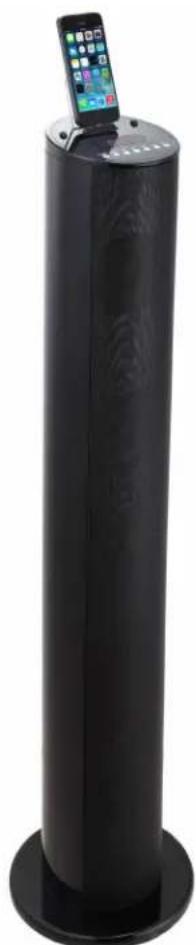
Docking Tower Speaker with Bluetooth
Model No.: LXBi800B / LXBi800W (iPhone5/iPad4/iPad mini not included)
natural_image
Black cylindrical electronic device with a smartphone on top, mounted on a circular base (no visible text or symbols)Read this instruction manual carefully before operating the appliance and save it for future reference.
SAFETY PRECAUTIONS
The purpose of these precautions is to ensure user safety and prevent property damage. Be sure to read and observe all safety precautions.
When using electrical equipments basic safety precautions should always be followed.
- This equipment is not intended for use by persons (including children) with reduced physical, sensory or mental capabilities or lack of experience or knowledge. They should be given appropriate supervision and instructions to use the equipment by a person responsible for their safety.
- Ensure the equipment is not too close to heat emitting appliances or placed in direct sunlight.
- Check that the voltage indicated on the type plate corresponds with that of the local network before connecting the equipment to the mains power supply (type plate is located on back side of the product).
- Do not leave the equipment unattended while connected to the power supply.
- Do not immerse the equipment in water or any other liquids.
- It is imperative to unplug the power cord after the equipment has been used, before it is cleaned and while being repaired.
- This product is not a toy. Never leave the equipment within reach of children. Close supervision is required when using this equipment near children.
- Repairs to electrical appliances should only be performed by qualified personnel. Improper repairs may place the user and/or equipment at serious risk.
- This equipment is intended for household use only and should not be used for industrial or commercial purposes.
- Do not operate this appliance with a damaged plug or cord, after a malfunction or after being dropped or damaged in any way.
- If the supply cord is damaged, it must be replaced by the manufacturer, its service agent or similarly qualified persons in order to avoid a hazard.
- Do not use this equipment for anything other than its intended use.
- This equipment must be placed on a stable, heat resistant surface.
- Do not push objects into any openings as damage to the equipment and/or electric shock may occur.
- Do not use this product in wet or bad weather conditions.
-
Do not play music at excessive levels, especially near children.
-
Main plug is used as disconnect device and it should remain readily operable during intended use. In order to disconnect the apparatus from the mains completely, the mains plug should be disconnected from the mains socket outlet completely.
- Battery shall not be exposed to excessive heat such as sunshine, fire or the like.
The Bluetooth® word mark and logos are registered trademarks owned by Bluetooth SIG Inc and any use of such marks by Netlogic is under license.
GETTING STARTED
- Read the instruction manual carefully.
- Remove the equipment from the box.
- Remove packaging and save it for future use (for example when moving the unit).
FEATURES
● Lightning Dock 1 for Lightning Devices
● Made for Lightning Devices
● Charges Lightning Devices while Playing or when in Standby Mode
- Remote Control
- Treble & Bass Control
● One built-in Subwoofer
- Two Main Speakers
- USB Port for Charging (5V, 1A)
- Bluetooth Connectivity
BOX CONTENT
- Speaker Body
- Speaker Base
- Screw with Ring Handle (1 pc)
● Metal Gasket (1 pc)
● 3.5 mm Line-in Cable - Remote Control
- Instruction Manual
COMPATIBLE IPHONE / IPAD / IPOD MODELS
iPhone 5
iPhone 5c
iPhone 5s
iPad 4
iPad mini
iPad mini 2
iPad Air
iPod touch 5
iPod nano 7
DESCRIPTION OF PARTS
Top Panel
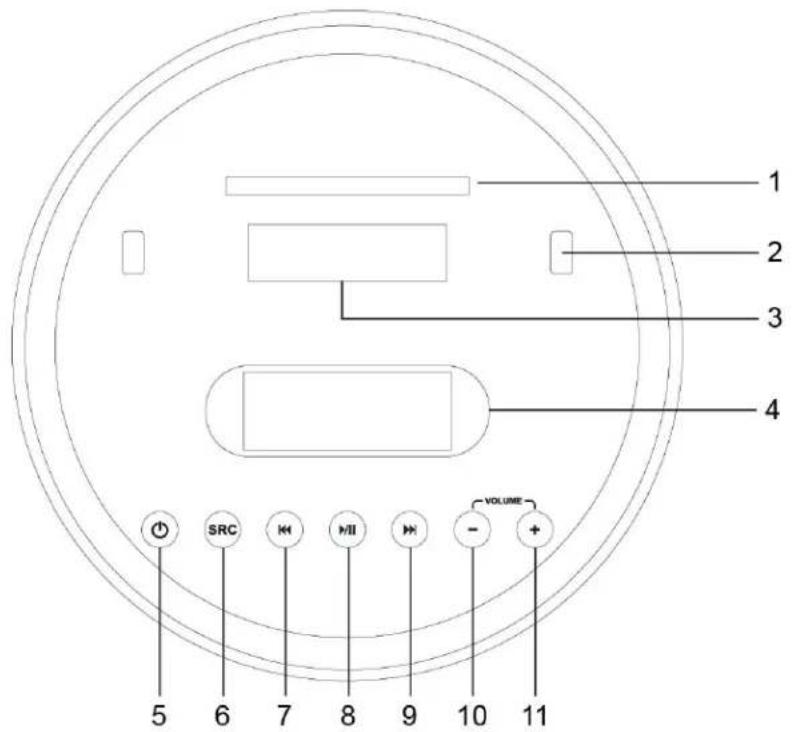
- Support bracket
- Rubber support
- Dock with Lightning Connector
- LED display
- STANDBY Button
Press to turn the speaker on and off.
- SOURCE Button
Press to switch between iDevice mode, Aux IN mode and Bluetooth mode.
- Skip Backward
Press to skip tracks or chapters backward on the docked Lightning device or connected Bluetooth device. Press and hold to rewind content.
- Play/Pause/Pair
Press to play, pause or pair with a Bluetooth device.
- Skip Forward
Press to skip tracks or chapters forward on the docked Lightning device or connected Bluetooth device. Press and hold to fast forward content.
10.Volume -
Press to decrease the volume.
11.Volume +
Press to increase the volume.
REMOTE CONTROL
1. Standby
Press to turn the speaker off or on.
2. Mute
Press to mute the volume.
Long press around 5 seconds and bass/treble settings will be reset to default level.
3. iDevice
Press to play docked Lightning device.
4. Aux IN
Press to play the source from Aux in.
5. Bluetooth
Press to play the source from Bluetooth.
6. Skip backward
Press to skip tracks or chapters backward on the docked Lightning device or connected Bluetooth device. Press and hold to rewind content.
7. Play/Pause/Pair
Press to play, pause or pair with a Bluetooth device.
8. Skip forward
Press to skip tracks or chapters forward on the docked Lightning device or connected Bluetooth device. Press and hold to fast forward content.
9. Bass +
Press to increase the level of bass output from the speaker.
10.Treb +
Press to increase the level of treble output from the speaker.
11.Volume +
Press to increase the volume.
12.Bass -
Press to decrease the level of bass output from the speaker.
13.Treb -
Press to decrease the level of treble output from the speaker.
14.Volume -
Press to decrease the volume.

Using the Remote Control to Operate the Unit
Aim the remote control directly at the remote control sensor (IR) on the front panel. Don't put any objects between the remote control and the system while operating the unit.
Batteries
- Slide out the battery holder from the remote control case. Push tab "A" towards the middle first, see diagram.
- Place one 3V CR2025 (Lithium) battery into the battery holder, observing the polar marking. If the battery is placed incorrectly, the remote control will not work. Dispose of the old battery properly. Do not leave it lying around where a you child or pet could play with or swallow it.
- Battery may explode or leak if it is mistreated. Do not attempt to recharge it or disassemble it. Do not dispose of the old battery in a fire.
- Insert the battery holder into the battery compartment.
NOTE: Please remove all the batteries to prevent damage or injury from battery leakage if the unit will not be used for a long period of time. Use only the specified size and type of battery.

Battery Safety
Always:
● Ensure the battery compartment is secured.
- Only use the batteries recommended.
- Ensure correct fit of batteries. Observe the plus and minus marks on both the battery and the compartment.
- Replace a full set of batteries at one time.
- Store unused batteries in their packaging and keep away from metal objects that may cause a short circuit.
- Remove dead batteries from the equipment.
- Remove batteries from the remote control if it is not to be used for a long time.
- Remember to keep button cell and batteries away from children as they can easily be swallowed.
- Seek medical attention immediately if batteries are swallowed.
Never:
- Dispose of batteries in a fire.
- Attempt to recharge ordinary batteries.
SET UP
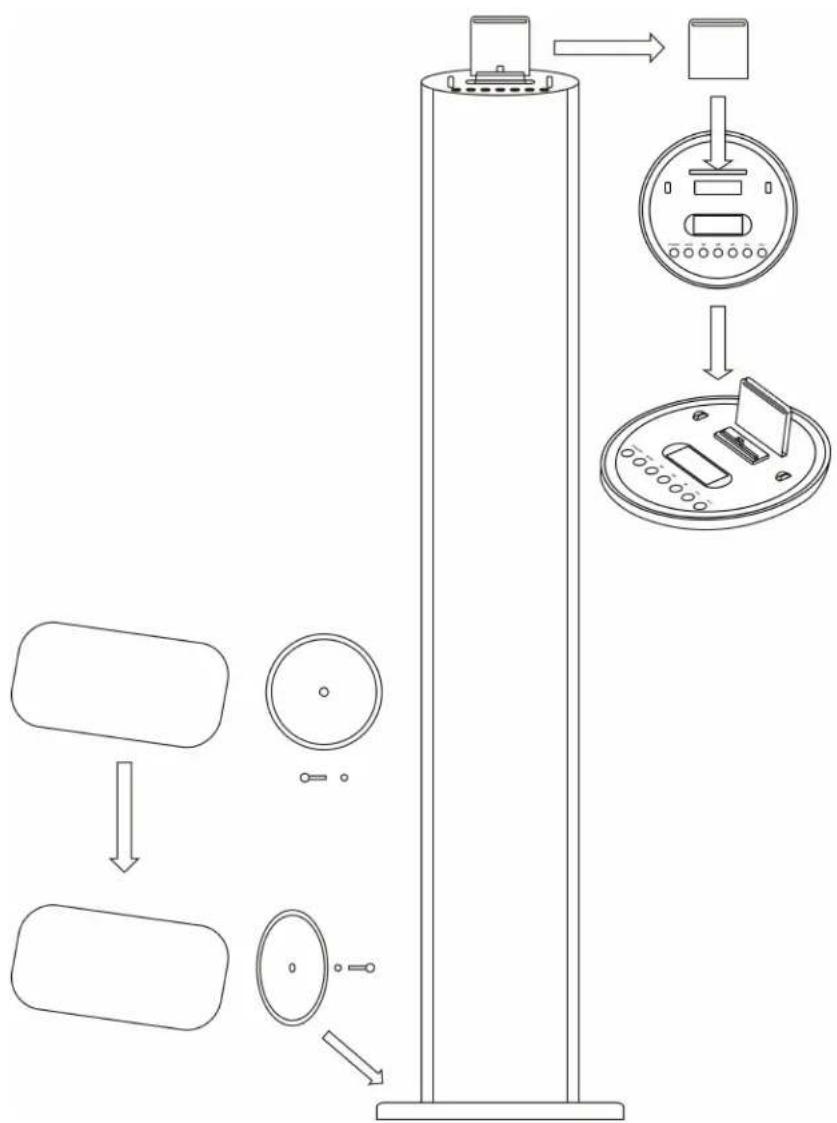
- Take out the speaker body and speaker base carefully from the box.
- Take out the accessories (one screw with ring handle and one metal gasket).
- Fit the base with the body with the one hole.
- Screw the base into the body by hands with the screw and fold the ring handle.
- Place the speaker standing on the floor and it's ready to use.
- If the Lightning device is docked - please insert the detachable holder to support the device.
flowchart
graph TD
    A["Rectangular Body"] --> B["Circular Component"]
    B --> C["Box with Display Unit"]
    C --> D["Top Panel Display Unit"]
    style A fill:#f9f,stroke:#333
    style B fill:#ccf,stroke:#333
    style C fill:#cfc,stroke:#333
    style D fill:#fcc,stroke:#333
DOCKING A LIGHTNING DEVICE
- Press STANDBY to turn the unit on.
- Press SRC to switch to iDevice mode (iDevice button on the remote control).
- Connect the Lightning device to the connector. When the device is connected it will charge.
- If the Lightning device is docked - please insert the detachable holder to support the device.

natural_image
Line drawing of a circular electronic device with buttons and a monitor (no text or symbols)PLAYING A LIGHTNING DEVICE
- Follow the instructions for docking a Lightning device.
- Short press the Play/Pause button to begin play and stop music from the docked Lightning device.
- Short press the Prev/Next buttons to select music from the docked Lightning device.
CHARGING YOUR LIGHTNING DEVICE
You can charge your Lightning device via the dock in either standby or operation mode.
Your Lightning device will automatically begin charging when it is docked.
PAIRING BLUETOOTH DEVICES
- Turn the unit on. Press SOURCE to switch to Bluetooth mode, the LED will indicate "BT"
- Long press "Play/Pause" key on unit for 3-5 seconds. Then you will hear a "DU" sound and the LED icon "✗" will flash. This means the speaker unit is in pairing mode.
- Turn on Bluetooth in your mobile device and ensure it is in "searching device" mode. Find LXBi800 and select it.
- Once the unit is found, enter password 0000 to connect (some devices may not need password).
- The LED icon “*” will light up and you will hear a “DU” sound if the pairing was successful.
- If the mobile device cannot find the speaker or can't pair, please power on again and repeat above steps.
- The speaker will automatically reconnect to the previously paired device when entering Bluetooth mode. If the unit cannot automatically connect to the previously paired device - please restart the Bluetooth connectivity in your mobile device and follow above steps to finish the connection.
- If the devices are far away from each other (over 10 meters) the connection between speaker and mobile device will be lost and the unit will go back to Bluetooth standby mode.
Ensure the Bluetooth in your mobile device is in “searching device” mode. Keep on pressing “Play/Pause” (pairing) key on the top panel, and then follow above steps to reconnect it.
USB PORT FOR CHARGING
USB power output DC 5V 1A supports to charge all Apple devices and other device in this power range. When charging the device - ensure the power supply is proper for your device.
AUX-IN (LINE IN TYPE)
Requires a 3.5 mm cable (included).
- Connect a 3.5 mm cable to the Aux IN jack. Connect the other end of the 3.5 mm cable to an MP3 player or other audio source.
- Press the "STANDBY" button to turn the unit on.
- Press the "SRC" button on the top panel or the "Aux IN" button on the remote to switch to Aux IN mode.
- Use the controls on the connected device to begin playing audio routed through the unit.

CARE AND MAINTENANCE
- Always disconnect the equipment from the power supply before cleaning.
- Clean the equipment with a soft, damp, lint free cloth.
- Do not use abrasives or harsh cleaners.
SPECIFICATIONS
| Power Supply AC 220-240V, 50/60Hz | |
| Speaker Units | 2 x 3.5" speakers |
| 1 x 4" speakers | |
| Output Power | 2 x 10W + 1 x 25W, max 50W |
| Power Consumption Max 70W | |
| USB Charging 5V, 1A | |
| Bluetooth Version | 3.0 |
| Bluetooth Profile | A2DP |
| Operation Distance | Up to 10 meters |
NOTE: As a result of continual improvements, the design and specifications of the product within may differ slightly from the unit illustrated on the packing.
| ENVIRONMENTWaste of Electrical and Electronic Equipment (WEEE)WEEE Directive 2012/19/EUThis symbol on the product or in the instructions means that the electrical and electronic equipment must be disposed of separately from other household waste when it does not work anymore. The EU has separate waste collection systems, contact your local dealer or authority for more information. |  |
| LAW AND SAFETYThis product has been manufactured according to current regulations for electromagnetic fields (EMF), which means that it is safe to use if used according to safety instructions. The product is manufactured according to current regulations within the EU legislation, limiting the use of hazardous substances in electrical and electronic equipment (RoHS Directive 2011/65/EU). |  |
| RESERVATIONSWe reserve the right to correct any typographical errors, and reserve the right to make ongoing changes and improvements to the product and related materials. |  |
- Play/Paus/Parkoppla
- SPELA EN LIGHTNING-ENHET
- AVSPILLING MED EN LIGHTNING-ENHET
- STELL OG VEDLIKEHOLD
- Batteri sikkerhed
- Altid:
- AFSPILNING AF ET LIGHTNING UDSTYR
- AUX-IN (Line in-type)
- LIGHTNING-LAITTEEN KÄYTTÖ
- Docking Tower Speaker with Bluetooth
- SAFETY PRECAUTIONS
- GETTING STARTED
- FEATURES
- BOX CONTENT
- COMPATIBLE IPHONE / IPAD / IPOD MODELS
- DESCRIPTION OF PARTS
- Top Panel
- REMOTE CONTROL
- Standby
- Mute
- iDevice
- Aux IN
- Bluetooth
- Skip backward
- Play/Pause/Pair
- Skip forward
- Bass +
- 10.Treb +
- 11.Volume +
- 12.Bass -
- 13.Treb -
- 14.Volume -
- Using the Remote Control to Operate the Unit
- Batteries
- Battery Safety
- Always:
- Never:
- SET UP
- DOCKING A LIGHTNING DEVICE
- PLAYING A LIGHTNING DEVICE
- CHARGING YOUR LIGHTNING DEVICE
- PAIRING BLUETOOTH DEVICES
- USB PORT FOR CHARGING
- AUX-IN (LINE IN TYPE)
- CARE AND MAINTENANCE
Brand : Luxor
Model : LXBI800B
Category : Loudspeaker