
ACM 226 - Cooker WHIRLPOOL - Free user manual and instructions
Find the device manual for free ACM 226 WHIRLPOOL in PDF.


| Product Type | Freestanding Electric Cooker |
| Brand | Whirlpool |
| Model | ACM 226 |
| External Dimensions (HxWxD) | 850 mm x 600 mm x 600 mm |
| Voltage / Frequency | 220-240 V ~ 50 Hz |
| Total Power Consumption | 10 kW |
| Fuse Rating | 16 A x 3 |
| Hob Type | Ceramic glass hob with 4 cooking zones |
| Hob Zones | Rear left: Single 140 mm / 1200 W; Front left: Dual 210/120 mm / 2200/750 W; Front right: Single 180 mm / 1800 W; Rear right: Extended 170/265 mm / 1500/2400 W |
| Oven Type | Multifunction electric oven |
| Oven Energy Efficiency Class | A |
| Oven Functions | Top and bottom heating, bottom heating, fan supported bottom/top, fan only (defrost), fan heating, full grill, grill+fan, booster |
| Grill Power | 2.2 kW |
| Interior Light | 15-25 W, replaceable |
| Timer | Digital with cooking time, end of cooking, alarm, and keylock |
| Child Lock | Yes, on oven door |
| Keylock | Yes, on control panel |
| Cleaning | Wipe with damp cloth; avoid abrasive cleaners; oven door removable for cleaning |
| Accessories Included | Oven tray, deep tray, aluminium cake tray, cake tray, small oven tray, wire shelf, telescopic racks |
| Installation Requirements | Minimum distance 400 mm above hotplate, 650 mm if hood installed; secured with safety chain |
| Weight | Approximately 55 kg |
Frequently Asked Questions - ACM 226 WHIRLPOOL
User questions about ACM 226 WHIRLPOOL
0 question about this device. Answer the ones you know or ask your own.
Ask a new question about this device
Download the instructions for your Cooker in PDF format for free! Find your manual ACM 226 - WHIRLPOOL and take your electronic device back in hand. On this page are published all the documents necessary for the use of your device. ACM 226 by WHIRLPOOL.
USER MANUAL ACM 226 WHIRLPOOL
Instructions for use
Mode d'emploi
Gebruiksaanwijzing
natural_image
Close-up of a pair of white paper cloths with metal clips, no visible text or symbolsBrugsanvisning
Bruksanvisning
Käyttöohje
natural_image
Black and white photo of multiple glass bottles with black caps, arranged in a row (no visible text or symbols)
natural_image
Black and white close-up of multiple glasses with no visible text or symbolsΟδηγίες χρήσης
natural_image
Close-up of a metallic kitchen appliance with perforated ventilation slots and a handle (no visible text or symbols)Návod k použití
Návod na použitie
Please read this manual first.
Dear Customer,
We would like you to obtain best performance with your product that has been manufactured in modern facilities and passed through strict quality control procedures.
Therefore, we advise you to read through this User Manual carefully before using your product and keep it for future reference. If you hand over the product to someone else, deliver the User Manual as well.
The User Manual will help you use the product in a fast and safe way.
- Read the User Manual before installing and operating the product.
- You must strictly observe the safety instructions.
- Keep this User Manual within easy reach for future reference.
- Also read other documents supplied with the product.
Remember that this User Manual may also be applicable for several other models.
Differences between models are explicitly identified in the manual.
Explanation of symbols
Throughout this User Manual the following symbols are used:
i Important information or useful hints about usage.
⚠ Warning for hazardous situations with regard to life and property.
⚠ Warning for electric shock.
⚠ Warning for risk of fire.
Warning for hot surfaces.
Table of Contents
1 General information 4
Overview....4
Technical specifications .... 5
Accessories 6
2 Important safety instructions 8
General safety 8
Safety for children 10
Safety when working with electricity 10
Intended use 10
3 Installation 12
Before installation 12
Installation and connection 13
Disposal 15
Disposing of packaging material ..... 15
Future Transportation 15
Disposing of the old product ..... 16
4 Preparation 17
Tips for saving energy 17
Initial use....17
Initial time setting 17
First cleaning of the appliance ..... 18
Initial heating 18
5 How to use the hob 20
General information about cooking ..... 20
Using the hobs 21
6 How to operate the oven 23
General information on baking, roasting and grilling 23
How to operate the electric oven ..... 23
Operating modes 24
Using the oven clock 25
Using the keylock 27
Using the clock as an alarm 27
Cooking times table 28
How to operate the grill 30
Cooking times table for grilling ..... 31
7 Maintenance and care 32
General information 32
Cleaning the hob 32
Cleaning the control panel 33
Cleaning the oven 33
Removing the oven door 33
Replacing the oven lamp 34
8 Troubleshooting 35
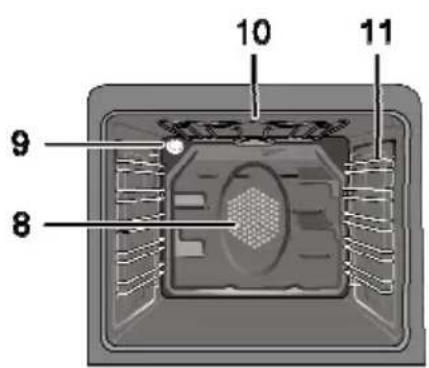
Overview
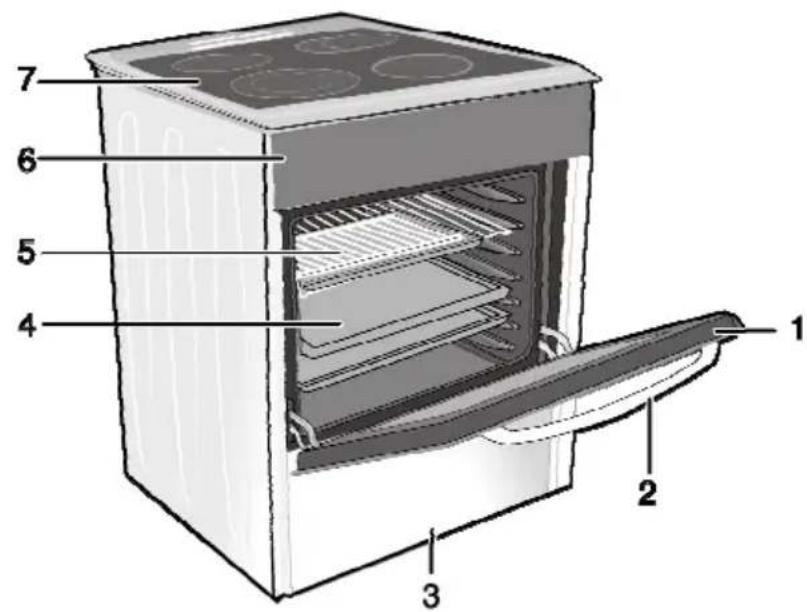
1 Front door
2 Handle
3 Bottom drawer
4 Tray
5 Wire shelf
6 Control panel
7 Burner plate
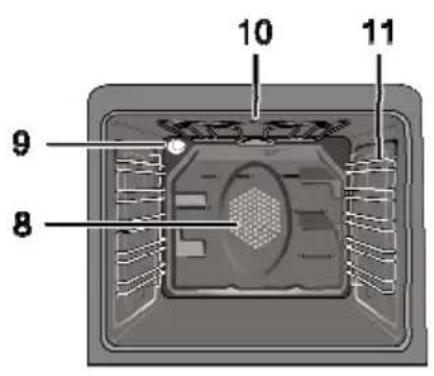
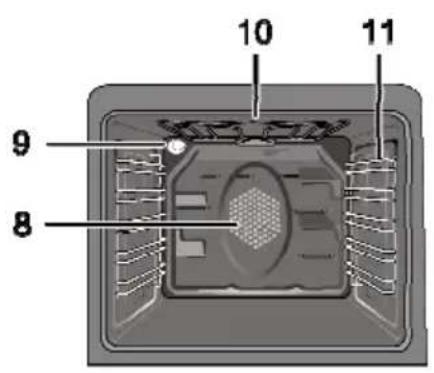
8 Fan motor (behind steel plate)
9 Lamp
10 Grill heating element
11 Shelf positions
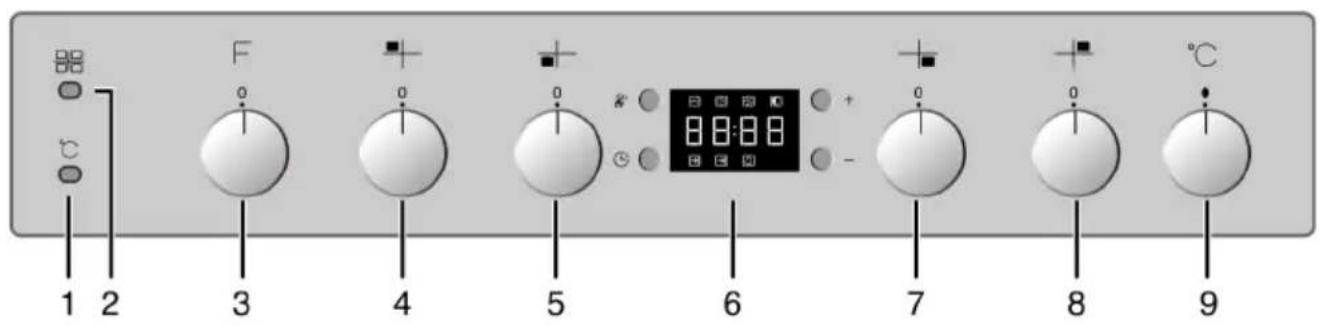
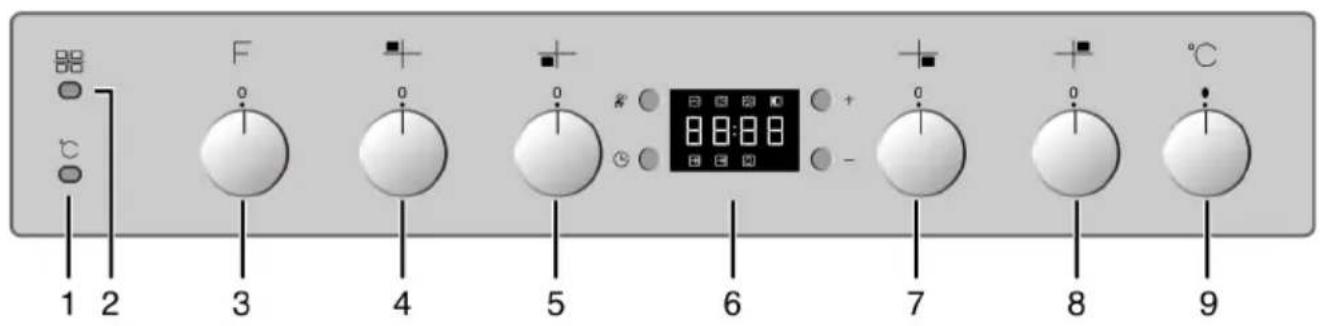
1 Thermostat lamp
2 Warning lamp
3 Function knob
4 Single-circuit cooking plate Rear left
5 Dual-circuit cooking plate Front left
6 Digital timer
7 Single-circuit cooking plate Front right
8 Extended cooking plate Rear right
9 Thermostat knob
Technical specifications
| GENERAL | |
| External dimensions (height / width / depth) 850 | mm/600 mm/600 mm |
| Voltage / frequency 220-240 V ~ 50 Hz | |
| Total power consumption 10 kW | |
| Fuse min. 16 A x 3 | |
| Cable type / section H05VV-FG 3 x 2,5 mm | 2 |
| Cable length max. 2 m | |
| HOB | |
| Burners | |
| Rear left | Single-circuit cooking plate |
| Dimension 140 mm | |
| Power 1200 W | |
| Front left | Dual-circuit cooking plate |
| Dimension 210/120 mm | |
| Power 2200/750 W | |
| Front right | Single-circuit cooking plate |
| Dimension 180 mm | |
| Power 1800 W | |
| Rear right | Extended cooking plate |
| Dimension 170/265 mm | |
| Power 1500/2400 W | |
| OVEN/GRILL | |
| Main oven | Multifunction oven |
| Energy efficiency class# | A |
| Inner lamp 15–25 W | |
| Grill power consumption 2.2 kW | |
Basics: Information on the energy label of electrical ovens is given in accordance with the EN 50304 standard. Those values are determined under standard load with bottom-top heater or fan assisted heating (if any) functions.
Energy efficiency class is determined in accordance with the following prioritization depending on whether the relevant functions exist on the product or not. 1-Cooking with eco-fan, 2- Turbo slow cooking, 3- Turbo cooking, 4- Fan assisted bottom/top heating, 5-Top and bottom heating.

Important
Technical specifications may be changed without prior notice to improve the quality of the product.

Important
Figures in this manual are schematic and may not exactly match your product.

Important
Values stated on the product labels or in the documentation accompanying it are obtained in laboratory conditions in accordance with relevant standards. Depending on operational and environmental conditions of the product, these values may vary.
Accessories

Important
Accessories supplied can vary depending on the product model. Not every accessory described in the user manual may exist on your product.
Oven tray
Used for pastries, frozen foods and big roasts.
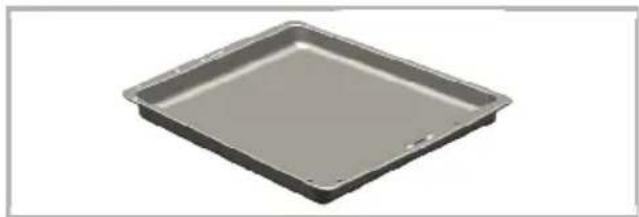
natural_image
Exterior view of a square baking tray (no text or symbols)Deep tray
Used for pastries, large roasts, juicy dishes, and for collecting the fat while grilling.
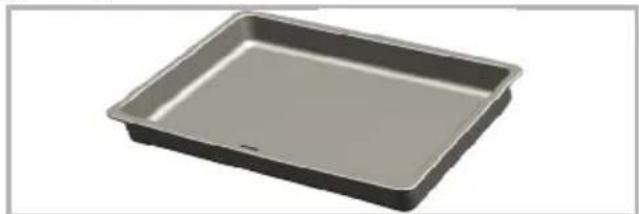
natural_image
Exterior view of a rectangular baking tray (no text or symbols)Aluminium cake tray
Used for pastries such as cookies and biscuits.
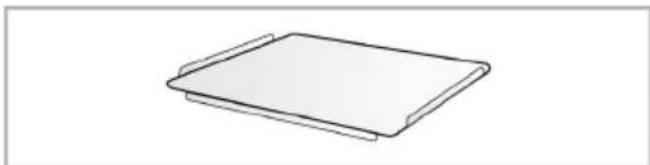
natural_image
Simple line drawing of a rectangular tray or tray with two side handles (no text or symbols)Cake tray
Used for pastries such as cookies and biscuits.
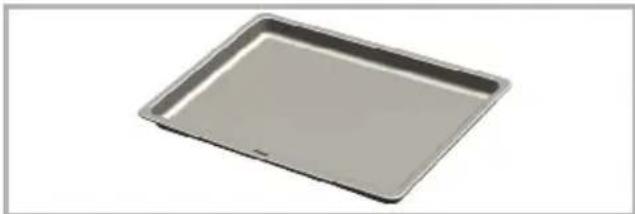
natural_image
Exterior view of a rectangular baking tray (no text or symbols)Small oven tray
Used for small portions. This oven tray is placed onto the wire shelf.
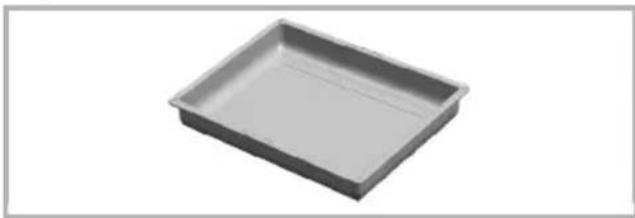
natural_image
3D rendering of a rectangular baking tray (no text or symbols)Wire Shelf
Used for roasting and for placing the food to be baked, roasted or cooked in casserole dishes to the desired rack.
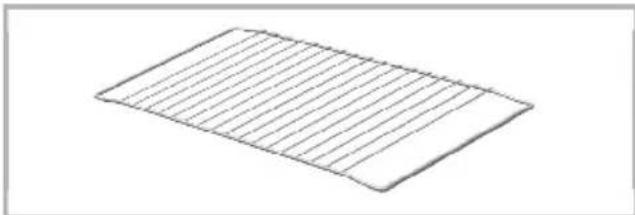
natural_image
Isometric view of a rectangular grid pattern with horizontal lines, no text or symbols present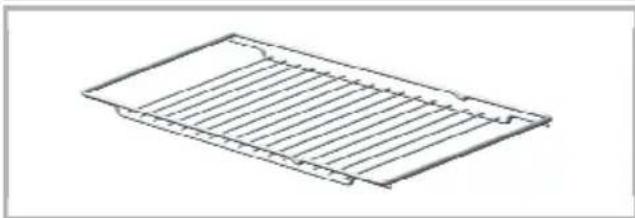
natural_image
Line drawing of a rectangular metal grate or rack structure with no text or symbolsPlacing the wire shelf and tray onto the telescopic racks properly
Telescopic racks allow you to install and remove the trays and wire shelf easily.
When using the tray and wire shelf with telescopic racks, make sure that the pins at the rear section of the telescopic rack stands against the edges of the wire shelf and tray.
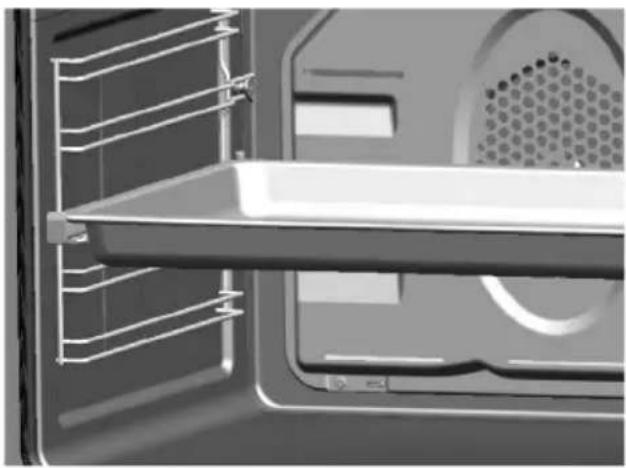
natural_image
Interior view of a refrigerator showing the door, front panel, and side panels (no text or symbols visible)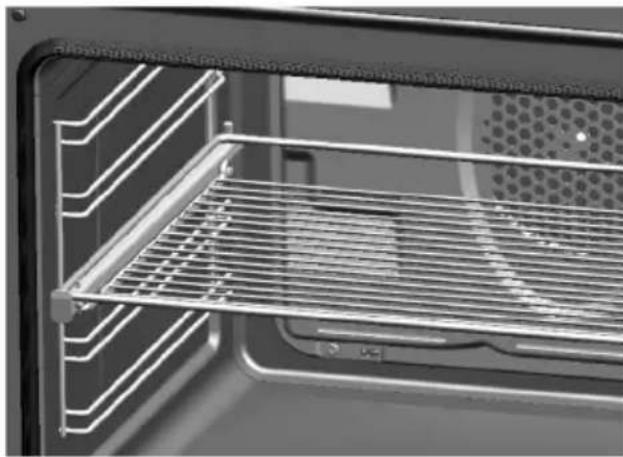
natural_image
Interior view of a kitchen oven with grating and ventilation grilles (no text or symbols visible)2 Important safety instructions
This section contains safety instructions that will help you avoid risk of injury and damage. All warranties will become void if you do not follow these instructions.
General safety
WARNING: The appliance and its accessible parts become hot during use. Care should be taken to avoid touching heating elements.
Children less than 8 years old shall be kept away, unless continuously supervised.
This appliance can be used by children aged from 8 years and above and persons with reduced physical, sensory or mental capabilities or lack of experience and knowledge if they have been given supervision or instruction concerning use of the appliance in a safe way and understand hazards involved. Children shall not play with the appliance.
Cleaning and user maintenance shall not be made by children without supervision.
WARNING: Accessible parts may become hot during use. Young children should be kept away. Do not use harsh abrasive cleaners or sharp metal scrapers to clean the oven door glass since they can scratch the surface, which may result in shattering of the glass.
WARNING: Ensure that the appliance is switched off before replacing the lamp to avoid the possibility of electric shock.
WARNING: Unattended cooking on a hob with fat or oil can be dangerous and may result in fire. NEVER try to extinguish a fire with water, but switch off the appliance and then cover flame e.g. with a lid or a fire blanket.
WARNING: Danger of fire: do not store items on the cooking surface. This appliance is not intended to be operated by means of an external timer or separate remote-control system.
WARNING: If the surface is cracked, switch off the appliance to avoid possibility of electric shock.
- Connect the product to an earthed outlet/line protected by a fuse of suitable capacity as stated in the "Technical specifications" table. Have the earthing installation made by a qualified electrician while using the product with or without a transformer. Our company shall not be liable for any problems arising due to the product not being earthed in accordance with the local regulations.
- If the supply cord is damaged, it must be replaced by the manufacturer, its service agent or similar qualified persons in order to avoid a hazard.
- Do not operate the product if it is defective or has any visible damage.
- Do not carry out any repairs or modifications on the product. However, you may remedy some troubles that do not require any repairs or modifications. See Troubleshooting, page 35.
- Never wash down the product with water! There is the risk of electric shock!
- Never use the product when your judgment or coordination is impaired by the use of alcohol and/or drugs.
- Product must be disconnected from the mains during installation, maintenance, cleaning and repair procedures.
- Be careful when using alcoholic drinks in your dishes. Alcohol
evaporates at high temperatures and may cause fire since it can ignite when it comes into contact with hot surfaces.
- Do not heat closed tins and glass jars in the oven. The pressure that would build-up in the tin/jar may cause it to burst.
- Do not place any flammable materials close to the product as the sides may become hot during use.
- Do not place baking trays, dishes or aluminium foil directly onto the bottom of the oven. The heat accumulation might damage the bottom of the oven.
- Keep all ventilation slots clear of obstructions.
- Product may be hot when it is in use. Never touch the hot burners, inner sections of the oven, heaters and etc.
• Always use heat resistant oven gloves when putting in or removing dishes into/from the hot oven.
- Do not use the product with front door glass removed or cracked.
- Rear surface of the oven gets hot when it is in use. Make sure that the gas/electrical connection does not contact the rear surface; otherwise, connections can get damaged.
- Do not trap the mains cable between the oven door and frame and do not route it over hot surfaces. Otherwise, cable insulation may melt and cause fire as a result of short circuit.
- Make sure that the product function knobs are switched off after every use.
- Vapour pressure that build up due to the moisture on the hob surface or at the bottom of the pot can cause the pot to move. Therefore, make sure that the oven surface and bottom of the pots are always dry.

Important
The appliance is not intended to be operated by means of an external timer or separate remote control.
Safety for children
- Electrical and/or gas products are dangerous to children. Keep children away from the product when it is operating and do not allow them to play with the product.
- Accessible parts of the appliance will become hot whilst the appliance is in use. Children should be kept away until the product has cooled down.
- "CAUTION: Accessible parts may be hot when the grill is in use. Young children should be kept away."
- Do not place any items above the appliance that children may reach for.
- When the door is open, do not load any heavy object on it and do not allow children to sit on it. It may overturn or door hinges may get damaged.
- The packaging materials will be dangerous for children. Keep the packaging materials away from children. Please dispose of all parts of the packaging according to environmental standards.
Child lock
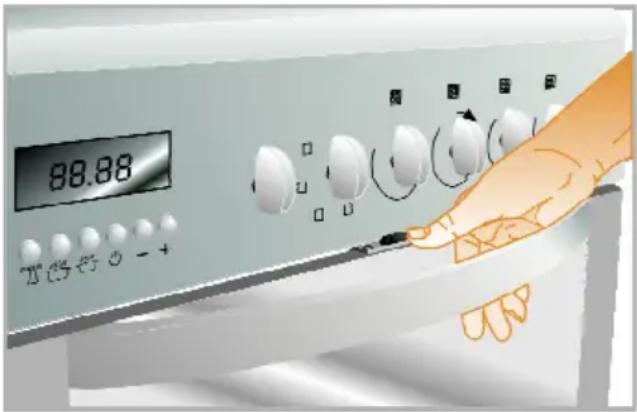
The cooker has child lock system on the oven door.
To open the oven door, pull to the plastic button slightly up and pull the door handle.
When close the door, child lock will be locked itself.
SAVE THESE INSTRUCTIONS
Safety when working with electricity
Defective electric equipment is one of the major causes of house fires.
- Any work on electrical equipment and systems should only be carried out by authorized and qualified persons.
- In case of any damage, switch off the product and disconnect it from the mains. To do this, turn off the fuse at home.
- Make sure that fuse rating is compatible with the product.
Intended use
This product is designed for domestic use. Commercial use will void the guarantee.
"CAUTION: This appliance is for cooking purposes only. It must not be used for other purposes, for example room heating."
This product should not be used for warming the plates under the grill, drying towels, dish cloths etc. by hanging them on the oven door handles. This product should also not be used for room heating purposes.
The manufacturer shall not be liable for any damage caused by improper use or handling errors.
The oven can be used for defrosting, baking, roasting and grilling food.
3 Installation
Product must be installed by a qualified person in accordance with the regulations in force. The manufacturer shall not be held responsible for damages arising from procedures carried out by unauthorized persons which may also void the warranty.

Important
Preparation of location and electrical and gas installation for the product is under customer's responsibility.
DANGER
The product must be installed in accordance with all local gas and/or electrical regulations.
DANGER
Prior to installation, visually check if the product has any defects on it. If so, do not have it installed.
Damaged products cause risks for your safety.
Before installation
To ensure that critical air gaps are maintained under the appliance, we recommend that this appliance is mounted on a solid base and that the feet do not sink into any carpet or soft flooring.
The kitchen floor must be able to carry the weight of the appliance plus the additional weight of cookware and bakeware and food.
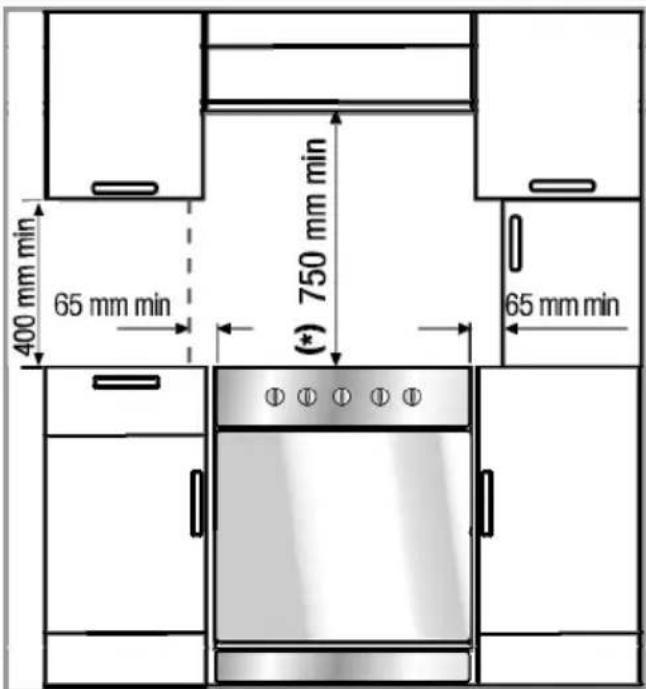
- It can be used with cabinets on either side but in order to have a minimum distance of 400mm above hotplate level allow a side clearance of 65mm between the appliance and any wall, partition or tall cupboard.
- It can also be used in a free standing position. Allow a minimum distance of 750 mm above the hob surface.
- (*) If a cooker hood is to be installed above the cooker, refer to cooker hood manufacturer' instructions regarding installation height (min 650 mm).
- The appliance corresponds to device class 1, i.e. it may be placed with the rear and one side to kitchen walls, kitchen furniture or equipment of any size. The kitchen furniture or equipment on the other side may only be of the same size or smaller.
- Any kitchen furniture next to the appliance must be heat-resistant (100 °C min.).

Important
The appliance must be secured against overbalancing by using the supplied chain on your oven. Fasten hook (1) to the kitchen wall (5) and connect safety chain (2) to the hook.
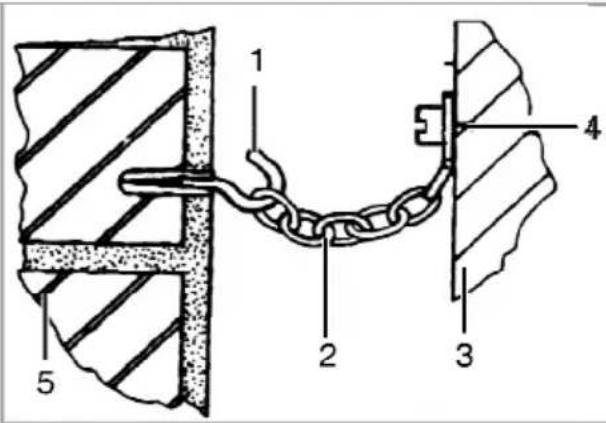
1 Hook (is not supplied)
2 Safety chain (supplied and mounted to oven)
3 Rear of cooker
4 Firmly fix chain to cooker rear
5 Kitchen wall
Installation and connection
Product can only be installed and connected in accordance with the statutory installation rules.

Important
Do not install the appliance next to refrigerators or freezers. The heat emitted by the appliance will lead to an increased energy consumption of cooling appliances.
- Carry the product with at least two persons.
- Product must be placed directly on the floor. It must not be placed onto a base or a pedestal.

NOTICE
Material damage!
The door and/or handle must not be used for lifting or moving the appliance.
Electrical connection
Connect the product to a grounded outlet/line protected by a fuse of suitable capacity as stated in the "Technical specifications" table. Have the grounding installation made by a qualified electrician while using the product with or without a transformer. Our company shall not be liable for any damages that will arise due to using the product without a grounding installation in accordance with the local regulations.
DANGER
Risk of electric shock, short circuit or fire by unprofessional installation!
The appliance may be connected to the mains supply only by an authorized qualified person and the appliance is only guaranteed after correct installation.
DANGER
Risk of electric shock, short circuit or fire by damage of the mains lead!
The mains lead must not be clamped, bent or trapped or come into contact with hot parts of the appliance.
If the mains lead is damaged, it must be replaced by a qualified electrician.
The mains supply data must correspond to the data specified on the type label of the product. The rating plate is either seen when the door or the lower cover is opened or it is located at the rear wall of the unit depending on the unit type.
Power cable of your product must comply with the values in "Technical specifications" table.
DANGER
Risk of electric shock!
Before starting any work on the electrical installation, please disconnect the appliance from the mains supply.
Connecting the power cable
- If it is not possible to disconnect all poles in the supply power, a disconnection unit with at least 3 mm contact clearance (fuses, line safety switches, contactors) must be connected and all the poles of this disconnection unit must be adjacent to (not above) the product in accordance with IEE directives. Failure to obey this instruction may cause operational problems and invalidate the product warranty. Additional protection by a residual current circuit breaker is recommended.
If a cable is supplied with the product:
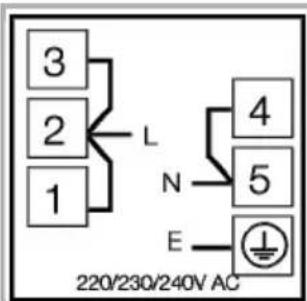
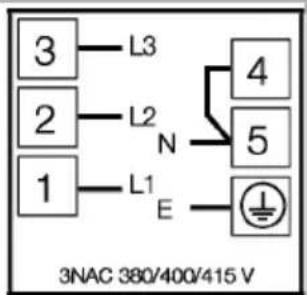
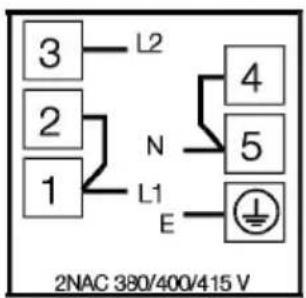
2. For single-phase
connection,connect as identified below:
- Brown cable = L (Phase)
- Blue cable = N (Neutral)
- Green/yellow cable = (E) (Ground)

- Push the product towards the kitchen wall.
- Hook safety chain.
- Adjusting the feet of oven
Vibrations during use may cause cooking vessels to move. This dangerous situation can be avoided if the product is level and balanced.
For your own safety please ensure the product is level by adjusting the four feet at the bottom by turning left or right and align level with the work top.
For products with cooling fan
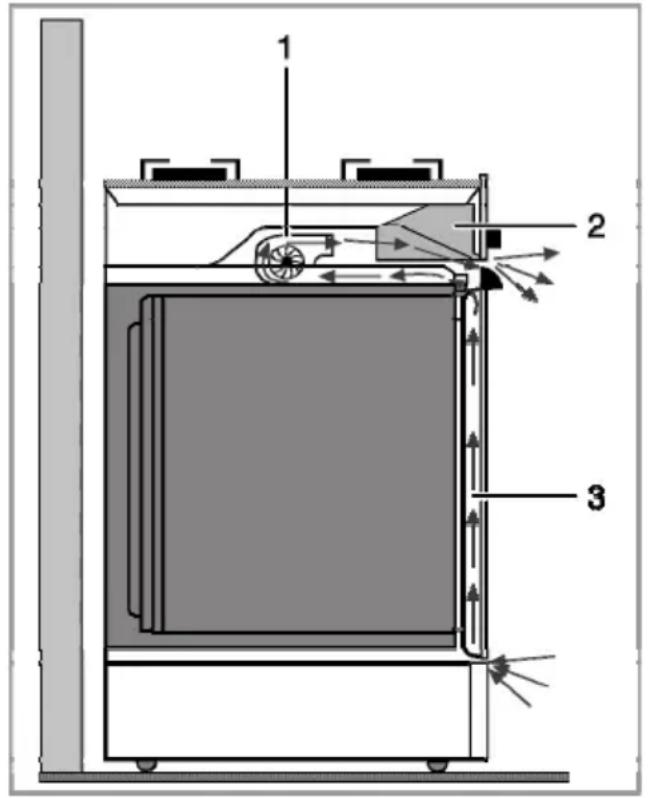
1 Cooling fan
2 Control panel
3 Door
The cooling fan cools both the control panel and the front of the appliance.

NOTICE
Cooling fan continues to run for up to 20-30 minutes (approx.) even after the oven is turned off.
Final check
- Reconnect the product to the mains.
- Open gas supply.
Disposal
Disposing of packaging material
Packaging materials are dangerous to children. Keep packaging materials in a safe place out of reach of children.
Packaging materials of the product are manufactured from recyclable materials. Dispose of them properly and sort in accordance with recycled waste instructions. Do not dispose of them with normal domestic waste.
Future Transportation
- Keep the product's original carton and transport the product in it. Follow the instructions on the carton. If you do not have the original carton, pack the product in bubble wrap or thick cardboard and tape it securely.
- To prevent the wire grill and tray inside the oven from damaging the oven door, place a strip of cardboard onto the inside of the oven door that lines up with the position of the trays. Tape the oven door to the side walls.
- Do not use the door or handle to lift or move the product.

NOTICE
Do not place other items on the top of the appliance. The appliance must be transported upright.

Important
Check the general appearance of your product for any damages that might have occurred during transportation.
Disposing of the old product
Dispose of the old product in an environmentally friendly manner.
This equipment bears the selective sorting symbol for waste electrical and electronic equipment (WEEE). This means that this equipment must be handled pursuant to European
Directive 2002/96/EC in order to be recycled or dismantled to minimize its impact on the environment. For further information, please contact local or regional authorities.
Refer to your local dealer or solid waste collection centre in your area to learn how to dispose of your product.
Before disposing of the product, cut off the power cable plug and make the door lock (if any) unusable to avoid dangerous conditions to children.
Tips for saving energy
The following information will help you to use your appliance in an ecological way, and to save energy:
- Use dark coloured or enamel coated cookware in the oven since the heat transmission will be better.
- While cooking your dishes, perform a preheating operation if it is advised in the user manual or cooking instructions.
- Do not open the door of the oven frequently during cooking.
- Try to cook more than one dish in the oven at the same time whenever possible. You can cook by placing two cooking vessels onto the wire shelf.
- Cook more than one dish one after another. The oven will already be hot.
- You can save energy by switching off your oven a few minutes before the end of the cooking time. Do not open the oven door.
- Defrost frozen dishes before cooking them.
- Use pots/pans with cover for cooking. If there is no cover, energy consumption may increase 4 times.
- Select the burner which is suitable for the bottom size of the pot to be used. Always select the correct pot size for your dishes. Larger pots require more energy.
- Pay attention to use flat bottom pots when cooking with electric hobs.
Pots with thick bottom will provide a better heat conduction. You can obtain energy savings up to 1/3.
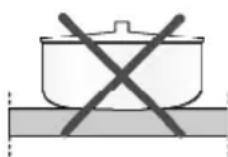
- Vessels and pots must be compatible with the cooking zones. Bottom of the vessels or pots must not be smaller than the hotplate.
- Keep the cooking zones and bottom of the pots clean. Dirt will decrease the heat conduction between the cooking zone and bottom of the pot.
- For long cookings, turn off the cooking zone 5 or 10 minutes before the end of cooking time. You can obtain energy savings up to 20% by using the residual heat.
Initial use
Initial time setting

Important
Before using the oven the clock time must be set. If the clock time is not set, the main oven will not work.

NOTICE
While making any adjustment, related symbols on the clock will flash.
Press „−“ or „+“ (5/6) keys to set the time after the oven in energized for the first time.
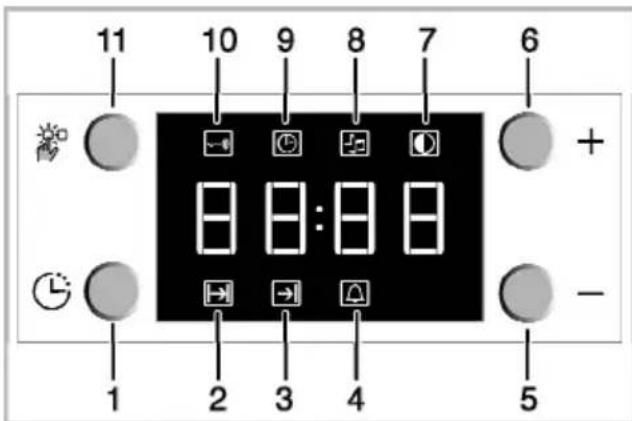
1 Program key
2 Cooking time
3 End of cooking time
4 Alarm
5 Minus key
6 Plus key
7 Screen brightness setting
8 Alarm volume
9 Current time
10 Keylock
11 Adjustment key
After setting the time, you can start and end the cooking by selecting the desired position with temperature button and function button.

Important
If the current time is not set, time setting will start increasing/moving up from 12:00. Clock symbol '9' will be displayed to indicate that the current time has not been set. This symbol will disappear once the time is set.

Important
Current time settings are cancelled in case of power failure. It needs to be readjusted.
To change the time of the day you have previously set:
-
Press (11) key to activate current time symbol '9'.
-
Press „−“ or „+“ (5/6) keys to set the current time.
Changing screen brightness adjustment
- Press (11) key to activate screen brightness symbol '7' for screen brightness adjustment.
- Press '-' or '+' (5/6) keys to set the desired brightness.
» Selected brightness level will appear as d-01, d-02 or d-03 on the display.
First cleaning of the appliance

NOTICE
The surface may get damaged by some detergents or cleaning materials.
Do not use aggressive detergents, cleaning powder/cream or any sharp objects.
- Remove all packaging materials.
- Wipe the surfaces of the appliance with a damp cloth or sponge and dry with a cloth.
Initial heating
Heat up the product for about 30 minutes and then switch it off. Thus, any production residues or layers will be burnt off and removed.
WARNING
Hot surfaces may cause burns!
Do not touch the hot surfaces of the appliance. Use oven gloves. Keep children away from the appliance.
Electric oven
- Take all baking trays and the wire grill out of the oven.
-
Close the oven door.
-
Select Static position.
- Select the highest grill power; See How to operate the electric oven, page 23.
- Operate the oven for about 30 minutes.
- Turn off your oven; See How to operate the electric oven, page 23
Grill oven
-
Take all baking trays and the wire grill out of the oven.
-
Close the oven door.
- Select the highest grill power; see How to operate the grill, page 30.
- Operate the grill about 30 minutes.
- Turn off your grill; see How to operate the grill, page 30

Important
Smell and smoke may emit during first heating. Ensure that the room is well ventilated.
5 How to use the hob
General information about cooking
DANGER
Risk of fire by overheated oil!
When you heat oil, do not leave it unattended.
Never try to extinguish the fire with water! When oil has caught fire, immediately cover the pot or pan with a lid. Switch off the hob if safe to do so and phone the fire service.
- Before frying foods, always dry them well and gently place into the hot oil. Ensure complete thawing of frozen foods before frying.
- Do not cover the vessel you use when heating oil.
- Place the pans and saucepans in a manner so that their handles are not over the hob to prevent heating of the handles. Do not place unbalanced and easily tilting vessels on the hob.
- Do not place empty vessels and saucepans on cooking zones that are switched on. They might get damaged.
- Operating a cooking zone without a vessel or saucepan on it will cause damage to the product. Turn off the cooking zones after the cooking is complete.
- As the surface of the product can be hot, do not put plastic and aluminum vessels on it.
Clean any melted such materials on the surface immediately.
Such vessels should not be used to keep foods either.
- Use flat bottomed saucepans or vessels only.
- Put appropriate amount of food in saucepans and pans. Thus, you will not have to make any unnecessary cleaning by preventing the dishes from overflowing.
Do not put covers of saucepans or pans on cooking zones.
Place the saucepans in a manner so that they are centered on the cooking zone. When you want to move the saucepan onto another cooking zone, lift and place it onto the cooking zone you want instead of sliding it.
Tips about glass ceramic hobs
- Glass ceramic surface is heatproof and is not affected by big temperature differences.
- Do not use the glass ceramic surface as a place of storage or as a cutting board.
- Use only the saucepans and pans with machined bottoms. Sharp edges create scratches on the surface.
- Do not use aluminum vessels and saucepans. Aluminum damages the glass ceramic surface.
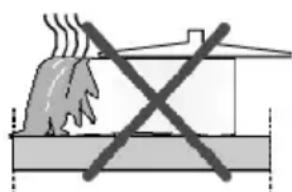
natural_image
Diagram showing a fire with smoke rising above a building, crossed out by a black X (no text or symbols present)Spills may damage the glass ceramic surface and cause fire.
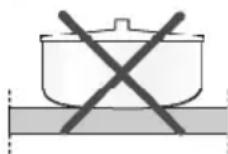
Do not use vessels with concave or convex bottoms.
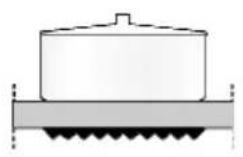
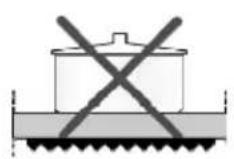
Use only the saucepans and pans with flat bottoms. They ensure easier heat transfer. If the diameter of the saucepan is too small, energy will be wasted.
Using the hobs
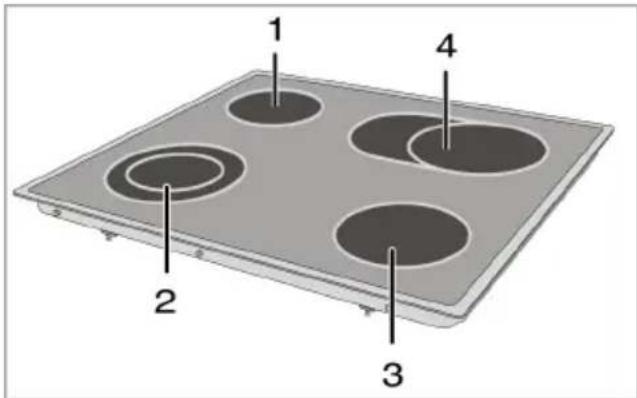
1 Single-circuit cooking plate 14-16 cm
2 Dual-circuit cooking plate 21-23/12-14 cm
3 Single-circuit cooking plate 18-20 cm
4 Extended cooking plate 17-19/26-28 cm is list of advised diameter of pots to be used on related burners.
Hob hot indicator lights
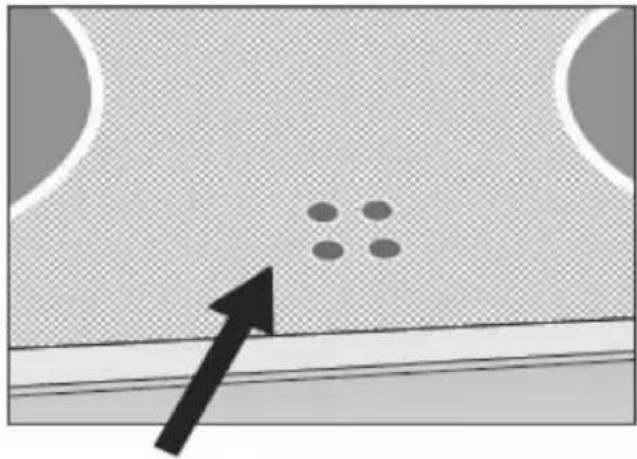
The hob indicator lights show which hob is operating and/or hot. The relevant indicator light will remain on whenever a hob is hot. When the temperature of the hob surface falls below 64^ C the indicator light will go off.
Weak flicker illumination is not a problem at residual heat indicator light.
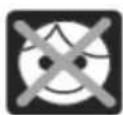
Do not touch and keep children away from the heating zones and appliance all times.
natural_image
Diagram showing a particle arrangement on a textured surface with an arrow pointing to it (no text or symbols)
DANGER
Broken glass!
Do not let any objects fall onto the hob. Even small objects (e.g. salt shaker) may damage the hob.
Do not use glass ceramic hobs with cracks. Water may enter into the cracks and cause a short circuit.
If the surface is damaged in any way (e. g. visible cracks), switch off the device immediately to reduce the risk of an electric shock.

NOTICE
Quick heating glass-ceramic hobs emit a bright light when they are switched on. Do not stare at the bright light.
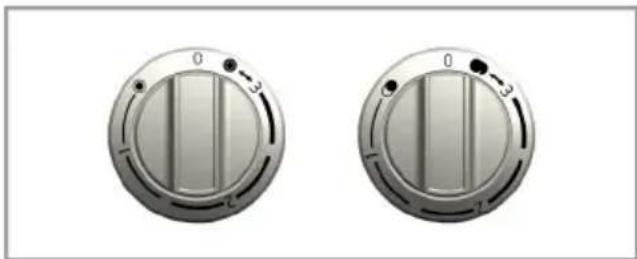
Turning on the ceramic plates
The hob control knobs are used for operating the plates. To obtain the desired cooking power, turn the hob control knobs to the corresponding level.
| Cooking level | 1 2 3 | ||
| warming | stewing, | simmering | cooking, roasting, boiling |
Turning off the ceramic plates
Turn the plate knob to OFF (upper) position.
Using multi-segmented cooking zones
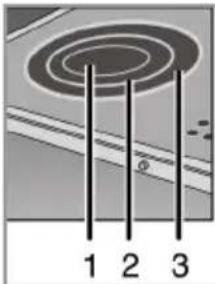
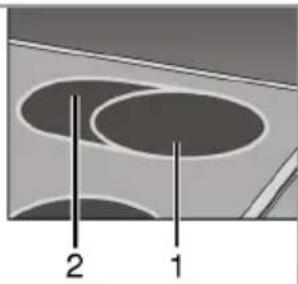
Multi-segmented cooking zones allows to cook with different size of saucepans on the same cooking zone. When these cooking zones are activated, first the inward cooking zone turns on.
- To change the active cooking zone diameter, turn the control knob clockwise.
- A "click" will be heard as soon as the hotplate radius changes.
natural_image
Two identical metallic circular buttons with control knobs and adjustment knobs, no text or symbols visible.Turning off multi-segment cooking zones
- Turn the knob counter clockwise to OFF (upper) position to turn off the oven. All segments of the cooking zone are turned off.
natural_image
Diagram of a spiral-patterned object with three vertical lines and numbered labels (1, 2, 3) below, no readable text or symbols.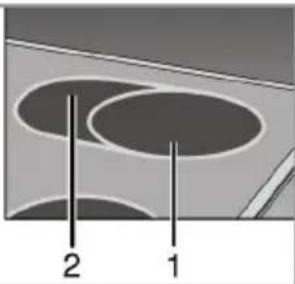
natural_image
Diagram showing two concentric circular shapes labeled 1 and 2, with no text or symbols beyond labels1 Position 1
2 Position 2
3 Position 3

NOTICE
Position 2 and 3 of the multi-segment cooking zones do not operate independently.
General information on baking, roasting and grilling
DANGER
Risk of scalding by hot steam!
Take care when opening the oven door as steam may escape.
Tips for baking
- Use non-sticky coated appropriate metal plates or aluminum vessels or heat-resistant silicone molds.
- Make best use of the space on the rack.
- Place the baking mold in the middle of the shelf.
- Select the correct rack position before turning the oven or grill on. Do not change the rack position when the oven is hot.
- Keep the oven door closed.
Tips for roasting
- Treating whole chicken, turkey and big-piece meats with dressings such as lemon juice and black pepper before cooking will increase the cooking performance.
- It lasts about 15 to 30 minutes longer to roast the meat with bones when compared to roasting the same size of meat without bones.
• Each centimeter of the meat thickness requires approximately 4 to 5 minutes of cooking time. - Let meat rest in the oven for about 10 minutes after the cooking time is over. The juice is better distributed all over the roast and does not run out when the meat is cut.
- Fish should be placed on the middle or lower rack in a heat-resistant plate.
Tips for grilling
When meat, fish and poultry are grilled, they quickly get brown, have a nice crust and do not get dry. Flat pieces, meat skewers and sausages are particularly suited for grilling as are vegetables with high water content such as tomatoes and onions.
- Distribute the pieces to be grilled on the wire shelf or in the baking tray with wire shelf in such a way that the space covered does not exceed the size of the heater.
- Slide the wire shelf or baking tray with grill into the desired level in the oven. If you are grilling on the wire shelf, slide the baking tray to the lower rack to collect fats. Add some water in the tray for easy cleaning.

NOTICE
Fire danger due to food which is unsuitable for grilling!
Only use food for grilling which is suitable for intensive grilling heat. Do not place the food too far in the back of the grill. This is the hottest area and fat food may catch fire.
How to operate the electric oven

Important
Before using the oven the clock time must be set. If the clock time is not set, the main oven will not work.
Select temperature and operating mode
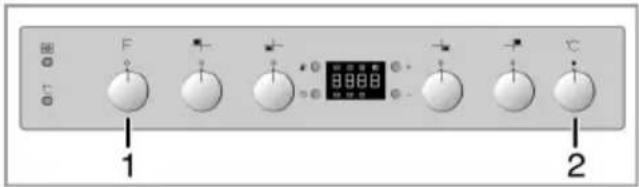
1 Function knob
2 Thermostat knob
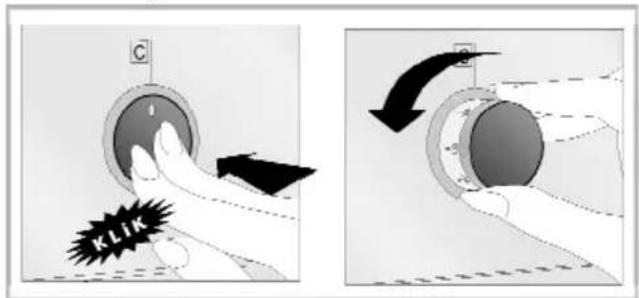
Your oven is equipped with pop-out knobs that protrude when you press them.
- Press inwards to protrude the knob and then turn it to make the desired setting.
-
When the cooking process is finished, turn the knob to off (upper) position and press it inwards.
-
Set the Temperature knob to the desired temperature.
- Set the Function knob to the desired operating mode.
» Oven heats up to the adjusted temperature and maintains it. During heating, temperature lamp stays on.
Switching off the electric oven
Turn the function knob and temperature knob to off (upper) position.
natural_image
Cross-sectional diagram of a refrigerator interior showing internal compartments and ventilation ducts (no text or labels)Rack positions (For models with wire shelf)
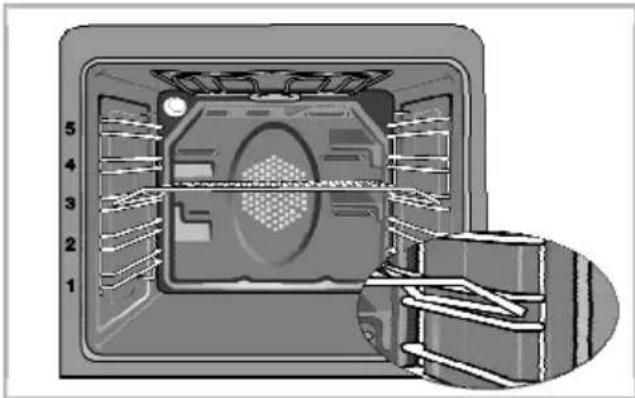
It is important to place the wire shelf onto the side rack correctly. Wire shelf must be inserted between the side racks as illustrated in the figure.
Do not let the wire shelf stand against the rear wall of the oven. Slide your wire shelf to the front section of the rack and settle it with the help of the door in order to obtain a good grill performance.
Operating modes
The order of operating modes shown here may be different from the arrangement on your product.
Top and bottom heating
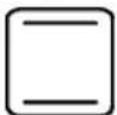
Top and bottom heating are in operation. Food is heated simultaneously from the top and bottom. For example, it is suitable for cakes, pastries, or cakes and casseroles in baking moulds. Cook with one tray only.
Bottom heating
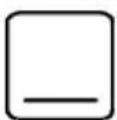
Only bottom heating is in operation. It is suitable for pizza and for subsequent browning of food from the bottom.
Fan supported bottom/top heating
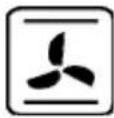
Top heating, bottom heating plus fan (in the rear wall) are in operation. Hot air is evenly distributed throughout the oven rapidly by means of the fan. Cook with one tray only.
Operating with fan
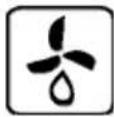
The oven is not heated. Only the fan (in the rear wall) is in operation. Suitable for thawing frozen granular food slowly at room temperature and cooling down the cooked food.
Fan Heating

Warm air heated by the rear heater is evenly distributed throughout the oven rapidly by means of the fan. It is suitable for cooking your meals in different rack levels and preheating is not required in most cases. Suitable for cooking with multi trays.
Full grill
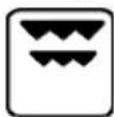
Large grill at the ceiling of the oven is in operation. It is suitable for grilling large amount of meat.
- Put big or medium-sized portions in correct rack position under the grill heater for grilling.
- Set the temperature to maximum level.
• Turn the food after half of the grilling time.
Grill+Fan

Grilling effect is not as strong as in Full Grill
- Put small or medium-sized portions in correct shelf position under the grill heater for grilling.
- Set the desired temperature.
• Turn the food after half of the grilling time.
Booster
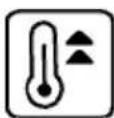
This function is used to heat the oven rapidly; it is not suitable for cooking food.
- Select the desired temperature after selecting this function. Temperature light turns on and oven is heated.
• Light turns off after the heating process is completed. Now select the desired function to cook your food.
Using the oven clock
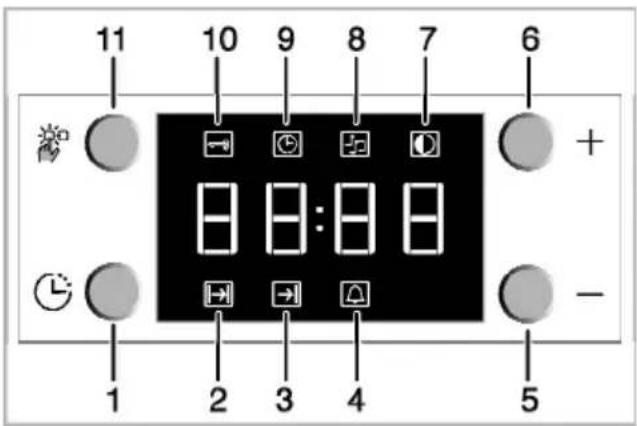
1 Program key
2 Cooking time
3 End of cooking time
4 Alarm
5 Minus key
6 Plus key
7 Screen brightness setting
8 Alarm volume
9 Current time
10 Keylock
11 Adjustment key

Important
The maximum time to be set for the end of the cooking process is 5 hours and 59 minutes. In case of power cut, program will be canceled. Reprogram is needed.

NOTICE
While making any adjustments, related symbols will flash on the display. You must wait for a short time for the settings to take effect.

Important
If no cooking setting is made, time of the day cannot be set.

NOTICE
Cooking time will be displayed once the cooking starts.
Cooking by specifying the cooking time:
You can set the oven so that it will stop at the end of the specified time by setting the cooking time on the clock.
-
To adjust the cooking time, Press Program key (1) and activate the Cooking Time symbol (2).
-
Press '-' / '+' (5/6) keys to set the cooking time.
» Once the Cooking Time is set, Cooking symbol will be displayed continuously.
If you want to set the end of cooking time to a later time:
After setting the cooking time on the clock, you can set the end of cooking time to a later time.
- To adjust the cooking time, press Program key (1) and activate the Cooking Time symbol (2).
- Adjust the cooking time with Minus (5) and Plus (6) keys.
» Cooking Time symbol remains lit (displayed continuously) after setting the cooking time. - To set the End of Cooking Time, Press Program key (1) and activate the Cooking Time symbol (3).
- Press - (5) and + (6) keys to set the end of cooking time.
» Once the End of Cooking Time is set, End of Cooking symbol and Cooking symbol will be displayed continuously. The End of Cooking Time symbol (3) will disappear as soon as the cooking starts. - Put your dish into the oven.
-
Select operation mode and temperature.
» Oven timer automatically calculates the startup time for cooking by using the end of cooking time and the cooking period you have set. Selected operation mode is activated when the startup time of cooking has come and the oven is heated up to the set temperature. It maintains this temperature until the end of cooking time. -
After the cooking process is completed, "End" appears on the displayed and the alarm will sound.
- Alarm signal will sound for 2 minutes. To stop the alarm signal, just press any key. Alarm will be silenced and current time will be displayed.

Important
If you mute the alarm by pressing any key, the oven will restart operating. If you press any button at the end of the alarm period, the oven will restart operating.
- Turn off the oven with the Temperature knob and Function knob.
Using the keylock
Activating the keylock
You can prevent oven from being used by activating the Keylock function.
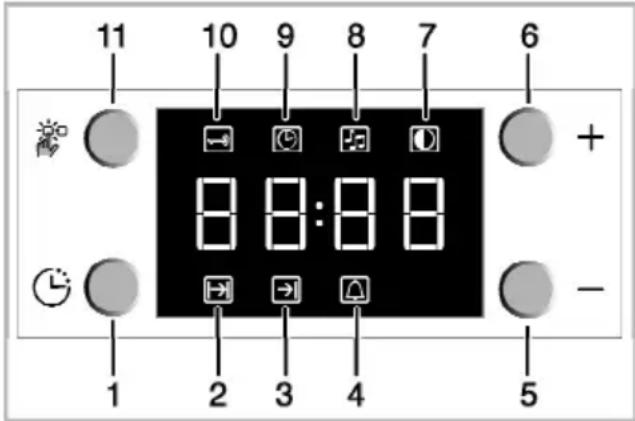
1 Program key
2 Cooking time
3 End of cooking time
4 Alarm
5 Minus key
6 Plus key
7 Screen brightness setting
8 Alarm volume
9 Current time
10 Keylock
11 Adjustment key
- Press the key (11) to activate Keylock symbol (10).
» "OFF" will appear on the display. - Press '+' key (6) to activate the keylock.
» Once the keylock is activated, "On" appears on the display and the Keylock symbol (10) remains lit.

NOTICE
When the Keylock function is activated, control panel buttons except for the key (11) cannot be used.
Deactivating the keylock
- Press Adjustment key (11) to activate Keylock symbol (10).
» "On" will appear on the display. - Press '-' (5) to deactivate the keylock.
» "OFF" will be displayed once the keylock is deactivated.
Using the clock as an alarm
You can use the clock of the product for any warning or reminder apart from the cooking programme.
The alarm clock has no influence on the functions of the oven. It is only used as a warning. For example, this is useful when you want to turn food in the oven at a certain point of time.
Alarm clock will give a signal once the time you set is over.
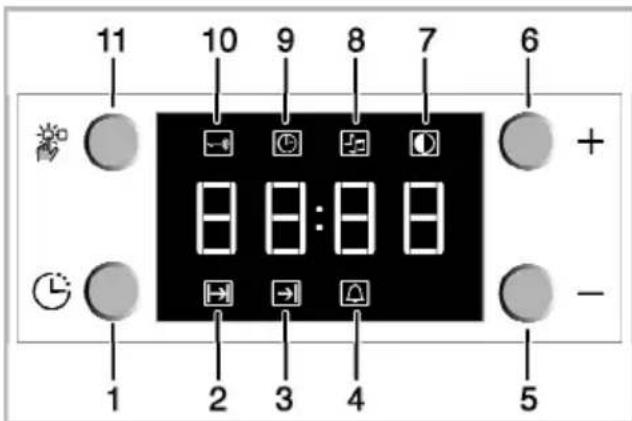
1 Program key
2 Cooking time
3 End of cooking time
4 Alarm
5 Minus key
6 Plus key
7 Screen brightness setting
8 Alarm volume
9 Current time
10 Keylock
11 Adjustment key
Setting the alarm clock
- Press Program key (1) to activate the alarm time symbol (4).

Important
The maximum alarm time can be 23 hours and 59 minutes.
- Adjust the alarm time using „+“ /„-“ (5/6) keys.
» Alarm symbol will remain lit and the alarm time will appear on the display once the alarm time is set.
- At the end of the alarm time, Alarm Time symbol (4) will start flashing and the alarm signal is heard.
Turning off the alarm
- To stop the alarm, just press any key.
» Alarm will be silenced and current time will be displayed.
If you want to cancel the alarm:
- To reset the alarm time, press Program key (1) to activate the alarm time symbol (4).
- Press and hold the '-' (5) key until "00:00" is displayed.

Important
Alarm time will be displayed. If the alarm time and cooking time are set concurrently, shortest time will be displayed.
Changing alarm tone
- Press Setting key (11) to activate the Alarm Tone symbol (8).
- Adjust the desired tone using „+“ /„-“ (5/6) keys.
» Selected alarm tone will appear as "b-01", "b-02" or "b-03" on the display.
Cooking times table

Important
The values indicated in the table below are data indicative. They may vary according to the type of food as well as your preferences of cooking.
Baking and roasting

Important
Level 1 is the bottom level in the oven.
| Dish | Cooking level number | Rack position | Temperature (°C) | Cooking time (approx. in min.) | |
| Cakes in tray* One | level 4 175 30 ... 35 | ||||
| 2 levels | 1 - 5 175 40 ... 45 | ||||
| Cakes in mould* One | level 2 180 40 ... 50 | ||||
| Cakes in cooking paper* | One level | 3 175 25 ... 30 | |||
| 2 levels | 1 - 5 175 30 ... 40 | ||||
| 3 levels | 1 - 3 - 5 180 45 ... 55 | ||||
| Sponge cake* One | level 3 200 5 ... 10 | ||||
| 2 levels | 1 - 5 175 18 ... 25 | ||||
| Cookies* | One level | 3 175 20 ... 25 | |||
| 2 levels | 1 - 5 175 25 ... 30 | ||||
| 3 levels | 1 - 3 - 5 175 30 ... 40 | ||||
| Dough pastry* One | level 2 200 30 ... 40 | ||||
| 2 levels | 1 - 5 200 45 ... 55 | ||||
| 3 levels | 1 - 3 - 5 200 55 ... 65 | ||||
| Rich pastry* One | level 2 200 25 ... 35 | ||||
| 2 levels | 1 - 5 200 30 ... 40 | ||||
| 3 levels | 1 - 3 - 5 190 40 ... 50 | ||||
| Leaven* | One level | 2 200 35 ... 45 | |||
| 2 levels | 1 - 3 200 35 ... 45 | ||||
| Lasagna* | One level | 2 - 3 | 200 | 30 ... 40 | |
| Beef steak (whole) / Roast | One level | 3 | 25 min. 250/max, then 180 ... 190 | 100 ... 120 | |
| Leg of Lamb (casserole) | One level | 3 | 25 min. 250/max, then 190 | 70 ... 90 | |
| Roasted chicken | One level | 2 | 15 min. 250/max, then 180 ... 190 | 65 ... 70 | |
| Turkey (5.5 kg) | One level | 2 | 25 min. 250/max, then 180 ... 190 | 150 ... 210 | |
| Fish | One level | 3 200 20 ... 30 | |||
| When cooking with 2 trays at the same time, place the deeper tray on the upper rack and the other one on the lower rack.* It is suggested to perform preheating for all foods. | |||||
In a cooking that requires preheating, preheat at the beginning of cooking until the thermostat lamp turns off.
Tips for baking cake
- If the cake is too dry, increase the temperature by 10 ^1 and decrease the cooking time.
- If the cake is wet, use less liquid or lower the temperature by 10^ .
- If the cake is too dark on top, place it on a lower rack, lower the
temperature and increase the cooking time.
- If cooked well on the inside but sticky on the outside use less liquid, lower the temperature and increase the cooking time.
Tips for baking pastry
- If the pastry is too dry, increase the temperature by 10 ^1 and decrease the cooking time. Dampen the layers of dough with a sauce
composed of milk, oil, egg and yoghurt.
- If the pastry takes too long to bake, pay care that the thickness of the pastry you have prepared does not exceed the depth of the tray.
- If the upper side of the pastry gets browned, but the lower part is not cooked, make sure that the amount of sauce you have used for the pastry is not too much at the bottom of the pastry. Try to scatter the sauce equally between the dough layers and on the top of pastry for an even browning.

Important
Cook the pastry in accordance with the mode and temperature given in the cooking table. If the bottom part is still not browned enough, place it on one lower rack next time.
Tips for cooking vegetables
- If the vegetable dish runs out of juice and gets too dry, cook it in a pan with a lid instead of a tray. Closed vessels will preserve the juice of the dish.
- If a vegetable dish does not get cooked, boil the vegetables beforehand or prepare them like canned food and put in the oven.
How to operate the grill

Important
Before using the oven the clock time must be set. If the clock time is not set, the main oven will not work.
WARNING
Hot surfaces may cause burns! Close oven door during grilling.
Switching on the grill
- Turn the Function knob to the desired grill symbol.
- Then, select the desired grilling temperature.
- If required, perform a preheating of about 5 minutes.
» Temperature light turns on.
Switching off the grill
- Turn the Function knob to Off (top) position.
Rack positions
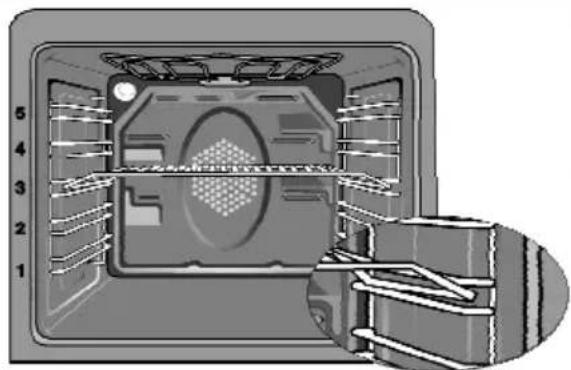
Grill performance will decrease if the wire grill stands against rear part of the oven. Slide your wire grill to the front section of the rack and settle it with the help of the door in order to obtain the best grill performance.
natural_image
Interior view of a microwave oven with numbered ventilation slots and internal structure (no text or symbols)
NOTICE
Do not use the upper level for grilling.

NOTICE
Fire danger due to food which is unsuitable for grilling!
Only use food for grilling which is suitable for intensive grilling heat. Do not place the food too far in the back of the grill. This is the hottest area and fat food may catch fire.
Cooking times table for grilling
Grilling with electric grill
| Food Insertion level Grilling time (approx.) | ||
| Fish | 4...5 | # 20...25 |
| Sliced chicken 4...5 | 25...35 | min. |
| Lamb chops 4...5 20...25 min. | ||
| Roast beef 4...5 25...30 min. | # | |
| Veal chops 4...5 | 25...30 | min. # |
| Toast bread 4 1...2 min. | ||
| # depending on thickness | ||
General information
Service life of the product will extend and the possibility of problems will decrease if the product is cleaned at regular intervals.
DANGER
Risk of electric shock!
Switch off the electricity before cleaning appliance to avoid an electric shock.
DANGER
Hot surfaces may cause burns!
Allow the appliance to cool down before you clean it.
- Clean the product thoroughly after each use. In this way it will be possible to remove cooking residues more easily, thus avoiding these from burning the next time the appliance is used.
- No special cleaning agents are required for cleaning the product. Use warm water with washing liquid, a soft cloth or sponge to clean the product and wipe it with a dry cloth.
- Always ensure any excess liquid is thoroughly wiped off after cleaning and any spillage is immediately wiped dry.
- Do not use cleaning agents that contain acid or chloride to clean the stainless or inox surfaces and the handle. Use a soft cloth with a liquid detergent (not abrasive) to wipe those parts clean, paying attention to sweep in one direction.

NOTICE
The surface may get damaged by some detergents or cleaning materials.
Do not use aggressive detergents, cleaning powder/cream or any sharp objects.

Important
Do not use steam cleaners for cleaning.
Cleaning the hob
Glass ceramic surfaces
Wipe the glass ceramic surface using a piece of cloth dampened with cold water in a manner as not to leave any cleaning agent on it. Dry with a soft and dry cloth. Residues may cause damage on the glass ceramic surface when using the hob for the next time. Dried residues on the glass ceramic surface should under no circumstances be scraped with hook blades, steel wool or similar tools.
Remove calcium stains (yellow stains) by a small amount of lime remover such as vinegar or lemon juice. You can also use suitable commercially available products.
If the surface is heavily soiled, apply the cleaning agent on a sponge and wait until it is absorbed well. Then, clean the surface of the hob with a damp cloth.

Important
Sugar-based foods such as thick cream and syrup must be cleaned promptly without waiting the surface to cool down. Otherwise, glass ceramic surface may be damaged permanently.
Slight color fading may occur on coatings or other surfaces in time. This will not affect operation of the product. Color fading and stains on the glass ceramic surface is a normal condition, and not a defect.
Cleaning the control panel
Clean the control panel and control knobs with a damp cloth and wipe them dry.

NOTICE
Damage of the control panel! Do not remove the control knobs for control panel cleaning.
Cleaning the oven
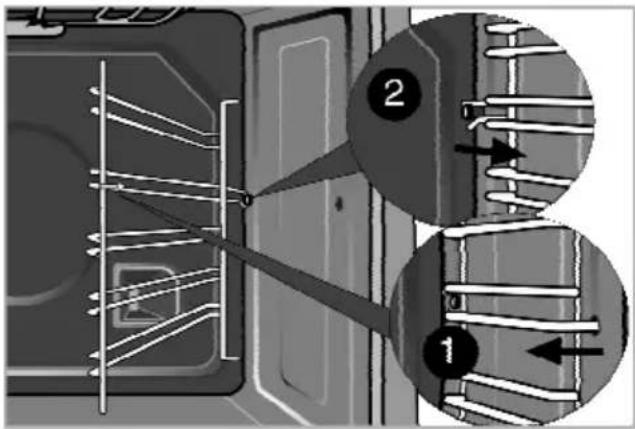
To clean the side wall
- Remove the front section of the side rack by pulling it in the opposite direction of the side wall.
- Remove the side rack completely by pulling it towards you.
Clean oven door
To clean the oven door, use warm water with washing liquid, a soft cloth or sponge to clean the product and wipe it with a dry cloth.

Important
Don't use any harsh abrasive cleaners or sharp metal scrapers for cleaning the oven door. They could scratch the surface and destroy the glass.
Removing the oven door
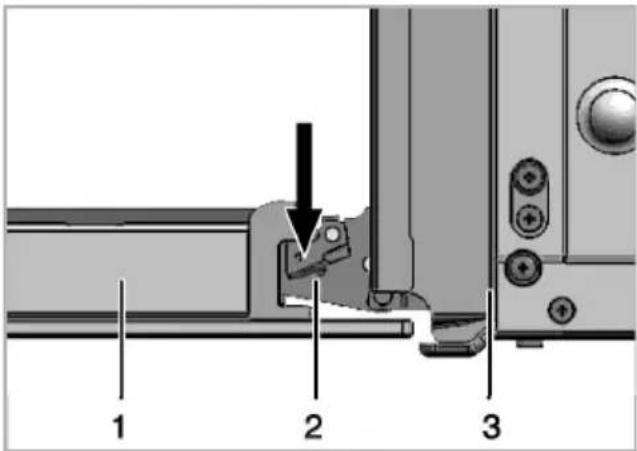
- Open the front door (1).
- Open the clips at the hinge housing (2) on the right and left hand sides of the front door by pressing them down as illustrated in the figure.
natural_image
Mechanical component diagram showing a folded metal bracket with mounting holes and a curved arrow indicating rotation (no text or symbols)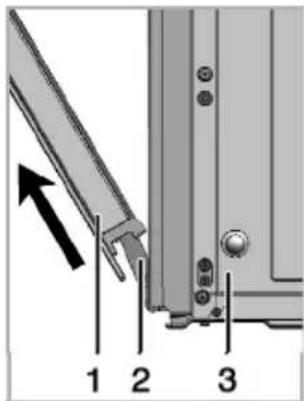
-
Move the front door to half-way.
-
Remove the front door by pulling it upwards to release it from the right and left hinges.
NOTICE
Steps carried out during removing process should be performed in reverse order to install the door. Do not forget to close the clips at the hinge housing when reinstalling the door.
Replacing the oven lamp
DANGER
Hot surfaces may cause burns!
Make sure that the appliance is switched off and cooled down in order to avoid the risk of an electrical shock.
Important
The oven lamp is a special electric light bulb that can resist up to 300 °C. See Technical specifications, page 5 for details. Oven lamps can be obtained from Authorised Service Agents.
NOTICE
Position of lamp might vary from the figure.
If your oven is equipped with a round lamp:
- Disconnect the product from mains.
-
Turn the glass cover counter clockwise to remove it.
-
Remove the oven lamp by turning it counter clockwise and replace it with the new one.
-
Install the glass cover.

Troubleshooting
| Oven emits steam when it is in use. | |
| It is normal that steam escapes during operation. This is not a fault. | |
| Water drops occur during cooking | |
| The vapour that arises during cooking can condense and form water droplets when it hits cold surfaces of the product. This is not a fault. | |
| Product does not operate. | |
| The mains fuse is defective or has tripped. | Check fuses in the fuse box. If necessary, replace or reset them. |
| Buttons/knobs/keys on the control panel do not function. | Keylock may be enabled. Please disable it.(See. Using the keylock, page 27 |
| Oven light does not work. | |
| Oven lamp is defective. Replace oven lamp. | |
| Power is cut. Check if there is power. Check | the fuses in the fuse box. If necessary, replace or reset the fuses. |
| Oven does not heat. | |
| Function and/or Temperature are not set. Set the function and the temperature with the Function and/or Temperature knob/key. | |
| In models equipped with a timer, the timer is not adjusted.(In products with microwave oven, timer controls only microwave oven.) | Adjust the timer. |
| Power is cut. Check if there is power. Check | the fuses in the fuse box. If necessary, replace or reset the fuses. |
| (In models with timer) Clock display is blinking or clock symbol is on. | |
| A previous power outage has occurred. Adjust the timer / Switch of the product and switch it on again. | |
Important Consult the Authorised Service Agent or the dealer where you have purchased the product if you can not remedy the trouble although you have implemented the instructions in this section. Never attempt to repair a defective product yourself. Consult the Authorised Service Agent or the dealer where you have purchased the product if you can not remedy the trouble although you have implemented the instructions in this section. Never attempt to repair a defective product yourself. | |
natural_image
3D rendering of a gray rectangular baking tray with no text or symbolsLångpanna
natural_image
Exterior view of a rectangular baking tray (no text or symbols)Aluminiumlångpanna
natural_image
Simple line drawing of a rectangular tray or tray with two side handles (no text or symbols)Grund plåt
natural_image
Exterior view of a rectangular baking tray (no text or symbols)Liten ugnsplåt
natural_image
3D rendering of a rectangular tray or container with no visible text or symbolsUgnsgaller
natural_image
Isometric view of a rectangular grid structure with horizontal lines, no text or symbols present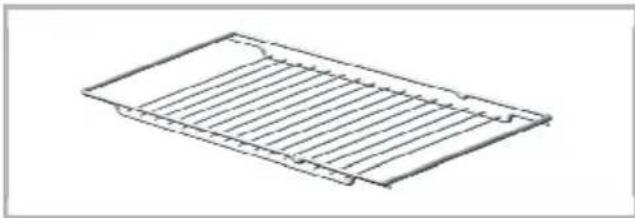
natural_image
Line drawing of a rectangular metal grate or rack structure (no text or symbols)natural_image
Interior view of an oven with a rack and ventilation grilles (no text or symbols visible)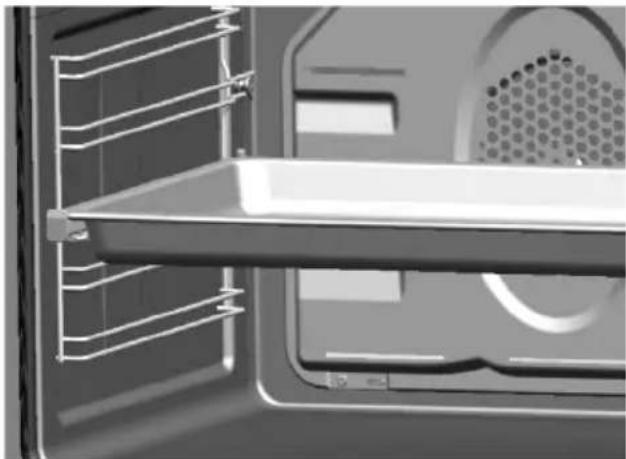
natural_image
Interior view of a microwave oven with visible grating and ventilation duct (no text or symbols)natural_image
Diagram showing a hand holding a curved object above a rectangular structure with a diagonal X mark (no text or symbols present)natural_image
Diagram showing a particle arrangement on a textured surface with an arrow pointing to one particle (no text or symbols)
FARA
Trasigt glas!
natural_image
Diagram showing two concentric oval shapes labeled 1 and 2, with no text or symbols beyond labels1 Position 1
2 Position 2
3 Position 3

ANMÄRKNING
natural_image
Diagram showing hand operating a device with a magnified view of the device's internal structure (no text or symbols present)natural_image
Interior view of a microwave oven with numbered compartments (1-5) and a close-up of the interiormost chamber (no text or symbols visible)natural_image
Interior view of a microwave oven with numbered compartments (1–5) and internal structure, showing no visible text or symbols.
ANMÄRKNING
Rengör ugnsluckan
natural_image
Close-up of a mechanical component with an arrow indicating rotation or assembly (no visible text or symbols)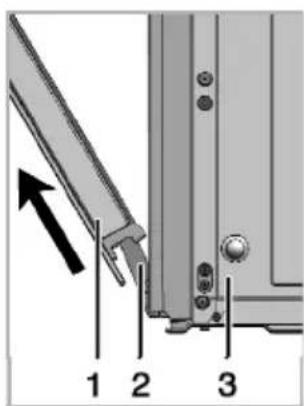
natural_image
Close-up of a hand holding a circular knob on a mechanical component (no text or symbols visible)Tips for energisparing....81
1 Frontdør
2 Håndtak
3 Nederste skuff
4 Stekebrett
5 Stekerist
6 Kontrollpanel
7 Brennerplate
8 Viftemotor (bak stålplaten)
9 Lampe
10 Grillvarmeelement
11 Hylleposisjoner
natural_image
Exterior view of a square baking tray (no text or symbols)Dypt brett
natural_image
Exterior view of a gray rectangular baking tray (no text or symbols)Bakebrett i aluminium
natural_image
Simple line drawing of a rectangular tray or tray with two side handles (no text or symbols)Kakebrett
natural_image
Exterior view of a modern office building (no signage)Lite stekebrett
natural_image
3D rendering of a rectangular baking tray (no text or symbols)Stekerist
natural_image
Isometric view of a rectangular sheet with horizontal lines, no text or symbols present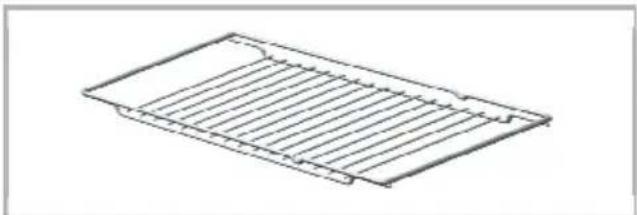
natural_image
Line drawing of a rectangular metal grate or rack structure (no text or symbols)natural_image
Close-up of an open refrigerator with a horizontal shelf and ventilation grilles (no visible text or symbols)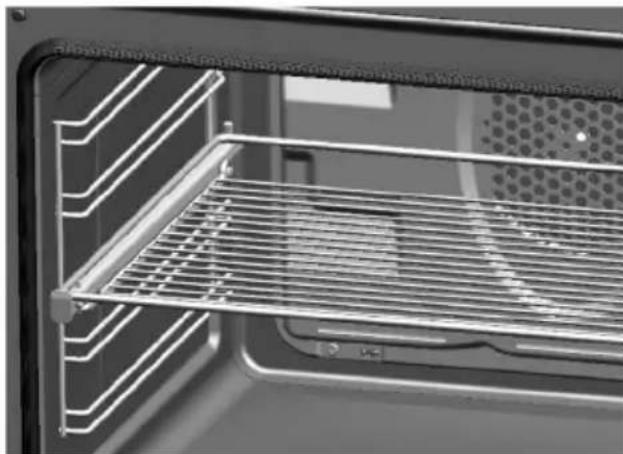
natural_image
Interior view of an oven with a metal rack and ventilation grilles (no text or symbols visible)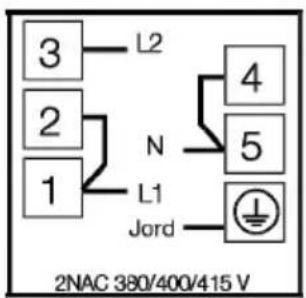
1 Kjølevifte
2 Kontrollpanel
3 Dør
natural_image
Simple line drawing of a chimney with steam rising and crossed out by a horizontal line (no text or symbols)Søl kan skade den glasskeramiske overflaten og kan forårsake brann.
natural_image
Two diagrams showing a tank on a platform with a cross symbol indicating resistance or crossed-out (no text or labels)natural_image
Diagram showing a particle arrangement on a textured surface with an arrow pointing to one particle (no text or symbols)
FARE
Knust glass!
natural_image
Diagram of a spiral-patterned object with three vertical lines and numbered labels (1, 2, 3) below, no readable text or symbols.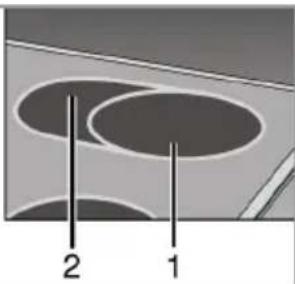
natural_image
Diagram showing two concentric circular shapes labeled 1 and 2, with no text or symbols beyond labelsnatural_image
Cross-sectional diagram of a refrigerator interior showing internal components and wiring (no text or labels)natural_image
Interior view of a microwave oven with numbered compartments (1–5), showing internal structure and a close-up of the lid (no text or symbols)
MERK
Rengjør ovnsdøren
natural_image
Close-up of a mechanical component with a curved arrow indicating rotation or movement (no text or symbols visible)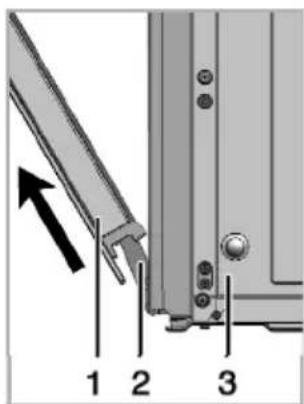
natural_image
Close-up of a hand holding a circular knob on a vehicle wheel (no text or symbols visible)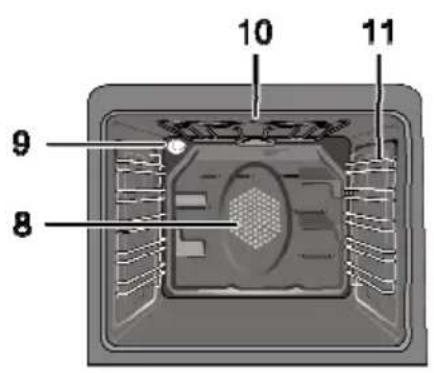
1 Frontlåge
2 Håndtag
3 Nederste skuffe
4 Bradepande
5 Trådhylde
6 Betjeningspanel
natural_image
3D rendering of a gray square baking tray with no text or symbolsDyb bradepande
natural_image
Exterior view of a rectangular baking tray (no text or symbols)Aluminiums flad bradepande
natural_image
Simple line drawing of a rectangular tray or tray with two side handles (no text or symbols)Flad bradepande
natural_image
Exterior view of a rectangular baking tray (no text or symbols)Mindre bradepande
natural_image
3D rendering of a rectangular baking tray (no text or symbols)Rist
natural_image
Isometric view of a rectangular sheet with horizontal lines, no text or symbols present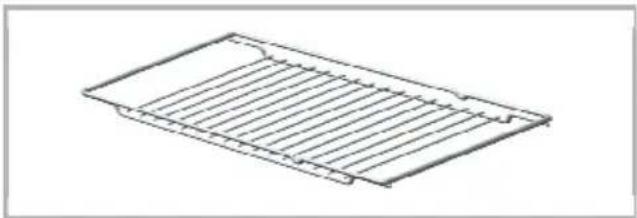
natural_image
Line drawing of a rectangular metal grate or rack structure with no text or symbolsnatural_image
Interior view of a microwave oven with visible tray and ventilation slots (no text or symbols)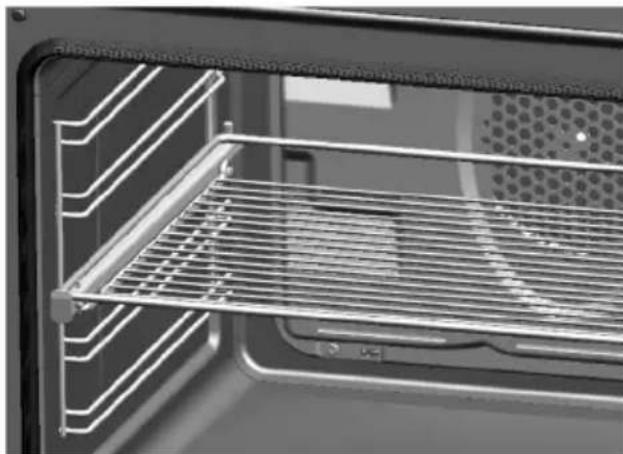
natural_image
Interior view of a kitchen oven with grating and ventilation grilles (no text or symbols visible)1 Ventilato r
2 Betjeningspanel
3 Låge
natural_image
Diagram showing a hand holding a curved object above a rectangular structure with a crossed X symbol (no text or labels)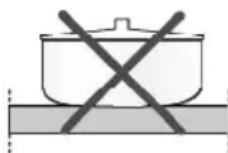
natural_image
Two diagrams showing a tank on a platform and a cooking pot with a crossed-out mark (no text or symbols)natural_image
Diagram showing a particle arrangement on a textured surface with an arrow pointing to one particle (no text or symbols)
FARE Ødelagt glas!
natural_image
Diagram showing two concentric oval shapes labeled 1 and 2, with no text or symbols beyond labels1 Position 1
2 Position 2
3 Position 3

BEMAERK
natural_image
Cross-sectional diagram of a refrigerator interior showing internal components and ventilation ducts (no text or labels)Hyldepositioner (for modeller med trådgrill)
natural_image
Cross-sectional diagram of a refrigerator or oven with numbered parts (1–5), showing internal structure and airflow direction (no text or symbols)
BEMÆRK
Rens ovnlågen
natural_image
Mechanical component diagram showing a folded metal bracket with a curved arrow indicating rotation (no text or symbols)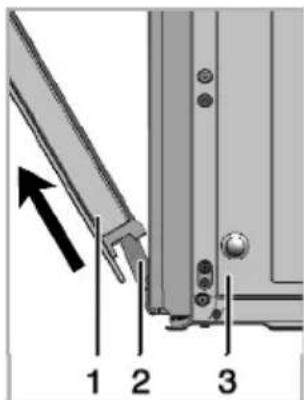
natural_image
Close-up of a hand holding a circular knob on a vehicle wheel (no text or symbols visible)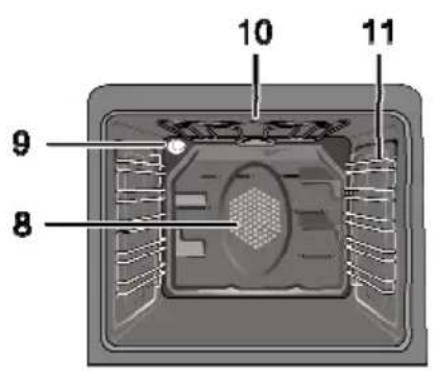
natural_image
Exterior view of a gray square baking tray (no text or symbols)Syvä uunipelti
natural_image
Exterior view of a rectangular baking tray (no text or symbols)natural_image
Simple line drawing of a rectangular tray or tray with two side handles (no text or symbols)Kakkupelti
natural_image
Exterior view of a modern office building (no signage)Pieni uunipelti
natural_image
3D rendering of a rectangular baking tray (no text or symbols)Ritiläteline
natural_image
Simple line drawing of a rectangular sheet with horizontal lines, no text or symbols present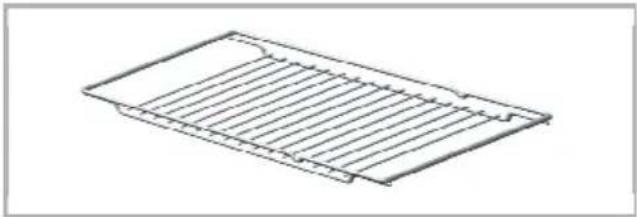
natural_image
Line drawing of a rectangular metal tray with horizontal slats (no text or symbols)natural_image
Interior view of a refrigerator showing the door, front pane, and side panel (no text or symbols visible)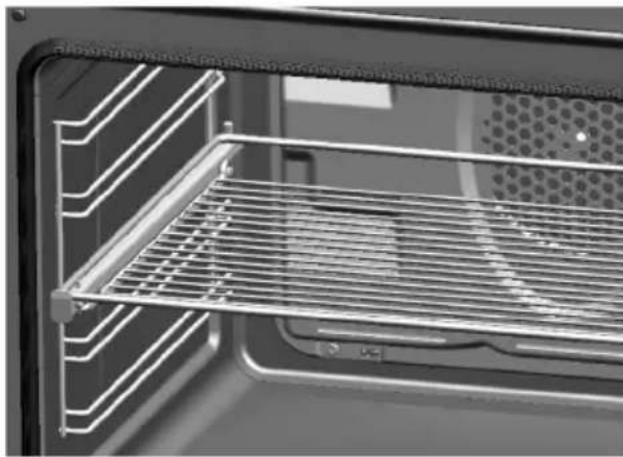
natural_image
Interior view of a kitchen oven with grating and ventilation grilles (no text or symbols visible)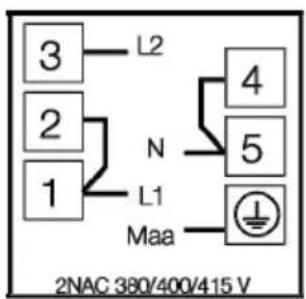
natural_image
Diagram showing a hand holding a wall with a crossed-out X symbol (no text or labels)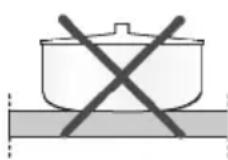
natural_image
Diagram showing a particle arrangement on a textured surface with an arrow pointing to one particle (no text or symbols)
VAARA
Rikkoutunut lasi!
natural_image
Two identical metallic circular switches with adjustment knobs, shown side by side (no text or symbols visible)natural_image
Diagram of a spiral-patterned object with three vertical lines and numbered labels (1, 2, 3) below, no readable text or symbols.1 Asento 1
2 Asento 2
3 Asento 3
natural_image
Diagram showing two concentric circular shapes labeled 1 and 2, with no text or symbols beyond labels
HUOMAUTUS
natural_image
Cross-sectional diagram of a refrigerator interior showing internal components and ventilation duct (no text or labels)natural_image
Interior view of a refrigerator with numbered shelves and internal compartments (no text or symbols visible)
HUOMAUTUS
natural_image
Close-up of a mechanical component with a diagonal metal edge and mounting holes, showing a curved arrow indicating rotation (no text or symbols present)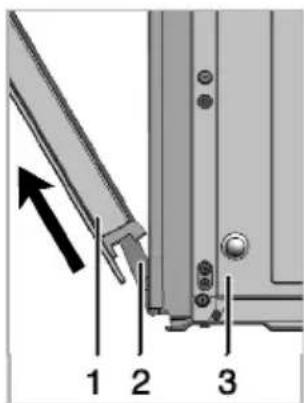
natural_image
Close-up of a hand holding a circular knob on a vehicle wheel (no text or symbols visible)- Brugsanvisning
- Návod k použití
- Please read this manual first.
- The User Manual will help you use the product in a fast and safe way.
- Explanation of symbols
- Table of Contents
- General information 4
- Important safety instructions 8
- Installation 12
- Preparation 17
- How to use the hob 20
- How to operate the oven 23
- Maintenance and care 32
- Troubleshooting 35
- Overview
- Basics: Information on the energy label of electrical ovens is given in accordance with the EN 50304 standard. Those values are determined under standard load with bottom-top heater or fan assisted heating (if any) functions.
- Important
- Accessories
- Oven tray
- Deep tray
- Aluminium cake tray
- Cake tray
- Small oven tray
- Wire Shelf
- Placing the wire shelf and tray onto the telescopic racks properly
- Important safety instructions
- General safety
- Safety for children
- Child lock
- SAVE THESE INSTRUCTIONS
- Safety when working with electricity
- Intended use
- Installation
- DANGER
- Before installation
- Installation and connection
- NOTICE
- Electrical connection
- Risk of electric shock!
- Connecting the power cable
- If a cable is supplied with the product:
- For single-phase
- - Adjusting the feet of oven
- Final check
- Disposal
- Disposing of packaging material
- Future Transportation
- Disposing of the old product
- Tips for saving energy
- Initial use
- Initial time setting
- Changing screen brightness adjustment
- First cleaning of the appliance
- Initial heating
- WARNING
- Electric oven
- Grill oven
- How to use the hob
- General information about cooking
- Tips about glass ceramic hobs
- Using the hobs
- Hob hot indicator lights
- Weak flicker illumination is not a problem at residual heat indicator light.
- Broken glass!
- Turning on the ceramic plates
- Turning off the ceramic plates
- Using multi-segmented cooking zones
- Turning off multi-segment cooking zones
- General information on baking, roasting and grilling
- Tips for baking
- Tips for roasting
- Tips for grilling
- How to operate the electric oven
- Select temperature and operating mode
- Switching off the electric oven
- Rack positions (For models with wire shelf)
- Operating modes
- Top and bottom heating
- Bottom heating
- Fan supported bottom/top heating
- Operating with fan
- Fan Heating
- Full grill
- Grill+Fan
- Booster
- Using the oven clock
- Cooking by specifying the cooking time:
- If you want to set the end of cooking time to a later time:
- Using the keylock
- Activating the keylock
- Deactivating the keylock
- Using the clock as an alarm
- Setting the alarm clock
- Turning off the alarm
- If you want to cancel the alarm:
- Changing alarm tone
- Cooking times table
- Baking and roasting
- Tips for baking cake
- Tips for baking pastry
- Tips for cooking vegetables
- How to operate the grill
- Switching on the grill
- Switching off the grill
- Rack positions
- Cooking times table for grilling
- General information
- Cleaning the hob
- Glass ceramic surfaces
- Cleaning the control panel
- Cleaning the oven
- To clean the side wall
- Clean oven door
- Removing the oven door
- Replacing the oven lamp
- If your oven is equipped with a round lamp:
- Troubleshooting
- Långpanna
- Aluminiumlångpanna
- Grund plåt
- Liten ugnsplåt
- Ugnsgaller
- FARA
- Trasigt glas!
- ANMÄRKNING
- Rengör ugnsluckan
- Dypt brett
- Bakebrett i aluminium
- Kakebrett
- Lite stekebrett
- Stekerist
- FARE
- Knust glass!
- MERK
- Rengjør ovnsdøren
- Dyb bradepande
- Aluminiums flad bradepande
- Flad bradepande
- Mindre bradepande
- Rist
- FARE Ødelagt glas!
- BEMAERK
- Hyldepositioner (for modeller med trådgrill)
- BEMÆRK
- Rens ovnlågen
- Syvä uunipelti
- Kakkupelti
- Pieni uunipelti
- Ritiläteline
- VAARA
- Rikkoutunut lasi!
- HUOMAUTUS
Brand : WHIRLPOOL
Model : ACM 226
Category : Cooker