
FS-1320D/KL3 - Printer KYOCERA - Free user manual and instructions
Find the device manual for free FS-1320D/KL3 KYOCERA in PDF.


| Product Type | Monochrome Laser Printer |
| Brand | Kyocera |
| Model | FS-1320D/KL3 |
| Print Speed | Up to 35 ppm (A4) |
| Print Resolution | Fast 1200 dpi, 600 dpi, 300 dpi |
| Paper Capacity (Standard) | 250-sheet cassette + 50-sheet multipurpose tray |
| Paper Output | 150-sheet face-down output tray |
| Media Sizes | A4, A5, B5, Letter, Legal, Custom (70 x 148 mm to 216 x 356 mm) |
| Connectivity | USB 2.0 (Hi-Speed), Parallel (IEEE 1284), Optional Network |
| Memory | 32 MB (expandable to 288 MB) |
| Processor | PowerPC 405 200 MHz |
| Dimensions (W x D x H) | 375 x 393 x 272 mm |
| Weight | Approx. 12 kg |
| Power Consumption | Printing: 385 W, Standby: 5.3 W, Sleep: 0.4 W |
| Power Supply | AC 220-240 V, 50/60 Hz |
| Noise Level | Printing: ≤ 49 dB(A), Standby: ≤ 29 dB(A) |
| Duty Cycle | Up to 50,000 pages per month |
| Warm-up Time | ≤ 19 seconds from power on |
| First Print Out Time | ≤ 6 seconds |
| Supported Operating Systems | Windows, Mac, Linux |
| Energy Star Certified | Yes |
| Included Accessories | Toner cartridge, power cord, USB cable, driver CD, user manual |
Frequently Asked Questions - FS-1320D/KL3 KYOCERA
User questions about FS-1320D/KL3 KYOCERA
0 question about this device. Answer the ones you know or ask your own.
Ask a new question about this device
Download the instructions for your Printer in PDF format for free! Find your manual FS-1320D/KL3 - KYOCERA and take your electronic device back in hand. On this page are published all the documents necessary for the use of your device. FS-1320D/KL3 by KYOCERA.
USER MANUAL FS-1320D/KL3 KYOCERA
natural_image
Exterior view of a beige and dark printer with no visible text or symbols on its body (text is part of the image)natural_image
Technical line drawing of a mechanical component with a close-up inset showing internal components (no text or symbols)Indholdsfortegnelse
1 Maskinens dele 1-1
Komponenter på printerens forside 1-2
THE DEVICE YOU HAVE PURCHASED CONTAINS ONE OR MORE SOFTWARE PROGRAMS ("PROGRAMS") WHICH BELONG TO INTERNATIONAL BUSINESS MACHINES CORPORATION ("IBM"). THIS DOCUMENT DEFINES THE TERMS AND CONDITIONS UNDER WHICH THE SOFTWARE IS BEING LICENSED TO YOU BY IBM. IF YOU DO NOT AGREE WITH THE TERMS AND CONDITIONS OF THIS LICENSE, THEN WITHIN 14 DAYS AFTER YOUR ACQUISITION OF THE DEVICE YOU MAY RETURN THE DEVICE FOR A FULL REFUND. IF YOU DO NOT SO RETURN THE DEVICE WITHIN THE 14 DAYS, THEN YOU WILL BE ASSUMED TO HAVE AGREED TO THESE TERMS AND CONDITIONS.
The Programs are licensed not sold. IBM, or the applicable IBM country organization, grants you a license for the Programs only in the country where you acquired the Programs. You obtain no rights other than those granted you under this license.
The term “Programs” means the original and all whole or partial copies of it, including modified copies or portions merged into other programs. IBM retains title to the Programs. IBM owns, or has licensed from the owner, copyrights in the Programs.
1. License
Under this license, you may use the Programs only with the device on which they are installed and transfer possession of the Programs and the device to another party.
If you transfer the Programs, you must transfer a copy of this license and any other documentation to the other party. Your license is then terminated. The other party agrees to these terms and conditions by its first use of the Program.
You may not:
- use, copy, modify, merge, or transfer copies of the Program except as provided in this license;
- reverse assemble or reverse compile the Program; or
- sublicense, rent, lease, or assign the Program.
2. Limited Warranty
The Programs are provided "AS IS."
THERE ARE NO OTHER WARRANTIES COVERING THE PROGRAMS (OR CONDITIONS), EXPRESS OR IMPLIED, INCLUDING, BUT NOT LIMITED TO, THE IMPLIED WARRANTIES OF MERCHANTABILITY AND FITNESS FOR A PARTICULAR PURPOSE.
Some jurisdictions do not allow the exclusion of implied warranties, so the above exclusion may not apply to you.
3. Limitation of Remedies
IBM's entire liability under this license is the following;
For any claim (including fundamental breach), in any form, related in any way to this license, IBM's liability will be for actual damages only and will be limited to the greater of:
- the equivalent of U.S. \$25,000 in your local currency; or
- IBM's then generally available license fee for the Program
This limitation will not apply to claims for bodily injury or damages to real or tangible personal property for which IBM is legally liable.
IBM will not be liable for any lost profits, lost savings, or any incidental damages or other economic consequential damages, even if IBM, or its authorized supplier, has been advised of the possibility of such damages. IBM will not be liable for any damages claimed by you based on any third party claim. This limitation of remedies also applies to any developer of Programs supplied to IBM. IBM's and the developer's limitations of remedies are not cumulative. Such developer is an intended beneficiary of this Section. Some jurisdictions do not allow these limitations or exclusions, so they may not apply to you.
4. General
You may terminate your license at any time. IBM may terminate your license if you fail to comply with the terms and conditions of this license. In either event, you must destroy all your copies of the Program. You are responsible for payment of any taxes, including personal property taxes, resulting from this license. Neither party may bring an action, regardless of form, more than two years after the cause of action arose. If you acquired the Program in the United States, this license is governed by the laws of the State of New York. If you acquired the Program in Canada, this license is governed by the laws of the Province of Ontario. Otherwise, this license is governed by the laws of the country in which you acquired the Program.
- "Software" shall mean the digitally encoded, machine readable, scalable outline data as encoded in a special format as well as the UFST Software.
- You agree to accept a non-exclusive license to use the Software to reproduce and display weights, styles and versions of letters, numerals, characters and symbols ("Typefaces") solely for your own customary business or personal purposes at the address stated on the registration card you return to Monotype Imaging. Under the terms of this License Agreement, you have the right to use the Fonts on up to three printers. If you need to have access to the fonts on more than three printers, you need to acquire a multi-user license
agreement which can be obtained from Monotype Imaging. Monotype Imaging retains all rights, title and interest to the Software and Typefaces and no rights are granted to you other than a License to use the Software on the terms expressly set forth in this Agreement.
-
To protect proprietary rights of Monotype Imaging, you agree to maintain the Software and other proprietary information concerning the Typefaces in strict confidence and to establish reasonable procedures regulating access to and use of the Software and Typefaces.
-
You agree not to duplicate or copy the Software or Typefaces, except that you may make one backup copy. You agree that any such copy shall contain the same proprietary notices as those appearing on the original.
-
This License shall continue until the last use of the Software and Typefaces, unless sooner terminated. This License may be terminated by Monotype Imaging if you fail to comply with the terms of this License and such failure is not remedied within thirty (30) days after notice from Monotype Imaging. When this License expires or is terminated, you shall either return to Monotype Imaging or destroy all copies of the Software and Typefaces and documentation as requested.
-
You agree that you will not modify, alter, disassemble, decrypt, reverse engineer or decompile the Software.
-
Monotype Imaging warrants that for ninety (90) days after delivery, the Software will perform in accordance with Monotype Imaging-published specifications, and the diskette will be free from defects in material and workmanship. Monotype Imaging does not warrant that the Software is free from all bugs, errors and omissions.
-
THE PARTIES AGREE THAT ALL OTHER WARRANTIES, EXPRESSED OR IMPLIED, INCLUDING WARRANTIES OF FITNESS FOR A PARTICULAR PURPOSE AND MERCHANTABILITY, ARE EXCLUDED.
-
Your exclusive remedy and the sole liability of Monotype Imaging in connection with the Software and Typefaces is repair or replacement of defective parts, upon their return to Monotype Imaging.
-
IN NO EVENT WILL MONOTYPE IMAGING BE LIABLE FOR LOST PROFITS, LOST DATA, OR ANY OTHER INCIDENTAL OR CONSEQUENTIAL DAMAGES, OR ANY DAMAGES CAUSED BY ABUSE OR MISAPPLICATION OF THE SOFTWARE AND TYPEFACES.
-
Massachusetts U.S.A. law governs this Agreement.
-
You shall not sublicense, sell, lease, or otherwise transfer the Software and/or Typefaces without the prior written consent of Monotype Imaging.
-
Use, duplication or disclosure by the Government is subject to restrictions as set forth in the Rights in Technical Data and Computer Software clause at FAR 252-227-7013, subdivision (b)(3)(ii) or subparagraph (c)(1)(ii), as appropriate. Further use, duplication or disclosure is subject to restrictions applicable to restricted rights software as set forth in FAR 52.227-19 (c)(2).
-
YOU ACKNOWLEDGE THAT YOU HAVE READ THIS AGREEMENT, UNDERSTAND IT, AND AGREE TO BE BOUND BY ITS TERMS AND CONDITIONS. NEITHER PARTY SHALL BE BOUND BY ANY STATEMENT OR REPRESENTATION NOT CONTAINED IN THIS AGREEMENT. NO CHANGE IN THIS AGREEMENT IS EFFECTIVE UNLESS WRITTEN AND SIGNED BY PROPERLY AUTHORIZED REPRESENTATIVES OF EACH PARTY. BY OPENING THIS DISKETTE PACKAGE, YOU AGREE TO ACCEPT THE TERMS AND CONDITIONS OF THIS AGREEMENT.
Compliance and Conformity
This equipment has been tested and found to comply with the limits for a Class B digital device, pursuant to Part 15 of the FCC Rules. These limits are designed to provide reasonable protection against harmful interference in a residential installation. This equipment generates, uses and can radiate radio frequency energy and, if not installed and used in accordance with the instructions, may cause harmful interference to radio communications. However, there is no guarantee that interference will not occur in a particular installation. If this equipment does cause harmful interference to radio or television reception, which can be determined by turning the equipment off and on, the user is encouraged to try to correct the interference by one or more of the following measures:
- Reorient or relocate the receiving antenna.
- Increase the separation between the equipment and receiver.
- Connect the equipment into an outlet on a circuit different from that to which the receiver is connected.
- Consult the dealer or an experienced radio/TV technician for help.
- The use of a non-shielded interface cable with the referenced device is prohibited.
CAUTION — The changes or modifications not expressly approved by the party responsible for compliance could void the user's authority to operate the equipment.
This device complies with Part 15 of FCC Rules and RSS-Gen of IC Rules.
Operation is subject to the following two conditions; (1) this device may not cause interference, and (2) this device must accept any interference, including interference that may cause undesired operation of the device.
* The above warning is valid only in the United States of America.
2004/108/EF, 2006/95/EF, 93/68/E∅F, 1999/5/EF og 2009/125/EF
Energy Star (ENERGY STAR®) Program
1 Indikatoren Ready
2 Indikatoren Attention
3 Indikatoren Toner
4 Indikatoren Data
5 Indikatoren Paper
6 Indikatoren Jam
7 Tasten [Cancel]
8 Tasten [GO]
Indikatorer
natural_image
Illustration of hands operating a printer with a paper sheet and an arrow symbol, showing a close-up of the paper (no text or symbols present)Farvet papir
natural_image
Illustration showing two hand-drawn panels: top panel shows a folded paper or sheet with motion arrows, bottom panel shows a closed book or notebook with motion arrows (no text or symbols)Klargøring af papir
natural_image
Illustration of hands inserting a device into a printer case (no text or symbols visible)natural_image
Diagram of a hand pressing down on a device casing (no text or symbols visible)natural_image
Illustration of hands assembling a mechanical component with an inset showing a close-up of a device (no text or symbols present)natural_image
Illustration of hands assembling a mechanical component with an inset showing a close-up of the part (no text or symbols present)natural_image
Technical line drawing of a mechanical component with two views: top view shows internal structure, bottom view shows disassembled parts (no text or symbols)
natural_image
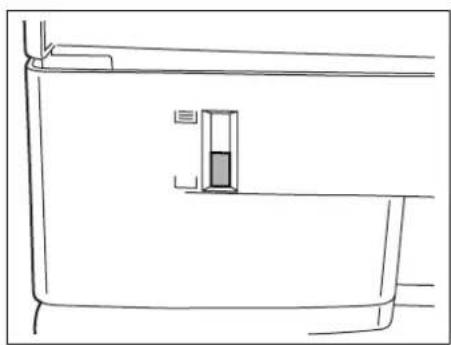
Illustration of a hand inserting a device into a computer case (no text or symbols visible)6 Skub kassetten ind i printeren igen. Skub den helt ind.
natural_image
Line drawing of a door frame with a small rectangular object inside (no text or symbols)natural_image
Diagram of a device interior showing a rectangular component with an arrow indicating a downward motion (no text or symbols present)natural_image
Line drawing of hands installing or adjusting a device component with bidirectional arrows (no text or symbols)natural_image
Diagram of a printer's internal structure showing internal components and a downward arrow indicating a component (no text or symbols present)natural_image
Illustration of a printer with two views of the printer's side panel, showing hands holding a tray with an arrow pointing upward (no text or symbols present)Tilslutninger
natural_image
Illustration of a computer tower with an arrow pointing to a button (no text or symbols present)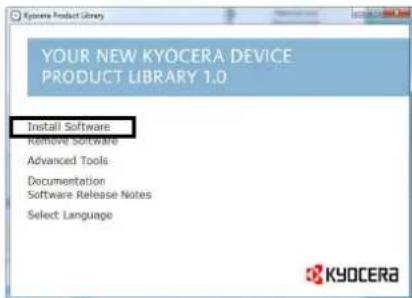
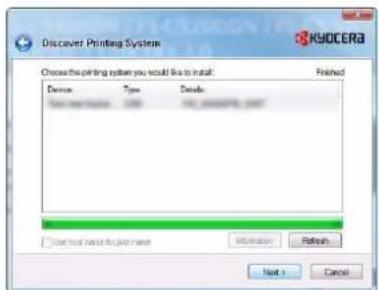
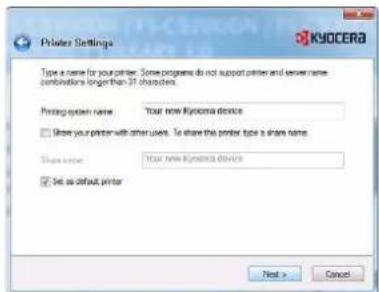
Express Mode (Hurtig installation)
Custom Mode (Brugerdefineret installation)
natural_image
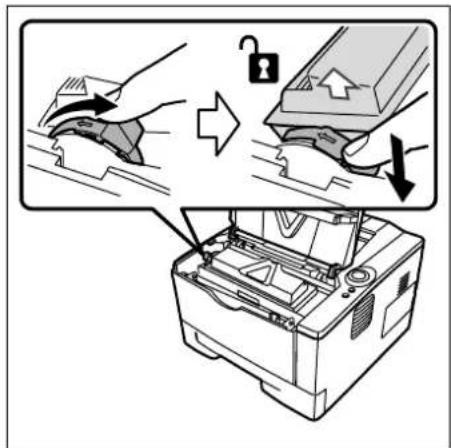
Illustration of hands operating a printer into a machine (no text or symbols visible)1 Åbn topdækslet.
natural_image
Diagram of a mechanical component with a curved arrow indicating motion or force direction (no text or symbols)natural_image
Two-step diagram showing hands operating a printer in two different states: one with a close-up view, the other with a closed lid (no text or symbols)natural_image
Two-step illustration showing hands operating a printer to press or install an open circuit board (no text or symbols present)natural_image
Technical line drawing of a printer with a circular prohibition symbol (no text or labels)natural_image
Diagram of a hand pressing a mechanical component with an inset showing internal components (no text or symbols)5 Brug en ren, fnugfri klud til at fjerne støv og snavs fra registreringsrullen af metal.
natural_image
Illustration of hands operating a printer with an arrow indicating left-side motion (no text or symbols present)natural_image
Illustration of hands installing or adjusting a mechanical component inside a device casing (no text or symbols visible)natural_image
Illustration of hands operating a printer into a machine (no text or symbols visible)natural_image
Diagram of a printer's paper roll being inserted into a slot, with a hand pointing to the page (no text or symbols present)natural_image
Illustration of hands pressing a printer onto a tray with an upward arrow (no text or symbols)natural_image
Illustration of two hands inserting a printer into a machine, showing internal components and shipment (no text or symbols)natural_image
Illustration of hands inserting a device into a machine (no text or symbols visible)natural_image
Line drawing of hands installing or adjusting a mechanical component inside a device (no text or symbols visible)natural_image
Illustration of hands operating a printer into a rack with arrows indicating process (no text or symbols)natural_image
Diagram of a printer's internal structure showing a printer's base with a hand inserting a slot into it (no text or symbols present)natural_image
Illustration of a printer's internal structure with hands operating it, showing no text or symbolsnatural_image
Illustration of hands operating a printer into a machine (no text or symbols visible)natural_image
Illustration of a printer being inserted into a slot, showing mechanical components and a hand holding the tray (no text or symbols)natural_image
Line drawing of a printer with an inset close-up showing the mechanism of inserting or removing components (no text or symbols present)natural_image
Line drawing of two hands holding a rectangular object with a ruler, no text or symbols presentForkert
natural_image
Illustration of a hand pressing down on a ruler (no text or symbols visible)natural_image
Illustration of a hand using a screwdriver to press a button on a device (no text or symbols visible)natural_image
Illustration of a hand inserting a device into a control panel (no text or symbols visible)natural_image
Diagram of a device interior showing internal components and directional arrows (no text or symbols)natural_image
Diagram of a device interior with arrows indicating movement or flow, no text or symbols presentnatural_image
Line drawing of a layered printer or printer unit (no text or symbols visible)natural_image
Line drawing of a computer tower with an open drive and internal circuitry (no text or symbols)natural_image
Line drawing of a computer printer internal structure with scroll wheel and scroll wheel (no text or symbols)natural_image
Line drawing of a computer printer with scroll wheel and paper feed (no text or symbols)natural_image
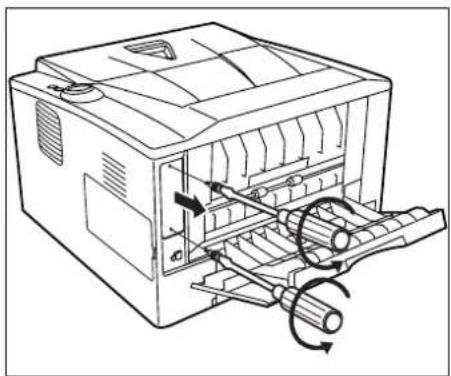
Line drawing of an open computer chassis with a cable inserted, showing internal components and a base structure (no text or symbols)2 Åbn bagdækslet.
natural_image
Line drawing of a computer chassis with internal components and scroll wheel (no text or symbols)natural_image
Diagram of a computer printer internal structure with scroll wheel and paper feed (no text or symbols)natural_image
Diagram of a computer interface showing internal components and a magnified view of the device (no text or symbols present)4 Indsæt CF-kortet.
Installing the Printer Driver Windows PC ....3-3
J
Justeringsstyr 2-14
PASSIONATE PEOPLE. FROM ALL OVER THE WORLD.


KYOCERA MITA EUROPE B.V.
EUROPEAN HEADQUARTERS
Bloemlaan 4
2132 NP Hoofddorp
The Netherlands
Phone: +31 20 654 0000
Fax: +31 20 653 1256
www.kyoceramita-europe.com
KYOCERA MITA Europe B.V., Amsterdam (NL)
(Europe, Middle East & North Africa)
Bloemlaan 4
2132 NP Hoofddorp
The Netherlands
Phone: +31 20 654 0000
Fax: +31 20 653 1256
www.kyoceramita-europe.com
AUSTRIA
KYOCERA MITA AUSTRIA GmbH
Eduard Kittenberger Gasse 95
A-1230 Wien
Phone: +43 1 86 338 0
Fax: +43 1 86 338 400
www.kyoceramita.at
BELGIUM
S.A. KYOCERA MITA Belgium N.V.
Sint-Martinusweg 199-201
BE-1930 Zaventem
Phone: +32 2 720 9270
Fax: +32 2 720 8748
www.kyoceramita.be
DENMARK
KYOCERA MITA Denmark A/S
Ejby Industrivej 1
DK-2600 Glostrup
Phone: +45 70 22 3880
Fax: +45 45 76 3850
www.kyoceramita.dk
FINLAND
KYOCERA MITA Finland OY
Kirvesmiehenkatu 4
FI-00880 Helsinki
Phone: +358 9 4780 5200
Fax: +358 9 4780 5390
www.kyoceramita.fi

FRANCE
KYOCERA MITA France S.A.
KYOCERA MITA South Africa (Pty) Ltd.
527 Kyalami Boulevard, Kyalami
Business Park · ZA-1685 Midrand
Phone: +27 11 540 2600
Fax: +27 11 466 3050
www.kyoceramita.co.za

SPAIN
8 Beacontree Plaza, Gillette Way,
Reading, Berkshire RG2 OBS
Phone: +44 1189 311 500
Fax: +44 1189 311 108
www.kyoceramita.co.uk
2-28, 1-Chome, Tamatsukuri, Chuo-ku,
Osaka 540-8585, Japan
Phone: +81 6 6764 3555
Fax: +81 6 6764 3980
www.kyoceramita.com

USA
KYOCERA MITA America, INC.
(Head office)
225 Sand Road, P.O. Box 40008
Fairfield, New Jersey 07004-0008, USA
www.kyoceramita.com/us
KYOCERA CORPORATION

JAPAN
KYOCERA CORPORATION
(Corporate Headquarters)
6 Takeda Tobadono-cho, Fushimi-ku
Kyoto 612-8501, Japan
Phone: +81 75 604 3500
Fax: +81 75 604 3501
www.kyocera.co.jp

KYOCERA
- Indholdsfortegnelse
- Maskinens dele 1-1
- License
- Limited Warranty
- Limitation of Remedies
- General
- Compliance and Conformity
- Energy Star (ENERGY STAR®) Program
- Indikatorer
- Farvet papir
- Klargøring af papir
- Tilslutninger
- Express Mode (Hurtig installation)
- Custom Mode (Brugerdefineret installation)
- J
- PASSIONATE PEOPLE. FROM ALL OVER THE WORLD.
- KYOCERA MITA EUROPE B.V.
- KYOCERA CORPORATION
Brand : KYOCERA
Model : FS-1320D/KL3
Category : Printer