
DEH-2910MP - Uncategorized PIONEER - Free user manual and instructions
Find the device manual for free DEH-2910MP PIONEER in PDF.


| Product Type | Car CD Receiver / Tuner |
| Brand | Pioneer |
| Model | DEH-2910MP |
| Dimensions (DIN Chassis) | 178 × 50 × 162 mm |
| Dimensions (DIN Nose) | 188 × 58 × 14 mm |
| Dimensions (D Chassis) | 178 × 50 × 162 mm |
| Dimensions (D Nose) | 170 × 47 × 14 mm |
| Weight | 1.3 kg |
| Power Source | 14.4 V DC (10.8 V to 15.1 V allowable) |
| Grounding System | Negative type |
| Maximum Current Consumption | 10.0 A |
| Continuous Power Output | 22 W × 4 (50 Hz – 15,000 Hz, 5% THD, 4 Ω load) |
| Maximum Power Output | 50 W × 4 |
| Load Impedance | 4 Ω (4 Ω – 8 Ω allowable) |
| Preout Max Output Level / Impedance | 2.2 V / 1 kΩ |
| FM Tuner Frequency Range | 87.5 – 108.0 MHz |
| MW Tuner Frequency Range | 531 – 1602 kHz (9 kHz step) |
| LW Tuner Frequency Range | 153 – 281 kHz |
| Playable Disc Types | CD, CD-R, CD-RW (finalized discs only) |
| Playable File Formats | Audio CD, WMA, MP3, WAV (Linear PCM & MS ADPCM) |
| Equalizer Presets | DYNAMIC, VOCAL, NATURAL, CUSTOM, FLAT, POWERFUL |
| Bass / Mid / Treble Adjustment | ±13 dB at 100 Hz / ±12 dB at 1 kHz / ±12 dB at 10 kHz |
| Loudness Contour | Low / High (adjustable) |
| AUX Input | 3.5 mm stereo jack (front panel) |
| Detachable Faceplate | Yes |
| RDS Features | AF, TA, PTY, regional, traffic announcements |
Frequently Asked Questions - DEH-2910MP PIONEER
User questions about DEH-2910MP PIONEER
0 question about this device. Answer the ones you know or ask your own.
Ask a new question about this device
Download the instructions for your Uncategorized in PDF format for free! Find your manual DEH-2910MP - PIONEER and take your electronic device back in hand. On this page are published all the documents necessary for the use of your device. DEH-2910MP by PIONEER.
USER MANUAL DEH-2910MP PIONEER
Pleasereadthroughtheseoperatinginstructionsssoyouwillknowhowtooperate yourmodelproperly.Afteryouhavefinishedreadingtheinstructions,keepthismanualinasafeplaceforfuturereference.
01 BeforeYouStart
Aboutthisunit3
AboutWMA3
AboutMP33
Visitourwebsite3
Protectingyourunitfromtheft3
-Removingthefrontpanel4
-Attachingthefrontpanel4
02 Operatingthisunit
What'sWhat5
-Headunit5
-Optionalremotecontrol6
-LCDdisplay6
BasicOperations7
-Turningtheunitonandselectinga source7
-Adjustingthevolume7
-Turningtheunitoff7
Tuner7
-Listeningtotheradio7
-Storingandrecallingbroadcast frequencies7
-Tuninginstrongsignals8
-Storingthestrongestbroadcast frequencies8
RDS8
-IntroductionofRDSoperation8
-SwitchingtheRDSdisplay8
-ReceivingPTYalarmbroadcasts8
-Selectingalternativefrequencies8
-Receivingtrafficannouncements9
-PTYlist10
Built-inPlayer10
-Playingadisc10
-Repeatingplay11
-Playingtracksinrandomorder11
-Scanningtracksorfolders11
-Pausingdiscplayback11
-UsingcompressionandBMX11
-Searching every 10 tracks in the current discorfolder 11
-Displayingtextinformationondisc12
AudioAdjustments12
-Usingbalanceadjustment12
-Usingtheequalizer12
-Adjustingequalizercurves13
-Adjustingloudness13
-Adjustingsourcelevels13
OtherFunctions13
-Adjustinginitialsettings13
-SettingtheFMtuningstep13
-SwitchingAutoPISeek14
-Switchingtheauxiliarysetting14
-Multilanguagedisplaysetting14
-Savingthebatteryconsumption14
-Soundmuting14
AdditionalInformation
Troubleshooting15
Errormessages15
Handlingguidelineofdiscsandplayer15
DualDiscs16
WMA,MP3andWAVfiles16
-Exampleofahierarchy16
-Compressedaudiocompatibility17
Russiancharacterchart17
Specifications18
Aboutthisunit
ThetunerfrequenciesonthisunitareallocatedforuseinWesternEurope,Asia,the MiddleEast,AfricaandOceania.Useinother areasmayresultinpoorreception.TheRDS (radiodatasystem)functionoperatesonlyin areaswithFMstationsbroadcastingRDSsignals.

CAUTION
- Donotallowthisunittocomeintocontact with liquids. Electricalshockcouldresult. Also, thisunitdamage, smoke, and overheat could result from contact with liquids.
- Keep this manual handy as a reference for operating procedures and precautions.
•Alwayskeepthevolumelowenoughsothat youcanhearsoundsfromoutsidethevehicle. - Protect this unit from moisture.
- If the battery is disconnected, discharged, the preset memory will be erased and must be reprogrammed.
- Should this product fail to operate properly, contact your dealer or nearest authorized PioneerServiceStation.
AboutWMA

TheWindowsMedia™logoprintedonthebox indicatesthatthisunitcanplaybackWMA data.
WMAisshortforWindowsMediaAudioand referstoanaudiocompressiontechnology that is developed by Microsoft Corporation.
WMAdatacanbeencodedbyusingWindows MediaPlayerversion7orlater.
WindowsMediaandtheWindowslogoaretrademarksorregisteredtrademarksofMicrosoft
CorporationintheUnitedStatesand/orother countries.

Note
Thisunitmaynotoperatecorrectlydepending on theapplicationusedtoencodeWMAfiles.
AboutMP3
Supplyofthisproductonlyconveysalicense forprivate,non-commercialuseanddoesnot conveyalicensenorimplyanyrighttouse thisproductinanycommercial(i.e.revenue-generating)realtimebroadcasting(terrestrial, satellite,cableand/oranyothermedia),broadcasting/streamingviainternet,intranetsand/orothernetworksorinotherelectroniccontentdistributionsystems,suchaspay-audioor audio-on-demandapplications.Anindependentlicenseforsuchuseisrequired.Fordetails,pleasevisit
http://www.mp3licensing.com.
Visitourwebsite
Visitusatthefollowingsite:

- Registryyourproduct.Wewillkeepthedetailsofyourpurchaseonfiletohelpyou refertothisinformationintheeventofan insuranceclaimsuchaslossortheft.
- Weofferthelatestinformationabout PioneerCorporationonourwebsite.
Protectingyourunitfrom theft
Thefrontpanelcanbedetachedtodetertheft.

Important
- Handlegentlywhenremovingorattaching thefrontpanel.
- Avoid subjecting the front panel to excessive shocks.
- Keepthefrontpaneloutofdirectsunlightand hightemperatures.
Removingthefrontpanel
1PressDETACHtoreleasethefront panel.
2Grabthefrontpanelandremove.
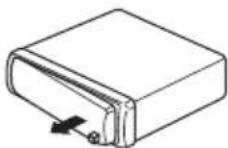
3Putthefrontpanelintoprovidedprotectivecaseforsafekeeping.
Attachingthefrontpanel
1Slidethefrontpaneltotheleftuntil clicks.
Frontpanelandtheheadunitarejointedon theleftside.Makesurethatthefrontpanel hasbeenjointedtotheheadunit.
2Presstherightsideofthefrontpanel untilitisfirmlyseated.
■If you can't attach the front panel to the head units successfully, try again. Front panel maybe damaged if you attach the front panel forcedly.

What's What
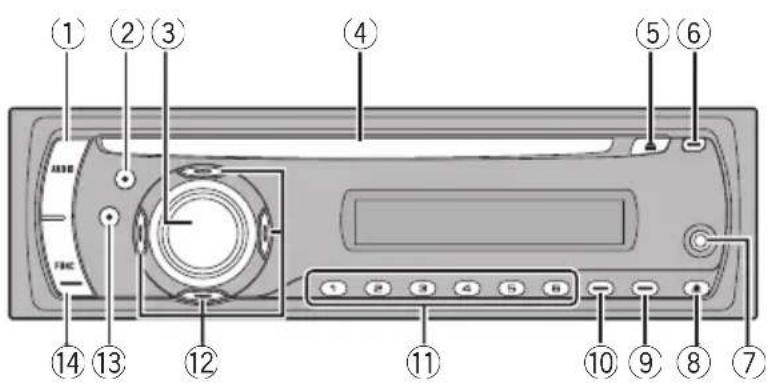
Headunit
①AUDIObutton
Presstoselectvarioussoundqualitycontrols.
②EQbutton
Presstoselectvariousequalizercurves.
③SOURCEbutton, VOLUME
Thisunitisturnedonbyselectingasource.
Presstocyclethroughalltheavailable sources.
Pressandholdtorecalltheinitialsetting menuwhenthesourcesareoff.
Rotateittoincreaseordecreasethevolume.
④Discloadingslot
Insertadisctoplay.
⑤EJECTbutton
PresstoejectaCDfromyourbuilt-inCD player.
⑥TAbutton
PresstoturnTAfunctiononoroff. Press andholdtoturnAFfunctiononoroff.
⑦AUXinputjack(3.5mmstereojack)
Usetoconnectanauxiliaryequipment.
⑧DETACHbutton
Presstoremovethefrontpanelfromthe headunit.
⑨DISPLAYbutton
Presstoselectdifferentdisplays.
⑩LOUDbutton
Presstoturnloudnessonoroff.
⑪1to6buttons
Pressforpreset tuning.
⑫ ▲/▼/◄/► buttons
Presstoperformmanualseektuning, fast forward, reverseandtracksearchcontrols. Alsousedforcontrollingfunctions.
⑬BANDbutton
PresstoselectamongMW/LWandtwoFM bandsandcancelthecontrolmodeoffunc- tions.
Pressandholdtoturnregionalfunctionon oroff.
⑭FUNCTIONbutton
Presstorecallthefunctionmenuwhenoperatingasource.
Optionalremotecontrol
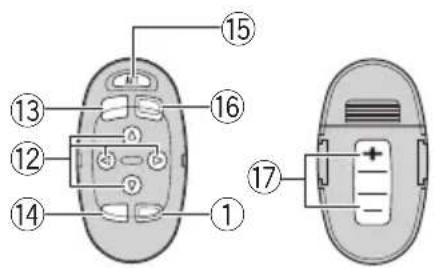
TheremotecontrolCD-SR100issoldseparately. Operationisthesameaswhenusingthebuttonsontheheadunit.Seetheexplanationof theheadunitabouttheoperationofeachbuttonwiththeexceptionofATT,whichisexplainedbelow.
⑮ATTbutton
Presstoquicklylowerthevolumelevel,by about90%.Pressoncemoretoreturntothe originalvolumelevel.
⑯SOURCEbutton
Presstocyclethroughalltheavailable sources.Pressandholdtoturnthesource off.
⑰VOLUMEbutton
Presstoincreaseordecreasethevolume.
LCDdisplay
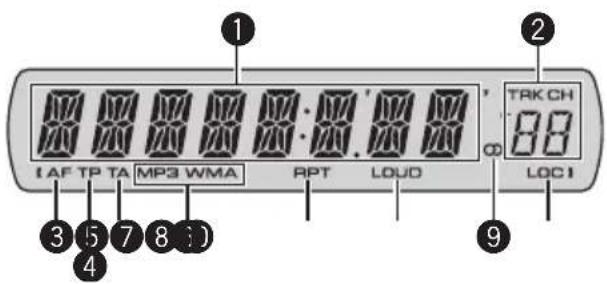
① Maindisplaysection
Showsthevariousinformationsuchas band,playtime,andothersetting.
- Tuner
Bandandfrequencyaredisplayed.
•RDS Programservicename, PTYinformation or frequency is displayed.
• Built-inCDPlayer(AudioCD) Erapsedplaytimeisdisplayed.
• Built-inCDPlayer(WMA/MP3/WAVdisc) Foldernumberanderapsedplaytimeare displayed. - Audioandinitialsetup Functionnamesandsetupstatusaredisplayed.
②Presetnumber/tracknumberindicator
Showsthetracknumberorpresetnumber.
- Ifatracknumber100ormoreisselected,
▶ontheleftofthetracknumberindicatorwilllight.
③AFindicator
ShowswhenAF(alternativefrequencies search)functionison.
④TPindicator
ShowswhenaTPstationistunedin.
⑤TAindicator
ShowswhenTA(trafficannouncement standby)functionison.
⑥MP3/WMAindicator
Showsthetypeofthecurrentlyplayingdisc.
Operatingthisunit
⑦RPTindicator
Showswhenrepeatplayisturnedon.
⑧LOUDindicator
Appearsinthedisplaywhenloudnessis turnedon.
⑨Stereo(○)indicator
Showswhentheselectedfrequencyis beingbroadcastinstereo.
⑩LOCindicator
Showswhenlocalseektuningison.
BasicOperations
Turningtheunitonand selectingasource
Youcanselectasourceyouwanttolistento. Toswitchtothebuilt-inCDplayer,loadadisc intheunit(refertopage10).
- PressSOURCEtoselectasource.
PressSOURCErepeatedlytoswitchbetween thefollowingsources:
Tuner—Built-inCDplayer—AUX

Notes
- In the following cases, the soundsource will not change:
—Whenthereisnodiscintheunit. —WhentheAUX(auxiliaryinput)issettooff (refertopage14).
- AUXissettoonbydefault.TurnofftheAUX whennotinuse(refertoSwitchingtheauxiliarysettingonpage14).
- Whenthisunit'sblue/whiteleadisconnected tothevehicle'sauto-antennarelaycontrol terminal,thevehicle'santennaextendswhen thisunit'ssourceisturnedon.Toretractthe antenna,turnthesourceoff.
Adjustingthevolume
●UseVOLUMEtoadjustthesoundlevel.
Turningtheunitoff
- PressSOURCEandholduntiltheunit turnsoff.
Tuner
Listeningtotheradio
1PressSOURCEtoselectthetuner.
2PressBANDtoselectaband.
PressBANDuntilthedesiredband(F1,F2for FMorMW/LW)isdisplayed.
3Toperformmanualtuning,brieflypress◀or▶.
4Toperformseektuning, pressandhold ◀or▶foraboutonesecondandrelease.
Thetunerwillscanthefrequenciesuntila broadcaststrongenoughforgoodreceptionis found.
- Youcancancelseektuningbybrieflypressing ◀or▶.
- If you press and hold ◀ or ▶ you can skip stations.Seektuningstartsassoonasyourelease thebutton.
Storingandrecallingbroadcast frequencies
- Whenyoufindafrequencythatyou wanttostoreinmemory, pressoneofpre-tuningbuttons1to6andholduntilthe presetnumberstopsflashing.
Memorizedradiostationfrequencycanbere-calledbypressingthepresettuningbutton.
■Upto12FMstations,6foreachofthetwoFM bands,and6MW/LWstationscanbestoredin memory.
- Press ▲ or ▼ to recall radio station frequencies.
Operatingthisunit
Tuninginstrongsignals
Localseektuningletsyoutuneinonlythose radiostationswithsufficientlystrongsignals forgoodreception.
1PressFUNCTIONtoselectLOCAL.
2Press▲or▼toturnlocalseektuning onoroff.
3Press◄or► tosetthesensitivity.
TheLOCAL4settingallowsreceptionofonly thestrongeststations,whilelowersettingslet youreceiveprogressivelyweakerstations.
Storingthestrongestbroadcast frequencies
BSM(beststationsmemory)letsyouautomaticallystorethesixstrongestbroadcastfrequenciesunderpresettuningbuttons1to6. Oncestoredyoucantuneintothosefrequencieswiththetouchofbutton.
- StoringbroadcastfrequencieswithBSM mayreplacebroadcastfrequenciesyou havesavedusingbuttons1to6.
1PressFUNCTIONtoselectBSM.
2Press▲toturnBSMon.
Sixstrongestbroadcastfrequencieswillbe storedintheorderoftheirsignalstrength.
■Tocancelthestorageprocess.press▼.
RDS
IntroductionofRDSoperation
RDS(radiodatasystem)containsinaudibleinformationsthathelpssearchingoftheradio stations.
- RDSservicemaynotbeprovidedbyallstations.
- RDSfunctionssuchasAFandTAareonly activewhenyourradioistunedtoanRDS station.
SwitchingtheRDSdisplay
- PressDISPLAY.
PressDISPLAYrepeatedlytoswitchbetween thefollowingsettings: Programservicename—PTYinformation— Frequency PTY(programtypeIDcode)informationis listedonpage10.
■PTYinformationandthefrequencyappearonthedisplayforeightseconds.
ReceivingPTYalarmbroadcasts
WhentheemergencyPTYcodebroadcasts, theunitreceivesitautomatically(ALARMappears). Whenthebroadcastingends, thesystemreturnstotheprevioussource.
• AnemergencyannouncementcanbecanceledbypassingTA.
Selectingalternativefrequencies
Whenthetunercan'tgetgoodreception,the unitautomaticallysearchforadifferentstationinasamenetwork.
●PressandholdTArepeatedlytoturnAF (alternativefrequencysearch)onoroff.

Notes
- YoucanalsoturntheAFfunctiononoroffin themenuthatappearswiththepressingof FUNCTION.
- OnlyRDSstationsaretunedinduringseek tuningorBSMwhenAFison.
Operatingthisunit
- Whenyourecallapresetstation,thetuner mayupdatethepresetstationwithanewfrequencyfromthestation'sAFlist.(Thisisonly availablewhenusingpresetsontheF1orF2 bands.)NopresetnumberappearsonthedisplayiftheRDSdataforthestationreceived differsfromthatfortheoriginallystoredstation.
- SoundmaybetemporarilyinterruptedbyanotherprogramduringanAFfrequency search.
- AFcanbeturnedonoroffindependentlyfor eachFMband.
UsingPISeek
Ifthetunercan'tfindasuitablestation,orreceptionstatusbecomesbad,theunitwillautomaticallysearchforadifferentstationwitha sameprogramming.Duringthesearch,PISEEKisdisplayedandtheoutputismuted.
UsingAutoPISeekforpresetstations
Whenpresetstations cannot berecalled, as when travelling long distances, the unit can besettoperform PISeek during preset recall.
- ThedefaultsettingforAutoPISeekisoff. SeeSwitchingAutoPISeekonpage14.
Limitingstationstoregional programming
When AFisused, theregional function limits theselection of stations broadcasting regional programs.
1PressFUNCTIONtoselectREG.
2Press▲or▼toturntheregionalfunctiononoroff.

Notes
- Regional programming and regional networks are organized differently depending on the country (i.e., they may change according to the hour, state or broadcast area).
- Thepresetnumbermaydisappearfromthe displayifthetunertunesinaregionalstation whichdiffersfromtheoriginallysetstation.
- Theregionalfunctioncanbeturnedonoroff independentlyforeachFMband.
Receivingtrafficannouncements
TA(trafficannouncementstandby)letsyoureceivetrafficannouncementsautomatically,no matterwhatsourceyouarelisteningto.TA canbeactivatedforbothaTPstation(astationthatbroadcaststrafficinformation)oran enhancedothernetwork'sTPstation(astation carryinginformationwhichcross-references TPstations).
1TuneinaTPorenhancedothernet-work'sTPstation.
TPindicatorwilllight.
2PressTAtoturntrafficannouncement standbyon.
■Toturntrafficannouncementsstandbyoff, pressTAagain.
3UseVOLUMEtoadjusttheTAvolume whenatrafficannouncementbegins.
Thenewlysetvolumeisstoredinmemoryand recalledforsubsequenttrafficannouncements.
4PressTAwhileatrafficannouncement is being received to cancel the announcement.
ThetunerreturnstotheoriginalsourcebutremainsinthestandbymodeuntilTAispressed again.
■Youcanalsocanceltheannouncementby pressing SOURCE, BAND, ▲, ▼, ◀ or ▶ while a trafficannouncementisbeingreceived.

Notes
- YoucanalsoturntheTAfunctiononoroffin themenuthatappearswiththepressingof FUNCTION.
- Thesystemswitchesbacktotheoriginal sourcefollowingtrafficannouncementreception.
- OnlyTPandenhancedothernetwork'sTPstationsaretunedinduringseektuningorBSM whenTAison.
PTYlist
SpecificTypeofprogram
NEWSNews
AFFAIRSCurrentaffairs
INFO General information and advice
SPORTSports
WEATHERWeatherreports/meteorological information
FINANCEStockmarketreports.commerce, trading, etc.
POPMUS Popularmusic
ROCKMUS Contemporary modern music
EASYMUSEasylisteningmusic
OTHMUS Non-categorizedmusic
JAZZ Jazz
COUNTRY Countrymusic
NATMUS Nationalmusic
OLDIES Oldies, goldenoldies
FOLKMUS Folkmusic
L.CLASS Lightclassicalmusic
CLASSIC Classicalmusic
EDUCATE Educationalprograms
DRAMA Radioplaysandserials
CULTURE Nationalorregionalculture
SCIENCE Nature, science and technology
VARIED Lightentertainment
CHILDREN Children's
SOCIAL Socialaffairs
RELIGION Religiousaffairsorservices
PHONEIN Phonein
TOURING Travelprograms;notfortrafficannouncements
LEISURE Hobbies and recreational activities
DOCUMENT Documentaries

Built-in Player
Playingadisc
1 Insert a CD (CD-ROM) into the disc loadingslot.
Playbackwill automaticallystart.
■Besuretoturnupthelabelsideofadisc.
■AfteraCD(CD-ROM)hasbeeninserted,press
SOURCEtoselectthebuilt-inCDplayer.
■YoucanejectaCD(CD-ROM)bypassing EJECT.
2 Press ▲ or ▼ to select a folder when playinga WMA/MP3/WAV disc.
■Youcannotselectafolderthatdoesnothave aWMA/MP3/WAVfilerecordedinit.
■Toreturntofolder01(ROOT),pressandhold
BAND. However, if folder01 (ROOT) contains no files, playbackcommenceswithfolder02.
3 Toperformfast forwardor reverse, press and hold ◀ or ▶.
- If you select ROUGH, pressing and holding ▲ or ▶ enablesyoutosearchevery10tracksinthe currentdisc(folder).(RefertoSearchingevery10 tracksinthecurrentdiscor folderonthenext page.)
4 Toskipback or forward to another track, press ◀ or ▶.

Notes
- Read the precautions with discs and player on page 15.
- IfanerrormessagesuchasERROR-11isdisplayed,refertoErrormessagesonpage15.
- Thereissometimesadelaybetweenstarting updiscplaybackandthesoundbeingissued. Whenbeingread,FRMTREADisdisplayed.
- WhenplayingCD-EXTRAorMIXED-MODE CDs, WMA/MP3/WAVandCD-DAcanbe swithcedbypassingBAND.
- If you have switched between WMA/MP3/WAVfiles and audio CD-DA, playback starts at the first track on the disc.
•Thebuilt-inCDplayercanplaybackaWMA/MP3/WAVfilerecordedonCD-ROM.(Referto page16for filesthatcanbeplayedback.) - WhenplayingbackVBR(variablebitrate)recordedfiles,erapsedplaytimemaynotbedisplayedcorrectly.
- WhenplayingWMA/MP3/WAVdisc, there is nosoundonfastforwardor reverse.
Operatingthisunit
Repeatingplay
Repeatplayplaysthesametrack/folderwithin theselectedrepeatplayrange.
1PressFUNCTIONtoselectRPT.
2Press◀or▶toselecttherepeatrange.
DSC—Repeatalltracks
TRK–Repeatjustthecurrenttrack
FLD–Repeat the current folder
■ If you select another folder during repeat play, therepeat play range changestodiscrepeat.
■WhenplayingCD,performingtracksearchor fastforward/reversecancelstherepeatplayautomatically.
■WhenplayingWMA/MP3/WAVdisc,performingtracksearchorfastforward/reverseduring
TRK(trackrepeat)changestherepeatplayrange tofolderrepeat.
■WhenFLD(folderrepeat)isselected,itisnot possibletoplaybackasubfolderofthatfolder.
■ To return to the normal display, press BAND.
Playingtracksinrandomorder
Randomplayplaystracksinarandomorder withintheselectedrepeatrange.
1Selecttherepeatrange.
RefertoRepeatingplayonthispage.
2PressFUNCTIONtoselectRDM.
3Press▲or▼toturnrandomplayonor off.
Whenrandomplayison,RDMappearsinthe display.
Ifyouturnrandomplayonduringfolderrepeat, FRDM appearsinthedisplay.
■ To return to the normal display, press BAND.
Scanningtracksorfolders
Scanplaysearchesthesongwithinthese-lectedrepeatrange.
1Selecttherepeatrange.
RefertoRepeatingplayonthispage.
2PressFUNCTIONtoselectSCAN.
3Press▲toturnscanplayon.
SCANappearsinthedisplay. The first 10 second so feach track is played.
■ If you turn scan play on during FLD, FSCN appearsinthedisplay.
4Whenyoufindthedesiredtrackpress ▼toturnscanplayoff.
■ Ifthedisplayhasautomaticallyreturned to the playbackdisplay, select SCAN again bypressing FUNCTION.
■Afterscanningofadisc(folder)isfinished, normal playbackofthetrackswillbeginagain.
Pausingdiscplayback
Pauseletsyoutemporarilystopplaybackof thedisc.
1PressFUNCTIONtoselectPAUSE.
2Press▲or▼toturnpauseonoroff.
■ To return to the normal display, press BAND.
UsingcompressionandBMX
UsingtheCOMP(compression)andBMX functionsletyouadjustthesoundplayback qualityofthisunit.
1PressFUNCTIONtoselectCOMPOFF.
2Press▲or▼toselectyourfavoritesetting.
COMPOFF—COMP1—COMP2— COMPOFF—BMX1—BMX2
■ To return to the normal display, press BAND.
Searching every 10 tracks in the current discor folder
Youcanswitchthesearchmethodbetween fastforward/reverseandsearchingevery10 tracks.SelectingROUGHenablesyouto searchevery10tracks.
Operatingthisunit
1PressFUNCTIONtoselectFF/REV.
■ If thesearchmethodROUGHhasbeenpreviouslyselected,ROUGHwillbedisplayed.
2Press▶toselectROUGH.
- FF/REV—Fastforwardandreverse
- ROUGH—Searchingevery10tracks
■ToselectFF/REV, press◀.
3PressBANDtoreturntothe playback display.
4Pressandhold◀or▶tosearchevery 10tracksonadisc(folder).
■ Iftherestoftracknumberislessthan10, pressandhold◀or▶recallsthefirst(last)one.
Displayingtextinformationon disc
- PressDISPLAY.
PressDISPLAY repeatedlytoswitchbetween thefollowingsettings:
ForCDTEXTdiscs
Play time—DISC TTL (disc title)—DISC ART (discartistname)—TRKTTL(tracktitle)—TRKART(trackartistname)
ForWMA/MP3discs
Play time—FOLDER (folder name)—FILE (file name)—TRK TTL (track title)—ARTIST (artist name)—ALBUM (album title)—COMMENT (comment)—Bitrate
ForWAVdiscs
Play time—FOLDER (folder name)—FILE (file name)—Samplingfrequency

Notes
- Youcanscrolltotheleftofthetitlebypassing andholdingDISPLAY.
• AudioCDthatcontaincertaininformation suchastextand/ornumberareCDTEXT. - If specific information has not been recorded on adisc, NOXXXX will be displayed (e.g., NOT-TTL).
-
WhenplayingbackVBR-recordedWMAfiles, theaveragebitratevalueisdisplayed.
-
WhenplayingbackVBR(variablebitrate)-recordedMP3files, VBRisdisplayedinsteadof bitratevalue.
- DependingontheversionofiTunes ^ usedto writeMP3filesontoadisc,commentinformationmaynotbecorrectlydisplayed. —iTunesisatrademarkofAppleComputer, Inc.,registeredintheU.S.andothercoun- tries.
- Thesamplingfrequencyshowninthedisplay maybeabbreviated.
AudioAdjustments
Usingbalanceadjustment
Fader/balancesettingcreatesanideallisten-ingenvironmentinallooccupiedseats.
1PressAUDIOtoselectFAD.
2Press▲or▼toadjustfront/rearspeak-erbalance.
FADF15toFADR15isdisplayed.
■FAD0isthepropersettingwhenonlytwo speakersareused.
3Press◀or▶toadjustleft/rightspeaker balance.
BALL15toBALR15isdisplayed.
■Toreturntothenormaldisplay,pressBAND.
Usingtheequalizer
Therearesixstoredequalizersettingssuchas DYNAMIC, VOCAL, NATURAL, CUSTOM, FLATandPOWERFULthatcaneasilybere-calledatanytime.
- CUSTOMisanadjustedequalizercurve thatyoucreate.
- When FLAT is selected nosupplementor correctionismadetothesound.
- PressEQtoselecttheequalizer.
PressEQrepeatedlytoswitchbetweenthefollowingequalizers: DYNAMIC—VOCAL—NATURAL—CUSTOM—FLAT—POWERFUL
Operatingthisunit
Adjustingequalizercurves
You can adjust the currently selected equalizer curvesetting as desired. Adjusted equalizer curvesettings are memorized in CUSTOM.
Adjustingbass/mid/treble
Youcanadjustthebass/mid/treblelevel.
1PressAUDIOtoselectBASS/MID/TREBLE.
2Press▲or▼toadjustthelevel.
+6 to -6 is displayed as the level is increased or decreased.
■ To return to the normal display, press BAND.
Adjustingloudness
Loudnesscompensatesfordeficienciesinthe low-andhigh-soundrangesatlowvolume.
1PressAUDIOtoselectLOUD.
2Press▲or▼toturnloudnessonoroff.
■YoucanalsoturnloudnessonoroffbypassingLOUD.
3Press◄or►toselectadesiredlevel.
LOW(low)—HI(high)
■ To return to the normal display, press BAND.
Adjustingsourcelevels
SLA(sourceleveladjustment) lets you adjust the volume level of each source to prevent radical changes in volumewhenswitching between sources.
- SettingsarebasedontheFMtunervolume level, which remains unchanged.
• The MW/LWtunervolume level can also be adjusted with source level adjustments.
1 Compare the FM tunervolume level with the level of the source you wish to adjust.
2PressAUDIOtoselectSLA.
3Press▲or▼toadjustthesourcevolume.
SLA+4toSLA-4isdisplayedasthesource volumeisincreasedordecreased.
■Toreturntothenormaldisplay,press BAND.
OtherFunctions
Adjustinginitialsettings
Using the initial settings, you can customize various system settings to achieve optimal performance from this unit.
1PressSOURCEandholduntiltheunit turnsoff.
2PressSOURCEandholduntilfunction nameappearsinthedisplay.
3PressFUNCTIONtoselectoneoftheinitialsettings.
PressFUNCTIONrepeatedlytoswitchbetweenthefollowingsettings: FM (FM tuning step)—A-PI (auto PI Seek)—AUX(auxiliaryinput)—TITLE(multilanguage)—SAVE(powersave) Usethefollowinginstructionstooperateeach particularsetting.
■Tocancelinitialsettings,pressBAND.
■Youcanalsocancelinitialsettingsbyholding downSOURCEuntiltheunitturnsoff.
SettingtheFMtuningstep
NormallytheFMtuningstepemployedby seektuningis50kHz.WhenAForTAison, thetuningstepautomaticallychangesto100 kHz.Itmaybepreferabletosetthetuningstep to50kHzwhenAFison.
- Thetuningstepremainsat50kHz during manualtuning.
1PressFUNCTIONtoselectFM.
2Press◀or▶toselecttheFMtuning step.
Press◀toselect50(50kHz).Press▶toselect100(100kHz).
SwitchingAutoPISeek
Theunitcanautomaticallysearchforadifferentstationwiththesameprogramming,even duringpresetrecall.
1PressFUNCTIONtoselectA-PI.
2Press▲or▼toturntheAutoPIseek onoroff.
Switchingtheauxiliarysetting
Itispossibletouseauxiliaryequipmentwith thisunit.Activatetheauxiliarysettingwhen usingauxiliaryequipmentconnectedtothis unit.
1PressFUNCTIONtoselectAUX.
2Press▲or▼toturntheauxiliarysettingonoroff.
Multilanguagedisplaysetting
Textinformationsuchastitlename,artist nameorcommentcanberecordedona WMA/MP3/WAVdisc.
ThisunitcandisplaythemeveniftheyareembeddedineitherEuropeanlanguageorRussianlanguage.
- Ifembeddedlanguageandselectedlanguagesettingarenotconsistentwitheachother,textinformationmaynotbedis-playedproperly.
- Somecharactersmaynotbedisplayed properly.
1PressFUNCTIONtoselectTITLE.
2Press◄or►toselectthelanguage.
EUR (European language)—RUS (Russian language)
Savingthebatteryconsumption
Switching this function on enables y outosave the consumption of battery power.
• Operationsotherthanturningonthe sourcearenotallowedwhenthisfunction ison.

Important
Ifthebatteryinyourvehicleisdisconnectedthe PowerSavemodeiscanceled.TurnonPower Saveagainoncethebatteryhasbeenreconnected.Iftheignitionswitchinyourvehicle doesn'thaveanACC(accessory)position,itis possibledependingontheconnectionmethod thatwhenPowerSaveisoff,theunitwilldraw powerfromthebattery.
1PressFUNCTIONtoselectSAVE.
2Press▲or▼toturnthepowersaveon oroff.
Soundmuting
Soundfromthisunitismutedautomatically in the following cases:
- When acallismadeorreceived using a cellulartelephoneconnectedtothisunit.
- Whenthevoiceguidanceisoutputfroma Pioneernavigationunitconnectedtothis unit.
Thesoundisturnedoff, MUTE is displayed and no audio adjustments, except volume control, are possible. Operation returnstonormal when the phone connection or the voice guidance is ended.
Troubleshooting
Common
| SymptomCauseAction(See) | ||
| Powerdoesn'tturnon. | Leadsandconnectorsareincorrectlyconnected. | Confirmoncemorethatallconnectionsare correct. |
| Theunitdoesn'toperate. | ||
| Theunitdoesn'toperateproperly. | Blacklead(chassisground)isnot correctlyconnectedbuttheother leadsareconnected. | Removethenegativeterminalofthevehicle's batteryandleaveatleastoneminite. |
| Displayindicationisimproper. | ||

Errormessages
Whenyoucontactyourdealeroryournearest PioneerServiceCenter,besuretorecordthe errormessage.
MessageCauseAction
| ERROR-11,12, 17,30 | DirtydiscCleandisc. | |
| ERROR-11,12, 17,30 | ScratcheddiscReplacedisc. | |
| ERROR-10,11, 12,15,17,30, A0 | Electricalormechanical | Turntheignition ONandOFF,or switchtoadiffer-entsource,then backtotheCD player. |
| ERROR-15Theinserteddisc doesnotcontain anydata | Replacedisc. | |
| ERROR-22,23 | TheCDformat cannotbeplayed back | Replacedisc. |
| NOAUDIO | Theinserteddisc doesnotcontain anyfilesthatcan beplayedback | Replacedisc. |
| PROTECT | Allthefileson theinserteddisc aresecuredby DRM | Replacedisc. |
| SKIPPED | Theinserteddisc containsWMA filesthatarepro-tectedbyDRM | Replacedisc. |

Handlingguidelineof discs andplayer
- Useonlydiscsfeaturingeitheroffollowing twologos.


- Useonlyconventional,fullycirculardiscs. Donotuseshapeddiscs.
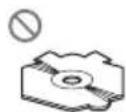

- Use12-cmor8-cmCD.Donotusean adapterwhenplaying8-cmCDs.
- DonotinsertanythingotherthanaCDinto theCDloadingslot.
- Donotusecracked, chipped, warped, or otherwisedamaged discsastheymaydamagetheplayer.
- UnfinalizedCD-R/CD-RWdiscplaybackis notpossible.
- Donottouchtherecordedsurfaceofthe discs.
- Storediscsintheircaseswhennotinuse.
- Avoidleavingdiscsinexcessivelyhotenvir- onmentsincludingunderdirectsunlight.
- Donotattachlabels, writeonorapplychemicalstothesurfaceofthediscs.
AdditionalInformation
- TocleanaCD, wipethediscwithasoft clothoutwardfromthecenter.
- Condensationmaytemporarilyimpairthe player'sperformance.Leaveittoadjustto thewarmertemperatureforaboutone hour.Also,wipeanydumpdiscswithasoft cloth.
- Playbackofdiscsmaynotbepossiblebe- causeofdisc characteristics, disc format, recorded application, playbackenvironment, storage conditions and soon.
- Textinformationmaynotbecorrectlydisplayeddependingontherecordedenvironment.
• Roadshocksmayinterruptdiscplayback. - Read the precautions with discs before using them.
DualDiscs
- DualDiscsaretwo-sideddiscsthathavea recordableCDforaudioononesideanda recordableDVDforvideoontheother.
- SincetheCDsideofDualDiscsisnotphysicallycompatiblewiththegeneralCD standard, it may not be possible to play the CDsidewith this unit.
- FrequentloadingandejectingofaDual Discmayresultinscratchesonthedisc. Seriousscratchescanleadtoplaybackproblemsonthisunit.Insomecases,aDual Discmaybecomestuckinthediscloading slotandwillnoteject.Topreventthis,we recommendyourefrainfromusingDual Discwiththisunit.
- Pleaserefertotheinformationfromthe discmanufacturerformoredetailedinformationaboutDualDiscs.
WMA,MP3andWAVfiles
- DependingontheversionofWindows MediaPlayerusedtoencodeWMAfiles, albumnamesandothertextinformation maynotbecorrectlydisplayed.
- Theremaybeaslightdelaywhenstarting playbackofWMAfilesencodedwithimage data.
- ISO9660Level1and2compliant.Romeo andJolietfilesystemsarebothcompatible withthisplayer.
- Multi-session playback is possible.
- WMA/MP3/WAVfilesarenotcompatible withpacketwritedatatransfer.
- Only64charactersfromthebeginningcan bedisplayedasafilename(includingthe extensionsuchas.wma,.mp3or.wav)ora foldername.
- Folderselectionsequenceorotheroperationmaybealtereddependingontheencodingorwritingsoftware.
- Regardless of the length of blank section between the song so for original recording, WMA/MP3/WAV disc will play with short pause between songs.
- Fileextensionssuchas.wma,.mp3or.wav mustbeusedproperly.
Exampleofahierarchy
Folder
File
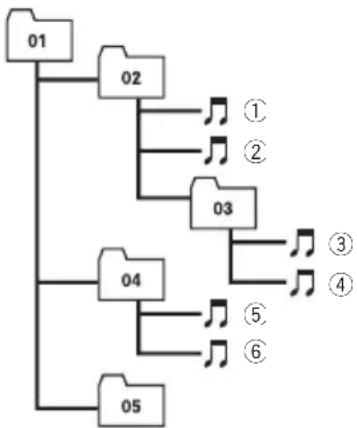
flowchart
graph TD
    01 --> 02
    02 --> 1
    02 --> 2
    02 --> 3
    03 --> 4
    04 --> 5
    04 --> 6
    05 --> 6
Level 1 L level 2 L level 3 L level 4
- Thisunitassignsfoldernumbers.Theuser cannotassignfoldernumbers.
- Folderhierarchyisalloweduptoeighttiers. However, practical hierarchyoffolderis lessthantwotiers.
- Upto99foldersonadisccanbeplayed back.
AdditionalInformation
Compressedaudiocompatibility
WMA
- Compatible format: WMAencoded by WindowsMediaPlayerVer.7,7.1,8,9or10
- Bitrate:48kbpsto320kbps(CBR),48kbps to384kbps(VBR)
•Samplingfrequency:32kHzto48kHz - WindowsMediaAudio9Professional, Lossless, Voice: No
MP3
- Bitrate:8kbpsto320kbps
- Samplingfrequency:16kHzto48kHz(32, 44.1,48kHzforeemphasis)
- CompatibleID3tagversion:1.0,1.1,2.2, 2.3,2.4(ID3tagVersion2.xisgivenpriority thanVersion1.x.)
• M3uplaylist:No
• MP3i(MP3interactive),mp3PRO:No
WAV
- Compatible format: Linear PCM(LPCM), MSADPCM
- Quantizationbits:8and16(LPCM),4(MS ADPCM)
- Samplingfrequency:16kHzto48kHz (LPCM),22.05kHzto44.1kHz(MSAD-PCM)
Russiancharacterchart
AdditionalInformation
Specifications
General
Powersource....14.4VDC(10.8Vto15.1V allowable)
Groundingsystem......Negativetype
Max.currentconsumption 10.0A
Dimensions(W×H×D):
DIN
Chassis....178×50×162mm
Nose....188×58×14mm
D
Chassis....178×50×162mm
Nose....170×47×14mm
Weight....1.3kg
Audio
Continuouspoweroutput...22W×4(50Hzto15000
Hz,5%THD,4Ωload,both
channelsdriven)
Maximumpoweroutput.....50W×4
Load impedance .... 4 Ω (4 Ω to 8 Ω allowable)
Preoutmaxoutputlevel/outputimpedance 2.2V/1kΩ
Bass/Mid/Treble:
Bass
Frequency.....100Hz
Gain....±13dB
Mid
Frequency.....1kHz
Gain....±12dB
Treble
Frequency.....10kHz
Gain....±12dB
Loudnesscontour:
Low....+7dB(100Hz),+4dB(10
kHz)
High....+10dB(100Hz),+6.5dB
(10kHz)
(volume:-30dB)
CDplayer
System....Compactdiscaudiosystem
Usablediscs....Compactdisc
Signalformat:
Samplingfrequency.....44.1kHz
Numberofquantizationbits
16;linear
Frequency characteristics...5Hz to 20000 Hz (±1dB)
Signal-to-noiseratio....94dB(1kHz)(IEC-Anetwork)
Dynamicrange....92dB(1kHz)
Numberofchannels......2(stereo)
WMAdecodingformat......Ver.7,7.1,8,9,10(2ch
audio)
(WindowsMediaPlayer)
MP3decodingformat......MPEG-1&2AudioLayer3
WAVsignalformat....LinearPCM&MSADPCM
FMtuner
Frequencyrange.....87.5MHzto108.0MHz
Usable sensitivity .... 8 dBf (0.7 μV/75 Ω, mono,
S/N:30dB)
Signal-to-noiseratio.....75dB(IEC-Anetwork)
Distortion....0.3%(at65dBf,1kHz,
stereo)
0.1%(at65dBf,1kHz,
mono)
Frequencyresponse....30Hzto15000Hz(±3dB)
Stereoseparation.....45dB(at65dBf,1kHz)
MWtuner
Frequencyrange.....531kHzto1602kHz(9kHz)
Usablesensitivity.....18μV(S/N:20dB)
Signal-to-noiseratio......65dB(IEC-Anetwork)
LWtuner
Frequencyrange.....153kHzto281kHz
Usablesensitivity....30μV(S/N:20dB)
Signal-to-noiseratio......65dB(IEC-Anetwork)

Note
Specificationsandthedesignaresubjecttopossiblemodificationswithoutnoticeduetoim-provements.
DYNAMIC—VOCAL—NATURAL—CUSTOM —FLAT—POWERFUL
Visit www.pioneer-eur.com to register your product.
4-1,MEGURO1-CHOME,MEGURO-KU
TOKYO153-8654,JAPAN
PIONEERELECTRONICS(USA)INC.
P.O.Box1540, LongBeach, California90801-1540, U.S.A.
TEL:(800)421-1404
PIONEEREUROPENV
Haven1087, Keetberglaan1, B-9120Melsele, Belgium
TEL:(0)3/570.05.11
PIONEERELECTRONICSASIACENTREPTE.LTD.
253AlexandraRoad,#04-01,Singapore159936
TEL:65-6472-7555
PIONEERELECTRONICSAUSTRALIAPTY.LTD.
178-184BoundaryRoad, Braeside, Victoria3195, Australia
TEL:(03)9586-6300
PIONEERELECTRONICSOFCANADA, INC.
300AllstateParkway, Markham, OntarioL3ROP2, Canada
TEL:1-877-283-5901
PIONEERELECTRONICSDEMEXICO,S.A.deC.V.
Blvd.ManuelAvilaCamacho13810piso
Col.LomasdeChapultepec,Mexico,D.F.11000
TEL:55-9178-4270
先鋒股份有限公司
總公司:台北市中山北路二段44號13樓
電話:(02)2521-3588
先鋒電子(香港)有限公司
香港九龍尖沙咀海港城世界商業中心
9樓901-6室
電話:(0852)2848-6488
PublishedbyPioneerCorporation.
Copyright©2006byPioneerCorporation.
Allrightsreserved.
права ©2006PioneerCorporation.Bce
права защищены.
PrintedinChina
Отпечатано в Китае