XS-EP314B - Speaker JVC - Free user manual and instructions
Find the device manual for free XS-EP314B JVC in PDF.


| Product Type | Car Speaker |
| Model | XS-EP314B |
| Brand | JVC |
| Speaker Size | 6.5 inches (165 mm) |
| Speaker Type | 2-way coaxial |
| Impedance | 4 ohms |
| Power Handling (RMS) | 50 Watts |
| Peak Power Handling | 300 Watts |
| Frequency Response | 40 Hz - 20 kHz |
| Sensitivity | 90 dB |
| Woofer Material | Polypropylene cone |
| Tweeter Type | Piezo or balanced dome |
| Mounting Depth | Approx. 50 mm (2 inches) |
| Mounting Diameter | Approx. 145 mm |
| Weight per Speaker | Approx. 0.9 kg (2 lbs) |
| Enclosure Type | Free air (no enclosure required) |
| Woofers Quantity | 1 |
| Protection | Built-in high-pass filter for tweeter |
| Compatibility | Most car audio systems with 4 ohm output |
| Included Accessories | Mounting hardware, grille, wire connectors |
| Warranty | 1 year limited |
Frequently Asked Questions - XS-EP314B JVC
User questions about XS-EP314B JVC
0 question about this device. Answer the ones you know or ask your own.
Ask a new question about this device
Download the instructions for your Speaker in PDF format for free! Find your manual XS-EP314B - JVC and take your electronic device back in hand. On this page are published all the documents necessary for the use of your device. XS-EP314B by JVC.
USER MANUAL XS-EP314B JVC
natural_image
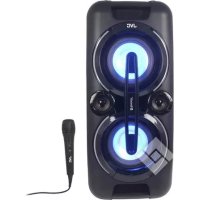
Black JVC audio jack with digital display and circular sound waves (no visible text or symbols on device body)Party Speaker
XS-EP314B
INTRODUCTION
- Thank you for buying our product.
- Please read through these operating instructions, so you will know how to operate your equipment properly. After you finished reading the instructions manual, put it away in a safe place for future reference.
SAFETY INFORMATION AND WARNINGS
SYMBOL DEFINITIONS
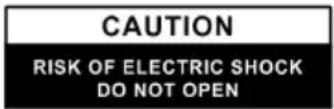
WARNING: TO REDUCE THE RISK OF ELECTRIC SHOCK DO NOT REMOVE COVER (OR BACK), NO USER SERVICEABLE PARTS INSIDE REFER SERVICING TO QUALIFIED SERVICE PERSONNEL.

The lightning flash with arrowhead symbol, within an equilateral triangle, is intended to alert the user to the presence of uninsulated “dangerous voltage” within the product’s enclosure that may be of sufficient magnitude as to constitute a risk of electric shock to persons.

The exclamation point within an equilateral triangle is intended to alert the user to the presence of important operating and maintenance (servicing) instructions in the literature accompanying the appliance.
SAFETY INSTRUCTIONS
- Read this Instruction Manual before you attempt to connect or operate the appliance.
- Keep these instructions in good condition. Heed all warnings. Follow all instructions.
- Save this Instruction Manual for future reference.
- The apparatus shall not be exposed to dripping or splashing and no objects filled with liquids, such as vases, shall be placed on the product. Dry location use only.
- No naked flame source, such as candles, should be placed on the product.
- Children should be supervised to ensure that they do not play with the appliance.
- Ventilation should not be impeded by covering the ventilation openings.
- Ensure that the unit is plugged into an AC 100-240V 50/60Hz power outlet. Using higher voltage may cause the unit to malfunction or even fire-catching. Turn off the unit before unplugging it from the power source to completely switch it off.
- Do not plug/ unplug the power plug into/from an electrical outlet with wet hands.
- If the power plug does not fit into your outlet, do not force the plug into an electrical socket if it does not fit.
- Use replacement parts, which are specified by the manufacturer.
- Install the unit in accordance with the manufacturer's instructions.
- Place the unit where there is good ventilation. Place the system on a flat, hard and stable surface. Do not expose to temperatures above 40^ . Allow at least 30 cm clearance from the rear and the top of the unit and 5 cm from each side.
- Press the buttons of the unit gently. Pressing them too hard can damage the unit.
- Dispose of used batteries in an environmentally responsible manner.
- Always ensure that the product is unplugged from the electrical outlet before moving or cleaning. Clean it with a dry cloth only.
- Unplug the product during lightning, storms or when it will not be used for long periods of time.
- This product has no user-serviceable parts. Do not attempt to repair this product yourself. Only qualified service personnel should perform servicing. Take the product to the electronics repair
shop of your choice for inspection and repair.
- NEVER let anyone, especially children, push anything into holes, slots or any other openings in the unit's casing as this could result in a fatal electric shock.
- Don't mount this product on a wall or ceiling.
- Do not place the unit near TVs, speakers and other objects that generate strong magnetic fields.
- Do not leave the unit unattended when it is in use.
PRODUCT OVERVIEW AND CONTROL BUTTONS
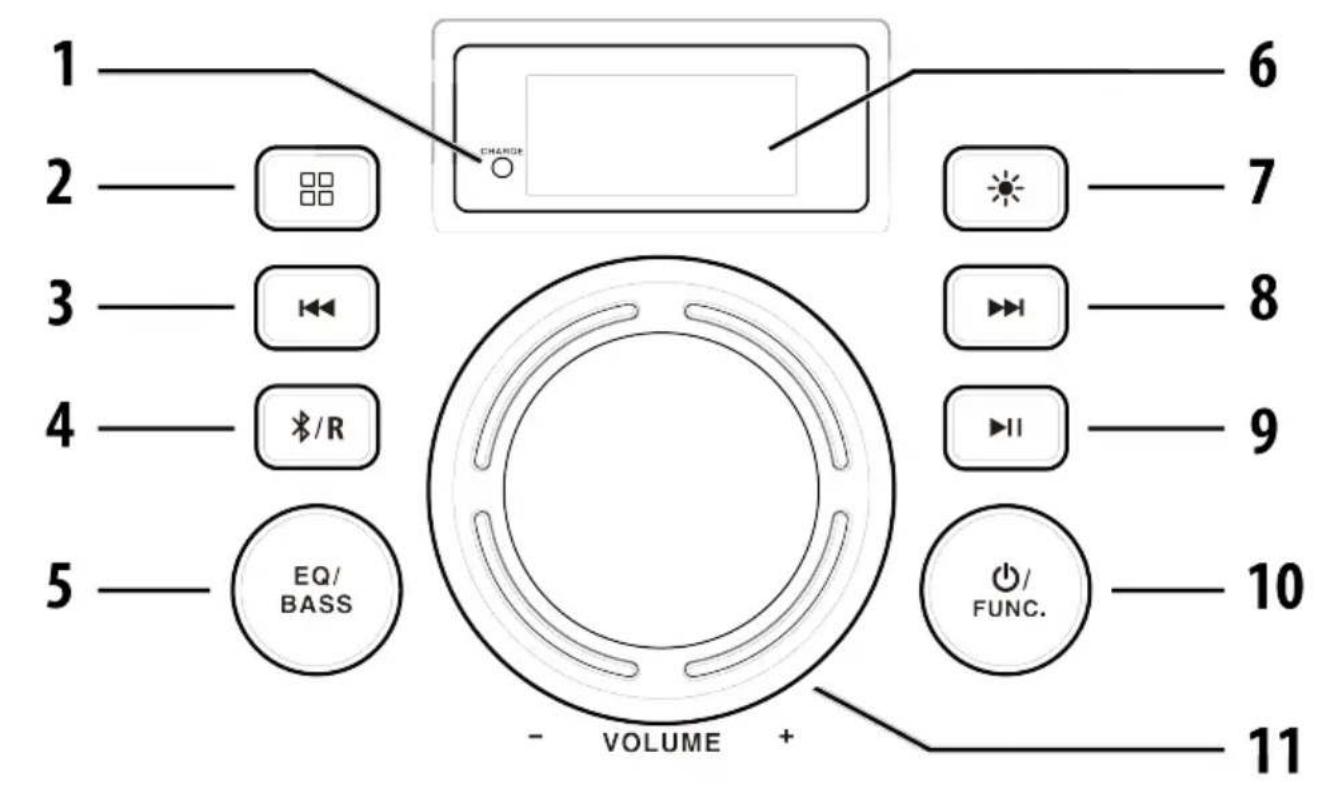
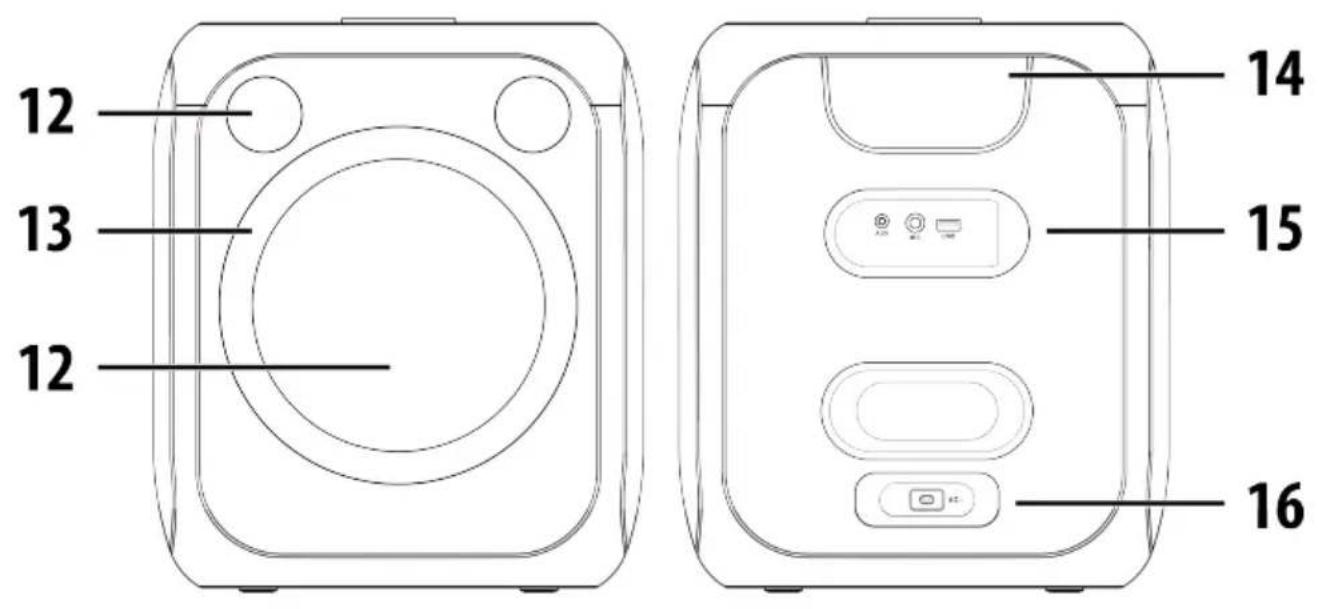
| 1. Charging indicator | 10. ∅FUNC. button |
| 2. button | 11. VOLUME knob |
| 3. button | 12. Speakers |
| 4. /R button | 13. LED light |
| 5. EQ/BASS button | 14. Handle |
| 6. Display | 15. AUX IN, Microphone/Guitar input, USB port |
| 7. button | |
| 8. button | 16. AC socket |
| 9. button |
NOTE: The USB port does not support charging external devices.
GETTING STARTED
CHARGING
NOTE: Before first-time use, fully charge the built-in battery.
Connect the AC power cord to the socket located on the back of the speaker and then to the wall outlet.
- The charging indicator glows red during charging.
- The charging indicator glows green when the battery is fully charged.
- The charging indicator will flash red when the speaker has a low battery.
WARNING: NEVER leave the speaker unattended while charging! If the speaker becomes hot, smokes, or gives off an odor during charging, terminate charging immediately!
WARNING: If the speaker is fully charged, unplug the AC power cord from the wall outlet to protect the battery from overcharging!
IMPORTANT: Please make a complete charge every three months to avoid shortening the battery lifespan.
WARRANTY: The capacity of the product battery decreases over time. Decreasing of battery capacity occurs during normal use of the appliance and is considered usual wear and tear of the appliance. Decreasing battery capacity is not a defect of the appliance.
BASIC OPERATION
Turning the speaker on/off
Press and hold the ⬇FUNC. button to switch the speaker on/off.
NOTE: In USB/Bluetooth/AUX mode, when the speaker is not providing the main function for around 15 minutes, the speaker will automatically switch into standby mode. Press and hold the ⏻/FUNC. button to turn on the speaker again.
Electrostatic Discharge hints – The unit may reset or may not reset to normal operation mode due to electrostatic discharge, switch it off and reconnect again.
Mode selection
Press the ⬆FUNC. button repeatedly to switch between USB/Bluetooth/AUX modes.
Volume setting
Rotate the VOLUME knob to increase or decrease the volume, the display will show the volume level [U30].
Equalizer settings
Press the EQ/BASS repeatedly button to select the equalizer.
Bass settings
Press and hold the EQ/BASS button to increase the bass effect. Press and hold the button again to deactivate the bass effect.
LED light settings
Press the ✦ button repeatedly to select the LED light effect. The display will show [L-1] [L-5] . To deactivate the LED light press the ✦ button repeatedly until [LOFF] appears on the display.
Microphone settings
- Volume - Press the ☐ button once, the display will show [CU00], then turn the VOLUME knob to increase or decrease the microphone volume.
- Echo effect - Press the ☐ button twice, the display will show [EC00], then turn the VOLUME knob to increase or decrease the echo effect.
- Voice changing effects - Press the ☐ button three times, the display will show [OFF], then turn the VOLUME knob to select one of the four effects. The display will show [H-1] \~ [H-4]. To deactivate the effect turn the knob until [OFF] appears on the display.
USB
NOTE: The device supports USB drives (FAT32, exFAT) with up to 256 GB of memory. Only support MP3 audio format. Do not use any USB extension cable for connecting the USB drive. The speaker may not be compatible with all USB drives, this is not an indication of a problem with the speaker.
In USB mode, insert the USB drive into the speaker. The speaker will start playing the saved music automatically.
Playback
- Press the ▶ button to play/pause the playback.
- Press the ↗ button to skip to the previous/next track.
- Press and hold the ↗button to fast forward/rewind.
Playback modes
- Press the XR button repeatedly to select one of the modes:
- Repeat one [ONE]- The current track will be played repeatedly.
- Repeat all [ALL] - All tracks will be played repeatedly.
- Repeat folder [FOLd]* - The current folder will be played repeatedly.
- Random playback [rAN] - All tracks will be played in random order.
* This option is only available for USB drives containing multiple folders.
BLUETOOTH
In Bluetooth mode, [bt] will flash on the display. This means the speaker is not paired with any Bluetooth device. Activate Bluetooth of the mobile phone and search for device name XS-EP314B then connect it. If the pairing is successful, [bt] will be solid on the display.
Disconnecting the paired mobile phone
Press the ⚠/R button to disconnect the current device. The speaker will be in pairing mode, [bt] will flash on the display.
Playback
- Adjust the volume to your desired level.
- Press the ▶ button to play/pause the playback.
- Press the ↗ button to skip to the previous/next track.
NOTE: The operational range between the speaker and the device is approximately 8 meters. If the signal strength is weak, your Bluetooth receiver may disconnect, but it will re-enter pairing mode automatically. For better signal reception, remove any obstacles between the speaker and the Bluetooth device. Compatibility with all devices and media types is not guaranteed. Some mobile phones with Bluetooth functions may connect and disconnect as you make and end calls. This is not an indication of a problem with the speaker.
AUX
This speaker provides AUX IN socket, through this 3,5 mm jack external audio sources can be connected to this speaker and be amplified.
- In AUX mode, connect your device with a cable (not included) to the AUX IN socket. Adjust the volume to your desired level.
NOTE: When using an external device, all playback features can only be controlled by the external device.
TWS
If you have two speakers of this model, you can connect the two speakers by TWS function to become stereo output.
NOTE: TWS function is only available for Bluetooth mode.
- Turn on one of the speakers, switch it to Bluetooth mode, and connect your mobile phone to it, this speaker will become the master unit.
- Turn on the second speaker and switch it to Bluetooth mode, [bt] will flash on the display.
- Press and hold the /R button on the master unit, [tS] will flash on the display.
- The second speaker will connect automatically with a sound indicating the connection is done. The master unit's display will show [tS-r] and the second unit's display will show [tS-L].
NOTE: Both units can be controlled by one of the speakers when connected.
Canceling the connection
Press and hold the ✗R button on any unit to end the connection between the two speakers.
SPECIFICATIONS
GENERAL
Power Supply AC 100 \~ 240 V; 50/60 Hz
Power consumption < 40 W
Battery type Li-ion, 14,8 V / 3,6 Ah
Battery Charging Time approx. 2,5 hours
Battery Playback Time 15 hours (50 % Volume)
USB port 5 V / 200 mA
AUX IN 3,5 mm jack
Microphone/Guitar input 6,3 mm jack
Weight approx. 7,2 kg
Dimensions 300 x 350 x 300 mm
Operation temperature +5°C \~ +35°C
BLUETOOTH SECTION
Bluetooth V 5.3, Supports A2DP profile
BT Frequency Range 2402 – 2480 MHz
EIRP 8,86 dBm
AUDIO SECTION
Frequency Range 40 Hz - 15 kHz
Power output 80 Watts RMS
WE RESERVE THE RIGHT TO CHANGE TECHNICAL SPECIFICATIONS.
PACKAGE CONTENTS
Party speaker, AC power cord, Microphone, Instruction Manual
MAINTENANCE / CLEANING
- Ensure the unit is fully unplugged from the mains socket before cleaning.
- Never use any harsh or strong solvents to clean the device since these may damage the surface of the device. Dry, soft cloth is appropriate, however, if the device is extremely dirty, it may be wiped off with a slightly moist cloth. Make sure the device is dried off after cleaning.
When you are necessary to ship the device, store it in its original package. Save the package for this purpose.
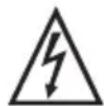
WARNING: DO NOT USE THIS PRODUCT NEAR WATER, IN WET AREAS TO AVOID FIRE OR INJURY OF ELECTRIC CURRENT. ALWAYS TURN OFF THE PRODUCT WHEN YOU DON'T USE IT OR BEFORE A REVISION. THERE AREN'T ANY PARTS IN THIS APPLIANCE WHICH ARE
REPARABLE BY CONSUMER. ALWAYS APPEAL TO A QUALIFIED AUTHORIZED SERVICE. THE PRODUCT IS UNDER A DANGEROUS TENSION.


TO AVOID DANGER OF SUFFOCATION, KEEP THE PLASTIC BAG AWAY FROM BABIES AND CHILDREN. DO NOT USE THIS BAG IN CRIBS, BEDS, CARRIAGES OR PLAYPENS. THIS BAG IS NOT A TOY.
Disposal of old Electrical & Electronic Equipment (Applicable in the European Union and other European countries with separate collection systems)
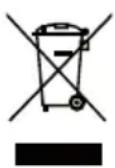
This symbol on the product or on its packaging indicates that this product shall not be treated as household waste. Instead it shall be handed over to the applicable collection point for the recycling of electrical and electronic equipment. By ensuring this product is disposed of correctly, you will help prevent potential negative consequences for the environment and human health, which could otherwise be caused by inappropriate
waste handling of this product. The recycling of materials will help to conserve natural resources. For more detailed information about recycling of this product, please contact your local Civic Office, your household waste disposal service or the shop where you purchased the product.
Bluetooth®
The Bluetooth® word mark and logos are registered trademarks owned by Bluetooth SIG, Inc. and any use of such marks by Shenzhen Royqueen Audio Technology Co., Ltd. is under license. Other trademarks and trade names are those of their respective owners.
Hereby, ETA a.s. declares that the radio equipment type XS-EP314B is in compliance with Directive 2014/53/EU. The full text of the EU declaration of conformity is available at the following internet address: www.JVCAUDIO.cz/doc
ÚVOD
This product is manufactured and distributed exclusively by ETA a.s., serviced and warranted by its designated partner.
"JVC" is the trademark of JVCKENWOOD Corporation, used by such company under license.