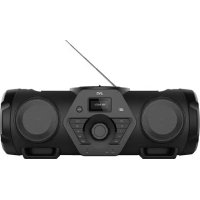
BoomBlaster RVNB200BT - Loudspeaker JVC - Free user manual and instructions
Find the device manual for free BoomBlaster RVNB200BT JVC in PDF.



| Product type | Amplified speaker with CD player and FM radio |
| Brand and model | JVC BoomBlaster RVNB200BT |
| Dimensions (W x H x D) | 696 x 261.5 x 265 mm |
| Weight | 7.235 kg |
| Power supply | AC 100-240 V, 50/60 Hz |
| Power consumption | 60 W (standby < 0.5 W) |
| Amplifier output power | 2 x 30 W |
| Frequency response | 30 Hz - 20 kHz (±3 dB) |
| FM radio | Yes, range 87.50 - 108.00 MHz, 30 presets, RDS |
| Bluetooth | Version 5.0, class 2, range approx. 10 m, profiles A2DP/AVRCP |
| CD player | Audio CD and CD-R/RW with MP3 files |
| USB port | Yes, front, MP3 compatible (FAT16/32, max. 500 mA) |
| AUX input (Line-In) | 3.5 mm jack socket |
| Microphone and guitar inputs | 6.35 mm jack socket (mono), adjustable, echo effect |
| LED lighting | Light effects in the speakers, 5 modes |
| Equalizer | Presets: ROCK, JAZZ, POP, CLASSIC, FLAT, 2-level bass boost |
| Clock functions | Sleep timer, alarm, 12/24 h display, automatic update via RDS or manual |
| Optional battery | JVC BN-R5000 rechargeable battery (not included) |
| Remote control | Yes, with included AAA battery |
| Care and cleaning | Clean the cabinet with a soft dry cloth; CD with a specific cloth in straight movements |
| Safety | Automatic power off in standby after 15 minutes, overload protection, detailed usage instructions |
| Warranty | 2 years, parts and labor, subject to conditions (see manual) |
Frequently Asked Questions - BoomBlaster RVNB200BT JVC
User questions about BoomBlaster RVNB200BT JVC
0 question about this device. Answer the ones you know or ask your own.
Ask a new question about this device
Download the instructions for your Loudspeaker in PDF format for free! Find your manual BoomBlaster RVNB200BT - JVC and take your electronic device back in hand. On this page are published all the documents necessary for the use of your device. BoomBlaster RVNB200BT by JVC.
USER MANUAL BoomBlaster RVNB200BT JVC
Before switching on the power supply 3
Safety instructions 3
Before Start-up 6
Handling CDs 6
Worth knowing about USB devices 6
Component names and functions 8
Basic functions 11
Turning on the system 11
Navigate in menus 11
Set menu language 11
Sleep timer 12
Using CD and USB 13
Preparation 13
Playing back CDs or audio files (USB, CD) 14
Selecting a folder (audio files only) 14
Programming tracks and files 15
-
Procedure for audio CD 15
-
Procedure for audio files 15
random play and repeat function 16
-
Procedure for audio CD 16
-
Procedure for audio files 16
using the DAB ^+ radio 163
setting the DAB + stations 163
selecting a DAB + station 173
Storing stations in the station memory 17
Expanded DAB + information 18
Menu functions DAB 18
Using the UKW radio 19
Setting the FM stations 19
Storing stations in the station memory 19
Menu functions UKW 20
Using BLUETOOTH 20
Pair BLUETOOTH devices 20
Playback via BLUETOOTH 20
Using line-in 21
Playing an external playback device 21
Guitar and microphone input 21
General information 22
Maintenance and care 22
Disposal 22
Technical specifications 23
Guarantee 24
Safety instructions!
Attention:
Read this page carefully to ensure safe operation of the device.
Read instructions carefully!
- Follow all safety and operating instructions when using this product.
Keep the instructions in a safe place!
- You should keep the safety and operating instructions for future reference.
Follow the warning instructions!
- You should strictly follow all warnings provided on the product and listed in the operating instructions.
1. Clean only with a dry cloth!
- Unplug the mains adapter of this device from the mains socket before cleaning this product. Never use liquid cleaning detergents or cleaning sprays. Use only a damp cloth for cleaning.
2. Accessories
- Use only the accessories specified by the manufacturer.
3. Do not use this device near water
- The device should never be exposed to water droplets or water splashes, such as those found near a bathtub, wash basin, kitchen sink, washing machine, wet basement or swimming pool. Never place containers filled with liquids, such as e.g. flower vases, on the device.
4. Ventilation
- Slots and openings in the housing are used to ventilate the device to ensure reliable operation of the device and to protect the device from overheating and possible autoignition. Do not block the ventilation holes. Install the device according to the manufacturer's instructions. Never block the ventilation holes by placing the device on a bed, sofa, rug, or similar soft surfaces. This device should not be installed in a bookshelf or built-in wardrobe unless adequate ventilation is ensured.
5. Power supply
- This device may connected only to the mains voltage indicated on the device. If you are unsure about the type of power supply in your home, contact your specialised dealer or power company.
6. Power cord
- Make sure that you can not trip over the cable or that it is being bent in the immediate vicinity of a power outlet, including auxiliary sockets. For pluggable equipment, the socket-outlet shall be installed near the equipment and shall be easily accessible.
7. Thunderstorm
- The device should be disconnected from the mains during thunderstorms and if it is not used for a long time.
8. Overload
- Never overload mains sockets, extension cords or multiple sockets, otherwise there is a risk of fire or electric shock.
9. Penetration of foreign material and liquid
- Be careful not to allow foreign material or liquid to enter this device through holes, otherwise it may come into contact with high voltage components or short circuit resulting in a fire or electric shock. Never spill liquids of any kind on this device.
10. Maintenance
- Never attempt to carry out the maintenance of this device yourself, because live parts can be exposed through the openings or by removing covers, contacting which can be hazardous. Leave all maintenance work to qualified service personnel.
11. Damage requiring repair
- Maintenance and repair work should only be carried out by a qualified customer service.
Maintenance/repair is required if the device has been damaged if liquid has entered the device, if objects have entered the device, if the device has been exposed to rain or moisture, when it stops working properly or has fallen down.
12. Spare Parts
- If replacement parts are required, make sure that the customer service technician uses spare parts specified by the manufacturer or that have the same characteristics as the original parts. Unauthorized parts may cause fire, electric shock or other accidents.
13. Safety test
- After completing service or repair of this device, ask the customer service technician to perform a safety test to determine if the equipment is in good order.
14. Heat
- Do not install the device near hot surfaces, such as radiators, fan heaters, stoves or other devices (including amplifiers) that can be hot. Never place objects with open flame, such as candles or lanterns, on or near the device. The installed batteries should not be exposed to excessive heat such as direct sunlight, fire or the like.
15. Battery and accumulator
- If you do not use the device for a month or more, remove the battery from the battery compartment of the remote control to prevent leakage. Immediately dispose of leaking batteries properly and observe all legal regulations. Leaking batteries can cause injury and damage the device.
To minimize the risk of electric shock, fire, etc.
-
do not remove screws, covers or body parts.
-
the power button does not completely disconnect the power supply in any position.
In order to disconnect the device from the power completely, unplug the power cord from the socket and remove any built-in accumulator.
Caution!
Danger of explosion in case of:
- high or low extreme temperatures to which a battery may be exposed during use, storage or transport;
- low air pressure at high altitude;
- the replacement of a battery by an incorrect type that can bypass a fuse (for example, some lithium battery types);
- the disposal of a battery in fire or a hot oven, or the mechanical crushing or cutting of a battery;
- leaving a battery in an extremely high temperature environment that may cause an explosion or leakage of flammable liquids or gases;
- extremely low air pressure, which may cause an explosion or leakage of flammable liquids or gases.
EU Declaration of Conformity
Hereby, JVCKENWOOD Corporation declares that the radio equipment type RV-NB200BT and RV-NB300DAB complies with Directive 2014/53/EU. The full text of the EU Declaration of Conformity is available at the following Internet address:
http://www3.jvckenwood.com/ecdoc/
Manufacturer:
JVCKENWOOD Corporation
3-12. Moriyacho, Kanagawa-ku, Yokohama-shi, Kanagawa 221-0022, JAPAN
Authorised Representative (EU):
- CLASS 1 LASER PRODUCT
- CAUTION: Do not open the casing (Besides of accessing the compartment for the accumulator) The device contains no user serviceable parts; Maintenance should only be carried out by qualified personnel. Open the compartment for the accumulator only in case of switched or and completely disconnected from the mains power grid.
Automatic energy saving function
The stereo system is equipped with an automatic energy saving function. This switches to standby mode after 15 minutes under the following conditions:
- There is no CD inserted or the CD player did not start
- The USB port is not assigned, or the playback function did not start
- STOP or PAUSE in CD or USB mode
- In the AUX-IN mode without music playback
- STOP or PAUSE in AUX-IN mode
- In BLUETOOTH mode without device connection
- With BLUETOOTH connection without audio playback
First use
When switching the device to DAB + for the first time, an automatic DAB + station search is initiated. Please wait until this process is completed. For more information, please refer to the section "Using the DAB + Radios". (Only* RV-NB300DAB model)
Handling of CDs
Precautions for handling
Hold the CD so that you do not touch the signal surface. (The unprinted side is the playing side.)
Precautions regarding CDs
Use only use CDs with mark. In some cases, CDs with this marking may not play back properly.
Worth knowing about USB devices
Notes on using a USB device
This device is capable of playing audio files stored on a flash memory or digital audio player if these devices have a USB port (these devices are referred to as USB Devices in this document).
The following restrictions apply to the usable USB Devices:
Usable USB Devices
- USB Devices that belong to the USB Mass Storage Class.
- USB Devices whose maximum power consumption is 500mA or less.
- USB Mass Storage Class: USB Devices that the PC recognizes as external storage without the need for a special driver or application software.
- Consult your dealer if you are not sure whether your USB device complies with the specifications for the USB Mass Storage Class.
- Using a USB device that is not supported may result in erroneous playback or display of the audio file.
Even if you use a USB device that meets the above specifications, audio files may not play back properly depending on the type or condition of the USB device.
Note on the Operating Instructions:
All data on DAB+ refer only to the RV-NB300DAB model.
Unpacking
Carefully unpack the device and make sure all accessories are present:
- Operating instructions
Remote Control - Battery LRO3/AAA
Power cord - Carrying strap
- 2 × fastening buckle for carrying strap
The remote control
- Insert the battery into the remote control, observing the correct polarity (+ and -).

- The supplied battery is intended for functional testing and may have a limited lifetime.
- If the range of the remote control decreases, replace the old battery with a new one.
- Exposing the remote control sensor to direct sunlight or high-frequency fluorescent light may cause malfunction. In such cases, you should move the system to a different location to avoid such malfunction.
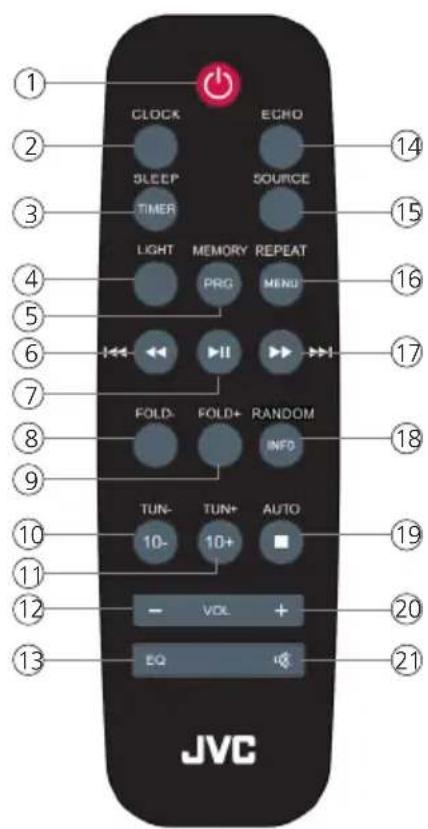
1 - Standby / On
2 - Clock
3 - Alarm clock / sleep timer
4 - Lighting Effects
5 - Memory / Program
6 - Fast Rewind / Previous
7 - Play / Pause
8 - Folder selection backward
9 - Folder selection forward
10-Backward search / 10-fold track jump backward
11 - Forward search / 10-fold track jump forward
12 - Lower the volume
13 - Equalizer
14 - Echo microphone input
15 - Source Selection
16 - Repeat / Menu
17 - Fast forward / Next
18 - Information / Random
19 - Stop / Auto Tune
20 - Increase the volume
21 - Muting
Note: By briefly pressing the key, the function described above the key is activated. To perform the function described on the key, press and hold the key.
Front side:
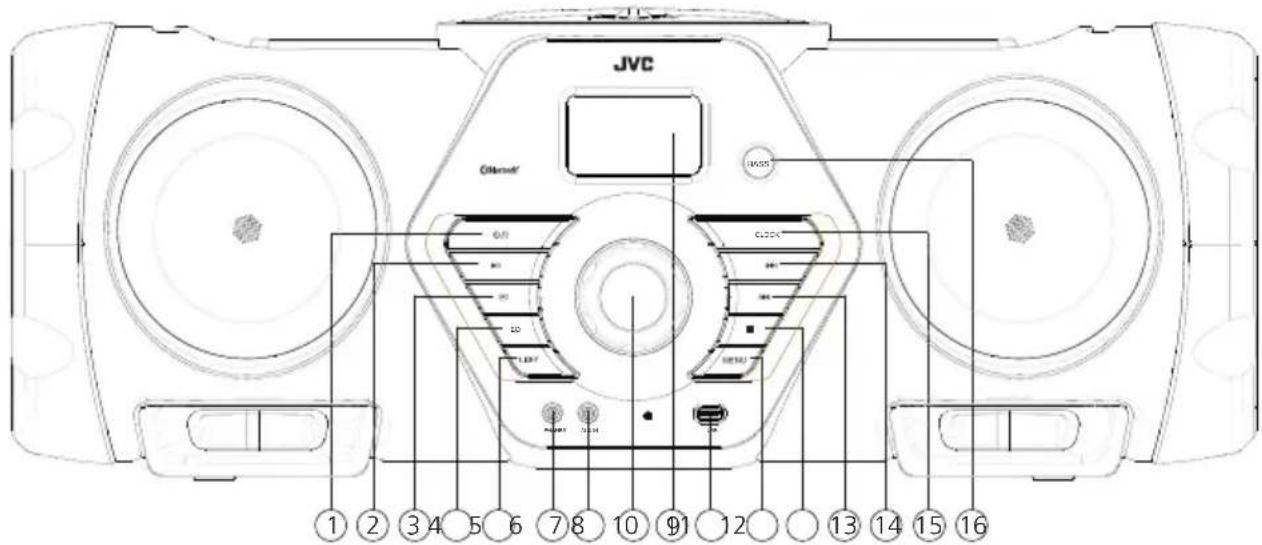
1 - Standby / On
9 - Display
2 - Play / Pause
10 - USB port
3 - Source Selection
11-Menu
4 - Equalizer
12 - Stop
5 - Speaker effect lighting
13 - Previous
6-Headphone port
14 - Next
7 - AUX-In port
15 - Clock
8 - Volume
16 - Bass
Backside:
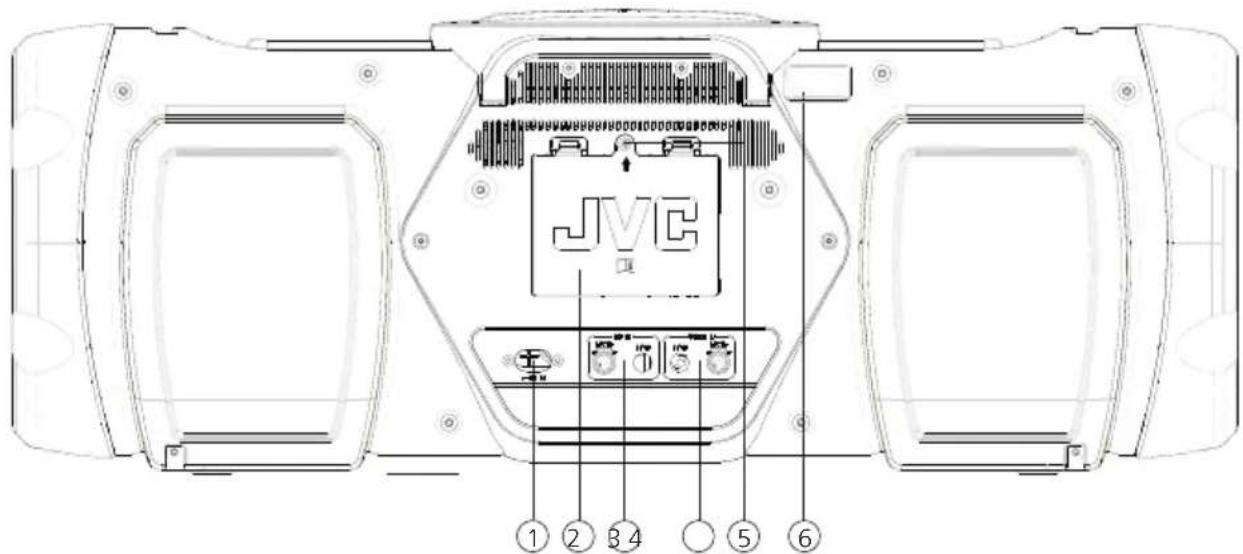
1 - AC Power Inlet
2 - Battery compartment
3 - Microphone input
4-Guitar input
5 - Screw to open Battery Compartment (see page 10)
6 - Antenna
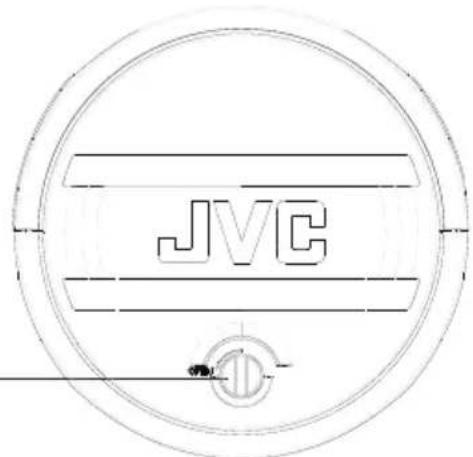
Open the CD compartment
Turn the lock (1) slightly 90 degrees counter-clockwise to open the CD compartment.
To close the lid, close it by hand until the lock engages again.
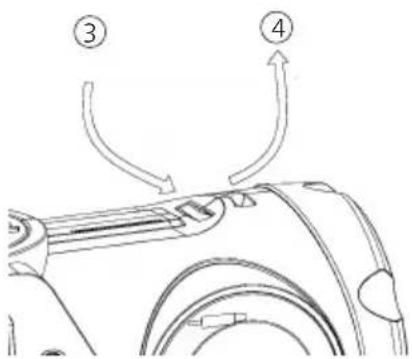
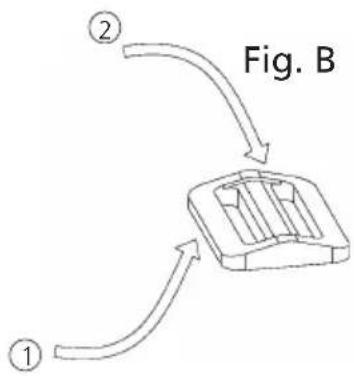
Mounting the carrying strap
- Take one end of the strap with the hem pointing upwards, and thread it from below into the buckle (1). Please pay attention to the correct alignment of the buckle. Insert the strap from above into the second opening of the strap buckle (2) and pull the strap out of the buckle approx. 20 cm
-
The end of the strap is now inserted into the casing holder (3) and pulled out of the second casing holder (4).
-
Thread the strap back through the buckle, pushing in the end over the previous belt rout. Tighten the strap, making sure the strap can not slip out of the buckle. With the other side of the belt please proceed to point 1.
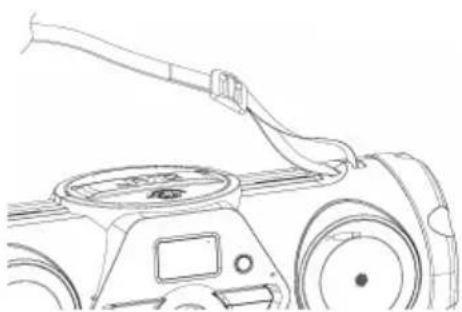

A rechargeable battery is available for the RV-NB200BT and RV-NB300DAB. To install the battery in, please proceed as follows:
Attention: Use only the battery pack BN-R5000! Risk of explosion if the battery is replaced by an incorrect type.
- Remove the battery compartment cover locking screw (indicated by arrow marking ⑤ , see page 8) with a suitable Phillips screwdriver.
- Press down the left and right latches of the lid and remove them.
- The battery should be positioned so that the connection cable is pointing to the left and the screwed bottom is down.
- Connect the connecting cables and carefully insert the battery into the battery compartment. The connection cable is stowed on the left side of the compartment. Avoid crushing the cables.
- Put the lid back into the battery compartment and snap the two tabs into the compartment. Then insert the screw and tighten.
The battery is being charged in the device. You can read the charge status in the display as a symbol display.
Please note: In battery mode, this device can not be turned on with remote control. This is to extend the lifetime of the battery.
If you dispose of the product, please remove the battery pack for separate disposal.
Basic functions
Connect the power cord to the device and to a suitable power outlet.
Telescopic antenna
- The telescopic antenna is located on the top of the device, to the left of the CD compartment.
- Pull out all the elements completely.
- Align the antenna for the best reception.
Power On
Press the button on the remote control or on the device. The display will show "JVC Boomblaster". Press the button again to switch off the device.
Volume control
Turn the "VOL" knob on the device or press the "VOL +/-" button on the remote control to increase or decrease the volume. The selected volume is displayed graphically.
Temporarily turning off the volume: To do this, press the button on the remote control. The "MUTE" flashes in the display. The next time the button is pressed, the original volume is restored.
Selecting a Source
Press the → button on the main device or on the "SOURCE" button on the remote control to select the desired playback source.
Equalizer
Press the EQ button on the remote control to successively enter the following settings: ROCK -> JAZZ -> POP -> CLASSIC -> FLAT ->
Using the "BASS" button on the device a 2-stage bass amplification can be called up.
Navigate in menus
To enter the menu, press the "MENU" button on the device. The selection of the menu item or the setting of numbers is done via buttons, the confirmation by pressing the button.
Setting the menu language
- Turn on the device and select the source USB.
- Press the "MENU" button, and the "System" menu will appear in the display. Then confirm with the button.
- By pressing the buttons or select the "Language" menu and then confirm.
- Use the buttons or to select and confirm the desired language.
Basic functions
Setting the display illumination
The display illumination can be programmed in 3 brightness levels. The following settings are possible in the "Backlight" menu:
"Dim Level": Brightness of the display when the radio is switched on.
Choices: "High" / "Medium" / "Low"
"On Level": Brightness adjustment for operation and standby.
Choices: "High" / "Medium" / "Low"
"Timeout": Time until the display is adjusted to the lighting level in the "Dim setting".
Choices: "On / 10 sec / 20 sec / 30 sec / 45 sec / 60 sec / 90 sec / 120 sec / 180 sec"
"On" means that the radio always remains in the brightness level of the "On setting".
For adjustment, please proceed as follows:
- Turn on the device and select the source USB.
- Press the "MENU" button, using the ll select the "System" menu.
- Use the buttons or to select the menu "Backlight" and confirm.
- Select the functions in the individual menus "On Level" / "Dim Level" / "Timeout" and confirm with the button.
Setting the sleep timer
The sleep timer is used to automatically turn off the device after a preset period of time. For adjustment, please proceed as follows:
- Turn on the radio and select the source USB.
- Press the "MENU", using ll select the"System" menu and confirm with the ll button.
- Using the buttons or select the menu "Sleep" and confirm.
- In the following menu, select the desired length of the runtime. Confirm with the button.
- The display shows "SL" in the middle line on the left to indicate an active sleep timer. If you would like to deactivate the sleep timer, please select the time setting "Off".
Setting the time
When receiving a DAB + or FM station in sufficient quality, the clock will be set automatically. Depending on the reception strength, this process may take some time. If no corresponding station is available, you can also set the time manually:
- Turn on the radio and select the source USB.
- Press the "MENU" button, use the button to select the "System" and press this button once again. Alternatively, you can use the "CLOCK" button on the remote control.
- Use the button or to select the "Time" and use the play/pause button to confirm.
- Select "Set Time/Date" and confirm. Then select, set and confirm hours, minutes, day, month and year.
Basic functions
Additional settings in the "Time" menu
The following functions can be set in the "Time" menu:
"Auto Update": Setting from which source the time is automatically retrieved.
Choices: "Update all" / "Update DAB" / "Update FM" / "No update"
"Set 12/24 hours": Setting the time format.
Choices: "Set 24 hours" / "set 12 hours"
"Set date format": Setting the date format
Choices: "DD-MM-YYYY" / "MM-DD-YYYY"
Effect lighting of the speakers
The Boomblaster is equipped with LED effects in the front speakers. Using the "LIGHT" button you can set 5 different modes on the Boomblaster.
Using CD and USB
Preparation
Insert a CD
- Open the CD compartment as described on page 9 of this manual.
- Place a CD with the printed side facing up in the CD compartment.
- Close the CD compartment.
Connecting USB devices
- Press the "Source" button to select USB mode.
- Connect the USB device to the USB port on the front panel.
Remove the USB device
- Press the button to select standby mode.
-
Remove the USB device from the USB port.
-
Always wait until the device has completely read the CD/USB device before proceeding.
- If no CD is loaded in the disc tray, "NO DISC" will be displayed.
- If there is no playable audio file in the USB device, "NO FILE" is displayed.
- For audio files, the read time may exceed 10 seconds if there is a lot of music on a CD or USB device.
Playing a CD or audio file (USB, CD)
On the remote: Use the "SOURCE" button to select the source and press button to start the playback.
On the main device: Use the → button to select the desired source and press the button to start playback
For USB devices or CDs containing audio files (such as MP3), the number of existing folders and files is displayed as follows:
F - - XXT - - XXX
The number behind "F" stands for the number of folders and the 2 number block the total no. of tracks.
For audio CDs, information about the number of tracks and total playing time is displayed as follows:
XX amp; XX : XX
The first number block stands for the number of tracks and the 2 for the total playing time of the CD.
Basic operating functions
Stop playback: Press the button on the device or on the remote control to stop the playback.
Interrupt the playback: Press the button on the device or on the remote control to interrupt the playback. The signal flashes on the display. Another pressing of the button resumes playback.
Searching for a specific passage during playback: Press and hold the button on the device or on the remote control more than 2 seconds to activate fast reverse or fast forward. Once the desired position has been reached, release the corresponding button.
Select a specific track: Press the or button on the main devise or on the remote control in playback, pause or stop mode.
Jump every 10 track: Press the +10 or -10 button on the remote control in play, pause or stop mode.
Select a specific folder (audio files only): Press on the Fold+ or Fold- on the remote control to select a folder.
Display the ID3 information: Press the "INFO" button on the remote control to display ID3 tags.
Programming tracks and files
You can use the remote control to program tracks on an audio CD or files in a sequence of your choice. The following number of storage locations is available:
Audio CD: 20 memory slots Files: 99 memory slots
Procedure for audio CD
- The source "CD" must be in stop mode, otherwise no programming is possible.
- Press the PRG button to start the programming mode.
- The display now shows "P01 T--001". The second number block shows the current track, the first number block the current memory location.
- Use the or button to select the track you want to save to the current memory location.
- Press the PRG button to confirm the operation.
- After that, the next memory location will be displayed. Repeat steps 4 and 5 until your selection is complete or the number of memory slots is full. In this case "Full" appears in the display.
- Using the button you can start the playback of the programmed tracks.
- Pressing the button twice clears the programming.
Procedure for audio files
- The source "USB" must be in Stop mode, otherwise no programming is possible.
- Press the PRG button to start the programming mode.
- The display now shows "P01 F--01 001" an. The first number block shows the current memory location, the second number block the current folder and the third block the current track number.
- Using the Fold+ or Fold- button you can select a folder or keep the current folder.
- Use the or button to select the track you want to save to the current memory location.
- Press the PRG button to confirm the operation.
- After that, the next memory location will be displayed. Repeat steps 4 and 6 until your selection is complete or the number of memory slots is full. In this case "FULL" appears in the display.
- Using the button you can start the playback of the programmed tracks.
-
Pressing the button twice clears the programming.
-
If the button is pressed during programming, the process is aborted. Switching off the device deletes an existing program.
Procedure for audio CD
- Press the "RANDOM" button on the remote control to start random playback. Pressing the "RANDOM" or pressing the button will cancel random playback.
- Press the "REPEAT" button on the remote control to activate the repeat function. Repeated pressing switches the following functions:
Repeat the current track (Display "REP-1")
Repeat all tracks (display "REP-ALL")
Press the button to start playback.
Pressing the button turns off the repeat function.
Procedure for audio files
- Press the "RANDOM" button on the remote control to start random playback. Pressing the "RANDOM" or pressing the button will cancel random playback.
- Press the "REPEAT" button on the remote control to activate the repeat function. Repeated pressing switches the following functions:
Repeat the current track (Display "REP-1")
Repeat the current folder (Display "REP-DIR")
Repeat all tracks (display "REP-ALL")
Press the button to start the repeat function.
Pressing the button turns off the repeat function.
Using the DAB + radio (RV-NB300DAB)
Press the "SOURCE" button on the remote control or the → button on the device until "DAB" appears in the display.
Start the automatic station search
- Press the "MENU" button on the device to enter the DAB menu.
The display shows "Full search". Start the search with the II button.
- During the search, the display will show the number of stations found so far.
If no stations are found, "No DAB Station" will be displayed for approx. 2 seconds and then changes to "Full scan".
Please check the correct orientation of the antenna or try to find another location for the device for better reception.
Manual tuning of ensembles
- Press the "MENU" button on the device to enter the DAB menu.
- Press the button until "Manual tune" appears in the Display.
- Pressing the button confirms the function and the currently set channel with the corresponding frequency is shown in the display.
- Press the button to manually select another channel.
- Press II to confirm the selection. After that, the signal level is shown in the display, another press loads the current ensemble.
Selecting a DAB + station
The stations stored alphabetically in the station list can be called up as follows:
- Press the TUN+ or TUN- button on the remote control to scroll backwards or forwards in the station list.
- When the desired station is selected, press the button on the remote control to start playback. The Display will show"Playing".
- If the reception level on the selected station is insufficient for trouble-free playback, "Service not available" appears in the display. In this case please select another station.
Storing stations in the station memory
To store DAB stations for easier retrieval, 30 memory slots are available. To assign the memory, please proceed as follows:
- Select a station to save
- Press the PRG button until the "Preset Store" and a memory location is showed on the Display. An empty memory location is displayed with "Empty", an assigned memory space with the name of the sender. You can also reassign an already assigned memory.
- Use the or buttons to select a memory location.
- Briefly press the ll button to save the station. The display briefly shows "Preset X Stored".
- The stations can now be selected using the or button on the device.
Expanded DAB + information
With DAB + additional information is transmitted in addition to the music signal. These can be retrieved as follows.
Press the "INFO" button on the remote control to retrieve the following information in succession:
- Signal level: The display shows the level using icons from left to right. The more icons displayed, the better the reception.
- PTY (Program Type): This designates the classification of the stations according to genre, e.g. Pop, News, Religion, Info, Classics, etc.
- Name of the ensemble, e.g. DR Germany
- Display of channel and frequency of the set station
- ERR XX: This information shows the error rate of the digital reception. This is also dependent on the signal level and can also be used to align the antenna.
- XX kbps: Display of the data rate of the station e.g. 80 kbit/s. The data rate may vary from station to station.
- DABPLUS: Designates the reception mode "DAB +".
Current date
Menu functions DAB +
Pressing and holding the "MENU" button opens a menu in which you can set various functions for DAB+. Use the or buttons to scroll through the menu. The following functions are available:
- Full scan: Another automatic station search. Confirm the function with the button.
- Manual tune: This allows you to manually set a specific reception station. Using the button confirms the function and shows the currently set station with the corresponding frequency.
- Press the or button to manually select another channel. Using the button you can confirm the selection. After that, the signal level is shown in the display, another press charges the current ensemble.
- DRC (Dynamic Range Control): If supported by the selected station, it is possible to adjust the dynamic range. Possible settings are "Off", "Low" and "High". The selection is made using the or buttons, the selection is confirmed with the button.
- PRUNE: This deletes invalid stations from the station list. Select "Yes/No" using the or buttons and confirm the selection with the button.
- SYSTEM: Settings for sleep timer, time, backlight, language and factory settings, software upgrade and software version.
Press the "SOURCE" button on the remote control or the → button on the device until "FM" appears in the display.
Setting an FM station
- Press the TUN+ button on the remote control to increase the reception frequency.
- Press the TUN- button on the remote control to decrease the reception frequency.
- If your press and hold the TUN+ or TUN- buttons an automatic station search starts, which stops at the next station found.
Usage of Radio Data System (RDS)
RDS is a broadcast system in which FM stations transmit useful information along with the actual broadcast signal. These can be extracted from the normal transmit signal and used for a number of additional functions.
RDS functions
The following information can be retrieved by repeatedly pressing the "INFO" key:
- PTY (Program Type) - If no PTY signal is sent from the station, "None" will be displayed.
Frequency and memory location of the received station - Stereo / Mono display
- Date - If no date signal is sent by the station "1-1-2019" appears.
In the case of insufficient reception conditions, the reception of the signals may be interrupted or not possible.
Storing stations in the station memory
To store UKW stations for easier retrieval, 30 memory slots are available. To assign the memory, please proceed as follows:
- Select a station to save.
- Press and hold the PRG button until the "Preset Store" and a memory location is showed on the Display. An empty memory location is displayed with "Empty", an assigned memory space with the name of the sender. You can also reassign an already assigned memory.
- Use the or buttons to select a memory location.
- Briefly press the button to save the station. The display briefly shows "Preset X Stored".
- Or press on the "AUTO" button on the remote control to start a channel search with automatic storage of the found stations.
- The stations can now be selected with or buttons.
Menu functions UKW
Pressing and holding the "MENU" button opens a menu in which you can set various functions for FM. Use the or buttons to scroll through the menu. The following functions are available:
- Scan settings: This allows you to set which stations are to be considered when searching for automatic storage. Possible settings are "All stations" or "Strong stations only". Confirm the function with the button.
- Audio Settings: Setting for "Mono" or "Stereo" reception. The selection is made using the or buttons, the selection is confirmed with the button.
- SYSTEM: Settings for sleep timer, time, backlight, language and factory reset, software upgrade and software version.
Using BLUETOOTH
Press the "SOURCE" button on the remote control or the → button on the device until "Bluetooth" appears in the display. If no paired device is nearby, "Not Connected" flashes in the display.
Pair BLUETOOTH devices
The BLUETOOTH function allows the wireless transmission of music files (audio streaming) to the system. To pair devices (such as smartphones), proceed as follows:
- Open the pairing function on your BLUETOOTH device and depending on the device model search for "Boomblaster".
- Select the appropriate device for pairing and wait until "Connected" appears in the display. The pairing is now complete.
- If your BLUETOOTH device asks for a 4-digit PIN, please enter "0000".
- The BLUETOOTH device is now stored and will automatically be paired in the future.
- To connect another BLUETOOTH device, please repeat steps 1 - 3.
Playback via BLUETOOTH
To transfer music via audio streaming, please use a music player of your choice on the BLUETOOTH device.
The following control options are now available:
- Press II to pause or resume playback.
- Press the Enter button to skip to the previous or next track.
- If you switch to another source, the BLUETOOTH connection is lost. To reconnect, go back to BLUETOOTH.
If the BLUETOOTH connection should be disconnected due to longer distances, an automatic connection will be made as soon as the distance is reduced again.
Using line-in
Play from external components
To play music, your connect external devices such as such as MP3 players, DVD players or game consoles to the line-in port.
To select this source, press the "SOURCE" button on the remote control or the → button on the device until "AUX IN" appears in the display.
Guitar and microphone input
This model has a guitar and microphone input on the back. Monoaural sources with 6.35mm jack plugs can be connected to these controllable inputs. The corresponding signals are mixed into the selected audio source. An echo function can be activated for the microphone input. For this please press the "ECHO" button on the remote control.
Maintenance and care
Cleaning the housing: Use a cloth lightly moistened with a mild detergent. Do not use detergents containing alcohol, ammonia or scouring agents.
Cleaning the CDs
- Clean soiled discs with a special cleaning cloth. Wipe the disc in a straight line from the middle to the edge. Do not wipe with circular motions.
- Do not use solvents such as benzine, thinner, commercially available cleaning agents or anti-static spray for analogue records.
Cautions on condensation
Condensation (dew) may form inside the unit if there is a significant difference between the temperature of the unit and the ambient temperature. If condensation occurs inside the unit, proper function is no longer guaranteed. In this case, you have to wait a few hours; After the moisture has dried, the device can be reused.
Special care should be taken in the following circumstances
When the unit is moved from one place to another at a much higher or lower temperature, or when the humidity at the installation site increases, etc.
Disposal
Disposal of used electrical and electronic equipment and batteries.
The crossed-out wheeled bin symbol on the product or its packaging indicates that this product must not be treated as normal household waste, but must be returned to a collection point for the recycling of electrical and electronic equipment and batteries. By helping to properly dispose of this product, you are protecting the environment and the health of your fellow human beings. Improper or incorrect disposal endangers the environment and health. For more information about the recycling of this product, please contact your local authority or your municipal waste disposal service.
Attention: The "Pb" sign under the battery symbol indicates that this battery contains lead.
If you dispose of the product, please remove the optional battery pack if it is installed and dipose it separately.
The Bluetooth® word mark and logos are registered trademarks of Bluetooth SIG Inc. and any use of such marks by Guangzhou Changjia Electronics Co, Ltd. takes place under license. Other trademarks and trade names are those of their respective owners.
Technical data RV-NB200BT / RV-NB300DAB
| Power supply AC voltage 100 - 240 V 50/60 Hz | |
| Power consumption 60 watt | |
| Recording power in standby mode <0.5 watt | |
| CD mode | |
| Signal-to-noise ratio (A filter) ≥ 68 dB | |
| Dynamic Range ≥ 60 dB | |
| Tuner FM/DAB + | |
| DAB tuning range BAND III (RV-NB300DAB only) 174.928 MHz – 239.200 MHz | |
| FM tuning range 87.50 MHz – 108.00 MHz | |
| BLUETOOTH | |
| BLUETOOTH version BT Version 5.0 | |
| Power class Class 2 | |
| Transmission power 5,42dbm | |
| Reach About 10 meters (may vary depending on the environment) | |
| Frequency band 2.402 GHz – 2.480 GHz | |
| BLUETOOTH profile A2DP (Advanced Audio Distribution Profile, AVRCP (Audio/Video Remote Control Profile) | |
| USB devices Playable files: MP3 | |
| Compatible with USB1.1 full-speedCompatible with FAT16, FAT32 Maximum 500 mA Bit rates: 32 kBit/s to 320 kBit/s | |
| Line-In | 3.5 mm jack socket |
| Microphone input / guitar input | 6.35 mm jack socket |
| Amplifier part | |
| Output capacity 2 x 30 watts | |
| Bandwidth | 30Hz – 20kHz (+- 3dB) |
| Dimensions and weight | 696 x 261.5 x 265mm , Weight 7.235KG |
| Temperature range | 0°C to 40°C |
Warranty
Dear Customer,
We would like to thank you for purchasing this JVC product. If this product is found to be defective in material or workmanship under normal operating conditions, in accordance with the provisions of the following warranty, we will rectify these faults free of charge or replace the device.
Please retain this warranty card in a safe place.
JVC grants a two year warranty for this device from the date of purchase according to the invoice or purchase receipt from the JVC dealer.
This warranty covers defects in materials or workmanship. We reserve the right to replace the product if economical repair is no longer possible. Costs for packaging and installation and risks associated with the actual repair are not included in the warranty coverage and will be invoiced.
Conditions
A. In addition to presentation of this warranty card, the following information is required to assert a claim:
(a) Your name with complete address
(b) The receipt or invoice of a retailer established in an EU state from which the original purchase date can be inferred.
(c) The complete name and address of the retailer from whom the product was purchased.
(d) The serial number and model of the product.
JVC reserves to right to deny warranty coverage if the above-mentioned information is missing or if changes have been made to the product after its initial purchase.
B. At the time of delivery of this product to the retailer, this product complied with all standards and safety regulations which apply in the country of destination. Modifications required to operate this device in countries outside the country of destination do not fall under the above-mentioned warranty provisions. Furthermore, we do not accept liability for work connected with this or for damage to the product which arise due to such work.
If the product is used in a country for which it is not designed and produced, then warranty work will only be carried out if the cost for converting the device to nationally valid standards and safety regulations is carried by the user.
Furthermore, if the product differs from the products distributed by the official importer and if replacement parts are not available for repairing this device, the user must carry the costs for the transport of the device to and from the land of purchase.
The same applies if no warranty coverage can be offered in the country under consideration because of other, justifiable reasons.
C. Exceptions from warranty coverage are:
(a) Changes to the product as well as normal service and adjustment work, including the regular checks mentioned in the operating manual.
(b) Damage to the product which have occurred as a result of defective or improper work if this work has been undertaken by third parties who are not authorised to carry out warranty services on behalf of the manufacturer.
(c) Damage due to negligence, accidents, modifications, incorrect mounting, defective packaging, incorrect operation or use of incorrect replacement parts during a repair.
(d) Damage due to fire, water damage, lightening, earthquake, insufficient ventilation, force majeure, connection to incorrect voltage or other causes external to JVC.
(e) Damage to speakers due to operation at higher outputs than those specified. Damage to records, tapes and video cassettes, CD Compact Discs and other articles which are not part of this product.
(f) Consumables and wear parts which must be replaced in the course of normal customer service, such as: Pickup systems, needles, drive belts, recording heads, slots, consoles, dry-cell batteries, rechargeable batteries, power tubes etc.
(g) All products on which the serial number(s) has/have been wholly or partially removed, changed or rendered unrecognisable.
This warranty can be invoked by anyone who has legally purchased the product.
In accordance with the above warranty provisions, the product will be either repaired or replaced free of charge. This right in now way restricts the user's other rights within the framework of the applicable legal regulations.
Repair or replacement do not effect any extension on the warranty period.
Any further claims shall be excluded, in particular any claims for order cancellation, price reduction or for compensation for any damage.
Contact address:
JVCKENWOOD U.K. Limited
12 Priestley Way, London, NW2 7BA
Email: Enquiries@uk.jvckenwood.com www.jvc.co.uk
Boomblaster
RV-NB200BT
RV-NB300DAB
NOTICE D'EMPLOI
JVCKENWOOD Corporation
Sommaire
Consignes de sccurite 3
JVCKENWOOD EUROPE B.V. Succursale France
7 Allee des Barbanniers,
92632 Gennevilliers CEDEX
Tel. 09-69-390-811 www.jvc.fr
Boomblaster
RV-NB200BT RV-NB300DAB
Navigeren in menu's 11
Menutaaal instellen 11
Sleeptimer 12

- Safety instructions!
- Attention:
- Read instructions carefully!
- Keep the instructions in a safe place!
- Follow the warning instructions!
- Clean only with a dry cloth!
- Accessories
- Do not use this device near water
- Ventilation
- Power supply
- Power cord
- Thunderstorm
- Overload
- Penetration of foreign material and liquid
- Maintenance
- Damage requiring repair
- Spare Parts
- Safety test
- Heat
- Battery and accumulator
- Caution!
- EU Declaration of Conformity
- Manufacturer:
- Authorised Representative (EU):
- Automatic energy saving function
- First use
- Handling of CDs
- Precautions regarding CDs
- Worth knowing about USB devices
- Usable USB Devices
- Note on the Operating Instructions:
- Unpacking
- The remote control
- Front side:
- Backside:
- Open the CD compartment
- Mounting the carrying strap
- Basic functions
- Telescopic antenna
- Power On
- Volume control
- Selecting a Source
- Equalizer
- Navigate in menus
- Setting the menu language
- Setting the display illumination
- For adjustment, please proceed as follows:
- Setting the sleep timer
- Setting the time
- Additional settings in the "Time" menu
- Effect lighting of the speakers
- Using CD and USB
- Preparation
- Insert a CD
- Connecting USB devices
- Remove the USB device
- Playing a CD or audio file (USB, CD)
- Basic operating functions
- Programming tracks and files
- Procedure for audio CD
- Procedure for audio files
- Using the DAB + radio (RV-NB300DAB)
- Start the automatic station search
- Manual tuning of ensembles
- Selecting a DAB + station
- Storing stations in the station memory
- Expanded DAB + information
- Menu functions DAB +
- Setting an FM station
- Usage of Radio Data System (RDS)
- RDS functions
- Menu functions UKW
- Using BLUETOOTH
- Pair BLUETOOTH devices
- Playback via BLUETOOTH
- Using line-in
- Play from external components
- Guitar and microphone input
- Maintenance and care
- Cleaning the CDs
- Cautions on condensation
- Special care should be taken in the following circumstances
- Disposal
- Technical data RV-NB200BT / RV-NB300DAB
- Warranty
- Dear Customer,
- Conditions
- Contact address:
- RV-NB200BT
- RV-NB300DAB
- NOTICE D'EMPLOI
- Sommaire
- RV-NB200BT RV-NB300DAB
Brand : JVC
Model : BoomBlaster RVNB200BT
Category : Loudspeaker