
TAS 950 WSB - Accessoire barre de son GoGen - Free user manual and instructions
Find the device manual for free TAS 950 WSB GoGen in PDF.


| Brand | GoGen |
| Model | TAS 950 WSB |
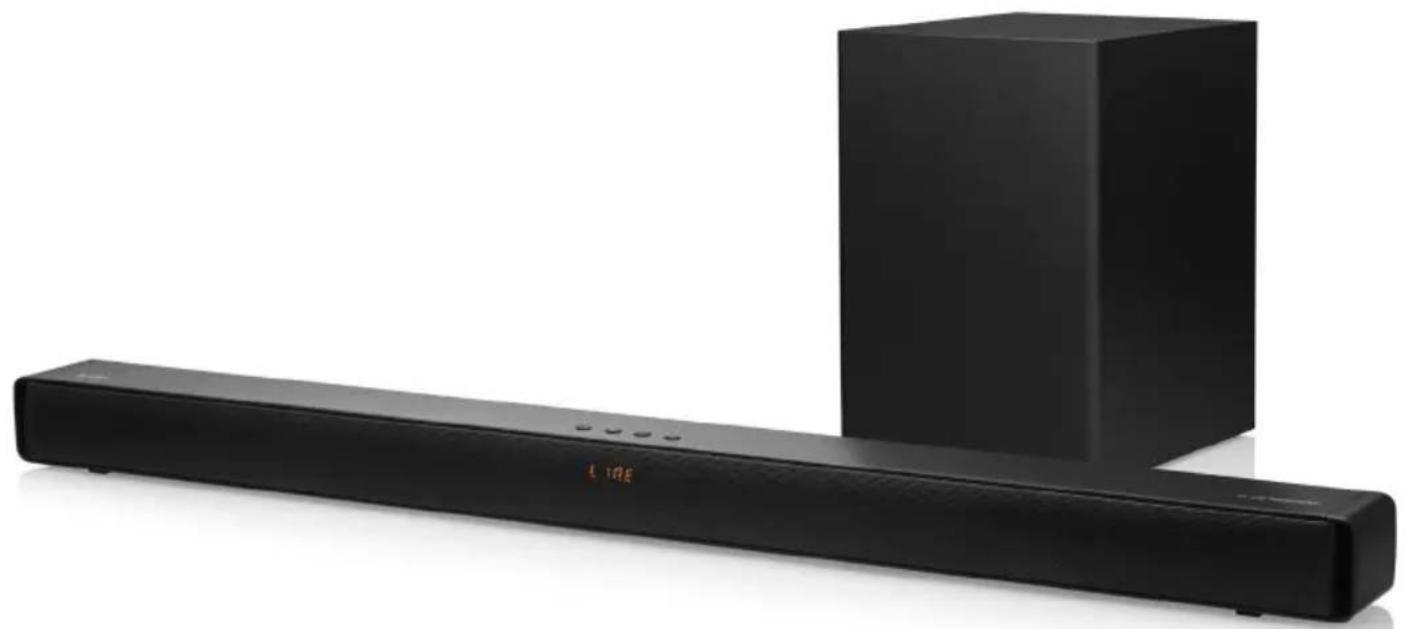
| Product Type | Soundbar with Wireless Subwoofer |
| Number of Channels | 2.1 |
| Soundbar Dimensions (W x H x D) | 920 x 63 x 80 mm |
| Subwoofer Dimensions (W x H x D) | 200 x 293 x 225 mm |
| Soundbar Power Input | AC 100-240V, 50/60 Hz |
| Subwoofer Power Input | AC 100-240V, 50/60 Hz |
| Soundbar Output Power | 2 x 30 W |
| Subwoofer Output Power | 80 W |
| Frequency Response | 60 Hz - 20 kHz |
| Bluetooth Version | 5.3 |
| Bluetooth Frequency Range | 2402 - 2480 MHz |
| Max Bluetooth Output Power | ≤13 dBm |
| Inputs | Optical, HDMI ARC, USB, Line In (3.5mm) |
| Equalizer Modes | Movie, Music, News |
| Wall Mountable | Yes (bracket included) |
| Remote Control | Yes (2x AAA batteries required) |
| Package Contents | Soundbar, Wireless Subwoofer, 2x AC Power Cords, Remote Control, 3.5mm to RCA Cable, Wall Plugs and Screws, Manual |
Frequently Asked Questions - TAS 950 WSB GoGen
User questions about TAS 950 WSB GoGen
0 question about this device. Answer the ones you know or ask your own.
Ask a new question about this device
Download the instructions for your Accessoire barre de son in PDF format for free! Find your manual TAS 950 WSB - GoGen and take your electronic device back in hand. On this page are published all the documents necessary for the use of your device. TAS 950 WSB by GoGen.
USER MANUAL TAS 950 WSB GoGen
natural_image
Abstract logo design with a stylized white 'S' inside a black circle (no text or symbols)GoGEN
natural_image
Black audio streaming device with a rectangular block and a long black speaker bar (no visible text or symbols)OVLÁDACÍ PRVKY / VSTUPY NA ZAŘÍZENÍ
DÁLKOVÝ OVLADAČ
DÔLEŽITÉ BEZPEČNOSTNÉ POKYNY
OVLÁDACIE PRVKY / VSTUPY NA ZARIADENÍÍ
DIAL'KOVÝ OVLÁDAČ
PILOT
Thank you for buying our product. Please read through these operating instructions, so you will know how to operate your equipment properly. After you finished reading the instructions manual, put it away in a safe place for future reference.
PACKAGE INCLUDE
Soundbar, Wirelles Subwoofer, 2x AC power cord, Remote control, 3.5 mm to RCA Cable, 2x Wall plug and 2x screw, Manual
IMPORTANT SAFETY INSTRUCTIONS
- This product was designed and manufactured to meet strict quality and safety standards.
• However, there are some operation precautions that you should be aware of. - Heed all warnings and follow all instructions.
- Do not use this soundbar near water.
- Clean the unit only with dry cloth. Unplug the AC power cord before cleaning.
- Do not block any ventilation openings. Install in accordance with the manufacturer's instructions.
- Do not install near any heat sources such as radiators, heat registers, stoves, or other apparatus (including amplifiers) that produce heat.
- Use only attachments / accessories specified by the manufacturer.
- Protect the power cord from being walked on or pinched, particularly at plugs, convenience receptacles, and the point where they exit the soundbar.
- Remove the AC power cord from the power source when the unit is to be not for a long period of time or during thunderstorms.
- Refer all servicing to qualified service personnel. Servicing is required when the soundbar has been damaged in any way, such as if the power-supply cord or plug is damaged, liquid has been spilled or objects have fallen into the soundbar, it has been exposed to rain or moisture, it does not operate normally, or it has been dropped.
WARNINGS AND PRECAUTIONS
- To reduce the risk of electric shock, do not remove cover (or back). There are no user-serviceable parts inside.
- Do not expose the soundbar to dripping or splashing liquids. Do not place objects filled with liquids (such as vases) on the soundbar.
- The mains plug is used as the disconnect device. It shall remain readily operable and should not be obstructed during intended use. To completely disconnect the soundbar from supply mains, the main plug of the product shall be disconnected from the mains socket outlet completely.
- Using the soundbar near fluorescent lighting may cause interference with the remote. If the soundbar is behaving erratically, move away from any fluorescent lighting.
WARNING: The batteries shall not be exposed to excessive heat such as sunshine, fire or the like.
CAUTION: Danger of explosion if battery is incorrectly replaced. Replace only with the same or equivalent type.

The lightning flash is intended to alert the user to the presence of dangerous voltage within the product's enclosure, and touching the internal components may result in a risk of electric shock to persons.

The exclamatory mark is intended to alert the user to the presence of important operating instructions.
MOUNTING SOUNDBAR ON A WALL
To prevent injuries, we strongly recommend mounting the soundbar on a wall following the below installation instructions:
- Drill the two holes (about 6mm diameter) in the wall and keep the distance between drill holes of the soundbar is 854mm. As shown in the picture on the right. Insert the two plugs supplied into two drilled holes and then insert two screws supplied into two holes and tighten. As shown in the picture on the right.
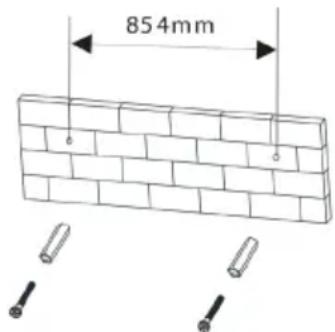
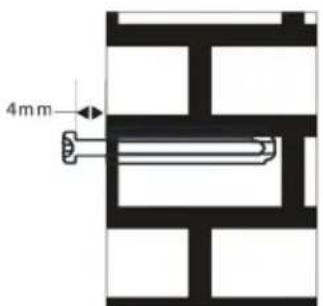
- Take care to leave 4 mm between the screw heads and wall. As shown in the picture below.
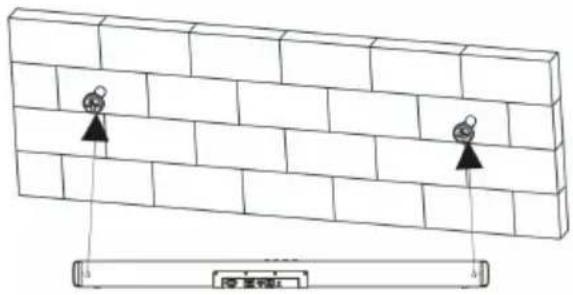
- Use the assembled soundbar to hang on the setscrews on the wall. As shown in the picture below.
ON DEVICE CONTROLS / INPUTS
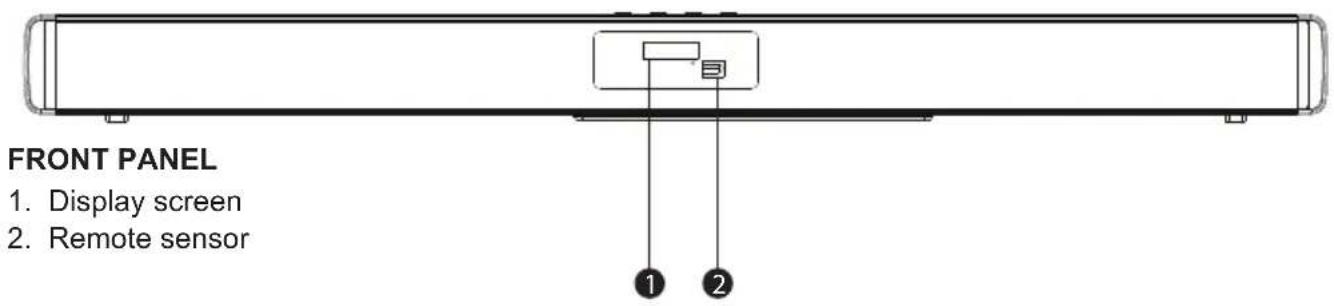
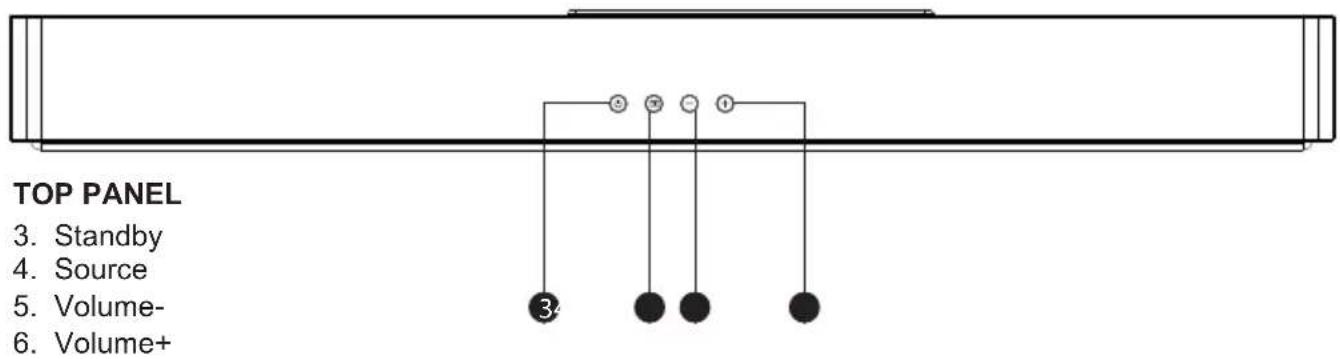
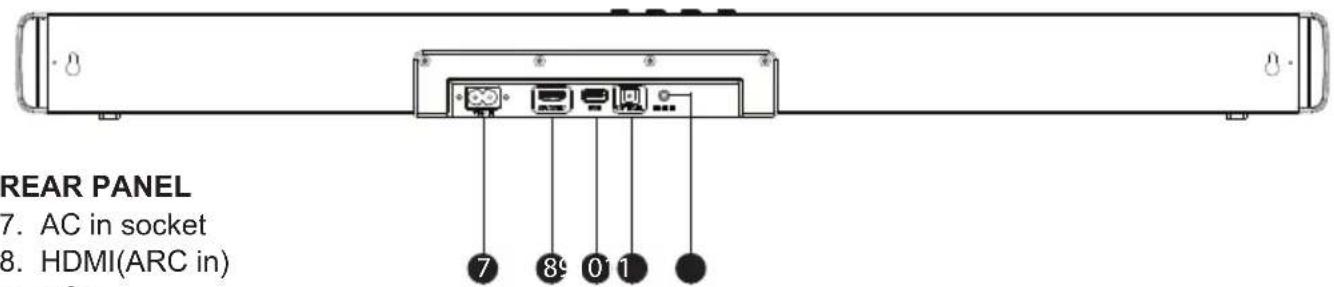
- USB
- Optical Digital Audio Input
- LINE IN
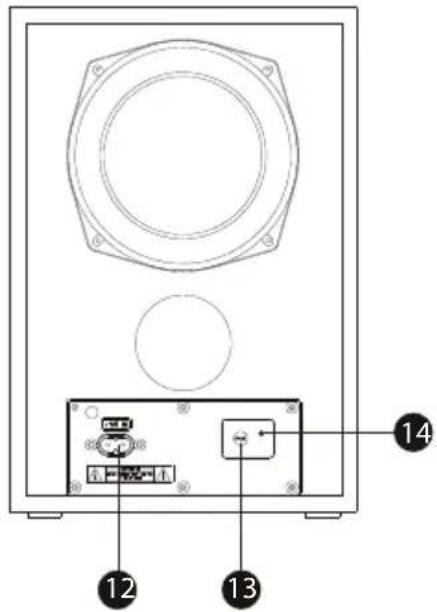
SUBWOOFER
- AC in socket
- Pair
- Indicator
REMOTE CONTROL
 | Press to switch on the unit. Press it again to put the unit in standby mode. |
 | Press to enter the BT(Bluetooth) mode. |
 | Press repeatedly to switch among in BLUETOOTH, LINE IN, USB, OPTICAL IN or ARC mode. |
| MOVIE | Press to enter the Eq1 equalizer mode, Eq1 stands for MOVIE. |
| MUSIC | Press to enter the Eq2 equalizer mode, Eq2 stands for MUSIC. |
| NEWS | Press to enter the Eq3 equalizer mode, Eq3 stands for NEWS. |
 | Press to temporarily pause a playback. Press it again to resume the playback.Hold down this button for 3 seconds to disconnect bluetooth. |
| |<<▶| | Press to skip/return to the next/previous track. |
 | Press to temporarily switch off the sound. Press it again to switch it on. |
| +- | Press + to turn up the volume.Press - to turn down the volume. |
Install the batteries into the remote control
- Open the battery compartment by sliding the cover back.
- Insert the new battery as pictured making you have observed the correct polarity.
- Close the battery compartment.
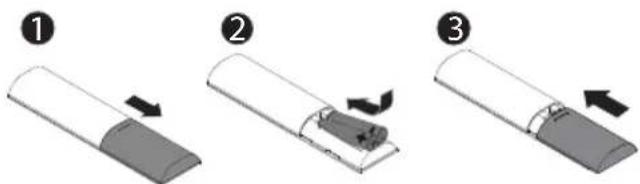
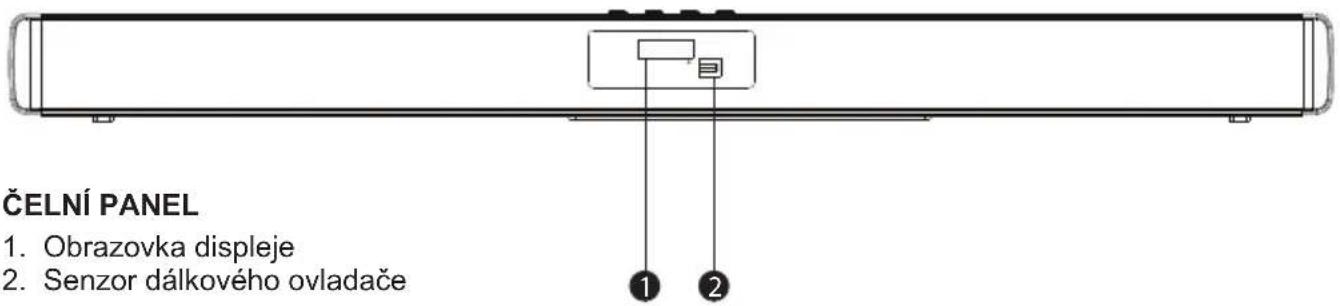
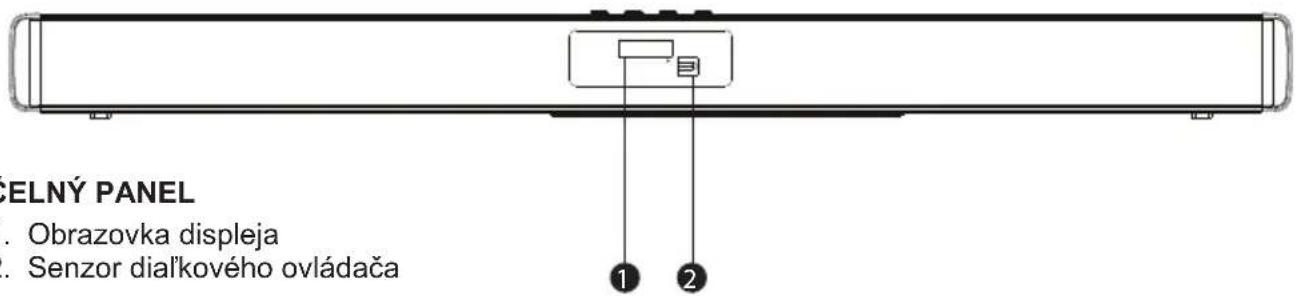
Point the remote control at the remote control sensor on the front panel. The remote control works with in a distance of about 8 meters from the sensor and within an angle of about 30 degrees from the left and right side. NOTE:
Remove the batteries when you don't intend to use the remote control for a long time.
Do not mix new and used batteries, or different types of batteries.
Weak batteries can leak and severely damage the remote control.
Be environmentally friendly and dispose of batteries according to your government regulations.
USAGE CONNECTION
Subwoofer connection
Make sure the AC power cord for the subwoofer is connected to a power supply securely. Power on the soundbar, press and hold ➕ button for 5 seconds, the subwoofer can receive the wireless audio signal from the soundbar. When the red indicator flashes on the subwoofer, the subwoofer is in searching wireless signal status, the blue indicator keeps lighting on the subwoofer means the soundbar and subwoofer were connected.
Press and hold [PAIR] button on the Subwoofer or press and hold ➕ button for 5 seconds to disconnect with the soundbar and the red indicator on the subwoofer flashing when the subwoofer and soundbar was disconnected, press [PAIR] button on the Subwoofer or press and hold ➕ button on the soundbar for 5 seconds again, the subwoofer will be reconnected with the soundbar.
OPTICAL digital audio input > OPT
Connect the Digital Optical Audio cable (not included) to the optical output on the audio source and to the Optical Input on the soundbar. Press the ➕ button on the remote control to switch to Optical mode or press the ➕ button on the main unit repeatedly to select the Optical mode.
Using the remote control on your connected device, make sure the audio settings are set to PCM or optical Audio and are turned On. Audio from the connected audio source will now be played through the speakers.
HDMI ARC (CEC) > Arc
Connect the ARC Audio cable (not included) to the ARC output on the audio source and to the ARC Input on the soundbar. Press the button on the remote control to switch to ARC mode or press the button on the main unit repeatedly to select the ARC mode.
Using the remote control on your connected device, make sure the audio settings are set to ARC or HDMI Audio and are turned on. Audio from the connected audio source will now be played through the speakers. HDMI CEC - This function allows to control the CEC-enabled devices, that are connected through HDMI ports by using the remote control of the TV.
Bluetooth connection > bt
Press STANDBY button on the remote control to power on the soundbar, then press ➕ button on the remote control to switch the bluetooth mode, the word no bt will be shown on the display screen, the soundbar is in searching bluetooth signal status. Use your smart phone to search the bluetooth signal of the soundbar, select GOG TAS950WSB on your list. Input the password 0000 if need the password prompt, the sound bar will synchronize to play songs on your mobile phone while the word bt is shown on the display screen and a beep will be heard means to be connected successfully. Disconnected the bluetooth on the smart phone to switched off the bluetooth connection.
NOTE: Do not connect the TV to the soundbar via Bluetooth due to sound delays.
USB Mode > Usb
Insert the USB stick with the MP3 music tracks into the socket marked „USB“ on the soundbar. Press the button until the soundbar switches to the USB mode. The soundbar will start playing the MP3 track automatically from the connected USB drive. If play does not start automatically, press ▶II button.
LINE IN > LINE
After turning on the soundbar and Press the button until soundbar switches to the Line in mode. Use the Line in cable (3,5mm) or RCA cable (3,5mm) to direct connect smart phone, tablets, and other music devices.
SPECIFICATIONS
| Soundbar power input AC ~ 100-240 V, | 50/60 Hz |
| Subwoofer power input AC ~ 100-240 V, | 50/60 Hz |
| Soundbar output power 2 x 30 W | |
| Subwoofer output power 80 W | |
| Channel 2.1 (wireless subwoofer) | |
| Frequency response 60 Hz - 20 kHz | |
| Bluetooth version 5.3 | |
| BT Operation Frequency 2402 MHz - 24 | 30 MHz |
| Max. BT output power ≤13 dBm | |
| Soundbar dimensions 920 x 63 x 80 mm | |
| Subwoofer dimensions 200 x 293 x 225 mm |
WE RESERVE THE RIGHT TO CHANGE TECHNICAL SPECIFICATIONS.
TROUBLE SHOOTING
| Problems Possible causes / measures Solution | ||
| No power | The unit is not connected to the power supply or the power cable is not properly connected to the outlet. | Make sure the unit is connected to the power supply. Try connecting the cable to a different outlet |
| No sound or distorted sound | The audio cables aren't properly connected.The volume is set to the minimum levelThe sound is switched off | Confirm that the audio cables are connected properly in the correct inputs.Turn up the Volume.Press MUTE on the remote control to switch on the sound.Press Play/Pause. |
| The IR remote control is not functioning properly. | Check to make sure that there are batteries inside and that they installed properly.The batteries installed are depleted and in need of replacement.The remote sensor is obstructed or the remote control is not pointed to the remote sensor.The remote control is out of its operating range.The unit is powered off. | Install 2 AAA/1.5V batteries in it.Replace the batteries with new ones.Remove any obstructions and make sure that the remote control is pointed at the remote control sensor.Make sure the remote control is within the operating range.Switch off the unit and disconnect it from the AC outlet. Then power the unit on again |

WARNING: DO NOT USE THIS PRODUCT NEAR WATER, IN WET AREAS TO AVOID FIRE OR INJURY OF ELECTRIC CURRENT. ALWAYS TURN OFF THE PRODUCT WHEN YOU DON'T USE IT OR BEFORE A REVISION. THERE AREN'T ANY PARTS IN THIS APPLIANCE WHICH ARE REPARABLE BY CONSUMER. ALWAYS APPEAL TO A
QUALIFIED AUTHORIZED SERVICE. THE PRODUCT IS UNDER A DANGEROUS TENTION.


TO AVOID DANGER OF SUFFOCATION, KEEP THE PLASTIC BAG AWAY FROM BABIES AND CHILDREN. DO NOT USE THIS BAG IN CRIBS, BEDS, CARRI-AGES OR PLAYPENS. THIS BAG IS NOT A TOY.
Disposal of old Electrical & Electronic Equipment (Applicable in the European Union and
other European countries with separate collection systems) This symbol on the product or on its

packaging indicates that this product shall not be treated as household waste. Instead it shall be handed over to the applicable collection point for the recycling of electrical and electronic equipment. By ensuring this product is disposed of correctly, you will help prevent potential negative consequences for the environment and human health, which could otherwise be caused by inappropriate waste handling of this product. The recycling of materials will help
to conserve natural resources. For more detailed information about recycling of this product, please contact your local Civic Office, your household waste disposal service or the shop where you purchased the product. Hereby, ETA a.s. declares that the radio equipment type TAS950WSB s in compliance with Directive 2014/53/EU. The full text of the EU declaration of conformity is available at the following internet address: http://www.gogen.cz/declaration_of_conformity
TÁVIRÁNYÍTÓ
natural_image
Abstract logo design with white stylized 'S' inside a black circle (no text or symbols)GoGEN

- GoGEN
- OVLÁDACÍ PRVKY / VSTUPY NA ZAŘÍZENÍ
- DÔLEŽITÉ BEZPEČNOSTNÉ POKYNY
- OVLÁDACIE PRVKY / VSTUPY NA ZARIADENÍÍ
- PACKAGE INCLUDE
- IMPORTANT SAFETY INSTRUCTIONS
- WARNINGS AND PRECAUTIONS
- MOUNTING SOUNDBAR ON A WALL
- ON DEVICE CONTROLS / INPUTS
- SUBWOOFER
- Install the batteries into the remote control
- USAGE CONNECTION
- Subwoofer connection
- OPTICAL digital audio input > OPT
- HDMI ARC (CEC) > Arc
- Bluetooth connection > bt
- USB Mode > Usb
- LINE IN > LINE
- Disposal of old Electrical & Electronic Equipment (Applicable in the European Union and
Brand : GoGen
Model : TAS 950 WSB
Category : Accessoire barre de son