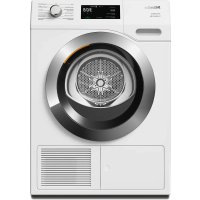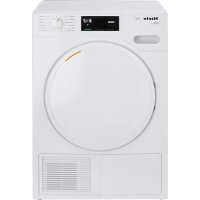
T 7644 C - Tumble drier MIELE - Free user manual and instructions
Find the device manual for free T 7644 C MIELE in PDF.


User questions about T 7644 C MIELE
0 question about this device. Answer the ones you know or ask your own.
Ask a new question about this device
Download the instructions for your Tumble drier in PDF format for free! Find your manual T 7644 C - MIELE and take your electronic device back in hand. On this page are published all the documents necessary for the use of your device. T 7644 C by MIELE.
USER MANUAL T 7644 C MIELE
natural_image
Illustration of a car wheel with a textured circular component, partially covered by fabric or cloth (no text or symbols)Operating instructions for condenser tumble dryer T 7644 C
To avoid the risk of accidents or damage to the machine it is essential to read these instructions before it is installed and used for the first time.
Disposal of the packing material
The transport and protective packing has been selected from materials which are environmentally friendly for disposal and can normally be recycled.
Ensure that any plastic wrappings, bags etc. are disposed of safely and kept out of the reach of babies and young children. Danger of suffocation!
Rather than just throwing these materials away, please ensure they are offered for recycling.
Disposal of your old appliance
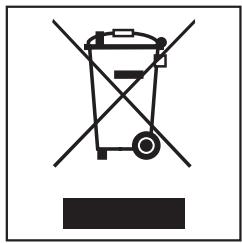
Electrical and electronic appliances often contain materials which, if handled or disposed of incorrectly, could be potentially hazardous to human health and to the environment. They are, however, essential for the correct functioning of your appliance. Please do not therefore dispose of your appliance with your household waste.
natural_image
Pure electrical circuit lines without any symbolsPlease dispose of it at your local community waste collection / recycling centre and ensure that it presents no danger to children while being stored for disposal.
It should be unplugged or disconnected from the mains electricity supply by a competent person. The plug must be rendered useless and the cable cut off directly behind it to prevent misuse.
See the "Warning and Safety" section of this booklet for further details.
Energy saving tips
To avoid unnecessarily long drying times and high consumption of energy:
- Make sure that your laundry is thoroughly spun before drying.
The higher the spin, the greater the savings that can be made in energy and time during drying.
- Load according to the optimum amount of laundry recommended for the programme being used (see Programme chart).
Underloading is uneconomical.
Overloading gives a poorer quality of drying and may cause unnecessary creasing.
- Make sure the room in which the dryer is located is well ventilated.
- Make sure the fluff filters are clean before using the dryer.
- Check the condenser unit from time to time and clean it when necessary.
Caring for the environment 2
Disposal of the packing material 2
Disposal of your old appliance 2
Energy saving tips 2
Warning and Safety instructions 5
Operating the tumble dryer 9
Control panel 9
Notes on laundry care 11
Care symbols....11
Tips on drying 11
How to dry correctly 12
Brief instructions 12
Additional options 15
Low temperature 15
Buzzer 15
Delay start 15
Programme chart 16
Changing the programme sequence 19
Changing a programme while it is running 19
Cancelling a programme....19
Interrupting a programme 19
Adding or removing laundry after a programme has started . . . . . . . . . . . . . . . 19
Electronic system lock 20
Cleaning and care 21
Emptying the condensed
water container 21
Cleaning the fluff filters 22
Cleaning them whilst dry 22
Cleaning them with water 23
Cleaning the tumble dryer 24
Cleaning the condenser unit 25
Removing the condenser unit. 25
Checking the condenser unit 26
Cleaning the condenser unit. 26
Replacing the condenser unit. 27
Problem solving guide....28
Check and fault messages 28
Other problems 30
Changing the lamp 33
After sales service 34
Repairs. 34
Future updates (PC)....34
Guarantee 34
Optional accessories....34
Installation and connection 35
Front view....35
Rear view....36
Installation site 36
Transporting the machine to its installation site 36
Washer-dryer stack....36
Levelling the machine....37
Room ventilation 37
Before moving the machine again (e.g. when moving house) 37
External condensed water outlet 38
Arranging the drain hose 38
External drainage via a sink or gully 39
Installation conditions requiring a non-return valve 39
Electrical connection 41
Electrical connection U.K. 41
Consumption data 42
Technical data 43
Programmable functions....45
Extending the range of the drying levels....45
Altering the volume of the buzzer 46
Memory function 47
Extending the cooling down time 48
Clean out airways indicator 49
Keypad tone 50
Adjusting the dryer's electronics for very soft water . . . . . . . . . . . . . . . . . . . . . . . . . . . . . . 51
To avoid the risk of accidents and damage to the machine please read these instructions carefully before using it for the first time. They contain important information on its safety, installation, use and maintenance.
Keep these instructions in a safe place and ensure that new users are familiar with the content. Pass them on to any future owner of the machine.
Correct use
The tumble dryer is only intended for drying fabrics which have been washed in a water solution, marked on the manufacturer's care label as being suitable for tumble drying.
"Dry cleaning kits" for freshening up garments in a tumble dryer are increasingly available on the market. If using, do so at your own risk, and follow the instructions provided on the packaging.
Any other applications may be dangerous. The manufacturer is not liable for damage resulting from improper use or operation.
Technical safety
Before setting up the machine, check it for any externally visible damage.
Do not install or use a damaged machine.
Before connecting the machine, ensure that the connection data on the data plate match the mains electricity supply. If in any doubt, consult a qualified electrician.
The electrical safety of this machine can only be guaranteed when continuity is complete between it and an effective earthing system which complies with local and national safety regulations. It is most important that this basic safety requirement is present and regularly tested, and where there is any doubt the household wiring system should be inspected by a qualified electrician. The manufacturer cannot be held liable for the consequences of an inadequate earthing system (e.g. electric shock).
Do not connect the machine to the mains electricity supply by an extension lead. Extension leads do not guarantee the required safety of the appliance (e.g. danger of overheating).
The machine is built in accordance with current safety requirements.
Unauthorised repairs could result in unforeseen dangers for the user, for which the manufacturer cannot accept liability. Repairs should only be undertaken by a Miele approved technician.
Ensure current is not supplied to the machine until after maintenance or repair work has been carried out.
Faulty components must only be replaced by genuine Miele original spare parts. Only when these parts are fitted can the safety standards of the machine be guaranteed.
If the connection cable is faulty it must only be replaced by a Miele approved service technician to protect the user from danger.
In countries where there are areas which may be subject to infestation by cockroaches or other vermin, pay particular attention to keeping the machine and its surroundings in a clean condition at all times. Any damage which may be caused by cockroaches or other vermin will not be covered by the machine guarantee.
In the event of a fault or for cleaning purposes, the machine is only completely isolated from the electricity supply when:
- it is switched off at the wall socket and the plug is withdrawn, or
- it is switched off at the mains, or
– the mains fuse is withdrawn, or
– the screw-out fuse is removed (in countries where this is applicable).
Operation
This equipment may only be used in mobile installations such as ships, caravans, aircraft etc. if a risk assessment of the installation has been carried out by a suitably qualified engineer.
The dryer must not be used without the fluff filters in place or if the fluff filters are damaged in any way.
The fluff filters must be thoroughly dried after cleaning. If they are still damp or wet when replaced there is a risk of faults occurring when the machine is used.
The dryer must not be used without the condenser unit in place.
Do not install the machine in a room where there is a risk of frost occurring. At temperatures around freezing point the machine may not be able to operate properly. There is a risk of damage if the condensed water is allowed to freeze in the pump, hoses and / or condensed water container.
The ambient room temperature should be between +2°C and +35°C.
If the water is drained externally through the drain hose instead of being collected in the condensed water container, make sure the drain hose is securely attached if you hang it in a sink or basin to avoid the hose slipping and the water causing damage.
Condensed water is not drinking water. It can cause health problems in both people and animals.
Always keep the area around the machine free of dust and fluff. Dust drawn into the machine can, over time, cause blockages in the condenser unit.
To prevent the risk of fire the following textiles must not be dried in this machine:
- fabrics which contain a large proportion of rubber, foam rubber or rubber like materials.
- items which contain damaged padding or fillings (e.g. pillows, jackets).
- items which have been treated with inflammable cleaning agents.
- items which have been splashed with hair lacquer, hair spray, nail varnish remover or similar substances.
- items which have been soiled with oils or residues containing grease (kitchen oils, cosmetics etc.).
- items soiled with wax or other chemicals (e.g. mops and floor cloths).
- items which have not been thoroughly cleaned and which are still soiled with grease or oil, e.g. workwear. Such clothing may require a heavy duty detergent to get them clean. If necessary consult the detergent manufacturer for advice.
Do not let anyone sit or lean on the door, as this can cause the machine to tip up.
Always close the door after use. This way you will avoid the danger of:
- children climbing onto or into the dryer or hiding things in it.
- pets or other small animals climbing into it.
Safety with children
This machine is not a toy. To avoid the risk of injury keep children away from the machine at all times and supervise them whilst you are using it. Do not allow children to play on or near it or to play with its controls. Supervise its use by the elderly or infirm.
Using accessories
- Accessory parts may only be fitted when expressly approved by Miele.
If non-Miele parts are used with this machine, guarantee, performance and product liability claims may be invalidated.
Disposal of your old machine
Before discarding an old machine, switch it off at the wall socket and unplug it. Render the plug useless and cut off the cable directly behind the machine. This should be done by a competent person.
The manufacturer cannot be held liable for damage caused by non-compliance with these Warning and Safety instructions.
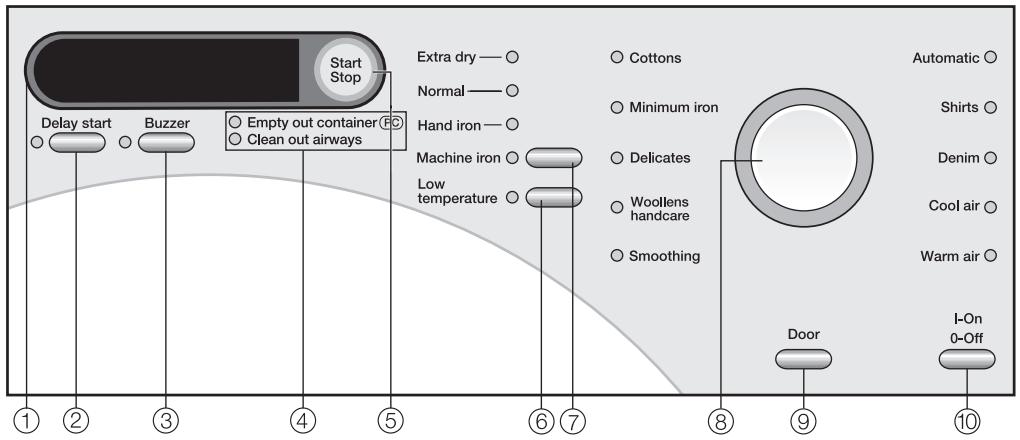
Control panel
text_image
Start Stop Extra dry — ○ Normal — ○ Hand iron — ○ Machine iron ○ Low temperature ○ 6 7 8 9 10 Door I-On 0-Off Automatic ○ Shirts ○ Denim ○ Cool air ○ Warm air ○ Empty out container (E) Clean out airways① Display
② Delay start button
This button is used for:
- Selecting the duration of the Warm air and Cool air programmes
- Delaying the start of a programme
③ Buzzer button
An audible tone sounds at the end of the programme.
④ Check lights
These indicator lights have various functions. See "Problem solving guide" / "After sales service" for details.
⑤ Start/Stop button
For starting the programme selected and cancelling a programme once it has started.
The button flashes while a programme is being selected and then is on constantly when the programme has started.
⑥ Low temperature button
Delicate fabrics are dried at a lower temperature.
⑦ Drying level button
with indicator lights
⑧ Programme selector
with indicator lights
⑨ Door button
Pressing this button will open the door even when the machine is switched off at the mains.
⑩ I-On/0-Off button
For switching the dryer on and off.
Display
The following are selected via the display:
- Delay start
– Duration of the Cool air and Warm air programmes - Programmable functions
The display also shows:
- Programme duration
- Programme stage Drying Cooling down Finish
- Check and fault messages
Programme duration / Estimated time remaining
When a programme is selected, the estimated duration (time remaining) will appear in the display. Please be aware that it is only an estimate!
The following factors all affect the estimated time remaining: residual moisture content after spinning; type of fabric; size of load; room temperature; fluctuations in power supply.
The electronics continually assess conditions in the machine and adjust the estimated time remaining for a more accurate reading. Because of this, the time displayed can alter during the course of a programme.
In the same way, the Woollens handcare and Smoothing programmes can finish earlier than expected if a certain temperature is reached. This can happen with particularly fine fabrics, very small loads or if items were partly dry beforehand.
Delay start
The delay start time selected will appear in the display.
After the Start/Stop button has been pressed, the delay start time will start counting down.
Once the delay start time has elapsed, the programme will begin and the estimated programme duration will appear in the display.
Programmable functions
The programmable functions can be used to tailor drying programmes to suit your individual requirements. In programming mode, the display will show the function selected.
Care symbols
Before drying check the drying symbol on the care label. If there are no symbols, dry at your own risk!
Dry at normal temperature
Dry at low temperature
Do not tumble dry
Tips on drying
- Always observe the maximum recommended loads given in the "Programme chart". Never overload the drum.
Overloading can cause unnecessary wear and tear to the laundry, give a disappointing drying result and cause more creasing.
- Do not put soaking wet items into the tumble dryer. Spin them thoroughly after washing using the appropriate spin speed.
- For delicates and fabrics with the following care label ☑ select Low temperature.
- Use the Automatic programme for drying mixed loads of cottons and minimum iron fabrics.
- Open jackets so that they can dry evenly.
-
Woollens and wool blends tend to become matted and shrink if dried in a tumble dryer. They can, however, be partially dried using the Woollens handcare programme.
-
Down-filled garments have linings which have a tendency to shrink, depending on the quality of the item. They can be partially dried using the Smoothing programme.
- Pure linen should only be machine dried if specified as suitable by the manufacturer on the care label, as the surface of the fabric may otherwise become rough. They can be partially dried using the Smoothing programme.
- Loopknit garments (e.g. T-shirts and underwear) tend to shrink depending on their quality. Do not over-dry these textiles. When purchasing these garments it is advisable to take their shrinkage properties into account.
- For garments made from very fine weave fibres, such as shirts or blouses, only use the Shirts or Delicates programme to avoid creasing. If in doubt, reduce the load or use the Smoothing programme.
- Starched laundry can be dried in the tumble dryer. To achieve the usual finish, double the amount of starch should be used.
- New dark coloured garments should be washed and dried separately from light coloured garments to avoid the danger of colours running and discolouring other garments or even plastic components in the machine. Dark coloured fibres can also settle on light coloured garments and vice versa.
Brief instructions
The headings numbered (1, 2, 3 ...) show the operating sequence and can be used as a brief guide to using your machine.
① Sort the laundry
To ensure an even drying result separate out the washed laundry and sort it according to: . .
... the drying level required
... the type of fibre or weave
..size
. . the moisture content after spinning.
⚠️ Make sure that objects e.g. detergent dispensing balls have been removed from the laundry. They could melt, and cause damage to the dryer or the laundry.
- Check seams and stitching to ensure that padding and linings are intact.
- Fasten duvet covers and pillow cases to prevent small items from being trapped inside them.
- Fasten hooks and eyes etc.
- Tie fabric belts and apron strings.
- Sew in or remove underwiring from bras.
② Turn on the tumble dryer
■ Switch the dryer on by pressing the I-On/0-Off button in.
The tumble dryer may be switched on after loading, saving energy as the light will not come on.
③ Load the tumble dryer
■ Press the Door button to open the door.
- Load the laundry loosely into the drum.
Do not overload the drum. See the "Programme chart" for recommended loads for each programme. Overloading can cause unnecessary wear and tear to the laundry and give a disappointing drying result.
■ Before closing the door make sure the fluff filter is correctly positioned.
natural_image
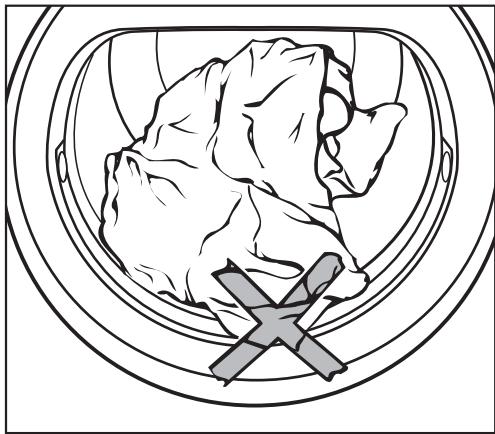
Illustration of a window frame containing a stylized mountain and a cross symbol (no text or labels)Check the laundry is right inside the drum so that it cannot get trapped or damaged when the door is shut.
■ Shut the door either with a gentle swing, or lean against it and push it shut.
4 Select a programme
text_image
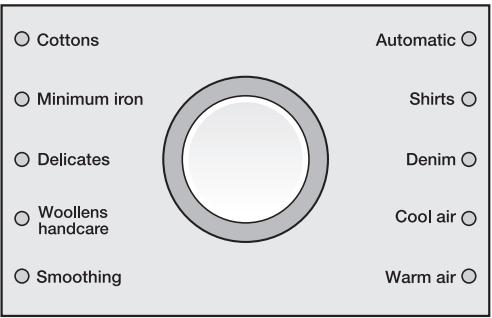
Cottons Minimum iron Delicates Woollens handcare Smoothing Automatic Shirts Denim Cool air Warm air■ Select the programme you want.
The indicator light for the programme selected will light up.
A drying level or additional option(s) indicator light may also light up, or a time may appear in the display (Memory function).
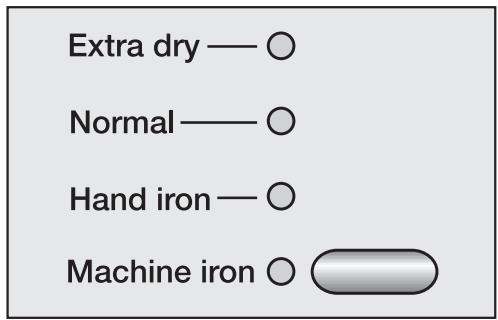
Select a drying level
(Programmes with drying levels: Cottons, Minimum iron, Delicates, Automatic, Shirts and Denim)
text_image
Extra dry — ○ Normal — ○ Hand iron — ○ Machine iron ○■ Press the Drying level button repeatedly until the indicator light for the drying level you want lights up.
- Any of the drying levels can be selected for the Cottons programme. A more limited range is available when using other programmes.
Important: Please note that the programme duration shown in the display will vary according to the programme selected (see "Programme duration / Estimated time remaining").
You cannot alter the drying level of the Woollens handcare and Smoothing programmes.
Select the duration for the Cool air and Warm air programmes
The indicator light for the Delay start button will flash when the Cool air or Warm air programme is selected.
■ Press the Delay start button repeatedly until the required duration shows in the display.
You can select a duration of 20 minutes up to 2 hours in 10 minute steps.
⑤ Select any additional options
■ The Low temperature, Buzzer, and Delay start additional options are selected by pressing the appropriate button (see "Additional options" for more details).
N.B.: It is not possible to select Delay start when using the Warm air or Cool air programme.
⑥ Start the programme
The Start/Stop button will flash when a programme is being selected. The flashing indicates that a programme can be started.
■ Press the Start/Stop button.
The Start/Stop button will now light up constantly.
Drying will appear in the display and the time remaining will start counting down.
Memory
Settings selected for a programme can be stored in memory, so that they are automatically selected when this programme is chosen again. See "Programmable functions - Setting the memory function".
Before the end of a programme
There is a cooling down phase at the end of the drying sequence (Cooling down will light up in the display). The programme will not finish until the cooling down phase has been completed.
There is no cooling down phase at the end of the following programmes:
Woollens handcare, Smoothing.
⑦ Remove the laundry when the programme has finished
0 and Finish will appear in the display to indicate that the programme has finished. The buzzer (if selected) will sound at intervals.
The drum will continue to rotate at intervals to prevent laundry creasing, if you do not wish to remove it immediately (anti-crease). The anti-crease phase lasts for an hour. There is no anti-crease phase at the end of the Woollens handcare programme.
■ Press the Door button.
■ Open the door.
■ Remove the laundry.
Check that all items have been removed from the drum. If items are left in the dryer, they could be damaged by overdrying when the dryer is next used.
If the dryer is switched on at the mains and the door is opened, the drum lighting will come on. It will go out a few minutes later to save energy.
■ Switch the dryer off by pressing the I-On/0-Off button.
■ Clean the fluff filters.
■ Close the door.
■ Empty the condensed water container (unless the dryer has been connected for external drainage).
■ The condenser unit should be checked and cleaned on a regular basis.
Low temperature
For drying delicates and fabrics with the ⚙ symbol on the care label at a lower temperature.
- For all delicate or minimum iron fabrics with the ⚙ symbol on the care label (e.g. acrylic garments).
- The programme duration is longer.
- On some programmes Low temperature is a standard part of the programme and so cannot be deselected.
Buzzer
A buzzer sounds (at intervals for a maximum of 1 hr) to let you know the programme has finished.
The buzzer will still sound if there is a fault, even if it has been switched off.
Delay start
The start of a programme can be delayed by up to 24 hours (24h).
After selecting a programme:
■ Press the Delay start button repeatedly until the required delay period shows in the display.
- The Delay start indicator light will flash.
- Times of:
up to 10h are selected in 30 minute steps
more than 10h in 1 hour steps
- If you keep the Delay start button pressed in, the time will continue to increase up to 24h.
To begin delay start
■ Press the Start/Stop button.
- The Delay start indicator light will light up constantly.
The delay start time counts down towards the start of the programme as follows:
– more than 10h by the hour
- less than 10h in minutes
The drum will turn briefly every hour to help prevent creasing.
While the delay start time is counting down, you can still add laundry to the drum:
■ Switch the dryer off.
■ Open the door and add the laundry.
■ Close the door and switch the dryer back on again.
To cancel/alter delay start
■ Press the Start/Stop button.
This cancels delay start.
■ Press the Delay start button repeatedly until the required delay period shows in the display.
■ Press the Start/Stop button.
The altered delay start time will start counting down from the beginning again.
| Cottons | Max. load: 6 kg* | |
| Extra dry, Normal** | ||
| Fabric type | Single and multi-layered cotton fabrics such as towelling, jerseywear, T-shirts, underwear. | |
| Notes | - Select Extra dry for multi-layered and very thick fabrics.- Do not use Extra dry for jersey fabrics (e.g. T-shirts, underwear), as they have a tendency to shrink. | |
| Low temperature | Also select the Low temperature option for delicate fabrics with the ☑ symbol on the care label. | |
| Hand iron**, Machine iron | ||
| Fabric type | Cottons or linen fabrics, e.g.: table linen, bed linen, starched laundry. | |
| Note | - To prevent laundry from drying out it should be rolled up until you are ready for ironing. | |
| Low temperature | Also select the Low temperature option for delicate fabrics with the ☑ symbol on the care label. | |
| Minimum iron | Max. load: 3 kg* | |
| Extra dry, Normal**, Hand iron | ||
| Fabric type | Minimum iron items made of cotton, synthetic or blended fabrics, e.g.: shirts, blouses, skirts and table cloths. | |
| Notes | - Select Hand iron for delicate fabrics and to reduce creasing even more, reduce the load to 1.5 kg*.- In the Minimum iron programme with the Hand iron drying level, items are dried with very little creasing, depending on fabric type and amount of laundry. | |
| Low temperature | Also select the Low temperature option for delicate fabrics with the ☑ symbol on the care label. | |
| Delicates | Max. load: 2 kg* | |
| Normal, Hand iron | ||
| Fabric type | Delicate items made of synthetic fibres, easy care cotton or blended fabrics, e.g. shirts, blouses and evening wear with sequins and beading. | |
| Low temperature | Low temperature cannot be deselected. | |
* Weight of dry laundry
** Note for test institutes: Use this programme without selecting Low temperature for testing according to EN 61121 Standard.
| Woollens handcare | Max. load: 2 kg* | |
| Fabric type | Woollen fabrics | |
| Notes | - This programme only fluffs up woollen garments. They are not dried completely by this programme.- Remove garments as soon as the programme has finished and leave to finish drying at room temperature. | |
| Low temperature | Low temperature cannot be deselected. | |
| Smoothing | Max. load: 3 kg* | |
| Fabric type | - Cotton and linen fabrics.- Minimum iron items made of mixed fibres, cottons or synthetics, e.g.: trousers, jackets, shirts. | |
| Notes | - Smooths out creasing caused during the spin cycle in the washing machine.- Fabrics are not completely dried in this programme.Remove garments as soon as the programme has finished and leave to finish drying at room temperature. | |
| Low temperature | Low temperature cannot be deselected. | |
| Automatic | Max. load: 3.5 kg* | |
| Normal, Hand iron | ||
| Fabric type | Mixed loads of garments suitable for theCottonsandMinimum iron programmes. Sort according to colour. | |
| Shirts | Max. load: 2 kg* | |
| Normal, Hand iron | ||
| Garments | Shirts and blouses. | |
| Low temperature | Also select the Low temperature option for delicate fabrics with the Symbol on the care label. | |
| Denim | Max. load: 3 kg* | |
| Normal, Hand iron | ||
| Fabric type | Denim garments, e.g. jeans, jackets, skirts, shirts. | |
| Low temperature | Also select the Low temperature option for delicate fabrics with the Symbol on the care label. | |
* Weight of dry laundry
Programme chart
| Cool air | Max. load: 6 kg* | |
| Fabric type | – Any item which only needs airing. | |
| Warm air | Max. load: 6 kg* | |
| Fabric type | – "Voluminous" and multi-layered fabrics whose layers have different drying characteristics, e.g. jackets, pillows.– For drying individual items, e.g. bath towels, bathing costumes, tea-towels and small loads. | |
| Note | Do not select the longest drying time to start with. Check the items as you are drying them to find the optimum time. | |
| Tip | You can use the Warm air programme to help remove odours from cotton clothing which has been worn but it still clean (select a duration of between 1/2 and 1 hour). Items must be suitable for drying in a tumble dryer. Dampen the garments a little beforehand or add a fabric conditioner sheet. The Warm air programme will not be as effective at removing odours from any parts of the garments which are made of synthetic fibres. | |
| Low temperature | Also select the Low temperature option for delicate fabrics with the ☐ symbol on the care label. | |
* Weight of dry laundry
Changing a programme while it is running
You cannot change to another programme once a programme has started (this prevents unintentional alterations).
You will need to cancel the current programme before you can select a new one.
Cancelling a programme
■ Press the Start/Stop button.
The items will be cooled down, depending on the temperature reached and how long they have been dried for.
If you press the Start/Stop button again during the cooling down phase, Finish will light up in the display.
■ Switch the dryer off and then on again.
■ You can now select a different programme.
Interrupting a programme
■ Switch the dryer off.
To continue drying
■ Switch the dryer on.
The programme will continue, as long as the cooling down phase has not been reached.
Adding or removing laundry after a programme has started
■ Press the Door button.
■ Open the door.
⚠ Do not touch the back of the drum when adding or removing items. The drum could be very hot - danger of burning.
■ Add or remove items as required.
■ Close the door.
■ Press the Start/Stop button.
Note
The time remaining shown in the display may now vary from the actual drying time.
The system lock prevents your machine being used without your knowledge.
It can be activated if wished.
The dryer's electronics are then locked. The dryer can still be switched on but a programme cannot be started.
- If an attempt is made to start a programme, the indicator light for the Low temperature button will come on and a key symbol 0 - will appear in the display.
The door is not locked and can be opened at any time.
To activate the lock
Before you begin, first ensure that:
- The tumble dryer is switched off.
- The door is closed.
① Press the Low temperature button and keep it pressed in whilst carrying out steps ② to ⑤.
② Press the I-On/0-Off button in.
The Automatic indicator light will come on.
3 Slowly turn the programme selector three positions stage by stage in a clockwise direction.
Each of the three programme indicator lights must come on one after the other.
4 Now slowly turn the programme selector six positions stage by stage in an anti-clockwise direction. Each of the six programme indicator lights must come on one after the other.
The indicator light for the Low temperature button will flash and a key symbol 0-0 will appear in the display.
5 Release the Low temperature button. The electronics have now been locked.
■ Switch the dryer off.
To deactivate the lock
Before you begin, first ensure that:
- The tumble dryer is switched off.
- The door is closed.
■ The procedure is the same as for activating the lock. Carry out steps ① to ⑤ as described previously.
At step 5 the indicator light for the Low temperature button will stop flashing and the key symbol 0-o will go out.
The electronics are no longer locked.
Emptying the condensed water container
The condensed water will be collected in the condensed water container unless the appliance has been fitted with a drain hose (see "Installation").
Empty the condensed water container after every drying programme.
The Empty out container indicator light will come on if the maximum level of the condensed water container is reached.
The indicator light will go out when the door is opened and closed again.
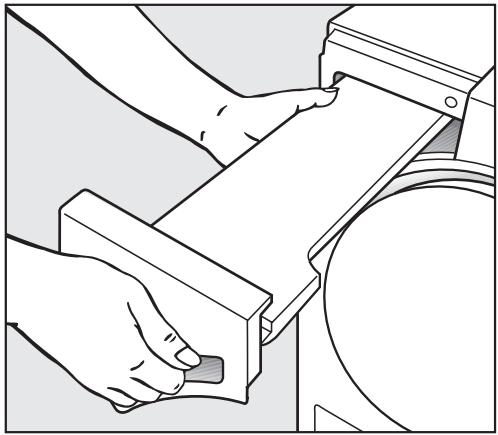
⚠️ Close the door fully. Otherwise the door and the front panel of the condensed water container could suffer damage when pulling the container out.
natural_image
Line drawing of a hand operating a mechanical device with a circular component (no text or symbols)■ Pull out the container.
■ Hold it at the front and towards the back and keep it in a horizontal position when carrying it.
natural_image
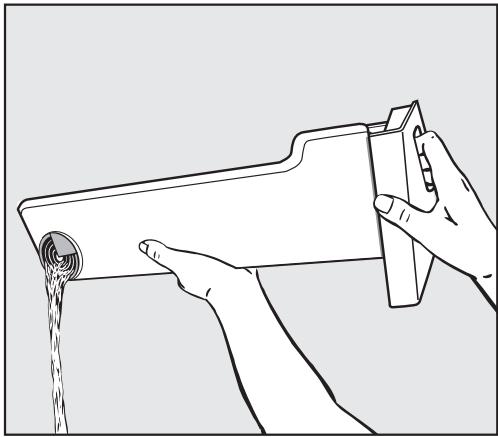
Line drawing of hands pouring liquid from a container into a bottle (no text or symbols)■ Empty the container.
■ Replace the container in the dryer.
⚠️ Condensed water should not be consumed. It could lead to health problems for people and animals.
Condensed water can be put to household use (e.g. in a steam iron or humidifier). To ensure that any residual particles of fluff in the condensed water are removed before use, pass it through a fine sieve or paper filter first.
Cleaning the fluff filters
The fluff which is created by the drying process is collected by the fluff filters in the door and the door opening. Clean the filters after each drying programme*.
Cleaning them whilst dry
Tip: You can also use a vacuum cleaner to remove the fluff.
text_image
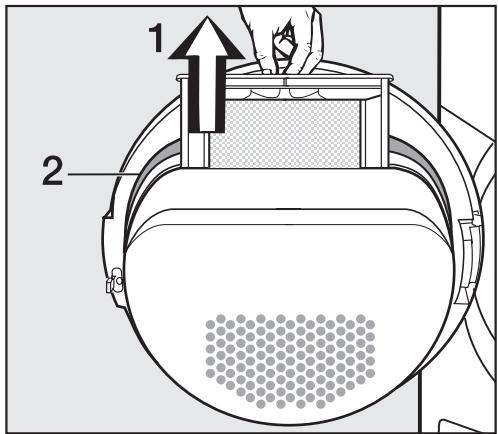
1 2■ Open the door and pull the fluff filter (1) out of the door as illustrated.
natural_image
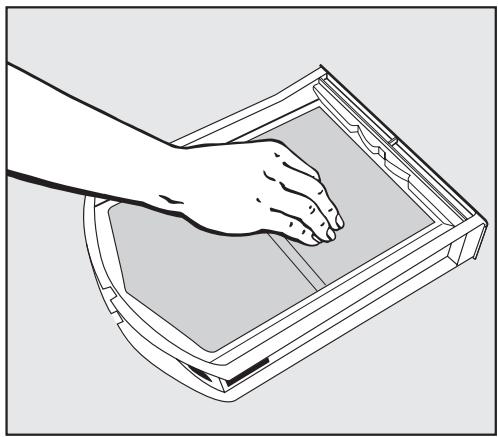
Line drawing of a hand opening a rectangular device (no text or symbols)■ Use your fingers to remove the fluff from the surface of the filter.
■ Remove any fluff from the hollow part of the door opening. You could also use a cleaning brush which is available as an optional extra from your Miele dealer or the Miele Spare Parts Department, or use a vacuum cleaner.
■ Also clean the door seal (2) with a damp cloth.
■ Once clean, push the filter back into the door holder until it clicks into position. Ensure it is facing the correct way.
natural_image
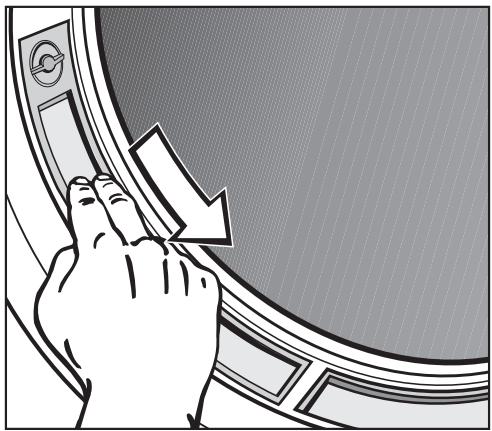
Illustration of a hand pressing down on a circular mechanical component with a downward arrow (no text or symbols)■ Use your fingers or a vacuum cleaner to remove the fluff from the two fluff filters in the door opening.
■ Close the door.
* Always check the fluff filters if the Clean out airways indicator light comes on.
Cleaning them with water
If there is a great deal of compacted fluff on any of the filters, they can be removed and cleaned under hot running water.
■ Open the door and pull the fluff filter out of the door as described previously.
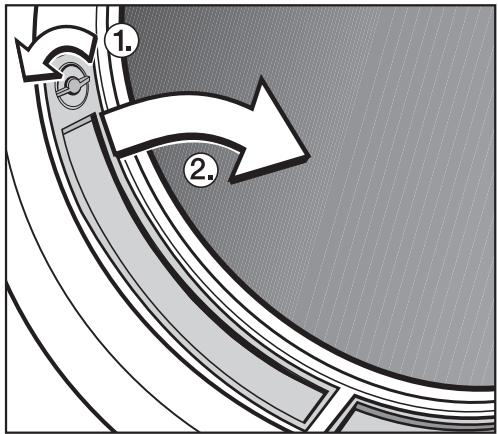
The two filters in the door opening can also be removed if you need to clean them with water.
text_image
Diagram showing a curved arrow with numbered annotations (1 and 2) indicating directional flow or process steps.■ Turn dial ① and pull the filter by the dial out of the door opening as shown ②. Do the same on the other side.
■ Rinse all the filters under hot, running water.
■ Then shake the filters until no more water droplets are visible.
■ Dry the filters thoroughly with care.
■ Clean the area underneath these filters, e.g. with a vacuum cleaner.
⚠ Do not replace them if they are damp or wet. Damp or wet filters could cause operational faults.
■ Push the large filter back into the door holder until it clicks into position. Ensure it is facing the correct way.
■ Replace the filters in the door opening by first inserting them at the bottom and then pressing them into place at the top.
■ Lock both dials.
Cleaning the tumble dryer
Disconnect the machine from the mains electricity supply.
■ Clean the housing and control panel with a slightly damp cloth and a mild detergent or soapy water.
■ The drum and other stainless steel parts can be cleaned with a suitable proprietary stainless steel cleaner following the manufacturer's instructions.
Do not use solvents, abrasive cleaners, glass cleaners or all-purpose cleaners. These could damage plastic surfaces and other parts. The machine must never be hosed down.
■ Dry all parts with a soft cloth.
■ A microfibre E-Cloth is available from the Miele UK Spare Parts Department which is suitable for cleaning surfaces such as stainless steel, glass, plastic and chrome without the use of chemicals. It can be washed 300 times.
Cleaning the condenser unit
Detergent residue, hair and fine fluff from the dryer can get through the fluff filters and block the condenser unit. Dust from the room in which the dryer is installed can also get into the condenser unit and cause a blockage.
Check the condenser unit at least twice a year. Always check it if the Clean out airways indicator light comes on. If the dryer is used frequently then check the condenser unit after approx. 100 drying cycles. Clean it if necessary.
Removing the condenser unit
natural_image
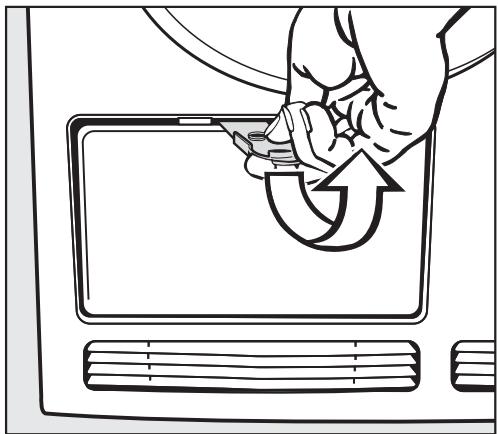
Line drawing of a hand inserting a device into a tablet with an arrow indicating rotation (no text or symbols)■ Open the service panel. Hold the panel securely when doing this.
■ Now remove the panel by pulling it diagonally upwards and place it to one side.
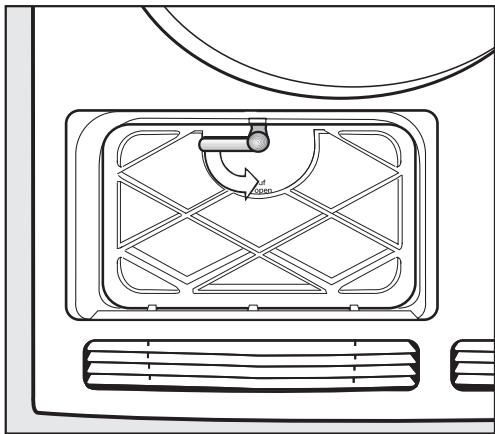
natural_image
Line drawing of a refrigerator interior with ventilation grilles and airflow indicators (no text or symbols)■ Turn the lever on the inner cover downwards to the vertical position.
■ Tilt the cover forwards.
■ Remove it by pulling it diagonally upwards.
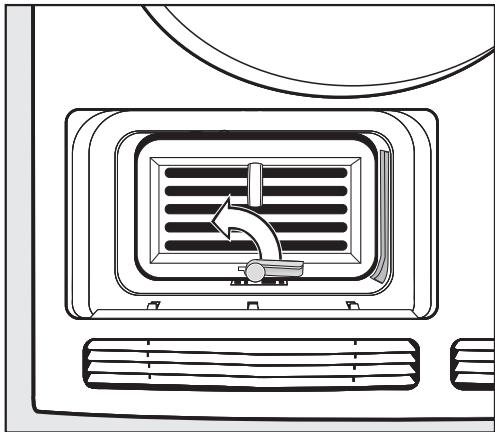
natural_image
Line drawing of an air conditioner unit with airflow direction arrow (no text or symbols)■ Turn the lever on the condenser unit upwards to the vertical position.
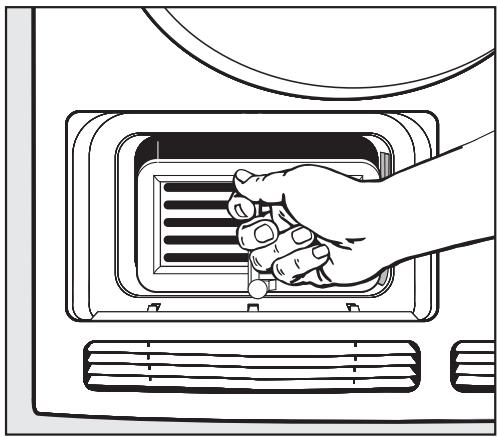
natural_image
Illustration of a hand inserting a fan into a microwave oven (no text or symbols)■ Pull the condenser unit out of its housing by the handle.
Checking the condenser unit
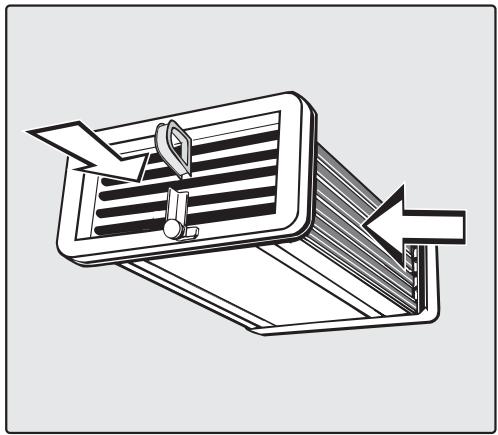
natural_image
Illustration of a folded notebook with a pen inserted, showing paper movement (no text or symbols)■ Hold the condenser unit up to the light as shown.
■ Check to see if there is any fluff inside it.
The arrows in the illustration above indicate where to look.
If you cannot see any fluff:
■ Replace the condenser unit (see following page).
If you can see some fluff:
■ Clean the condenser unit as described below.
Cleaning the condenser unit
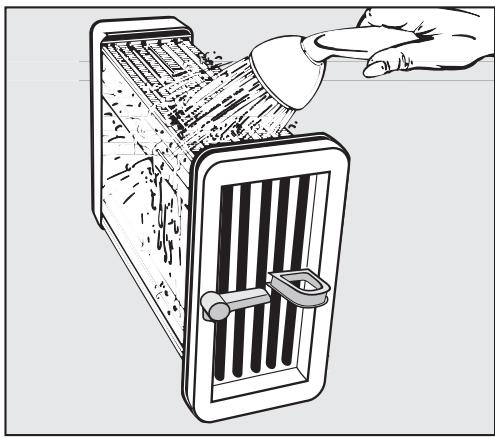
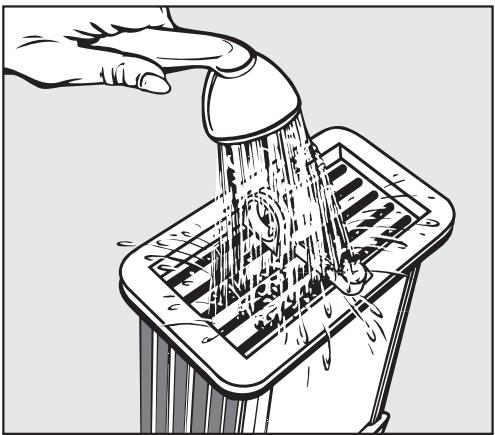
■ When rinsing the condenser unit, make sure you position it as shown in the next two illustrations.
natural_image
Illustration of a hand pouring liquid into a vertical gridded machine (no text or symbols)■ Use a shower head or similar to rinse the unit out as shown.
natural_image
Illustration of a hand using a showerhead to clean water from a tray (no text or symbols)■ Then flush the unit through from the front.
■ Check the condenser unit again for any visible fluff and if necessary flush it through again until it has all gone.
■ Remove any soiling still visible inside the housing unit by hand using a damp cloth. Do not try and access areas you cannot reach by hand!
■ Also make sure the rubber seals are clean.
The rubber seals must not be removed and must be free of kinks.
Replacing the condenser unit
■ With the handle facing upwards, push the condenser unit back into position in its housing.
■ Turn the lever down to the horizontal position, making sure that the hook on the lever clicks into the groove.
When replacing the inner cover after cleaning, ensure that the rubber seal fits correctly into the groove.
■ Replace the inner cover making sure the hooks locate correctly. Hold it at an angle and push it gently downwards.
■ Then turn the lever upwards into the horizontal position to lock the cover.
■ Replace the service panel and press the upper edge until it clicks into position.
⚠ It is important to ensure that both the condenser unit and the cover are correctly positioned and locked otherwise water may leak from the machine.
With the help of the following notes, minor faults in the performance of the machine, some of which may result from incorrect operation, can be put right without contacting the Service Department.
⚠️ Repair work to electrical appliances should only be carried out by a suitably qualified person in strict accordance with current local and national safety regulations. Repairs and other work by unqualified persons could be dangerous. The manufacturer cannot be held liable for unauthorised work.
Check and fault messages
| Problem | Possible cause | Remedy |
| The programme stops and appears in the display.The buzzer sounds. | This is not a fault.The electronic unit has recognised that there is no laundry in the drum and cancelled the programme.Drying individual garments or items which are already dry can also cause the programme to be cancelled. | – Use the Warm air programme (timed drying) to dry individual items.To delete the fault message:– Open and close the door. |
| The Low temperature indicator light starts flashing after the dryer has been switched on and appears in the display. | The electronic system lock is activated. | You will need to deactivate the system lock before the dryer can be used (see "Electronic system lock"). |
| The programme stops and Cooling down or Finish flashes in the display.The buzzer sounds. | No obvious cause. | – Switch the dryer off and then on again.– Then start the programme again.If the programme stops again and Cooling down or Finish flashes again there is a fault. Contact the Miele Service Department. |
| The Clean out airways indicator light comes on. | This indicator light comes on to warn you that the dryer is not working efficiently.Possible cause: The fluff filters are clogged with fluff or with detergent residues. | - Cleaning the fluff filters is usually all that is required.However, if the Clean out airways indicator light does not go out after you have cleaned the filters, then also check all the possible causes described under "The drying process goes on too long or even switches off".To switch off the indicator light:- Open and close the door. |
| The Clean out airways indicator light can be deactivated (see "Programmable functions"). | ||
| The programme stops and the Clean out airways indicator light is flashing.The buzzer sounds. | See above for possible causes and their remedies. | To switch off the indicator light:- Switch the dryer off and then back on again.- Then start the programme again.- If the indicator light flashes again, contact the Miele Service Dept. |
| The Empty out container indicator light comes on.The buzzer sounds. | The condensed water container is full or there is kink in the drain hose. | - Empty out the condensed water container.- Check the drain hose.To switch off the indicator light:- Open and close the door. |
| Other problems | ||
| Problem | Possible cause | Remedy |
| The drying process goes on too long or even switches off.In some circumstances, the Clean out airways indicator light still comes on, even though the filters are clean. | Please check all the possible causes and switch the dryer off and then back on again. | |
| Ventilation to and from the dryer may be insufficient (e.g. because it is installed in a small room). This has caused the temperature in the room to rise sharply. | Open a door or window while the machine is in operation for increased air flow. | |
| The fluff filters are clogged up with fluff or were still wet when they were replaced. | - Remove any fluff.- The fluff filters must be completely dry. | |
| The laundry has not been spun sufficiently. | Make sure that your laundry is thoroughly spun at the appropriate spin speed. | |
| The tumble dryer has been overloaded. | Do not exceed the maximum load for the programme selected. | |
| Metallic components, e.g. zips have prevented the dryer from registering the correct moisture level in the laundry. | - Open zips next time.If the problem occurs again, dry garments with long zips using the Warm air programme (timed drying). | |
| Detergent residues, hair and fine fibres can block up the condenser unit. | Check the condenser unit from time to time and clean it if necessary. | |
| The vents below the door are blocked. | Remove any objects that are blocking the vents. | |
| The laundry is not sufficiently dry. | The load consisted of different fabrics. | - Finish drying using the Warm air programme.- Select a different programme next time. |
| Problem | Possible cause | Remedy |
| Water leaks from the machine after the condenser unit has been cleaned. | - The inner cover of the condenser unit has not been locked properly and/or the condenser unit has not been positioned correctly.- Fluff has collected in the condenser unit housing. | - Ensure that the condenser unit is positioned correctly and lock the inner cover.- Check the rubber seals.- Use a cloth to remove any visible fluff from the inside of the condenser unit housing. |
| Items made of synthetic fibres are charged with static electricity after drying. | Synthetic fibres tend to attract static charge. | Static charge can be reduced by adding a fabric conditioner to the final rinse in the washing programme or a fabric conditioner sheet to the load when drying. |
| There is a build-up of fluff. | Fluff is principally the result of friction when garments are being worn and washed. Machine drying hardly causes any fluff to form and has been established by research institutes to have no appreciable effect on the lifetime of fabric. | Fluff is collected by the fluff filters and can be easily removed (see "Cleaning and Care"). |
Problem solving guide
| Problem | Possible cause | Remedy |
| The tumble dryer fails to start when switched on. | No obvious cause. | – Is the dryer switched on?– Is the plug correctly inserted into the socket and switched on?– Is the door closed properly?– Has the fuse or circuit breaker tripped? |
| The interior drum lighting does not come on. | The lighting switches off automatically (to save energy). | Switch the dryer off and then on again. |
| The lamp needs changing. | Change the lamp as described at the end of this section. |
Changing the lamp
Disconnect the machine from the mains electricity supply.
■ Open the door.
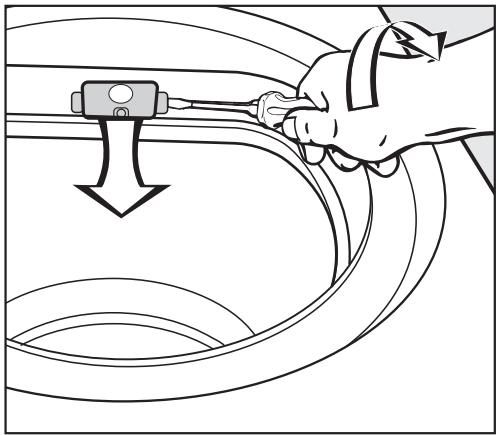
You will find the interior lamp cover at the top of the drum aperture.
natural_image
Line drawing of a hand using a tool to adjust or install a car interior panel (no text or symbols present)■ Insert a suitable tool, such as a wide bladed screwdriver, under the side edge of the lamp cover as illustrated.
■ Apply a little pressure and whilst doing so turn your wrist in the direction of the arrow to open the cover.
The cover will open downwards.
The temperature resistant lamp should only be ordered from your Miele dealer or the Miele Spare Parts Department.
The lamp specification and maximum wattage is stated on the data plate and on the lamp cover.
■ Replace the lamp.
■ To close the cover push it upwards and press it on the left and right until you hear it click into position.
⚠ Ensure that it is fitted into position securely, as any moisture could cause a short circuit.
Repairs
In the event of any faults which you cannot remedy yourself, or if the machine is under guarantee, please contact
- Your Miele dealer, or
– the Miele Service Department (see back cover for contact details).
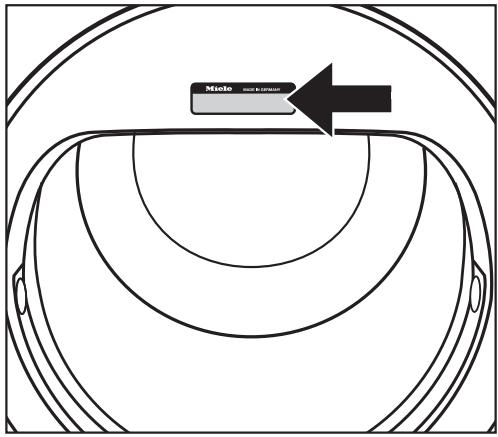
When contacting the your Dealer or the Service Department, please quote the model and serial number of your machine, both of which are shown on the data plate (visible when the door is opened).
text_image
Mielo MILLO DE ECONOMICSFuture updates (PC)
The indicator light marked PC is the interface used by Miele service technicians during service work for testing purposes and for updating the machine's programme data.
Guarantee
Please see the guarantee card supplied with your machine.
Optional accessories
Optional accessories for this dryer are available from your Miele Dealer or from the Miele Spare Parts Department.
Please note that telephone calls may be monitored and recorded for training purposes.
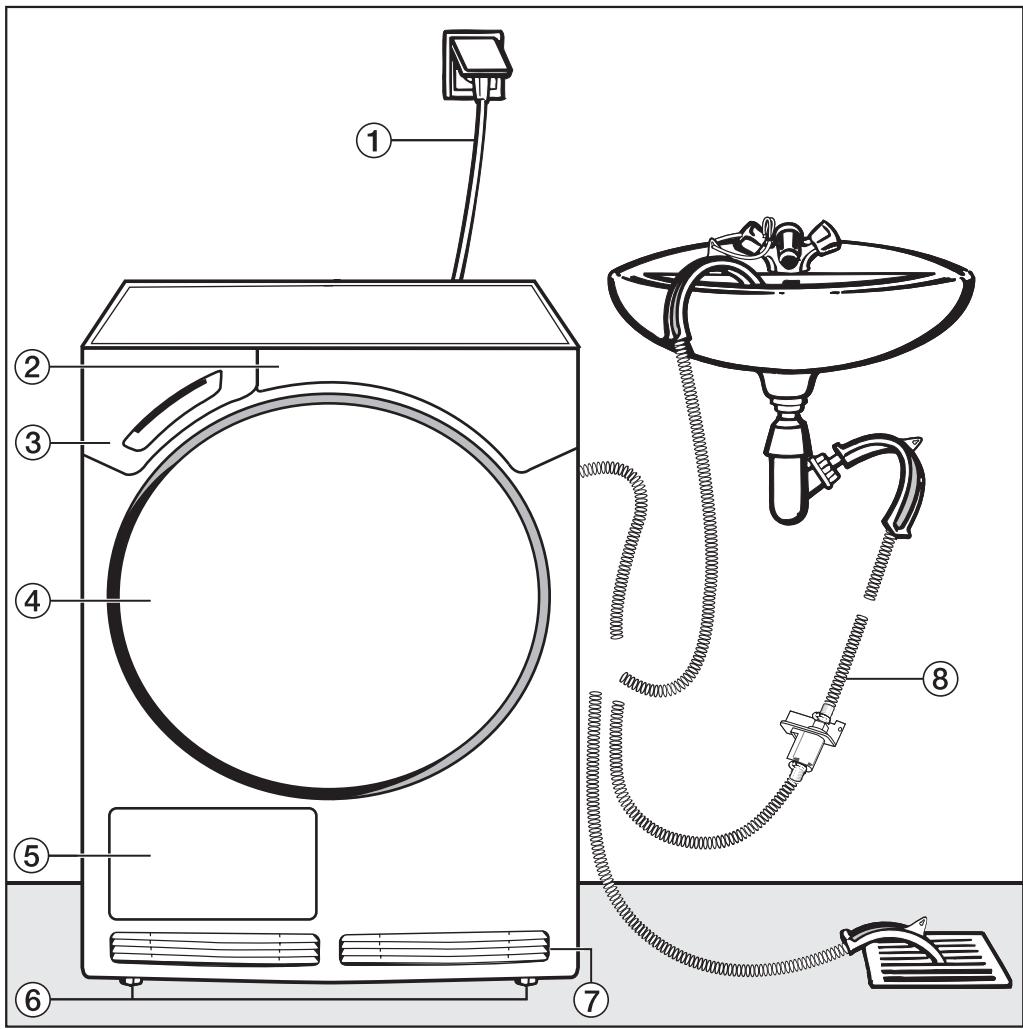
Front view
text_image
Technical diagram of a washing machine with numbered components and labeled parts① Mains connection cable
② Control panel
③ Condensed water container
④ Door
⑤ Service panel for condenser unit
⑥ Four height adjustable screw feet
⑦ Air inlet and outlet vent for cooling the condenser unit
⑧ External drainage options (e.g. via wash basin, wash basin drain outlet or gully)
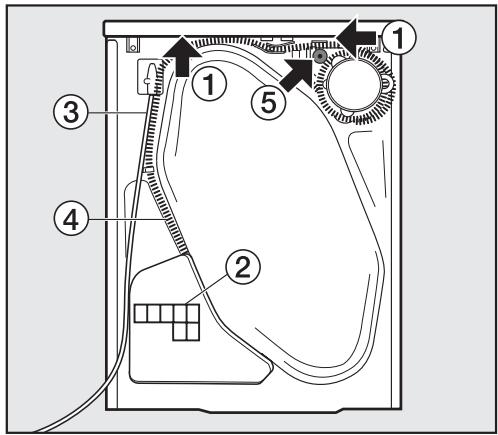
Rear view
text_image
Diagram of a device interior with numbered components and directional arrows indicating flow or movement.① Protruding lid for holding when moving the machine (see arrows)
② Air inlet vent for cooling the condenser unit
③ Mains connection cable
④ External drainage of the condensed water
⑤ Accessories for connection to a sink drain outlet
Installation site
⚠️ The machine lid must not be removed.
The dryer can be pushed under a worktop with its lid in place, providing the worktop is high enough.
⚠️ Make sure the dryer door can be opened without hindrance after installation.
Transporting the machine to its installation site
When moving the machine, you can hold it by the lid where it protrudes to the rear of the dryer. To manoeuvre the dryer out of its packing case to its installation site you will also need to hold it by the front feet.
Washer-dryer stack
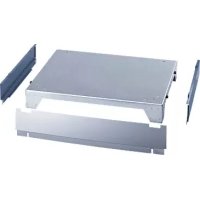
The tumble dryer can also be combined with a Miele washing machine in a washer-dryer stack. The appropriate "WTV" stacking kit (available to order) to match your dryer is required.
⚠️ Stacking kits must only be installed by a suitably qualified fitter.
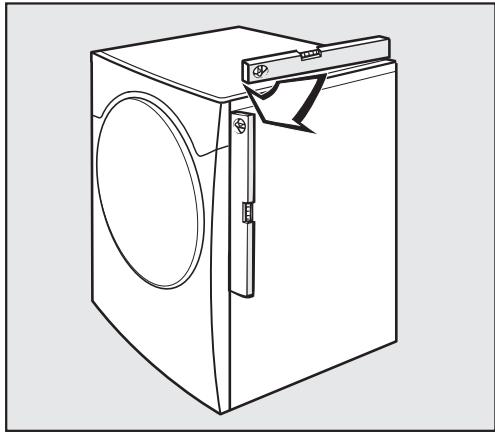
Levelling the machine
natural_image
Line drawing of a washing machine with handle and side panel (no text or symbols)The machine must be perfectly level to ensure safe and proper operation.
natural_image
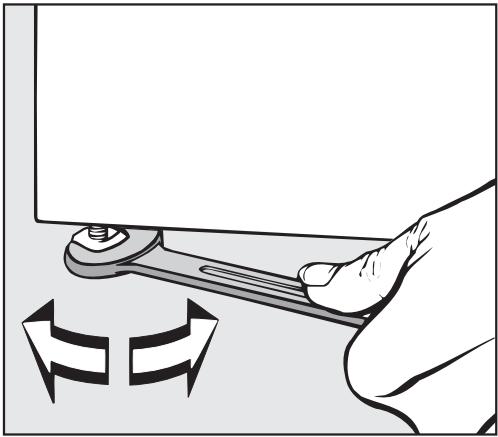
Illustration of a hand using a wrench to adjust a component, with directional arrows indicating rotation (no text or symbols)■ The screw feet can be adjusted to compensate for any unevenness in the floor.
⚠️ The air inlet and outlet vents on the front and back of the machine must not be covered as this would prevent sufficient ventilation for cooling the condenser unit.
Room ventilation
The air which is taken in when the dryer is in operation is blown out of the vents on the front of the machine and warms up the air in the room. It is very important, particularly if the room is small, to ensure adequate ventilation. Opening a window, for example, will allow more air to enter the room. Otherwise running times and energy consumption could be increased.
Before moving the machine again (e.g. when moving house)
After each use a small quantity of condensed water will collect in the area around the pump. This water can run out if the machine is tipped up when it is being moved. It is a good idea to run the Cool air programme for approximately 1 minute before moving the machine. Any remaining condensed water will then be fed into the condensed water container or out through the drain hose.
External condensed water outlet
General notes
When drying is in progress, condensed water is pumped into the condensed water container through the drain hose at the back of the dryer. The condensed water can also be drained off directly if the machine is installed near a sink, drain outlet etc. so that the condensed water container does not have to be emptied.
Drain hose length 1.50 m
Maximum delivery head ..... 1.50 m
Maximum drain hose length . . . . 4.00 m
⚠️ If the on-site water drainage system is not fitted with a non-return valve or an appropriate air gap, one must be fitted to prevent the risk of back-flow. (See "Installation conditions requiring a non-return valve").
The following optional accessories are available:
- an extension hose
- a non-return valve kit for connection to an external condensed water outlet
(includes an extension hose).
Maximum delivery head with non-return valve fitted: 1.00 m
Arranging the drain hose
⚠ Do not pull on the drain hose and do not stretch it or allow it to become kinked as it could get damaged.
■ There will be a small amount of residual water in the drain hose. Have a container ready to collect this.
natural_image
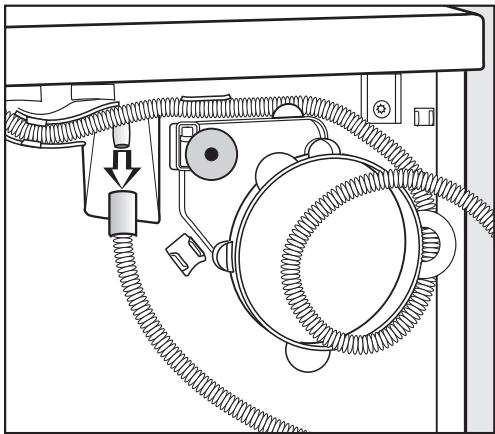
Technical diagram of a mechanical device with hoses and a central hub (no text or symbols)■ Pull the hose off its connection (see arrow).
- Allow any residual water to run into the container.
■ Unwind the hose and pull it carefully out of the holders.
natural_image
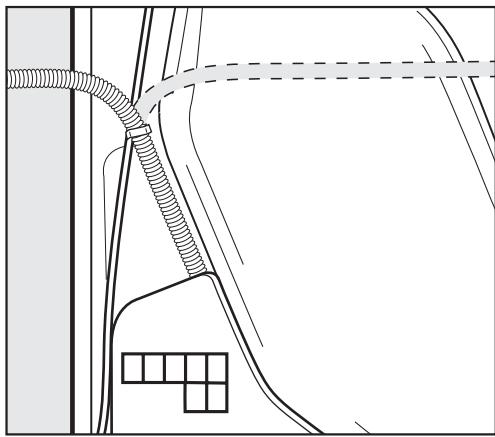
Pure technical line drawing of a mechanical or architectural component without any text, numbers, or symbols■ Position the hose to the right or left hand side as necessary.
Leave the hose in the middle holder (see previous illustration) to prevent it from becoming kinked inadvertently.
External drainage via a sink or gully
■ See "Front view" illustration.
⚠️ If you want to drain the water off into a sink you will need to secure the hose carefully, e.g. by tying it to a tap to make sure it cannot slip during use. Otherwise there is a risk of overflowing water which could cause damage.
■ Use the bow-shaped guide to prevent the drain hose from becoming kinked (see "Front view" illustration).
Installation conditions requiring a non-return valve
⚠️ If the on-site water drainage system is not fitted with a non-return valve or an appropriate air gap, one must be fitted to prevent the risk of back-flow (a non-return valve kit is available as an optional accessory). Otherwise water could leak out of the dryer and cause damage.
A non-return valve is required:
- If the tumble dryer is connected to a sink drain outlet (see the following section).
- If the tumble dryer is to be connected to a drainage system already in use by another appliance, e.g. a dishwasher.
Example: Connection to a sink drain outlet
The drain hose with non-return valve fitted can be connected directly to a suitable sink drain outlet.
text_image
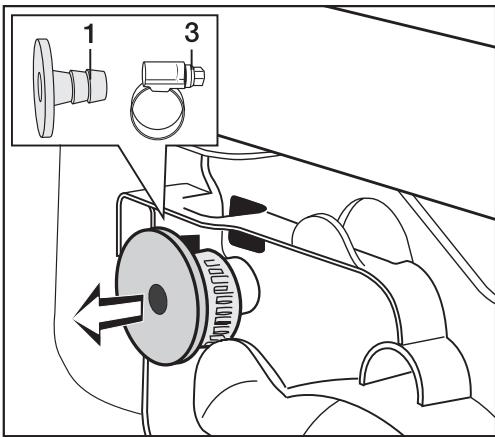
Technical diagram of a mechanical device with labeled parts 1 and 3, showing internal components and directional flow arrows.■ Remove the following from the back of the dryer at the top: Adapter 1 and hose clip 3 behind it.
text_image
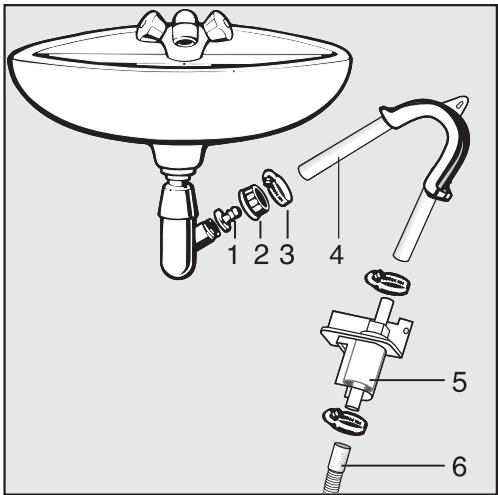
Technical diagram of a cleaning or piping assembly with numbered parts for identification1 Adapter
2 Nut
3 Hose clip
4 End of the hose
5 Non-return valve
6 Dryer drain hose
■ Fit adapter 1 to the sink drain outlet using nut 2.
If this nut has a flat disc in it you should take the disc out first.
■ Attach the end of the hose 4 to adapter 1.
■ Use a screwdriver to tighten hose clip 3 up close to the nut.
⚠️ The non-return valve 5 must only be fitted in an upright position or at a slight angle (see illustration). If it is fitted in a horizontal position it will not work correctly.
■ Fit the non-return valve 5 to the drain hose of the dryer 6 (make sure it is in the correct position, see illustration).
- Secure the non-return valve using hose clips.
Electrical connection U.K.
All electrical work should be carried out by a suitably qualified and competent person, in strict accordance with current national and local safety regulations (BS 7671 in the UK).
Ensure power is not supplied to the appliance until after installation work has been carried out.
The appliance is supplied with a mains cable with moulded plug ready for connection to a 230-240V mains supply. Please ensure the connection data quoted on the data plate match the household mains supply.
Connection should be made via a suitable switched socket which is easily accessible after installation.
For extra safety it is advisable to install a residual current device (RCD), with a trip current of 30 mA (in accordance with DIN VDE 0664, VDE 0100 Section 739).
Do not connect via an extension lead. Extension leads do not guarantee the required safety of the appliance (e.g. danger of overheating).
Non-rewireable plugs BS 1363
The fuse cover must be refitted when changing the fuse, and if the fuse cover is lost, the plug must not be used until a suitable replacement is obtained. The colour of the correct replacement cover is that of the coloured insert in the base of the plug, or the colour that is embossed in words on the base of the plug (as applicable to the design of plug fitted).
Replacement fuses should be ASTA approved to BS 1362 and have the correct rating. Replacement fuses and fuse covers may be purchased from your local electrical supplier.
WARNING: THIS APPLIANCE MUST BE EARTHED
Consumption data
| Programme | Loadkg* | Final spin speedin a domestic washing machinerpm | EnergykWh | DurationMinutes |
| CottonsNormal | 6.0 | 800 (70 % residual moisture)**1000 (60 % residual moisture)***1200140016001800 | 3.803.303.002.852.752.50 | 1028981787569 |
| CottonsHand iron | 6.0 | 800 (70 % residual moisture)**1000 (60 % residual moisture)***1200140016001800 | 3.202.652.352.202.101.80 | 847163605751 |
| Minimum iron Normal | 3.0 | 1000 (50 % residual moisture)**1200 (40 % residual moisture)*** | 1.451.20 | 4437 |
| Minimum iron Hand iron | 3.0 | 1200 | 1.00 | 32 |
| Delicates Normal | 2.0 | 800 | 1.40 | 95 |
| Automatic Normal | 3.5 | 800 | 2.10 | 85 |
| Shirts Normal | 2.0 | 600 | 1.15 | 41 |
| Denim Normal | 3.0 | 900 | 2.00 | 96 |
| Woollens handcare | 2.0 | 1000 | 0.15 | 4 |
| Smoothing | 3.0 | 1000 | 0.30 | 8 |
* Weight of dry laundry
** EN 61121:2000 test programme
***EN 61121:2005 test programme
All data without a "star" against it was calculated using EN 61121:2000.
Before testing in accordance with EN 61121, dry a 3 kg load of cotton laundry with 70% residual moisture as per the above standard using the Cottons Normal programme without selecting any additional options.
Consumption data can vary from the nominal values given above depending on the size of the load, types of textiles, residual moisture levels after spinning, fluctuations in the electricity supply and any extra options selected.
| Height | 850 mm |
| Width | 595 mm |
| Depth | 634 mm |
| Depth with door open | 1074 mm |
| Suitable for pushing under a worktop | Yes |
| Suitable for stacking | Yes |
| Weight | 52 kg |
| Drum volume | 111 litres |
| Maximum capacity | 6 kg dry weight |
| Capacity of condensed water container | approx. 3.5 litres |
| Drain hose length | 1.50 m |
| Maximum delivery head | 1.50 m |
| Maximum drain hose length | 4.00 m |
| Length of connection cable | 2.00 m |
| Voltage | see data plate |
| Connected load | see data plate |
| Fuse rating | see data plate / plug |
| Lamp wattage | see data plate / plug |
| Energy consumption | see "Consumption data" |
| Test certificates awarded | Radio/TV suppression, VDE |
Programmable functions for changing default settings
The programmable functions are used to alter the machine's electronics to suit changing requirements. Programmable functions can be altered at any time.
Extending the range of the drying levels
You can extend the range of the drying levels for many of the programmes:
Machine iron+
(drier than Machine iron).
Hand iron+
(drier than Hand iron).
Normal+
(drier than Normal).
In addition the Extra dry drying level can be made available for the Delicates and Denim programmes.
You can use this programmable function to extend the range of the drying levels for the following programmes:
Cottons, Minimum iron*, Delicates*, Automatic, Denim.
* Machine iron+ is not available.
Follow steps ① to ⑤ to programme and store in memory.
Before you begin, first ensure that:
- The tumble dryer is switched off.
- The door is closed.
1 Press the Start/Stop button and keep it pressed in whilst carrying out steps
2-3.
② Press the I-On/0-Off button in.
Wait until the indicator light for the Start/Stop button lights up constantly ...
3 . . . and then release the Start/Stop button.
- The Low temperature indicator light will briefly flash on and off twice.
- P and (default setting) will flash alternately in the display.
The number which appears alternately in the display with P means:
Default setting
1 Drying level range extended
(The Automatic indicator light will also flash).
4 Pressing the Start/Stop button switches from one to the other.
5 Switch the machine off with the I-On/0-Off button.
The setting you have selected is now stored in memory. You can change it again at any time.
To select the extended drying level
■ Select a programme.
■ Press the drying level button repeatedly until one or two indicator lights come on.
- Indicator lights Extra dry and Normal = Normal+
- Indicator lights Hand iron and Normal = Hand iron+
- Indicator lights Machine iron and Hand iron = Machine iron+
Altering the volume of the buzzer
The buzzer has two volumes.
Normal
The buzzer sounds at the end of a programme (default setting).
Loud
The buzzer sounds at maximum volume at the end of a programme.
Follow steps ① to ⑥ to programme and store in memory.
Before you begin, first ensure that:
- The tumble dryer is switched off.
- The door is closed.
1 Press the Start/Stop button and keep it pressed in whilst carrying out steps 2-3.
② Press the I-On/0-Off button in.
Wait until the indicator light for the Start/Stop button lights up constantly . . .
3 . . . and then release the Start/Stop button.
4 Press the Low temperature button once.
- The Low temperature indicator light will briefly flash on and off four times.
- P and (default setting) will flash alternately in the display.
The number which appears alternately in the display with P means:
Normal buzzer
(Default setting)
1 Loud buzzer
(The Automatic indicator light will also flash).
5 Pressing the Start/Stop button switches from one to the other. You will hear the two buzzer volumes as you do so.
6 Switch the machine off with the I-On/0-Off button.
The setting you have selected is now stored in memory. You can change it again at any time.
Memory function
The electronics will memorise any additional options selected for a programme. The duration selected for the Warm air and Cool air programmes and the Delay start period selected will also be stored in memory. These settings will be selected automatically the next time the programme is chosen. You can either accept these or change them by pressing the appropriate button.
Follow steps ① to ⑥ to programme and store in memory.
Before you begin, first ensure that:
- The tumble dryer is switched off.
- The door is closed.
1 Press the Start/Stop button and keep it pressed in whilst carrying out steps 2-3.
② Press the I-On/0-Off button in.
Wait until the indicator light for the Start/Stop button lights up constantly . . .
3 . . . and then release the Start/Stop button.
4 Press the Low temperature button twice.
- The Low temperature indicator light will briefly flash on and off six times.
- P and I (default setting) will flash alternately in the display.
The number which appears alternately in the display with P means:
0 Memory deactivated
1 Memory activated
(Default setting). (The Automatic indicator light will also flash).
5 Pressing the Start/Stop button switches from one to the other.
6 Switch the machine off with the I-On/0-Off button.
The setting you have selected is now stored in memory. You can change it again at any time.
Extending the cooling down time
The cooling down phase which takes place before the end of a programme can be lengthened if required. This makes the garments easier to handle.
The cooling down time
- can be extended by 5 minutes or 10 minutes.
- is not available for the following programmes: Woollens handcare, Smoothing, Warm air, Cool air.
Follow steps ① to ⑥ to programme and store in memory.
Before you begin, first ensure that:
- The tumble dryer is switched off.
- The door is closed.
1 Press the Start/Stop button and keep it pressed in whilst carrying out steps 2-3.
② Press the I-On/0-Off button in.
Wait until the indicator light for the Start/Stop button lights up constantly . . .
3 . . . and then release the Start/Stop button.
4 Press the Low temperature button three times.
- The Low temperature indicator light will briefly flash on and off seven times.
- P and (default setting) will flash alternately in the display.
The number which appears alternately in the display with P means:
Default setting
1 The cooling down time will be five minutes longer.
(The Automatic indicator light will also flash once).
2 The cooling down time will be ten minutes longer.
(The Automatic indicator light will also flash twice).
5 Pressing the Start/Stop button switches from one to the other.
6 Switch the machine off with the I-On/0-Off button.
The setting you have selected is now stored in memory. You can change it again at any time.
Clean out airways indicator
Fluff should be removed after drying. The Clean out airways indicator will remind you to clean the filters when a certain amount of fluff has collected in the filters. You can decide at what level of fluff this reminder should be given.
You will have an idea of which of the four options to select after a few drying programmes.
Follow steps ① to ⑥ to programme and store in memory.
Before you begin, first ensure that:
- The tumble dryer is switched off.
- The door is closed.
1 Press the Start/Stop button and keep it pressed in whilst carrying out steps 2-3.
② Press the I-On/0-Off button in.
Wait until the indicator light for the Start/Stop button lights up constantly ...
3 . . . and then release the Start/Stop button.
4 Press the Low temperature button four times.
- The Low temperature indicator light will flash on and off slowly once.
- P and 2 (default setting) will flash alternately in the display.
The number which appears alternately in the display with P means:
☐ The Clean out airways indicator light is deactivated
The Clean out airways indicator light will come on when there is a heavy build-up of fluff
(The Automatic indicator light will also flash once).
2 Default setting
(the Automatic indicator light will also flash twice).
3 The Clean out airways indicator light will come on when there is only a light build-up of fluff
(The Automatic indicator light will also flash three times).
5 Pressing the Start/Stop button switches from one to the other.
6 Switch the machine off with the I-On/0-Off button.
The setting you have selected is now stored in memory. You can change it again at any time.
Keypad tone
An audible tone sounds each time a button is pressed.
Follow steps ① to ⑥ to programme and store in memory.
Before you begin, first ensure that:
- The tumble dryer is switched off.
- The door is closed.
1 Press the Start/Stop button and keep it pressed in whilst carrying out steps 2-3.
② Press the I-On/0-Off button in.
Wait until the indicator light for the Start/Stop button lights up constantly . . .
3 . . . and then release the Start/Stop button.
4 Press the Low temperature button five times.
- The Low temperature indicator light will flash on and off slowly once and will then flash on and off quickly once.
- P and (default setting) will flash alternately in the display.
The number which appears alternately in the display with P means:
☐ Keypad tone deactivated (Default setting)
1 Keypad tone activated
(The Automatic indicator light will also flash)
5 Pressing the Start/Stop button switches from one to the other.
6 Switch the machine off with the I-On/0-Off button.
The setting you have selected is now stored in memory. You can change it again at any time.
Adjusting the dryer's electronics for very soft water
⚠ In some areas of the UK, water is extremely soft which can affect the sensitivity of the control electronics. If the machine is installed in an area with very soft water, you should contact your local water supplier for information and advice regarding water hardness and water conductivity. If the water conductivity is less than 150 μS, the following programmable function will need to be activated.
Important. This programmable function should not be activated if, despite the water being extremely soft (as would be the case if a water softener were used), its conductivity is greater than 150 S .
Follow steps ① to ⑥ to programme and store in memory.
Before you begin, first ensure that:
- The tumble dryer is switched off.
- The door is closed.
1 Press the Start/Stop button and keep it pressed in whilst carrying out steps 2-3.
② Press the I-On/0-Off button in.
Wait until the indicator light for the Start/Stop button lights up constantly . . .
3 . . . and then release the Start/Stop button.
4 Press the Low temperature button six times.
- The Low temperature indicator light will flash on and off slowly once and will then flash on and off quickly twice.
- P and (default setting) will flash alternately in the display.
The number which appears alternately in the display with P means:
Default setting
1 Adjusted for very soft water
(with low conductivity) (The Automatic indicator light will also flash)
5 Pressing the Start/Stop button switches from one to the other.
6 Switch the machine off with the I-On/0-Off button.
The setting you have selected is now stored in memory. You can change it again at any time.
United Kingdom:
Miele Co. Ltd.
Fairacres, Marcham Road
Abingdon, Oxon, OX14 1TW
tel. Abingdon (01235) 554455
Service Office: (01235) 554466
fax (01235) 554477
Internet: www.miele.co.uk
Ireland:
Miele Ireland Ltd.
Broomhill Road, Tallaght, Dublin 24
Tel: (01) 46 10 710, Fax: (01) 46 10 797
Email: info@miele.ie
Internet: http://www.miele.ie
Australia:
Miele Australia Pty. Ltd.
A.C.N. 005635398
1 Gilbert Park Drive
Knoxfield, VIC 3180
Telephone: (03) 9764 7100
Fax: (03) 9764 7129
Internet: www.miele.com.au
Distributor New Zealand:
Steelfort Engineering Company. Ltd.
500 Rangitikei Street
Palmerston North, Priv. Bag 11045, NZ
Telephone: (06) 350 1350
Fax: (06) 356 1507
South Africa:
Miele (Pty) Ltd
63 Peter Place
Bryanston 2194
P.O. Box 69434
Bryanston 2021
Tel.: (011) 548 1900
Telefax (011) 548 1935
Internet: www.miele.co.za
E-mail: info@miele.co.za
Singapore:
Miele Southeast Asia
Miele Pte. Ltd.
163 Penang Road
# 04 - 02/03 Winsland House II
Singapore 238463
Tel : +65-67351191
Fax: +65-67351161
Email: infosea@miele.com.sg
Internet: www.miele.sg
Hong Kong:
Miele (Hong Kong) Limited
AIA Plaza, 24 ^™ Floor
18 Hysan Avenue
Causeway Bay
Hong Kong
Tel.: (852) 2610 1331
Fax: (852) 2610 1013
E-mail: mielehk@miele.com.hk