
Pulse - Uncategorized Evolveo - Free user manual and instructions
Find the device manual for free Pulse Evolveo in PDF.


| Type | Fitness Tracker / Smartwatch |
| Dimensions | 45 x 35 x 10 mm |
| Weight | 30 g |
| Power Supply | Built-in rechargeable lithium battery, 200 mAh |
| Display | 1.3 inch AMOLED touchscreen |
| Connectivity | Bluetooth 5.0 |
| Main Functions | Heart rate monitor, step counter, sleep tracking, notifications, GPS |
| Water Resistance | IP68 rated |
| Operating System Compatibility | iOS 10.0+ and Android 5.0+ |
| Battery Life | Up to 7 days on typical use |
| Charging Time | Approximately 2 hours |
| Sensor Types | Optical heart rate, accelerometer, gyroscope |
| Maintenance and Cleaning | Clean with soft, dry cloth; avoid solvents. Remove device from wrist periodically for cleaning. |
| Safety | Made of hypoallergenic materials. Not a medical device. |
| Spare Parts and Repairability | Strap replaceable. Battery and other components not user-serviceable. Contact support for repairs. |
| General Information | Designed for fitness and health tracking. Compatible with Evolveo Pulse app. |
Frequently Asked Questions - Pulse Evolveo
User questions about Pulse Evolveo
0 question about this device. Answer the ones you know or ask your own.
Ask a new question about this device
Download the instructions for your Uncategorized in PDF format for free! Find your manual Pulse - Evolveo and take your electronic device back in hand. On this page are published all the documents necessary for the use of your device. Pulse by Evolveo.
USER MANUAL Pulse Evolveo
natural_image
Black power supply unit with visible fan and connected circuit boards (no readable text or symbols)Instalace:
natural_image
Silhouette of a traditional building with two tall chimneys and a central entrance (no text or symbols)(6)


natural_image
Simple black-and-white icon of a vertical pole with two square eyes, resembling a stylized lamp or device (no text or symbols)(7)

natural_image
Pure black vertical bar with three small protrusions at the base (no text or symbols)(8)

(9)

natural_image
Pure electrical circuit lines without any symbols
natural_image
Abstract black-and-white geometric pattern with vertical bars and rectangles (no text or symbols)Ochrana:
No.5, 17/F, Strand 50, 50 Bonham Strand, Sheung Wan, Hong Kong
Vyrobeno v Číně
Copyright © Abacus Electric, s.r.o.
www.evolveo.com
www.facebook.com/EvolveoCZ
No.5, 17/F, Strand 50, 50 Bonham Strand,
Sheung Wan, Hong Kong
Vyrobené v Číne
Copyright © Abacus Electric, s.r.o.
www.evolveo.com
www.facebook.com/EvolveoCZ
Check the red power supply voltage switch setting before installation (if applicable). It should be the same as your local power voltage (115V for North America, Japan, etc. and 230V for Europe and many other countries). Change the voltage setting if necessary. Failure to take this precaution could result in damage to your equipment and could void your warranty.
- Disconnect the power cord from your old power supply.
- Follow your computer case manual and open the case.
- Disconnect all the power connectors from the motherboard and from the peripheral devices such as case fans, hard drives, floppy drives, etc.
- Remove the existing power supply from your computer case and replace it with new power supply.
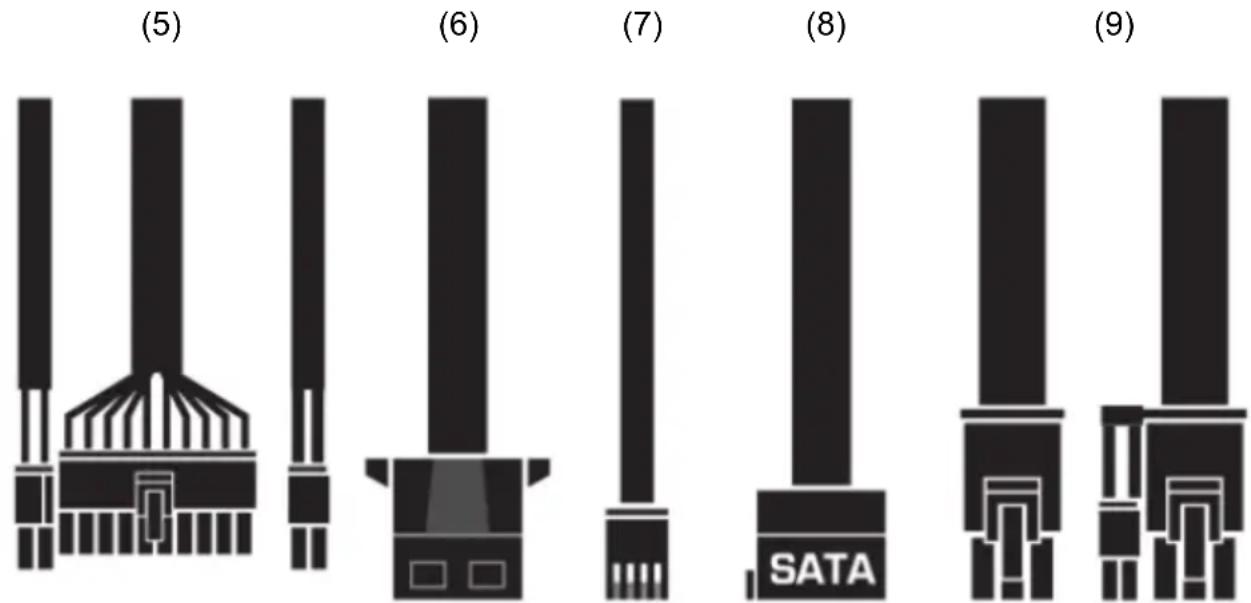
- Connect the Power Connectors to your motherboard and peripheral devices. Note: Slide-in Main Connector (20P+4P) is used for 24pin ATX/BTX/EPS power connector. Slide-In 4P+4P 12V Connector is used for 4Pin 12V ATX or 8Pin(4P+4P) 12V EPS power connector on motherboard.
- Connect the large 4-pin connectors to your storage peripherals, such as HOD, CD-ROM or DVD-drive etc.
- Connect the small 4-pin device connectors in your 3 1 /2" FDD.
- Connect the SATA 15-pin power connector to your Serial-ATA hard disc device.
- Connect 6-pin and 6+2-pin (if applicable) VGA blue color power connectors to your PCI-Express VGA Card(if applicable).
- Close the computer case.
- Connect the power cord to the power supply.
Protection:
If the power supply latches into shutdown stage (when over current, over voltage or short circuit protection is working), the power supply shall return to normal operation only after the fault has been removed and PS-ON is reset for a minimum of 1 Second or by removing AC power cord and reconnect it.
Trouble Shooting:
If the system has no responses when user turns on the power supply, then please follow the following instructions to check the problem.
A. Ensure the power cord is connected tightly.
B. Ensure all the connectors are connected in the right direction.
C. Check whether there is any short-circuit problem, or defective peripherals by unhooking each peripheral one at a time.
D. Ensure the on/off switch is turn to the ON position.
E. If one of the above-mentioned have occurred, please wait for 10-30 seconds to release the power supply protect condition, then turn on the power supply again.
F. If the power supply still cannot work, please send it back to your vendor or supplier for further analyzing and repairing.
WARNING:
- Please do not open the power cover without any authorizations; it will cause thunder-stroke danger.
Note:
- Warranty void if the serial number sticker broken or removed.
- If you have any technical problem, please feel free to contact us. More information on www.evolveo.com
IMPORTANT SAFETY PRECAUTIONS:
- Do not pull the power cord out of the socket by the cord.
- Do not connect or pull the power cord into the socket with wet hands.
- Do not connect the adapter to the mains if you find that the adapter is damaged (e.g. short circuit, burnt PVC casing).
- Immediately unplug from the mains if you smell a burn.
- Do not disassemble this equipment, do not attempt to modify it in any way there is a risk of fire, injury or damage to personal property. Entrust all repairs to an authorised service centre (Abacus Electric s.r.o.).
- Do not expose it to direct sunlight or place it on a heater or other heat source. Do not cover it with paper or other material to allow air to circulate
- Do not use in environments where the temperature is below 0^ C and above 40^ C. Use in ventilated areas.
- Do not place the adapter in areas that are sensitive to heat.
- Make sure that your power source supplies the correct voltage (V) and the correct frequency (Hz).
- Do not use the adapter with damaged power cords, output cables, or fuses.
- Keep out of reach of children
- Make sure the output voltage of this power adapter is appropriate for your equipment.
-
Disconnect the device from the mains if you will not be using it for an extended period of time.
-
Connect the connectors according to the peripheral manufacturer's instructions and guidelines (HDD, MB, CPU/GPU,...)
- Check the rated power consumption of the peripherals and make sure it matches the power supply output.
- Power supplies of higher categories may have a passive cooling function, the fan will only turn on when the power supply is heated or loaded.
Disposal
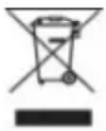
The crossed-out container symbol on the product, in the enclosed documentation or on packaging means that all the electric and electronic equipment, batteries and storage cells in the European Union must be disposed of as sorted waste at the end of their service life. These products must not be disposed as unsorted municipal waste.
CE DECLARATION OF COMPLIANCE
Abacus Electric, s.r.o. hereby declares that the EVOLVEO Pulse complies with the requirements of standards and regulations relevant for this type of device.
For the full wording of the Declaration of Compliance see http://ftp.evolveo.com/ce/
Dovozce / Dovozca / Importer / Importör
Abacus Electric, s.r.o.
Planá 2, 370 01, Czech Republic
No. 5, 17/F, Strand 50, 50 Bonham Strand, Sheung Wan, Hong Kong
Made in China
Copyright © Abacus Electric, s.r.o.
www.evolveo.com
www.facebook.com/EvolveoCZ
All rights reserved.
Product appearance and technical specifications are subject to changes without prior notice.


Brand : Evolveo
Model : Pulse
Category : Uncategorized