
Tones1 - Headphones Lamax - Free user manual and instructions
Find the device manual for free Tones1 Lamax in PDF.


| Product Type | Wireless Earbuds |
| Brand | Lamax |
| Model | Tones1 |
| Wireless Technology | Bluetooth 5.3 |
| Maximum Range | 15 m |
| Supported Codecs | AAC |
| Battery Capacity (Earbud) | 30 mAh |
| Battery Capacity (Charging Case) | 300 mAh |
| Playback Time | Up to 8 hours |
| Charging Time (Earbuds) | 60 minutes |
| Charging Time (Charging Case) | 85 minutes |
| Weight (Single Earbud) | 4 g |
| Total Weight (with Case) | 36 g |
| Controls | Multi-function button: tap, double tap, triple tap, hold |
| Microphone | Yes |
| LED Indicators | Green (pairing/flash), Red (charging), White (low battery case) |
| Automatic Power On/Off | On when removed from case, off when inserted |
| Voice Assistant Activation | Triple tap on left earbud |
| Call Functions | Answer (tap), End (hold 1s), Reject (hold 2s) |
| Charging Interface | USB-C (charging case) |
| Package Contents | Earbuds, charging station, USB-C cable (0.3m), user manual, safety instructions |
Frequently Asked Questions - Tones1 Lamax
User questions about Tones1 Lamax
0 question about this device. Answer the ones you know or ask your own.
Ask a new question about this device
Download the instructions for your Headphones in PDF format for free! Find your manual Tones1 - Lamax and take your electronic device back in hand. On this page are published all the documents necessary for the use of your device. Tones1 by Lamax.
USER MANUAL Tones1 Lamax
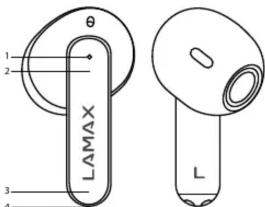
1) LED notifications
2) Multifunction button
3) Microphone
4) Charging pins
PACKAGING CONTENT
1× LAMAX Tones1
1× Charging station
1× USB-C cable (0.3 m)
1× User manual
1× Safety Instructions
CONTROLS
| Switch on | Hold the multi-function button for 5 seconds |
| Switch off | Hold the multi-function button for 5 seconds |
| Play / Pause | Tap the multi-function button |
| Volume up | Double tap the multi-function button on the right handset |
| Volume down | Double tap the multi-function button on the left handset |
| Next track | Hold down the multi-function button on the right handset for 3 seconds |
| Previous track | Hold down the multi-function button on the left handset for 3 seconds |
| Answer call | Tap the multi-function button |
| End call | Hold the multi-function button for 1 second |
| Reject a call | Hold the multi-function button for 2 seconds |
| To activate the mobile assistant | Triple tap the multi-function button on the left handset |
SWITCHING ON
The headphones automatically switch on when removed from the charging station. To switch on manually, hold the multi-function button for 5 seconds. An audible notification will sound when switched on.
SWITCHING OFF
The headphones automatically switch off when inserted into the charging station. To switch off manually, hold the multi-function button for 5 seconds. An audible notification will sound when switching off.
PAIRING
-
Remove the headphones from the charging station. The headphones will automatically connect to each other. One of the headphones will be the master and ready for pairing, this is indicated by a green flash.
-
Switch on Bluetooth on your device and search for LAMAX Tones1 in the list of available Bluetooth devices. After successful pairing, an audio notification sounds and the LED on one of the headphones turns green and then goes off after a while.
If you have problems pairing, remove the headphones from the list of paired devices on your phone. Insert the headphones into the charging station and then remove them. Press the multi-function button on both headphones 5 times at the same time. Both headphones will flash 5 times. Then pair them as described in step 1.
CHARGING
To charge the charging station, plug the cable into the USB-C port on the back of the charging station and plug the other end of the cable into a USB power supply with a maximum input voltage of 5 V and current of 2 A.
The LED will flash red when charging. When fully charged, the LED will glow red. If the charging station is discharged, the LED will flash white 4 times.
PARAMETERS
| Wireless technology | Bluetooth 5.3 |
| Maximum pairing distance | up to 15 m |
| Supported codecs | AAC |
| Battery capacity in the handset | 30 mAh |
| Charging station battery capacity | 300 mAh |
| Playback time | up to 8 h on a single charge |
| Charging time of headphones | 60 minutes |
| Charging time of the charging station | 85 minutes |
| Weight of one handset | 4 g |
| Weight with charging station | 36 g |
Printing errors reserved.
Download the current version of the user manual here: https://lamax-electronics.com/tones1/manual


CE

LAMAX Tones1
BESCHREIBUNG


Brand : Lamax
Model : Tones1
Category : Headphones