
TRC 533 AU3BS - Radio HYUNDAI - Free user manual and instructions
Find the device manual for free TRC 533 AU3BS HYUNDAI in PDF.


| Product Type | Car Radio / Stereo |
| Brand | Hyundai |
| Model | TRC 533 AU3BS |
| Dimensions (W x H x D) | 180 x 50 x 160 mm (1 DIN) |
| Weight | 0.5 kg |
| Power Supply | 12V DC (negative ground) |
| Power Output | 4 x 50W max |
| Radio Bands | FM, AM |
| Preset Stations | 30 (18 FM, 12 AM) |
| Playback Media | CD, CD-R/RW, USB, AUX |
| Bluetooth | Built-in for hands-free calling and audio streaming |
| Display | LCD with white backlight |
| Remote Control | Included (wired or IR) |
| Audio Features | EQ presets, loudness, fader, balance |
| Security | Detachable faceplate with lock code |
| Fuse Rating | 10A (ATC/ATO blade type) |
| Operating Temperature | -20°C to +60°C |
| Maintenance | Clean with a soft, dry cloth; avoid solvents |
| Spare Parts / Repairability | Standard ISO connectors; faceplate and knobs available |
Frequently Asked Questions - TRC 533 AU3BS HYUNDAI
User questions about TRC 533 AU3BS HYUNDAI
0 question about this device. Answer the ones you know or ask your own.
Ask a new question about this device
Download the instructions for your Radio in PDF format for free! Find your manual TRC 533 AU3BS - HYUNDAI and take your electronic device back in hand. On this page are published all the documents necessary for the use of your device. TRC 533 AU3BS by HYUNDAI.
USER MANUAL TRC 533 AU3BS HYUNDAI
natural_image
Two Hyundai portable radio devices with digital displays and control buttons, no visible text or symbols on the devices themselves.NÁVOD K POUŽITÍ / NÁVOD NA POUŽITIE INSTRUKCJA OBSŁUGI / INSTRUCTION MANUAL HASZNÁLATÍ ÚTMUTATÓ
PŘENOSNÝ PŘEHRÁVAC CD/MP3/USB PRENOSNÝ PREHRÁVAC CD/MP3/USB PRZENOŚNY ODTWARZACZ CD/MP3/USB PORTABLE CD/MP3/USB PLAYER HORDOZHATÓ CD/MP3/USB LEJÁTSZÓ
IMPORTANT: Please read before using and retain for future reference.
IMPORTANT NOTES
INTRODUCTION
• Thank you for buying our product.
- Please read through these operating instructions, so you will know how to operate your equipment properly. After you finished reading the instructions manual, put it away in a safe place for future reference.
WARNING
To prevent fire or shock hazard, do not expose this appliance to rain or moisture. To avoid electrical shock, do not open the cabinet; refer servicing to qualified personnel only.
CAUTION
Use of controls or adjustment or performance of procedures other than those specified herein may result in hazardous radiation exposure.
DANGER
Invisible laser radiation when open and interlock failed or defeated. Avoid direct exposure to beam.
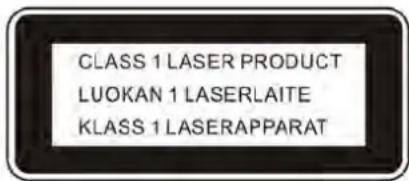
This Compact Disc player is classified as a Class 1 LASER PRODUCT. THE CLASS 1 LASER PRODUCT label is located on the rear exterior.
NOTE: The manufacturer is not responsible for any radio or TV interference caused by unauthorized modifications could void the user's authority to operate the equipment.
- Aoid installing the unit in locations described below:
- Places exposed to direct sunlight or close to heat radiating appliance such as electric heaters, on top of other stereo equipment that radiate too much heat.
- Places locking ventilation or dusty places.
- Places subject to constant vibration.
- Humid or moist places.
• Operate buttons and switches as instructed in manual.
• Before turning on the power for the first time, make sure that the power cord is properly installed.
• Store your tapes or CD in a cool area to avoid damage from heat.
CAUTION: TO REDUCE THE RISK OF ELECTRIC SHOCK, DO DOT REMOVE COVER (OR BACK). NO USER SERVICEABLE PARTS INSIDE, REFER SERVICING TO QUALIFIED SERVICE PERSONNEL.
WARNING: Remove batteries if exhausted or if they will not be used again for a long period.
- The incorrect use of batteries can cause electrolyte leakage and will corrode the compartment or cause the batteries to burst, therefore:
-Do not mix battery types, e.g. alkaline with zinc carbonate.
- When inserting new batteries, replace all batteries at the same time.
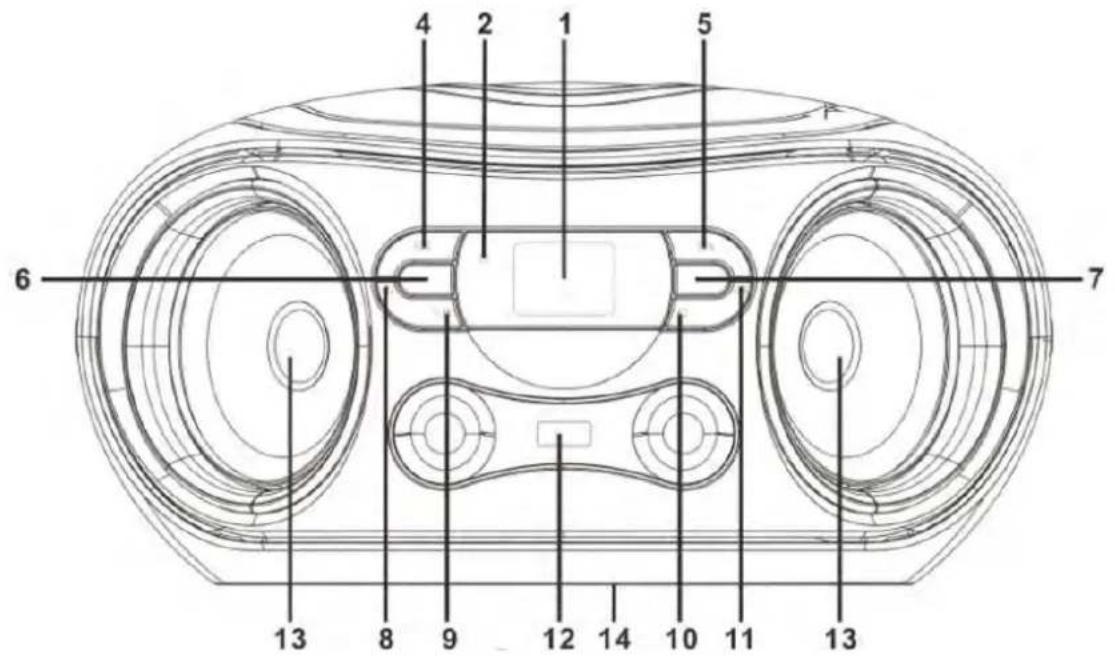
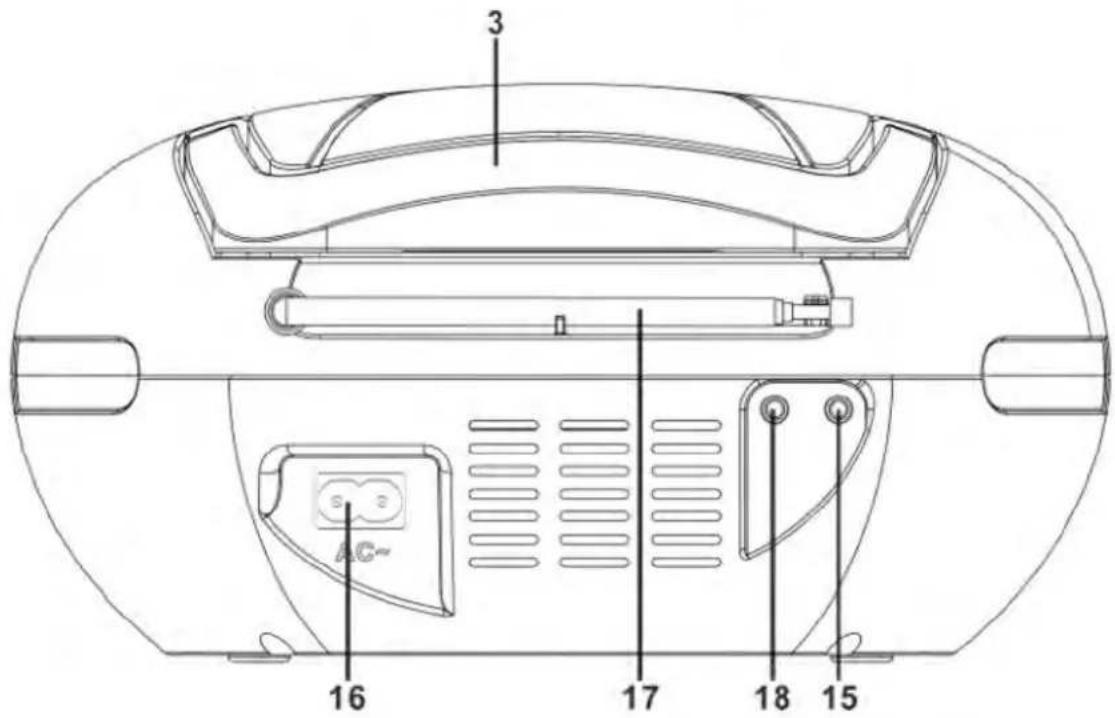
LOCATION OF CONTROLS
- LCD DISPLAY
- STANDBY INDICATOR
- HANDLE
- PREV/FAST BACKWARD/TUN-/FOLD.-BUTTON
- NEXT/FAST FORWARD/TUN+/FOLD.+ BUTTON
- STANDBY/FUNCTION BUTTON
- PROG./MEM./P-MODE BUTTON
-
VOLUME- BUTTON
-
PLAY/PAUSE/-10/MEM.- BUTTON
- STOP/+10/MEM.+ BUTTON
- VOLUME+ BUTTON
- USB PORT
- SPEAKERS
- BATTERY COMPARTMENT
- 3.5mm AUX IN JACK
- AC SOCKET
- FM ANTENNA
- PHONE JACK
POWER SOURCE
This unit is designed to be operated on AC/DC.
AC OPERATION
Plug the smaller end of AC power cord into AC jack on unit and the other bigger end into household AC wall outlet. The batteries will be automatically disconnected.
DC OPERATION
Open the BATTERY COMPARTMENT DOOR. Install 6 pcs UM-2/C size batteries (not included) into compartment. Please follow correct polarities as indicated.
CAUTION:
- Remove batteries if they are exhausted or long time use.
• Batteries contain chemical substances, so they should be disposed of properly.
BASIC FUNCTION
SWITCHING ON THE UNIT
Press and hold button-to-turn the unit on or of f.
Note: In CD/MP3/USB/AUX mode, when the unit is not providing the main function for 15 minutes, the unit will automatically switch into standby mode. Press the button to turn on the unit again.
Please note that low volume setting in the audio source may be recognized as “no audio signal”, this will affect the capability of signal detection from the device and can also originate an automatic switch into standby mode. If this happens please reactivate the audio signal transmission or increase the volume setting on the audio source player in order to resume playback.
Electrostatic Discharge hints – The unit may reset or may not reset to normal operation mode due to electrostatic discharge, just switch it off and reconnect again.
SETTING THE FUNCTION MODE
There are 3 function modes; press the button-to-change modes. The 3 modes are:
• TUNER: Listen to FM radio broadcasts.
• CD: Play compact discs (CD-audio or CD-MP3).
• USB: Play MP3s from USB memory sticks.
• AUX: Play external audio source through AUX IN jack.
The current function mode will be shown on the display when you turn on the boom box.
TO ADJUST VOLUME
Press VOL.+/- button to increase or decrease volume.
RADIO OPERATION
1) Press the untuno.select the FM band(this unit is designed for FM ONLY).
2) Tune to desired station by press the TUN- or TUN+ on unit, the display will show the band frequency. Example: FM 97.10 MHz.
3) Extend FM ANTENNA to its full length and gently move the unit back and forth to get the best reception, or place the unit in an open location.
4) Press the button to select other functions, or turn of f the unit.
RADIO AUTO SCAN (SEARCH)
Press and hold the ▶M-/-10 button on unit, the unit will conduct auto scan and program until having found a strong signal. The unit will start to broadcast from the P01 after searching finished.
You may pre-store 30 (FM) radio stations in memory for your preference, so as you can listen to your desired station directly and quickly, no need to tuning and search for again.
1) Press the TUNING button to select the first desired station. The press PROG./MEM/P-MODE button on unit, "P01" will flash on the display.
2) Use ▶I /M/-10 button to go to "P" memory, to choose the desired sequence you want to store, then press the PROG./MEM/P-MODE button on unit to enter.
3) Search another station, repeat steps (1) & (2) until all desired stations stored. Up to 30 stations can be programmed.
4) Press the ▶I /M-/-10 or ■/ M.+/+10 to listen to the stored station directly.
CD/MP3 OPERATION
Discs for Playback
This system can playback all digital audio CD, MP3, WMA finalized digital audio CD-Recordable (CD-R) discs, finalized digital audio CD-Rewritable (CD-RW) discs and CD-DA format digital audio CD/CD-R/CD-RW discs.
LOADING A DISC
1) Press the ⏻/FUNC. button on until to select "CD" mode.
2) Press the PUSH T O OPEN button to open the CD door, "OP" will be shown on the display.
3) Place an audio CD DISC into the tray with the front side facing up.
4) Close the CD door. The display will show a flashing “---”, then the total number of trackswould be shown and the playback will starts from the first track.
5) To remove the CD, press ■ / M.+/+10 button to turn off the unit, press PUSH TO OPEN button to open CD door, the display will show "OP". Hold the CD by its edges, and carefully take it out.
Note:
1) To ensure good system performance; wait until the disc tray completely reads the disc before proceeding.
2) If NOd is loaded into the compartment, or the disc is placed upside down, the display will show N0 DISC.
PLAYING A DISC
1) The unit will start playback from track 1 after reading finished. The ▶ indicator would be shown on the display. To interrupt playback, press the ▶I/-10/M.- button. The ▶ indicator and the current track will flash on the display. To resume playback, press the ▶I/-10/M.- button again.
2) To stop playback, press the ■ / M.+/+10 . button, the total number of tracks appear on the display.
SELECTING A DESIRED TRACK/PASSAGE
To select a desired track
- Press the ▶/TUN.+/FOLD.+ or ◀/TUN.-/FOLD.- button repeatedly in stop mode or during play until the desired track appears on the display.
- Press the ▶II/-10/M.- button to start play.
To search for a particular passage during playback (track scanning at high speed)
Press and hold the ▶/TUN.+/FOLD.+ nebo ▶TUN.-/FOLD.- button to scan the current playing track at high speed until desired passage appears, and then release the button. Playback will start again from this point.
To select a song which track number exceeds 10
To select a song/track which number exceeds 10, Press the ■/+10/M.+ button each time to skip forward/backward 10 tracks, then press the ▶/TUN.+ or ▶TUN.- button to select desired track.
For example: to select the 17th track, press ■/+10/M.+ button, and then the ▶/TUN.+ button six times immediately.
To Select A Desired Folder (for MP3 disc only)
(if the MP3 disc contains more than one folder)
To skip to the desired folder during playback, press and hold the ■/+10/M.+ or ▶II/-10/M.- button for about 2 seconds to skip to next/previous folder.
PROGRAM TRACKS
Programming tracks of disc are possible when playback is stopped. Up to CD 20 tracks can be stored in the memory in any order.
1) In stop mode, press the PROG./M./P-MODE. button, the "PROG" will flash and the P01 indicator will be on.
2) Press the CD ▶/TUN.+/FOLD.+ or ◀/TUN.-/FOLD.- button to select the first desired track to be programmed.
3) Press the PROG./P-MODE button to enter. The display changes to show P02.
4) Repeat steps 2 & 3 to store other desired tracks until all tracks are programmed.
5) Press the ▶II/-10/M.- button to start playback from the first programmed track.
6) Press the ■/+10/M.+ button to stop program playback.
To Erase the Memory (Program)
To clear the program, you have two options:
1) Press the ■/+10/M.+ button when the disc is stopped, and
2) Open the CD compartment lid, program will be erased.
REPEAT
To Repeat a Single Track
1) Press the PROG./M./P-MODE. button once in play mode, "REPEAT" will flash on the display.. The current track will be played repeatedly until the ■/+10/M.+ button is pressed.
2) To cancel Repeat function, press the PROG./M./P-MODE. button until the "REPEA T" disappear.
To repeat all the Tracks
1) Press PROG./M./P-MODE. button in play mode till the "REPEAT" shows steady on the display, all tracks on the disc will be played repeatedly until the ■/+10/M.+ button is pressed.
2) To cancel Repeat function, press the PROG./M./P-MODE. button until the "REPEAT" disappear.
To repeat current folder (only for MP3 disc which contains more than one folder)
1) Press PROG./M./P-MODE. button in play mode, till the "REPEAT FOLDER" shows steady on the display, the current folder will be played repeatedly until the ■/+10/M.+ button is pressed.
2) To cancel Repeat function, press the PROG./M./P-MODE. button until the "REPEAT FOLDER" disappear.
RANDOM PLAY
Press the PROG./M./P-MODE button in play mode till the "RAN" shows steady on the display, the random play will start from next track automatically(or press CD skip forward button), until all tracks are played over and then stop. Press the PROG./P-MODE button once to cancel.
USB OPERATION
1) Press the button to choose USB mode.
2) Connect the USB to the USB INPUT. The LCD will show the total number of tracks and folders stored in the USB. After reading the USB, the unit will start playback automatically.
3) Press ▶II/-10/M.- button to pause and resume playback.
4) Proceed repeat play (repeat 1- repeat folder - repeat all) /program play/skip up and back operation as the same described in above "CD/MP3 OPERATION".
CAUTION:
Do not use any USB extension cable for connecting the USB bar which may cause harmful interference.
AUX IN OPERATION
This unit has provided special AUX-IN jack, through this jack other audio sources can be connected to this unit and be amplified.
1) Press the ⏻/FUNC. button to Choose AUX mode.
2) Connect the audio cable into the AUX IN jack and the other end connects to the AUDIO OUT jack of the external audio source. The unit will change to AUX mode automatically.
3) Adjust the volume of the main unit to your desired level.
4) Press PLAY of the external audio source (eg. MP3 player) to start playback.
COMPACT DISC MAINTENANCE
1) Always use a compact disc bearing the mark as shown.

2) Notes on handling discs:
- Removing the disc from its storage case and loading it.
• Do not touch the reflective recorded surface.
• Do not stick paper or write anything on the surface.
• Do not bend the disc.
3) Storage
• Store the disc in its case.
• DO not expose discs to direct sunlight or high temperatures, high humidity or dusty places.
4) Cleaning a disc
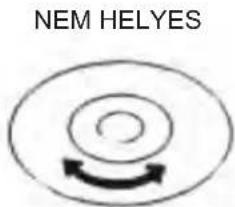
• Should the disc become soiled, wipe offdust, dirt and fingerprints with a soft cloth.
• The disc should be cleaned from the center to the edge.
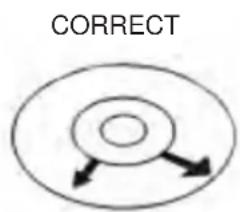
FROM THE CENTRE TO THE EDGE
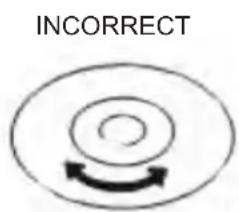
• Never use benzene, thinners, record cleaner fluid or anti-static spray.
- Be sure to close the CD doorso the lens is not contaminated by dust.
• Do not touch the lens.
SPECIFICATIONS
GENERAL
| Power Requirement | AC 100-240V ~ 50/60Hz |
| DC 9 V UM-2/C 1,5 V x 6 PC S | |
| Power consumption | 13 Watts |
| Standby Power Consumption < 0,5 Watts | |
| Weight | Approx. 1,4 kg |
| Dimensions | Approx. 240 mm (W) x 225 mm (D) x 126 mm (H) |
| Operation temperature + 5 °C - + 35 °C | |
RECEIVER SECTION
| Receiving Bands | FM ST. |
| Tuning Range: | FM: 87,5 - 108 MHz |
| Antenna: | FM rod antenna, |
COMPACT DISC SECTION
| Optical Pickup | 3 – Beam Laser |
| Frequency Response | 100Hz – 16KHz |
AUDIO SECTION
| Power output | MAX. 2 x 1,2 W |
| Aux Jack | 3,5 mm |
| Phone Jack | 3,5 mm |
ACCESSORIES
| Instruction Booklet | 1 |
| AC Cord | 1 |
WE RESERVE THE RIGHT TO CHANGE TECHNICAL SPECIFICATIONS.
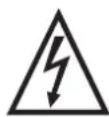
WARNING: DO NOT USE THIS PRODUCT NEAR WATER, IN WET AREAS TO AVOID FIRE OR INJURY OF ELECTRIC CURRENT. ALWAYS TURN OFF THE PRODUCT WHEN YOU DON'T USE IT OR BEFORE A REVISION. THERE AREN'T ANY PARTS IN THIS APPLIANCE WHICH ARE REPARABLE BY CONSUMER. ALWAYS APPEAL TO A
QUALIFIED AUTHORIZED SERVICE. THE PRODUCT IS UNDER A DANGEROUS TENTION.


TO AVOID DANGER OF SUFFOCATION, KEEP THE PLASTIC BAG AWAY FROM BABIES AND CHILDREN. DO NOT USE THIS BAG IN CRIBS, BEDS, CARRIAGES OR PLAYPENS. THIS BAG IS NOT A TOY.
Disposal of old Electrical & Electronic Equipment (Applicable in the European Union and other European countries with separate collection systems).
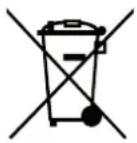

This symbol on the product or on its packaging indicates that this product shall not be treated as household waste. Instead it shall be handed over to the applicable collection point for the recycling of electrical and electronic equipment. By ensuring this product is disposed of correctly, you will help prevent potential negative consequences for the environment and human health, which could otherwise be caused by inappropriate waste handling of this product. The recycling of materials will
help to conserve natural resources. For more detailed information about recycling of this product, please contact your local Civic Office, your household waste disposal service or the shop where you purchased the product.
Hereby, ETA a.s. declares that the radio equipment type TRC533AU3 is in compliance with Directive 2014/53/EU. The full text of the EU declaration of conformity is available at the following internet address: http://www.hyundai-electronics.cz/declaration_of_conformity
flowchart
graph TD
    A[" "] --> B[" "]
    B --> C[" "]
    style A fill:#fff,stroke:#000
    style B fill:#fff,stroke:#000
    style C fill:#fff,stroke:#000
KÖZEPÉTÖL KIFELÉ
Licensed by Hyundai Corporation Holdings, Korea
