
CT 400 BRUNCH - Cooking appliance ROWENTA - Free user manual and instructions
Find the device manual for free CT 400 BRUNCH ROWENTA in PDF.



| Product type | Programmable drip coffee maker |
| Model | CT 400 BRUNCH |
| Brand | Rowenta |
| Capacity | Approximately 1.25 L (10 cups) |
| Carafe type | Thermal carafe |
| Power | Approximately 1000 W |
| Power supply | 220-240 V, 50-60 Hz |
| Dimensions (approx.) | 25 x 20 x 35 cm |
| Weight (approx.) | 1.5 kg |
| Functions | Automatic shut-off at end of cycle, drip-stop, keep warm |
| Filter | Filter holder for paper filter #4, removable and dishwasher safe |
| Cleaning | Damp cloth, descaling every 40 cycles |
| Safety | Automatic shut-off, overheat protection |
| Included accessories | Thermal carafe, filter holder, water tank |
| Use | Household, indoor use only |
Frequently Asked Questions - CT 400 BRUNCH ROWENTA
User questions about CT 400 BRUNCH ROWENTA
0 question about this device. Answer the ones you know or ask your own.
Ask a new question about this device
Download the instructions for your Cooking appliance in PDF format for free! Find your manual CT 400 BRUNCH - ROWENTA and take your electronic device back in hand. On this page are published all the documents necessary for the use of your device. CT 400 BRUNCH by ROWENTA.
USER MANUAL CT 400 BRUNCH ROWENTA
natural_image
Exterior view of a modern black coffee maker with a metallic kettle and control panel (no visible text or symbols)www.rowenta.com
text_image
Technical diagram of a coffee maker with numbered parts for identification and assembly reference.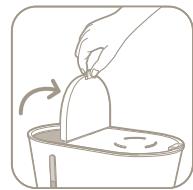
fig.1
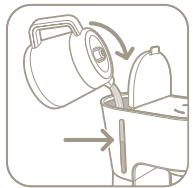
fig.2
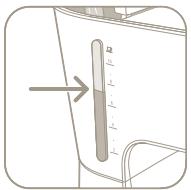
fig.3
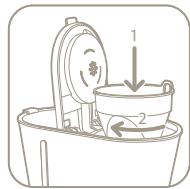
fig.4
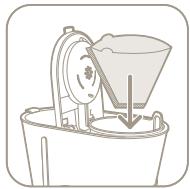
fig.5
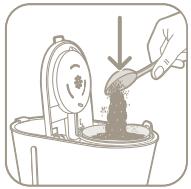
fig.6
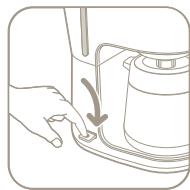
fig.7
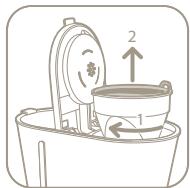
fig.8
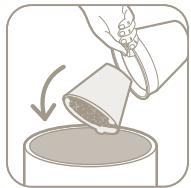
fig.9
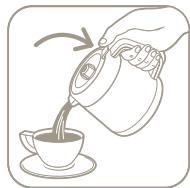
fig.10
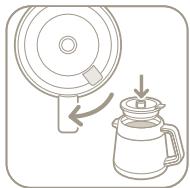
fig.11
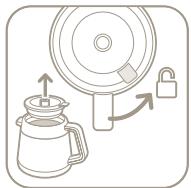
fig.12
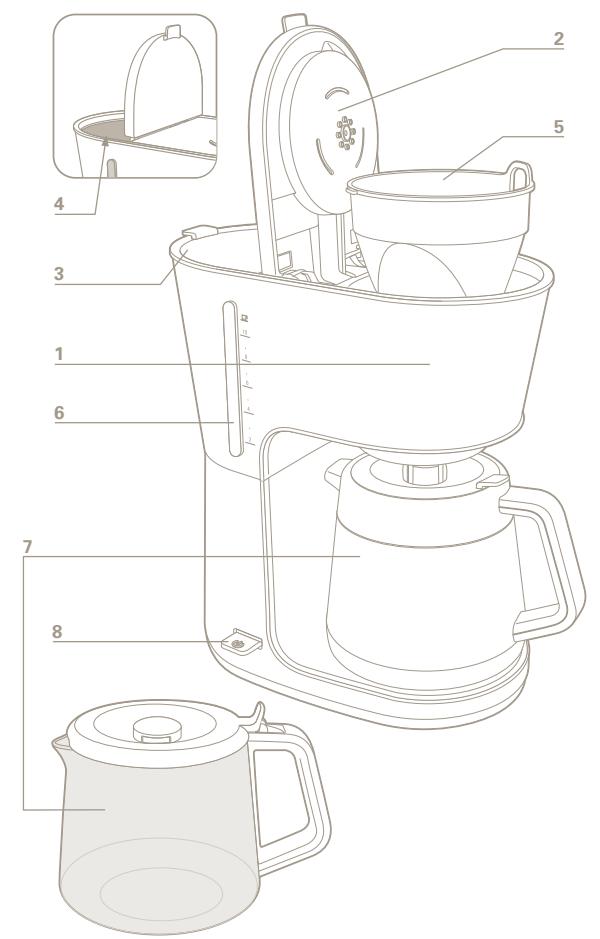
DESCRIPTION
1 Main body
2 Filter holder cover
3 Water tank cover
4 Water tank
SAFETY INSTRUCTIONS
- Read the instructions carefully before using the appliance for the first time: the manufacturer may not be held responsible for any incorrect use.
- This appliance is not intended for use by persons (including children) with reduced physical, sensory or mental capabilities, or lack of experience and knowledge, unless they have been given supervision or instruction concerning use of the appliance by a person responsible for their safety. Children should be supervised to ensure that they do not play with the appliance.
- Before plugging in the appliance, ensure that the supply voltage of your system matches that of the appliance and that the socket has an earth pin.
Any incorrect connection will invalidate the guarantee.
- Your appliance has been designed solely for domestic use in the home. Any commercial use, inappropriate use or failure to comply with the instructions, the manufacturer accepts no responsibility and the guarantee will not apply.
- Unplug the appliance immediately after use and when cleaning it.
- Do not use the appliance if it is not operating correctly or if it has been damaged. If this is the case, please contact an approved service centre.
- Any operations other than cleaning and regular servicing by the customer must only be carried out by an approved service centre.
- If the power cord or the plug is damaged, do not use the appliance. To avoid any danger, the power cord must be replaced by an approved service centre.
- Do not place the appliance, the power cord or the plug in water or any other liquid.
- Do not let the power cord dangle in the reach of children.
5 Filter holder
6 Water gauge
7 Isotherm or glass jug (depending on model)
8 ON/OFF switch.
- The power cord must not be brought into contact with the hot parts of your appliance, close to a source of heat or a sharp edge.
- For your safety, only use spare parts and accessories sold by the manufacturer for your appliance.
- Do not unplug by pulling on the power cord.
- Do not use the isotherm or pouring jug on a flame or kitchen hob.
- Do not add water to the appliance if it is still hot.
• Always close the cover (2) when using the coffee maker. - All of the appliances undergo strict quality control. Operating tests are carried out on appliances selected at random, which is why certain appliances have traces of use.
- Do not place your isotherm jug in a microwave oven, a dishwasher or on a cooking hob.
- Do not place your hand inside the isotherm jug.
• Never put the glass jug in the dishwasher. - Do not use the pouring jug or the isotherm jug without the lid.


- This appliance is intended to be used only in the household. It is not intended to be used in the following applications, and the guarantee will not apply for:
- staff kitchen areas in shops, offices and other working environments;
- farm houses;
- by clients in hotels, motels and other residential type environments;
- bed and breakfast type environments.
PRIOR TO FIRST USE
GB
Operate your coffee maker for the first time without coffee with using 1 litre of water to rinse the circuit.
MAKING COFFEE
(Follow the illustrations 1 to 7)
- Only use cold water and a n°4 coffee filter paper.
- Do not fill beyond the maximum water level marked on the water tank.
1 – Switching on your coffee maker:
- For models with isotherm jugs, press the transparent button. It will light up with a white light and will return to its initial position once it is released.
Note: Models equipped with an isotherm jug have an automatic stop system at the end of the cycle.
- For models with pouring jugs, press the transparent button. It will light up with a white light and will remain in this position. To switch off the machine, move the button back to its initial position (the light will be extinguished).
2 - For models with isotherm jugs:
- To keep the jug warm longer, rinse it with hot water prior to use.
- The lid of the isotherm jug must be closed tightly towards the left as far as possible when making and keeping coffee hot, figure 11.
- To serve the coffee, press down the lever on the lid isotherm jug, figure 10.
3 - For all models:
- This coffee maker has a non-drip system which allows you to serve a coffee before all of the water has passed through the filter. Place the pouring or isotherm jug back in position rapidly to avoid any overflows.
- Wait for a few minutes before making coffee again.
CLEANING
- To remove the used coffee, remove the filter holder from the coffee maker, figures 8 and 9.
- Unplug the appliance.
- Do not clean the appliance when it is still hot.
- Clean with a soft cloth or a damp sponge.
- Do not immerse the appliance in water or place it under running water.
- The filter holder is dishwasher-safe.
DESCALING
- Descale your coffee maker every 40 cycles or so.
You can use:
- either a sachet of descaler from the shops diluted in 12 litre of cold water.
• or 2 large cups of commercial white vinegar available from hardware stores. - Pour the descaling solution into the water tank (4) and switch on the coffee maker (without any coffee in it).
- Let half of the solution pour into the glass or isotherm jug (7), then turn the appliance off by pressing the "On / Off" button, figure 7.
- Leave to act for around one hour.
- Switch the coffee maker on again and run through the rest of the descaling solution.
- Rinse the coffee maker by operating it 2 or 3 times with 1 litre of water and without coffee.
The guarantee does not cover coffee makers which dysfunction or no longer function due to a lack of descaling.
ACCESSORIES
- Isotherm jug (CT500 or CT400 models)
- Glass pouring jug (CG400 model)
TROUBLESHOOTING
- Check:
- the plug/socket
- that the "ON-OFF" switch (indicator light lit) is in the ON position.
-
that the filter holder is tightened correctly into place.
-
The water flows through slowly or makes excessive noise:
- descaled your coffee maker.
If your appliance still doesn't work: Contact an approved service centre.
DISPOSAL OF ELECTRICAL OR ELECTRONIC PRODUCTS
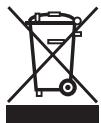
Help protect the environment!
① Your appliance contains many materials that may be recovered or recycled.
Leave it at a local civic waste collection point.
HELPLINE:
If you have any product problems or queries, please contact our Customer Relations Team first for expert help and advice:
0845 602 1454 - UK
(01) 677 4003 – Ireland
or consult our website www.rowenta.co.uk
BESCHREIBUNG
- in bed & breakfast locaties.