
OV-CR-417B - Gps Overmax - Free user manual and instructions
Find the device manual for free OV-CR-417B Overmax in PDF.


| Type | Car audio / USB/SD/MP3/FM player |
| Brand | Overmax |
| Model | OV-CR-417B |
| Power Supply | 12V DC (negative ground) |
| Speaker Impedance | 4Ω - 8Ω |
| FM Frequency Range | 87.5 MHz - 108 MHz |
| Intermediate Frequency | 10.7 MHz |
| Signal to Noise Ratio (S/N) | ≥ 50 dB |
| Channel Separation | ≥ 50 dB (1 kHz) |
| Harmonic Distortion | ≤ 5% |
| Frequency Response | 100 Hz - 10 kHz (+6 dB) |
| Playback Media | USB, SD/MMC card, AUX input |
| Radio Bands | FM1, FM2, FM3 |
| Detachable Panel | Yes |
| Mute Function | Yes |
| Clock Display | Yes, 12/24 hour selectable |
| Remote Control Receiver | Yes |
| Equalizer Presets | Yes (BAS, TRE, BAL, FAD, LOD, EQ) |
| Speaker Output Connector | ISO connector (8 pins) |
| Antenna Input | Yes, with power antenna output |
| Installation | DIN size with support and fixing piece |
| Fuse Rating | Use same specification as original |
Frequently Asked Questions - OV-CR-417B Overmax
User questions about OV-CR-417B Overmax
0 question about this device. Answer the ones you know or ask your own.
Ask a new question about this device
Download the instructions for your Gps in PDF format for free! Find your manual OV-CR-417B - Overmax and take your electronic device back in hand. On this page are published all the documents necessary for the use of your device. OV-CR-417B by Overmax.
USER MANUAL OV-CR-417B Overmax
Your electronic world
Instrukcja obsługi
User Manual
PL / EN / CZ / SK
ODTWARZACZ USB / SD / MP3 / FM
OV-CR-417B
USB/SD/MP3/FM PLAYER


I-PANEL STEROWANIA
![OV-CR-417B USB/SD MP3 PLAYER F2 1.00.203 MD /POW MUTE CLK VOL/R.CN RPT [SD] (USB) MP3 AVIX Overmax ① ③ ⑤ ⑦ ⑧ ⑨ ⑩ ⑫](/content/2026/05/845284/images/b92474f0ff51546fcf2116cb98210f61df6d1eafea7fcf8493c3293429b92131.jpg)
Grey/black - siwo-czarny
To battery – do akumulatora
IX-ZDEJMOWANIE PANELU
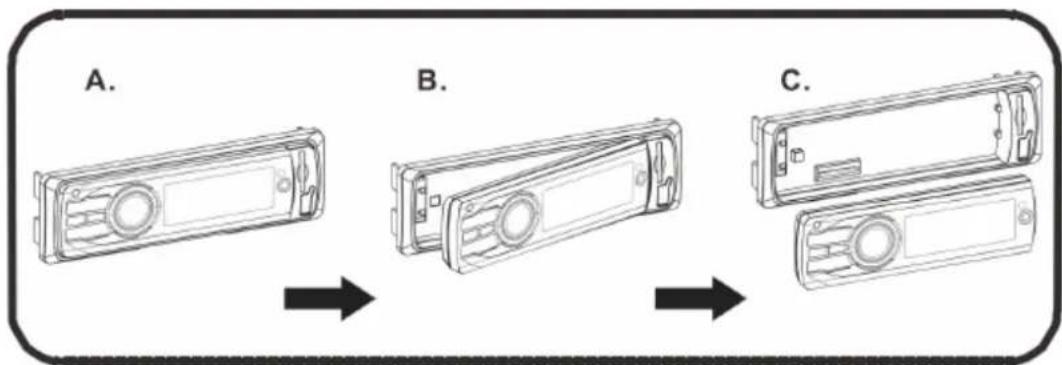
flowchart
graph LR
    A["Step A: Display case"] --> B["Step B: Display case"]
    B --> C["Step C: Display case"]
X-ROZWIAZYWANIE PROBLEMÓW
-
Clock
-
Rotary Volume
-
LCD Display
-
Remote control receiver
-
Aux In
12.SD/MMC Card Slot
- USB Slot
II -Basic Operations
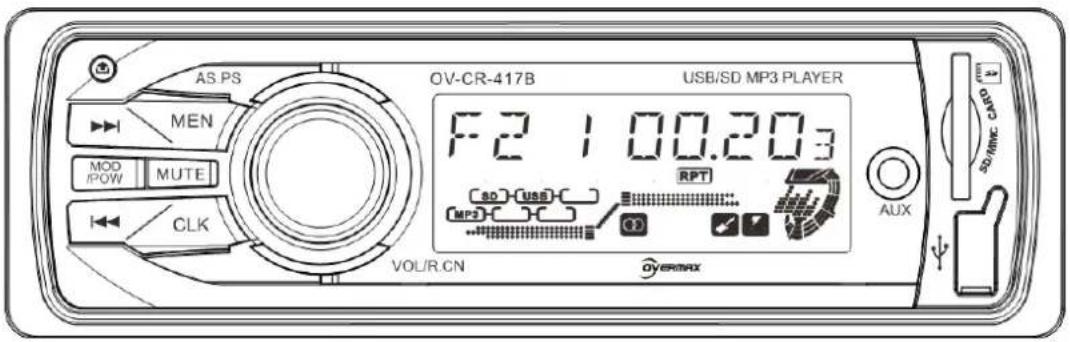
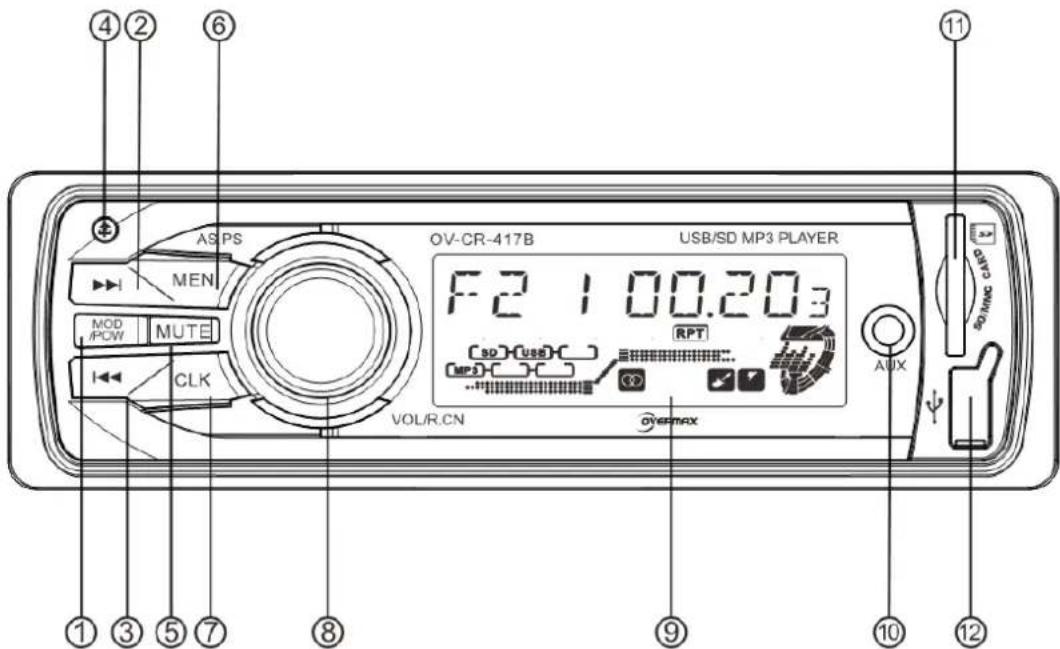
1.Power/Mode
Short press under working station can change the playing mode, long press is power off. Under power off state, short press can be power on.
2. Forward
▶▶ Button: Under the radio mode, short press is automatically searching the stations forwardly, long press is forwardly search the stations by hand. Under the music playing mode, short press is play next song, long press is quickly forwardly choose time to play
3. Backward
◀◀ Button: Under the radio mode, long press is automatically searching the stations backwardly, short press is backwardly searching the stations by hand. Under the music playing mode, short press is playing last song, long press is quickly backwardly chose time to play.
4. Detach Panel Key
Short press this button, the panel will detach from the unit.
5. MUTE
Short press for the first time is mute function, short press for the second time is release from mute function.
6. MEN/ AS. PS
Under radio mode:
1) Short press the button (when the LCD display SEL), then short press volume knob
to enter into SEL function (BAS, TRE.BAL, FAD, LOD and EQ), adjusting each function by rotating the volume knob.
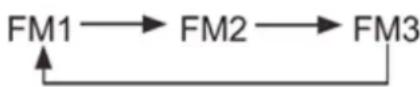
2) Under radio mode, short press the button two times (when the LCD display BND), rotating the volume knob to choose the band (FM1—FM2—FM3), and short press the volume knob to confirm.
3) Long press to search and save the stations automatically.
Under Music playing mode:
1) Same operation as on radio mode.
Long press to enter into song-selected function, choose the number by rotating the volume knob and short press volume knob to next numbers with same operation and short press MEN button to confirm.
7. CLK Button
Short press can show the present time. Then long press to enter into hour adjustment function, use the volume knob to adjust. Short press again can adjust minute, also use the volume control button to adjust. Under the hour adjustment, long press to switch 12/24 hours showing.
8. VOL/R.CN
Volume can be adjusted by rotating the knob.
On radio mode, short press the knob and the current frequency will blink, then rotate the knob to select the saved channel, long press the knob and the station number will blink, then rotate the knob to select saved stations and short press to confirm. Also you can save the present frequency to the station by long press the knob.
On music playing mode, repeat short press this button to choose the function as following: INT ON—INT OFF—RPT ON—RPT OFF—RDM ON—RDM OFF
Long press to enter into folder selection by rotating the volume knob and short press R.CN to confirm.
9. LCD Display
Display the channel of radio or the playing information.
10. Aux In
Outer connection signal input
11. SD/MMC Card Slot
Insert the SD or MMC card, the system will play it accordingly.
12. USB Socket
Insert the USB, the system will play it accordingly.
III·Radio Operation
- Short press the MEN/AS.PS button in the panel for selecting BAND function, and press Volume knob for entering into it, then rotating the knob for change the bands as following:
-
Long press the ▶ button or ◀ button, can choose the stations by manual, Short press the ▶ button, can choose the station automatically.
-
Under the radio mode, short press and then rotate the volume button can change the station; Long pres the volume knob can save the station and then rotate the knob for choosing the stored number, short press the knob again for confirm.
- Under the radio mode, short press MEN/AS.PS button and entering into Band function for changing the band, long press can scan stations and store the stations automatically.
IV-MP3 plays operation
- Our system support to play any time you insert the card. When it plays the USB, logo USB will blink. When it plays the SD/MMC card, the logo SD will blink.
- Short press the button ▶▶ or ◀◀ button can play the next/last song, long press is quickly forwardly / backwardly choose time to play
V-Clock Operation
Short press can show the present time. Then long press to enter into hour adjustment function, use the volume knob to adjust. Short press again can adjust minutes, also use the volume control button to adjust. Under the hour adjustment, long press to switch 12/24 hours mode.
VI. Technical parameters
Tuner Section:
Frequency Range----87.5MHz-108MHz
Intermediate frequency----10.7MHZ
Signal to noise ratio (S/N)----50≥dB
Play Section:
Signal to noise ratio (S/N) 50≥dB
Channel Separation (1 KHZ)----50≥dB
Voltage Harmonic Distortion----≤5%
Frequency Response----100Hz-10kHz(+6dB)
Amplifier Section:
Speaker output
Speaker Impedance 4Ω-8Ω
Power source 12VDC
Car battery (the negative pole connect ground, see on the unit in detail)
Cautions
When replacing the fuse, please select the fuse of same specification, do not replace it with others.
VIII. Installation Diagram
- Before install the main unit, please place the main unit at desired position, connect the speaker wire and power wire for test use.
- After the working effect of the main unit is ideal, fix the main unit.
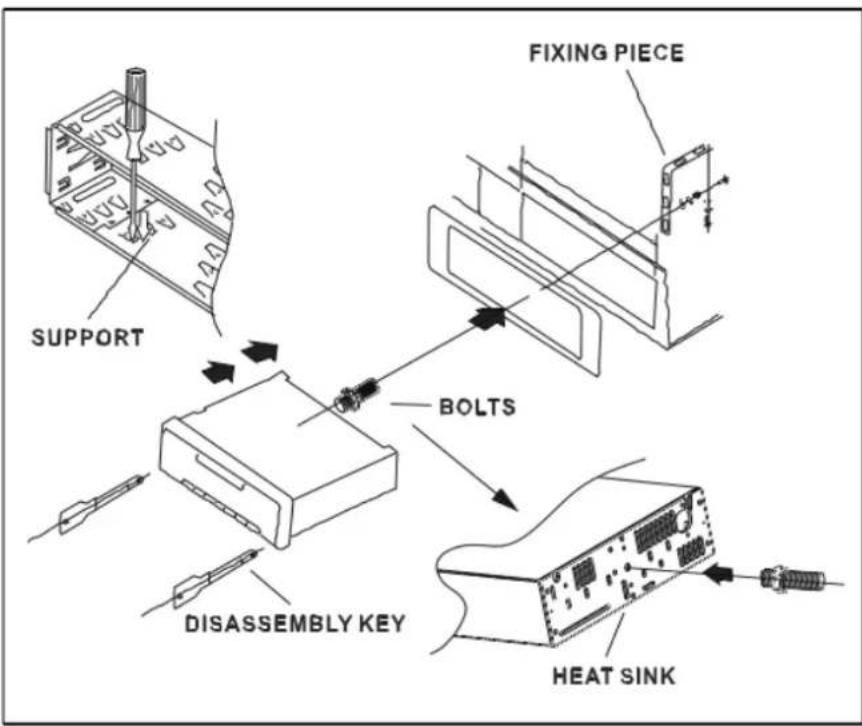
Install the main unit
- Install the support on the instrument panel of the car, bend the clamp of the support
- Connect the power wire and speaker wire, fix the fixing piece in the car
- Insert the antenna plug, push the main unit into the support, tighten the fixing nut of the fixing piece.
Disassemble the main unit
Insert two disassembly keys into the left and right gap, make the keys hook the main unit, pull out it to remove the main unit from the support, then disassemble the connection wire and unplug the antenna plug.
IX. Wiring Diagram
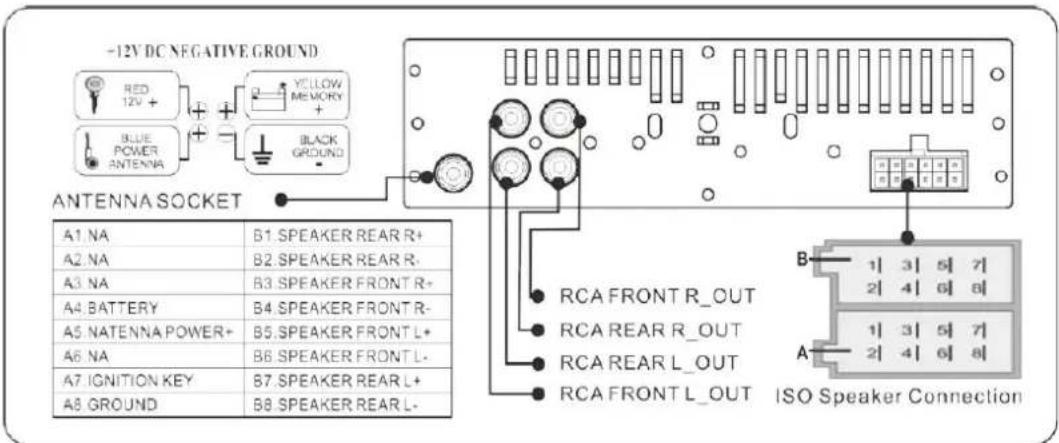
X .Detaching the front panel
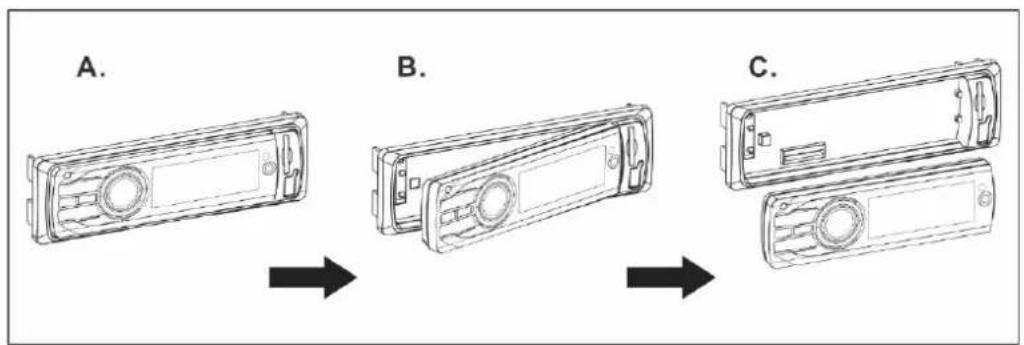
flowchart
graph LR
    A["A. Device with circular ports"] --> B["B. Interface panel"]
    B --> C["C. Panel with circular ports"]
XI. Trouble and solution
| Fault | Reasons | Solutions |
| LCD doesn’t display | 1.Yellow wire is not connected with battery+2.Fuse of red wire is open3.The panel connector is dirty | 1 .Assure yellow wire is connected with battery+2. Replace fuse3. Clean the panel connector with absolute alcohol |
| No sound | 1.No power supply2.Speaker wire is open circuit3.SD/MMC card, U disk don’t have song with corresponding format.4.SD/MMC card, U disk golden finger is dirt which causes bad contact. | 1. Connect the power wire2. Connect speaker wire.3. Check the contents of SD/MMC card, U disk.4. Clean with absolute alcohol |
| Low sound (not clear) | 1.Power internal resistance is high2.Antenna is bad contact. | Replace the power supply Tighten the antenna plug. |
| Mono track | 1.One channel of speaker wire is open circuit2.Amplifier integrated circuit is damaged. | Connect speaker wireReplace the IC of amplifier |
| System down | Power supplier not stable | Long press the reset button |
Note: Technical data is subject to change without prior notice.
Český
I-Ovládací panel
flowchart
graph LR
    A["Step A: Display module"] --> B["Step B: Internal panel with circular ports"]
    B --> C["Step C: External panel with rectangular buttons"]
X-ŘEŠENÍ PROBLÉMŮ
12 DC negative ground - 12 DC uzemnenie
Green - zelená
Purple - fialová
Grey - sivá
White - biela
Red - červená
Blue - modrá
Your electronic world
- Instrukcja obsługi
- User Manual
- PL / EN / CZ / SK
- USB/SD/MP3/FM PLAYER
- I-PANEL STEROWANIA
- IX-ZDEJMOWANIE PANELU
- X-ROZWIAZYWANIE PROBLEMÓW
- II -Basic Operations
- 1.Power/Mode
- Forward
- Backward
- Detach Panel Key
- MUTE
- MEN/ AS. PS
- CLK Button
- VOL/R.CN
- LCD Display
- Aux In
- SD/MMC Card Slot
- USB Socket
- III·Radio Operation
- IV-MP3 plays operation
- V-Clock Operation
- Technical parameters
- Tuner Section:
- Play Section:
- Amplifier Section:
- Cautions
- Installation Diagram
- Install the main unit
- Disassemble the main unit
- Wiring Diagram
- X .Detaching the front panel
- Trouble and solution
- Český
- I-Ovládací panel
- X-ŘEŠENÍ PROBLÉMŮ
Brand : Overmax
Model : OV-CR-417B
Category : Gps