
SDC 120 - Alarm Clock SENCOR - Free user manual and instructions
Find the device manual for free SDC 120 SENCOR in PDF.


| Product Type | Alarm Clock Radio |
| Brand / Model | Sencor SDC 120 |
| Display Type | LED curved display with adjustable brightness (HI/LO/OFF) |
| Time Format | 24-hour |
| Alarm Features | Dual independent alarms (A1 and A2) with snooze and alarm duration of 2 minutes |
| Snooze Duration | Adjustable from 5 to 60 minutes (default 5 minutes) |
| Power Supply | DC 5.0V, 0.6A via included AC adapter (model AS0601A-0500600EUL) |
| Backup Battery | 1 x CR2032 lithium battery (not included) for time retention up to approximately 3 days |
| Power Consumption | 3.0 W |
| Dimensions (W x H x D) | 171 x 87 x 40 mm |
| Weight | 140 g |
| Battery Safety | Coin cell battery; keep away from children; seek medical help if swallowed |
| Cleaning Instructions | Unplug before cleaning; use soft cloth moistened with mild soap and water; avoid benzene or thinners |
| Troubleshooting | Unplug adapter and remove backup battery to reset to defaults |
| Warranty | 24 months from date of purchase for domestic use |
| Disposal | Do not dispose as household waste; recycle at designated collection points |
| Additional Functions | Hi-Lo-Off dimmer for display brightness |
Frequently Asked Questions - SDC 120 SENCOR
User questions about SDC 120 SENCOR
0 question about this device. Answer the ones you know or ask your own.
Ask a new question about this device
Download the instructions for your Alarm Clock in PDF format for free! Find your manual SDC 120 - SENCOR and take your electronic device back in hand. On this page are published all the documents necessary for the use of your device. SDC 120 by SENCOR.
USER MANUAL SDC 120 SENCOR
LED CLOCK WITH A DOUBLE ALARM AND CURVED DISPLAY
LED HODINY S DVOJITÝM BUDÍKEM A ZAKŘIVENÝM DISPLEJEM
LED HODINY S DVOJITÝM BUDÍKOM A ZAKRIVENÝM DISPLEJOM
LED ÓRA KETTŐS ÉBRESZTŐVEL ÉS ÍVELT KIJELZŐVEL
ZEGAR LED Z PODWÓJNYM BUDZIKIEM I ZAKRZYWIONYM WYŚWIETLACZEM
| |
一 |
FUNCTION AND CONTROLS
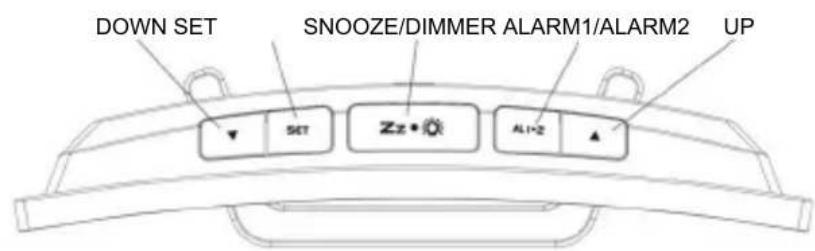
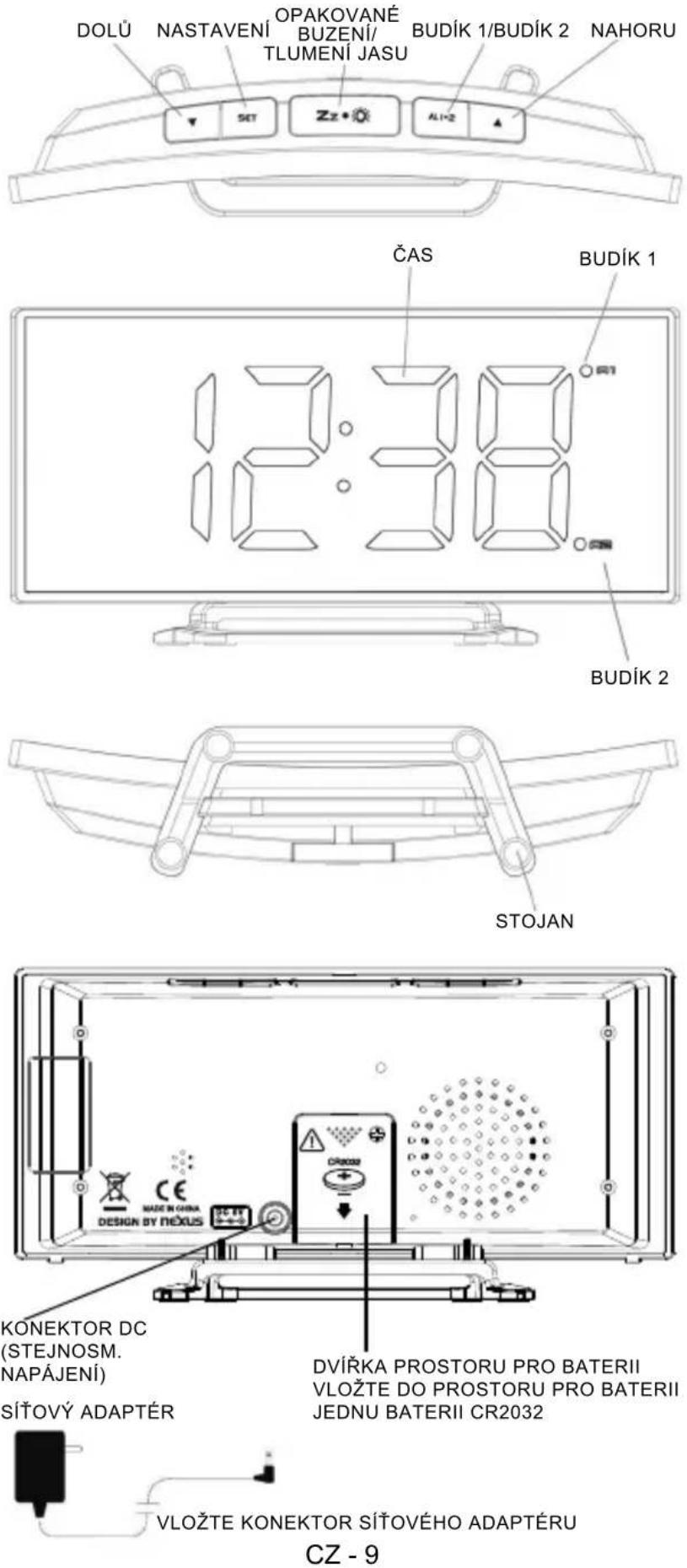
TIME ALARM1
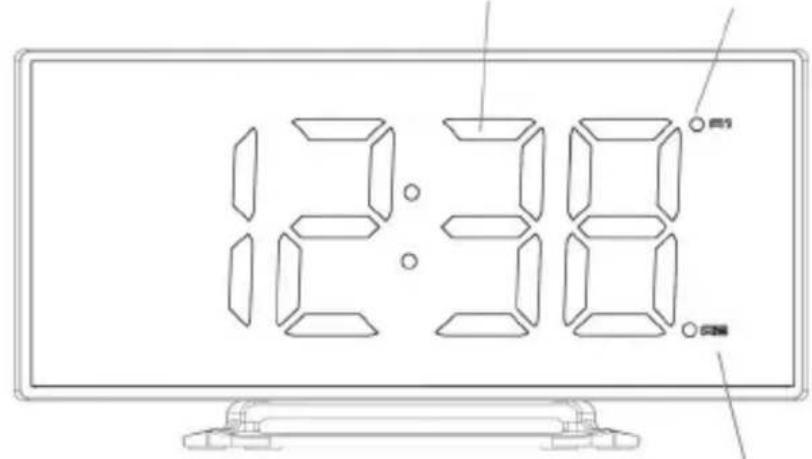
natural_image
Technical line drawing of a boat hull with support structures (no text or symbols)STAND
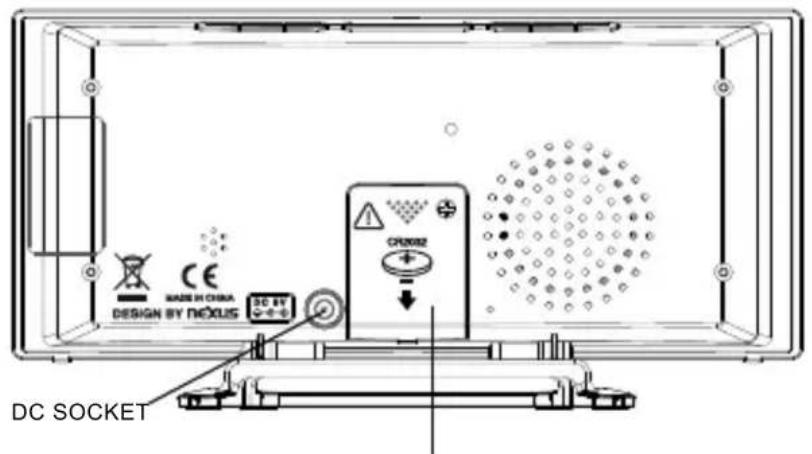
BATTERY DOOR
INSERT 1 x CR2032
BATTERY INSIDE
THE BATTERY COMPARTMENT
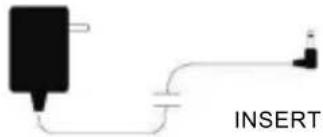
INSERT AC/DC ADAPTOR JACK
INSTALLATION
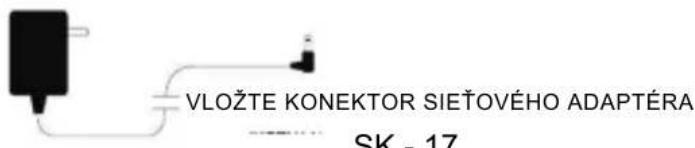
Plug the AC/DC adaptor to an AC household outlet, and then plug the DC jack to the back of the unit. Your clock is ready to work for you.
BACKUP BATTERY INSTALLATION
Your clock requires one CR2032 lithium battery (not included) to provide backup power to the clock in the event of a temporary power interruption.
- Place your unit face down on a flat and soft surface.
- Use screw driver to open the backup battery compartment door located on the back of the unit.
- Slide and remove the battery cover at the bottom of your unit.
- Insert one new CR2032 lithium battery into the battery compartment with the “+” side facing up as indicated.
- Close the battery compartment door and tighten the battery door screw.
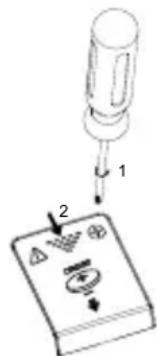
If AC power is interrupted, the LED display will go off and the alarm will not function. The backup battery will keep the time and all settings of your unit. Make sure a fresh CR2032 lithium battery is used. A fresh CR2032 battery could backup your clock continuously for around 3 days.
SETTING TIME AND THE SNOOZE DURATION
- Press SET once, the hour digits flash. Press ▲ to set the current hour (hold to advance rapidly).
- Press SET again, the minute digits flash. Press ▲ or ▼ to set minutes. (hold to advance rapidly).
- Press SET again, the display shows "05" and fl ashes. Press ▲ or ▼ to select your snooze time from 5 to 60 minutes.
- Press SET again or if no key is pressed in approx. 10 seconds to exit the setting mode.
SETTING THE ALARMS
-
Press AL 1.2 once, the A1 LED and the hour digits flash. Press ▲ or ▼ to set the alarm 1 hour. (hold to advance rapidly).
-
Press AL 1.2 again to adjust minutes. Press ▲ or ▼ to set the alarm 1 minutes. (hold to advance rapidly).
-
Press AL 1.2 again, LED displays "OFF" (alarm off). To turn on the alarm, press ▲ or ▼ to select "ON"
-
Press AL 1.2 again, LED displays "HI". To select lower buzzer sound level, press ▲ or ▼ to select "LO".
-
Press AL 1.2 again, the A2 LED and the hour digits flash. Press ▲ or ▼ to set the alarm 2 hour. Repeat step 2) and 4) to set alarm 2.
-
Press AL1.2 again or if no key is pressed in approx. 10 seconds to exit alarm setting mode. When the related alarm is turned on, it will be indicated by the appearance of the A1 and/or the A2 LED on the right side of the display.
STOP AND RESET THE ALARM TO COME ON THE NEXT DAY
When alarm 1 or 2 is sounding, the related A1 or A2 LED fl ashes. Press the AL 1.2 once to stop the alarm and reset it to come on the following day. After that, A1 or A2 icon stays on the display.
SNOOZE OPERATION (default snooze duration is 5 minutes)
When alarm is sounding, press once, the alarm will be silenced and come on again after the set snooze duration.
Note:
If your second alarm activates while the fi rst alarm is sounding or it is in the snooze mode, the second alarm overrides the fi rst alarm (the fi rst alarm is reset to come on the next day).
USING THE HI-LO-OFF DIMMER
Press Z to adjust the brightness (HI/LO/OFF) of the LED display. This can only be done when the unit is not sounding or snooze functioning.
TROUBLE SHOOTING
If your clock displays irrelevant time or does not function properly, which maybe caused by electro-static discharge or other interference, unplug the DC jack to disconnect the AC power (and remove the backup battery). The clock will be reset to default settings and you need to set it again.
CARE OF YOUR PRODUCT
- Place your clock on a stable surface, away from sources of direct sunlight or excessive heat or moisture.
- Protect your furniture when placing your units on a natural wood and lacquered fi nish by using a cloth or protective material between it and the furniture.
- Clean your unit with a soft cloth moistened only with mild soap and water. Stronger agents such as Benzene, thinner or similar materials can damage the surface of the unit. Make sure the unit is unplugged before cleaning.
- If the unit is not to be used for a prolonged period, such as a month or longer, remove the batteries to prevent possible corrosion. Should the battery compartment become corroded or dirty, clean the compartment thoroughly and replace the batteries.
BATTERIES SAFETY WARNING
- Danger of explosion if battery is incorrectly replaced.
- Replace only with the same or equivalent type.
- Battery shall not be exposed to excessive heat such as sunshine, fire or the like.
- Do not ingest the battery, chemical burn hazard.
- This product contains a coin/button cell battery. If the coin/button cell battery is swallowed, it can cause severe internal burns in just 2 hours and can lead to death.
- Keep new and used batteries away from children.
- If the battery compartment does not close securely, stop using the product and keep it away from children.
- If you think batteries might have been swallowed or placed inside any part of the body, seek immediate medical attention.
SPECIFICATIONS
Alarm duration 2 minutes
Snooze duration 5 to 60 minutes
Time format 24 hr
Default settings:
00:0 emiT
Alarm 1 and 2 6:00
Snooze duration 05 (5 minutes)
Power supply: power adapter DC 5.0V, 0.6A
(included)
backup battery 1 x 3.0V type CR 2032
(not included with this product)
Power consumption: 3.0 W
Dimensions: 171 x 87 x 40 mm
:Wgi g 041
ADAPTER TECHNICAL SPECIFICATIONS:
Manufacturer's name or trade mark, commercial registration number and address:
Shenzhen Fushigang Technology Co., Ltd.,
301, 401 No.8 Building, Shiguan Industry
Park shangcun Community, Guangming
District 518106 Shenzhen
Model identifi er: AS0601A-0500600EUL
Input voltage: AC100 - 240V
Input AC frequency: 50/60Hz
Output voltage: DC 5.0V
Output current: 0.6A
Output power: 3.0W
Average active efficiency: ≥69.65%
No-load power consumption: ≤0.10W
INSTRUCTIONS AND INFORMATION REGARDING THE DISPOSAL OF USED PACKAGING MATERIALS
Dispose of packaging material at a public waste disposal site.
DISPOSAL OF USED ELECTRICAL AND ELECTRONIC EQUIPMENT
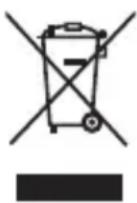
The meaning of the symbol on the product, its accessory or packaging indicates that this product shall not be treated as household waste. Please, dispose of this product at your applicable collection point for the recycling of electrical & electronic equipment waste. Alternatively in some states of the European Union or other European states you may return your products to your local retailer when buying an equivalent new product. The correct disposal of this product will help save valuable natural resources and help in preventing the potential negative impact on the environment and human health, which could be caused as a result of improper liquidation of waste. Please ask your local authorities or the nearest waste collection centre for further details. The improper disposal of this type of waste may fall subject to national regulations for fi nes.
For business entities in European Union states
If you wish to dispose of an electrical or electronic device, request the necessary information from your seller or supplier.
Disposal in other countries outside the European Union
If you wish to dispose of this product, request the necessary information about the correct disposal method from local government departments or from your seller.

The product meets EU requirements.
Changes to the text, design and technical specifications may occur without prior notice and we reserve the right to make these changes
The full text of the EU declaration of conformity is available at the following internet address: www.sencor.eu
The original version is in the Czech language.
Address of the manufacturer: FAST ČR, a.s., U Sanitasu 1621, Říčany CZ-251 01
SENCOR®
EN Warranty conditions
Warranty card is not a part of the device packaging.
This product is warranted for the period of 24 months from the date of purchase to the end-user. Warranty is limited to the following conditions. Warranty is referred only to the customer goods using for common domestic use. The claim for service can be applied either at dealer's shop where the product was bought, or at below mentioned authorized service shops. The end-user is obligated to set up a claim immediately when the defects appeared but only till the end of warranty period. The end user is obligated to cooperate to certify the claiming defects. Only completed and clean (according to hygienic standards) product will be accepted. In case of eligible warranty claim the warranty period will be prolonged by the period from the date of claim application till the date of taking over the product by end-user, or the date the end-user is obligated to take it over. To obtain the service under this warranty, end-user is obligated to certify his claim with duly completed following documents: receipt, certificate of warranty, certificate of installation.
This warranty is void especially if apply as follows:
■ Defects which were put on sale.
■ Wear-out or damage caused by common use.
The product was damaged by unprofessional or wrong installation, used in contrary to the applicable instruction manual, used in contrary to legal enactment and common process of use or used for another purpose which has been designed for.
■ The product was damaged by uncared-for or insufficient maintenance.
■ The product was damaged by dirt, accident of force majeure (natural disaster, fire, and flood).
■ Defects on functionality caused by low duality of signal, electromagnetic field interference etc.
■ The product was mechanically damaged (e.g. broken button, fall).
■ Damage caused by use of unsuitable media, fillings, expendable supplies (batteries) or by unsuitable working conditions (e.g. high temperatures, high humidity, quakes).
■ Repair, modification or other failure action to the product by unauthorized person.
■ End-user did not prove enough his right to claim (time and place of purchase).
■ Data on presented documents differs from data on products.
Cases when the claiming product cannot be identified according to the presented documents (e.g. the serial number or the warranty seal has been damaged).
Authorized service centers
Visit www.sencor. for detailed information about authorized service centers. com
FUNKCE A OVLÁDACÍ PRVKY
INSTALACE
Shenzhen Fushigang Technology Co., Ltd., 301, 401 No.8 Building, Shiguan Industry Park shangcun Community, Guangming District 518106 Shenzhen
KONEKTOR DC
(JEDNOSM. NAPÁJANIE)
DVIERKA PRIESTORU NA BATÉRIU
VLOŽTE DO PRIESTORU NA
BATÉRIU JEDNU BATÉRIU CR2032
SIEŤOVÝ ADAPTÉR
INŠTALÁCIA
Co., Ltd., 301, 401 No.8 Building,
Shiguan Industry Park shangcun
Community, Guangming District
518106 Shenzhen
Shenzhen Fushigang Technology Co., Ltd., 301, 401 No.8 Building, Shiguan Industry Park shangcun Community, Guangming District 518106 Shenzhen
Modellazonosító:
AS0601A-0500600EUL
Shenzhen Fushigang Technology Co., Ltd., 301, 401 No.8 Building, Shiguan Industry Park shangcun Community, Guangming District 518106 Shenzhen
Identyfi kator modelu: AS0601A-0500600EUL


- INSTALLATION
- BACKUP BATTERY INSTALLATION
- SETTING TIME AND THE SNOOZE DURATION
- SETTING THE ALARMS
- STOP AND RESET THE ALARM TO COME ON THE NEXT DAY
- SNOOZE OPERATION (default snooze duration is 5 minutes)
- USING THE HI-LO-OFF DIMMER
- TROUBLE SHOOTING
- CARE OF YOUR PRODUCT
- BATTERIES SAFETY WARNING
- SPECIFICATIONS
- ADAPTER TECHNICAL SPECIFICATIONS:
- INSTRUCTIONS AND INFORMATION REGARDING THE DISPOSAL OF USED PACKAGING MATERIALS
- DISPOSAL OF USED ELECTRICAL AND ELECTRONIC EQUIPMENT
- For business entities in European Union states
- Disposal in other countries outside the European Union
- SENCOR®
- EN Warranty conditions
- This warranty is void especially if apply as follows:
- Authorized service centers
- INSTALACE
- INŠTALÁCIA
Brand : SENCOR
Model : SDC 120
Category : Alarm Clock