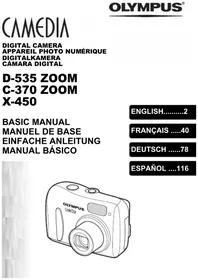
C-765 UZ - Digital Camera OLYMPUS - Free user manual and instructions
Find the device manual for free C-765 UZ OLYMPUS in PDF.


| Product Type | Digital camera |
| Brand | OLYMPUS |
| Model | C-765 UZ |
| Effective resolution | 4.0 million pixels |
| Sensor | CCD 1/2.5-inch 4.11 million pixels (gross) |
| Lens | Olympus 6.3-63 mm f/2.8-3.7 (equivalent 38-380 mm in 35 mm) |
| Optical zoom | 10x |
| Digital zoom | Up to 40x (combined super zoom and digital) |
| Maximum resolution | 2288 × 1712 pixels (optical), 3200 × 2400 pixels (ENLARGE mode) |
| Viewfinder | 0.44-inch TFT LCD, 240,000 pixels |
| LCD screen | 1.8-inch TFT LCD screen, 118,000 pixels |
| Shutter speed | 15 to 1/1000 sec |
| Aperture | f/2.8 to f/8.0 |
| ISO sensitivity | Auto, 64, 100, 200, 400 |
| Shooting modes | Auto, Program, Aperture/Shutter Priority, Manual, Portrait, Sports, Landscape, Night, Video, My Mode |
| Flash modes | Auto, Red-eye reduction, Fill-in, Slow sync, Flash off |
| Storage | xD-Picture Card (16 to 512 MB) |
| Power source | Olympus LI-10B lithium-ion battery, LI-10C charger (2 hours) |
| Dimensions (W × H × D) | 104.5 × 60 × 68.5 mm |
| Weight | 280 g (without battery or card) |
| Connections | USB (mini-B), A/V OUT (mono), DC power input |
| Flash range | Wide: 0.3-4.5 m, Telephoto: 1.2-3.5 m |
| Special features | Continuous shooting, self-timer, macro, super macro, white balance, exposure compensation |
| Display | 1.8-inch LCD monitor and 0.44-inch electronic viewfinder |
Frequently Asked Questions - C-765 UZ OLYMPUS
User questions about C-765 UZ OLYMPUS
0 question about this device. Answer the ones you know or ask your own.
Ask a new question about this device
Download the instructions for your Digital Camera in PDF format for free! Find your manual C-765 UZ - OLYMPUS and take your electronic device back in hand. On this page are published all the documents necessary for the use of your device. C-765 UZ by OLYMPUS.
USER MANUAL C-765 UZ OLYMPUS
natural_image
Line drawing of a Olympus digital camera with lens and control knobs (no text or symbols on body)CONTENTS
GETTING STARTED....4
MENU FUNCTIONS....16
SHOOTING BASICS 22
Taking still pictures 24
If correct focus cannot be obtained (Focus lock) ....25
Recording movies 26
Zooming in on a subject (optical zoom) .....26
Using the flash 27
Using the self-timer....28
ADVANCED SHOOTING....29
PLAYBACK....31
Playing back still pictures ....31
Playing back movies 32
Protecting pictures 33
Erasing pictures 33
Formatting (CARD SETUP)....34
Playback on a TV 35
PRINT RESERVATION/DIRECT PRINT .....36
DOWNLOADING PICTURES TO A COMPUTER.....37
ERROR CODES....39
SPECIFICATIONS....40
These instructions are only for quick reference. For more details on the functions described here, refer to the "Reference Manual" on CD-ROM.
En
2
En
natural_image
Pure geometric diagram with intersecting lines and a circular pattern (no text or symbols)
natural_image
Pure geometric diagram with concentric circles and intersecting lines (no text or symbols)

natural_image
Abstract geometric pattern with concentric circles and intersecting lines (no text or symbols)■ Before using your camera, read this manual carefully to ensure correct use.
We recommend that you take test shots to get accustomed to your camera before taking important photographs.
These instructions are only a basic manual. For more details on the functions described here, refer to the Reference Manual on the CD-ROM. For connection to the PC or installation of provided software, refer to the Software Installation Guide included in the CD-ROM package.
For customers in North and South America
For customers in USA
Declaration of Conformity
Model Number : C-765 Ultra Zoom
Trade Name : OLYMPUS
Responsible Party : Olympus America Inc.
Address : 2 Corporate Center Drive, Melville, New York 11747-3157 U.S.A.
Telephone Number : 1-631-844-5000
Tested To Comply With FCC Standards
FOR HOME OR OFFICE USE
This device complies with Part 15 of the FCC rules. Operation is subject to the following two conditions:
(1) This device may not cause harmful interference.
(2) This device must accept any interference received, including interference that may cause undesired operation.
For customers in Canada
This Class B digital apparatus meets all requirements of the Canadian Interference-Causing Equipment Regulations.
En
For customers in Europe

“CE” mark indicates that this product complies with the European requirements for safety, health, environment and customer protection. “CE” mark cameras are intended for sales in Europe.
Trademarks
• IBM is a registered trademark of International Business Machines Corporation.
- Microsoft and Windows are registered trademarks of Microsoft Corporation.
• Macintosh is a trademark of Apple Computer Inc.
- All other company and product names are registered trademarks and/or trademarks of their respective owners.
- The standards for camera file systems referred to in this manual are the “Design Rule for Camera File System/DCF” standards stipulated by the Japan Electronics and Information Technology Industries Association (JEITA).
natural_image
Abstract geometric diagram with concentric circles and intersecting lines, no text or symbols present
En
3
natural_image
Pure geometric diagram with concentric circles and radial lines, no text or symbols presentGETTING STARTED
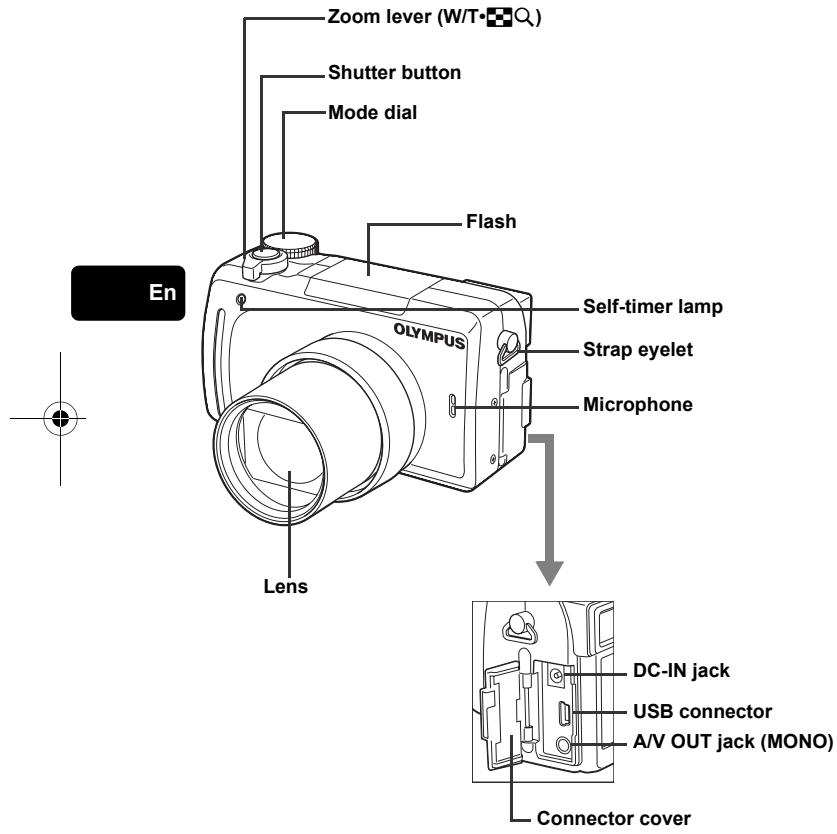
NAMES OF PARTS
natural_image
Pure geometric diagram with intersecting lines and shapes, no text or symbols present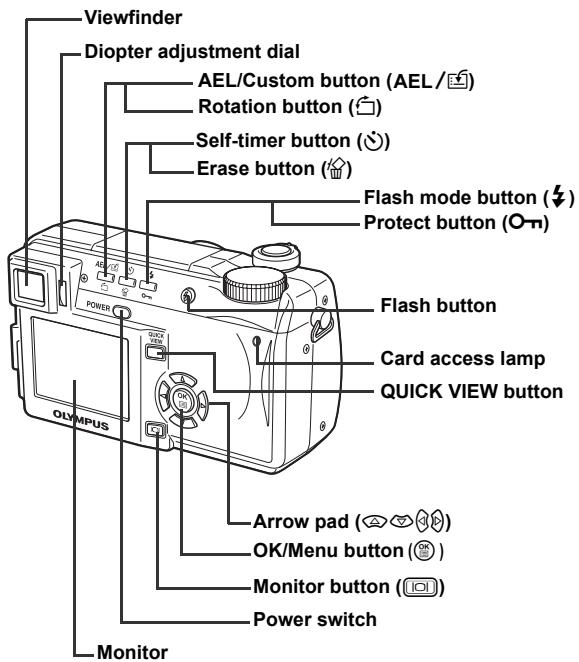
En
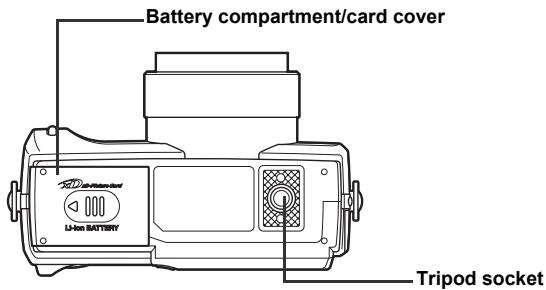

natural_image
Pure geometric diagram with concentric circles and crosshairs, no text or symbols present

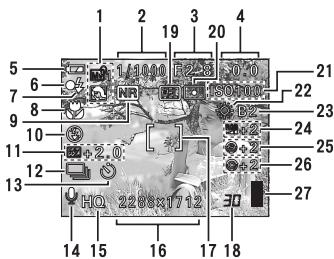
VIEWFINDER AND MONITOR INDICATIONS
Shooting modes
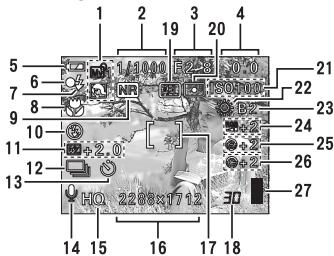
Still picture
![1 2 3 4 5 1/1000 F2.8-F2.0 20 8 ISO100 21 10 [ ] 22 13 HQ 59-35 14 15 17 18](/content/2019/11/84418/images/fa84710ee855bd150518ab6d7d4f8eeefe58cf3f5e2b317dcc4d1784d47d5678.jpg)
Movie
En
| Item | Indications | ||
| 1 | Shooting modes | P, A, S, M, 📋, 📋, 📋, 📋, 📋, 📋, 📋, 📋, 📋, 📋, 📋, 📋, 📋, 📋, 📋, 📋, 📋, 📋, 📋, 📋, 📋, 📋, 📋, 📋, 📋, 📅, 📅, 📅, 📅, 📅, 📅, 📅, 📅, 📅, 📅, 📅, 📅, 📅, 📅, 📅, 📅, 📅, 📅, 📅, 📅, 📅, 📅, 📅, 📅, 📅, 📄, 📄, 📄, 📄, 📄, 📄, 📄, 📄, 📄, 📄, 📄, 📄, 📄, 📄, 📄, 📄, 📄, 📄, 📄, 📄, 📄, 📄, 📄, 📄, 📄, 📅, 📅, 📅, 📅, 📅, 📅, 📅, 📅, 📅, 📅, 📅, 📅, 📅, 📅, 📅, 📅, 📅, 📅, 📅, 📅, 📅, 📅, 📅, 📅, 📃, 📃, 📃, 📃, 📃, 📃, 📃, 📃, 📃, 📃, 📃, 📃, 📃, 📃, 📃, 📃, 📃, 📃, 📃, 📃, 📃, 📃, 📃, 📃, 📃, 📅, 📅, 📅, 📅, 📅, 📅, 📅, 📅, 📅, 📅, 📅, 📅, 📅, 📅, 📅, 📅, 📅, 📅, 📅, 📅, 📅, 📅, 📅, 📅, 📁, 📁, 📁, 📁, 📁, 📁, 📁, 📁, 📁, 📁, 📁, 📁, 📁, 📁, 📁, 📁, 📁, 📁, 📁, 📁, 📁, 📁, 📁, 📁, 📁, 📅, 📅, 📅, 📅, 📅, 📅, 📅, 📅, 📅, 📅, 📅, 📅, 📅, 📅, 📅, 📅, 📅, 📅, 📅, 📅, 📅, 📅, 📅, 📅, 📆, 📆, 📆, 📆, 📆, 📆, 📆, 📆, 📆, 📆, 📆, 📆, 📆, 📆, 📆, 📆, 📆, 📆, 📆, 📆, 📆, 📆, 📆, 📆, 📆, 📅, 📅, 📅, 📅, 📅, 📅, 📅, 📅, 📅, 📅, 📅, 📅, 📅, 📅, 📅, 📅, 📅, 📅, 📅, 📅, 📅, 📅, 📅, 📅, 📉, 📉, 📉, 📉, 📉, 📉, 📉, 📉, 📉, 📉, 📉, 📉, 📉, 📉, 📉, 📉, 📉, 📉, 📉, 📉, 📉, 📉, 📉, 📉, 📉, 📅, 📅, 📅, 📅, 📅, 📅, 📅, 📅, 📅, 📅, 📅, 📅, 📅, 📅, 📅, 📅, 📅, 📅, 📅, 📅, 📅, 📅, 📅, 📅, 📎, 📎, 📎, 📎, 📎, 📎, 📎, 📎, 📎, 📎, 📎, 📎, 📎, 📎, 📎, 📎, 📎, 📎, 📎, 📎, 📎, 📎, 📎, 📎, 📎, 📅, 📅, 📅, 📅, 📅, 📅, 📅, 📅, 📅, 📅, 📅, 📅, 📅, 📅, 📅, 📅, 📅, 📅, 📅, 📅, 📅, 📅, 📅, 📅, 📂, 📂, 📂, 📂, 📂, 📂, 📂, 📂, 📂, 📂, 📂, 📂, 📂, 📂, 📂, 📂, 📂, 📂, 📂, 📂, 📂, 📂, 📂, 📂, 📂, 📁, 📁, 📁, 📁, 📁, 📁, 📁, 📁, 📁, 📁, 📁, 📁, 📁, 📁, 📁, 📁, 📁, 📁, 📁, 📁, 📁, 📁, 📁, 📁, 📄, 📄, 📄, 📄, 📄, 📄, 📄, 📄, 📄, 📄, 📄, 📄, 📄, 📄, 📄, 📄, 📄, 📄, 📄, 📄, 📄, 📄, 📄, 📄, 📁, 📁, 📁, 📁, 📁, 📁, 📁, 📁, 📁, 📁, 📁, 📁, 📁, 📁, 📁, 📁, 📁, 📁, 📁, 📁, 📁, 📁, 📁, 📁, 📀, 📀, 📀, 📀, 📀, 📀, 📀, 📀, 📀, 📀, 📀, 📀, 📀, 📀, 📀, 📀, 📀, 📀, 📀, 📀, 📀, 📀, 📀, 📀, 📀, 📄, 📄, 📄, 📄, 📄, 📄, 📄, 📄, 📄, 📄, 📄, 📄, 📄, 📄, 📄, 📄, 📄, 📄, 📄, 📄, 📄, 📄, 📄, 📄, 📃, 📃, 📃, 📃, 📃, 📃, 📃, 📃, 📃, 📃, 📃, 📃, 📃, 📃, 📃, 📃, 📃, 📃, 📃, 📃, 📃, 📃, 📃, 📃, 📄, 📄, 📄, 📄, 📄, 📄, 📄, 📄, 📄, 📄, 📄, 📄, 📄, 📄, 📄, 📄, 📄, 📄, 📄, 📄, 📄, 📄, 📄, 📄, 📇, 📇, 📇, 📇, 📇, 📇, 📇, 📇, 📇, 📇, 📇, 📇, 📇, 📇, 📇, 📇, 📇, 📇, 📇, 📇, 📇, 📇, 📇, 📇, 📇, 📄, 📄, 📄, 📄, 📄, 📄, 📄, 📄, 📄, 📄, 📄, 📄, 📄, 📄, 📄, 📄, 📄, 📄, 📄, 📄, 📄, 📄, 📄, 📄, 📀, 📀, 📀, 📀, 📀, 📀, 📀, 📀, 📀, 📀, 📀, 📀, 📀, 📀, 📀, 📀, 📀, 📀, 📀, 📀, 📀, 📀, 📀, 📀, 📁, 📁, 📁, 📁, 📁, 📁, 📁, 📁, 📁, 📁, 📁, 📁, 📁, 📁, 📁, 📁, 📁, 📁, 📁, 📁, 📁, 📁, 📁, 📁, 📞, 📞, 📞, 📞, 📞, 📞, 📞, 📞, 📞, 📞, 📞, 📞, 📞, 📞, 📞, 📞, 📞, 📞, 📞, 📞, 📞, 📞, 📞, 📞, 📞, 📟, 📟, 📟, 📟, 📟, 📟, 📟, 📟, 📟, 📟, 📟, 📟, 📟, 📟, 📟, 📟, 📟, 📟, 📟, 📟, 📟, 📟, 📟, 📟, 📟, 📠, 📟, 📟, 📟, 📟, 📟, 📟, 📟, 📟, 📟, 📟, 📟, 📟, 📟, 📟, 📟, 📟, 📟, 📟, 📟, 📟, 📟, 📟, 📟, 📟, 📞, 📞, 📞, 📞, 📞, 📞, 📞, 📞, 📞, 📞, 📞, 📞, 📞, 📞, 📞, 📞, 📞, 📞, 📞, 📞, 📞, 📞, 📞, 📞, 📝, 📝, 📝, 📝, 📝, 📝, 📝, 📝, 📝, 📝, 📝, 📝, 📝, 📝, 📝, 📝, 📝, 📝, 📝, 📝, 📝, 📝, 📝, 📝, 📝, 📞, 📞, 📞, 📞, 📞, 📞, 📞, 📞, 📞, 📞, 📞, 📞, 📞, 📞, 📞, 📞, 📞, 📞, 📞, 📞, 📞, 📞, 📞, 📞, 📜, 📜, 📜, 📜, 📜, 📜, 📜, 📜, 📜, 📜, 📜, 📜, 📜, 📜, 📜, 📜, 📜, 📜, 📜, 📜, 📜, 📜, 📜, 📜, 📜, 📞, 📞, 📞, 📞, 📞, 📞, 📞, 📞, 📞, 📞, 📞, 📞, 📞, 📞, 📞, 📞, 📞, 📞, 📞, 📞, 📞, 📞, 📞, 📞, 📛, 📛, 📛, 📛, 📛, 📛, 📛, 📛, 📛, 📛, 📛, 📛, 📛, 📛, 📛, 📛, 📛, 📛, 📛, 📛, 📛, 📛, 📛, 📛, 📛, 📦, 📦, 📦, 📦, 📦, 📦, 📦, 📦, 📦, 📦, 📦, 📦, 📦, 📦, 📦, 📦, 📦, 📦, 📦, 📦, 📦, 📦, 📦, 📦, 📦, 📤 | 10000000000000000000000000000000000000000000000000000000000000000000000000000000000000000000000000000 |
natural_image
Abstract geometric pattern with concentric circles and a shaded circle, no text or symbols present6
En
natural_image
Pure geometric diagram with intersecting lines and a circular pattern (no text or symbols)| Item | Indications | |
| 15 | Record mode | TIFF, SHQ, HQ, SQ1, SQ2 |
| 16 | Resolution | 2288 × 1712, 1280 × 960, 640 × 480 etc. |
| 17 | AF target mark | [ ] |
| 18 | Number of storable still picturesTime remaining | 3000:36 |
| 19 | AE lockAE memory | AELMEMO |
| 20 | Spot metering | |
| 21 | ISO | ISO 64, ISO 100, ISO 200, ISO 400 |
| 22 | White Balance | |
| 23 | White balance compensation | B1 - B7, R1 - R7 |
| 24 | Saturation | RGB-5 - +5 |
| 25 | Sharpness | S-5 - +5 |
| 26 | Contrast | C-5 - +5 |
| 27 | Memory gauge |
En
En
7


natural_image
Pure geometric diagram with concentric circles and crosshairs, no text or symbols presentPlayback mode
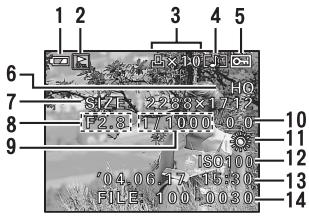
Still picture
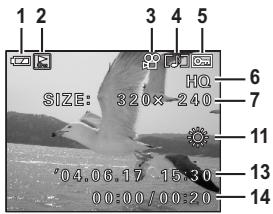
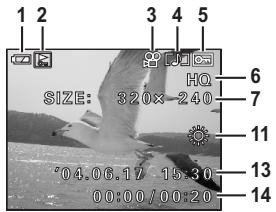
Movie
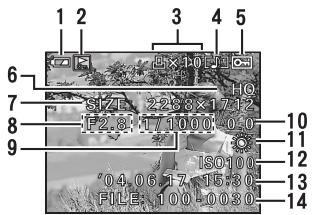
| Item | Indications | |
| 1 | Battery check | |
| 2 | Switch frame | |
| 3 | Print reservation, Number of prints Movie | × 10 |
| 4 | Sound record | |
| 5 | Protect | |
| 6 | Record mode | TIFF, SHQ, HQ, SQ1, SQ2 |
| 7 | Resolution | 2288 × 1712, 1280 × 960, 640 × 480, 320 × 240 etc. |
| 8 | Aperture value | F2.8 - F8.0 |
| 9 | Shutter speed | 15" - 1/1000 |
| 10 | Exposure compensation | -2.0 - +2.0 |
| 11 | White balance | WB AUTO, ⚙ , ⚙ , ⚙ , ⚙ , ⚙ , ⚙ , ⚙ |
| 12 | ISO | ISO 64, ISO 100, ISO 200, ISO 400 |
| 13 | Date and time | '04.06.17 15:30 |
| 14 | File number, Frame number Playing time/ Total recording time | FILE : 100 - 0030, 3000:00/00:20 |
En
8
En
natural_image
Abstract geometric pattern with concentric circles and a shaded circle, no text or symbols present
natural_image
Pure geometric diagram with intersecting lines and a circular pattern (no text or symbols)
natural_image
Pure geometric diagram with concentric circles and crosshairs, no text or symbols present
natural_image
Abstract geometric pattern with intersecting lines and shaded circles (no text or symbols)Memory gauge
The memory gauge lights up when you take a still picture. While the gauge is lit, the camera is storing the picture on the card. The memory gauge indication changes as shown below depending on the shooting status. The indication is not displayed during movie recording.
![Battery check R 1/100 F2 3 0.0 [ ] HQ 228X7712 30 Memory gauge](/content/2019/11/84418/images/22b8fa2240c6fdfcd0d7b30e01e70f62f70d5bbade5aef1bbeff10e8e14b4923.jpg)

flowchart
graph LR
    A["Shoot"] <--> B["Shoot"]
    B <--> C["Shoot"]
    C <--> D["Wait"]
Before shooting (Gauge is off)
One picture taken (Lit)
Two or more taken (Lit)
No more pictures can be taken (Fully lit) Wait until the gauge returns to the status on the left to take the next shot.
En
Battery check
If the remaining battery power is low, the battery check indication changes as follows when the camera is turned on or while the camera is in use.
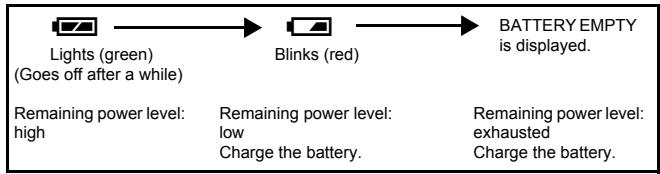
flowchart
graph LR
    A["Lights (green)<br>(Goes off after a while)"] --> B["Blinks (red)"]
    B --> C["BATTERY EMPTY is displayed."]
    D["Remaining power level: high"] --> E["Remaining power level: low"]
    D --> F["Charge the battery."]
    G["Remaining power level: exhausted"] --> H["Charge the battery."]
natural_image
Abstract geometric pattern with intersecting lines and shaded circles (no text or symbols)En
9
natural_image
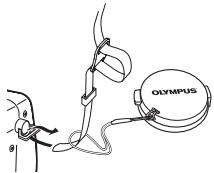
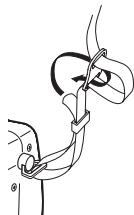
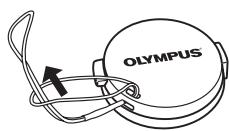
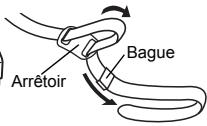
Pure geometric diagram with concentric circles and radial lines, no text or symbols presentATTACHING THE STRAP AND LENS CAP
1
2
3
4
5
natural_image
Diagram of a person using a device labeled 'OLYMPUS' connected to a cable or harness (no text or symbols beyond label)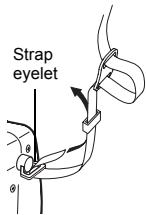
natural_image
Anatomical illustration of a surgical procedure with an arrow indicating direction (no text or labels present)En
CHARGING THE BATTERY
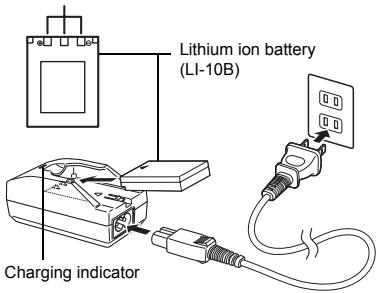
This camera uses an Olympus lithium ion battery (LI-10B). The battery is dedicated to this camera and other batteries do not work.
The battery is not fully charged when the camera is purchased. Fully charge the battery on the specified charger (LI-10C) before first use. For details, read the charger's instructions (provided).
1
Make sure that the and terminals of the battery shown in the illustration on the right are correctly oriented when loading the battery into the charger.
- The charge indicator will light red during charging.
- When charging is complete, the charger indicator will change from red to green.
- Charging normally takes approximately 2 hours.
Connection terminals
INSERTING AND REMOVING THE BATTERY AND CARD
1 Make sure the camera is turned off.
- The monitor is off.
- The viewfinder is off.
- The lens is not extended.
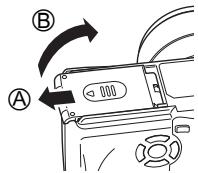
2 Slide the battery compartment/card cover in the direction of Ⓐ, then lift in the direction of Ⓑ.
- Use the ball of your finger to slide the cover. Do not use your fingernail as this could result in injury.
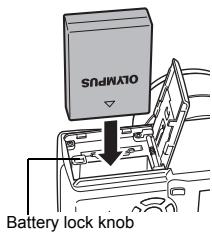
3 Loading the battery Align the battery as shown and insert it into the battery compartment until the battery is locked in position with the battery lock knob.
En
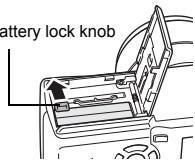
Removing the battery
Slide the knob in the direction of the arrow. When the battery is ejected, pull it out of the battery compartment.
Battery lock knob
Low battery warning
The amount of power consumed varies considerably depending on the operations performed on the digital camera. If you use an exhausted battery, the camera may turn off without displaying the battery level warning.
natural_image
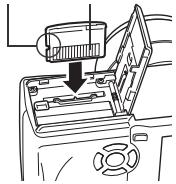
Pure geometric diagram with concentric circles and crosshairs, no text or symbols presentInserting a card
Insert the card in the appropriate direction.
- Insert the card while keeping it straight.
- Inserting the card the wrong way or at an angle could damage the contact area or cause the card to jam.
- If the card is not inserted all the way, data may not be written to the card.
Notch Contact area
natural_image
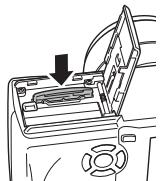
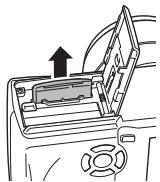
Line drawing of a device with an open lid and a downward arrow indicating a process (no text or symbols present)Removing the card
Push the card all the way in to unlock it, then let it return slowly.
- The card is ejected a short way and then stops. Hold the card straight and pull it out.
natural_image
Line drawing of a device with a downward arrow indicating a component or operation (no text or symbols present)En
4 Close the battery compartment/card cover in direction © and then slide it in the direction shown Ⓓ.
natural_image
Diagram of a car interior showing a door handle and steering wheel (no text or symbols)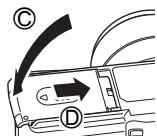
Notes for removing the card
Releasing your finger quickly after pushing the card all the way in may cause it to eject forcefully out of the slot.
natural_image
Abstract geometric diagram with concentric circles and intersecting lines (no text or symbols)12
En
natural_image
Pure geometric diagram with intersecting lines and shapes, no text or symbols presentPOWER ON/OFF
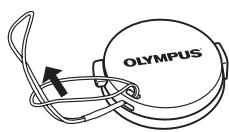
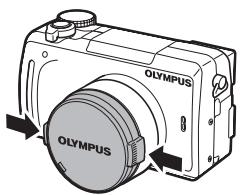
1 Press the tabs on the lens cap as indicated by the arrows and remove the lens cap.
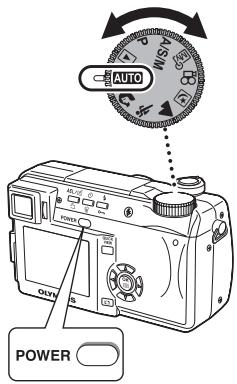
Mode dial
2 Press the power switch.
- The power turns on and the lens extends when the mode dial is set to any mode other than ▶. The monitor turns on.
- When the mode dial is set to ▶, the camera turns on in the playback mode and the monitor turns on.
En
3 To turn the camera off, press the power switch again.

Note
- To save battery power, the camera automatically enters the sleep mode and stops the operation after about 3 minutes of non-operation. The camera activates again as soon as you operate the shutter button or zoom lever.
SELECTING A LANGUAGE
1 Set the mode dial to P and press the power switch to turn the camera on.
2 Press OK.
- The top menu is displayed.
3 Press 🏠 on the arrow pad to select MODE MENU.
4 Press 🔒 to select the SETUP tab, then press 🔒.
5 Press 🔒 to select 🔒, then press 🔒.
- The green frame moves to the selected item.
6 Press 🔒 to select a language, then press OK.
7 Press OK again to exit the menu.
8 To turn the camera off, press the power switch.
En
natural_image
Pure geometric diagram with intersecting lines and circles, no text or symbols present
natural_image
Pure geometric diagram with intersecting lines and shapes, no text or symbols present
natural_image
Pure geometric diagram with concentric circles and crosshairs, no text or symbols present
natural_image
Abstract geometric diagram with concentric circles and intersecting lines (no text or symbols)SETTING THE DATE AND TIME
1 Set the mode dial to P and press the power switch to turn the camera on.
2 Press OK.
- The top menu is displayed.
3 Press ▶ on the arrow pad to select MODE MENU.
4 Press 🔒 to select the SETUP tab, then press 🔒.
5 Press 🔒 to select ⏻, then press ⏻.
- The green frame moves to the selected item.
6 Press 🔒 to select one of the following date formats: Y-M-D (Year/Month/Day), M-D-Y (Month/Day/Year), D-M-Y (Day/Month/Year). Then press 🔒.
- Move to the year setting.
- The following steps show the procedure used when the date and time settings are set to Y-M-D.
7 Press 🔒 to set the year, then press 🔒 to move to the month setting.
- To move back to the previous setting, press 🔒.
- The first two digits of the year are fixed.
8 Repeat this procedure until the date and time are completely set.
- The time is displayed in the 24-hour format. Consequently, 2 p.m. is displayed as 14:00.
9 Press OK.
- For a more accurate setting, press OK when the time signal hits 00 seconds. The clock starts when you press the button.
10 To turn the camera off, press the power switch.

Note
- The date and time settings will be returned to the factory default settings if the camera is left without the battery for approximately one day.
natural_image
Abstract geometric pattern with intersecting lines and shaded circles (no text or symbols)
MENU FUNCTIONS
USING THE MENUS AND TABS
When you turn on the camera and press ⏻, the top menu is displayed on the monitor. The functions of this camera are set from the menus.
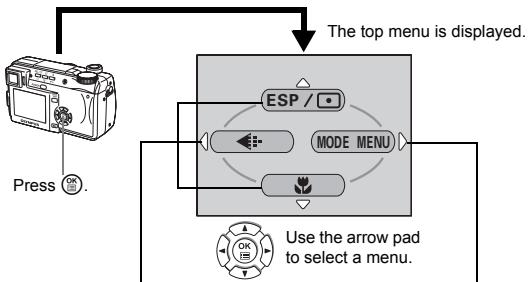
flowchart
graph TD
    A["Press"] --> B["Top Menu Display"]
    B --> C["Mode Menu"]
    C --> D["Arrow Pad to Select a Menu"]
    D --> E["Use the Arrow Pad to Select a Menu"]
En
SHORTCUT MENUS
• Take you directly to the setting screens.
- Display operational buttons at the bottom of the screen.
- The functions registered in the shortcut menus can also be accessed from the MODE MENU.
- The shortcut menus can be replaced in modes other than AUTO 🎨.
MODE MENU
- Lets you access the menu selections to set the ISO, sharpness, etc.
- Categorizes the settings into 4 tabs.
- Press 🔒 to select a tab and display the associated menu items.
- There is no mode menu in AUTO mode.
How to use the mode menus
1 Press OK to display the top menu. Press 🏠.
2 Press 🔒 to select a tab, then press 🔒.
3 Press 🔒 to select an item, then press 🔒.
4 Press 🔒 to select a setting. Press OK to complete setting.
Press OK again to exit the menu and return to shooting status.
natural_image
Pure geometric diagram with concentric circles and crosshairs, no text or symbols present
natural_image
Abstract geometric pattern with concentric circles and crosshairs (no text or symbols)Shortcut menus
Shooting modes
DRIVE
Selects a shooting mode from □ (single-frame shooting), □ (sequential shooting), HI □ (high speed sequential shooting), AF □ (AF sequential shooting) and BKT (auto bracketing).
ESP/
Selects the metering method (ESP, □ or MULTI).
DIGITAL ZOOM
Extends the maximum optical zoom, making possible up to approx. 40× zoom.

Sets the image quality and resolution. Still picture: TIFF*, SHQ, HQ, SQ1, SQ2 Movie : SHQ, HQ, SQ
*TIFF cannot be selected when the mode dial is set to AUTO.

Used to take pictures of a close subject. Selects OFF, 🎨 or 📊.
WB
Sets the appropriate white balance according to the light source.

Sets the date and time.
CARD SETUP
Formats a card.
Playback mode

Runs through all saved pictures one after another.
En
En
17
natural_image
Abstract geometric pattern with concentric circles and a shaded circle, no text or symbols present
natural_image
Two abstract geometric diagrams: one with a central black circle and crosshairs, the other with a circular pattern on a grid-like base (no text or symbols)
natural_image
Pure geometric diagram with concentric circles and crosshairs, no text or symbols presentMOVIE PLAY
| MOVIE PLAYBACK | Plays back movies. |
| INDEX | Creates an index picture of a movie in 9 frames. |
| EDIT | Edits a movie. |
INFO
Displays all the shooting information on the monitor.
SWITCH FRAME
Selects ALL to display all images or Oπ to display only protected images.
Mode menus
En
The MODE MENU has 4 tabs. Press 🔒 to select a tab and display the associated menu items.
These instructions are only for quick reference. For more details on the functions described here, refer to the "Reference Manual" on CD-ROM.
Shooting modes
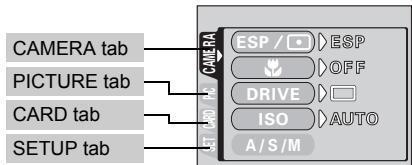
| CAMERA tab | |
| ESP/☐ | Selects the metering method (ESP, ☐, MULTI). |
| Used to take pictures of a close subject. Selects OFF, ☑, s☑. | |
| DRIVE | Selects a shooting mode from ☐ (single-frame shooting), ☐ (sequential shooting), HI ☐ (high speed sequential shooting), AF ☐ (AF sequential shooting) and BKT (auto bracketing). |
| ISO | Selects the ISO sensitivity from AUTO, 64, 100, 200 and 400. |
| A/S/M | Selects the shooting mode from A (Aperture priority shooting), S (Shutter priority shooting) and M (Manual shooting). |
| 1/2/3/4 | Selects a mode to be activated when taking pictures in mode. |
| S2 | Adjusts the amount of light emitted by the flash. |
| SLOW | Selects from SLOW1 (1st curtain), SLOW1 (1st curtain with red-eye reduction) and SLOW2 (2nd curtain) when the flash mode is set to SLOW (slow synchronization). |
| NOISE REDUCTION | Reduces the noise that affects pictures during long exposures. |
| DIGITAL ZOOM | Extends the maximum optical zoom up to approximately 40× magnification. |
| FULLTIME AF | Keeps the image in focus at all times without having to press the shutter button halfway. |
| AF MODE | Selects the auto focus method (iESP or SPOT). |
| Enables you to take a picture of yourself while holding the camera. | |
| PANORAMA | Allows panorama pictures to be taken with Olympus CAMEDIA-brand cards. |
| 2 IN 1 | Combines two still pictures taken in succession and stores them as a single picture. |
| FUNCTION | Adds special effects to pictures (BLACK & WHITE, SEPIA, WHITE BOARD, BLACK BOARD). |
| AF AREA | Changes the position of the AF target mark using the arrow pad. |
| INFO | Selects whether to display all the information such as shutter speed and white balance, or only the minimum information. |
| Displays a histogram showing the luminance distribution of still pictures. | |
| (still pictures) | Sound can be recorded when taking still pictures. |
| (movies) | Selects whether to record sound when shooting a movie. You can play back sound only when you play back through a PC, TV, etc. |
| SUPER ZOOM | Extends the optical zoom, making possible up to 14× zoom in 1600 × 1200 record mode. |
En
En
19
natural_image
Abstract geometric pattern with concentric circles and a shaded circle, no text or symbols present

natural_image
Pure geometric diagram with concentric circles and intersecting lines, no text or symbols present
natural_image
Pure geometric diagram with concentric circles and crosshairs, no text or symbols present

| PICTURE tab | |
| ←: | Sets the image quality and resolution. Still picture: TIFF, SHQ, HQ, SQ1, SQ2 |
| WB | Sets the appropriate white balance according to the light source. |
| WBZ | Makes fine changes to the white balance. |
| SHARPNESS | Adjusts the sharpness of the image. |
| CONTRAST | Adjusts the contrast of the image. |
| SATURATION | Adjusts the level of color depth without changing the tint. |
| CARD tab | |
| CARD SETUP | Formats a card. |
En
| SETUP tab | |
| ALL RESET | Selects whether to keep the current camera settings when you turn off the power. |
| Selects a language for on-screen display. | |
| PW ON/OFF SETUP | Sets the picture that is displayed when the power is turned on and off. |
| REC VIEW | Selects whether to display pictures on the monitor while saving them to a card. |
| SLEEP | Sets the sleep timer. |
| MY MODE SETUP | Customizes settings which are activated in the mode. |
| FILE NAME | Changes how file names are assigned. |
| PIXEL MAPPING | Checks the CCD and image processing functions for errors. |
| Adjusts the brightness of the viewfinder or monitor. | |
| Sets the date and time. | |
| m/ft | Sets the measurement unit (m/ft) used during manual focus. |
| VIDEO OUT | Selects NTSC or PAL according to your TV's video signal type. TV video signal types differ depending on the region. |
| SHORT CUT | Assigns frequently used functions as shortcut menus. |
| CUSTOM BUTTON | Assigns a frequently used function to the camera's custom button. |
| Turns off the beep sound for button operations and warnings. |
natural_image
Pure geometric diagram with concentric circles and crosshairs, no text or symbols present

Playback mode
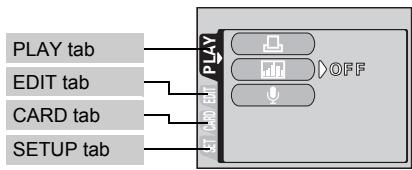
| PLAY tab ^1 | |
| Stores the necessary information on the card to allow you to print the pictures taken. | |
| Displays a histogram showing the luminance distribution. | |
| Adds sound to a still picture already taken. |
*1 The PLAY tab is not displayed during movie playback.
| EDIT tab ^2 | |
| Makes the file size smaller and saves it as a new file. | |
| Crops part of a picture and saves it as a new file. |
^2 The EDIT tab is not displayed during movie playback.
| CARD tab | |
| CARD SETUP | Erases all image data stored on the card or format the card. |
| SETUP tab | |
| ALL RESET | Selects whether to keep the current camera settings when you turn off the power. |
| Selects a language for on-screen display. | |
| PW ON/OFF SETUP | Sets the picture that is displayed when the power is turned on and off. |
| SCREEN SETUP | Registers a stored picture for use as the picture displayed when the power is turned on and off. |
| Adjusts the brightness of the viewfinder or monitor. | |
| Sets the date and time. | |
| VIDEO OUT | Selects NTSC or PAL according to your TV's video signal type. TV video signal types differ depending on the region. |
| Selects the number of frames in the index display. | |
| Turns off the beep sound for button operations and warnings. |

SHOOTING BASICS
Mode dial
The shooting modes include modes where the optimal settings for the situation are automatically selected, and modes where you can select the settings best suited to the shooting conditions and the effect you wish to achieve.
You can change the shooting mode before and after turning the camera on.
En
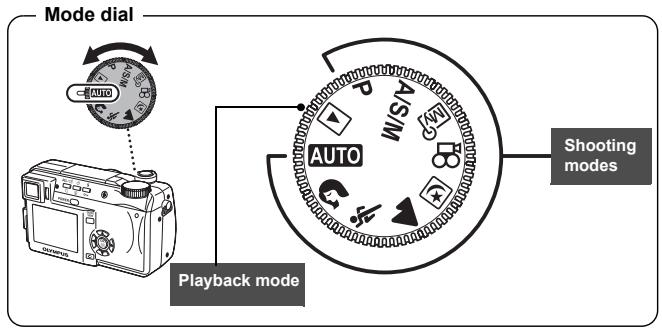
flowchart
graph TD
    A["Mode dial"] --> B["Auto"]
    B --> C["Wi-Fi"]
    C --> D["80°/24""]
    D --> E["Shooting modes"]
    F["Playback mode"] --> G["Auto"]
AUTO Full-auto shooting
Allows you to take still pictures using no special functions or manual adjustments. The camera sets the optimal focusing and exposure. This is the simplest of all shooting modes.

Portrait shooting
Suitable for taking a portrait-style shot of a person. This mode features an in-focus subject against a blurred background. The camera automatically sets the optimal shooting conditions.

Sports shooting
Suitable for capturing fast-moving action (such as sports) without blur. The camera automatically sets the optimal shooting conditions.
natural_image
Pure geometric diagram with concentric circles and crosshairs, no text or symbols present
natural_image
Abstract geometric pattern with concentric circles and crosshairs (no text or symbols)▲ Landscape shooting
Suitable for taking pictures of landscapes and other outdoor scenes. Both the foreground and the background are in focus. Since blues and greens are vividly reproduced in this mode, it is excellent for shooting natural scenery. The camera automatically sets the optimal shooting conditions.
Night Scene shooting
Suitable for shooting pictures in the evening or at night. The camera sets a slower shutter speed than is used in normal shooting. For example, if you take a picture of a street at night in AUTO mode, the lack of brightness will result in a dark picture with the background underexposed and without details. In the Night Scene shooting mode, the true appearance of the street is captured. The camera automatically selects the optimal settings for this type of shooting condition. Since the shutter speed is slow, make sure you stabilize the camera by using a tripod.
P Program shooting
Allows you to take still pictures. The camera sets the aperture and shutter speed. Other functions, such as flash modes and drive modes, can be adjusted manually.
A/S/M Aperture priority/Shutter priority/Manual shooting
When the mode dial is set to A/S/M, the following items can be set with the menus.
A Aperture priority shooting
Allows you to set the aperture manually. The camera sets the shutter speed automatically.
Press ⬆ to increase the aperture value (f number).
Press ⬇ to decrease the aperture value (f number).
S Shutter priority shooting
Allows you to set the shutter speed manually. The camera sets the aperture automatically.
Press 🔒 to set a faster shutter speed.
Press 📋 to set a slower shutter speed.
En
natural_image
Abstract geometric pattern with intersecting lines and shaded circles (no text or symbols)En
23
natural_image
Two abstract geometric diagrams with concentric circles and intersecting lines, no text or symbols present.
natural_image
Pure geometric diagram with concentric circles and crosshairs, no text or symbols present
natural_image
Abstract geometric pattern with concentric circles and crosshairs (no text or symbols)M Manual shooting
Allows you to set the aperture and shutter speed manually.
Press ⚙ to increase the aperture value (f number).
Press ⬇ to decrease the aperture value (f number).
Press 🔒 to set a faster shutter speed.
Press ☑ to set a slower shutter speed.

My Mode
Allows you to save your favorite settings as your own personal mode and use these customized settings when taking pictures. Current settings can also be saved for retrieving by this mode.

Movie record
En
Allows you to record movies. The camera sets the aperture and shutter speed automatically. Even if the subject moves during recording or the distance to the subject changes, correct focusing and exposure are maintained continuously. If ⏻ is set to ON, sound is recorded at the same time.
TAKING STILL PICTURES
You can take still pictures using either the monitor or the viewfinder. Both methods are easy as all you have to do is to press the shutter button.
1 Set the mode dial to AUTO 🎯 🔍 🔍 🔍 🔍 🔍 A/S/M P and press the power switch.
• The monitor turns on.
To shoot using the viewfinder, press 📄 to turn the viewfinder on.
2 Decide the composition of the picture.
3 Press the shutter button gently (halfway) to adjust the focus.
natural_image
Abstract geometric diagram with concentric circles and intersecting lines, no text or symbols present[Non-Text]
24
En
natural_image
Pure geometric diagram with intersecting lines and a circular pattern (no text or symbols)
natural_image
Pure geometric diagram with concentric circles and intersecting lines (no text or symbols)
natural_image
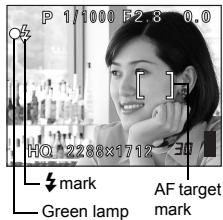
Pure geometric diagram with intersecting lines and circles, no text or symbols present- When the focus and exposure are locked, the green lamp lights (focus lock).
- The AF target mark moves to the focused position.
- The shutter speed and aperture value automatically set by the camera are displayed (except in M mode).
- blinks to warn of camera movement. Press the flash button to open the flash.
- When lights after the flash has popped up, the flash is ready to fire. The flash fires automatically when the shutter button is p
4 Press the shutter button all the way (fully).
• The camera takes the picture.
- The card access lamp blinks while the picture is stored on the card.
IF CORRECT FOCUS CANNOT BE OBTAINED (FOCUS LOCK)
When the subject cannot be focused on, you can focus the camera on another point at roughly the same distance (focus lock) and take the picture as explained below.
En
1 Position the AF target mark on the subject you want to focus on.
- When shooting a hard-to-focus subject or a fast-moving subject, point the camera at an object about the same distance away as the subject.
![P 1/1000 F2.8 0.0 [ ] HQ >24X1F2 0.020 AF target mark](/content/2019/11/84418/images/70f5d272a944187eeaec7226f5cd66f6f284062854cb5956b5b69b7a287511cc.jpg)
2 Press the shutter button halfway until the green lamp lights.
- When the focus and exposure are locked, the green lamp lights.
- The AF target mark moves to the focused position.
- When the green lamp blinks, the focus and exposure are not locked. Release your finger from the shutter button, re-position your subject and press the shutter button halfway again.
En
25
natural_image
Abstract geometric pattern with intersecting lines and shaded circles (no text or symbols)
natural_image
Pure geometric diagram with concentric circles and crosshairs, no text or symbols present
natural_image
Abstract geometric diagram with concentric circles and intersecting lines (no text or symbols)3 Keeping the shutter button pressed halfway, recompose your shot.
![P 1/1000 F2.8 0.0 [ ] HQ 2288×1710.5](/content/2019/11/84418/images/42f046465e6e6244e76fe986f57c9a98bbc9c1cb367df9299132417e468de318.jpg)
4 Press the shutter button fully.
RECORDING MOVIES
1 Set the mode dial to 🔗 and press the power switch.
• The monitor turns on.
- The available recording time on the card that you are using is displayed.
2 Decide the composition of the picture.
- You can use the zoom lever to enlarge your subject.
3 Press the shutter button fully to start recording.
- You can adjust the zoom during movie recording. Sound is recorded at the same time.
- The card access lamp blinks while the movie is stored on the card.
- During movie recording, lights red.
4 Press the shutter button again to stop recording.
- When the remaining recording time has been used up, recording stops automatically.
- When there is space in the card memory, the remaining recording time is displayed, and the camera is ready to shoot.

Note
- During movie recording, the flash and manual focus (MF) are disabled.
- It takes longer to store movies than still pictures.
- The remaining recording time varies depending on the record mode and the amount of space available on the card.
• This camera cannot play back sound.
ZOOMING IN ON A SUBJECT (OPTICAL ZOOM)
In addition to the optical zoom, this camera is equipped with a super zoom and digital zoom for taking telephoto and wide-angle shots. You can increase the zoom magnification by combining the super zoom or digital zoom with the optical zoom. The super zoom and digital zoom cannot be used at the same time.
Camera movement is likely to occur at higher magnifications. Stabilize the camera with a tripod, etc. to avoid camera movement.
26
En

natural_image
Abstract geometric diagram with concentric circles and intersecting lines, no text or symbols present
natural_image
Pure geometric diagram with intersecting lines and a circular pattern (no text or symbols)
natural_image
Pure geometric diagram with concentric circles and crosshairs, no text or symbols present
natural_image
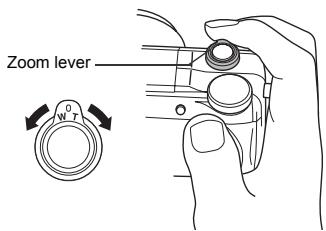
Abstract geometric pattern with concentric circles and intersecting lines (no text or symbols)1 Push or pull the zoom lever.
- Wide-angle: Push the zoom lever toward W to zoom out.
- Telephoto: Pull the zoom lever toward T to zoom in.
2 Take the picture.
USING THE FLASH
1 Press the flash button.
- The flash pops up.
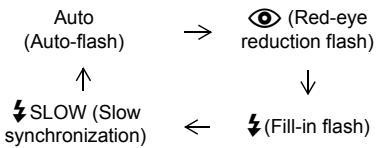
2 Set the flash mode by repeatedly pressing ↗.
- The flash mode changes in the sequence shown below (when all modes are available).
- To prevent the flash from firing, press down on the top of the flash to retract it.
3 Press the shutter button halfway.
- In conditions where the flash will fire, ↓ lights.
4 Press the shutter button fully to take the picture.

TIPS
Flash working range W (max.): Approx. 0.3 m - 4.5 m (1.0 ft. - 14.8 ft.) T (max.): Approx. 1.2 m - 3.5 m (3.9 ft. - 11.5 ft.)
En
27
En
natural_image
Abstract geometric pattern with concentric circles and a shaded circle, no text or symbols present
Auto-flash (No indication)
The flash fires automatically in low light or backlight conditions.
Red-eye reduction flash (○)
The red-eye reduction flash mode significantly reduces the red-eye phenomenon by emitting pre-flashes before firing the regular flash.
Fill-in flash (↓)
The flash always fires every time the shutter button is pressed.
Flash off (⚡)
The flash does not fire even in low light conditions.
Slow synchronization (↓SLOW1 ↓SLOW2 Ⓞ↓SLOW1)
1st curtain (front curtain) ↘ SLOW1 (factory default setting):
Adjusts the flash for slow shutter speeds.
2nd curtain (rear curtain) ↘ SLOW2:
The 2nd curtain fires the flash just before the shutter closes.
1st curtain with red-eye reduction Ⓞ SLOW1:
Adjusts the flash for slow shutter speeds, and minimizes red-eye.
En
USING THE SELF-TIMER
This function lets you take pictures using the self-timer. Fix the camera securely on a tripod for self-timer shooting. This function is useful for taking pictures where you want to be included in the photograph.
1 Select ⚙ by repeatedly pressing ⚙.
2 Press the shutter button fully to take the picture.
- Pressing the shutter button halfway locks the focus and exposure.
- The self-timer lamp lights for approximately 10 seconds, then starts blinking. After blinking for approximately 2 seconds, the picture is taken.
natural_image
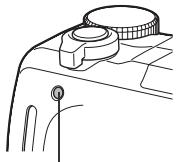
Line drawing of a mechanical component with a circular end and cylindrical top (no text or symbols)Self-timer lamp
natural_image
Abstract geometric diagram with concentric circles and intersecting lines (no text or symbols)
natural_image
Pure geometric diagram with intersecting lines and a circular pattern (no text or symbols)ADVANCED SHOOTING
SEQUENTIAL SHOOTING
There are 4 sequential shooting modes: sequential shooting, high speed sequential shooting, AF sequential shooting and auto bracketing. Sequential shooting modes can be selected from the DRIVE mode menu.
Sequential shooting cannot be performed when the record mode is set to TIFF.
Drive mode
☐ Shoots 1 frame at a time when the shutter button is pressed. (Normal shooting mode, single-frame shooting)
Focus, exposure and white balance are locked at the first frame. Approx. 7 frames at 1.6 frames/sec. (in HQ mode)
HI Pictures can be taken at a faster speed than normal sequential shooting. The sequential shooting speed varies depending on the record mode setting. 2 frames at 2.1 frames/sec.
AF ☐ Focus is individually locked for each frame. The AF sequential shooting speed is slower than for normal sequential shooting.
BKT When auto bracketing is set, the exposure is changed automatically for each frame when you start shooting. The exposure differential and number of frames can be selected in the menus. The focus and white balance are locked at the first frame.
METERING
There are three ways of measuring the brightness of a subject.
ESP metering : Meters the center of the subject and the surrounding area separately.
Spot metering : Exposure is determined by metering within the AF target area. In this mode, a subject can be shot with optimal exposure regardless of the background light.
Multi-metering : Meters the brightness of the subject at up to 8 different points to set the optimal exposure based on the average brightness. This method is useful with a high contrast subject.
natural_image
Pure geometric diagram with intersecting lines and shaded circles, no text or symbols present
natural_image
Pure geometric diagram with concentric circles and crosshairs, no text or symbols present
natural_image
Abstract geometric pattern with concentric circles and intersecting lines (no text or symbols)AE LOCK
This function is suitable for situations when optimal exposure is difficult to achieve, such as when there is excessive contrast between the subject and the surroundings.
MACRO MODE SHOOTING
Focusing is usually slow when you get close to a subject (W: 7 cm/2.8" to 60 cm/2.0 ft., T: 1.2 m/3.9 ft. to 2 m/6.6 ft.). However, in the ⬇ mode focusing is performed quickly. When the optical zoom lever is at the maximum wide position and you are as close as 7 cm/2.8" to your subject, you can fill the entire frame with your subject.
SUPER MACRO MODE SHOOTING
This mode lets you shoot from as close as 3 cm/1.2" to your subject. In the mode, normal shooting is also possible, but the position of the zoom is fixed automatically and cannot be changed.
En
MANUAL FOCUS
If auto focus is unable to focus on a subject, use manual focus.
natural_image
Pure geometric diagram with intersecting lines and a circular pattern (no text or symbols)PLAYBACK
1 Set the mode dial to ▶ and press the power switch.
- The monitor turns on and displays the last picture taken. (Single-frame playback)
2 Use the arrow pad to play back other pictures.
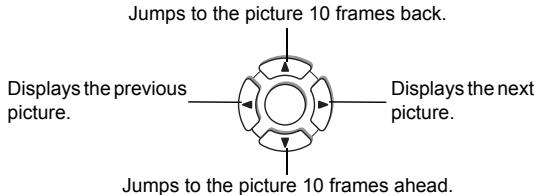
flowchart
graph TD
    A["Displays the previous picture."] --> B["Jumps to the picture 10 frames back."]
    C["Displays the next picture."] --> D["Jumps to the picture 10 frames ahead."]
    B --> E["Arrow pointing inward"]
    D --> F["Arrow pointing inward"]
En
QUICK VIEW
This function lets you play back pictures while the camera is in the shooting mode. This is useful when you want to check shooting results and resume shooting quickly.
1 Press the QUICK VIEW button in the shooting mode.
2 Press the QUICK VIEW button again to return to the shooting mode.
Close-up playback
Pictures displayed on the monitor can be enlarged 1.5, 2, 2.5, 3, 3.5 or 4 times. This function is useful when you want to check the details of a picture.
1 Select the still picture you want to enlarge.
- You cannot enlarge pictures with 📄.
natural_image
Pure geometric diagram with concentric circles and intersecting lines (no text or symbols)
natural_image
Abstract geometric diagram with concentric circles and intersecting lines (no text or symbols)2 Pull the zoom lever toward T.
• Each time you pull the zoom lever, the picture is enlarged gradually.
- To return the picture to the original size (1×), push the zoom lever toward W.
Index display
This function lets you show several pictures at the same time on the monitor. It is useful for quickly finding the picture you want to view. The number of pictures shown can be 4, 9 or 16.
1 In the single-frame playback mode, push the zoom lever toward W.
- Use the arrow pad to select the picture.
- To return to the single-frame playback, pull the zoom lever toward T.
En
PLAYING BACK MOVIES
1 Use the arrow pad to display the picture with 📋 you want to play back.
2 Press OK.
- The top menu is displayed.
3 Press 🔒 to select MOVIE PLAY.
4 Press 🔒 to select MOVIE PLAYBACK, then press OK.
- The movie is played back. When playback ends, the display automatically returns to the beginning of the movie.
- Fast forward/fast rewind functions are available during playback.
∵: Fast forward. Each press switches the speed between ×1, ×2 and ×20.
☑: Fast rewind. Each press switches the speed between ×1, ×2 and ×20.
- Press OK again after playback ends to display the menu.
PLAYBACK : Plays back the entire movie again.
FRAME BY FRAME :
Plays back the movie manually one frame at a time.
EXIT : Leaves the movie playback mode.
Press 🔒 to select the desired operation, then press OK.
natural_image
Abstract geometric diagram with concentric circles and intersecting lines (no text or symbols)
natural_image
Pure geometric diagram with intersecting lines and a circular pattern (no text or symbols)
natural_image
Pure geometric diagram with concentric circles and crosshairs, no text or symbols present
natural_image
Abstract geometric diagram with concentric circles and intersecting lines (no text or symbols)When FRAME BY FRAME is selected
: Displays the first frame of the movie.
: Displays the last frame of the movie.
: Displays the next frame. The movie can be played continuously by holding the button down.
: Displays the previous frame. The movie can be played continuously in reverse by holding the button down.
OK : Displays the MOVIE PLAYBACK menu.
PROTECTING PICTURES
You are recommended to protect important pictures to avoid accidentally erasing them.
1 Use the arrow pad to display the picture you want to protect.
2 Press Oπ.
- To cancel protection, press O again.
En

Note
- Protected pictures cannot be erased by the single-frame/all-frame erase function, but they are all erased by formatting.
ERASING PICTURES
This function erases recorded pictures. Pictures can be erased either one frame at a time or all the pictures in the card.

Note
- Once erased, pictures cannot be restored. Check each picture before erasing to avoid accidentally erasing pictures you want to keep.
Single-frame erase
1 Use the arrow pad to display the picture you want to erase.
2 Press 📋.
- The ERASE screen is displayed.
3 Press 🔒 to select YES, then press OK.
- The picture is erased and the menu is closed.
En
33
natural_image
Abstract geometric diagram with concentric circles and intersecting lines, no text or symbols present
natural_image
Pure geometric diagram with concentric circles and intersecting lines (no text or symbols)
natural_image
Abstract geometric diagram with concentric circles and intersecting lines (no text or symbols)All-frame erase
1 In the top menu, select MODE MENU → CARD → CARD SETUP, and press 🔒.
2 Press 🔒 to select 🔒 ALL ERASE, then press OK.
3 Press 🔒 to select YES, then press OK.
- All the pictures are erased.
FORMATTING (CARD SETUP)
This function lets you format a card. Formatting prepares cards to receive data. Before using non-Olympus cards or cards which have been formatted on a PC, you must format them with this camera.


- All existing data, including protected pictures, are erased when the card is formatted. Make sure that you save or transfer important data to a PC before formatting a card.
1 In the top menu, select MODE MENU → CARD → CARD SETUP, and press 🔒.
- The Ⓤ FORMAT screen is displayed.
When AUTO is selected: In the top menu, press 🔒 to select CARD SETUP.
When ▶ is selected: In the top menu, select MODE MENU → CARD → CARD SETUP, and press 🔒. Press 🔒 to select 📋 FORMAT, then press OK.
2 Press 🔒 to select YES, then press OK.
- The BUSY bar is displayed and the card is formatted.
natural_image
Pure geometric diagram with intersecting lines and a circular pattern (no text or symbols)
natural_image
Pure geometric diagram with concentric circles and crosshairs, no text or symbols present
natural_image
Abstract geometric diagram with concentric circles and crosshairs, no text or symbols presentPLAYBACK ON A TV
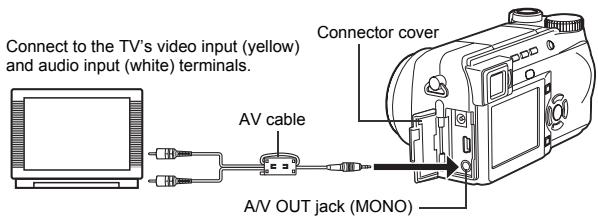
Use the AV cable provided with the camera to play back recorded images on your TV.
1 Make sure that the TV and camera are turned off. Connect the A/V OUT jack on the camera to the video input terminal on the TV using the AV cable.
En
2 Turn the TV on and set it to the video input mode.
- For details of switching to video input, refer to your TV's instruction manual.
3 Set the mode dial to ▶ and turn the camera on.
- The last picture taken is displayed on the TV. Use the arrow pad to select the picture you want to display.
- The close-up playback, index display and slideshow functions can also be used on a TV screen.

Note
- You are recommended to use the optional AC adapter when using the camera with a TV.
- Make sure that the camera's video output signal type is the same as the TV's video signal type.
natural_image
Abstract geometric pattern with intersecting lines and shaded circles (no text or symbols)En
35
natural_image
Pure geometric diagram with concentric circles and radial lines, no text or symbols presentPRINT RESERVATION/DIRECT PRINT
PRINT RESERVATION (DPOF)
DPOF is short for Digital Print Order Format. DPOF is the format used to record automatic print information from digital cameras. If a card containing print reservation data is taken to a print shop that supports the DPOF format, the pictures can be printed according to the DPOF reservations. Or pictures can be printed out at home on a personal DPOF-compatible printer.
All-frame reservation
Use this feature to print all the pictures stored on the card. Select the desired number of prints and whether you want the date and time included.
Single-frame reservation
Use this feature to print only selected pictures. It is also used to change the reserved number of prints and the date/time settings. Display the frame to be printed and select the desired number of prints.
Resetting the print reservation data
This function allows you to reset all the print reservation data for pictures stored on the card.
DIRECT PRINT (PictBridge)
By connecting the camera to a PictBridge-compatible printer with the USB cable, you can print out recorded pictures directly without the use of a computer.
PictBridge is the standard for connecting digital cameras and printers of different makers and printing out pictures directly.
PRINT Prints the selected picture.
ALL PRINT Prints all the pictures stored on the card.
MULTI PRINT * Prints one picture in multiple layout format.
ALL INDEX * Prints an index of all the pictures stored on the card.
PRINT ORDER * Prints the pictures according to the print reservation data on the card. If no print reservations have been made, this option is not available.
* This option may not be available depending on the type of printer.
For more details, refer to the "Reference Manual" on CD-ROM.
natural_image
Pure geometric diagram with intersecting lines and a circular pattern (no text or symbols)DOWNLOADING PICTURES TO A COMPUTER
By connecting the camera to a computer with the provided USB cable, images on a card can be transferred to the computer. Some OS's (operating systems) may need a special setup before connecting to the camera for the first time. Follow the chart below. For details of the procedures in the chart, refer to the "Reference Manual" on the software CD. Also refer to the "Software Installation Guide" included in the CD-ROM package.
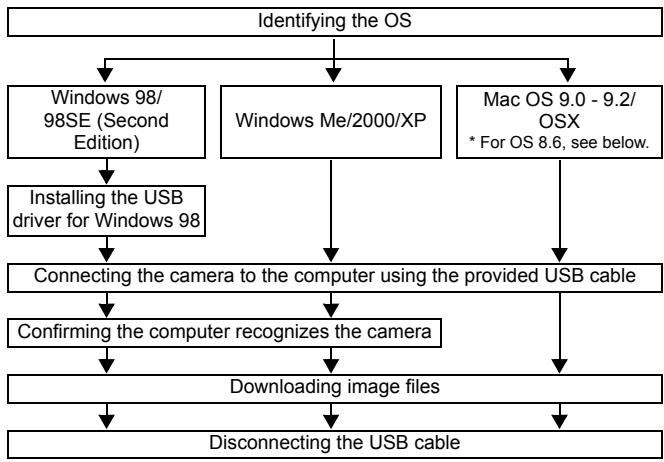
flowchart
graph TD
    A["Identifying the OS"] --> B["Windows 98/98SE (Second Edition)"]
    A --> C["Windows Me/2000/XP"]
    A --> D["Mac OS 9.0 - 9.2/OSX * For OS 8.6, see below."]
    B --> E["Installing the USB driver for Windows 98"]
    C --> F["Connecting the camera to the computer using the provided USB cable"]
    D --> G["Confirming the computer recognizes the camera"]
    E --> H["Downloading image files"]
    F --> H
    G --> H
    H --> I["Disconnecting the USB cable"]
* Even if your computer has a USB connector, data transfer may not function correctly if you are using one of the operating systems listed below or if you have an add-on USB connector (extension card, etc.).
- Windows 95/NT 4.0
• Windows 98/98SE upgrade from Windows 95
- Mac OS 8.6 or lower (except Mac OS 8.6 equipped with USB MASS Storage Support 1.3.5 installed at the factory)
- Data transfer is not guaranteed on a home-built PC system or PCs with no factory installed OS.

Note
- You can view images using: graphics applications that support the JPEG file format (Paint Shop Pro, Photoshop, etc.); Internet browsers (Netscape Communicator, Microsoft Internet Explorer, etc.); CAMEDIA Master software; or other software. For details on using commercial graphics applications, refer to their instruction manuals.
En
37
natural_image
Abstract geometric pattern with concentric circles and a shaded circle, no text or symbols present
natural_image
Pure geometric diagram with concentric circles and crosshairs, no text or symbols present- QuickTime is needed for playing back movies. QuickTime is included on the provided software CD.
- If you want to process images, make sure to download them to your computer first. Depending on the software, image files may be destroyed if the images are processed (rotated, etc.) while they are on the card.
FOR OTHER OS USERS
Users running other OS cannot use the provided USB cable to connect the camera directly to a computer.
● Windows 95 ● Windows NT ● Mac OS before OS 9
You can download images directly to your computer using a PC card adapter.
Does your computer have a USB interface?
The USB port is indicated by a 📄 mark. Check that the port has the 📄 mark.
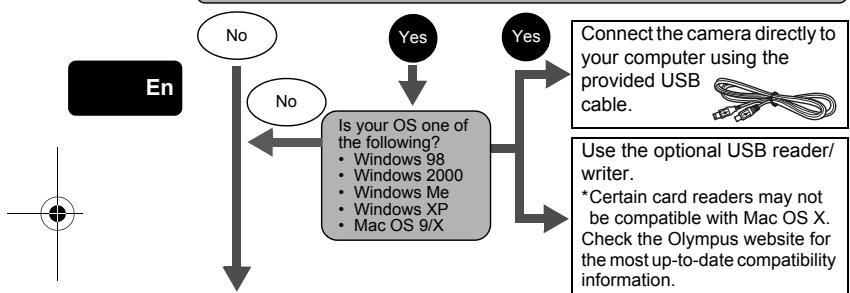
flowchart
graph TD
    A["En"] --> B{No}
    B --> C{Is your OS one of the following?}
    C --> D["Windows 98"]
    C --> E["Windows 2000"]
    C --> F["Windows Me"]
    C --> G["Windows XP"]
    C --> H["Mac OS 9/X"]
    D --> I["Yes"]
    E --> I
    F --> I
    G --> I
    H --> I
    I --> J["Connect the camera directly to your computer using the provided USB cable."]
    I --> K["Use the optional USB reader/writer. *Certain card readers may not be compatible with Mac OS X. Check the Olympus website for the most up-to-date compatibility information."]
Does your computer have a built-in PC card slot?

Use the optional PC card adapter.
*Not supported by Windows NT4.0 or lower.
Consult your nearest Olympus representative.
For more details, refer to the "Reference Manual" on CD-ROM. For connection to the PC, refer to the "Software Installation Guide" included in the CD-ROM package.
natural_image
Pure geometric diagram with intersecting lines and a circular pattern (no text or symbols)ERROR CODES
| Monitor indication | Possible cause | Corrective action |
| NO CARD | The card is not inserted, or it cannot be recognized. | Insert a card or insert a different card. If the problem persists, format the card. If the card cannot be formatted, it cannot be used. |
| CARD ERROR | There is a problem with the card. | Use a different card. Insert a new card. |
| WRITE-PROTECT | Writing to the card is prohibited. | The recorded image has been protected (read-only) on a PC. Download the image to a PC and cancel the read-only setting. |
| CARD FULL | The card is full. No more pictures, movies or information such as print reservations can be recorded. | Replace the card or erase unwanted pictures. Before erasing, download important images to a PC. |
| NO PICTURE | There are no pictures on the card. | The card contains no pictures. Record pictures. |
| PICTUREERROR | There is a problem with the selected picture and it cannot be played back on this camera. | Use image processing software to view the picture on a PC. If that cannot be done, the image file is damaged. |
| CARD-COVER OPEN | The card cover is open. | Close the card cover. |
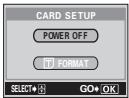 | The card is not formatted. | Format the card. All data on the card is deleted. |
En
natural_image
Abstract geometric pattern with concentric circles and a shaded circle, no text or symbols presentEn
39
natural_image
Pure geometric diagram with concentric circles and intersecting lines, no text or symbols presentSPECIFICATIONS
| Product type | : Digital camera (for shooting and displaying) |
| Recording system | |
| Still picture | : Digital recording, TIFF (non-compression), JPEG (in accordance with Design rule for Camera File system (DCF)) |
| Applicable standards | : Exif 2.2, Digital Print Order Format (DPOF), PRINT Image Matching II, PictBridge |
| Sound with still pictures | : Wave format |
| Movie | : QuickTime Motion JPEG support |
| Memory | : xD-Picture Card (16-512 MB) |
| Resolution | : 3200 × 2400 pixels (ENLARGE SIZE: SHQ, HQ) 2288 × 1712 pixels (TIFF, SHQ, HQ) 2288 × 1520 pixels (3:2 TIFF, SHQ, HQ) 2048 × 1536 pixels (TIFF, SQ1) 1600 × 1200 pixels (TIFF, SQ1) 1280 × 960 pixels (TIFF, SQ1) 1024 × 768 pixels (TIFF, SQ2) 640 × 480 pixels (TIFF, SQ2) |
En
No. of storable pictures
when using a 16 MB card (Without sound)
| : Approx. 1 frame | (TIFF : 2288 × 1712) |
| Approx. 5 frames | (SHQ : 2288 × 1712) |
| Approx. 16 frames | (HQ : 2288 × 1712) |
| Approx. 49 frames | (SQ1 : 1280 × 960 NORMAL) |
| Approx. 165 frames | (SQ2 : 640 × 480 NORMAL) |
No. of effective pixels
| : 4,000,000 pixels |
| : 1/2.5" CCD solid-state image pickup, 4,110,000 pixels (gross) |
| : Olympus lens 6.3 mm to 63 mm, f2.8 to f3.7, 11 elements in 7 groups (equivalent to 38 mm to 380 mm lens on 35 mm camera) |
Image pickup device
Lens
Photometric system
Aperture
Shutter speed
Shooting range
Viewfinder
: ESP metering, spot metering system
: f2.8 to f8.0
: 15 to 1/1000 sec.
: 0.6 m (2 ft.) to ∞ (w), 2 m (6.6 ft.) to ∞ (T) (NORMAL) 0.07 m (0.2 ft.) to ∞ (w), 1.2 m (4 ft.) to ∞ (T) (macro mode)
: 0.44" TFT color LCD display, 240,000 pixels
natural_image
Abstract geometric diagram with concentric circles and intersecting lines (no text or symbols)
natural_image
Pure geometric diagram with intersecting lines and a circular pattern (no text or symbols)| Monitor | : 1.8" TFT color LCD display, 118,000 pixels |
| Auto focus | : TTL system autofocusContrast detection system |
| Outer connector | : DC-IN jack, USB connector (mini-B), A/V OUT jack |
| Automatic calendar system | : 2000 up to 2099 |
| Operating environment | |
| Temperature | : 0°C to 40°C (32°F to 104°F) (operation)-20°C to 60°C (-4°F to 140°F) (storage) |
| Humidity | : 30% to 90% (operation)/10% to 90% (storage) |
| Power supply | : Only an Olympus LI-10B lithium-ion batteryAC adapter specified by Olympus (optional) |
| Dimensions | : 104.5 mm (W) × 60 mm (H) × 68.5 mm (D)(4.1" × 2.4" × 2.7") (excluding protrusions) |
| Weight | : 280 g (0.62 lb.) (without battery or card) |
SPECIFICATIONS ARE SUBJECT TO CHANGE WITHOUT ANY NOTICE OR OBLIGATION ON THE PART OF THE MANUFACTURER.
En
natural_image
Abstract geometric pattern with intersecting lines and shaded circles (no text or symbols)En
41
natural_image
Pure geometric diagram with concentric circles and intersecting lines, no text or symbols present
natural_image
Pure geometric diagram with concentric circles and intersecting lines (no text or symbols)
natural_image
Abstract geometric pattern with concentric circles and intersecting lines (no text or symbols)TABLE DES MATIÈRES
GUIDE RAPIDE DE DÉMARRAGE....44
FONCTIONS DU MENU ....56
INSTRUCTIONS DE BASE....62
natural_image
Pure geometric diagram with intersecting lines and shapes, no text or symbols present
natural_image
Pure geometric diagram with concentric circles and intersecting lines (no text or symbols)
natural_image
Abstract geometric pattern with intersecting lines and shaded circles (no text or symbols)natural_image
Abstract geometric diagram with concentric circles and intersecting lines, no text or symbols present
GUIDE RAPIDE DE DÉMARRAGE
NOMENCLATURE DES PIÈCES
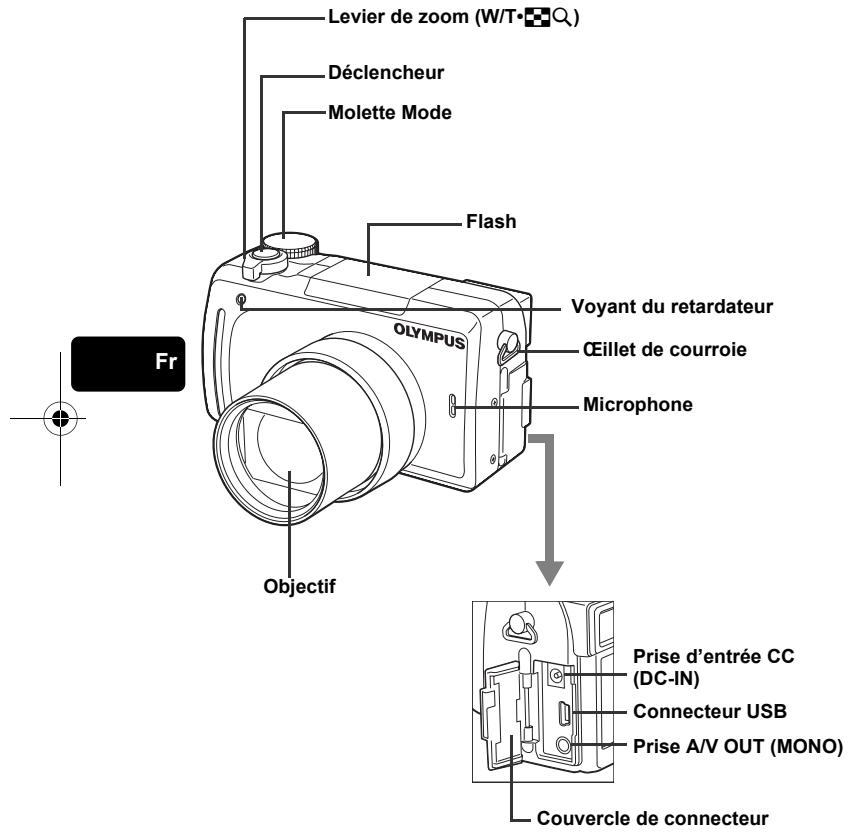
natural_image
Pure geometric diagram with intersecting lines and circles, no text or symbols present
natural_image
Pure geometric diagram with concentric circles and crosshairs, no text or symbols present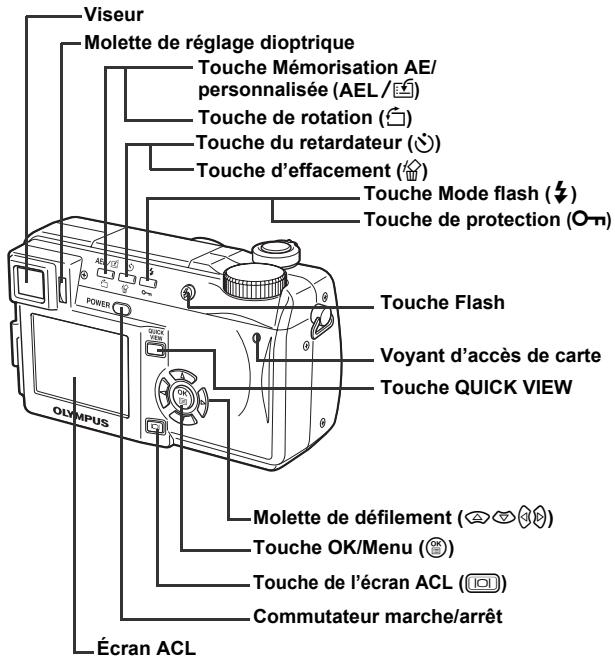
natural_image
Abstract geometric diagram with concentric circles and intersecting lines, no text or symbols present
natural_image
Pure geometric diagram with concentric circles and crosshairs, no text or symbols present

INDICATIONS SUR LE VISEUR ET L'ÉCRAN ACL
Mode prise de vue
Vue fixe
![1 2 3 4 5 1/1000 F2 8 F2.0 ISO100 20 8 [ ] 21 10 HQ 33-35 14 15 17 18](/content/2019/11/84418/images/8b650ad9b18f60babcca3cc99a2a1aede6d1b153326b754313f489324338b8dd.jpg)
Vidéo
Fr
| Éléments | Indications | ||
| 1 | Mode prise de vue | P, A, S, M, ☎, ☎, ☎, ☎, ☎, ☎, ☎, ☎, ☎, ☎, ☎, ☎, ☎, ☎, ☎, ☎, ☎, ☎, ☎, ☎, ☎, ☎, ☎, ☎, ☎, ☎, ☎, ☎, ☎, ☎, ☎, ☎, ☎, ☎ | |
| 2 | Vitesse d'obturation | 15" – 1/1000 | |
| 3 | Valeur de l'ouverture | F2.8 – F8.0 | |
| 4 | Compensation d'expositionDiférentiel d'exposition | -2.0 – +2.0-3.0 – +3.0 | |
| 5 | Contrôle de la batterie | ☐, ☐ | |
| 6 | Voyant vert | ○ | |
| 7 | Flash en attenteAvertissement de bougé/Chargement du flash | ☑ (Allumé)☑ (Clignote) | |
| 8 | Mode gros planMode Super gros planMise au point manuelle | ☑sMF | |
| 9 | Réduction des parasites | NR | |
| 10 | Mode de flash | ☐, ☎, ☎, ☎, ☎, ☎, ☎, ☎, ☎, ☎, ☎, ☎, ☎, ☎, ☎, ☎, ☎, ☎, ☎, ☎, ☎, ☎, ☎, ☎, ☎, ☎, ☎, ☎, ☎, ☎, ☎, ☎, ☎, ☎ | ☐, ☎, ☎, ☎, ☎, ☎, ☎, ☎, ☎, ☎, ☎, ☎, ☎, ☎, ☎, ☎, ☎, ☎, ☎, ☎, ☎, ☎, ☎, ☎, ☎, ☎, ☎, ☎, ☎, ☎, ☎, ☎, ☎, |
| 11 | Commande d'intensitédu flash | ☐ -2.0 – +2.0 | |
| 12 | Mode d'entraînement | ☐, ☎, ☎, ☎, ☎, ☎, ☎, ☎, ☎, ☎, ☎, ☎, ☎, ☎, ☎, ☎, ☎, ☎, ☎, ☎, ☎, ☎, ☎, ☎, ☎, ☎, ☎, ☎, ☎, ☎, ☎, ☎, ☎, | |

natural_image
Abstract geometric pattern with concentric circles and a shaded circle, no text or symbols present
natural_image
Pure geometric diagram with intersecting lines and a circular pattern (no text or symbols)
natural_image
Pure geometric diagram with concentric circles and crosshairs, no text or symbols present
natural_image
Two abstract geometric diagrams with concentric circles and crosshairs, no text or symbols present.natural_image
Abstract geometric pattern with concentric circles and a shaded circle, no text or symbols present
Fr
47
natural_image
Pure geometric diagram with concentric circles and intersecting lines, no text or symbols present
natural_image
Pure geometric diagram with concentric circles and crosshairs, no text or symbols present

Mode affichage
Vue fixe
Vidéo
Fr
natural_image
Abstract geometric pattern with concentric circles and a shaded circle, no text or symbols present48
Fr
natural_image
Abstract geometric pattern with concentric circles and a shaded circle, no text or symbols present
natural_image
Pure geometric diagram with intersecting lines and shapes, no text or symbols present
natural_image
Pure geometric diagram with concentric circles and crosshairs, no text or symbols present

Bloc mémoire
natural_image
Abstract geometric pattern with concentric circles and a shaded circle, no text or symbols present
Fr
49

natural_image
Pure geometric diagram with concentric circles and intersecting lines, no text or symbols presentFIXATION DE LA COURROIE ET DU BOUCHON D'OBJECTIF
1
4
2
natural_image
Anatomical illustration of a surgical procedure showing a hand holding an angular instrument (no text or labels present)Fr
CHARGEMENT DE LA BATTERIE
natural_image
Pure geometric diagram with concentric circles and crosshairs, no text or symbols present


natural_image
Line drawing of a mechanical device with an arrow pointing to a component (no text or symbols)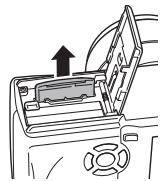
natural_image
Diagram of a car interior showing a door handle and steering wheel (no text or symbols)natural_image
Abstract geometric diagram with concentric circles and intersecting lines, no text or symbols present52
Fr

natural_image
Pure geometric diagram with intersecting lines and a circular pattern (no text or symbols)MISE EN MARCHE/ARRÊT
natural_image
Abstract geometric pattern with concentric circles and a shaded circle, no text or symbols presentFr
53
natural_image
Pure geometric diagram with concentric circles and radial lines, no text or symbols present
natural_image
Pure geometric diagram with concentric circles and crosshairs, no text or symbols present
natural_image
Abstract geometric diagram with concentric circles and intersecting lines (no text or symbols)SÉLECTION DE LA LANGUE
natural_image
Pure geometric diagram with intersecting lines and shapes, no text or symbols present
natural_image
Pure geometric diagram with concentric circles and crosshairs, no text or symbols present
natural_image
Abstract geometric diagram with concentric circles and intersecting lines (no text or symbols)RÉGLAGE DE LA DATE ET DE L'HEURE
natural_image
Abstract geometric pattern with concentric circles and a shaded circle, no text or symbols present
FONCTIONS DU MENU
UTILISATION DES MENUS ET DES ONGLETS
natural_image
Pure geometric diagram with concentric circles and crosshairs, no text or symbols present
natural_image
Two abstract geometric diagrams with concentric circles and crosshairs, no text or symbols present.Menus Raccourcis
Mode prise de vue
DRIVE
DIGITAL ZOOM [ZOOM NUM]
CARD SETUP [DEF CARTE]
Formate une carte.
natural_image
Abstract geometric pattern with concentric circles and a shaded circle, no text or symbols present![OLYMPUS C-765 UZ - CARD SETUP [DEF CARTE] - 1](/content/2019/11/84418/images/b3ee5df314900a450aa03c5dbb088aeb21f8954d6831c07c0cbcc5971d431fd0.jpg)
![OLYMPUS C-765 UZ - CARD SETUP [DEF CARTE] - 2](/content/2019/11/84418/images/bdc4d031a17c7cadc1c19b8a926fa8f3f182722aa555a1e98dd80bf0b456a2c4.jpg)
![OLYMPUS C-765 UZ - CARD SETUP [DEF CARTE] - 3](/content/2019/11/84418/images/fec8967e17c4ec0275280f69df6c83fca6564470df1d728338f91630817f2131.jpg)
![OLYMPUS C-765 UZ - CARD SETUP [DEF CARTE] - 4](/content/2019/11/84418/images/38725fc5bc7b2127460c4d43dc6129d72c527baff692f592e615acade4d34143.jpg)
![OLYMPUS C-765 UZ - CARD SETUP [DEF CARTE] - 5](/content/2019/11/84418/images/8f4c75044f8ae79a2183fe25cb1d305c0e04beb4a3bdf01680c2bb70d010cacf.jpg)
natural_image
Two abstract geometric diagrams: one with a central black circle and crosshairs, the other with a circular pattern on a radial gradient (no text or symbols)![OLYMPUS C-765 UZ - CARD SETUP [DEF CARTE] - 6](/content/2019/11/84418/images/24e2ef0bfee4a603c9d095031e497c657911aa54ba1e39877dffcf6be8b6b105.jpg)
natural_image
Pure geometric diagram with concentric circles and crosshairs, no text or symbols present![OLYMPUS C-765 UZ - CARD SETUP [DEF CARTE] - 7](/content/2019/11/84418/images/4957f8463e144b956bb22ae26c9e65314eed647398bc4e535690dc2f2e703fd8.jpg)
![OLYMPUS C-765 UZ - CARD SETUP [DEF CARTE] - 8](/content/2019/11/84418/images/a54101c8a64ec36247e15ad702bcb8c80d4e85b41832f6e5d5f846f0fa40ca45.jpg)
![OLYMPUS C-765 UZ - CARD SETUP [DEF CARTE] - 9](/content/2019/11/84418/images/6ce1caf058ce0bc29627e9d7fbe82b86dfbdbd1638389b66e18d6e157a940fc8.jpg)
natural_image
Abstract geometric diagram with concentric circles and intersecting lines (no text or symbols)MOVIE PLAY [LECT MOVIE]
natural_image
Abstract geometric diagram with concentric circles and intersecting lines, no text or symbols present![OLYMPUS C-765 UZ - CARD SETUP [DEF CARTE] - 10](/content/2019/11/84418/images/43ef234cbf648091aacdde0de55cac24cb65a24a37cddf304827e91a9ffce487.jpg)
![OLYMPUS C-765 UZ - CARD SETUP [DEF CARTE] - 11](/content/2019/11/84418/images/61b223c2ecb51bba6a67021ea1128778f2b5a119163555a77dc12eb875fbba59.jpg)
![OLYMPUS C-765 UZ - CARD SETUP [DEF CARTE] - 12](/content/2019/11/84418/images/d18382f75c9c8150f13f552c5c57e8c6a8f4d0011bbdbb9af4d887816bfc80de.jpg)
natural_image
Pure geometric diagram with intersecting lines and a circular pattern (no text or symbols)![OLYMPUS C-765 UZ - CARD SETUP [DEF CARTE] - 13](/content/2019/11/84418/images/195507afebb2b8a96c1c7404a407d240cccd82b68c14566da9be76507eef6890.jpg)
natural_image
Pure geometric diagram with concentric circles and crosshairs, no text or symbols present![OLYMPUS C-765 UZ - CARD SETUP [DEF CARTE] - 14](/content/2019/11/84418/images/50724d67abfaa2a1b516420e14c36f010de313a01f39e930a66f1a0f0b245ad2.jpg)
![OLYMPUS C-765 UZ - CARD SETUP [DEF CARTE] - 15](/content/2019/11/84418/images/77a8f14b8529f9b6122431615a11bff37586c4c1110858dd768b86d84132c003.jpg)
natural_image
Abstract geometric pattern with concentric circles and a shaded circle, no text or symbols present![OLYMPUS C-765 UZ - CARD SETUP [DEF CARTE] - 16](/content/2019/11/84418/images/be99954f2c7284358c827c83c46704edc5eab0ba7b50e5dcac64dec306920137.jpg)
![OLYMPUS C-765 UZ - CARD SETUP [DEF CARTE] - 17](/content/2019/11/84418/images/e79115768cad811748ae34e86eeb4506ca958ca18d5d56b179e665a3d7676d59.jpg)
![OLYMPUS C-765 UZ - CARD SETUP [DEF CARTE] - 18](/content/2019/11/84418/images/7c996d3a1165dd3d05a2d5ccc9ad1511017706d366c7eb42e1b6c7d097a56a85.jpg)
![OLYMPUS C-765 UZ - CARD SETUP [DEF CARTE] - 19](/content/2019/11/84418/images/a098881f5b353e92fffc29d6f26b4d7753c7d3150e637da3c1e3698fb36300b6.jpg)
natural_image
Pure geometric diagram with concentric circles and intersecting lines, no text or symbols present![OLYMPUS C-765 UZ - CARD SETUP [DEF CARTE] - 20](/content/2019/11/84418/images/4b7643598b01fe2ba3ace5f45beafa5406b43e33bfbada9099863072502de3f9.jpg)
natural_image
Pure geometric diagram with concentric circles and crosshairs, no text or symbols present![OLYMPUS C-765 UZ - CARD SETUP [DEF CARTE] - 21](/content/2019/11/84418/images/b88415811a0b9ed3a3761400463e12ad130d897adb3ea7d9cbf70ac881f30cf5.jpg)
![OLYMPUS C-765 UZ - CARD SETUP [DEF CARTE] - 22](/content/2019/11/84418/images/29e4fac31ede8f2359a8ba322943e7c66b0fad181e6a9cbad31a4a26194fd34f.jpg)
![OLYMPUS C-765 UZ - CARD SETUP [DEF CARTE] - 23](/content/2019/11/84418/images/e102d834cbc4a603f3e7fad220d30ec364f17bc2fe646285c049427f4b75291e.jpg)
natural_image
Pure geometric diagram with concentric circles and crosshairs, no text or symbols present![OLYMPUS C-765 UZ - CARD SETUP [DEF CARTE] - 24](/content/2019/11/84418/images/b5435149e9cf62828f2d101df240ea0f7d4d836a61e5cff918eef998ae8a85c8.jpg)
![OLYMPUS C-765 UZ - CARD SETUP [DEF CARTE] - 25](/content/2019/11/84418/images/e16adae6ac270efccd3c47efa93482dfeda8d7975ee3eeedc3098fc94d1721a5.jpg)
![OLYMPUS C-765 UZ - CARD SETUP [DEF CARTE] - 26](/content/2019/11/84418/images/6138d8666bc5ab73d458e49e8aba27ca1b5891fa1a2dedca59a59f55cf690d8e.jpg)
Mode affichage
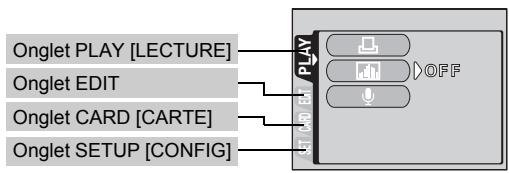
flowchart
graph LR
    A["Onglet PLAY [LECTURE"]] --> B["PLAY"]
    C["Onglet EDIT"] --> B
    D["Onglet CARD [CARTE"]] --> B
    E["Onglet SETUP [CONFIG"]] --> B
    B --> F["OFF"]
| OngletPLAY*1[LECTURE] |
natural_image
Abstract geometric pattern with concentric circles and a shaded circle, no text or symbols present
natural_image
Two abstract geometric diagrams with concentric circles and intersecting lines, no text or symbols present.INSTRUCTIONS DE BASE
Molette Mode
natural_image
Pure geometric diagram with concentric circles and crosshairs, no text or symbols present
natural_image
Abstract geometric diagram with concentric circles and crosshairs, no text or symbols present
Photo de sport
natural_image
Abstract geometric pattern with intersecting lines and shaded circles (no text or symbols)Fr
63
natural_image
Pure geometric diagram with concentric circles and intersecting lines, no text or symbols present
natural_image
Pure geometric diagram with concentric circles and crosshairs, no text or symbols present
natural_image
Abstract geometric pattern with concentric circles and crosshairs (no text or symbols)natural_image
Abstract geometric diagram with concentric circles and intersecting lines, no text or symbols present[Non-Text]
64
Fr

natural_image
Pure geometric diagram with intersecting lines and shapes, no text or symbols present
natural_image
Pure geometric diagram with concentric circles and crosshairs, no text or symbols presentSI UNE MISE AU POINT SATISFAISANTE EST IMPOSSIBLE (MÉMORISATION DE LA MISE AU POINT)
natural_image
Abstract geometric pattern with intersecting lines and shaded circles (no text or symbols)

natural_image
Pure geometric diagram with concentric circles and crosshairs, no text or symbols presentENREGISTREMENT DE FILMS
natural_image
Pure geometric diagram with concentric circles and crosshairs, no text or symbols present
natural_image
Abstract geometric diagram with concentric circles and intersecting lines (no text or symbols)natural_image
Abstract geometric diagram with concentric circles and intersecting lines, no text or symbols present
Fr
67

natural_image
Pure geometric diagram with concentric circles and intersecting lines, no text or symbols present
natural_image
Pure geometric diagram with concentric circles and crosshairs, no text or symbols present
natural_image
Abstract geometric diagram with concentric circles and intersecting lines (no text or symbols)natural_image
Line drawing of a mechanical component with no visible text or symbolsnatural_image
Pure geometric diagram with intersecting lines and a circular pattern (no text or symbols)PRISE DE VUE ÉLABORÉE
PRISE DE VUE EN SÉRIE
natural_image
Abstract geometric pattern with concentric circles and crosshairs, no text or symbols presentFr
69
natural_image
Pure geometric diagram with concentric circles and radial lines, no text or symbols present
natural_image
Pure geometric diagram with concentric circles and crosshairs, no text or symbols present
natural_image
Abstract geometric pattern with concentric circles and intersecting lines (no text or symbols)MÉMORISATION AE (AE LOCK)
MISE AU POINT MANUELLE
natural_image
Pure geometric diagram with intersecting lines and shapes, no text or symbols presentAFFICHAGE
AFFICHAGE DE VUES FIXES
natural_image
Pure geometric diagram with intersecting lines and a shaded circle, no text or symbols presentFr
71
natural_image
Abstract geometric diagram with concentric circles and intersecting lines (no text or symbols)
natural_image
Pure geometric diagram with intersecting lines and a circular pattern (no text or symbols)
natural_image
Pure geometric diagram with concentric circles and crosshairs, no text or symbols present


natural_image
Abstract geometric pattern with concentric circles and a shaded circle, no text or symbols present

natural_image
Pure geometric diagram with concentric circles and intersecting lines (no text or symbols)
natural_image
Abstract geometric diagram with concentric circles and intersecting lines (no text or symbols)natural_image
Pure geometric diagram with intersecting lines and a circular pattern (no text or symbols)
natural_image
Pure geometric diagram with concentric circles and crosshairs, no text or symbols present
natural_image
Pure geometric diagram with intersecting lines and circles, no text or symbols presentAFFICHAGE SUR UN TÉLÉVISEUR
natural_image
Abstract geometric pattern with intersecting lines and shaded circles (no text or symbols)
Fr
75
natural_image
Pure geometric diagram with concentric circles and intersecting lines, no text or symbols presentRÉSERVATION D'IMPRESSION/IMPRESSION DIRECTE
RÉSERVATION D'IMPRESSION (DPOF)
natural_image
Abstract geometric pattern with concentric circles and a shaded circle, no text or symbols present
natural_image
Pure geometric diagram with concentric circles and crosshairs, no text or symbols present

natural_image
Abstract geometric pattern with concentric circles and a shaded circle, no text or symbols presentFr
79
natural_image
Pure geometric diagram with concentric circles and intersecting lines, no text or symbols presentCARACTÉRISTIQUES
Normes applicable : Exif 2.2, Digital Print Order Format (DPOF), PRINT Image Matching II, PictBridge
2.288 × 1.712 pixels (TIFF, SHQ, HQ)
2.288 × 1.520 pixels (3:2 TIFF, SHQ, HQ)
2.048 × 1.536 pixels (TIFF, SQ1)
1.600 × 1.200 pixels (TIFF, SQ1)
1.280 × 960 pixels (TIFF, SQ1)
1.024 × 768 pixels (TIFF, SQ2)
640 × 480 pixels (TIFF, SQ2)
natural_image
Abstract geometric pattern with concentric circles and a shaded circle, no text or symbols presentFr
81

natural_image
Pure geometric diagram with concentric circles and intersecting lines, no text or symbols presentINHALT
ERSTE SCHRITTE....84
MENÜFUNKTIONEN 96
GRUNDLEGENDE AUFNAHMEFUNKTIONEN ..... 102
natural_image
Pure geometric diagram with intersecting lines and a circular pattern (no text or symbols)
natural_image
Pure geometric diagram with concentric circles and crosshairs, no text or symbols presentAdresse : 2 Corporate Center Drive, Melville,
New York11747-3157, USA
Telefonnummer : 1-631-844-5000
natural_image
Abstract geometric pattern with concentric circles and a shaded circle, no text or symbols present
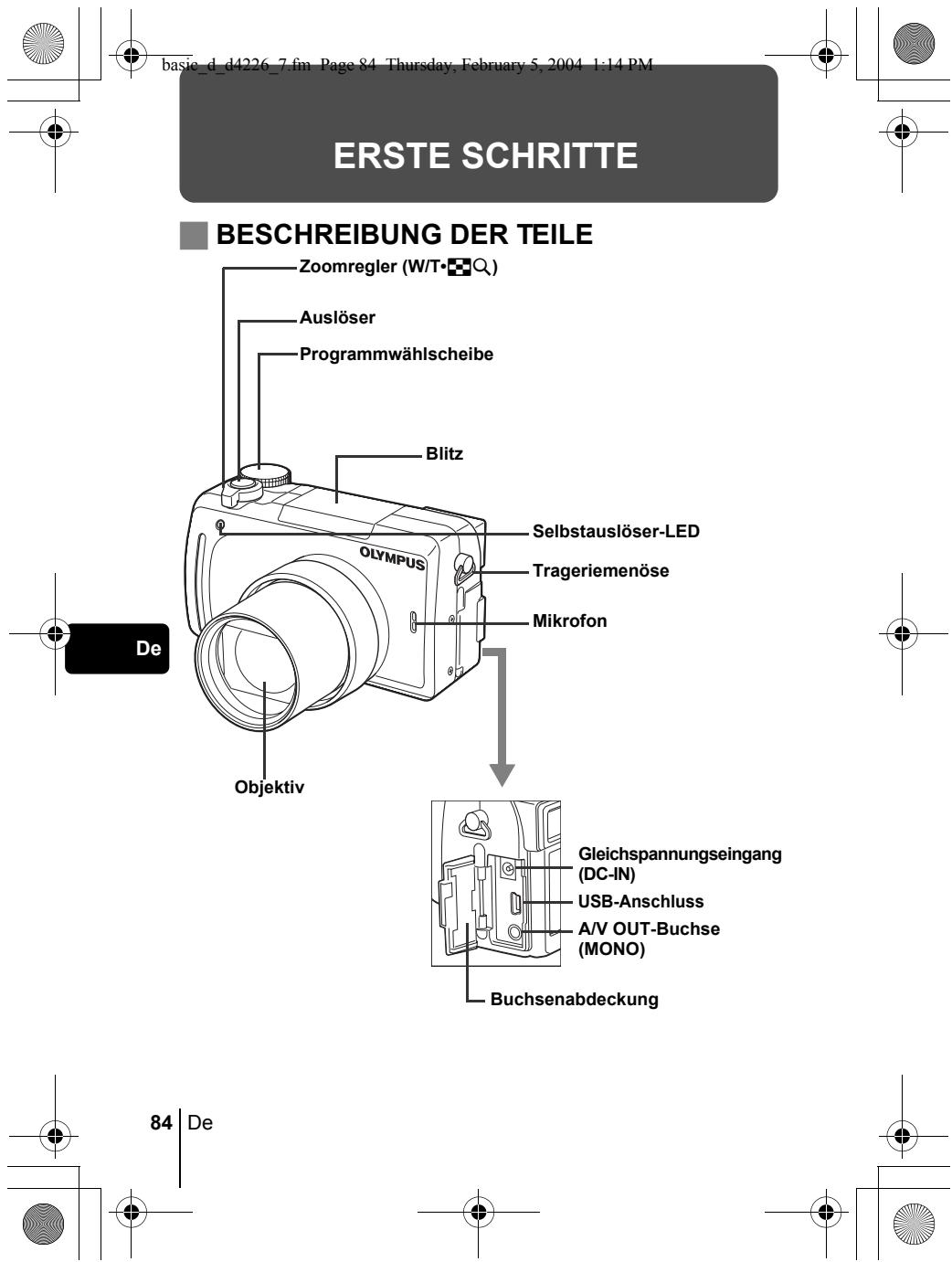
basic_d_d4226_7.fm Page 84 Thursday, February 5, 2004 1:14 PM
ERSTE SCHRITTE
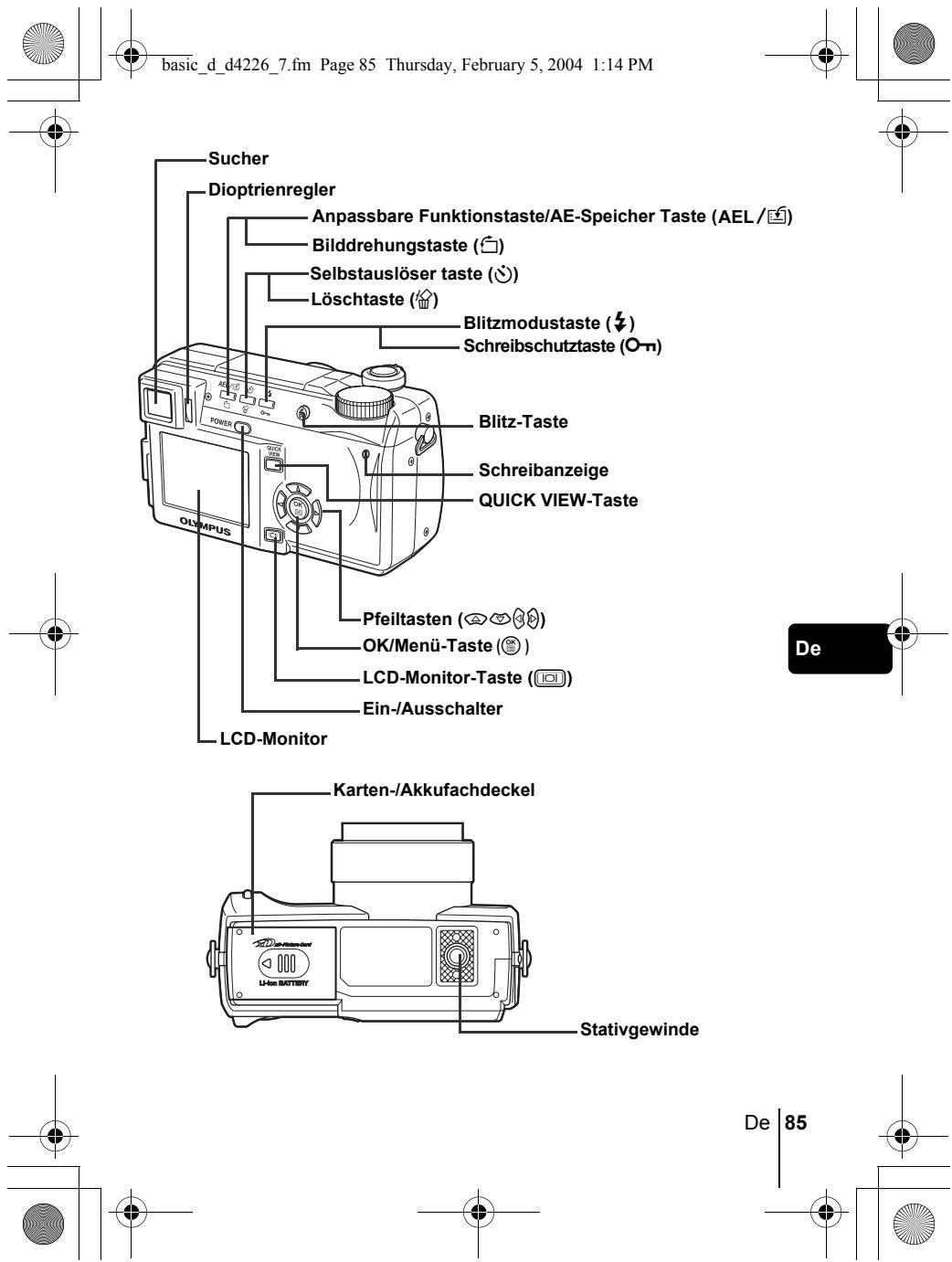
basic_d_d4226_7.fm Page 85 Thursday, February 5, 2004 1:14 PM
natural_image
Pure geometric diagram with concentric circles and crosshairs, no text or symbols present

natural_image
Abstract geometric pattern with concentric circles and a shaded circle, no text or symbols present

natural_image
Pure geometric diagram with concentric circles and crosshairs, no text or symbols present

Wiedergabemodus
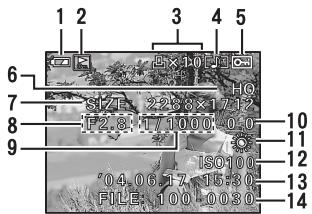
Einzelbild
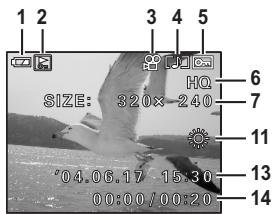
Movie
natural_image
Abstract geometric pattern with concentric circles and a shaded circle, no text or symbols present88
De
natural_image
Abstract geometric pattern with concentric circles and a shaded circle, no text or symbols present
natural_image
Simple geometric diagram with intersecting lines and a central circle (no text or symbols)
natural_image
Pure geometric diagram with concentric circles and crosshairs, no text or symbols present

natural_image
Abstract geometric pattern with concentric circles and a shaded circle, no text or symbols present
ANBRINGEN DES TRAGERIEMENS UND OBJEKTIVSCHUTZ
1
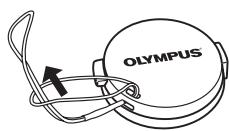
4
2
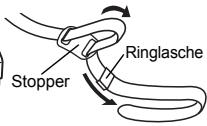
3
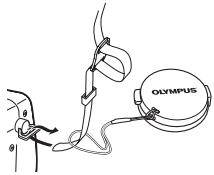
5
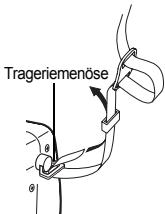
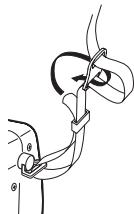
natural_image
Anatomical illustration of a surgical procedure showing a hand holding an angular instrument (no text or labels present)AUFLADEN DES AKKUS
natural_image
Abstract geometric pattern with concentric circles and crosshairs, no text or symbols present


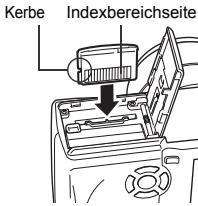
natural_image
Line drawing of a car interior showing a door handle and dashboard (no text or symbols)De
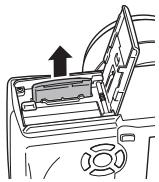
natural_image
Diagram of a car interior showing a door handle and steering wheel (no text or symbols)natural_image
Abstract geometric diagram with concentric circles and intersecting lines (no text or symbols)92
De
natural_image
Pure geometric diagram with intersecting lines and a circular pattern (no text or symbols)
natural_image
Pure geometric diagram with concentric circles and crosshairs, no text or symbols presentnatural_image
Abstract geometric pattern with concentric circles and a shaded circle, no text or symbols present
De
93

natural_image
Pure geometric diagram with concentric circles and radial lines, no text or symbols present
natural_image
Pure geometric diagram with intersecting lines and shapes, no text or symbols present
natural_image
Pure geometric diagram with concentric circles and crosshairs, no text or symbols present
natural_image
Abstract geometric pattern with intersecting lines and shaded circles (no text or symbols)natural_image
Abstract geometric pattern with concentric circles and a shaded circle, no text or symbols present


De
MENÜFUNKTIONEN
VERWENDEN DER MENÜS UND MENÜANZEIGER
natural_image
Abstract geometric diagram with concentric circles and intersecting lines (no text or symbols)
natural_image
Pure geometric diagram with intersecting lines and a circular pattern (no text or symbols)
natural_image
Pure geometric diagram with concentric circles and crosshairs, no text or symbols present


DIGITAL ZOOM [DIGITALZOOM]
natural_image
Abstract geometric pattern with concentric circles and a shaded circle, no text or symbols present![OLYMPUS C-765 UZ - DIGITAL ZOOM [DIGITALZOOM] - 1](/content/2019/11/84418/images/2a1d698f50e6f8cf216b8375e2a7a6c85f783991e17ead091eca01f94051972b.jpg)
![OLYMPUS C-765 UZ - DIGITAL ZOOM [DIGITALZOOM] - 2](/content/2019/11/84418/images/9abf1b270d34bcc229a3b054d0153d85e91d3416c1191c6f075195df9acdc068.jpg)
De
97
![OLYMPUS C-765 UZ - DIGITAL ZOOM [DIGITALZOOM] - 3](/content/2019/11/84418/images/532e797fea48716c09fc4b1fb6fa99e835b60162da60ef6b4c79d8c37bfdae89.jpg)
![OLYMPUS C-765 UZ - DIGITAL ZOOM [DIGITALZOOM] - 4](/content/2019/11/84418/images/c4cdd4604bacd3a4a629acf69877bfbb3dd842071ebfba51f50eec424454cbf3.jpg)
![OLYMPUS C-765 UZ - DIGITAL ZOOM [DIGITALZOOM] - 5](/content/2019/11/84418/images/65d6041854be5704103e43b4f07db1b334444faa71238225e2085cf2f00471fe.jpg)
natural_image
Pure geometric diagram with concentric circles and crosshairs, no text or symbols present![OLYMPUS C-765 UZ - DIGITAL ZOOM [DIGITALZOOM] - 6](/content/2019/11/84418/images/3d54f705f15f5818667d5984d78e8fae191bf5862946118fab0aa2ebf736fc67.jpg)
![OLYMPUS C-765 UZ - DIGITAL ZOOM [DIGITALZOOM] - 7](/content/2019/11/84418/images/cc116c0d24de83f88e0d623152561d1b9f46004f3f3a568d7ee9ba0ec83c9bb6.jpg)
![OLYMPUS C-765 UZ - DIGITAL ZOOM [DIGITALZOOM] - 8](/content/2019/11/84418/images/91406e66c64c3415421d75c9429b67181ad7bfdc41a6f508b8e3e5f4d9136966.jpg)
Wiedergabemodus

natural_image
Abstract geometric diagram with concentric circles and intersecting lines (no text or symbols)
natural_image
Pure geometric diagram with intersecting lines and a circular pattern (no text or symbols)
natural_image
Pure geometric diagram with concentric circles and crosshairs, no text or symbols presentnatural_image
Abstract geometric pattern with concentric circles and a shaded circle, no text or symbols present
natural_image
Pure geometric diagram with concentric circles and crosshairs, no text or symbols present

natural_image
Pure geometric diagram with concentric circles and crosshairs, no text or symbols present

Wiedergabemodus
![Menüanzeiger PLAY [W.GAB] Menüanzeiger EDIT [BEAR.] Menüanzeiger CARD [KARTE] Menüanzeiger SETUP [EINR]](/content/2019/11/84418/images/d0542ee9f47d23ba4888c9d9ebad295071a6f5cf5f13a26f238292bfbdce67d6.jpg)
natural_image
Abstract geometric pattern with concentric circles and a shaded circle, no text or symbols present
natural_image
Pure geometric diagram with concentric circles and crosshairs, no text or symbols present
natural_image
Abstract geometric pattern with concentric circles and intersecting lines (no text or symbols)
Sportaufnahmen
natural_image
Abstract geometric diagram with concentric circles and intersecting lines, no text or symbols present
De
103
natural_image
Pure geometric diagram with concentric circles and intersecting lines, no text or symbols presentM Manuelle Aufnahme
natural_image
Abstract geometric pattern with intersecting lines and shaded circles (no text or symbols)
natural_image
Pure geometric diagram with intersecting lines and shapes, no text or symbols present
natural_image
Pure geometric diagram with concentric circles and crosshairs, no text or symbols presentAF-Markierung
natural_image
Abstract geometric pattern with intersecting lines and shaded circles (no text or symbols)De
105

natural_image
Pure geometric diagram with concentric circles and crosshairs, no text or symbols presentnatural_image
Pure geometric diagram with concentric circles and crosshairs, no text or symbols present
natural_image
Abstract geometric diagram with concentric circles and intersecting lines (no text or symbols)natural_image
Abstract geometric pattern with concentric circles and a shaded circle, no text or symbols present
natural_image
Line drawing of a mechanical component with a circular end and cylindrical top (no text or symbols)Selbstauslöser-LED
natural_image
Pure geometric diagram with concentric circles and crosshairs, no text or symbols present
natural_image
Pure geometric diagram with intersecting lines and circles, no text or symbols presentAE LOCK
natural_image
Pure geometric diagram with intersecting lines and a circular pattern (no text or symbols)WIEDERGABE
natural_image
Symmetrical mechanical component with four curved arms and central hub (no text or symbols)natural_image
Abstract geometric pattern with intersecting lines and shaded circles (no text or symbols)

natural_image
Pure geometric diagram with concentric circles and crosshairs, no text or symbols present

natural_image
Abstract geometric pattern with concentric circles and a shaded circle, no text or symbols present
natural_image
Pure geometric diagram with concentric circles and intersecting lines (no text or symbols)
natural_image
Abstract geometric diagram with concentric circles and intersecting lines (no text or symbols)natural_image
Pure geometric lines and shapes without any text, numbers, or symbols
natural_image
Abstract geometric diagram with concentric circles and intersecting lines (no text or symbols)
natural_image
Pure geometric diagram with intersecting lines and a circular pattern (no text or symbols)
natural_image
Pure geometric diagram with concentric circles and crosshairs, no text or symbols present

WIEDERGABE AUF EINEM FERNSEHGERÄT
natural_image
Abstract geometric pattern with concentric circles and a shaded circle, no text or symbols present
De
115

natural_image
Two abstract geometric diagrams with concentric circles and radial lines, no text or symbols present.DRUCKVORAUSWAHL/DIREKTES AUSDRUCKEN
DRUCKVORAUSWAHL
natural_image
Abstract geometric pattern with concentric circles and a shaded circle, no text or symbols present

natural_image
Pure geometric diagram with concentric circles and crosshairs, no text or symbols present

natural_image
Abstract geometric pattern with concentric circles and a shaded circle, no text or symbols present
natural_image
Pure geometric diagram with intersecting lines and a circular pattern (no text or symbols)FEHLERMELDUNGEN
natural_image
Abstract geometric pattern with concentric circles and a shaded circle, no text or symbols presentDe
119
natural_image
Two abstract geometric diagrams with concentric circles and radial lines, no text or symbols present.TECHNISCHE DATEN
natural_image
Abstract geometric pattern with concentric circles and intersecting lines (no text or symbols)De
natural_image
Abstract geometric pattern with concentric circles and a shaded circle, no text or symbols presentDe
121
natural_image
Two abstract geometric diagrams with intersecting lines and circles, no text or symbols present.CONTENIDO
PRIMEROS PASOS.... 124
natural_image
Pure geometric diagram with concentric circles and intersecting lines (no text or symbols)
natural_image
Abstract geometric diagram with intersecting lines and shaded circles (no text or symbols)natural_image
Abstract geometric diagram with concentric circles and intersecting lines, no text or symbols present
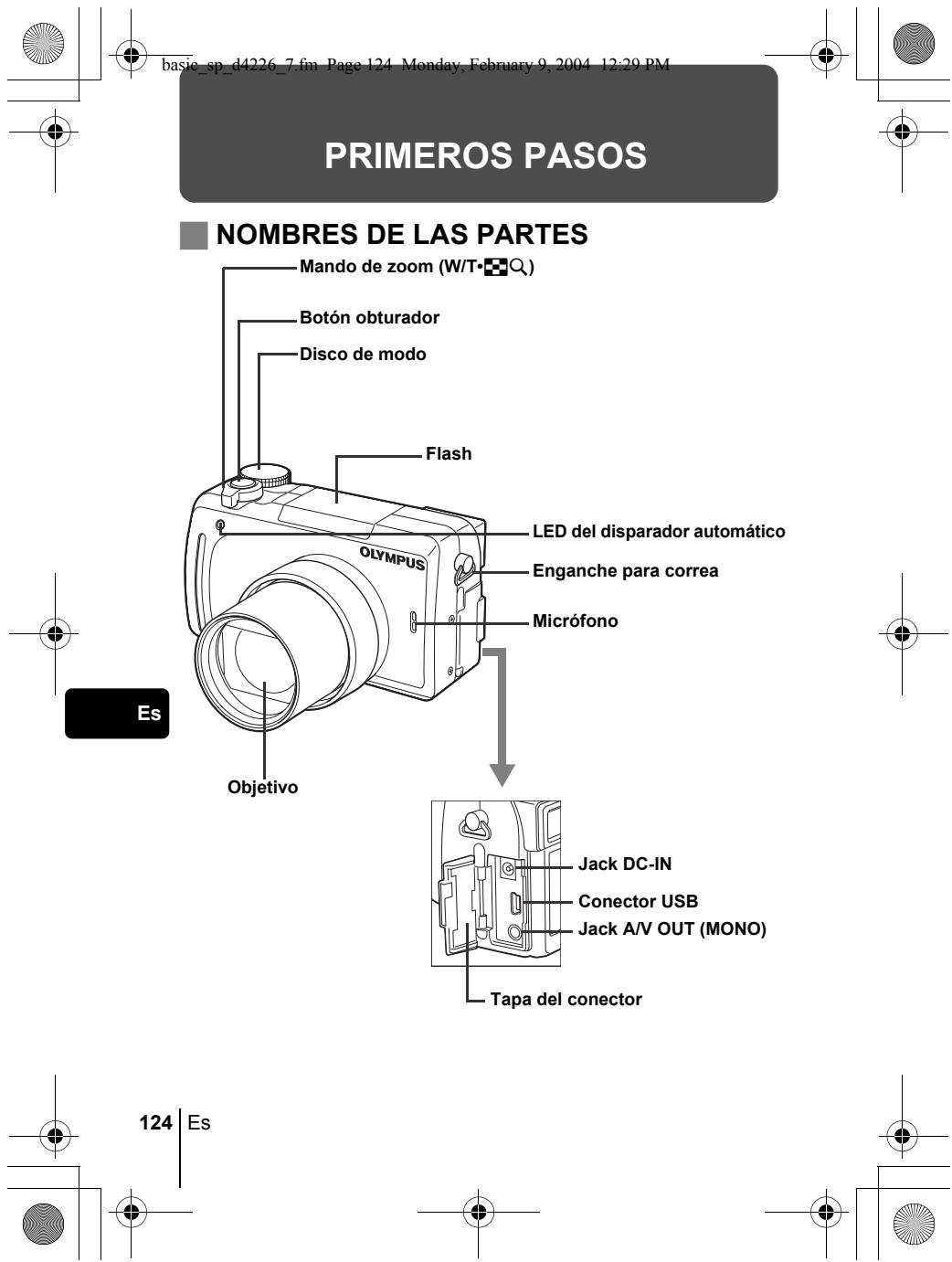
basic_sp_d4226_7.fm Page 124 Monday, February 9, 2004 12:29 PM
PRIMEROS PASOS
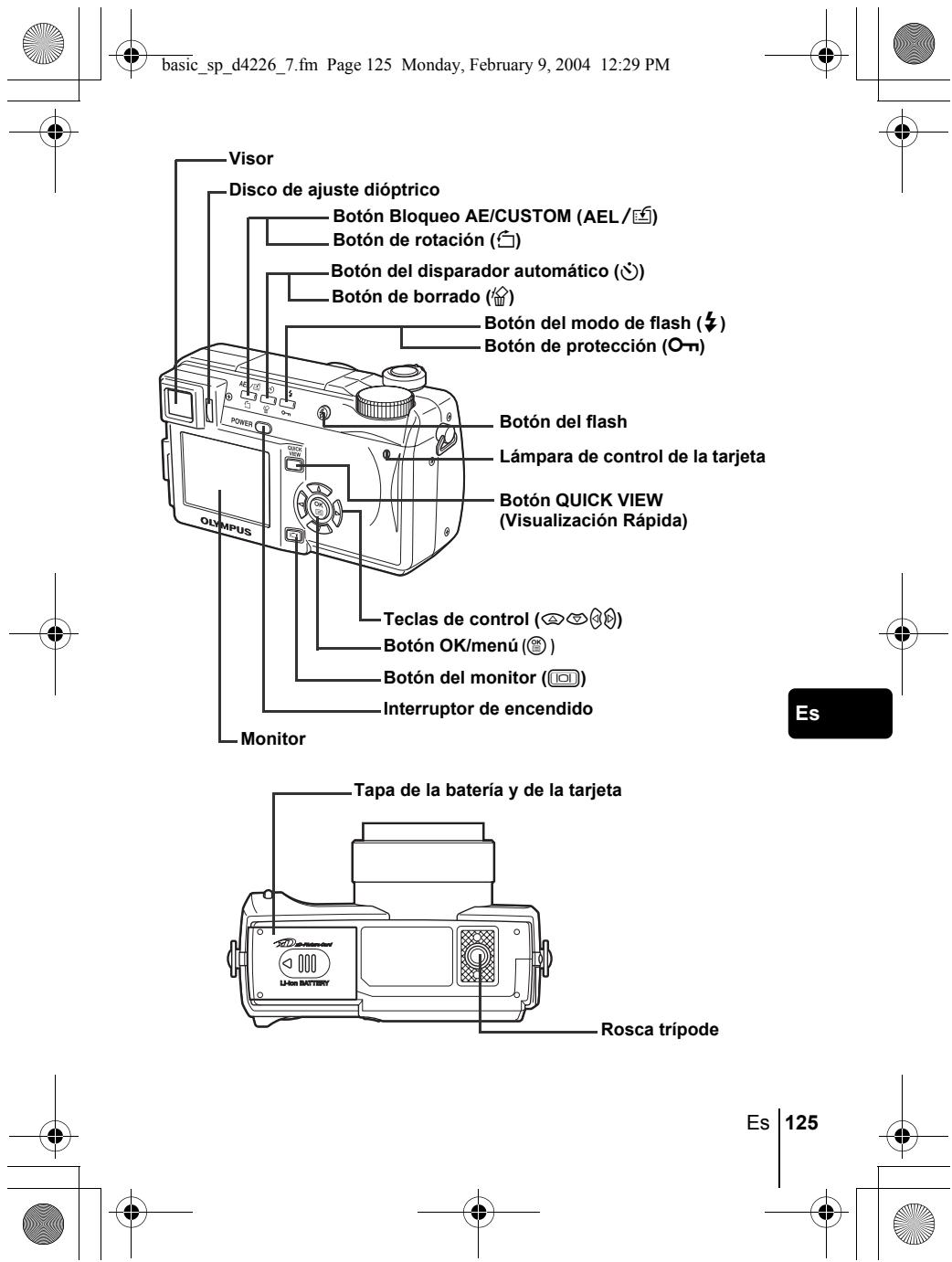
basic_sp_d4226_7.fm Page 125 Monday, February 9, 2004 12:29 PM
natural_image
Pure geometric diagram with concentric circles and crosshairs, no text or symbols present
basic_sp_d4226_7.fm Page 126 Monday, February 9, 2004 12:29 PM

INDICACIONES DEL VISOR Y DEL MONITOR
Modos de fotografía
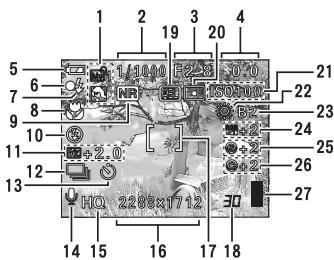
Imagen fija
![1 2 3 4 5 1/1000 F2.8 F2.0 20 8 ISO100 21 10 [ ] 22 13 HQ 33:35 14 15 17 18](/content/2019/11/84418/images/fa8c283f98bbc61afa6b5e72734b1261fc4d6a53ed3958fcd18f94891ffdd78c.jpg)
Vídeo
| Opción | Indicaciones | |
| 1 | Modos de fotografía | P, A, S, M, 📋, 📋, 📋, 📋, 📋, 📋, 📋, 📋, 📋, 📋, 📋, 📋, 📋, 📋, 📋, 📋, 📋, 📋, 📋, 📋, 📋, 📋, 📋, 📋, 📋, 📅, 📅, 📅, 📅, 📅, 📅, 📅, 📅, 📅, 📅, 📅, 📅, 📅, 📅, 📅, 📅, 📅, 📅, 📅, 📅, 📅, 📅, 📅, 📅, 📅, 📄, 📄, 📄, 📄, 📄, 📄, 📄, 📄, 📄, 📄, 📄, 📄, 📄, 📄, 📄, 📄, 📄, 📄, 📄, 📄, 📄, 📄, 📄, 📄, 📄, 📅, 📅, 📅, 📅, 📅, 📅, 📅, 📅, 📅, 📅, 📅, 📅, 📅, 📅, 📅, 📅, 📅, 📅, 📅, 📅, 📅, 📅, 📅, 📅, 📃, 📃, 📃, 📃, 📃, 📃, 📃, 📃, 📃, 📃, 📃, 📃, 📃, 📃, 📃, 📃, 📃, 📃, 📃, 📃, 📃, 📃, 📃, 📃, 📃, 📅, 📅, 📅, 📅, 📅, 📅, 📅, 📅, 📅, 📅, 📅, 📅, 📅, 📅, 📅, 📅, 📅, 📅, 📅, 📅, 📅, 📅, 📅, 📅, 📁, 📁, 📁, 📁, 📁, 📁, 📁, 📁, 📁, 📁, 📁, 📁, 📁, 📁, 📁, 📁, 📁, 📁, 📁, 📁, 📁, 📁, 📁, 📁, 📁, 📅, 📅, 📅, 📅, 📅, 📅, 📅, 📅, 📅, 📅, 📅, 📅, 📅, 📅, 📅, 📅, 📅, 📅, 📅, 📅, 📅, 📅, 📅, 📅, 📆, 📆, 📆, 📆, 📆, 📆, 📆, 📆, 📆, 📆, 📆, 📆, 📆, 📆, 📆, 📆, 📆, 📆, 📆, 📆, 📆, 📆, 📆, 📆, 📆, 📅, 📅, 📅, 📅, 📅, 📅, 📅, 📅, 📅, 📅, 📅, 📅, 📅, 📅, 📅, 📅, 📅, 📅, 📅, 📅, 📅, 📅, 📅, 📅, 📉, 📉, 📉, 📉, 📉, 📉, 📉, 📉, 📉, 📉, 📉, 📉, 📉, 📉, 📉, 📉, 📉, 📉, 📉, 📉, 📉, 📉, 📉, 📉, 📉, 📅, 📅, 📅, 📅, 📅, 📅, 📅, 📅, 📅, 📅, 📅, 📅, 📅, 📅, 📅, 📅, 📅, 📅, 📅, 📅, 📅, 📅, 📅, 📅, 📎, 📎, 📎, 📎, 📎, 📎, 📎, 📎, 📎, 📎, 📎, 📎, 📎, 📎, 📎, 📎, 📎, 📎, 📎, 📎, 📎, 📎, 📎, 📎, 📎, 📅, 📅, 📅, 📅, 📅, 📅, 📅, 📅, 📅, 📅, 📅, 📅, 📅, 📅, 📅, 📅, 📅, 📅, 📅, 📅, 📅, 📅, 📅, 📅, 📂, 📂, 📂, 📂, 📂, 📂, 📂, 📂, 📂, 📂, 📂, 📂, 📂, 📂, 📂, 📂, 📂, 📂, 📂, 📂, 📂, 📂, 📂, 📂, 📂, 📁, 📁, 📁, 📁, 📁, 📁, 📁, 📁, 📁, 📁, 📁, 📁, 📁, 📁, 📁, 📁, 📁, 📁, 📁, 📁, 📁, 📁, 📁, 📁, 📄, 📄, 📄, 📄, 📄, 📄, 📄, 📄, 📄, 📄, 📄, 📄, 📄, 📄, 📄, 📄, 📄, 📄, 📄, 📄, 📄, 📄, 📄, 📄, 📁, 📁, 📁, 📁, 📁, 📁, 📁, 📁, 📁, 📁, 📁, 📁, 📁, 📁, 📁, 📁, 📁, 📁, 📁, 📁, 📁, 📁, 📁, 📁, 📀, 📀, 📀, 📀, 📀, 📀, 📀, 📀, 📀, 📀, 📀, 📀, 📀, 📀, 📀, 📀, 📀, 📀, 📀, 📀, 📀, 📀, 📀, 📀, 📀, 📄, 📄, 📄, 📄, 📄, 📄, 📄, 📄, 📄, 📄, 📄, 📄, 📄, 📄, 📄, 📄, 📄, 📄, 📄, 📄, 📄, 📄, 📄, 📄, 📇, 📇, 📇, 📇, 📇, 📇, 📇, 📇, 📇, 📇, 📇, 📇, 📇, 📇, 📇, 📇, 📇, 📇, 📇, 📇, 📇, 📇, 📇, 📇, 📇, 📄, 📄, 📄, 📄, 📄, 📄, 📄, 📄, 📄, 📄, 📄, 📄, 📄, 📄, 📄, 📄, 📄, 📄, 📄, 📄, 📄, 📄, 📄, 📄, 📉, 📉, 📉, 📉, 📉, 📉, 📉, 📉, 📉, 📉, 📉, 📉, 📉, 📉, 📉, 📉, 📉, 📉, 📉, 📉, 📉, 📉, 📉, 📉, 📄, 📄, 📄, 📄, 📄, 📄, 📄, 📄, 📄, 📄, 📄, 📄, 📄, 📄, 📄, 📄, 📄, 📄, 📄, 📄, 📄, 📄, 📄, 📄, 📃, 📃, 📃, 📃, 📃, 📃, 📃, 📃, 📃, 📃, 📃, 📃, 📃, 📃, 📃, 📃, 📃, 📃, 📃, 📃, 📃, 📃, 📃, 📃, 📄, 📄, 📄, 📄, 📄, 📄, 📄, 📄, 📄, 📄, 📄, 📄, 📄, 📄, 📄, 📄, 📄, 📄, 📄, 📄, 📄, 📄, 📄, 📄, 📀, 📀, 📀, 📀, 📀, 📀, 📀, 📀, 📀, 📀, 📀, 📀, 📀, 📀, 📀, 📀, 📀, 📀, 📀, 📀, 📀, 📀, 📀, 📀, 📁, 📁, 📁, 📁, 📁, 📁, 📁, 📁, 📁, 📁, 📁, 📁, 📁, 📁, 📁, 📁, 📁, 📁, 📁, 📁, 📁, 📁, 📁, 📁, 📟, 📟, 📟, 📟, 📟, 📟, 📟, 📟, 📟, 📟, 📟, 📟, 📟, 📟, 📟, 📟, 📟, 📟, 📟, 📟, 📟, 📟, 📟, 📟, 📟, 📠, 📟, 📟, 📟, 📟, 📟, 📟, 📟, 📟, 📟, 📟, 📟, 📟, 📟, 📟, 📟, 📟, 📟, 📟, 📟, 📟, 📟, 📟, 📟, 📟, 📞, 📞, 📞, 📞, 📞, 📞, 📞, 📞, 📞, 📞, 📞, 📞, 📞, 📞, 📞, 📞, 📞, 📞, 📞, 📞, 📞, 📞, 📞, 📞, 📞, 📟, 📟, 📟, 📟, 📟, 📟, 📟, 📟, 📟, 📟, 📟, 📟, 📟, 📟, 📟, 📟, 📟, 📟, 📟, 📟, 📟, 📟, 📟, 📟, 📉, 📉, 📉, 📉, 📉, 📉, 📉, 📉, 📉, 📉, 📉, 📉, 📉, 📉, 📉, 📉, 📉, 📉, 📉, 📉, 📉, 📉, 📉, 📉, 📞, 📞, 📞, 📞, 📞, 📞, 📞, 📞, 📞, 📞, 📞, 📞, 📞, 📞, 📞, 📞, 📞, 📞, 📞, 📞, 📞, 📞, 📞, 📞, 📉, 📉, 📉, 📉, 📉, 📉, 📉, 📉, 📉, 📉, 📉, 📉, 📉, 📉, 📉, 📉, 📉, 📉, 📉, 📉, 📉, 📉, 📉, 📉, 📎, 📎, 📎, 📎, 📎, 📎, 📎, 📎, 📎, 📎, 📎, 📎, 📎, 📎, 📎, 📎, 📎, 📎, 📎, 📎, 📎, 📎, 📎, 📎, 📉, 📉, 📉, 📉, 📉, 📉, 📉, 📉, 📉, 📉, 📉, 📉, 📉, 📉, 📉, 📉, 📉, 📉, 📉, 📉, 📉, 📉, 📉, 📉, 📟, 📟, 📟, 📟, 📟, 📟, 📟, 📟, 📟, 📟, 📟, 📟, 📟, 📟, 📟, 📟, 📟, 📟, 📟, 📟, 📟, 📟, 📟, 📟, 📹, 📹, 📹, 📹, 📹, 📹, 📹, 📹, 📹, 📹, 📹, 📹, 📹, 📹, 📹, 📹, 📹, 📹, 📹, 📹, 📹, 📹, 📹, 📹, 📹, 📉, 📉, 📉, 📉, 📉, 📉, 📉, 📉, 📉, 📉, 📉, 📉, 📉, 📉, 📉, 📉, 📉, 📉, 📉, 📉, 📉, 📉, 📉, 📉, 📊, 📊, 📊, 📊, 📊, 📊, 📊, 📊, 📊, 📊, 📊, 📊, 📊, 📊, 📊, 📊, 📊, 📊, 📊, 📊, 📊, 📊, 📊, 📊, 📊, 📉, 📉, 📉, 📉, 📉, 📉, 📉, 📉, 📉, 📉, 📉, 📉, 📉, 📉, 📉, 📉, 📉, 📉, 📉, 📉, |
Es
126
Es
natural_image
Abstract geometric pattern with concentric circles and a shaded circle, no text or symbols present
natural_image
Simple geometric diagram with intersecting lines and a central circle (no text or symbols)

natural_image
Pure geometric diagram with concentric circles and crosshairs, no text or symbols present


natural_image
Abstract geometric pattern with concentric circles and a shaded circle, no text or symbols present
Es
127
natural_image
Pure geometric diagram with concentric circles and intersecting lines, no text or symbols present
natural_image
Pure geometric diagram with concentric circles and crosshairs, no text or symbols present

natural_image
Abstract geometric pattern with concentric circles and a shaded circle, no text or symbols present128
Es


natural_image
Pure geometric diagram with intersecting lines and a circular pattern (no text or symbols)
natural_image
Pure geometric diagram with concentric circles and crosshairs, no text or symbols present

natural_image
Abstract geometric pattern with concentric circles and a shaded circle, no text or symbols presentEs
129


natural_image
Pure geometric diagram with concentric circles and intersecting lines, no text or symbols presentnatural_image
Anatomical illustration of a surgical procedure showing a hand holding an angular instrument (no text or labels present)CARGA DE LA BATERÍA
natural_image
Line drawing of a mechanical device with an open lid and internal components, no text or symbols presentnatural_image
Line drawing of a device interior showing a switch and fan (no text or symbols)Es
natural_image
Diagram of a car interior showing a door handle and dashboard with an upward arrow (no text or symbols)
natural_image
Abstract geometric diagram with concentric circles and intersecting lines (no text or symbols)132
Es
natural_image
Pure geometric diagram with intersecting lines and a circular pattern (no text or symbols)
natural_image
Pure geometric diagram with concentric circles and crosshairs, no text or symbols present
natural_image
Two abstract geometric diagrams with concentric circles and crosshairs, no text or symbols present.natural_image
Abstract geometric pattern with concentric circles and a shaded circle, no text or symbols present
Es
133

natural_image
Pure geometric diagram with concentric circles and radial lines, no text or symbols present
natural_image
Pure geometric diagram with concentric circles and crosshairs, no text or symbols present
natural_image
Abstract geometric pattern with concentric circles and intersecting lines (no text or symbols)natural_image
Pure geometric diagram with intersecting lines and a circular pattern (no text or symbols)
natural_image
Pure geometric diagram with concentric circles and crosshairs, no text or symbols present
natural_image
Abstract geometric diagram with concentric circles and intersecting lines (no text or symbols)AJUSTE DE LA FECHA Y LA HORA
natural_image
Abstract geometric pattern with intersecting lines and shaded circles (no text or symbols)Es
135

natural_image
Pure geometric diagram with concentric circles and intersecting lines, no text or symbols presentnatural_image
Pure geometric diagram with concentric circles and crosshairs, no text or symbols present


DIGITAL ZOOM [ZOOM DIG.]
natural_image
Abstract geometric pattern with concentric circles and a shaded circle, no text or symbols present![OLYMPUS C-765 UZ - DIGITAL ZOOM [ZOOM DIG.] - 1](/content/2019/11/84418/images/c75463a2012eebf13152b6f7a38bd401f8569ec6923c81d257933bfc90ee646c.jpg)
![OLYMPUS C-765 UZ - DIGITAL ZOOM [ZOOM DIG.] - 2](/content/2019/11/84418/images/baafc447d5b134c16f6caf38ae88ac53b0dc70851766a502aa47db1186e86243.jpg)
![OLYMPUS C-765 UZ - DIGITAL ZOOM [ZOOM DIG.] - 3](/content/2019/11/84418/images/c10e69601e40a63b94f9b59f03e65d1cb4e2f073e05f73598502206320ed5efb.jpg)
![OLYMPUS C-765 UZ - DIGITAL ZOOM [ZOOM DIG.] - 4](/content/2019/11/84418/images/40578da010483d022be2e2dcf44e32fd4c661baf7f85f2172bf4a70fdccc559e.jpg)
![OLYMPUS C-765 UZ - DIGITAL ZOOM [ZOOM DIG.] - 5](/content/2019/11/84418/images/6ecceb504c8f2a3e2cb86e664263996729b24748c6754b0f9a8fb462930f8e8b.jpg)
natural_image
Pure geometric diagram with concentric circles and crosshairs, no text or symbols present![OLYMPUS C-765 UZ - DIGITAL ZOOM [ZOOM DIG.] - 6](/content/2019/11/84418/images/b37e10e17a2b1764429f3379f4fb8bfdf2b66046e3a0c56f9830db95a14257bf.jpg)
![OLYMPUS C-765 UZ - DIGITAL ZOOM [ZOOM DIG.] - 7](/content/2019/11/84418/images/b9681a5af1ede3486d522adf1ab73ae31957ff53b652dd92377aafecd2dcf52f.jpg)
![OLYMPUS C-765 UZ - DIGITAL ZOOM [ZOOM DIG.] - 8](/content/2019/11/84418/images/3df02a07c62d480c7cfd429b7002a552c9817b5b3f605eaa0647ce747b196c10.jpg)
MOVIE PLAY [REP. VIDEO]
natural_image
Pure geometric diagram with concentric circles and crosshairs, no text or symbols present![OLYMPUS C-765 UZ - DIGITAL ZOOM [ZOOM DIG.] - 9](/content/2019/11/84418/images/6eb84260b01c86c65ea8dbf4c3b1975d0fa8fae04efc83df2b12e49988810075.jpg)
![OLYMPUS C-765 UZ - DIGITAL ZOOM [ZOOM DIG.] - 10](/content/2019/11/84418/images/5b41c05f48f452dd111f2321d4513015dd8a45a4d1cd74ef756d3c76266314e9.jpg)
![OLYMPUS C-765 UZ - DIGITAL ZOOM [ZOOM DIG.] - 11](/content/2019/11/84418/images/33cdc2b9cda654fb6907030c528df4357da076057fa48fe91a1061665ca7fb61.jpg)
natural_image
Two abstract geometric patterns: a circular pattern on the left and a crosshair on the right, both without any text or symbols.natural_image
Abstract geometric pattern with concentric circles and a shaded circle, no text or symbols present![OLYMPUS C-765 UZ - DIGITAL ZOOM [ZOOM DIG.] - 12](/content/2019/11/84418/images/b0799fe25a52923e9f38b055a29c4ad990eaa80b60cadb9dd34c94ad8b69796e.jpg)
Es
139
![OLYMPUS C-765 UZ - DIGITAL ZOOM [ZOOM DIG.] - 13](/content/2019/11/84418/images/2bb0bda46b0b2074412812b013ad7ad0dadb7ae05729abd1c5ea46dd366238b3.jpg)
natural_image
Pure geometric diagram with concentric circles and intersecting lines, no text or symbols present![OLYMPUS C-765 UZ - DIGITAL ZOOM [ZOOM DIG.] - 14](/content/2019/11/84418/images/82d82548799f69dd7b01955a7a4ff1853ff576e4cc0179ad5dc4689d317c20c1.jpg)
natural_image
Pure geometric diagram with concentric circles and crosshairs, no text or symbols present![OLYMPUS C-765 UZ - DIGITAL ZOOM [ZOOM DIG.] - 15](/content/2019/11/84418/images/7bc45a46ce026979df9c7cb2d6483278dfaaba78fd5e00167ced32d8e8894d82.jpg)
![OLYMPUS C-765 UZ - DIGITAL ZOOM [ZOOM DIG.] - 16](/content/2019/11/84418/images/89ea783bb159b3bae2e66692c8b06a5c880699a516778c93c4b1a14b88e884f9.jpg)
![OLYMPUS C-765 UZ - DIGITAL ZOOM [ZOOM DIG.] - 17](/content/2019/11/84418/images/27e413a3f3e1e3da883d28bf9ae4b44d0b718daeb5a4262f2dcc1c72de7c9cfe.jpg)
natural_image
Abstract geometric pattern with concentric circles and a shaded circle, no text or symbols present![OLYMPUS C-765 UZ - DIGITAL ZOOM [ZOOM DIG.] - 18](/content/2019/11/84418/images/5f8207fbb7deea805e8189facdd6cc3276a80cd0f32a61844a4eb0261685e226.jpg)
![OLYMPUS C-765 UZ - DIGITAL ZOOM [ZOOM DIG.] - 19](/content/2019/11/84418/images/dd0b8357f225e94dfa7708d1a4f866aa0f0d2a64dec399011a1fbbe8eb335683.jpg)
![OLYMPUS C-765 UZ - DIGITAL ZOOM [ZOOM DIG.] - 20](/content/2019/11/84418/images/324204ca6d45a3ae4bbd55d1eb4b22b2069da35f07de5702bfd7c83f284b20c0.jpg)
natural_image
Pure geometric diagram with intersecting lines and a circular pattern (no text or symbols)![OLYMPUS C-765 UZ - DIGITAL ZOOM [ZOOM DIG.] - 21](/content/2019/11/84418/images/8f71492732b215c3d5526d71869515c4590f8f15d8acba2a82684f7b65456c98.jpg)
natural_image
Pure geometric diagram with concentric circles and crosshairs, no text or symbols present![OLYMPUS C-765 UZ - DIGITAL ZOOM [ZOOM DIG.] - 22](/content/2019/11/84418/images/2ddaa7b4d335efddddba25d246d88d88cf9369e23337f73d6454a9ba157f79ce.jpg)
![OLYMPUS C-765 UZ - DIGITAL ZOOM [ZOOM DIG.] - 23](/content/2019/11/84418/images/23116d6a4007364f8a69904524221a11d5e06e966c8ad50c004a3e534dc5c4e1.jpg)
![OLYMPUS C-765 UZ - DIGITAL ZOOM [ZOOM DIG.] - 24](/content/2019/11/84418/images/ba765e41c6b46fbf3dc72b4e7ad20a3e73a15d09d567656c141cd487f052f308.jpg)
natural_image
Abstract geometric pattern with concentric circles and a shaded circle, no text or symbols present![OLYMPUS C-765 UZ - DIGITAL ZOOM [ZOOM DIG.] - 25](/content/2019/11/84418/images/27d172b8a01f3b3ba8b9f7ebbb8cd7bb3662360d64751f4edfc4feacc02754d1.jpg)
![OLYMPUS C-765 UZ - DIGITAL ZOOM [ZOOM DIG.] - 26](/content/2019/11/84418/images/69c59ad668f30ad30c7bd7e0bad7e46077c0957c6c736df1c6ee6eb2877c03da.jpg)
![OLYMPUS C-765 UZ - DIGITAL ZOOM [ZOOM DIG.] - 27](/content/2019/11/84418/images/e9829f0129394d03685684baf9cbfba90bc4ca5848dd728835df572f577cbf0f.jpg)
![OLYMPUS C-765 UZ - DIGITAL ZOOM [ZOOM DIG.] - 28](/content/2019/11/84418/images/c3e607bf7c4e46261106a4abd47d36f321a3fb52d00f43dd181b6122726c3c61.jpg)
natural_image
Pure geometric diagram with concentric circles and intersecting lines, no text or symbols presentOPERACIONES BÁSICAS
Modos de fotografía
natural_image
Pure geometric diagram with concentric circles and crosshairs, no text or symbols present
natural_image
Abstract geometric pattern with concentric circles and intersecting lines (no text or symbols)
Toma de paisajes
natural_image
Abstract geometric pattern with intersecting lines and shaded circles (no text or symbols)
Es
143
natural_image
Pure geometric diagram with concentric circles and radial lines, no text or symbols present
natural_image
Pure geometric diagram with concentric circles and intersecting lines (no text or symbols)
natural_image
Abstract geometric pattern with concentric circles and intersecting lines (no text or symbols)M Toma manual
natural_image
Abstract geometric diagram with concentric circles and intersecting lines, no text or symbols present
44 | Es
natural_image
Pure geometric diagram with intersecting lines and a circular pattern (no text or symbols)
natural_image
Pure geometric diagram with concentric circles and crosshairs, no text or symbols presentnatural_image
Abstract geometric pattern with intersecting lines and shaded circles (no text or symbols)
natural_image
Pure geometric diagram with concentric circles and crosshairs, no text or symbols presentnatural_image
Pure geometric diagram with intersecting lines and shapes, no text or symbols present
natural_image
Pure geometric diagram with concentric circles and crosshairs, no text or symbols present
natural_image
Abstract geometric pattern with concentric circles and intersecting lines (no text or symbols)ZOOM DE ACERCAMIENTO SOBRE EL SUJETO (ZOOM ÓPTICO)
natural_image
Pure geometric diagram with concentric circles and crosshairs, no text or symbols present
natural_image
Pure geometric diagram with concentric circles and crosshairs, no text or symbols present
natural_image
Abstract geometric diagram with concentric circles and intersecting lines (no text or symbols)natural_image
Line drawing of a mechanical component with no visible text or symbolsnatural_image
Pure geometric diagram with intersecting lines and a circular pattern (no text or symbols)FOTOGRAFÍA AVANZADA
natural_image
Abstract geometric pattern with concentric circles and crosshairs, no text or symbols present
natural_image
Two abstract geometric diagrams with concentric circles and radial lines, no text or symbols present.
natural_image
Pure geometric diagram with concentric circles and crosshairs, no text or symbols present
natural_image
Abstract geometric pattern with concentric circles and intersecting lines (no text or symbols)BLOQUEO AE (AE LOCK)
natural_image
Pure geometric diagram with intersecting lines and a circular pattern (no text or symbols)REPRODUCCIÓN
natural_image
Pure geometric diagram with concentric circles and intersecting lines (no text or symbols)
natural_image
Abstract geometric diagram with concentric circles and intersecting lines (no text or symbols)natural_image
Abstract geometric diagram with concentric circles and intersecting lines (no text or symbols)
natural_image
Pure geometric diagram with intersecting lines and a circular pattern (no text or symbols)
natural_image
Pure geometric diagram with concentric circles and crosshairs, no text or symbols present
natural_image
Pure geometric diagram with intersecting lines and circles, no text or symbols presentnatural_image
Abstract geometric pattern with intersecting lines and shaded circles (no text or symbols)
natural_image
Pure geometric diagram with concentric circles and crosshairs, no text or symbols present

natural_image
Abstract geometric diagram with concentric circles and intersecting lines (no text or symbols)
natural_image
Pure geometric diagram with intersecting lines and a circular pattern (no text or symbols)
natural_image
Pure geometric diagram with concentric circles and crosshairs, no text or symbols present
natural_image
Two abstract geometric diagrams with concentric circles and crosshairs, no text or symbols present.natural_image
Abstract geometric pattern with intersecting lines and shaded circles (no text or symbols)Es
155

natural_image
Pure geometric diagram with concentric circles and intersecting lines, no text or symbols presentnatural_image
Abstract geometric pattern with concentric circles and a shaded circle, no text or symbols present
Es
natural_image
Pure geometric diagram with concentric circles and crosshairs, no text or symbols presentnatural_image
Abstract geometric pattern with concentric circles and a shaded circle, no text or symbols present158
Es
natural_image
Pure geometric diagram with intersecting lines and a circular pattern (no text or symbols)CÓDIGOS DE ERROR
natural_image
Abstract geometric pattern with concentric circles and a shaded circle, no text or symbols presentEs
159
natural_image
Pure geometric diagram with concentric circles and intersecting lines, no text or symbols presentESPECIFICACIONES
Conector exterior : Jack DC-IN, conector USB (mini-B), jack A/V OUT
natural_image
Abstract geometric pattern with concentric circles and a shaded circle, no text or symbols presentEs
161
natural_image
Pure geometric diagram with concentric circles and intersecting lines, no text or symbols present
basic_sp_d4226_7.fm Page 162 Monday, February 9, 2004 12:29 PM
basic_sp_d4226_7.fm Page 163 Monday, February 9, 2004 12:29 PM
OLYMPUS®
http://www.olympus.com/
OLYMPUS CORPORATION
Shinjuku Monolith, 3-1 Nishi-Shinjuku 2-chome, Shinjuku-ku, Tokyo, Japan
OLYMPUS AMERICA INC.
Two Corporate Center Drive, Melville, NY 11747-3157, U.S.A. Tel. 631-844-5000
Technical Support (USA)
24/7 online automated help: http://www.olympusamerica.com/support
Phone customer support: Tel. 1-888-553-4448 (Toll-free)
Our phone customer support is available from 8 am to 10 pm
(Monday to Friday) ET
E-Mail: distec@olympus.com
Olympus software updates can be obtained at: http://www.olympus.com/digital
Olympus Europa GmbH
Premises/Goods delivery: Wendenstrasse 14-18, 20097 Hamburg, Germany
Tel: +49 40-23 77 3-0 / Fax: +49 40-23 07 61
Letters: Postfach 10 49 08, 20034 Hamburg, Germany
European Technical Customer Support:
Please visit our homepage http://www.olympus-europa.com
or call our TOLL FREE NUMBER*: 00800 - 67 10 83 00
for Austria, Belgium, Denmark, Finland, France, Germany, Italy, Luxemburg, Netherlands, Norway, Portugal, Spain, Sweden, Switzerland, United Kingdom
* Please note some (mobile) phone services/provider do not permit access or request an additional prefix to +800 numbers.
For all not listed European Countries and in case that you can't get connected to the above mentioned number please make use of the following
CHARGED NUMBERS: +49 180 5 - 67 10 83 or +49 40 - 237 73 899
Our Technical Customer Support is available from 9 am to 6 pm MET (Monday to Friday)
© 2004 OLYMPUS CORPORATION
Printed in Japan
1AG6P1P2054--
VT825101
natural_image
Abstract geometric pattern with concentric circles and crosshairs, no text or symbols present