
BT 100 - Charging Station / Dock ECG - Free user manual and instructions
Find the device manual for free BT 100 ECG in PDF.


| Product Type | Charging Station / Dock |
| Brand | ECG |
| Model | BT 100 |
| Dimensions | Approx. 100 x 80 x 30 mm |
| Weight | Approx. 150 g |
| Power Input | 5V DC, 2A via USB-C |
| Power Output | 5V DC, 1A (max) |
| Charging Indicator | LED indicator: red while charging, green when full |
| Compatible Devices | ECG Bluetooth devices (e.g., headphones, speakers) |
| Overcharge Protection | Yes, automatic shut-off |
| Short Circuit Protection | Yes |
| Material | ABS plastic with non-slip base |
| Cleaning Instructions | Wipe with a dry, soft cloth; do not use liquids or abrasives |
| Storage Temperature | -10°C to 50°C |
| Operating Temperature | 0°C to 40°C |
| Safety Certifications | CE, RoHS |
Frequently Asked Questions - BT 100 ECG
User questions about BT 100 ECG
0 question about this device. Answer the ones you know or ask your own.
Ask a new question about this device
Download the instructions for your Charging Station / Dock in PDF format for free! Find your manual BT 100 - ECG and take your electronic device back in hand. On this page are published all the documents necessary for the use of your device. BT 100 by ECG.
USER MANUAL BT 100 ECG
natural_image
Black portable electronic device with mesh grille and three buttons (no visible text or symbols)BT 100
BLUETOOTH REPRODUKTOROVÝ MINI SYSTÉM
NÁVOD K OBSLUZE
BLUETOOTH REPRODUKTOROVÝ MINI SYSTÉM
NÁVOD NA OBSLUHU
SYSTEM MINI GŁOŚNIKÓW BLUETOOTH
INSTRUKCJA OBSŁUGI
BLUETOOTH HANGSZÓRÓS MINI-RENDSZER
HASZNÁLATI ÚTMUTATÓ
BLUETOOTH LAUTSPRECHER-MINI-SYSTEM
BEDIENUNGSANLEITUNG
BLUETOOTH MINI SPEAKER SYSTEM
INSTRUCTION MANUAL
CZ
SK
PL
HU
DE
EN
BEZPEČNOSTNÍ POKYNY
natural_image
Line drawing of an open laptop connected to a USB 5V device (no text or symbols on the diagram itself)POUŽÍVANIE

Bezdrôtová Bluetooth© reprodukcia
natural_image
Diagram showing an open laptop connected to a USB 5V device via cable (no text or symbols on the diagram itself)HASZNÁLAT
Read carefully and save for future use!
Warning: The safety measures and instructions, contained in this manual, do not include all conditions and situations possible. The user must understand that common sense, caution and care are factors that cannot be integrated into a product. Therefore, these factors shall be ensured by the user/s using and operating this appliance. We are not liable for damages caused during shipping, by incorrect use, voltage fluctuation or the modification or adjustment of any part of the appliance.
To protect against a risk of fire or electric shock, basic precautions shall be taken while using electrical appliances, including the following:
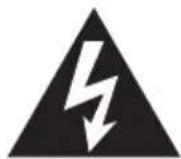
The symbol of lightning with arrow in an equilateral triangle is supposed to alert the user to the presence of "uninsulated voltage" inside the device, which can be sufficiently strong to cause injury to a person.
ATTENTION
RISK OF INJURY BY ELECTRIC SHOCK! DO NOT OPEN!
WARNING: If you want to lower the risk of electric shock, do not open the cover or the rear panel of the device. There are no components inside, which could be repaired by the user. Always contact trained personnel of the service centre.

The exclamation mark in an equilateral triangle is intended to inform the user that in the literature accompanying the device are many important instructions for its operation and maintenance (or service).
WARNING: PREVENT WATER DRIPPING AND SPLASHING ON THE DEVICE AND PENETRATING THE DEVICE, YOU WILL PREVENT THE RISK OF FIRE AND INJURY BY ELECTRIC SHOCK.
NOTE: WARNING SYMBOLS ARE PLACED ON THE BOTTOM PANEL OF THE DEVICE. PLEASE, PAY ATTENTION TO THESE SYMBOLS AND FOLLOW THE INSTRUCTIONS IN THE MANUAL.
NOTE: YOU CAN FIND THE POWER LABEL OF THE PRODUCT ON THE BOTTOM OF THE DEVICE.
DESCRIPTION
EN
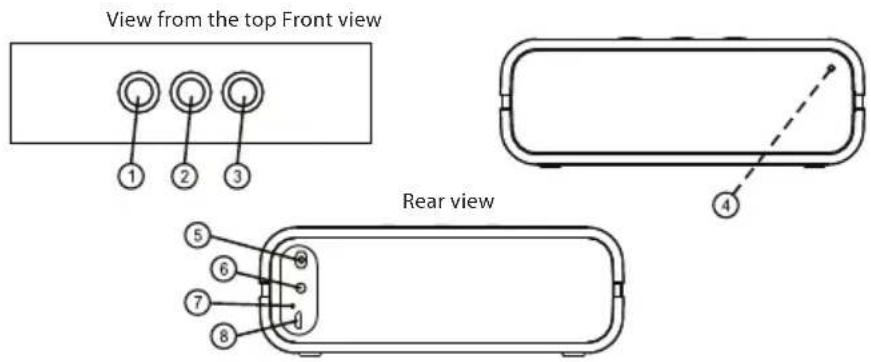
Location of controls
- Volume down button
- Pairing button/play/pause
- Volume up button
-
LED indicator of Bluetooth© pairing
-
On/Off switch
- External input AUX
- LED charging indicator
- Charging connector Micro USB
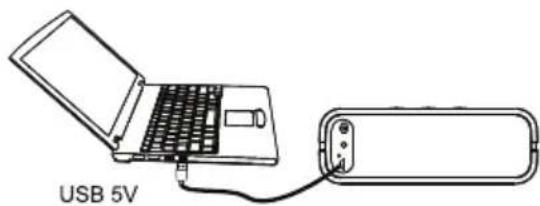
CHARGING
Always charge the speakers before use for optimal results.
natural_image
Diagram of an open laptop connected to a USB 5V device (no text or symbols on the diagram itself)OPERATION
Wireless Bluetooth© playback
This device allows you to play wirelessly audio from any Bluetooth© device within about 9 meter range. Simply pair the devices and enjoy wireless playback controlled by your Bluetooth© device.
Preparing the device
- Turn the device on using the ON/OFF switch.
- When the LED indicator flashes, it means that the device is on and is waiting for pairing.
- After pairing, the indicator light is on continuously.
- Keep in mind that at any given moment only one device may be paired with the device.
Preparing telephone or other Bluetooth© device
Turn on the Bluetooth© function. You can find this setting usually in general settings or in the menu selection of your Bluetooth© device.
For other details about Bluetooth© setting, see please the instruction manual of your device.
Establishing a connection
- In the menu of your Bluetooth© device enter the menu for the Bluetooth© setting.
- Select the option to add or to find a device.
- When asked to enter a password, enter "0000".
* This operation is done once for every device. If you want to pair the unit with another device, repeat the above steps for preparation and establishing connection.
Disconnecting
If you want to end the pairing with the Bluetooth© device, which is already paired, press and hold the pairing button for several seconds.
Volume control
You can increase or lower the volume using the volume buttons on the device or using the volume control on your Bluetooth© device.
* If there is no sound, make sure that the volume of this unit or of the Bluetooth© device is not set to minimum and that the correct device is paired with the unit.
Speakers control
- Turn the device on using ON/OFF switch.
- Press this button to start playback.
- You can pause playing any time during the playback by pressing ▶■ button. Resume playback of the same track and from the same location by pressing it again.
- Using the volume buttons, set the volume of the playback as required.
Using line input (AUX-IN)
- You can connect an audio input of an external device, for example of an MP3 player and enjoy the sound from the player using the high quality amplifier of this unit.
- To connect an external device to the AUX connector of this unit, use standard cable with 3.5 mm jack, which you connect to the headphones or line output of the player.
- Turn on the external device (e.g. MP3 player).
- Connect the cable from the player to the connector AUX on the rear of the device. This way, you would turn off the Bluetooth© function and activate the external input AUX.
- Start playback on the external device and set the volume of the device to required level.
- Do not forget to disconnect the cable from the AUX connector after you finish the playback from the external device to switch the unit back to the Bluetooth© mode.
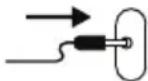
Plugging the connector in you switch to AUX mode
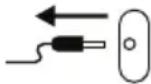
Disconnecting the connector, you switch back to the Bluetooth© mode
TECHNICAL SPECIFICATIONS
Power: Built-in lithium battery 3.7 V / 1000 mA
Charging USB, 5 V / min. 500 mA
Input sensitivity AUX 800 mV
The name Bluetooth© and associated logos are registered trademarks owned by Bluetooth SIG, Inc. Any use of such trademark is under license. Any other trademarks and trade names are the property of their respective owners.
USE AND DISPOSAL OF WASTE
Wrapping paper and corrugated paperboard – deliver to scrapyard. Packing foil, PE bags, plastic elements – throw into plastic recycling containers.
DISPOSAL OF PRODUCTS AT THE END OF LIFETIME
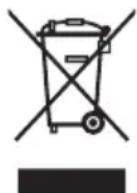
Disposal of electric and electronic equipment (valid in EU member countries and other European countries with an implemented recycling system)
The represented symbol on the product or package means the product shall not be treated as domestic waste. Hand over the product to the specified location for recycling electric and electronic equipment. Prevent negative impacts on human health and the environment by properly recycling your product.
Recycling contributes to preserving natural resources. For more information on the recycling of this product, refer to your local authority, domestic waste processing organization or store, where you purchased the product.
This product complies with EU directive requirements on electromagnetic compatibility and electrical safety.
08/05

Changes in text and technical parameters reserved.
K+B Progres
K+B Progres, a.s. (dále jen K+B), IČO: 61860123
- BT 100
- BLUETOOTH REPRODUKTOROVÝ MINI SYSTÉM
- SYSTEM MINI GŁOŚNIKÓW BLUETOOTH
- BLUETOOTH HANGSZÓRÓS MINI-RENDSZER
- BLUETOOTH LAUTSPRECHER-MINI-SYSTEM
- BLUETOOTH MINI SPEAKER SYSTEM
- BEZPEČNOSTNÍ POKYNY
- POUŽÍVANIE
- Bezdrôtová Bluetooth© reprodukcia
- HASZNÁLAT
- Read carefully and save for future use!
- ATTENTION
- DESCRIPTION
- EN
- Location of controls
- CHARGING
- OPERATION
- Wireless Bluetooth© playback
- Preparing the device
- Preparing telephone or other Bluetooth© device
- Establishing a connection
- Disconnecting
- Volume control
- Speakers control
- Using line input (AUX-IN)
- TECHNICAL SPECIFICATIONS
- USE AND DISPOSAL OF WASTE
- DISPOSAL OF PRODUCTS AT THE END OF LIFETIME
- Disposal of electric and electronic equipment (valid in EU member countries and other European countries with an implemented recycling system)
- K+B Progres
Brand : ECG
Model : BT 100
Category : Charging Station / Dock