
MINISTACK - Guitar amplifier Laney - Free user manual and instructions
Find the device manual for free MINISTACK Laney in PDF.


| Product Type | Guitar Amplifier |
| Model | MINISTACK / MINISTACK-B |
| Power Output | 2 x 3W Stereo (6W total) |
| Channels | Single Channel |
| Speaker Configuration | 4 x 3" Full Range |
| Bluetooth | Yes (MINISTACK-B only), supports A2DP |
| Dimensions (H x W x D) | 295 x 205 x 105 mm |
| Weight | 2.6 kg |
| Power Supply | 6 x AA batteries (LR6/NiMH) or optional 12V DC 0.75A adapter |
| Power Consumption | 9W |
| Controls | Gain, Drive (button), Level, Tone, Delay Level, Delay, Volume |
| Inputs | Guitar (1/4" mono), AUX In (3.5mm stereo) |
| Outputs | Headphone (3.5mm) |
| Special Features | Laney Smart Interface (LSI) for smart device connectivity, compatible with Ultimate Guitar Tonebridge app |
| Design Styles | Ironheart (black/red) and Lionheart (black/gold) |
| Included Accessories | LSI cable (TRRS 3.5mm) |
| Optional Accessories | 12V 0.75A PSU (MINI-LANEY-PSU) |
| Cleaning Instructions | Clean with a dry cloth only |
| Safety Precautions | Refer to manual; do not expose to water or moisture; use only recommended power supply |
| Repair and Service | Refer all servicing to qualified personnel; no user serviceable parts inside |
| Manufacturer | Laney Electronics Ltd. |
| Copyright Year | 2020 |
Frequently Asked Questions - MINISTACK Laney
User questions about MINISTACK Laney
0 question about this device. Answer the ones you know or ask your own.
Ask a new question about this device
Download the instructions for your Guitar amplifier in PDF format for free! Find your manual MINISTACK - Laney and take your electronic device back in hand. On this page are published all the documents necessary for the use of your device. MINISTACK by Laney.
USER MANUAL MINISTACK Laney
MINISTACK/MINISTACK-B USER MANUAL
INTRODUCTION
Welcome to your MINISTACK amplifier.
Great tone should be available anywhere.....now it is!
Battery powered and designed to give you great tone wherever you want it, the MINISTACK is as happy on your desk as it is in your bedroom or backstage.
Along with great sounding guitar tones, the MINISTACK represents an exciting development in the Laney guitar amp range, it features the ground breaking Laney Smart Interface.
The Laney Smart Interface — LSI — is a unique feature that allows you to access the digital world of online apps with nothing more than your smart device and the LSI cable, which is supplied with your amp.

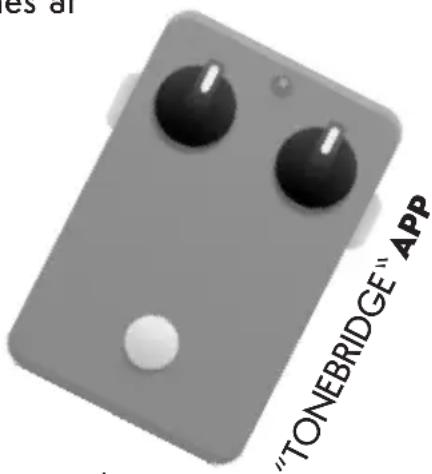
Recommended for use with the Ultimate Guitar "TONEBRIDGE" app the MINISTACK gives you great guitar tone, great effects, whenever and wherever you want it!
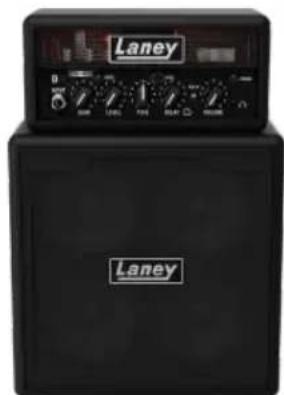
The MINISTACK amps are available in 2 iconic design styles inspired by Laney's 50+years strong back catalogue of amp building.
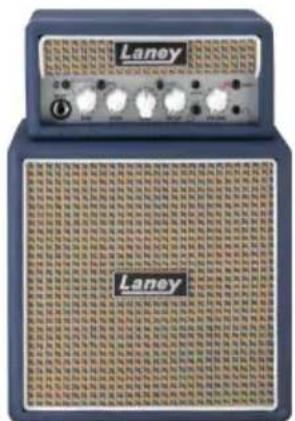
MINISTACK & MINISTACK-B-LIONHEART
MINISTACK & MINISTACK-B-IRONHEART
Both models feature the same control layout, with the addition of a BLUETOOTH option on the MINISTACK-B model. This manual explains each amplifiers feature set and how to get the best out of your MINISTACK & MINISTACK-B amp.
FEATURES - MINISTACK
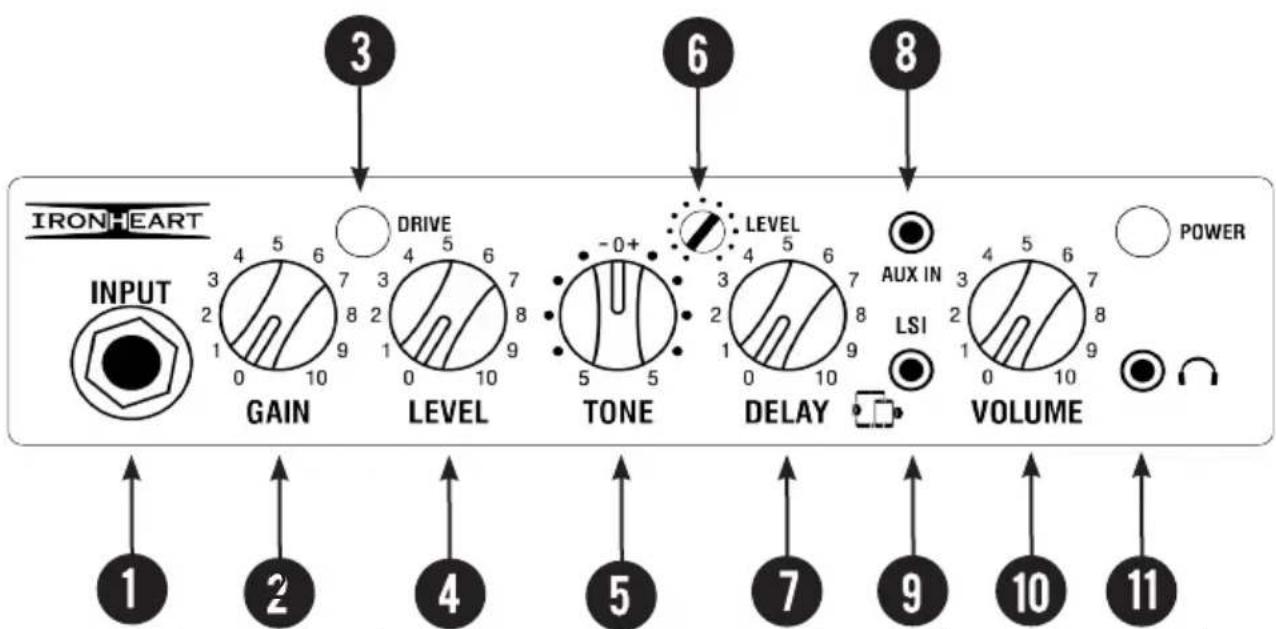
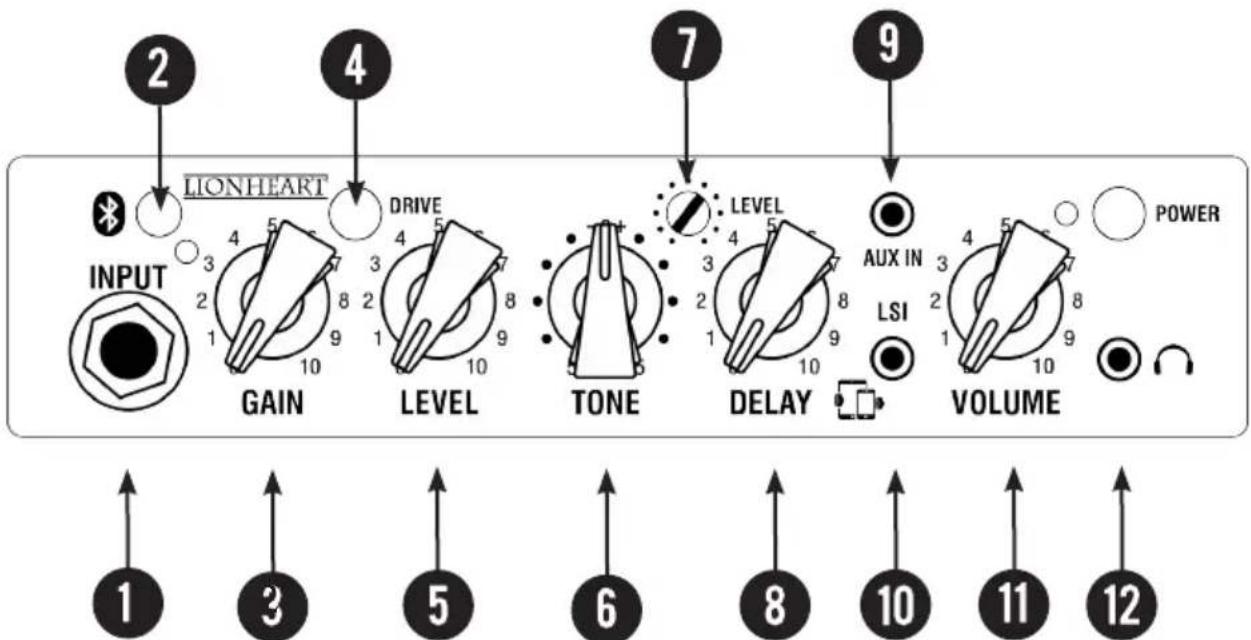
1 - INPUT: Mono jack socket — connect your guitar here. Please use a good quality guitar cable.
2 - GAIN: Control the level of gain in the signal. For clean sounds dial in less gain, for more distorted sounds dial in more gain
3 - DRIVE BUTTON: This button engages the drive circuitry in the amplifier for increased gain sounds.
4 - LEVEL: Determines the overall level of the guitar input.
5 - TONE: Sets the overall EQ of the guitar signal.
6 - DELAY LEVEL: Determines the overall volume of the delayed signal. The higher the level the more noticeable the delay repeats.
7 - DELAY: Sets the delay time applied to the guitar signal. Delays range from short delays, around 100 ms to longer delays of around 400ms and every thing in between.
8 - AUX IN: A 3.5mm stereo line input for connection of an external sound source such as an MP3 or CD player. This can be used to play a backing track. Volume of this input is controlled by the volume on your MP3/CD player and the master volume (10)
FEATURES - MINISTACK
9 - LSI: Laney Smart Interface socket. This totally unique feature allows you to connect your amp to your smart device, using the Laney LSI cable supplied to access the world of DIGITAL GUITAR. No other amp on the market offers you this facility.
With nothing more than your amp, your smart device and an LSI cable, you have access to thousands of digital guitar tones at your fingertips.
The MINISTACK is brought to you in conjunction with ultimate-guitar.com and their "TONEBRIDGE" app.
We thoroughly recommend you get this app and experience just how amazing your MINISTACK and "TONEBRIDGE" sound together. Check out the online video. Search Laney Mini "How To Connect it"
10 - VOLUME: Controls the overall volume of anything connected to the amplifier.
11 - HEADPHONE: 3.5mm Mini Jack Socket provided for connecting a good pair of headphones for silent playing.
FEATURES - MINISTACK-B
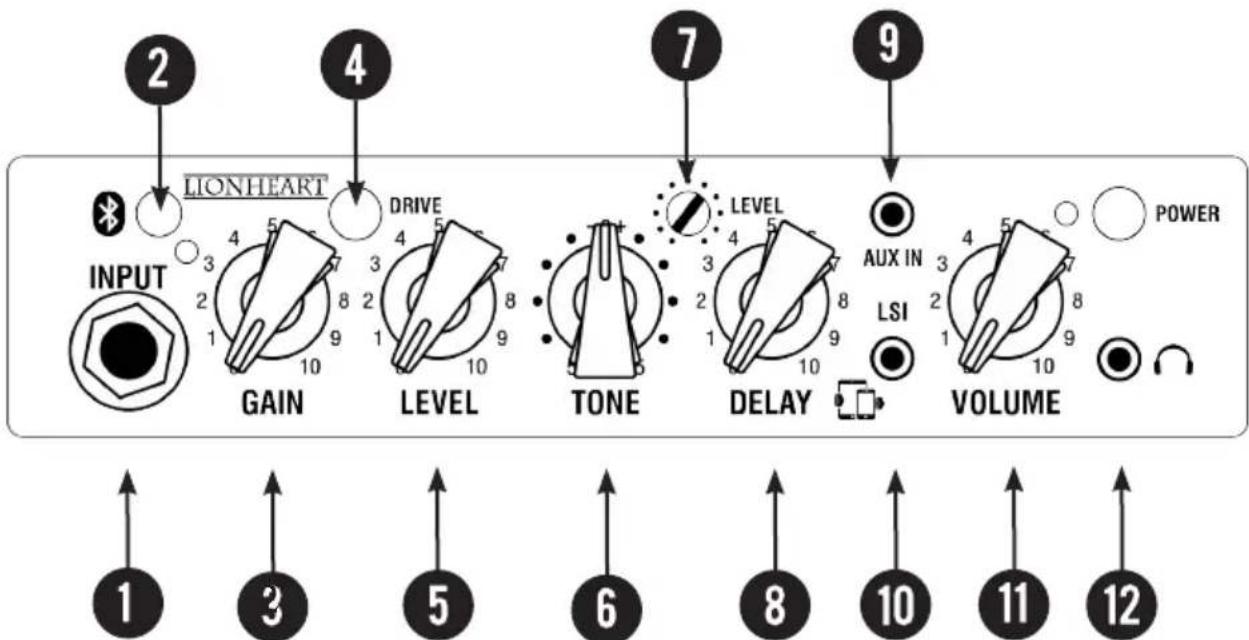
1 - INPUT: Mono jack socket — connect your guitar here. Please use a good quality guitar cable.
2 - BLUETOOTH PAIR BUTTON — to listen to music over your Bluetooth wireless connection you need to pair your device with your MINISTACK-B. Make sure the device you wish to connect has BLUETOOTH capability. Power up your MINISTACK-B. Press and hold the BLUETOOTH button on your MINISTACK-B to enter pairing mode. Follow the instructions on your device to pair the unit.
Press play on your device and use the controls on the paired device to adjust the desired volume.
Once you have successfully paired your device, you typically will not need to repeat the pairing process. If for some reason your MINISTACK-B fails to pair repeat the above process after removing the MINISTACK-B from your device BLUETOOTH DEVICES list before trying again.
3 - GAIN: Control the level of gain in the signal. For clean sounds dial in less gain, for more distorted sounds dial in more gain
4 - DRIVE BUTTON: This button engages the drive circuitry in the amplifier for increased gain sounds.
5 - LEVEL: Determines the overall level of the guitar input.
FEATURES - MINISTACK-B
6 - TONE: Sets the overall EQ of the guitar signal.
7- DELAY LEVEL: Determines the overall volume of the delayed signal. The higher the level the more noticeable the delay repeats.
8 - DELAY: Sets the delay time applied to the guitar signal. Delays range from short delays, around 100 ms to longer delays of around 400ms and everything inbetween.
9 - AUX IN: A 3.5mm stereo line input for connection of an external sound source such as an MP3 or CD player. This can be used to play a backing track. Volume of this input is controlled by the volume on your MP3/CD player and the master volume (11)
10 - LSI: Laney Smart Interface socket. This totally unique feature allows you to connect your amp to your smart device, using the Laney LSI cable supplied to access the world of DIGITAL GUITAR. No other amp on the market offers you this facility.
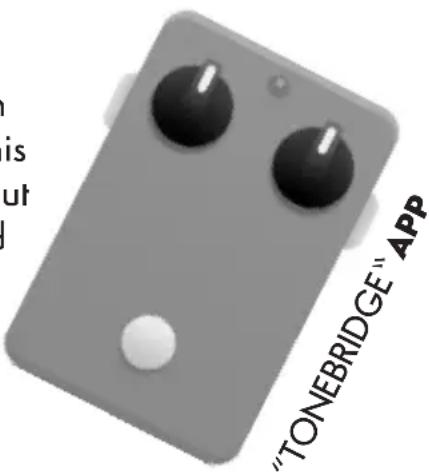
With nothing more than your amp, your smart device and an LSI cable, you have access to thousands of digital guitar tones at your fingertips.
The MINISTACK-B is brought to you in conjunction with ultimateguitar.com and their "TONEBRIDGE" app.
We thoroughly recommend you get this app and experience just how amazing your MINISTACK-B and "TONEBRIDGE" sound together.
11 - VOLUME: Controls the overall volume of anything connected to the amplifier.
12 - HEADPHONE: Socket provided for connecting a good pair of headphones for silent playing.
SETTING UP TO USE TONEBRIDGE
Download the correct version of the TONEBRIDGE APP for your device from your preferred APP provider such as the Google Play Store and the Apple App store.
When you first open "TONEBRIDGE" the APP checks your device for compatibility and gives it a compatibility rating* along with some useful information about using the APP on your device.
Once this is complete you can make your guitar sound like any of 10,000 songs of your choice!
Let's start by setting your MINISTACK & MINISTACK-B up ready to use "TONEBRIDGE".
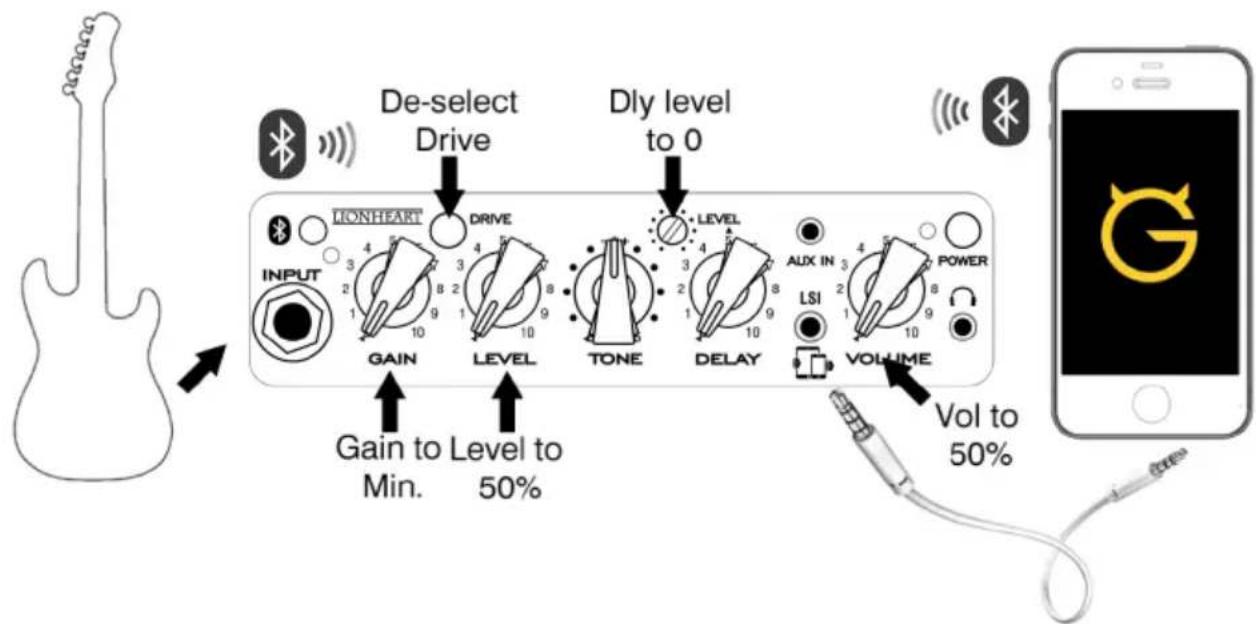
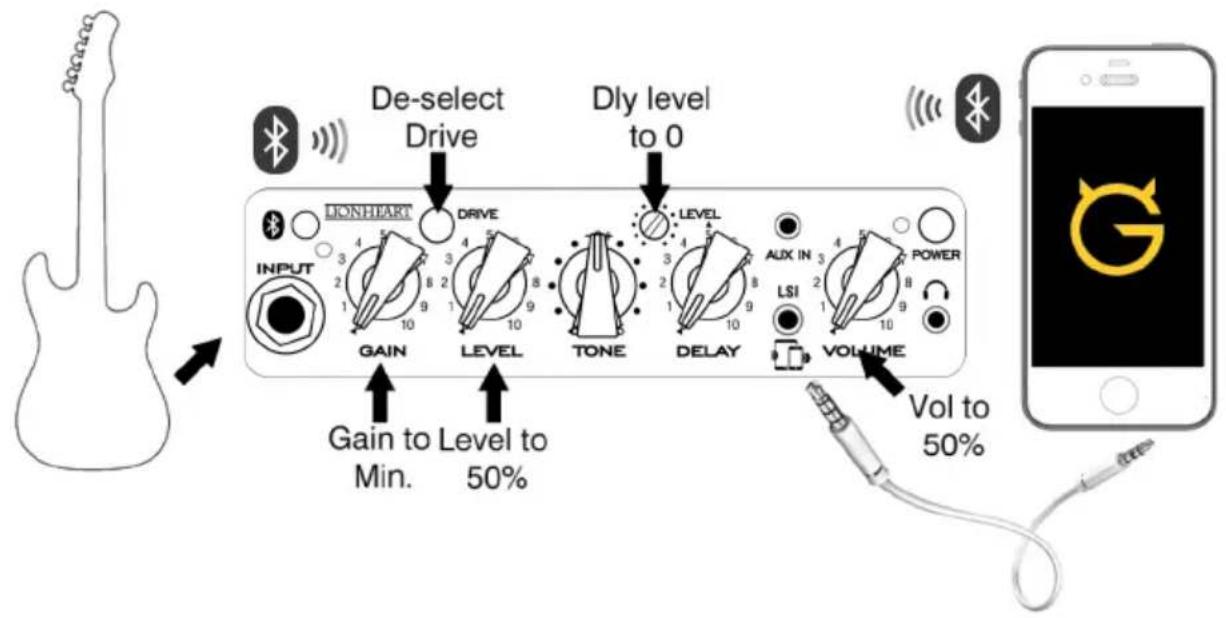
With your guitar connected to the MINISTACK-B do the following: -
1 - Turn the GAIN control to minimum
2 - Turn the LEVEL CONTROL to halfway
3 - Turn VOLUME to halfway
Connect one end of your LSI Cable to the LSI socket on the amp.
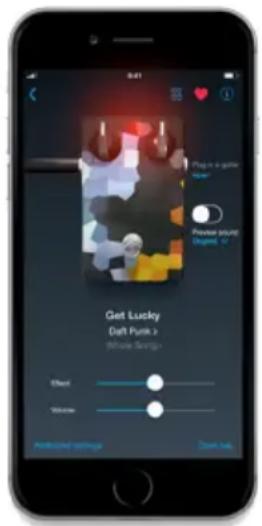
*This is only required for Android devices. iOS devices give optimum performance and are advised to give the best experience when using TONE-BRIDGE APP.
Connect the other end of the LSI cable to the headphone socket or headphone socket adaptor on your smart device.
Fire up the "TONEBRIDGE" app.
Turn the volume on your device up to halfway.
Search for and select a song you are familiar with. Now you need to balance the level of your smart device with your guitar signal. Use the "Preview Sound" facility on "TONEBRIDGE" to indicate the level of the app volume and use the Level control to balance the guitar level in relation to the app.
Note in "TONEBRIDGE" — no guitar level will be heard when you preview a sound — so toggle the preview sound function on and off to check your guitar-level.
Once you are happy with the mix you can choose whatever song you want and immediately have the authentic tone at your fingertips!
The amps controls can be used to further enhance the characteristics of the tone depending on what guitar you choose to use.
Should you experience any feedback when using "TONEBRIDGE" you need to adjust the noise gate within "TONEBRIDGE" which can be found in the additional setting tab for the tone that you have loaded.
Whilst we recommend TONEBRIDGE you can connect your MINISTACK & MINISTACK-B to any number of your favourite APPS, Audio devices and DAW's making your Laney MINISTACK-B a truly versatile go anywhere amp.
CONNECTING TO SMART DEVICE
flowchart
graph LR
    A["De-select Drive"] --> B["INLET"]
    B --> C["LEAVING"]
    C --> D["LEVEL"]
    D --> E["TONE"]
    E --> F["DELAY"]
    F --> G["VOLUME"]
    G --> H["VOOL to 50%"]
    style A fill:#f9f,stroke:#333
    style H fill:#ccf,stroke:#333
INSTALLING BATTERIES
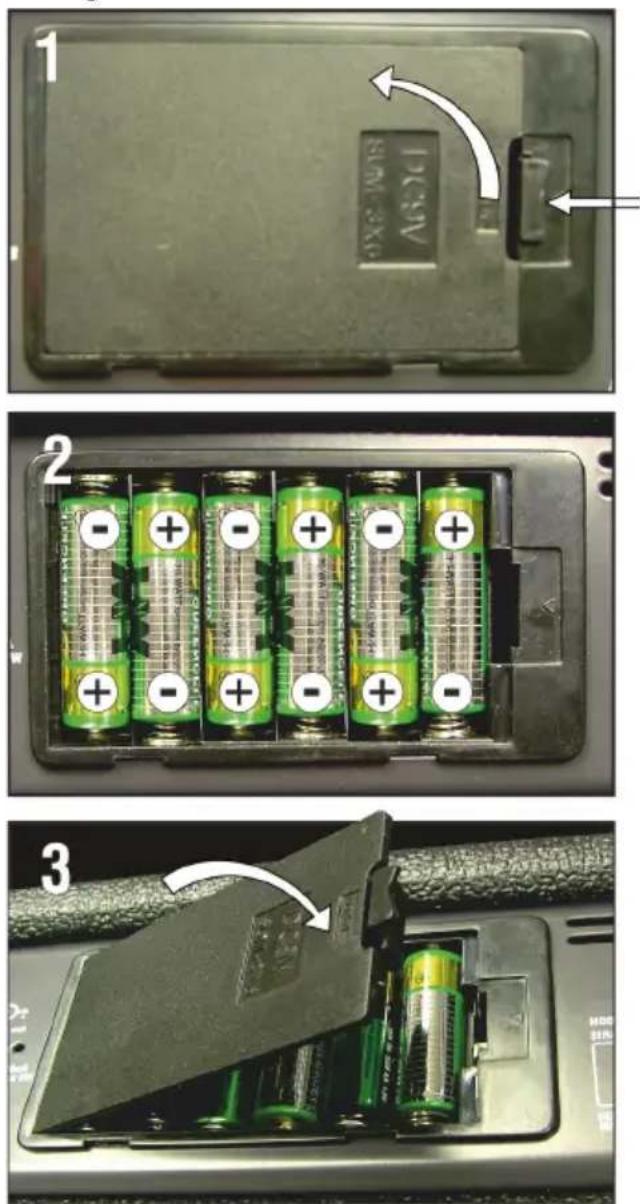
MINISTACK & MINISTACK-B can be battery powered should this be desired and require 6xAA Batteries. Batteries, If used incorrectly may leak or explode and cause damage or injury, please take the following precautions.
Fitting batteries
1) Carefully follow the installation instructions pictured opposite for fitting new batteries, especially the polarity
2) Avoid mixing new batteries with old or part used batteries
3) Avoid mixing battery types
4) Do not try to recharge or take apart alkaline batteries
5) Remove the batteries from the unit if it is not going to be used for a long time.
6) If batteries have leaked in the battery tray, remove the batteries and all traces of the discharge in the tray. Use caution so that none of the discharge gets near the skin or the eyes. Any affected area should be immediately rinsed with cold running water, seek medical advice.
7) Do not dispose of used batteries in fire or water systems. Batteries must not be exposed to excessive heat such as sunlight, fire or the like. Used batteries should always be disposed of in compliance with the current regulations applicable to the country/region where you live.
USING A PSU
Your MINISTACK & MINISTACK-B can be powered using the optional extra 12V 0.75A PSU (MINI-LANEY-PSU)
This is easily fitted between the mains outlet and the amp. When using the amp with the power supply a few precautions should be followed:
Only use the DC power supply that is recommended. The use of other DC power supplies may cause damage or other problems, and void your warranty.
Turn the power switch to OFF and disconnect any other attached devices before plugging in and turning ON the DC Power Supply.
When the DC plug is connected to the socket, the battery compartment is isolated from the unit. Both the DC power supply and the battery tray are independent of each other.
Technical Specifications
MINISTACK & MINISTACK-B*
| Features | Product | GUITAR Amplifier | |||
| Power | 2x3W Stereo | ||||
| Channels | Single | Channel | |||
| Bluetooth Audio Enabled* | |||||
| Supports | A2DP | audio | stre | ||
| Gain/Level/Shape | |||||
| Tone | |||||
| Tilt | |||||
| Aux | in | (3.5mm) | |||
| LSI | - | Laney | Smart | ||
| (3.5mm) | TRRS | lead | included | ||
Speaker 4 x 3" Full Range
Unit Size/mm
295×205×105
(HxWxD)
Unit Weight 2.6 Kg
Carton Size mm 310x215x115 (HxWxD)
Packed Weight 3.1 Kg
Power Consumption 9W
Power
6*AA
(LR6/NiMH)
or optional
12V
dc
Optional Adaptor 12V 0.75A PSU (MINI-LANEY-PSU)
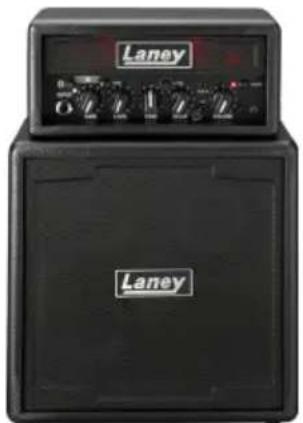
MINISTACK-IRON & MINISTACK-B-IRON
natural_image
Front view of a Laney audio amplifier with grid-patterned back panel (no visible text or symbols)MINISTACK-LION & MINISTACK-B-LION
Manufacturer: Laney Electronics Ltd.
© 2020 Laney Electronics Ltd. May not be reproduced without prior written consent
In the interest of continued product development, Laney reserve the right to amend product specification without prior notice

USER MANUAL
SAFETY INFORMATION
WWW.LANEY.CO.UK
DESIGNED & ENGINEERED IN THE UK BY LANEY
GENERAL INSTRUCTIONS
In order to take full advantage of your new product and enjoy long and trouble-free performance, please read this owner's manual carefully, and keep it in a safe place for future reference.
1) Unpacking: On unpacking your product please check carefully for any signs of damage that may have occurred whilst in transit from the Laney factory to your dealer. In the unlikely event that there has been damage, please re-pack your unit in its original carton and consult your dealer. We strongly advise you to keep your original transit carton, since in the unlikely event that your unit should develop a fault, you will be able to return it to you dealer for rectification securely packed.
2) Amplifier Connection: In order to avoid damage, it is advisable to establish and follow a pattern for turning on and off your system. With all system parts connected, turn on source equipment, tape decks, cd players, mixers, effects processors etc, BEFORE turning on your amplifier. Many products have large transient surges at turn on and off which can cause damage to your speakers. By turning on your bass amplifier LAST and making sure its level control is set to a minimum, any transients from other equipment should not reach your loud speakers. Wait till all system parts have stabilised, usually a couple of seconds. Similarly when turning off your system always turn down the level controls on your bass amplifier and then turn off its power before turning off other equipment.
3) Cables: Never use shielded or microphone cable for any speaker connections as this will not be substantial enough to handle the amplifier load and could cause damage to your complete system.
4) Servicing: The user should not attempt to service these products. Refer all servicing to qualified service personnel.

FCC COMPLICANCY STATEMENT
This device complies with Part 15 of the FCC rules.
Operation is subject to the following two conditions:
1) This device may not cause harmful interference
2) This device must accept any interference received, that may cause undesired operation.
Warning: Changes or modification to the equipment not approved by Laney can void the user's authority to use the equipment. Note: This equipment has been tested and found to comply with the limits for Class B digital device, pursuant to Part 15 of the FCC Rules. These limits are designed to provide reasonable protection against harmful interference in a residential installation. This equipment generates, uses and can radiate radio frequency energy and if not installed and used in accordance with the instructions, may cause harmful interference to radio communications. However, there is no guarantee that interference will not occur in a particular installation. If this equipment does cause harmful interference to radio or television reception, which can be determined by turning the equipment off and on, the user is encouraged to try and correct the interference by one or more of the following measures.
Reorient or relocate the receiving antenna.
Increase the separation between the equipment and receiver.
Connect the equipment into an outlet on a circuit different from that to which the receiver is connected.
Consult the dealer or an experienced radio/TV technician for help

This product conforms to the requirements of the following European Regulations, Directives & Rules: CE Mark (93/68/EEC), Low Voltage 2014/35/EU, EMC (2014/30/EU), RoHS (2011/65/EU), RED (2014/30/EU), ErP 2009/125/EU
SIMPLIFIED EU DECLARATION OF CONFORMITY
Hereby, Laney Electronics Ltd. declares that the radio equipment is in compliance with Directives 2014/53/EU, 2011/65/EU, 2009/125/EU
Full text of the EU declaration of conformity is available at the following internet address:
support.laney.co.uk/approvals

In order to reduce environmental damage, at the end of its useful life, this product must not be disposed of along with normal household waste to landfill sites. It must be taken to an approved recycling centre according to the recommendations of the WEEE (Waste Electrical and Electronic Equipment) directive applicable in your country.
The Bluetooth® word mark and logos are registered trademarks owned by the Bluetooth SIG, Inc. and any use of such marks by Headstock Distribution Ltd is under license. Other trademarks and trade names are those of their respective owners. Laney is a registered trademark of Headstock Distribution Ltd.
INCORPORATED RADIO EQUIPMENT DEVICE TECHNICAL SPECIFICATION:
Frequency Range: 2402-2480MHz
Transmit Power: +8dBm (6.3mW)
Receiver Sensitivity: -91 dBm
WARNING: When using electrical products, basic cautions should always be followed, including the following:
I. Read these instructions.
-
Keep these instructions safe.
-
Heed all warnings.
-
Follow all instructions.
-
Do not use this apparatus near water.
-
Clean only with a dry cloth.
-
Do not block any of the ventilation openings. Install in accordance with manufacturer's instructions.
-
Do not install near any heat sources such as radiators, heat registers, stoves or other apparatus (including amplifiers) that produce heat.
-
An apparatus with Class I construction shall be connected to a mains socket outlet with a protective connection. Do not defeat the safety purpose of the polarized or grounding-type plug. A polarized plug has two blades with one wider than the other: A grounding type plug has two blades and a third grounding prong. The wide blade or third prong is provided for your safety. If the provided plug does not fit into your outlet, consult an electrician for replacement of the obsolete outlet.
-
Protect the power cord from being walked on or pinched, particularly at plugs, convenience receptacles, and the point they exit from the apparatus.
-
Only use attachments/accessories provided by the manufacturer.
- Use only with a cart, stand, tripod, bracket, or table specified by the manufacturer, or sold with the apparatus. When a cart is used, use caution when moving the cart/apparatus combination to avoid injury from tip-over.
- The mains plug or appliance coupler is used as the disconnect device and shall remain readily operable. The user should allow easy access to any mains plug, mains coupler and mains switch used in conjunction with this unit thus making it readily operable. Unplug this apparatus during lightning storms or when unused for long periods of time.
- Refer all servicing to qualified service personnel. Servicing is required when the apparatus has been damaged in any way, such as when power-supply cord or plug is damaged, liquid has been spilled or objects have fallen into the apparatus, the apparatus has been exposed to rain or moisture, does not operate normally, or has been dropped.
- Never break off the ground pin. Connect only to a power supply of the type marked on the unit adjacent to the power supply cord.
- If this product is to be mounted in an equipment rack, rear support should be provided.
- Note for UK only: If the colours of the wires in the mains lead of this unit do not correspond with the terminals in your plug, proceed as follows:
a) The wire that is coloured green and yellow must be connected to the terminal that is marked by the letter E, the earth symbol, coloured green or coloured green and yellow.
b) The wire that is coloured blue must be connected to the terminal that is marked with the letter N or the colour black.
c) The wire that is coloured brown must be connected to the terminal that is marked with the letter L or the colour red.
-
This electrical apparatus should not be exposed to dripping or splashing and care should be taken not to place objects containing liquids, such as vases, upon the apparatus.
-
Exposure to extremely high noise levels may cause a permanent hearing loss. Individuals vary considerably in susceptibility to noise-induced hearing loss, but nearly everyone will lose some hearing if exposed to sufficiently intense noise for a sufficient time. The U.S. Government's Occupational Safety and Health Administration (OSHA) has specified the following permissible noise level exposures: According to OSHA, any exposure in excess of the above permissible limits could result in some hearing loss. Earplugs or protectors to the ear canals or over the ears must be worn when operating this amplification system in order to prevent a permanent hearing loss, if exposure is in excess of the limits as set forth above. To ensure against potentially dangerous exposure

to high sound pressure levels, it is recommended that all persons exposed to equipment capable of producing high sound pressure levels such as this amplification system be protected by hearing protectors while this unit is in operation.
- Symbols & nomenclature used on the product and in the product manuals, intended to alert the operator to areas where extra caution may be necessary, are as follows:
Intended to alert the user to the presence of high 'Dangerous Voltage' within the products enclosure that may be sufficient to constitute a risk of electrical shock to persons.
Intended to alert the user of the presence of important operating and maintenance (Servicing) instructions in the literature accompanying the product.
Risk of electrical shock - DO NOT OPEN. To reduce the risk of electrical shock, do not remove the cover. No user serviceable parts inside. Refer servicing to qualified personnel.
To prevent electrical shock or fire hazard, do not expose this appliance to rain or moisture. Before using this appliance please read the operating instructions.
natural_image
Two black rectangular objects with corner handles, one being rotated by an arrow (no text or symbols)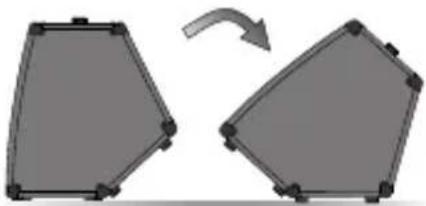
natural_image
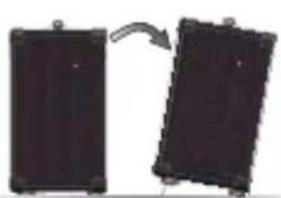
Two gray 3D geometric shapes with corner brackets, one rotated to form a curved arrow (no text or symbols)If your appliance features a tilting mechanism or a kickback style cabinet, please use this design feature.
with caution. Due to the ease with which the amplifier can be moved between straight and tilted back positions, only use the amplifier on a level, stable surface. DO NOT operate the amplifier on a desk, table, shelf or otherwise unsuitable non-stable platform.
MINISTACK/MINISTACK-B USER MANUAL
Einführung
CONNECTING TO SMART DEVICE
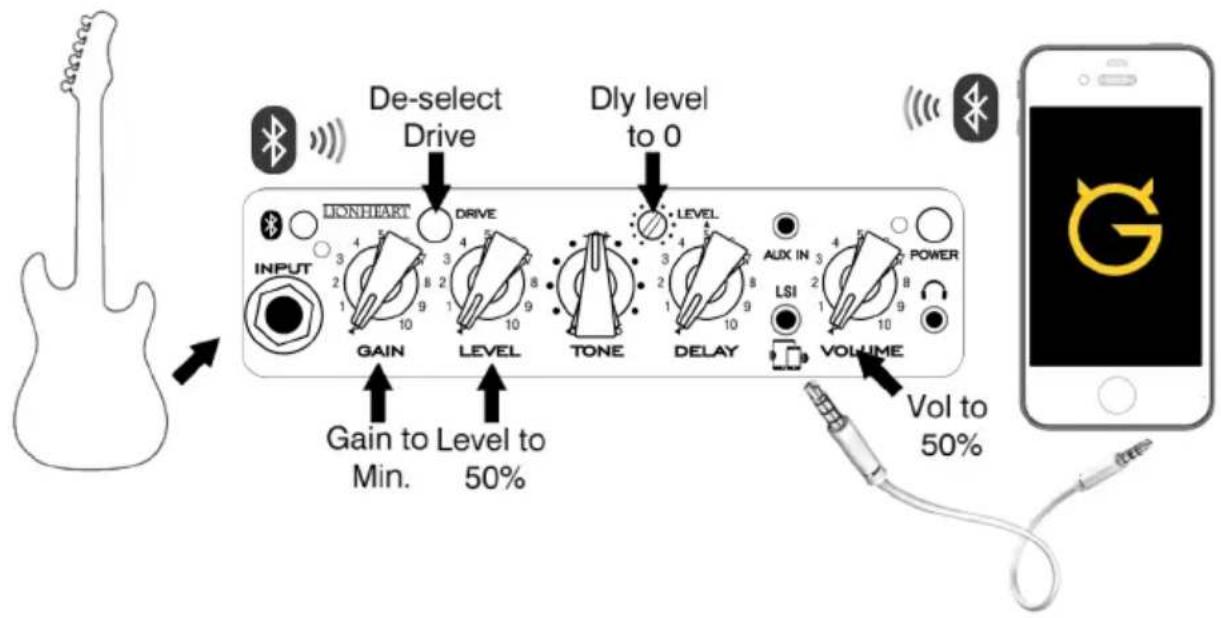
flowchart
graph LR
    A["De-select Drive"] --> B["INPUT"]
    B --> C["GAIN"]
    C --> D["LEVEL"]
    D --> E["TONE"]
    E --> F["DELAY"]
    F --> G["VOLUME"]
    G --> H["Vol to 50%"]
    style A fill:#f9f,stroke:#333
    style H fill:#ccf,stroke:#333
INSTALLIEREN VON BATTERIEN
natural_image
Close-up of six green battery cells with white circular indicators and grid patterns, mounted on a black plastic housing (no text or symbols visible)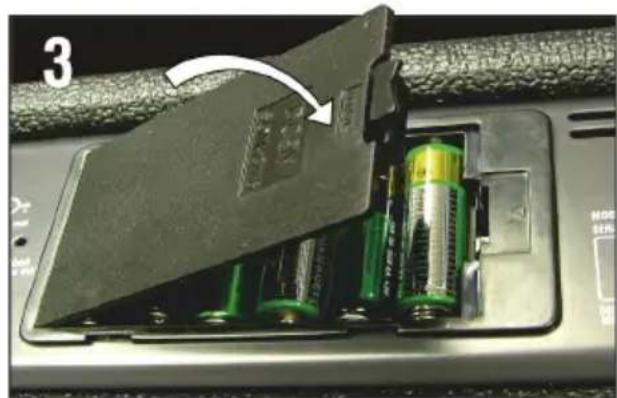
natural_image
Close-up of a battery pack with two batteries and an open socket, showing internal components (no text or symbols visible)Speaker 4 x 3" Full Range
Unit
Size/mm
295×205×105
(HxWxD)
Unit Weight 2.6 Kg
Carton Size mm 310x215x115 (HxWxD)
Packed Weight 3.1 Kg
Power Consumption 9W
Power
6*AA
(LR6/NiMH)
or
optional
12V
dc
12V
Adapter
optional
Manufacturer: Laney Electronics Ltd.
© 2020 Laney Electronics Ltd. May not be reproduced without prior written consent
In the interest of continued product development, Laney reserve the right to amend product specification without prior notice
Laney
MINISTACK/MINISTACK-B USER MANUAL
INTRODUCCIÓN
INSTALANDO BATERIAS
natural_image
Close-up of six green cylindrical batteries with white circular indicators, placed in a black plastic housing (no text or symbols visible)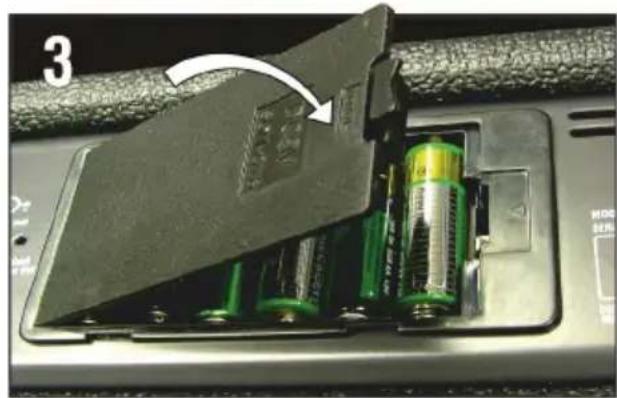
natural_image
Close-up of an open battery pack with green and black components, showing a damaged cover (no text or symbols visible)LSI - Laney Smart Ir (Cable de 3.5mm TRRS
Altavoces 4 de 3 pulgadas Full Range
Manufacturer: Laney Electronics Ltd.
© 2020 Laney Electronics Ltd. May not be reproduced without prior written consent
In the interest of continued product development, Laney reserve the right to amend product specification without prior notice
Laney
MINISTACK/MINISTACK-B USER MANUAL
INTRODUÇÃO
flowchart
graph LR
    A["De-select Drive"] --> B["LEAVED DRIVE"]
    B --> C["Dly level to 0"]
    C --> D["LEVEL"]
    D --> E["VOLUME"]
    E --> F["Vol to 50%"]
    G["GAIN"] --> H["Gain to Level to Min."]
    I["LEVEL"] --> J["Gain to Level to 50%"]
INSTALANDO BATERIAS
natural_image
Interior view of a battery pack with six green cylindrical batteries and white circular indicators (no text or symbols visible)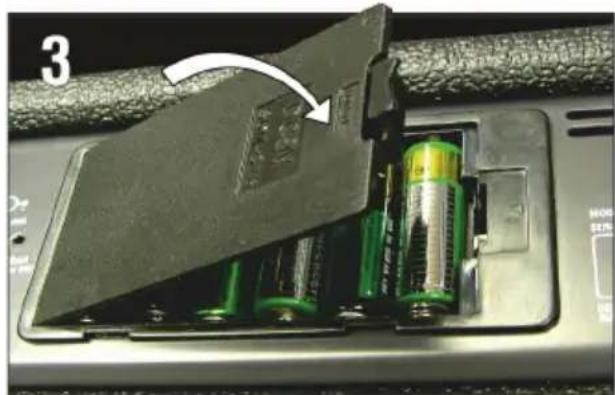
natural_image
Close-up of a battery pack with green and yellow liquid, showing internal components and an arrow indicating a component (no text or symbols visible)MINISTACK-IRON & MINISTACK-B-IRON

MINISTACK-LION & MINISTACK-B-LION
Manufacturer: Laney Electronics Ltd.
© 2020 Laney Electronics Ltd. May not be reproduced without prior written consent
In the interest of continued product development, Laney reserve the right to amend product specification without prior notice
Laney
MINISTACK/MINISTACK-B USER MANUAL

MIN ISTACK-LION MIN ISTACK-B-LION MIN ISTACK-IRON MIN ISTACK-B-IRON
Laney
MINISTACK/MINISTACK-B USER MANUAL
제품소개
FEATURES - MINISTACK-B
CONNECTING TO SMART DEVICE
flowchart
graph LR
    A["De-select Drive"] --> B["LEIGHART"]
    B --> C["INPUT"]
    C --> D["GAIN"]
    D --> E["LEVEL"]
    E --> F["TONE"]
    F --> G["DELAY"]
    G --> H["VOLUME"]
    H --> I["VoL to 50%"]
    style A fill:#f9f,stroke:#333
    style B fill:#ccf,stroke:#333
    style C fill:#cfc,stroke:#333
    style D fill:#fcc,stroke:#333
    style E fill:#cff,stroke:#333
    style F fill:#ffc,stroke:#333
    style G fill:#cfc,stroke:#333
    style H fill:#fcc,stroke:#333
    style I fill:#fff,stroke:#333
INSTALLING BATTERIES
natural_image
Close-up of six green battery cells with white circular indicators, arranged in a row (no text or symbols visible)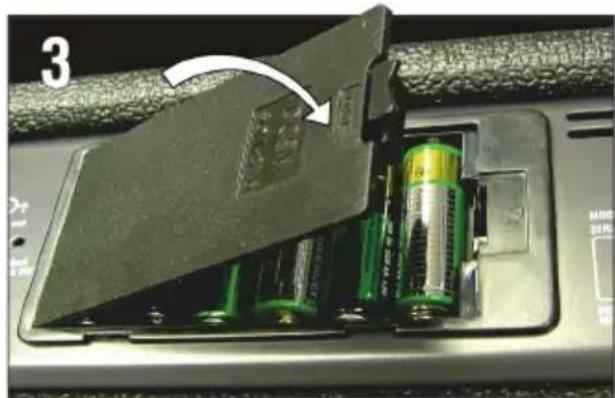
natural_image
Close-up of a battery pack with green and yellow batteries inserted into a device, showing a white arrow indicating the component (no text or symbols visible)아답터 사용
Technical Specifications
MINISTACK & MINISTACK-B*
| Features | Product | GUITAR Amplifier | |||
| Power Channels | 2*3W Stereo | ||||
| Single | Channel | ||||
| Bluetooth Audio Enabled* | |||||
| Supports | A2DP | audio | |||
| Gain/Level/Shape | |||||
| Tone | |||||
| Tilt | |||||
| Aux | in | (3.5mm) | |||
| LSI | - | Laney | |||
| (3.5mm) | TRRS | lead | |||
Speaker 4 x 3" Full Range
Unit Size/mm
295×205×105 (HxWxD)
Unit Weight 2.6 Kg
Carton Size mm 310x215x115 (HxWxD)
Packed Weight 3.1 Kg
Power Consumption 9W
Power
6*AA (LR6/NiMH)
or optional 12V dc
Manufacturer: Laney Electronics Ltd.
© 2020 Laney Electronics Ltd. May not be reproduced without prior written consent
In the interest of continued product development, Laney reserve the right to amend product specification without prior notice
- MINISTACK/MINISTACK-B USER MANUAL
- INTRODUCTION
- Great tone should be available anywhere.....now it is!
- FEATURES - MINISTACK
- SETTING UP TO USE TONEBRIDGE
- INSTALLING BATTERIES
- USING A PSU
- Technical Specifications
- SAFETY INFORMATION
- GENERAL INSTRUCTIONS
- FCC COMPLICANCY STATEMENT
- INCORPORATED RADIO EQUIPMENT DEVICE TECHNICAL SPECIFICATION:
- Einführung
- INSTALLIEREN VON BATTERIEN
- Laney
- INTRODUCCIÓN
- INSTALANDO BATERIAS
- INTRODUÇÃO
Brand : Laney
Model : MINISTACK
Category : Guitar amplifier