
Optiheat 2000GTWPT - Heating GORENJE - Free user manual and instructions
Find the device manual for free Optiheat 2000GTWPT GORENJE in PDF.


| Product Type | Electric panel convector heater |
| Voltage | 220-240 V~ |
| Frequency | 50/60 Hz |
| Power Settings | 1000 W / 2000 W |
| IP Rating | IP24 (splash-proof) |
| Control Type | Touch screen + remote control |
| Display | LED display showing current and set temperature |
| Heating Element | High quality aluminum |
| Thermostat | Electronic thermostat with 5°C to 40°C range |
| Timer | Weekly programmable timer (24h/7 days) |
| Modes | Work mode, standby mode, weekly timer mode |
| Child Lock | Yes (hold button to activate) |
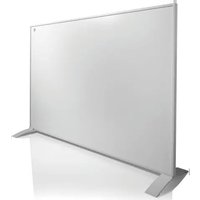
| Installation | Wall-mounted or free-standing on feet |
| Safety Features | Overheat protection, thermal cutout, IP24, auto-off when uncovered |
| Cleaning | Wipe with soft damp cloth; do not use abrasives |
| Operating Sound | Beep upon each operation setting |
| Remote Control | Included (controls all functions) |
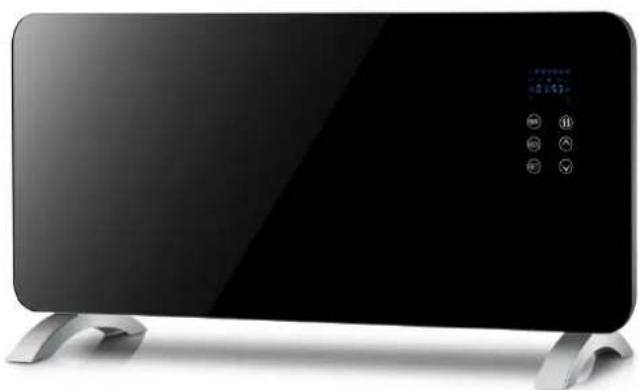
| Front Panel | Elegant glass panel |
Frequently Asked Questions - Optiheat 2000GTWPT GORENJE
User questions about Optiheat 2000GTWPT GORENJE
0 question about this device. Answer the ones you know or ask your own.
Ask a new question about this device
Download the instructions for your Heating in PDF format for free! Find your manual Optiheat 2000GTWPT - GORENJE and take your electronic device back in hand. On this page are published all the documents necessary for the use of your device. Optiheat 2000GTWPT by GORENJE.
USER MANUAL Optiheat 2000GTWPT GORENJE
natural_image
Exterior view of a modern flat-screen electric TV with control buttons and display screen (no visible text or symbols)EN Please read these instructions before installing or using this appliance for the first time
SLO Navodila preberite pred postavitvijo ali prvo uporabo grelnika.
HR Pročitajte upute prije postavljanja ili prve uporabe grijalice.
SRB Uputstva pročitajte pre postavljanja ili prve upotrebe grejača.
natural_image
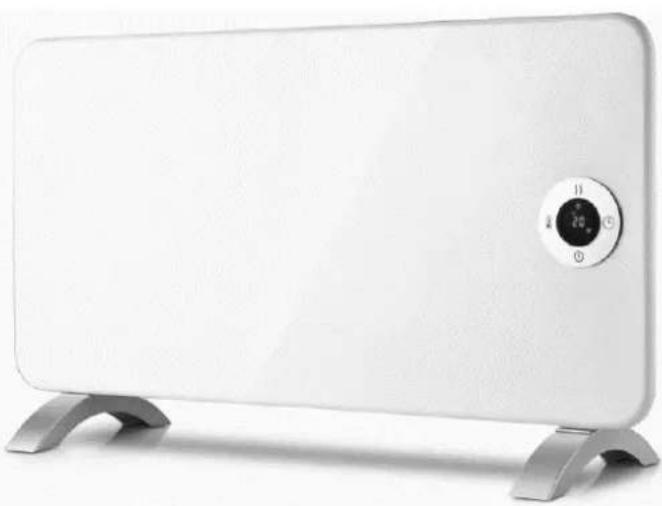
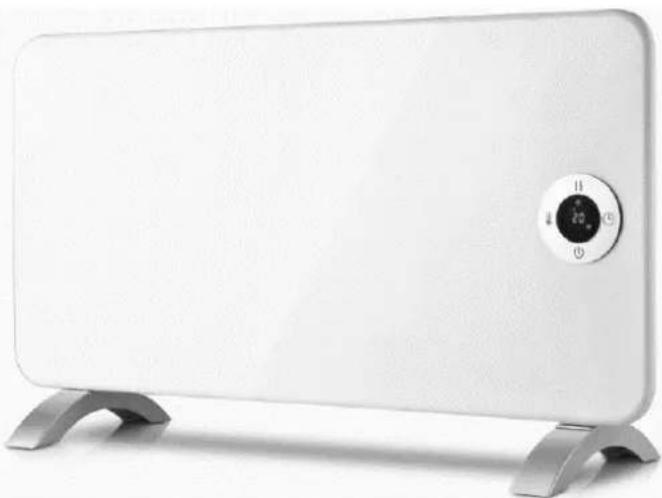
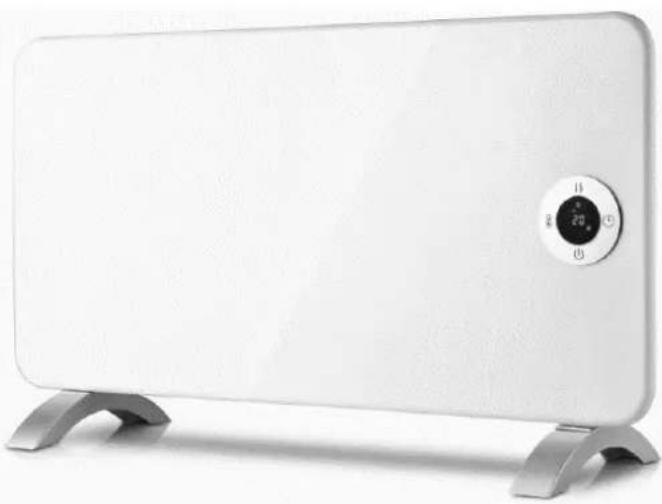
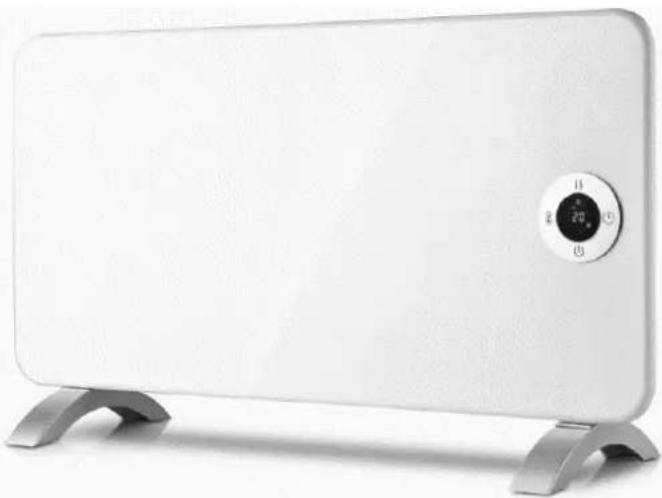
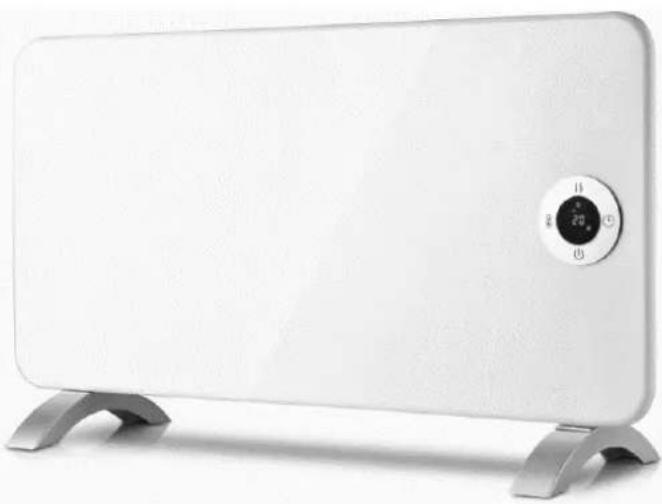
White rectangular solar heating device with metallic base (no visible text or symbols)OptiHeat 2000EWP
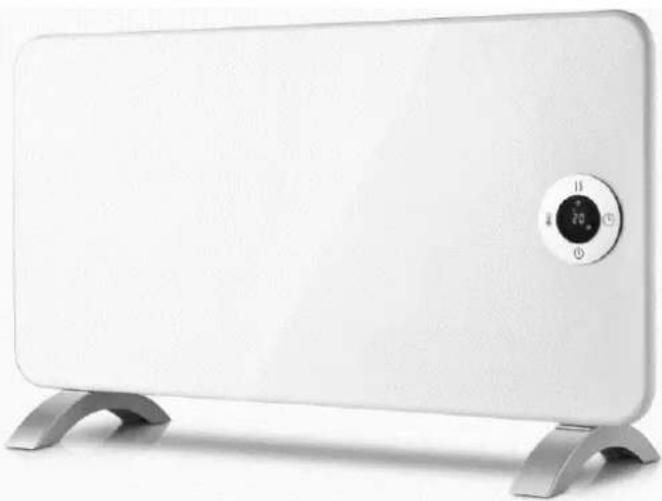
natural_image
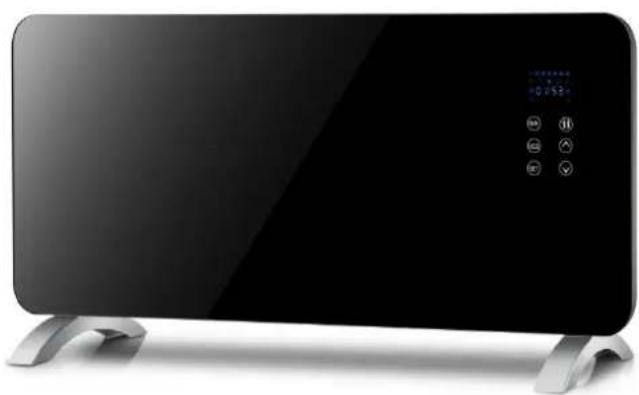
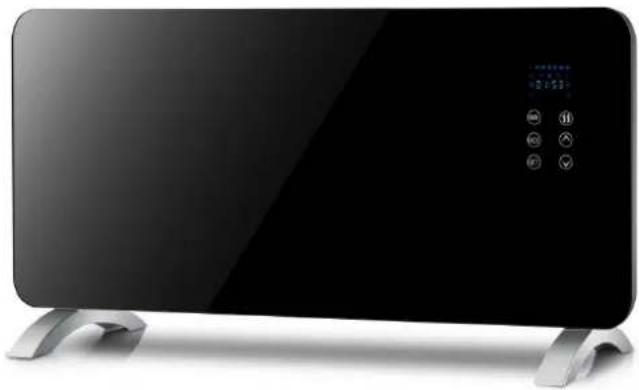
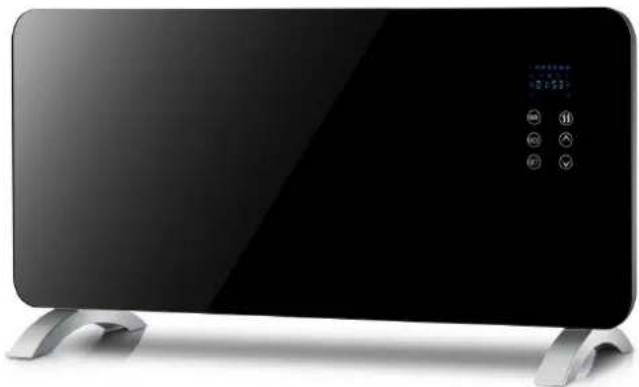
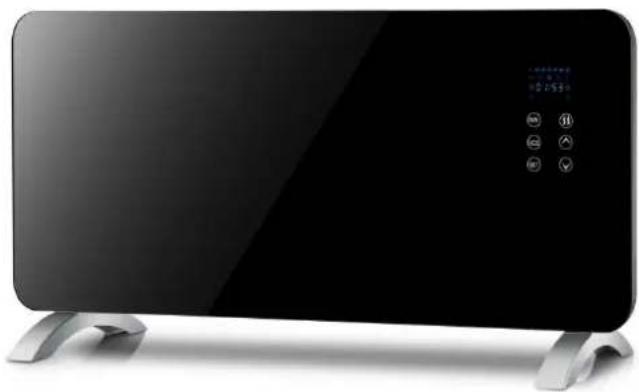
White rectangular solar heating device with a digital display and metal base (no visible text or symbols)OptiHeat 2000GTP(GTWPT)
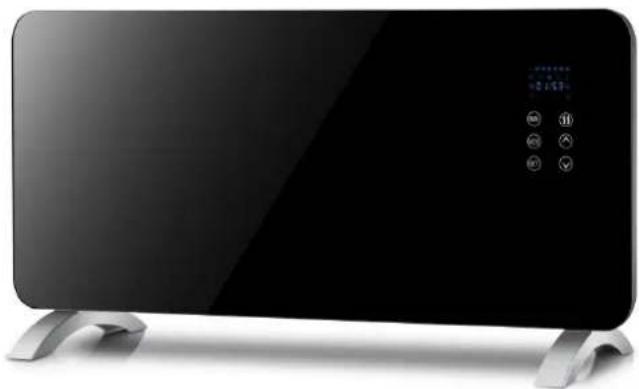
natural_image
Exterior view of a modern black electric heater with control buttons and display screen (no visible text or symbols)TECHNICAL SPECIFICATION
| Details | OptiHeat 2000MP | OptiHeat 2000EWP | OptiHeat2000GTP(GTWPT) |
| Voltage | 220-240V~ | 220-240V~ | 220-240V~ |
| Frequency | 50/60Hz | 50/60Hz | 50/60Hz |
| Power | 1000/2000W | 1000/2000W | 1000/2000W |
| IP Waterproof | IP24 | ||

IMPORTANT
Before plugging the unit into the mains, ensure by visual inspection that the unit is intact and has not suffered any damage during transit.

NOTE
These heaters are intended for domestic use only. They can be used either as portable or wall-mounted appliances.

CAUTION
The appliance must always be placed on a flat and stable surface.
In order to avoid a hazard due to inadvertent resetting of the thermal cutout, this appliance should not be connected via an external switching device, such as a timer, or connected to a circuit that is regularly switched on and off by the utility.
FOR YOUR OWN SAFETY
- Read all the instructions before using the heater.
- Only connect the heater to a single-phase socket with a mains voltage as specified on the rating plate.
- Do not leave your home while the appliance is in function: ensure that the switch is in the OFF (0) position and the thermostat is in the minimum position. Always unplug the appliance.
- Keep combustible materials such as furniture, cushions, bedding, paper, clothes, curtains etc. at least 100 cm away from the heater.
- Do not place anything on or in front of the heater.
-
Always use the heater in an upright position.
-
Do not place the heater against walls, furniture, curtains, etc.
-
Do not use the appliance in rooms with a surface area of less than 4 m^2 .
-
Always unplug the heater when not in use. Do not pull the cord to unplug the heater.
-
Keep the air inlet and outlet free from objects at least 1 m in front of and 50 cm behind the heater.
-
Do not install the heater immediately under a socket outlet.
-
Do not let animals or children touch or play with the heater. Please note that the air outlet becomes hot during operation.
-
Do not cover. If covered, overheating may occur.
-
Do not use this heater in the vicinity of showers, bath tubs, wash basins or a swimming pool etc.
-
Do not use the heater in rooms containing explosive gas, flammable solvents, varnish or glue.
-
Keep the heater clean. Do not allow any objects to enter any ventilation or exhaust opening as this may cause electric shock, fire or damage to the heater.
-
If the heater has been dropped or damaged it should not be used until it has been inspected by a qualified service center.
-
Close supervision is necessary when the heater is being used by or near children, persons suffering from any physical impairment or pets.
-
Do not use to dry clothes or other textiles.
-
Do not use the heater to dry your laundry. Never obstruct the intake and outlet grilles (overheating hazard).
-
Do not move the appliance while it is functioning in order to avoid overheating or a fire.
-
If any part of the heater or power supply cord becomes damaged, it must be replaced by a qualified electrician in order to avoid a hazard.
-
The heater must not be placed immediately under a socket outlet.
-
Do not use this heater with a programmer, timer or any other device that switches the heater on automatically, since a fire risk exists if the heater is covered or positioned incorrectly.
-
Do not leave the heater switched on when leaving your home or going to sleep.
-
Children should be supervised to ensure that they do not play with the appliance.
-
This appliance can be used by children aged from 8 years and above and by persons with reduced physical, sensory or mental capabilities or lack of experience or knowledge if they have been given supervision or instruction concerning the use of the appliance in a safe way and understand the hazards involved.
-
Children shall not play with the appliance. Cleaning and user maintenance shall not be made by children without supervision.
-
Children younger than 3 years should be kept away unless continuously supervised.
-
Children aged from 3 years and less than 8 years shall only switch on/off the appliance provided that it has been placed or installed in its intended normal operating position and they have been given supervision or instruction concerning use of the appliance in a safe way and understand the hazards involved.
-
Children aged from 3 years to 8 years shall not plug in, regulate and clean the appliance or perform user maintenance.
Do not leave the heater unattended when plugged into the mains. Some parts of the heater can become very hot and cause burns. Do not touch hot surfaces.
Particular attention must be paid where children and vulnerable people are present.
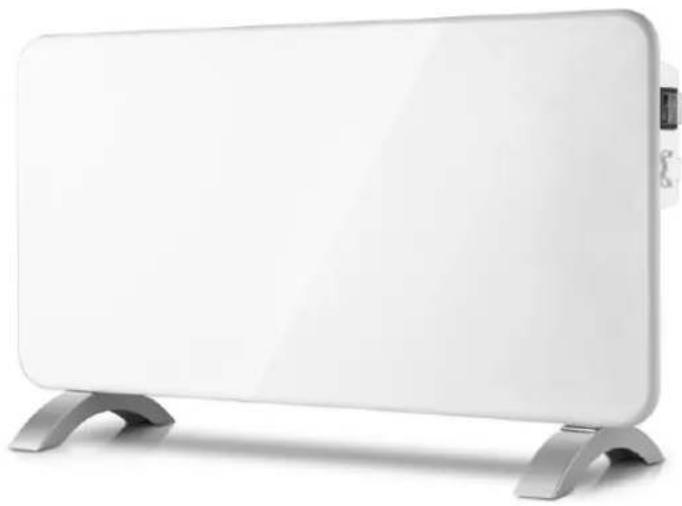
OptiHeat 2000MP
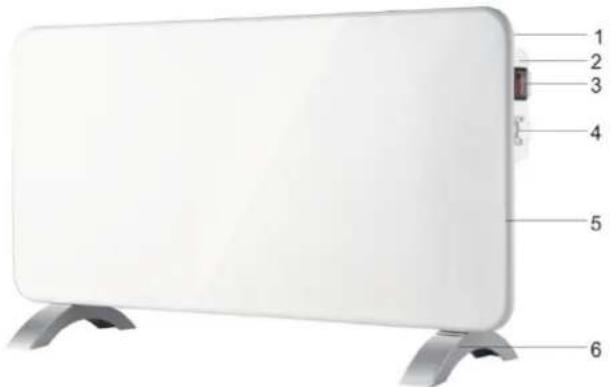
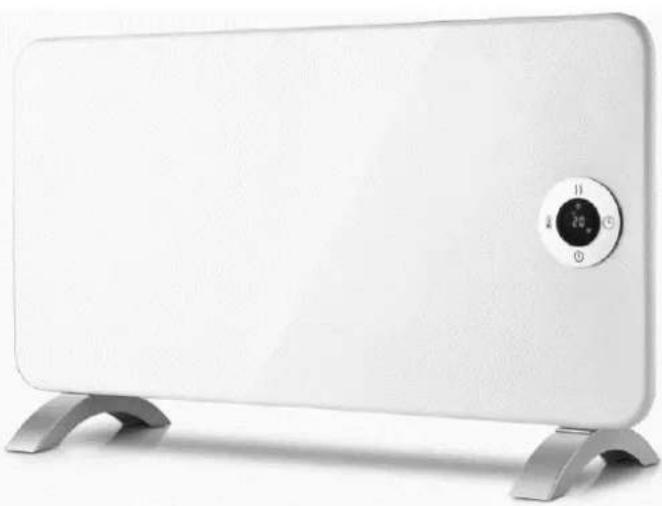
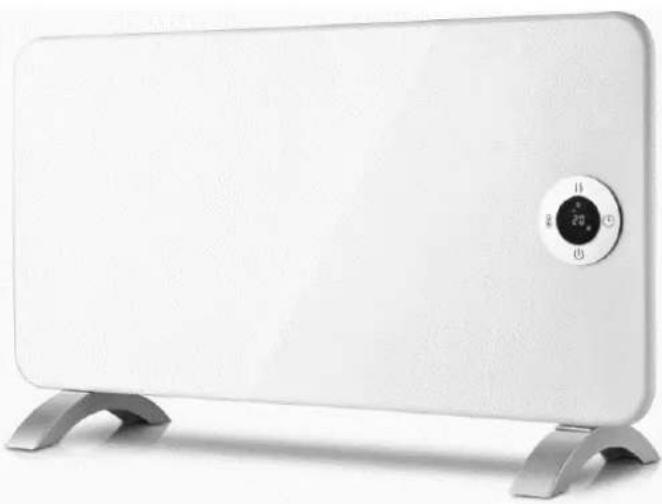
OptiHeat 2000EWP
- Back panel
- Control Panel
- Power switch
- Temperature control
- Front panel
- Feet
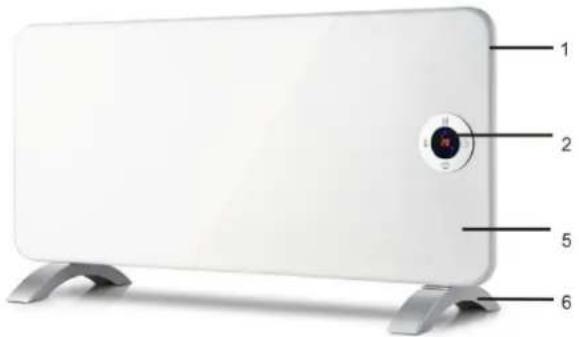
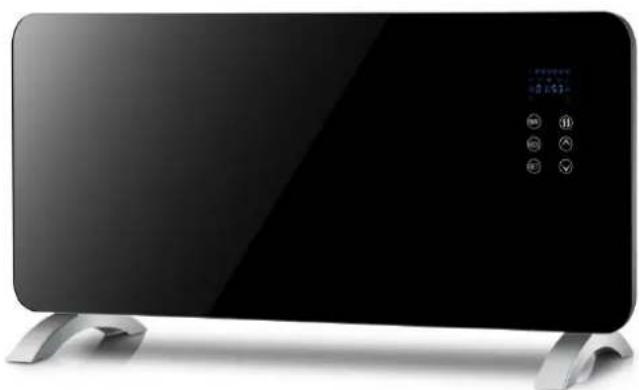
OptiHeat 2000GTPT(GTWPT)
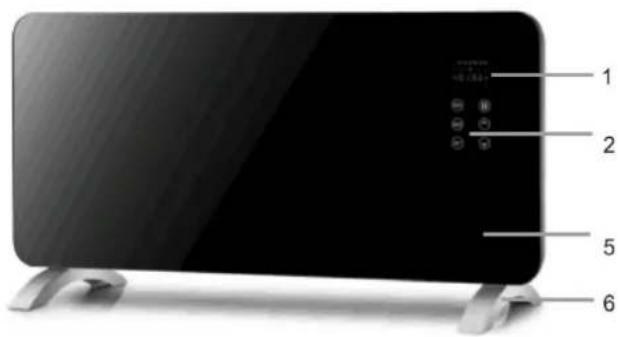
PRODUCT FEATURES
- Elegant glass panel (OptiHeat 2000GTPT(GTWPT))
- High quality aluminium heating element – quick heating with higher energy savings
- Touch control (OptiHeat 2000EWP and 2000GTPT(GTWPT))
- Timer
- Thermostat
• Mechanical control (OptiHeat 2000MP)
• LED display (OptiHeat 2000EWP and 2000GTPT(GTWPT))
• WIFI (OptiHeat 2000EWP)
INSTALLATION
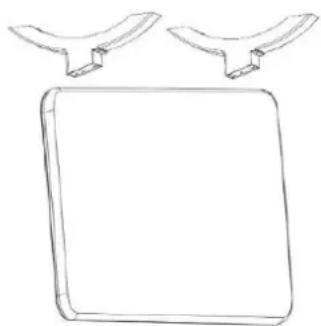
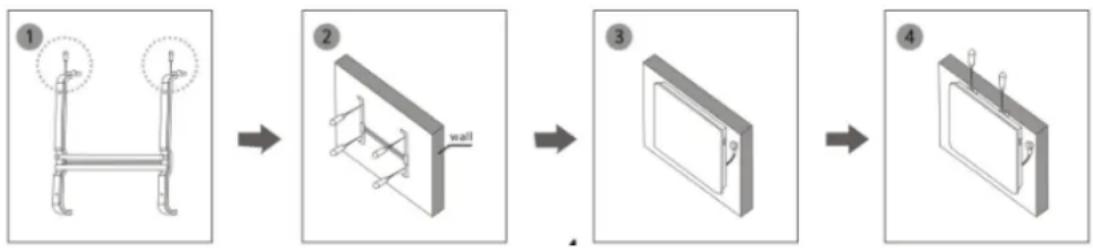
- Panel convector heaters should be wall-mounted. All the models can also be placed on their feet.
- Mount feet on the baseboard in accordance with diagram G1.
-
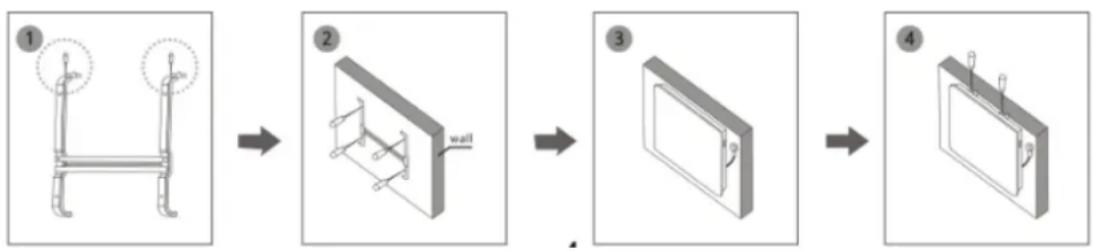
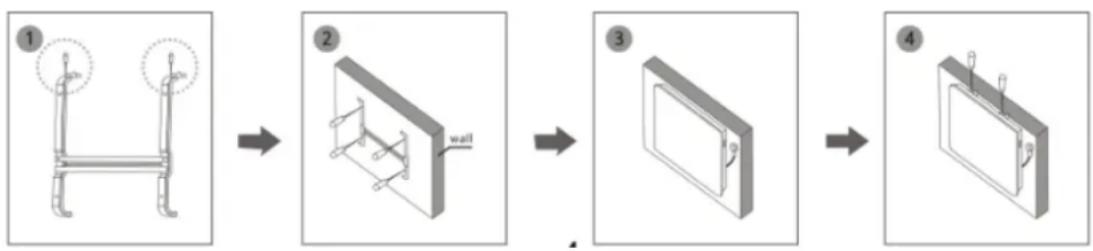
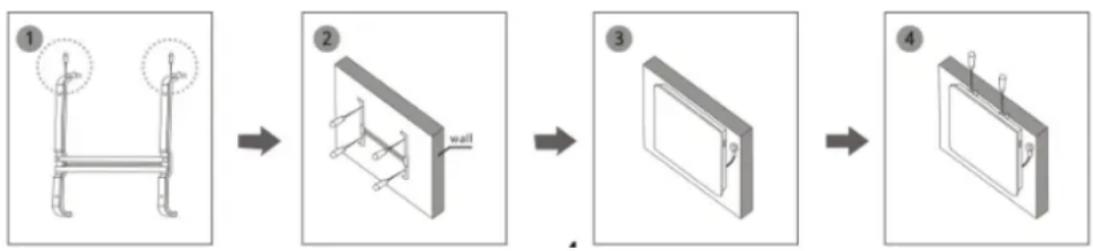
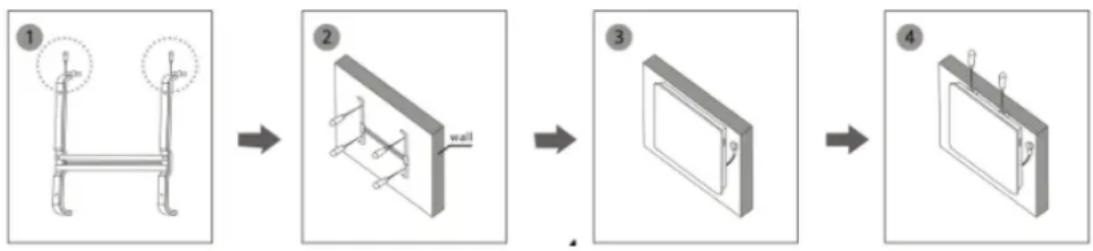
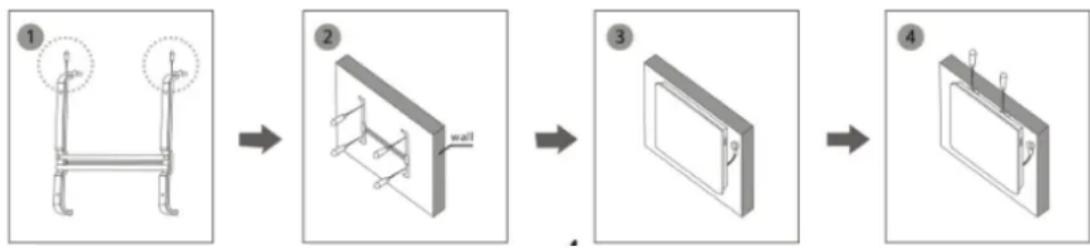
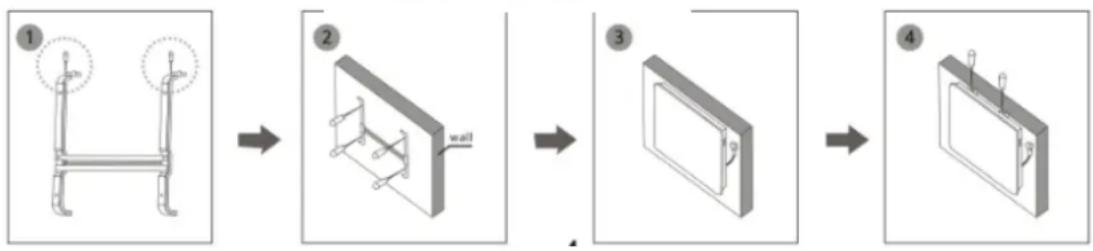
For wall mounting please see diagram G2.
-
Uninstall the bracket from the body, see Figure 1.
- Drill holes on each side on the wall, then insert the plastic anchor plugs, fix the bracket in the wall with a screw, see Figure 2.
- Place the heater into a suitable position ensuring that the holes align with the bracket, see Figure 3.
- Tighten the screw on top of the bracket, see Figure 4.
● Pay attention to the position of the convector heater with regard to other objects.
- It is forbidden to place the heater under a socket.
● The convector heater has an IP rating of IP24
- If you place the heater in a bathroom, make sure it is protected from water.
G1
natural_image
Simple line drawing of a square object with two curved blades above it (no text or symbols)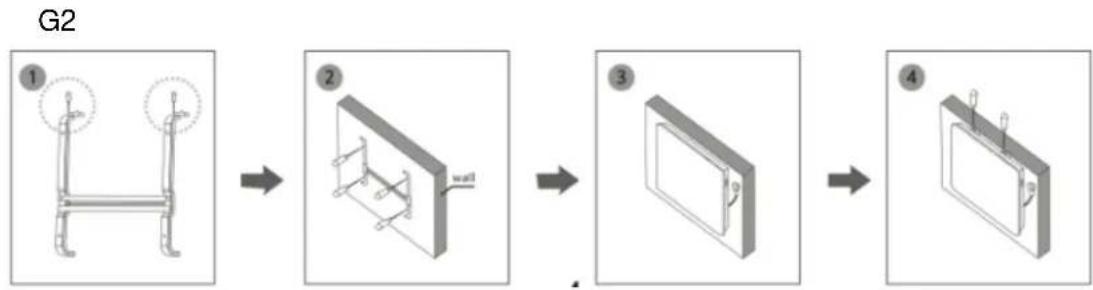
flowchart
graph LR
    A["Step 1: Initial mechanical component with circular head and ring"] --> B["Step 2: Assembly with wall"]
    B --> C["Step 3: Opening door with handle"]
    C --> D["Step 4: Final assembly with attached bracket and hook"]
INSTRUCTIONS FOR USE
Caution! Do not cover the product!
OptiHeat 2000MP
- Place the heater on a flat and stable surface.
- Switch thermostat knob in the off position.
- Plug the heater in an AC socket.
- By turning the handle of the thermostat clockwise or counterclockwise, set the required temperature. For fast heating of the room set the thermostat handle to the maximum level. As soon as the required temperature is reached, turn the thermostat handle counterclockwise until you hear a click. The heating elements will switch off. Indicator light will be also off.
- Convector heater will automatically switch on when the temperatures decrease and it will automatically switch off when the temperature increases. The heater maintains the appropriate room temperature.
- If the appliance will not be used for a longer period of time, switch it off using the power switch and pull the cable out of the plug.
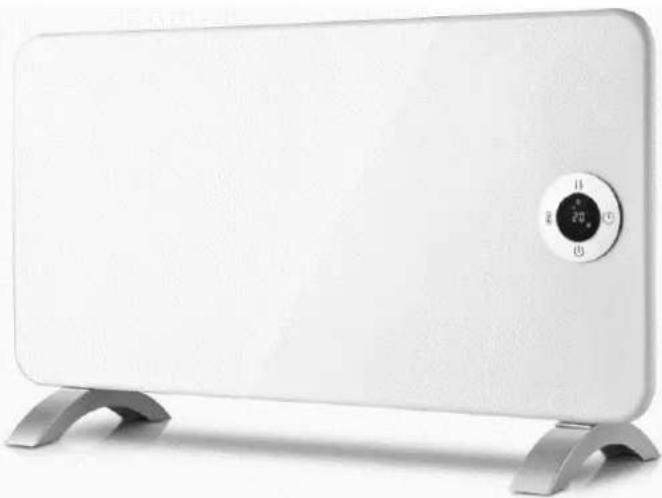
OptiHeat 2000EWP
Insert the plug in a suitable power socket.
The touch screen buttons located on the product correspond to the remote control functions:
- display
- temperature
- mode
- timer
- power
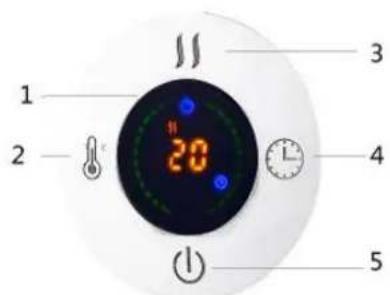
Power
When the heater is connected to the mains, press "power". The upper part of the display shows the temperature.
The heater is working at a low power.
Mode
Press "mode" to set low || or high temperature . ||
Temperature
Press the button to select the desired temperature within the range of 5^ - 40^ .
Timer
The timer button can be set to start or stop the appliance at the desired time, with a time interval between 1 hour and 24 hours.
WiFi function
- Use your phone to scan the QR code below or find the "Tuya Smart" application to download and install the app.
- Select your country code, enter the cell phone number and tap "Get" to get a message containing the verification code.
- Enter the verification code in the message and tap"Login" to log in to the app.
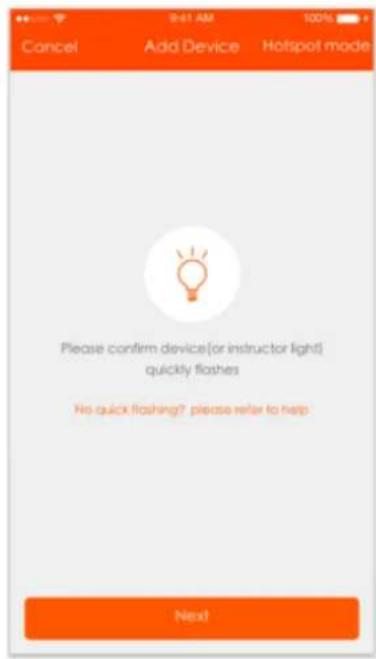
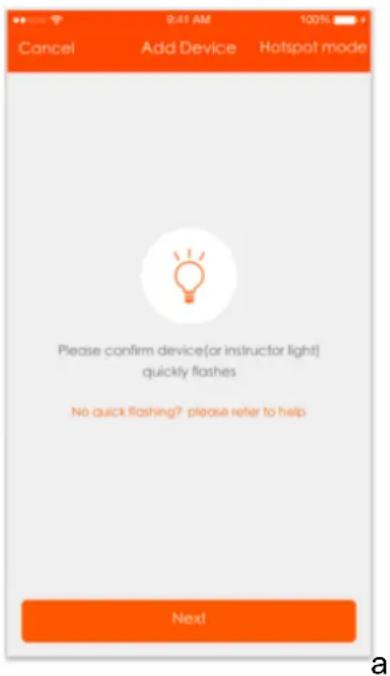
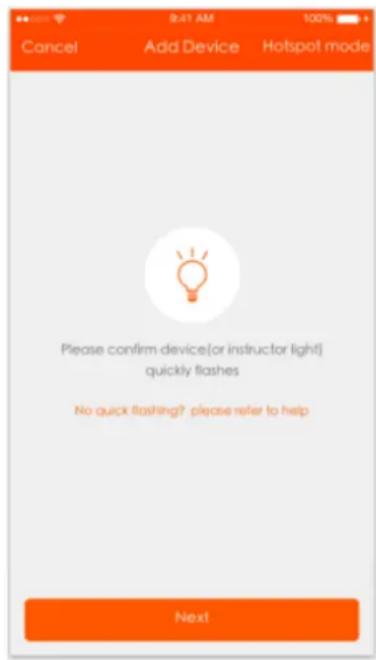
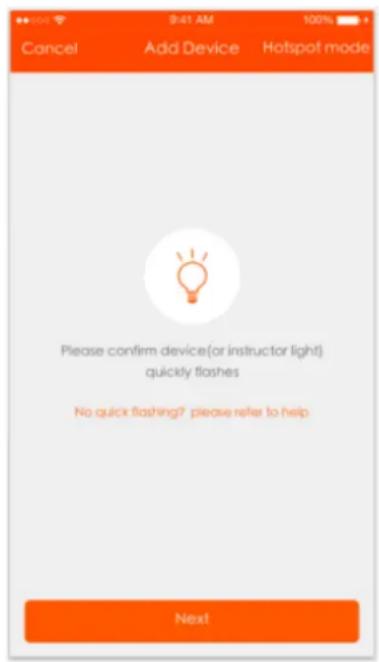
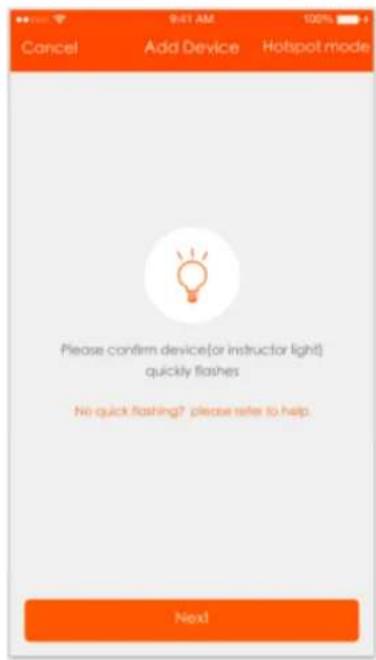
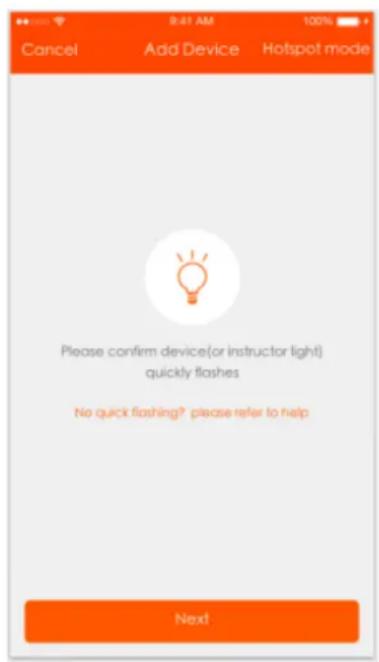
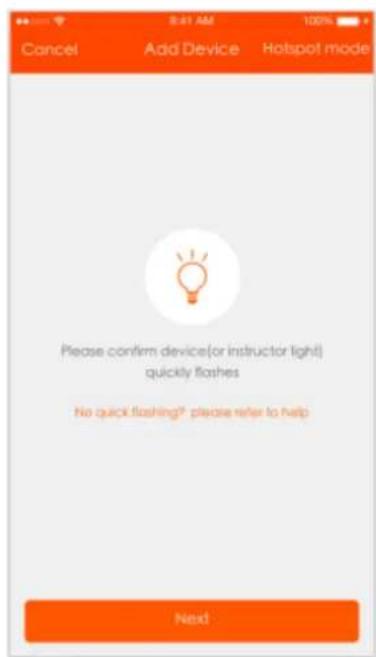
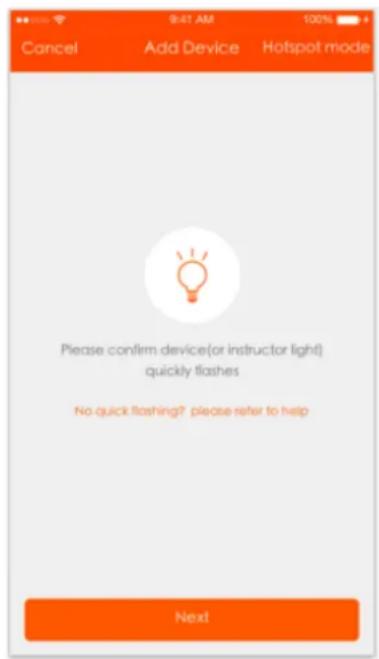
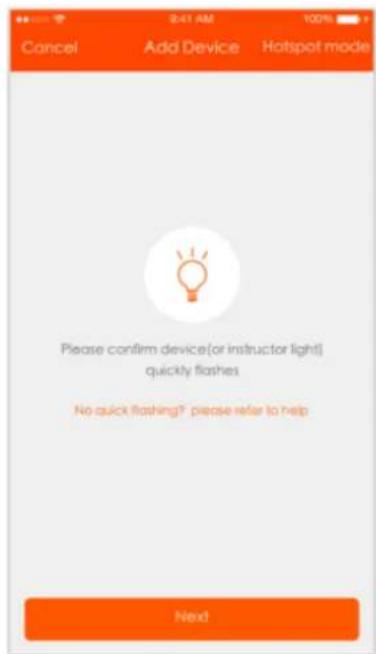
- Go to the app, tap "add device" at the bottom, as shown in Picture 1

Pic 1
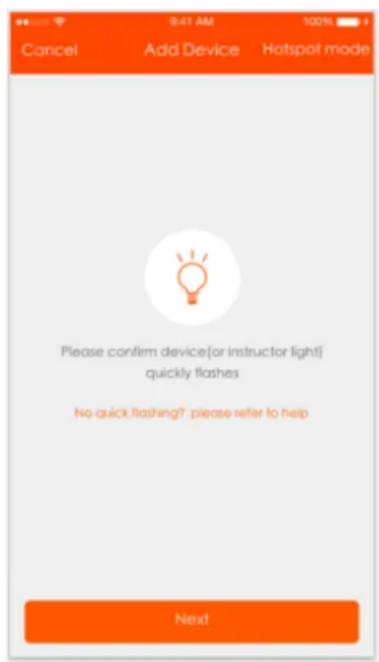
- There are two connection methods for the app (hotspot mode and quick connect mode). The default mode is the quick connect mode. Users can tap the upper right corner to switch the connection method to hotspot mode.
a. For quick connect mode, please make sure the device's control light flashes quickly.
b. For hotspot mode, please make sure the device's control light flashes slowly.
c. If the light is not flashing as described above, please press the device's reset
button 5 seconds or longer until it flashes correctly as shown in the picture below.
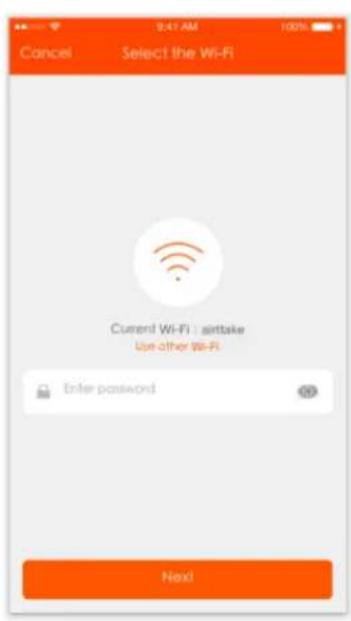
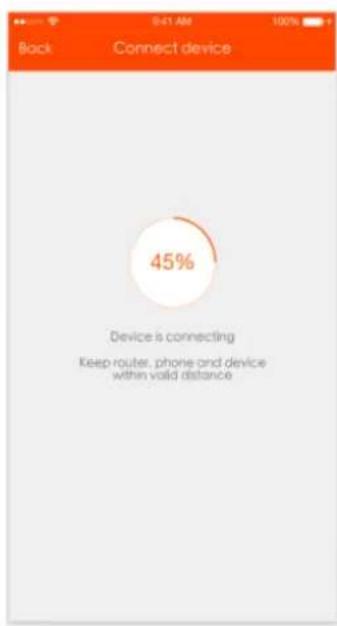
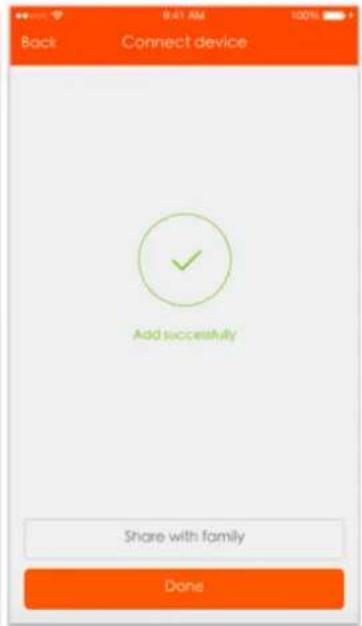
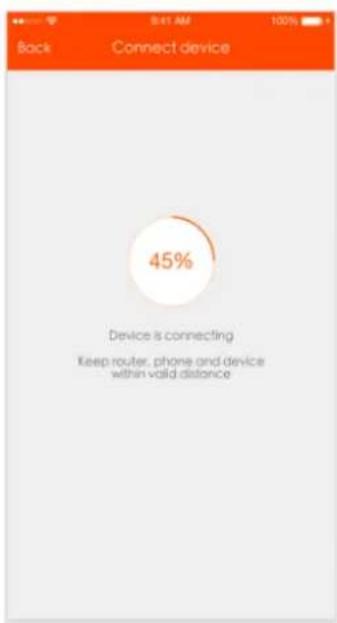
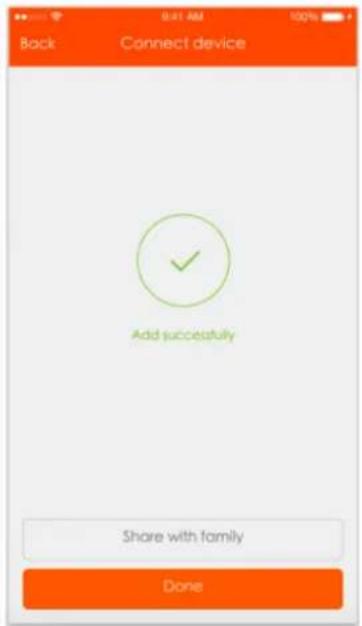
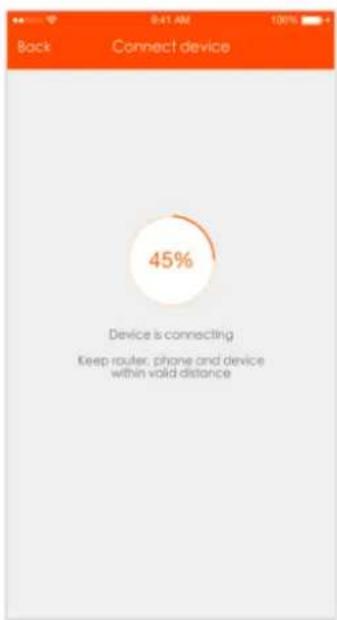
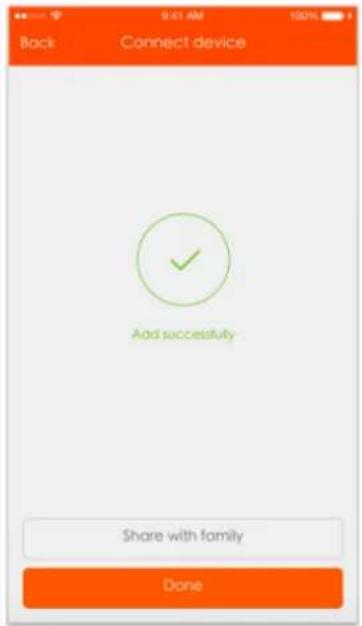
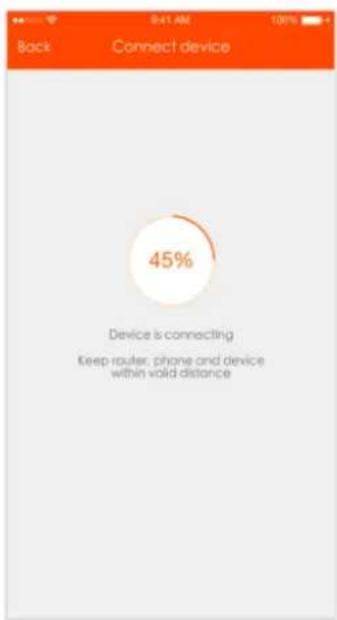
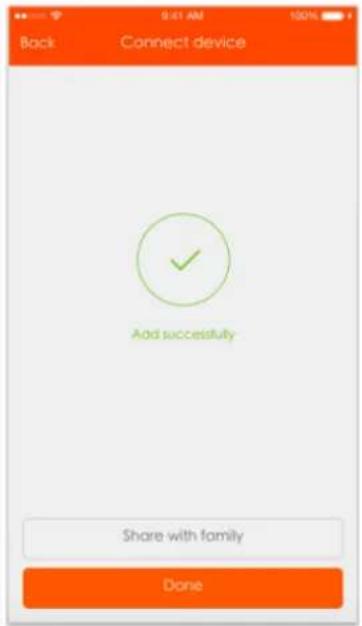
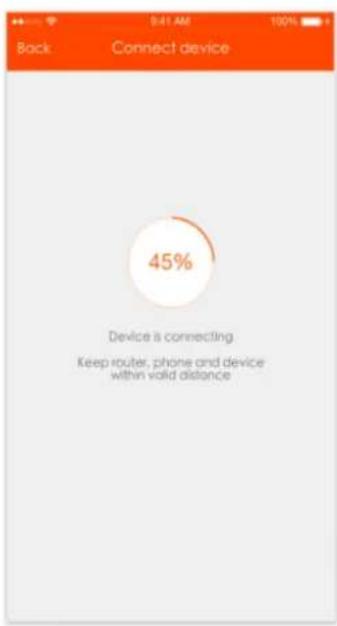
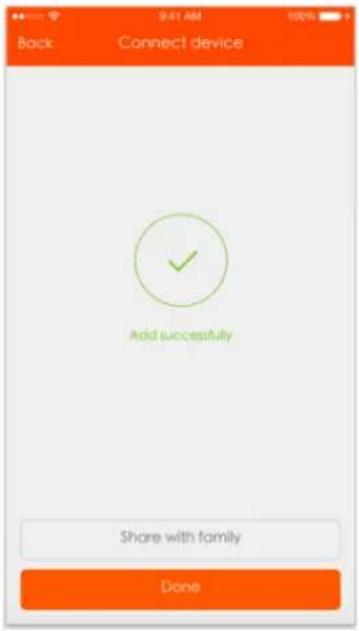
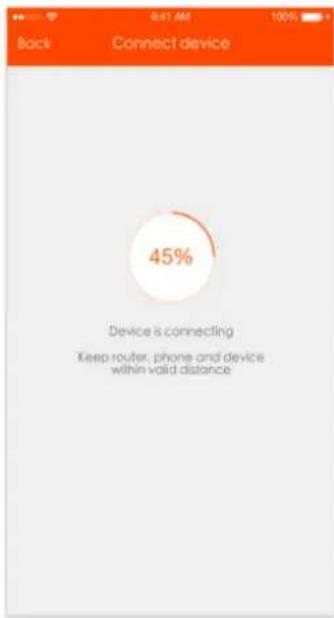
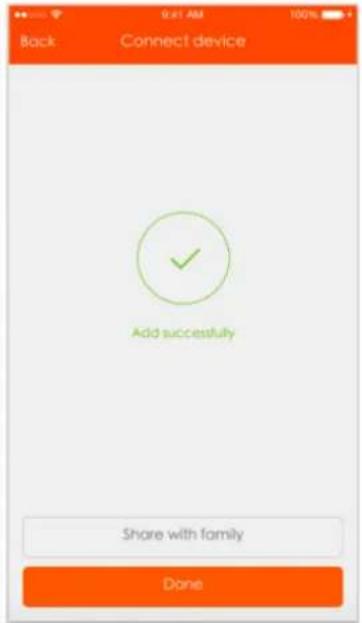
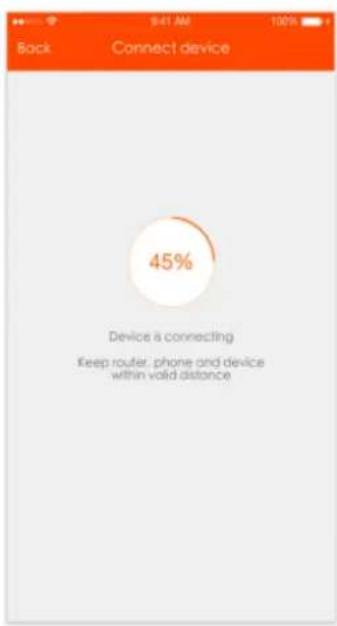
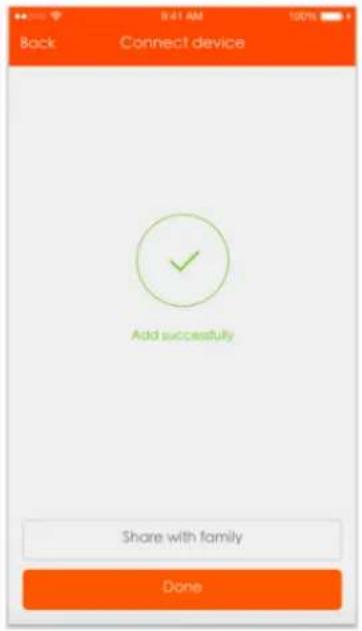
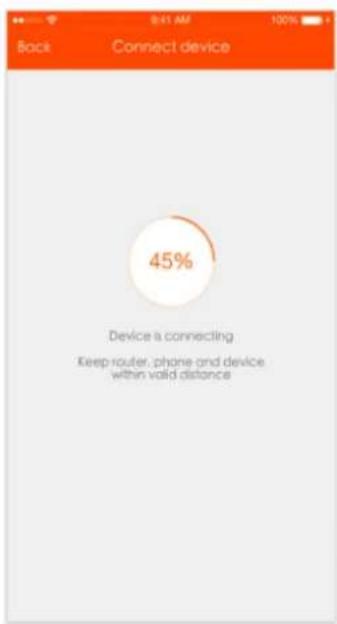
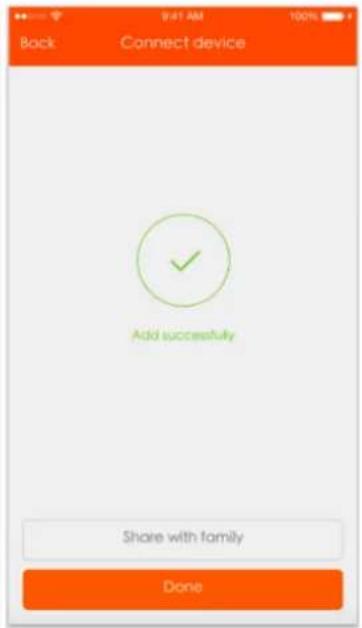
- Select Wi-Fi, enter the password and tap "Next", as shown in Picture 2 below. For quick connect mode, the App interface will go through the changes during the network configuration of the process as shown in Picture 3. Picture 4 shows the interface when the device is connected successfully.
Pic 2
Pic 3
Pic 4
- After the device is connected successfully, tap "Devices" at the bottom. The device name is shown on the list in Picture 5. Tap it to enter the control panel of the smart socket.
Notes:
When the device is online, there will be a green dot in front of the device icon;
When the device is offline, the dot will be grey;
If the device is shared with others, a double loop will be shown.
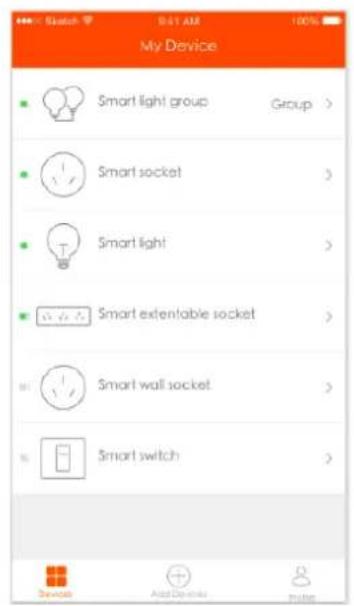
Pic 5
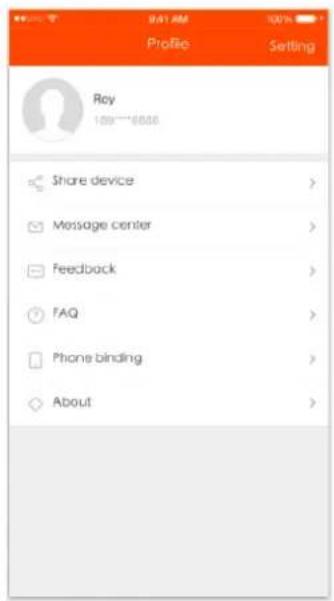
Pic 6
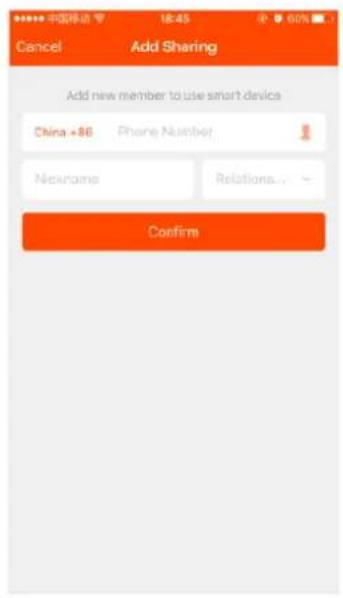
Pic 7
- "My profile" is where users can manage personal information. The key information is displayed in picture 6:
a. Personal information: including account name and cell phone number
b. Information on shared devices
c. Message center
d. Entry to submit feedback
e.F.A.Q
f. Phone binding: if you sign in with a social network account, you must bind your phone number with your account
g. About
- Add sharing: As shown in the picture, users can enter a new member's cell phone number and share the device with him or her. The new member can control the device using his or her own account, see Picture 7.
Operating sound
The appliance emits a beep upon each operation setting.
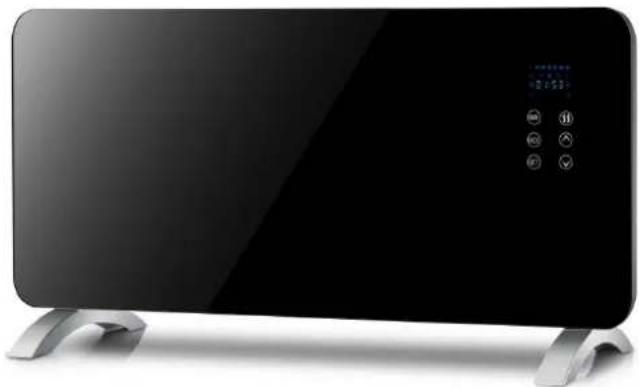
OptiHeat 2000GTPT (GTWPT)
Insert the plug into a suitable AC socket with the same voltage as shown on its rating plate.
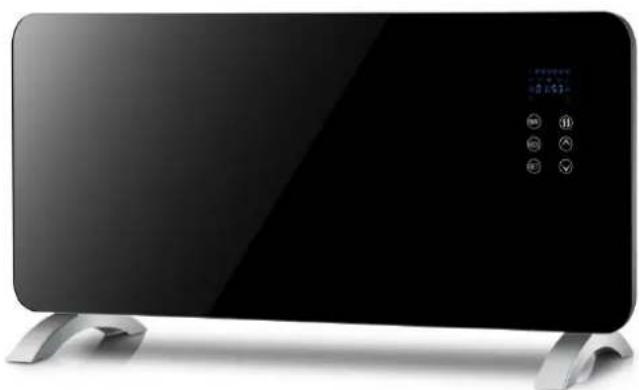
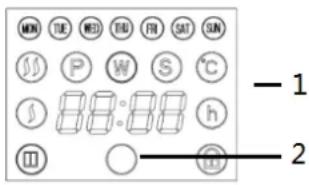
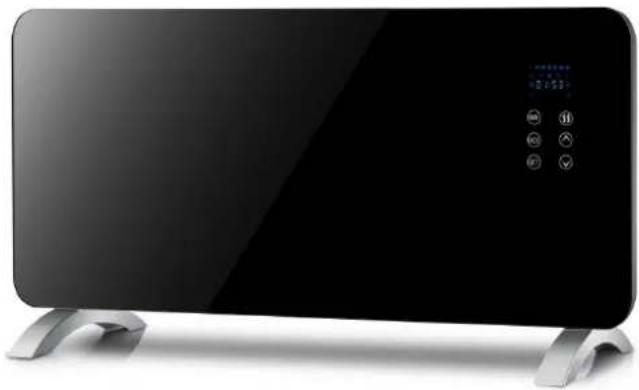
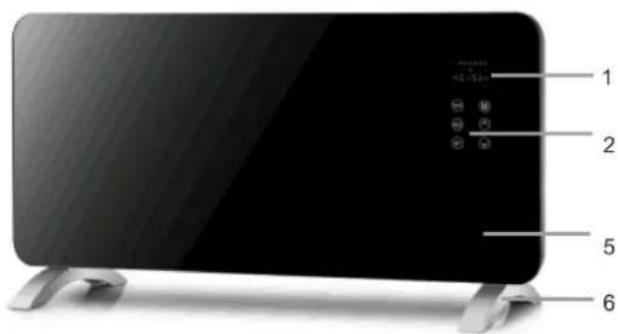
The touch screen buttons located on the product correspond to the remote control functions:
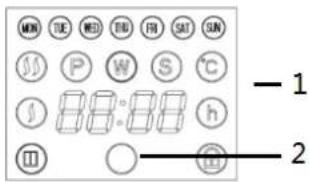
- Display
- Receiver
- Minutes button
- Mode button
- Setting button
- Heating button
- Temperature“+” button
- Temperature“-” button
Standby Mode
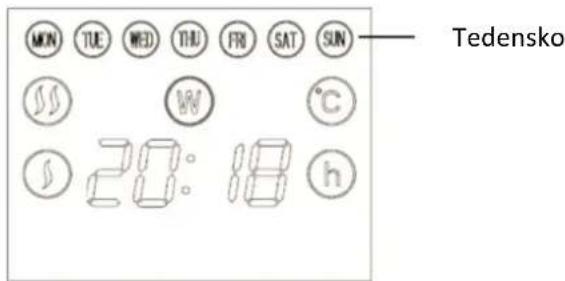
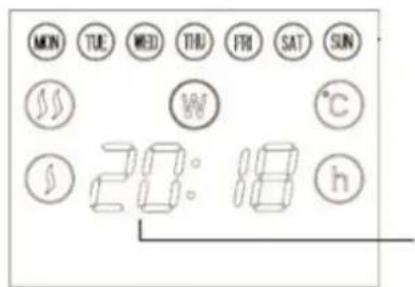
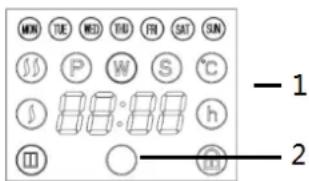
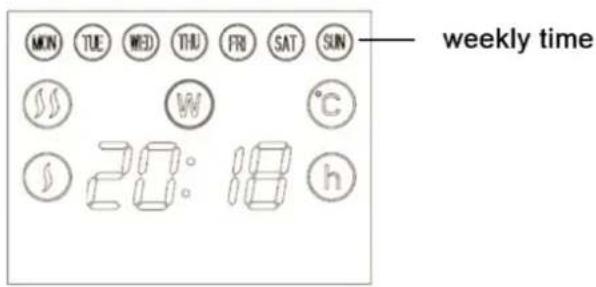
First switch on the heater using the switch on the side. The display is as shown in image 1, i.e. standby mode, no heating, is shown on the display.
To set the hours, hold the MODE button, to set minutes hold the MIN button, to set the day, hold the SET button, see image 1.
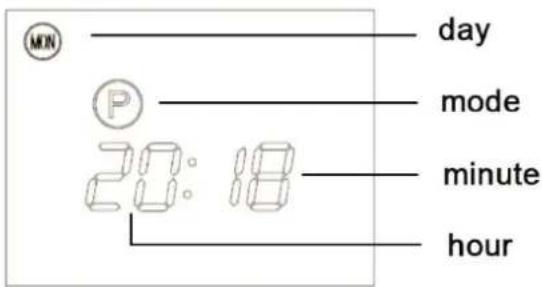
Image 1
Work Mode
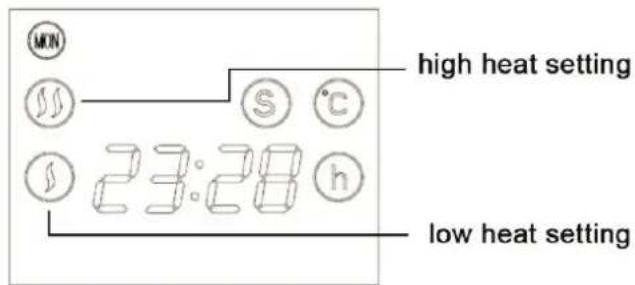
Press to switch from standby mode to work mode, the display is shown below in image 2, is displayed on the screen.
Press the 🎩 button to set a higher or lower temperature of heating. A lower temperature is set when is shown on the screen, and a higher temperature is set when is shown on the screen. See image 2.
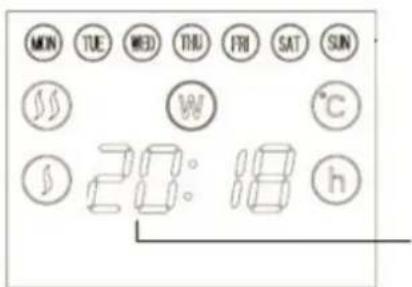
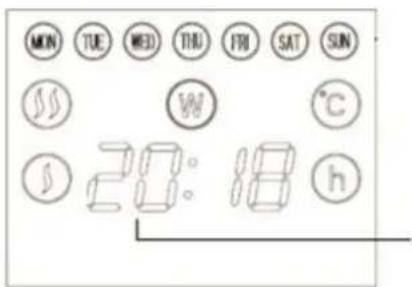
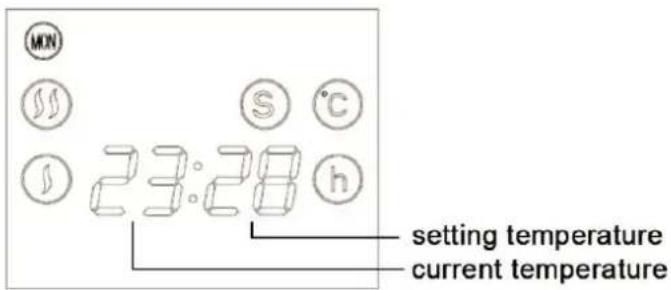
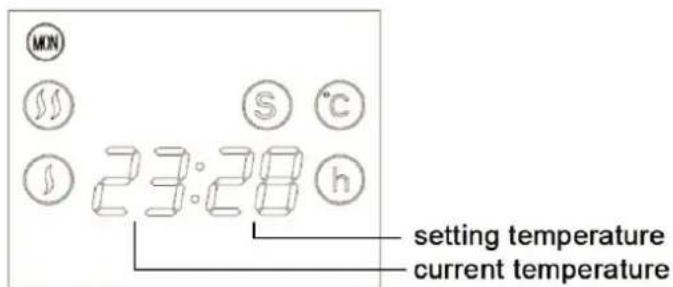
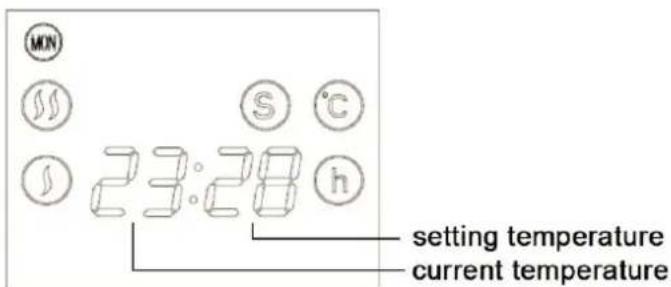
Press or button to select the desired temperature from a range of 5^ - 40^ . The temperature is shown by means of two numbers. The two numbers on the left show the current temperature, while the numbers on the right show the set temperature, see image 3.
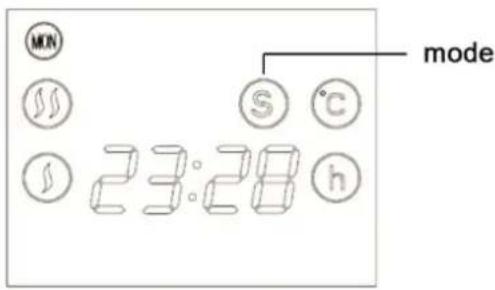
Image 2
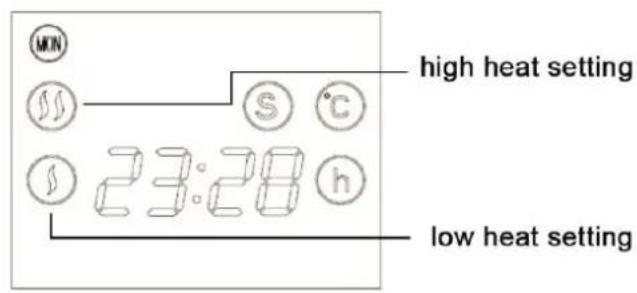
Image 3
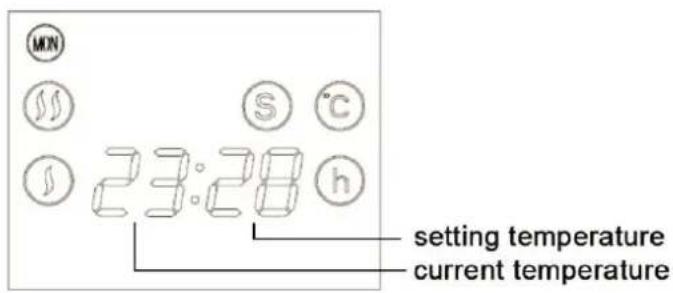
Image 4
Weekly timer Mode
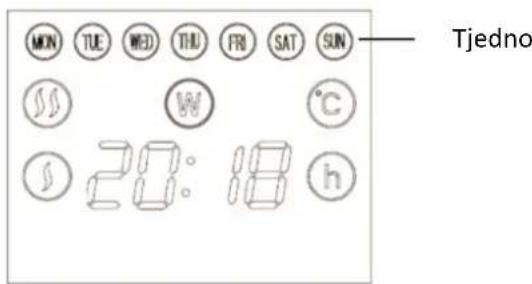
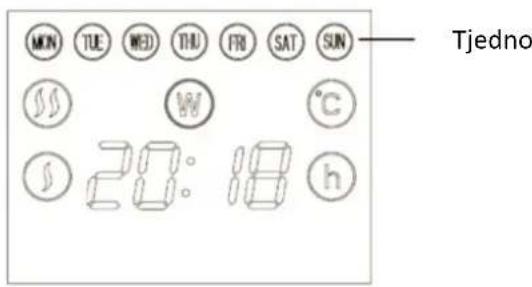
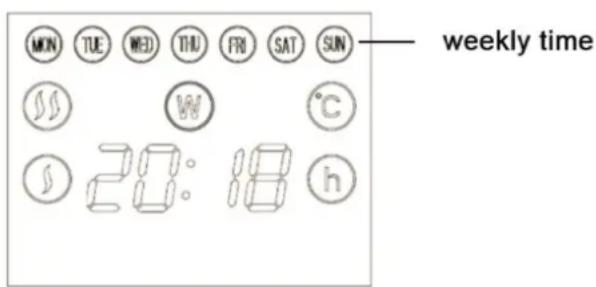
Press to change the mode from standby mode to work mode, image 5 shows the display. is displayed on the screen.
Press the MODE button to select between the following pre-programmed heating periods. See image 6.
- Mon. to Fri.
- Mon. to Sat.
- Every day
- Mon., Wed., Fri.
- Tues., Thur., Sat.
- Weekend
- Mon. to Wed.
- Thur. to Sat.
- All normal.
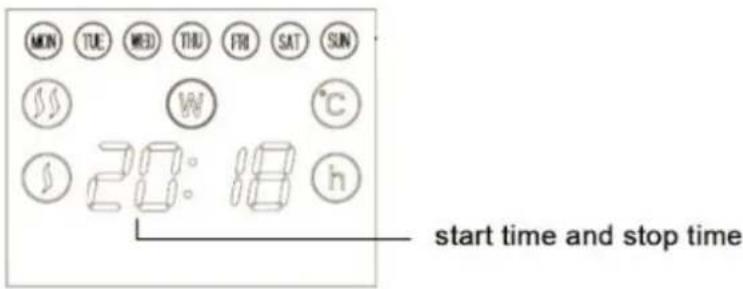
Press the button to set the start time, and press the button to set the stop
time. For example, press button to set the clock to 9:00. This means the heater will operate from 0:00 to 9:00. Then press the button to set the stop time. If you
set the time to 12:00, the heater will switch off at 12:00. Then press and again until the 24 hour setting is finished. When the setting is completed, the current time will be displayed. See image 7.
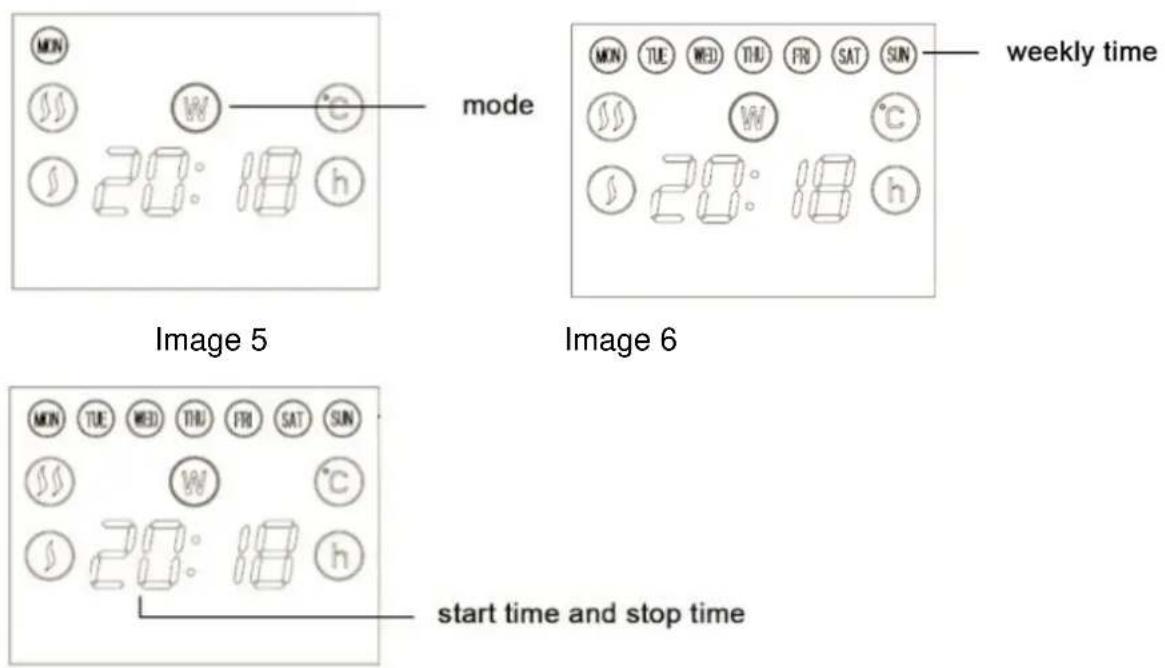
Image 7
Child lock
Hold the button until is displayed on the screen and the device can no longer be operated. To terminate the child lock function, repeat the process.
Remote control and control panel:
- "SET" P, W, S are three modes to select and set the current week.
- "MODE" Select week.
- “” Set child lock.
- “ ” Adjust the power.
- “ ⬇ ” Set the operation time and increase the temperature.
- “√” Set the operation time and decrease temperature.
Operating sound
The appliance emits a beep upon each operation setting.
CLEANING
- Before cleaning the appliance pull the plug out of the socket and wait until it cools down.
- Do not use abrasives and solvents. Wipe the product with a soft damp cloth.
- Remove dust from the surface regularly.
- Do not wash the product or place it in water!
- If you are not going to use the heater for a long period of time, wipe it clean and store it in a box.
- The appliance should be placed in a dry and ventilated room. Avoid high humidity and mechanical impacs on the appliance
Attention! The manufacturer does not assume any liability for any damage caused directly or indirectly by not following this instruction manual, general safety rules, or interference in the construction of the product.
This marking indicates that this product should not be disposed with other household wastes throughout the EU. To prevent possible harm to the environment or human health from uncontrolled waste disposal, recycle it responsibly to promote the sustainable reuse of material resources. To return your used device, please use the return and collection systems or contact the retailer
where the product was purchased. They can take this product for environmental safe recycling.
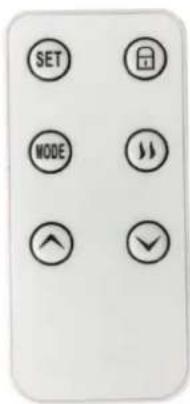
Table 2
Requirements for electric local space heaters
| Model identifier(s): OptiHeat 2000 MP | ||||||
| Item | Symbol | Value | Unit | Item | Unit | |
| Heat output | Tpye of heat input, for electric storage local space heaters only (select one) | |||||
| Nominal heat output | P_nom | 2.0 | kW | manual heat charge control, with integrated thermostat | [no] | |
| Minimum heat output (indicative) | P_min | 1.0 | kW | manual heat charge control with room and/or outdoor temperature feedback | [no] | |
| Maximum continuous heat output | P_max,c | 2.0 | kW | electronic heat charge control with room and/or outdoor temperature feedback | [no] | |
| Auxiliary electricity consumption | fan assisted heat output | [no] | ||||
| At nominal heat output | el_max | 2.0 | kW | Type of heat output/room temperature control (select one) | ||
| At minimum heat output | el_min | 1.0 | kW | single stage heat output and no room temperature control | [no] | |
| In standby mode | el_SB | 0 | kW | Two or more manual stages, no room temperature control | [no] | |
| with mechanic thermostat room temperature control | [yes] | |||||
| with electronic room temperature control | [no] | |||||
| electronic room temperature control plus day timer | [no] | |||||
| electronic room temperature control plus week timer | [no] | |||||
| Other control options (multiple selections possible) | ||||||
| room temperature control, with presence detection | [no] | |||||
| room temperature control, with open window detection | [no] | |||||
| with distance control option | [no] | |||||
| with adaptive start control | [no] | |||||
| with working time limitation | [no] | |||||
| with black bulb sensor | [no] | |||||
| Contact details | Gorenje gospodinski aparati, d.o.o. | |||||
Requirements for electric local space heaters
| Model identifier(s): OptiHeat 2000 EWP | ||||||
| Item | Symbol | Value | Unit | Item | Unit | |
| Heat output | Tpye of heat input, for electric storage local space heaters only (select one) | |||||
| Nominal heat output | P_nom | 2.0 | kW | manual heat charge control, with integrated thermostat | [no] | |
| Minimum heat output (indicative) | P_min | 0.001 | kW | manual heat charge control with room and/or outdoor temperature feedback | [no] | |
| Maximum continuous heat output | P_max,c | 2.0 | kW | electronic heat charge control with room and/or outdoor temperature feedback | [no] | |
| Auxiliary electricity consumption | fan assisted heat output | [no] | ||||
| At nominal heat output | el_max | 0 | kW | Type of heat output/room temperature control (select one) | ||
| At minimum heat output | el_min | 0 | kW | single stage heat output and no room temperature control | [no] | |
| In standby mode | els8 | 0.001 | kW | two or more manual stages, no room temperature control | [no] | |
| with mechanic thermostat room temperature control | [no] | |||||
| with electronic room temperature control | [no] | |||||
| electronic room temperature control plus day timer | [no] | |||||
| electronic room temperature control plus week timer | [yes] | |||||
| Other control options (multiple selections possible) | ||||||
| room temperature control, with presence detection | [no] | |||||
| room temperature control, with open window detection | [no] | |||||
| with distance control option | [yes] | |||||
| with adaptive start control | [no] | |||||
| with working time limitation | [no] | |||||
| with black bulb sensor | [no] | |||||
| Contact details | Gorenje gospodinjski aparati, d.o.o. | |||||
Requirements for electric local space heaters
| Model identifier(s): OptiHeat 2000 GTPT / OptiHeat 2000 GTWPT | ||||||
| Item | Symbol | Value | Unit | Item | Unit | |
| Heat output | Tpye of heat input, for electric storage local space heaters only (select one) | |||||
| Nominal heat output | P_nom | 2.0 | kW | manual heat charge control, with integrated thermostat | [no] | |
| Minimum heat output (indicative) | P_min | 0 | kW | manual heat charge control with room and/or outdoor temperature feedback | [no] | |
| Maximum continuous heat output | P_max,c | 2.0 | kW | electronic heat charge control with room and/or outdoor temperature feedback | [no] | |
| Auxiliary electricity consumption | fan assisted heat output | [no] | ||||
| At nominal heat output | el_max | -- | kW | Type of heat output/room temperature control (select one) | ||
| At minimum heat output | el_min | -- | kW | single stage heat output and no room temperature control | [no] | |
| In standby mode | eI_SB | 0.001742 | kW | two or more manual stages, no room temperature control | [no] | |
| with mechanic thermostat room temperature control | [no] | |||||
| with electronic room temperature control | [no] | |||||
| electronic room temperature control plus day timer | [no] | |||||
| electronic room temperature control plus week timer | [yes] | |||||
| Other control options (multiple selections possible) | ||||||
| room temperature control, with presence detection | [no] | |||||
| room temperature control, with open window detection | [no] | |||||
| with distance control option | [no] | |||||
| with adaptive start control | [yes] | |||||
| with working time limitation | [yes] | |||||
| with black bulb sensor | [no] | |||||
| Contact details | Gorenje gospodinski aparati, d.o.o. | |||||
OptiHeat 2000MP
natural_image
White rectangular solar heating device with silver base (no visible text or symbols)OptiHeat 2000EWP
natural_image
White rectangular solar heating device with a digital display and metal base (no visible text or symbols)OptiHeat 2000GTP(GTWPT)
natural_image
Exterior view of a modern flat-screen electric heater with control buttons and display screen (no text or symbols visible)TEHNIČNE SPECIFIKACIJE
| Podatki | OptiHeat 2000MP | OptiHeat 2000EWP | OptiHeat 2000GTP(GTWPT) |
| Napetost | 220-240 V~ | 220-240 V~ | 220-240 V~ |
| Frekvenca | 50/60 Hz | 50/60 Hz | 50/60 Hz |
| Moč | 1000/2000 W | 1000/2000 W | 1000/2000 W |
| IP Vodotesnost | IP24 | ||

POMEMBNO
natural_image
Simple line drawing of a square object with two curved metal clips above it, labeled G1 (no text or symbols on the object itself)G2
flowchart
graph LR
    A["Step 1: Frame 1 with circular head and loop"] --> B["Step 2: Wall with internal components"]
    B --> C["Step 3: Panel with door and valve"]
    C --> D["Step 4: Panel with circuit breakers and wires"]
Opozorilo! Izdelka ne pokrivajte!
OptiHeat 2000MP
- Sta dva načina načina povezave (način vstopne t povezave). Privzeti način je način hitre povezave. U zgornji desni vogal, da preklopite način povezave na
Pic 1
a. Za način hitre povezave preverite, da kontrolna lučka naprave hitro utripa.
b. Za način hotspot preverite, da kontrolna lučka naprave počasi utripa.
c. Če lučka ne utripa, kot je navedeno zgoraj, pritisnite tipko za ponastavitev
Slika 2
Slika 3
Slika 4
Slika 7
- "Moj profil" vam omogoča urejanje osebnih informacij. Ključne informacije so prikazane na sliki 6:
OptiHeat 2000GTPT (GTWPT)
3—

[Non-Text]
-6
4—

[NO TEXT]
-7
5—

↓
-8
Skica 5
Skica 6
Zvok za delovanje
natural_image
White rectangular solar heating device with silver base (no visible text or symbols)OptiHeat 2000EWP
natural_image
White rectangular solar heating device with a digital display and metal base (no visible text or symbols)OptiHeat 2000GTP(GTWPT)
natural_image
Exterior view of a modern flat-screen TV or appliance with control buttons and display screen (no visible text or symbols)TEHNIČKE SPECIFIKACIJE
| Podaci | OptiHeat 2000MP | OptiHeat 2000EWP | OptiHeat 2000GTP(GTWPT) |
| Napon | 220-240 V~ | 220-240 V~ | 220-240 V~ |
| Frekvencija | 50/60 Hz | 50/60 Hz | 50/60 Hz |
| Snaga | 1000/2000 W | 1000/2000 W | 1000/2000 W |
| IP stupanj vodootpornosti | IP24 | ||

VAŽNO
natural_image
Simple line drawing of a square object with two curved metal clips above it, labeled G1 (no text or symbols on the object itself)G2
flowchart
graph LR
    A["Step 1: Frame 1 with circular head and loop"] --> B["Step 2: Wall with internal components"]
    B --> C["Step 3: Panel with door and valve"]
    C --> D["Step 4: Panel with circuit breakers and wires"]
Pic 1
Slika 2.
Slika 3.
Slika 4.
Slika 7.
OptiHeat 2000GTPT (GTWPT)
Umetnite utikač u odgovarajuću mrežnu utičnicu na instalaciji naizmjenične struje s naponom koji je jednak naponu navedenom na natpisnoj pločici.
Tipke zaslona na dodir odgovaraju funkcijama daljinskog upravljanja:
3—


-1
4—


-7
5—


-8
- Zaslon
- Prijamnik
- Minute
- Tipka za odabir načina rada
- Tipka za podešavanje
- Tipka za zagrijavanje
- Temperatura“+”
- Temperatura“-”
Stanje pripravnosti
Skica 5.
Skica 6.
natural_image
White rectangular solar heating device with silver base (no visible text or symbols)OptiHeat 2000EWP
natural_image
White rectangular solar heating device with a digital display and metal base (no visible text or symbols)OptiHeat 2000GTP(GTWPT)
natural_image
Exterior view of a modern flat-screen electric heater with control buttons and display screen (no text or symbols visible)TEHNIČKE SPECIFIKACIJE
| Podaci | OptiHeat 2000MP | OptiHeat 2000EWP | OptiHeat 2000GTP(GTWPT) |
| Napon | 220-240 V~ | 220-240 V~ | 220-240 V~ |
| Frekvencija | 50/60 Hz | 50/60 Hz | 50/60 Hz |
| Snaga | 1000/2000 W | 1000/2000 W | 1000/2000 W |
| IP stupanj vodootpornosti | IP24 | ||

VAŽNO
natural_image
Simple line drawing of a square object with two curved metal clips above it, labeled G1 (no text or symbols on the object itself)G2
flowchart
graph LR
    A["Step 1: Frame 1 with circular head and loop"] --> B["Step 2: Wall with internal components"]
    B --> C["Step 3: Panel with door and valve"]
    C --> D["Step 4: Panel with circuit breakers and wires"]
Slika 2.
Slika 3.
Slika 4.
Slika 7.
OptiHeat 2000GTPT (GTWPT)
Umetnite utikač u odgovarajuću mrežnu utičnicu na instalaciji naizmjenične struje s naponom koji je jednak naponu navedenom na natpisnoj pločici.
Tipke zaslona na dodir odgovaraju funkcijama daljinskog upravljanja:
3—


-6
4—


-7
5—


-8
- Zaslon
- Prijamnik
- Minute
- Tipka za odabir načina rada
- Tipka za podešavanje
- Tipka za zagrijavanje
- Temperatura“+“
- Temperatura“-”
Stanje pripravnosti
Skica 5.
Skica 6.
natural_image
White rectangular solar heating device with silver base (no visible text or symbols)OptiHeat 2000EWP
natural_image
White rectangular solar heating device with a circular control knob and metallic base (no visible text or symbols)OptiHeat 2000GTP(GTWPT)
natural_image
Exterior view of a modern flat-screen digital TV or appliance with control buttons and display screen (no visible text or symbols)natural_image
Simple line drawing of a square object with two curved blades above it (no text or symbols)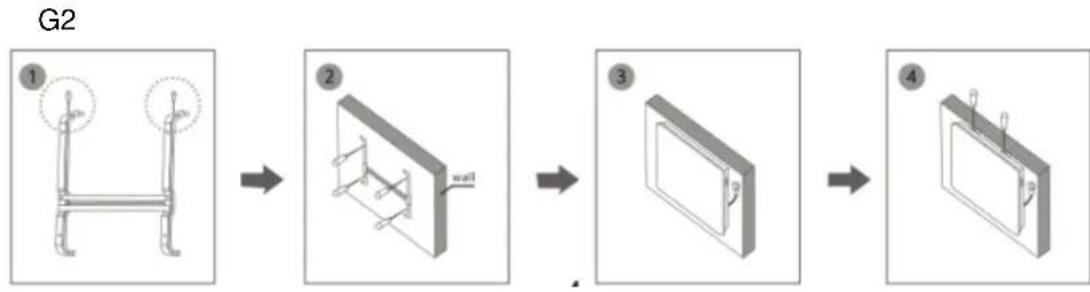
flowchart
graph LR
    A["Step 1: L-shaped bracket with circular ends"] --> B["Step 2: Wall-mounted bracket with internal structure"]
    B --> C["Step 3: Panel mounted on wall"]
    C --> D["Step 4: Panel mounted on panel with attached wires"]
Pic 1
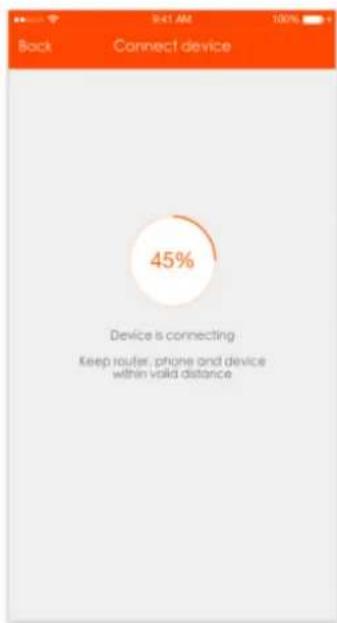
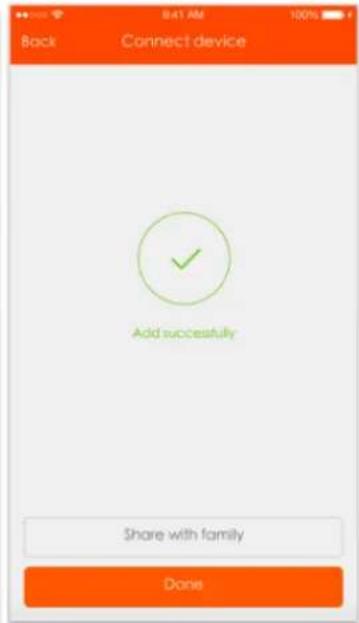
Рис. 7
OptiHeat 2000GTPT (GTWPT)
3—


-6
4—


-7
5—


-8
ОЧИСТКА
natural_image
White rectangular solar heating device with metallic base (no visible text or symbols)OptiHeat 2000EWP
natural_image
White rectangular solar heating device with a digital display and metal base (no visible text or symbols)OptiHeat 2000GTP(GTWPT)
natural_image
Exterior view of a modern black electric heater with control panel and display (no visible text or symbols)TECHNICKÉ PARAMETRY
| Podrobnosti | OptiHeat 2000MP | OptiHeat 2000EWP | OptiHeat 2000GTP(GTWPT) |
| Napětí | 220-240V~ | 220-240V~ | 220-240V~ |
| Kmitočet | 50/60Hz | 50/60Hz | 50/60Hz |
| Napájení | 1000/2000W | 1000/2000W | 1000/2000W |
| IP voděodolné | IP24 | ||

DŮLEŽITÉ
natural_image
Simple line drawing of a square object with two curved metal brackets above it, labeled G1 (no text or symbols on the object itself)G2
flowchart
graph LR
    A["1 Top View"] --> B["2 Wall"]
    B --> C["3 Panel"]
    C --> D["4 Panel"]
Pic 1
obr 2
obr 3
obr 4
obr 7
OptiHeat 2000GTPT (GTWPT)
3—


-6
4—


-7
5—


-8
Obrázek 3
Obrázek 4
Nastavená teplota
Aktuální teplota
ČIŠTĚNÍ
natural_image
White rectangular solar heating device with metallic base (no visible text or symbols)OptiHeat 2000EWP
natural_image
White rectangular solar heating device with a digital display and metal base (no visible text or symbols)OptiHeat 2000GTP(GTWPT)
natural_image
Exterior view of a modern black electric heater with control panel and display (no visible text or symbols)SPECYFIKACJA TECHNICZNA:
natural_image
Simple line drawing of a square object with two curved shapes above it, labeled G1 (no text or symbols on the object itself)G2
flowchart
graph LR
    A["Frame 1: Top view"] --> B["Step 2: Wall with internal components"]
    B --> C["Step 3: Panel with internal structure"]
    C --> D["Step 4: Panel with internal components"]
Pic 1
Rysunek 2
Rysunek 3
Rysunek 4
OptiHeat 2000GTPT (GTWPT)
3—


-1
4—


-7
5—


-8
(setting temperature – temperature
zadana, current temperature – obecna temperatura)
Szkic nr 4
natural_image
White rectangular solar heating device with metallic base (no visible text or symbols)OptiHeat 2000EWP
natural_image
White rectangular solar heating device with a circular control knob and metal base (no visible text or symbols)OptiHeat 2000GTP(GTWPT)
natural_image
Exterior view of a modern black electric heater with control buttons and display screen (no visible text or symbols)natural_image
Simple line drawing of a square object with two curved shapes above it (no text or symbols)G2
flowchart
graph LR
    A["1: Top view"] --> B["2: Wall component"]
    B --> C["3: Panel with internal components"]
    C --> D["4: Panel with internal components"]
Pic 1
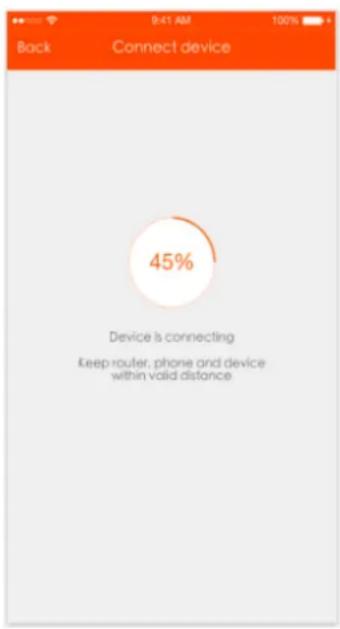
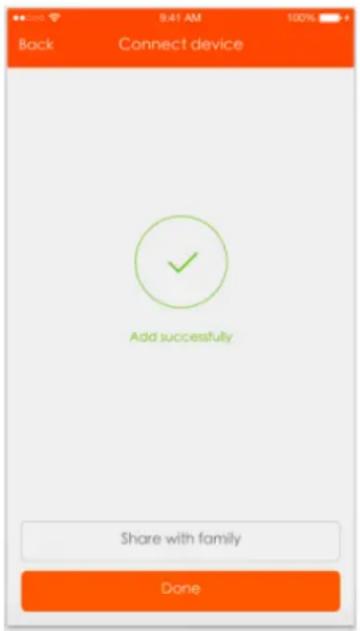
Abb. 2
Abb. 3
Abb. 4
Abb. 7
OptiHeat 2000GTPT (GTWPT)
Abb. 4
start time and stop time
start time and stop time = Start- und Stoppzeit
Abb. 7
Sperrfunktion
Betriebston
natural_image
White rectangular solar heating device with metallic base (no visible text or symbols)OptiHeat 2000EWP
natural_image
White rectangular solar heating device with a circular control knob and metal base (no visible text or symbols)OptiHeat 2000GTP (GTWPT)
natural_image
Modern black electric heater with control panel and display screen (no visible text or symbols)MÜSZAKI SPECIFIKÁCIÓ
OptiHeat 2000GTPT (GTWPT)
- ábra
- ábra
OptiHeat 2000GTPT (GTWPT)
- ábra
- ábra
- ábra
Heti időzítő
- ábra
- ábra
- ábra
Gyermekzár
TISZTÍTÁS
natural_image
White rectangular solar heating device with metallic base (no visible text or symbols)OptiHeat 2000EWP
natural_image
White rectangular solar heating device with a digital display and metal base (no visible text or symbols)OptiHeat 2000GTP(GTWPT)
natural_image
Modern black rectangular electronic device with control panel and display screen (no visible text or symbols)natural_image
Simple line drawing of a blank rectangular object with two curved top handles above it (no text or symbols)G2
flowchart
graph LR
    A["Step 1: Frame 1 with circular head and ring"] --> B["Step 2: Wall component"]
    B --> C["Step 3: Panel with door and valve"]
    C --> D["Step 4: Panel with attached wires and valves"]
Pic 1
Зображення 2
Зображення 3
Зображення 4
Зображення 7
OptiHeat 2000GTPT (GTWPT)
3—


-6
4—


— 7
5—


-8
Режим очікування
Зображення 3
Зображення 4
Mode = режим
Зображення 7
ОЧИЩЕННЯ
Information requirements for electric local space heaters

- TECHNICAL SPECIFICATION
- IMPORTANT
- NOTE
- CAUTION
- FOR YOUR OWN SAFETY
- PRODUCT FEATURES
- INSTALLATION
- INSTRUCTIONS FOR USE
- OptiHeat 2000MP
- OptiHeat 2000EWP
- Power
- Mode
- Temperature
- Timer
- WiFi function
- Operating sound
- OptiHeat 2000GTPT (GTWPT)
- Standby Mode
- Work Mode
- Weekly timer Mode
- Child lock
- Remote control and control panel:
- CLEANING
- TEHNIČNE SPECIFIKACIJE
- POMEMBNO
- Zvok za delovanje
- TEHNIČKE SPECIFIKACIJE
- VAŽNO
- Stanje pripravnosti
- ОЧИСТКА
- TECHNICKÉ PARAMETRY
- DŮLEŽITÉ
- ČIŠTĚNÍ
- SPECYFIKACJA TECHNICZNA:
- Abb. 2
- Abb. 3
- Abb. 4
- Sperrfunktion
- Betriebston
- Heti időzítő
- Gyermekzár
- TISZTÍTÁS
- Режим очікування
- ОЧИЩЕННЯ
Brand : GORENJE
Model : Optiheat 2000GTWPT
Category : Heating