
DJC123-120 - Drill Clas Ohlson - Free user manual and instructions
Find the device manual for free DJC123-120 Clas Ohlson in PDF.


| Product Type | Drill/Driver |
| Brand | Clas Ohlson |
| Model | DJC123-120 |
| Power Source | Rechargeable NiMH battery, 12 V |
| Battery Capacity | 1.2 Ah |
| Charging Time | 3–5 hours |
| Rotation Speed (Stepless) | 0–550 RPM |
| Adjustable Torque | 19 steps + drilling mode |
| Max Torque | 11 Nm |
| Chuck Type | Keyless |
| Chuck Capacity | 0.8–10 mm |
| Drilling Capacity (Wood) | 20 mm |
| Drilling Capacity (Steel) | 10 mm |
| Weight | 1.3 kg |
| Noise Level (LpA) | 67 dB(A), K=3 dB(A) |
| Vibration Level (No Load) | 1.77 m/s², K=1.5 m/s² |
| Forward/Reverse Selector | Yes |
| LED Work Light | Yes |
| Electric Brake | Yes |
| Care & Maintenance | Keep ventilation openings clean; clean with damp cloth; charge battery regularly |
| Safety Equipment Required | Safety glasses and ear protectors |
| Spare Parts & Repair | Contact authorized service center |
Frequently Asked Questions - DJC123-120 Clas Ohlson
User questions about DJC123-120 Clas Ohlson
0 question about this device. Answer the ones you know or ask your own.
Ask a new question about this device
Download the instructions for your Drill in PDF format for free! Find your manual DJC123-120 - Clas Ohlson and take your electronic device back in hand. On this page are published all the documents necessary for the use of your device. DJC123-120 by Clas Ohlson.
USER MANUAL DJC123-120 Clas Ohlson
natural_image
Illustration of a handheld electric drill putter with black and gray casing (no text or symbols)Art.no
18-3466
40-8554
Model
DJC123-120-UK
DJC123-120
Ver. 20130903
clas ohlson
12 V NiMH Drill/Driver
Art.no 18-3466 Model DJC123-120-UK
40-8554
DJC123-120
Please read the entire instruction manual before use and save it for future reference. We reserve the right for any errors in text or images and for making any necessary technical changes to this document. If you should have any questions concerning technical problems please contact our Customer Services.
Warning! When using an electric power tool, always observe the general safety rules below, to avoid the risk of fire, electric shock and injury. Read through the entire user guide before using the product and save the user guide for future reference. Always unplug the power lead from the socket before servicing and adjusting the product.
1. Safety
General safety instructions for rechargeable power tools
Warning! Read the entire user guide. If the instructions below are not followed, there is a risk of electric shock, fire and/or serious injury. The term “power tool” in the warning text below refers to your mains or battery powered hand tool.
KEEP THIS USER GUIDE.
1) Work area
a) Keep the work area clean and well lit. Accidents are more likely to happen in cluttered and dark areas.
b) Do not use power tools in explosive environments, for example in the presence of flammable liquids, gases or dust. Power tools generate sparks which may ignite dust or fumes.
c) Keep children and bystanders away when you are operating the power tool. You may lose control if you are distracted.
2) Electrical safety
a) The plug on the power tool must match the wall socket. Never modify the plug in any way. Never use an adaptor plug with an earthed power tool. Using unmodified plugs and matching wall sockets reduces the risk of electric shock.
b) Avoid body contact with earthed objects such as pipes, radiators, cookers or refrigerators. There is an increased risk of electric shock if your body is earthed.
c) Do not expose the power tool to rain or wet conditions. If water gets into the power tool, the risk of electric shock is increased.
d) Do not mistreat the mains lead. Never use the mains lead to carry or drag the power tool or to unplug it. Keep the mains lead away from heat, oil, sharp edges and moving parts. Damaged or tangled mains leads increase the risk of electric shock.
e) When operating a power tool outdoors, use an extension lead suitable for outdoor use. Using an extension lead suitable for outdoor use reduces the risk of electric shock.
f) If you need to use a power tool in a humid location, connect the tool to the power supply via a residual current device (RCD). Using an RCD reduces the risk of electric shock.
3) Personal safety
a) Stay alert and use common sense when using a power tool. Do not use a power tool if you are tired or under the influence of drugs, alcohol or medication. A moment of inattention when using a power tool may result in serious injury.
b) Use safety equipment. Always wear safety glasses. Using safety equipment such as a dust mask, non-slip safety shoes, a hard hat and ear protectors reduces the risk of injury.
c) Avoid starting the tool accidentally. Make sure that the switch is in the OFF position before you plug the tool in. You could cause an accident if you carry a power tool with your finger on the trigger switch or connect a power tool to the power supply when the switch is at ON.
d) Remove all service tools/keys before you switch on the power tool. A service tool left attached to a rotating part of the power tool may result in injury.
e) Do not overreach. Keep proper footing and balance at all times. This allows you to have better control of the power tool in unexpected situations.
f) Wear suitable clothing. Do not wear loose clothing or jewellery. Keep your hair, clothing and gloves away from moving parts. Loosely-fitting clothes, jewellery or long hair may get trapped in moving parts.
g) If dust extraction and collection equipment is available, make sure it is connected and properly used. Using such equipment can reduce dust-related hazards.
4) Using and maintaining the power tool
a) Do not overload the power tool. Use the correct power tool for the work you are doing. The correct power tool will do the job better and more safely at the rate for which it was designed.
b) Do not use the power tool if the switch does not turn it on and off. A power tool that cannot be controlled with the switch is dangerous and must be repaired.
c) Unplug the power tool before you make any adjustments, change an accessory or put the tool away. These preventive safety measures will reduce the risk of the tool being started accidentally.
d) Store idle power tools out of the reach of children and do not allow people unfamiliar with the power tool and these instructions to use it. Power tools are dangerous in the hands of inexperienced users.
e) Check for misalignment or binding of moving parts, for broken parts or anything else that may affect the operation of the power tool. If there is any damage it must be repaired before the tool can be used again. Many accidents are caused by poorly maintained power tools.
f) Keep cutting tools sharp and clean. Properly maintained cutting tools with sharp edges are less likely to bind and are easier to control.
g) Use the power tool, accessories, etc., in accordance with these instructions and in the manner intended for the particular type of power tool, taking into account the working conditions and the type of work to be done. Using the power tool to do work for which it is not intended may result in a hazardous situation.
5) Using and servicing a rechargeable power tool
a) Make sure that the switch is in the off position before you fit the battery. Fitting the battery to an electric power tool with the switch in the on position could cause an accident.
b) Only charge the battery with a charger supplied by the manufacturer. A charger that is suitable for one type of battery may be a fire hazard if used with a different type of battery.
c) Only use the correct batteries with rechargeable hand tools. Using the wrong battery may cause damage, injury and fire.
d) When the battery is not in use, keep it away from metal objects such as paperclips, coins, keys, nails, screws or other small items that may form a bridge from one pole of the battery to the other. Short-circuiting the poles of a battery may cause burns or fire.
e) If the battery is abused, it may leak acid. Avoid contact with this substance. If you happen to come into contact with the acid, rinse the affected area with water. If the acid gets into your eyes, seek medical assistance. Acid from the battery may cause irritation and burns.
6) Servicing
a) Servicing and repairs must be done by authorised personnel, using genuine spare parts. This guarantees that the safety of the electric power tool is preserved.
Special safety rules for rechargeable power tools
• Use only the charger supplied. The product is only intended to be used indoors.
- If a battery is warm, let it cool down before charging it. The temperature during battery charging should be between 0 °C and 40 °C (20–25 °C is recommended for optimum charging results).
- If the battery is charged at a temperature below 0 °C it may become over-charged, and this may damage the power tool. Do not charge the battery when the temperature is above 40 °C . The battery only delivers full power after about five charge/discharge cycles.
- Let the charger rest for 15 minutes before you start to charge the next battery. Do not charge more than two batteries in succession without a long interval.
• Make sure that no foreign bodies find their way into the tool via the battery opening.
- Avoid short circuits. Place adhesive tape across the battery contacts when storing it loose.
- Never dismantle the rechargeable battery or the charger.
- Make sure that the rechargeable battery is not short-circuited as this may damage the battery and result in accidents if the battery explodes.
- There is a risk of explosion if the battery is exposed to fire or high temperatures. Never put a battery in a fire. Never leave a battery in strong sunlight for a long time.
- Before drilling in floors, ceilings or walls, check for hidden electric wiring, water pipes or anything else that might be damaged in the area where you intend to drill. Use a metal detection device, for instance.
- Always set the forward/reverse switch to the locked position before you change an accessory.
Product marking with safety symbols on the power tool

natural_image
Icon of a person using a laptop inside a black circle (no text or symbols)Read the entire user guide, follow the safety rules and observe the warnings.

natural_image
Simple line drawing of a person wearing sunglasses inside a circle (no text or symbols)Wear ear protectors and safety glasses.
2. Care and maintenance
- Keep the ventilation openings of the motor free from debris and dust.
- Clean the power tool regularly with washing-up liquid and a slightly damp cloth. Never use strong solvents.
- Charge the battery regularly. It will last longer if it is used.
3. Disposal
- Follow local ordinances when disposing of this product. If you are unsure about how to dispose of this product contact your local authority.
- To avoid short circuits, place adhesive tape across the battery contacts before disposing of it.
• Faulty and exhausted batteries must be recycled. - Do not throw exhausted batteries into a fire or into water.
4. Description of the product
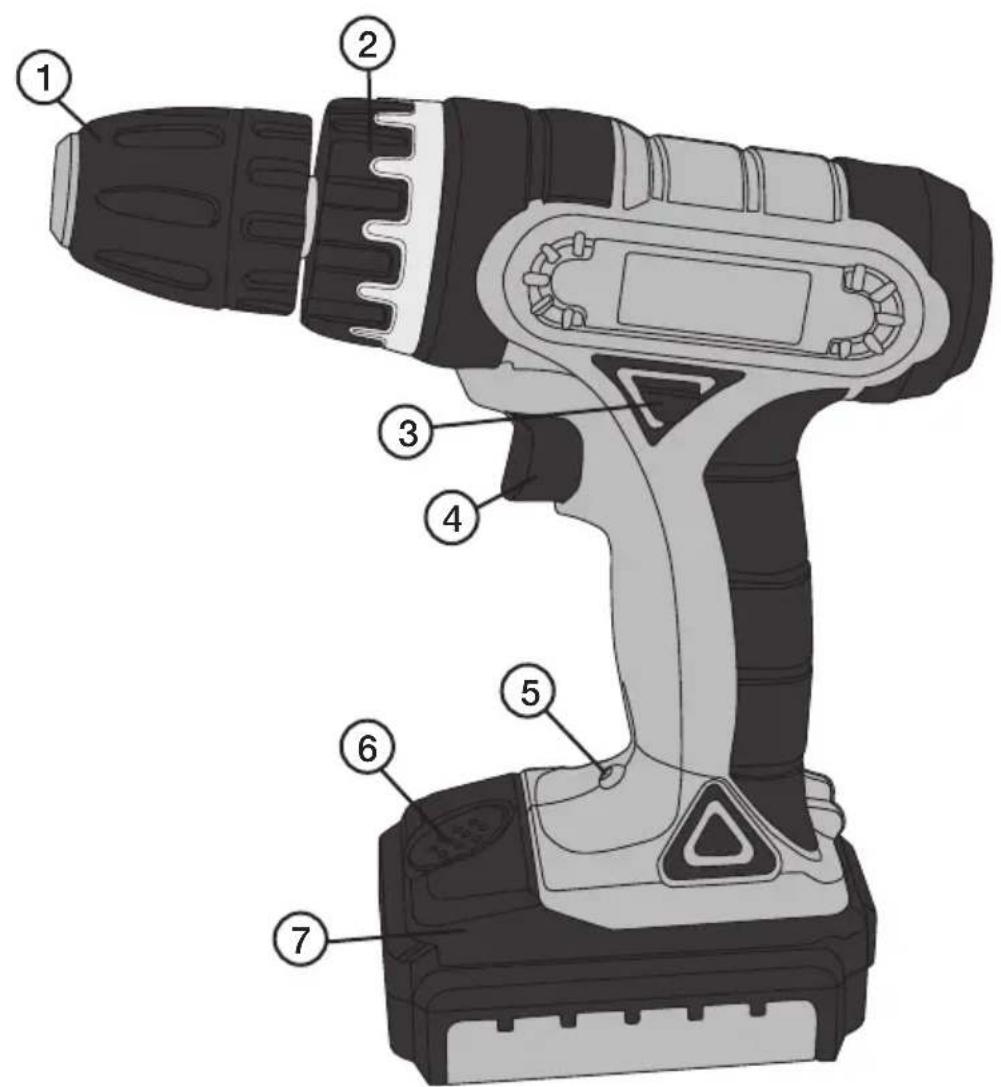
- Keyless chuck
- Torque setting
- Forward/reverse selector
- Trigger switch
- LED lighting
- Battery latch
- Battery
- Charger
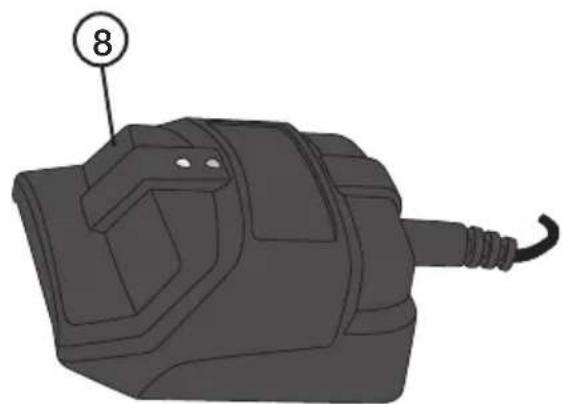
natural_image
Illustration of a mechanical component with a numbered label (8) pointing to its side, no text or symbols present.5. Charging
Note: The mains adaptor is designed for indoor use only.
- Press in the battery latch on the battery and pull it forward out from the power tool.
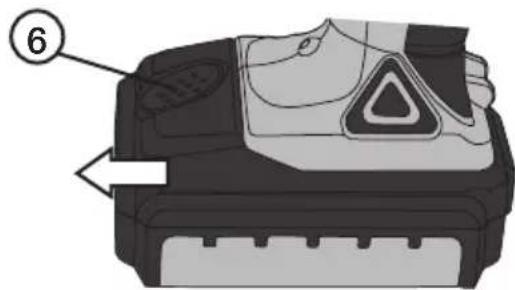
-
Connect the mains adaptor to a wall socket and connect the lead to the charger. The green LED lights up, indicating that the mains adaptor is connected.
-
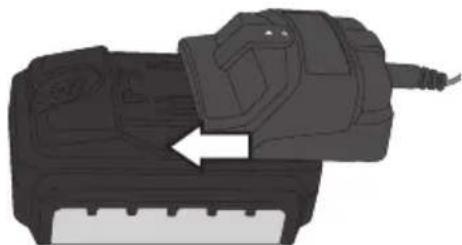
Place the charger on the battery and press it home.
natural_image
Illustration of a handheld electronic device with an arrow indicating motion or operation (no text or symbols present)The red LED lights up when the battery is correctly installed and is being charged. Allow the battery to charge for about 3–5 hours, then remove it from the charger. When charging is complete, unplug the mains adaptor.
Note: The charger does not switch off automatically.
6. Description of operation
Forward/reverse action
- To change the direction of rotation: Release the trigger switch and allow the chuck to stop rotating. To change the direction of rotation, press the forward/reverse selector in the required direction:
- Press in the selector on the left-hand side for anticlockwise rotation ⬤. - Press in the selector on the right-hand side for clockwise rotation ⬤.
- Move the selector to the midway position to prevent accidental starting of the power tool when you are not using it.
Keyless chuck
• The power tool has a rapid-action keyless chuck.
- Hold the rear ring of the chuck with one hand and turn the front part with the other hand to grip or release the accessory (drill bit, etc.).
Setting the torque
- The power tool has an adjustable clutch to set the required torque with the knob. When correctly set, the power tool stops tightening at the set torque to prevent the screw being over-tightened.
- The setting depends on the type and size of the screw and the type of material. Always start with the lowest torque and increase the torque gradually for the result you want.
Stepless speed control
- Excellent for screwdriving. The more you press the trigger switch, the higher the rotation speed.
- The power tool has an electric brake which operates when you release the trigger switch, so that the chuck stops quickly.
7. Use
- Choose the accessory you want to use (drill bit, etc), fit it to the chuck and tighten the chuck.
• To start and stop the power tool, press and release the trigger switch.
8. Troubleshooting
| Problem Possible cause | Action | |
| The motor does not run. | Battery discharged. Check | charge the battery. |
| Short-circuit. Contact our faulty trigger switch. | customer service department. | |
| The motor runs slowly. | Blunt/damaged accessory. | Sharpen or replace. |
| Trigger switch not fully pressed in. | Press the trigger switch further in. | |
| Motor overheated. Reduce the feed rate. | ||
| The power tool makes an unusual noise. | Mechanical obstruction. | contact our customer service department. |
| Winding short-circuited. | ||
| Severe vibrations. The accessory is loose in the chuck. | Tighten the chuck, check the fitting of the accessory. | |
| Sparks inside the motor. | Winding short-circuited. | contact our customer service department. |
| Commutator needs cleaning. | ||
9. Technical specifications
Supply voltage 12 V
Rotation speed, stepless 0–550 RPM
Adjustable torque 19 step and drilling mode
Max torque 11 Nm
Keyless chuck 0.8–10 mm
Drilling capacity ∅ 20 mm (wood), ∅ 10 mm (steel)
Weight 1.3 kg
Noise level LpA 67 dB(A) K=3dB(A)
Noise level LwA 78 dB(A) K=3 dB(A)
Vibration 1.77 m/s ^2 K=1.5 m/s ^2 (no load)
Battery 12 V/1.2 Ah (NiMH)
Mains adaptor Primary 230 V, 50 Hz
Secondary 12 V, 400 mA
Charging time 3 to 5 hours
Borrmaskin 12 V NiMH
Art. nr 18-3466 Modell DJC123-120-UK
40-8554
DJC123-120
natural_image
Icon of a person reading a book inside a circle (no text or symbols)natural_image
Simple line drawing of a person wearing sunglasses inside a circle (no text or symbols)natural_image
3D illustration of a mechanical component with a numbered label (8) pointing to its side, no text or symbols present.5. Laddning
natural_image
Illustration of a handheld electronic device with an arrow indicating motion or operation (no text or symbols present)natural_image
Icon of a person reading a book inside a circle (no text or symbols)natural_image
Simple line drawing of a person wearing sunglasses inside a circle (no text or symbols)natural_image
Illustration of a mechanical component with a numbered label (8) pointing to its side, no text or symbols present.5. Lading
natural_image
Illustration of a handheld electronic device with an arrow indicating motion or operation (no text or symbols present)natural_image
Icon of a person reading a book inside a circle (no text or symbols)natural_image
Simple line drawing of a person wearing sunglasses inside a circle (no text or symbols)natural_image
Illustration of a mechanical component with a numbered label (8) pointing to its side, no text or symbols present.5. Lataaminen
natural_image
Illustration of a handheld electronic device with an arrow indicating motion or operation (no text or symbols present)natural_image
Illustration of a mechanical component with a numbered label (8) pointing to its side, no text or symbols present.5. Ladevorgang
natural_image
Illustration of a handheld electronic device with an arrow indicating a process or operation (no text or symbols present)Declaration of Conformity
Declares that this product complies with the requirements of the following directives and standards
Machinery directive 2006/42/EC
| EN 60745-1:2009 |
| EN 60745-2-1:2003+A11:2007+A1:2009+A12:2009 |
| EN 60745-2-2:2003+A11:2007+A1:2009+A12:2009 |
EMC directive 2004/108/EC
| EN 55014-1:2006+A1:2009 |
| EN 55014-2:1997+A1:2001+A2:2008 |
Low Voltage directive 2006/95/EC
Klas Balkow
President
Insjön, Sweden, 2012-07-04
Sverige
Postal 10 – 13 Market Place
Kingston Upon Thames
Surrey
KT1 1JZ
Deutschland
- V NiMH Drill/Driver
- Safety
- General safety instructions for rechargeable power tools
- 1) Work area
- 2) Electrical safety
- 3) Personal safety
- 4) Using and maintaining the power tool
- 5) Using and servicing a rechargeable power tool
- 6) Servicing
- Special safety rules for rechargeable power tools
- Product marking with safety symbols on the power tool
- Care and maintenance
- Disposal
- Description of the product
- Charging
- Description of operation
- Forward/reverse action
- Keyless chuck
- Setting the torque
- Stepless speed control
- Use
- Troubleshooting
- Technical specifications
- Borrmaskin 12 V NiMH
- Laddning
- Lading
- Lataaminen
- Ladevorgang
- Declaration of Conformity
- Sverige
- Deutschland
Brand : Clas Ohlson
Model : DJC123-120
Category : Drill