
Spugna 20 G90072 - Dehumidifier G3 Ferrari - Free user manual and instructions
Find the device manual for free Spugna 20 G90072 G3 Ferrari in PDF.


| Product Type | Dehumidifier |
| Brand | G3 Ferrari |
| Model | Spugna 20 G90072 |
| Dehumidification Capacity (30°C, 80% RH) | 20 L/day |
| Water Tank Capacity | 3.5 L |
| Power Consumption | 350 W |
| Voltage / Frequency | 220-240 V ~ 50 Hz |
| Dimensions (W x D x H) | 350 x 250 x 520 mm |
| Weight (net) | 12 kg |
| Refrigerant | R290 |
| Operating Temperature Range | 5°C – 35°C |
| Humidity Control | Adjustable hygrostat |
| Auto Defrost | Yes |
| Continuous Drainage | Yes (hose not included) |
| Air Filter | Washable dust filter |
| Fan Speed | 2 speeds (Low/High) |
| Timer | 1-24 hours |
| Noise Level | 42 dB (A) |
| Security Features | Auto shut-off (tank full), overflow protection |
| Maintenance | Clean filter every 2 weeks; empty tank when full |
| Spare Parts Available | Water tank, filter, continuous drain hose adapter |
| Repairability Index | 7.5 / 10 (estimated) |
| Energy Class | A (estimated) |
| Includes | Dehumidifier, user manual, warranty card |
Frequently Asked Questions - Spugna 20 G90072 G3 Ferrari
User questions about Spugna 20 G90072 G3 Ferrari
0 question about this device. Answer the ones you know or ask your own.
Ask a new question about this device
Download the instructions for your Dehumidifier in PDF format for free! Find your manual Spugna 20 G90072 - G3 Ferrari and take your electronic device back in hand. On this page are published all the documents necessary for the use of your device. Spugna 20 G90072 by G3 Ferrari.
USER MANUAL Spugna 20 G90072 G3 Ferrari
natural_image
Exterior view of a Ferrari air purifier with visible wheels and ventilation slots (no text or symbols on the device itself)Deumidificatore
Dehumidifier
SPUGNA 20
ITA: INDICE
Simbologia.... p. 2
Safety instructions.... p. 8
General information p. 10
G90072....p. 11
Control panel.... p. 11
Operating....p. 11
Defrost.... p. 12
Water drain.... p. 12
Empty the tank.... p. 12
Air filter.... p. 12
Cleaning.... p. 13
Q&A......p. 13
Technical features.... p. 13
Refrigerant.... p. 13
Waste of electric and electronic equipment ((WEEE
Directive) p. 26
PORTUGUES:....p. 13
DEUTCH p. 19
CLASSI DI PROTEZIONE / PROTECTION CLASSES
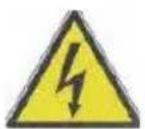
ATTENZIONE RISCHIO DI SCOSSE ELETTRICHE NON ESPORRE A PIOGGIA E UMIDITA'

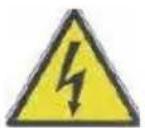
WARNING ELECTRIC SHOCK RISK DO NOT EXPOSE TO RAIN OR MOISTURE

ATTENZIONE: NON APRITE L'APPARECCHIO. ALL'INTERNO NON VI SONO COMANDI MANIPOLABILI DALL'UTENTE NE' PARTI DI RICAMBIO. PER TUTTE LE OPERAZIONI DI SERVIZIO RIVOLGERSI AD UN CENTRO DI ASSISTENZA AUTORIZZATO.
This symbol warns the user that un-insulated dangerous voltage inside the system may cause an electrical shock. Do not open the case.
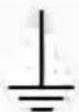
Class I Appliance symbol. This means the appliance must have the chassis connected to electrical earth/ground by an earth conductor.

Caution: this symbol reminds the user to read carefully the important operations and maintenance instructions in this owner's guide.
AVVERTENZE PER L'UTILIZZO
FUNZIONAMENTO
natural_image
Technical line drawing of a mechanical device with internal grid structure and wiring (no text or symbols)CONTENITORE PIENO
natural_image
Technical line drawing of a mechanical device with internal components and directional arrows (no text or symbols)PROBLEMI E RISPOSTE
ENGLISH: SAFETY INSTRUCTIONS
The following are important notes on the installation, use and maintenance; save this instruction manual for future reference; use the equipment only as specified in this guide; any other use is considered improper and dangerous; therefore, the manufacturer cannot be held responsible in the event of damages caused by improper, incorrect or unreasonable use.
Before use, ensure the equipment is undamaged; if in doubt, do not attempt to use it and contact the authorized service center; do not leave packing materials (i.e. plastic bags, polystyrene foam, nails, staples, etc.) within the reach of children as they are potential sources of danger; always remember that they must be separately collected.
Make sure that the rating information given on the technical label are compatible with those of the electricity grid; the installation must be performed according to the manufacturer's instructions considering the maximum power of the appliance as shown on the label; an incorrect installation may cause damage to people, animals or things, for which the manufacturer cannot be considered responsible thereof.
If it is necessary to use adapters, multiple sockets or electrical extensions, use only those that comply with current safety standards; in any case do not exceed the power consumption limits indicated on the electrical adapter and / or extensions, as well as the maximum power shown on multiple adaptor.
Do not leave the unit plugged; better to remove the plug from the mains when the device is not in use. Always disconnect from power supply if you leave it unattended. Cleaning operations should be carried out after unplugging the unit.
If the unit is out of order and you do not want to fix it, it must be made inoperable by cutting power cord.
- Do not allow the power cord to get closer to sharp objects or in contact with hot surfaces; do not pull it to disconnect the plug.
- Do not use the appliance in the event of damage to the power cord, plug, or in case of short circuits; to repair the product only address an authorized service center.
- Do not handle or touch the appliance with wet hands or bare feet. Do not expose the appliance to harmful weather conditions such as rain, moisture, frost, etc.. Always store it in a dry place.
- This appliance can be used by children of 8 years and above and persons with reduced physical, sensory or mental capabilities or lack of experience and knowledge if they received supervision or instruction concerning
use of the appliance in a safe way and understand hazards involved; children shall not play with the appliance; cleaning and user maintenance shall not be made by children without supervision.
- Children must not play with the appliance.
- Keep the appliance and its cord out of reach of children less than 8 years.
If the power cord is damaged, or in case of failure and / or malfunction do not tamper with the unit. The reparation must be done by manufacturer or by service center authorized by the manufacturer in order to prevent any risk. Failure to comply with the above may compromise the unit safety and invalidate the warranty.
- This appliance is intended to be used in household and similar applications such as: staff kitchen areas in shops, offices and other working environments; by clients in hotels, motels and other residential type environments; farm houses, bed and breakfast type environments.
- The appliance is not intended to be operated by means of an external timer or separate remote-control system.
- Before every use, unroll the power cord.
- Use original spare parts and accessories only.
- Do not subject the product to strong impacts, serious damages may result.
- Do not use near or under flammable materials (like curtains), heat, cold spots and steam.

- CAUTION: risk of fire. Gas R290
GENERAL INFORMATION
CAUTION: the dehumidifier contains refrigerant gas R290 (ODP = 0). The product must therefore be disposed of at designated collection centers. Ask for the dedicated waste disposal areas at your place of residence service.
- Before using the appliance, remove all inner and outer packaging and mount all the accessories.
- Use the product only for dehumidification of domestic environments.
- Do not turn unit upside down as water may leak from the container and damage the electrical parts.
- If the product emits a strange smell, turn it off and unplug it from the power outlet.
- Do not insert any objects into the ventilation slots.
-
Empty the container before moving the product; to move use only the handle. Before using the product dry it and check it is not wet.
-
Before you pull the plug off, turn the unit off by using the proper control knob.
- Cleaning operations should only be performed before having unplugged the unit and always following the specific instructions.
- Do not pull the power cord to disconnect the plug.
- If the product stops operating or filters have been exhausted, contact a service center. Using original accessories is recommended.
- Do not use in case of leakage of oil or gas, do not remove the float in the water container.
- Periodically remove the water collected in the container. Do not drink it for any reason, but use it as distilled water for irons.
During installation, follow the steps below:
- Always keep the dehumidifier in an upright position and place it on a stable and level surface.
- Always ensure a good ventilation: do not obstruct the air grids, leave enough space at both sides of the unit and clean the filters regularly.
- Do not place in closets or too small rooms.
- Use in environments with room temperatures between 5 °C and 35 °C.
- Do not place the product near heaters or heat or exposing it to direct sunlight. Do not use at too low temperatures to prevent freezing of internal parts.
- Do not use as a storage shelf for objects.
- The appliance should not be exposed to adverse weather conditions (such as rain, wind, humidity, frost, etc...); do not place it on or near open windows.
DESCRIPTION G90072
- Handle 2. Control panel 3. Filter
- Air outlet 5. Water container 6. Air inlet grill
- Wheels 8. Continuous water out spout 9. Power cable
CONTROL PANEL
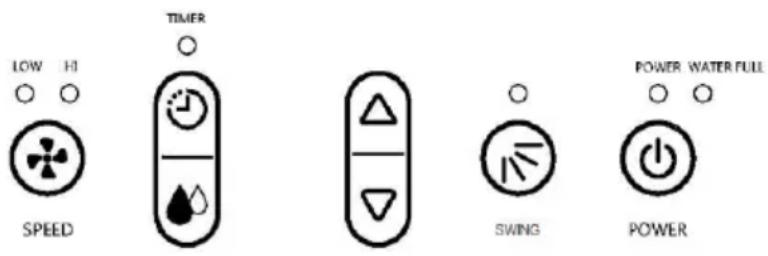
POWER: to switch on and off appliance
SWING: to activate the air outlet deflector
SETTING 🤒 to set humidity desired in the room
TIMER ☎: to set the 24 hours timer.
SPEED: to select fan speed
Light “power”: Color green, it switches on when product is linked to power supply.
Light “full”: Color red, it switches on if the water tank is full or not properly inserted.
Light “Swing”: Color green, it switches on if the deflector is moving.
Light "timer": Color green, it switches on when timer is set.
Light “HI”: Color green, it indicates that the fan is running at high speed.
Light “LOW”: Color green, it indicates that the fan is running at low speed.
DISPLAY: the 2 numbers display can indicate:
- Humidity sensed in the room during use
- Humidity set with button "SETTING"
- The hours set with TIMER
OPERATING
Before operating the unit, follow installation instructions found on page 11 of this user manual. On first use, and after having moved the unit, keep off dehumidifier in a vertical position for about 24 hours, so as to settle oil and gas. During operation, compressor make heat. This can result in a slight increase in room temperature.
- Make sure that the water tank (5) is empty. Connect the unit to the power outlet. The lamp "Power" on panel (2) lights on and the display indicates the humidity of the room.
- Press the button POWER on the panel (2). If the humidity in the room is more than the humidity set, the appliance switches on. Also the one of the lights “HI” or “LOW” light up, depending on the fan speed previously set. To change the speed of fan, press the button SPEED.
- During operation, the product will automatically switch on and off periodically to maintain a constant level of humidity in the environment.
- After use press the POWER button, then unplug the unit from the power outlet. Do not leave the plug inserted unnecessarily.
- If you turn off the appliance, wait at least 3 minutes before switching on again, in order to protect the compressor from damage.
HUMIDITY REGULATION
Humidity can be set between 40% and 80%.
- Press SETTING button on panel (2). On display a number flashes; it indicates humidity currently set.
- To change setting press SETTING button until reaching the desired value.
- Wait 5 seconds without pressing any key.
- During operation, the product will automatically switch on and off periodically to maintain a constant level of humidity in the environment.
TIMER
Product has a 24 hours timer
- Press TIMER button on panel (2). On display appears "00".
- To set timer, press TIMER button until reaching the desired time.
- Wait 5 seconds without pressing any key. Appliance will automatically switch off after the hours set.
DEFROST
When the dehumidifier works for too long or it is used in environments with low room temperatures, the antifreeze function (Defrost) it may work. This function prevents freezing of the evaporator located inside the product, when it tends to freeze, defrost function turns off the device periodically detaining dehumidification.
WATER DRAINAGE
When the unit collects moisture from the environment, the water can be discharged in the water tank (5), if the container is correctly mounted in its housing, or it can be drained continuously.
Continuous drain
If you want to operate the dehumidifier for a long time in the same environment, often without having to empty the container, you can drain the water continuously through a plastic tube with an inner diameter of 10mm (not included).
Follow the steps below:
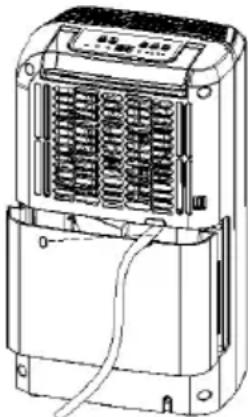
- Remove water tank (5) and insert the plastic tube on the water outlet located up-left in the water tank space; then install the water tank (5) again.
- Bring the plastic tube into a drainage container, taking care to keep the pipe always facing down.
CAUTION: whether you operate the unit in continuous drain mode or not, always place the water tank (5) in its housing, otherwise the product will not work.
natural_image
Technical line drawing of a mechanical device with internal spring and housing (no text or symbols)EMPTY THE WATER TANK
The red light "FULL" on the control panel (2) indicates that water container is full or not installed correctly. In this case, remove water tank (5), remove the water and reassemble it correctly in place.
CAUTION: the water collected in the tank can be used as distilled water for ironing. Do not drink the exhausted water for any reason, and/or use it for another purpose.
natural_image
Technical line drawing of a device casing with internal components and mounting holes (no text or symbols)AIR FILTER
Unplug unit from the electrical outlet before pulling out the filter.
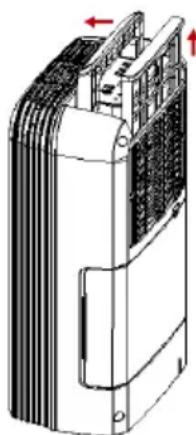
Mounted to the air inlet grill (4) is located a filter that purifies the air coming out. If you use the product on a regular basis clean the filter every 2 weeks. To do so, remove the grill by pulling it up. Wipe with a damp cloth or wash with warm water. In any case, let it dry completely before installing it back.
CLEANING
Unplug the unit from the electrical power outlet before starting any cleaning operation.
To clean the unit, use non-abrasive sponges or soft slightly damp cloths. Do not use thinner or other cleaning agents as they may damage the unit seriously.
Do not use flammable cleaning agents or sprays on any part of the product.
PROBLEMS AND SOLUTIONS
| Problem | Solution |
| The dehumidifier doesn’t turn on | - Check the plug is correctly inserted.- If the control lamp FULL is on, empty the water tank and/or check the container is correctly installed.- Timer setting can be active- Ambient temperature is below 5 or above 35 degree |
| The air flow is weak | - The filter is dirty.- Air inlet or outlet are closed. |
| Not able to lower the humidity | - The filter is dirty- The room is too big.- Doors and/or windows are open. |
| Too noisy | - Check the dehumidifier is located on a stable surface.- The filter is dirty |
| The unit turns off during operation | - Room is too hot or too cold. |
TECHNICAL FEATURES
Power supply: AC 230V \~ 50Hz. Power: 310W
Water tank capacity: 3 Lt
Moisture removal (30°C rh80%): 20Lt/day
Defrost option and water tank full indicator
Electronic control with timer and humidity regulation
Working temperature: 5°C \~ 35°C
GAS INFORMATION
The gas used is R290 in a quantity of 80g. Its total global warming potential (GWP) is 3.
PORTUGUES: ADVERTÊNCIAS
natural_image
Technical line drawing of a portable air conditioner unit with internal cooling fins and ventilation duct (no text or symbols)CONTENTOR CHEIO
natural_image
Technical line drawing of a mechanical device with internal components and mounting holes (no text or symbols)FILTRO DO AR
PROBLEMAS E RESPOSTAS
natural_image
Technical line drawing of a portable air conditioner unit with cooling fins and ventilation slots (no text or symbols)natural_image
Technical line drawing of a mechanical device with internal components and mounting holes (no text or symbols)REINIGUNG
The product is made of non-biodegradable and potentially polluting substances if not properly disposed of; other parts can be recycled. It’s our duty to contribute to the ecological health of the environment following the correct procedures for disposal. The crossed out wheelie bin symbol indicates the product complies with the requirements of the new directives introduced to protect the environment (2002/96/EC, 2003/108/EC, 2002/95/EC, 2012/19/EC) and must be properly disposed at the end of its lifetime. If you need further information, ask for the dedicated waste disposal areas at your place of residence. Who does not dispose of the product as specified in this section shall be liable according to the law.
To find the nearest service center, please call the telephone number 0541 694246, fax number 0541 756430 or contact us at assistenzatecnica@trevidea.it asking for the service centers supervisor.
Appliance is conform to the pertinent European regulation and is therefore marked with the CE mark.

www.g3ferrari.it TREVIDEA S.r.l.
TREVIDEA S.R.L. – Strada Consolare Rimini – San Marino n. 62 – 47924 – RIMINI (RN) - ITALY
MADE IN CHINA