
MOP-19M - Waffle Maker MPM - Free user manual and instructions
Find the device manual for free MOP-19M MPM in PDF.


| Product Type | Waffle Maker |
| Brand | MPM |
| Model | MOP-19M |
| Power | 750 W |
| Voltage | 220-240 V ~ 50/60 Hz |
| Dimensions (L x W x H) | 23 x 18 x 8 cm |
| Weight | 1.2 kg |
| Plate Material | Non-stick coated aluminum |
| Number of Waffles per Batch | 1 Belgian-style waffle |
| Indicator Lights | Power and Ready indicators |
| Temperature Control | Adjustable thermostat |
| Cool-Touch Handle | Yes |
| Non-Slip Feet | Yes |
| Cord Storage | Wrap-around base |
| Safety Features | Automatic shut-off; overheat protection |
| Cleaning and Maintenance | Wipe with damp cloth; do not immerse in water |
| Spare Parts Availability | Contact MPM customer service |
| Repairability | Score 5.0/10 on repairability index |
Frequently Asked Questions - MOP-19M MPM
User questions about MOP-19M MPM
0 question about this device. Answer the ones you know or ask your own.
Ask a new question about this device
Download the instructions for your Waffle Maker in PDF format for free! Find your manual MOP-19M - MPM and take your electronic device back in hand. On this page are published all the documents necessary for the use of your device. MOP-19M by MPM.
USER MANUAL MOP-19M MPM
natural_image
Exterior view of a modern stainless steel grater with black casing (no visible text or symbols)OPIEKACZ DO KANAPEK MOP-19M
INSTRUCTIONS ASSOCIATED WITH USE SAFETY
Before use, thoroughly read the operation manual.
Extreme care is required in case of children presence in vicinity of the appliance!
Do not use your roaster for any other purpose except of its assignment.
Do not immerse the appliance, its cord and plug in water or any other fluids!
Do not leave the roaster without supervision in course of its operation.
Always pull out the plug from the socket unless the appliance is used or before its cleaning.
Do not use the roaster in case of its damage, also if its cord or plug is damaged – in such case the appliance should be handed over to an authorized service shop for repair.
The use of any accessories not recommended by the manufacturer may result in damage of the appliance, fire or injuries.
Do not use the roaster outdoors.
Do not hang the cord on any sharp edges and prevent any contact with hot surfaces.
Do not stand the roaster in vicinity of electric and gas cookers, burners, ovens etc.
Do not touch any hot surfaces in course of roasting – open the roaster by means of holder designed for this purpose only.
Prior to commencing the cleaning, pull out the plug from the plug socket and allow the roaster to cool completely.
When opening the appliance in course of roasting, proceed carefully owing to hot damp from the area under the heating panels!!
The roaster should be connected into the socket with grounding pin!
This appliance is not intended for use by children under 8 years of age and individuals with reduced physical, sensory or mental capabilities, or lack of experience and knowledge, unless they have been given supervision or instruction concerning use of the appliance in a safe way and if they understand the hazards involved. Cleaning and user maintenance shall not be carried out by children without supervision.
Store the appliance and its cord out of reach of children under 8 years of age.
Make sure that children do not play with the appliance.
- Use on a flat, stable surface.
The equipment is not designed to work with external schedulers or a separate control system.

Warning! Hot surface!
Do not pull the plug by holding the power cord.
Do not connect the power plug with wet hands.
The temperature of surfaces may be higher when the appliance is in use.
This appliance is intended for household use only.
To avoid the risk of fire, do not place the appliance near flammable objects, such as curtains, tablecloths, etc.
Keep your children safe: do not leave any parts of the packaging readily accessible (i.e. plastic bags, cardboard boxes, polystyrene inserts, etc.).
WARNING! Never let children play with plastic film or bags. Choking/ asphyxiation hazard!
APPLIANCE DESCRIPTION
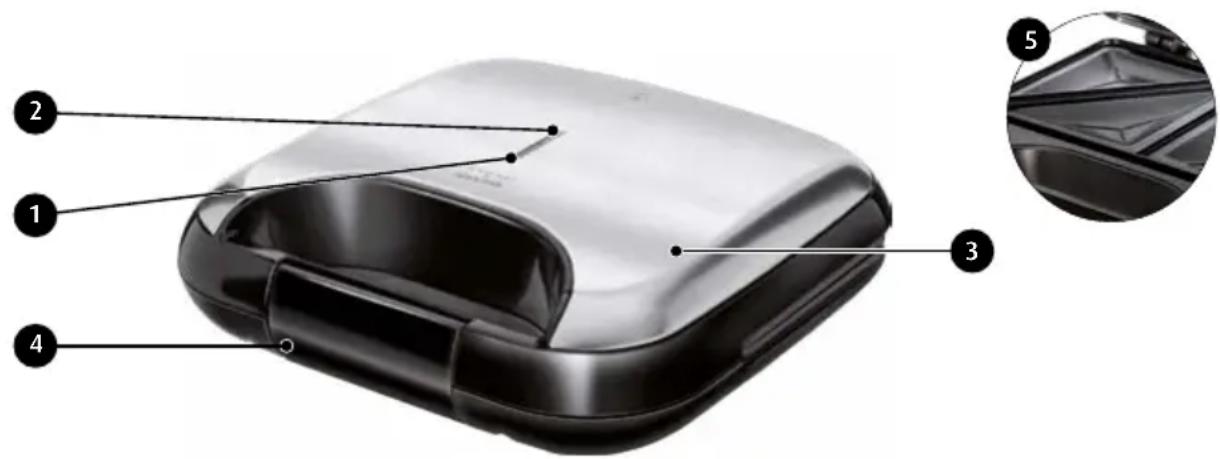
-
Red caution lamp (power supply)
-
Green caution lamp (thermostat)
-
Upper cover
-
Clip
-
Heating panel
PRIOR TO THE FIRST USE:
ATTENTION! Before cleaning the heating plates make sure the appliance is unplugged!
- Prior to the first use of the roaster, thoroughly wash the heating panels of the roaster with the cloth moistened with warm water and thoroughly wipe with dry cloth thereafter.
- Stand the appliance on a flat, stable and dry surface which is resistant to high temperatures.
- Before toasting for the first time, the hot plates must be properly conditioned by running them hot. Place the toaster on a firm, dry, level and smooth surface, plug the power cord to the mains. Leave it running for 10 minutes. Next, unplug the toaster from the mains and wait until it cools down completely. The hot plates may smoke slightly during this process. This is natural and will no recur during further use.
NOTE! Bread may burn! Therefore the appliance must not be used near or below curtains and in vicinity of other combustible materials!
NOTE! The working surfaces of the roaster are heated up to extremely high temperatures! Touch the holders only!
USE OF THE ROASTER
NOTE! When opening the cover, proceed carefully owing to hot damp from the area under the heating panels!
- Oil the heating plates (5) with butter, margarine or other fat.
- Insert the plug into the power outlet. The red light (1) will go on to signal power. Close the cover of the appliance (3).
- Prepare the sandwiches.
- The green indicator light (2) – thermostat will go on when the required temperature is reached. Open the top lid by pulling the latch (4), gently place the sandwiches on the baking trays. Gently close the cover and clamp with clip (4).
- When checking the condition of sandwiches in course of their roasting, open the cover carefully owing to hot damp escaping from the both sides of the roaster!
- Open the cover and remove roasted sandwiches using wooden or plastic spatula.
- Before preparation of the next sandwiches, always close the cover in order to maintain required temperature. The green caution lamp (thermostat) will go on and off in course of roasting to indicate that required temperature is maintained.
- After finished roasting pull out the plug from the plug socket and allow the appliance to cool completely.
NOTE! Do not use and metal and sharp knives or forks, otherwise the damages of heating surfaces are possible!
CLEANING AND MAINTENANCE
- Prior to commencing the cleaning (and after finishing the roasting), pull out the plug from the plug socket and allow the appliance to cool completely.
- Thoroughly wash the heating panels, clean the roaster edges using soft cloth or towel.
- If complete removal of any food residuals from the surface of heating panels is problematic, pour some edible onto dirty surface and try to clean after about 5 minutes. Your efforts will be successful this time.
- Wipe the external surface of the roaster using wet cloth.
ATTENTION! Do not immerse the appliance in water or any other liquids! Do not wipe the inside of the appliance with acute, abrasive cloths or sponges, as this can damage the heating surfaces!
TECHNICAL DATA:
The technical parameters are given on the data plate of the product.
Power cord lenght: 0,9 m

NOTE! MPM agd S.A. reserves the right to introduce technical modifications!
PROPER DISPOSAL OF THE PRODUCT (waste electrical and electronic equipment)
Poland
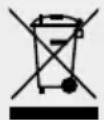
This symbol on the product indicates that the product, after its lifetime, should not be disposed with other household wastes. To avoid harmful influence on the environment and human health due to uncontrolled waste disposal, dispose the waste device to the service point of waste household appliances or report collecting it from home. In order to obtain detailed information about the location and how to dispose the
waste electrical and electronic equipment in a safe way, contact your retailer or local Department of Environmental Protection. Do not dispose the device with other municipal waste.
We wish you satisfaction from using the product and invite you to check a wide range of other MPM appliances
natural_image
Line drawing of a vacuum cleaner with a handle and spout (no text or symbols)MPM agd S.A.


- OPIEKACZ DO KANAPEK MOP-19M
- INSTRUCTIONS ASSOCIATED WITH USE SAFETY
- Warning! Hot surface!
- PRIOR TO THE FIRST USE:
- ATTENTION! Before cleaning the heating plates make sure the appliance is unplugged!
- USE OF THE ROASTER
- CLEANING AND MAINTENANCE
- TECHNICAL DATA:
- PROPER DISPOSAL OF THE PRODUCT (waste electrical and electronic equipment)
Brand : MPM
Model : MOP-19M
Category : Waffle Maker