7160-1585-02 - Keyboard Gamber-Johnson - Free user manual and instructions
Find the device manual for free 7160-1585-02 Gamber-Johnson in PDF.


User questions about 7160-1585-02 Gamber-Johnson
0 question about this device. Answer the ones you know or ask your own.
Ask a new question about this device
Download the instructions for your Keyboard in PDF format for free! Find your manual 7160-1585-02 - Gamber-Johnson and take your electronic device back in hand. On this page are published all the documents necessary for the use of your device. 7160-1585-02 by Gamber-Johnson.
USER MANUAL 7160-1585-02 Gamber-Johnson
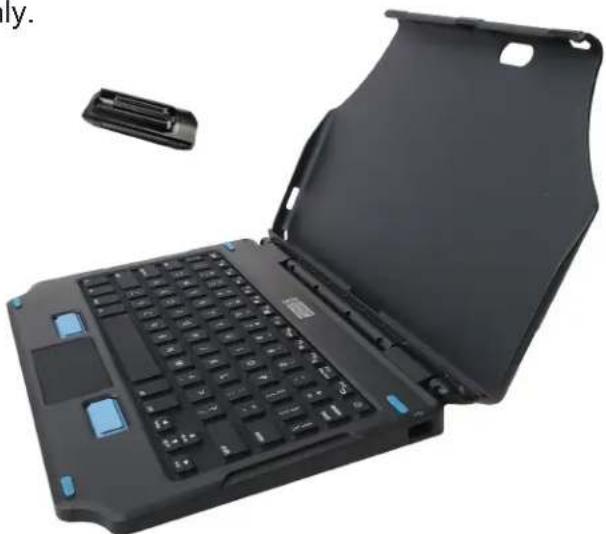
This instruction sheet is for the Gamber-Johnson 2-in-1 Attachable Keyboard only. For instructions on features, set-up, and operation of the Zebra tablets, please refer to the user guide on zebra.com.
This attachable keyboard is designed to be used with the Zebra ET5X 10" tablets without the rugged case and is compatible with the Windows and Android models. It is designed to assist users in the rugged market and be used outside as well as in the office. It is not designed to be mounted in a vehicle as it does not meet the specific safety standards Gamber-Johnson requires for rugged products in the vehicle. Gamber-Johnson offers a full line of products to mount the tablet in the vehicle. Please visit gamberjohnson.com for more information.
This instruction sheet is for the following products:
Item No. 7160-1585-00 English (US)*
Item No. 7160-1585-01 English (UK)
Item No. 7160-1585-02 German
Item No. 7160-1585-03 French
Item No. 7160-1585-04 Spanish
Item No. 7160-1585-05 French (CA)
Item No. 7160-1585-06 Thai
For more language options, please contact a Gamber-Johnson or Zebra representative.
*All images in this document are of the U.S. keyboard layout only.
natural_image
Laptop with open case showing front panel and small electronic device (no text or symbols visible)Product Mounting Disclaimer
Gamber-Johnson is not liable under any theory of contract or tort law for any loss, damage, personal injury, special, incidental or consequential damages for personal injury or other damage of any nature arising directly or indirectly as a result of the improper installation or use of its products in vehicle or any other application. In order to safely install and use Gamber-Johnson products full consideration of vehicle occupants, vehicle systems (i.e., the location of fuel lines, brakes lines, electrical, drive train or other systems), air-bags and other safety equipment is required. Gamber-Johnson specifically disclaims any responsibility for the improper use or installation of its products not consistent with the original vehicle manufactures specifications and recommendations, Gamber-Johnson product instruction sheets, or workmanship standards as endorsed through the Gamber-Johnson Certified Installer Program.
© Copyright 2021 Gamber-Johnson, LLC
If you need assistance or have questions, call Gamber-Johnson at 1-800-456-6868.
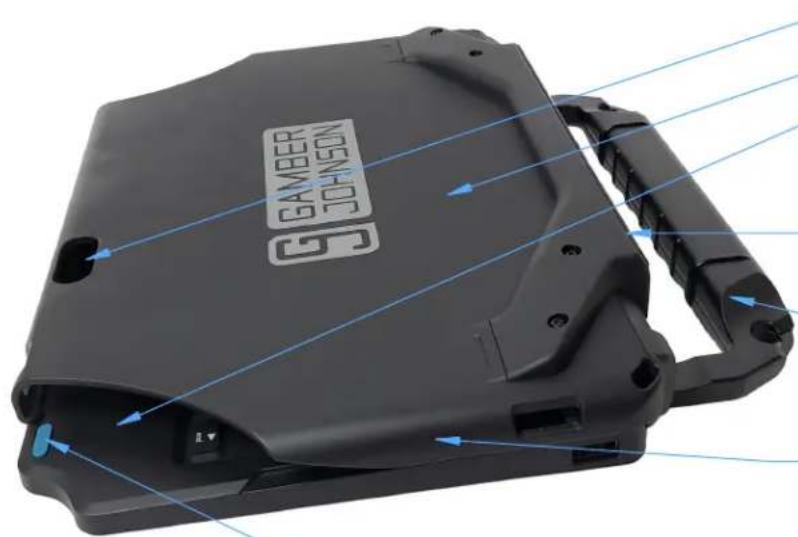
FEATURE IDENTIFICATION - KEYBOARD
natural_image
Close-up of a black GAMBER JOHNSON device with blue directional arrows indicating motion or flow (no text or symbols on the device itself)Camera Opening
Cover
Corner Tablet Opening
This space allows access to the tablet to help remove it from the Cover.
Built-in Kickstand
Provides support when the tablet is open.
Carry Handle
Allows for easy hand carrying and the potential to add a shoulder strap to each corner. See page 4.
Side Walls
Provide docking guidance, prevents mis-docking, and adds strength.
Bumpers
natural_image
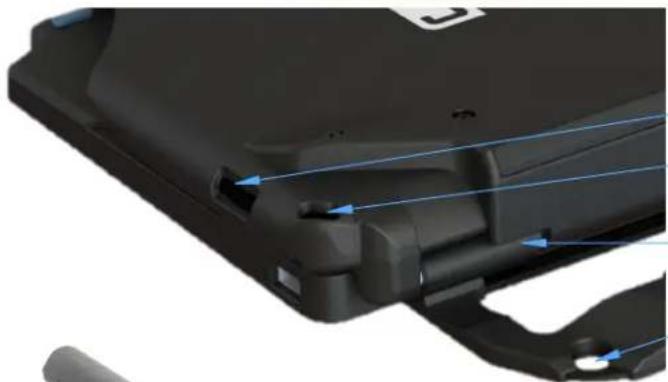
Close-up of a black plastic electronic device with blue directional arrows indicating flow or movement (no text or symbols visible)Speaker Opening
Drain Holes
Allow excess water to drain.
Hinge
Shoulder Strap Holes
These can accommodate a clip-on shoulder strap. See page 4.
Top Latch Ridge
Provides the latching function to hold the tablet down. Easy to slide on and off.
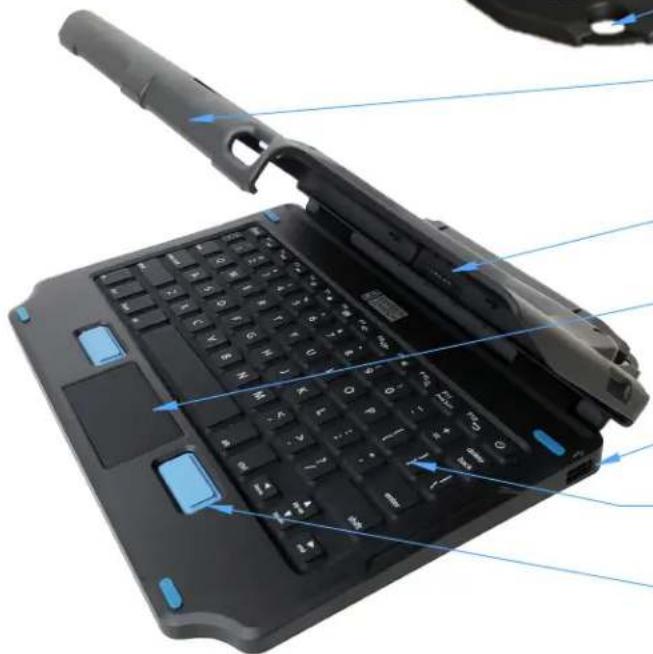
Pogo Pin Connector
Connects the keyboard to the tablet.
Touchpad
Capacitive touch allows for multi-finger gestures.
USB 2.0 Input Port (500 mA)
Provides a port to quickly connect digital devices such as flash drives or a mouse.
Rubber Keys
Standard U.S. keyboard layout with 12 function keys.
Mouse Buttons
Rubber Pads
Provide protection and a non-slip surface.
Part Number Label
Provides information on the product. Reference this label regarding any service needs.
natural_image
Laptop keyboard with blue indicator lights and a handle, showing internal components (no text or symbols visible)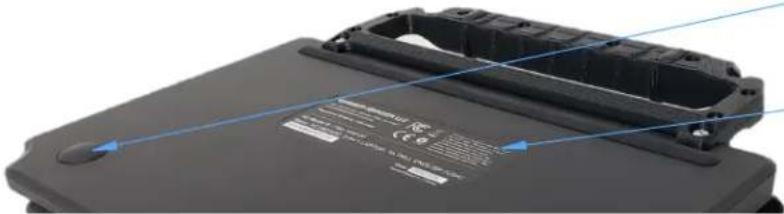
natural_image
Close-up of a black electronic device casing with blue alignment lines and certification marks (no readable text or symbols)FEATURE IDENTIFICATION - CONNECTOR ADAPTER
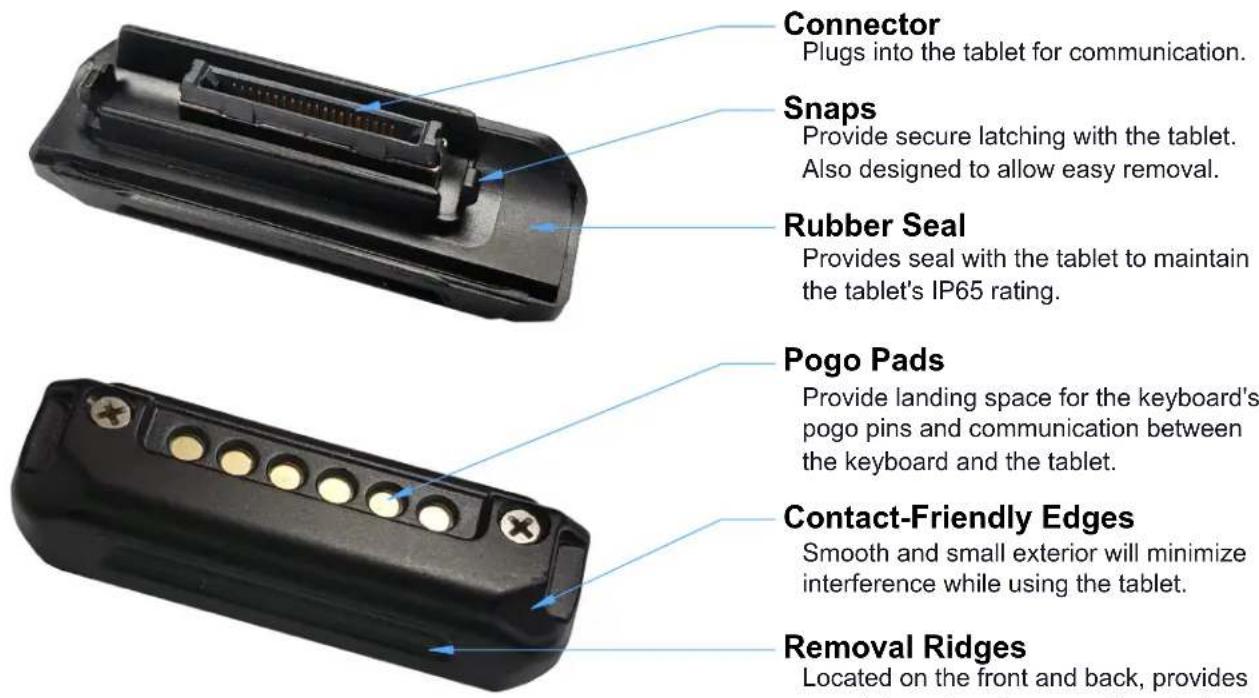
Connector
Plugs into the tablet for communication.
Snaps
Provide secure latching with the tablet. Also designed to allow easy removal.
Rubber Seal
Provides seal with the tablet to maintain the tablet's IP65 rating.
Pogo Pads
Provide landing space for the keyboard's pogo pins and communication between the keyboard and the tablet.
Contact-Friendly Edges
Smooth and small exterior will minimize interference while using the tablet.
Removal Ridges
Located on the front and back, provides a spot to grab and remove the adapter.
INSERTING THE CONNECTOR ADAPTER
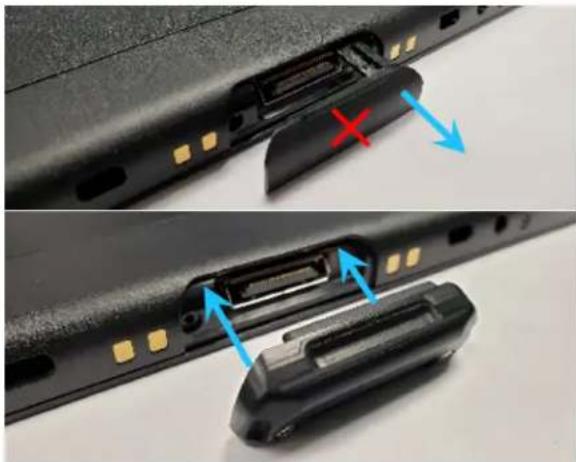
Remove the rubber seal from the bottom of the tablet and discard it. At this point, the tablet is no longer IP65 rated.
Align the Connector Adapter so it matches the shape of the tablet. The Connector on the adapter will mate with the connector on the tablet. The adapter can only be inserted in one direction.
Insert the adapter into the connector opening on the tablet. Keep the connector straight and press until an audible confirmation is recognized. At this point, the Snaps on the adapter have securely latched the adapter to the tablet. The tablet is IP65 rated again and is ready to use with the keyboard.
REMOVING THE CONNECTOR ADAPTER
natural_image
Close-up of hands installing a black plastic component with blue arrows indicating fasteners (no text or symbols visible)-- Optional --
The Connector Adapter may cause interference with other devices such as the Zebra Charge Dock or ShareCradle System. The adapter can be removed so the tablet can be used with those devices.
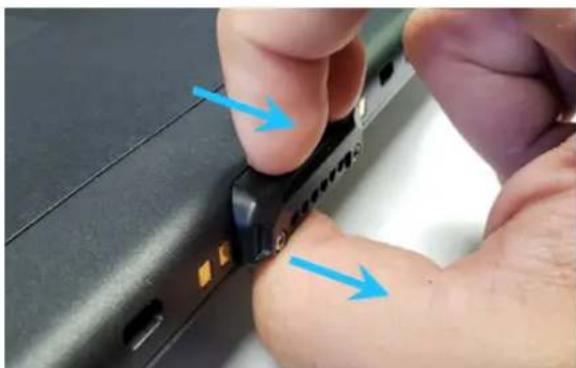
Use fingers or finger nails to find the edge or grooves in the adapter plastic. Pull straight out until the Snaps release the adapter from the tablet. The tablet is now ready to use with other devices. The adapter will need to be inserted again to use the keyboard.
INFORMATION ABOUT USING THIS PRODUCT
Environmental Conditions
This keyboard, including the Pogo Pins and the USB2.0 Input Port is IP54 rated. No plug or cover is needed. This rating applies with or without the tablet; however, any damage to the product, even if the product is still functional, may negate the IP rating. There is also a pair of Drain Holes at the bottom corners of the Cover to help drain excess water. The Connector Adapter is IP65 rated while attached to the tablet.
This keyboard is rated for use and storage at these temperatures:
$$ \begin{array}{l} \text { Operating } - 2 0 ^ {\circ} \mathrm{C} \text { to } 5 0 ^ {\circ} \mathrm{C} (- 4 ^ {\circ} \mathrm{F} \text { to } 1 2 2 ^ {\circ} \mathrm{F}) \ \text { Storage } ^ {-} - 4 0 ^ {\circ} \mathrm{C} \text { to } 8 5 ^ {\circ} \mathrm{C} (- 4 0 ^ {\circ} \mathrm{F} \text { to } 1 8 5 ^ {\circ} \mathrm{F}) \ \end{array} $$
This keyboard is tested to a hybrid of Gamber-Johnson rugged standards including life cycle testing of the hinge and the removal of the tablet. It is designed to assist in the rugged market, but it is NOT designed to mount in a vehicle.
Using the Product
This keyboard is designed to be plug & play with both Windows and Android tablets. Simply insert the Connector Adapter and dock the tablet. It is now ready to use.
There is a USB 2.0 Input Port that supplies 500 mA of power. This port can be used to quickly and easily attach a flash drive, mouse, or other digital device with a USB type A plug.
There are 12 function keys as well as a range of preset quick keys. These keys may not perform the same function on each platform or program.
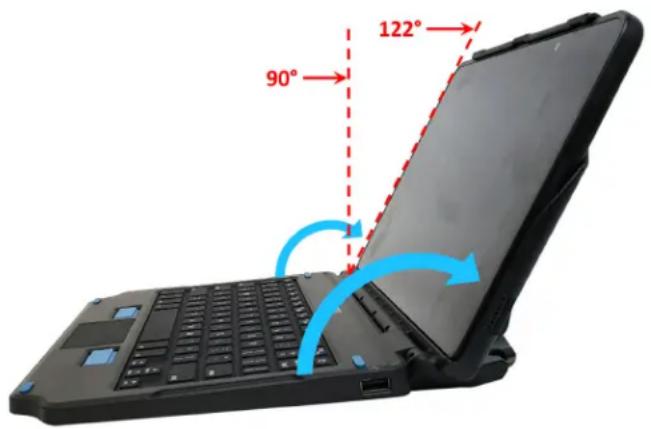
The keyboard is designed to work with the Cover open from 90° to 122° but is best at 122°. The Rubber Pads and Built-in Kickstand provide support and prevent the keyboard from slipping while being used. The Cover opens to a max of 122°. (See right.)
There is a hard stop to prevent it from opening further. Trying to open the Cover beyond this angle may result in permanent damage.
All features of the tablet including the camera, microphones, speakers, USB-C port, and buttons at the top, remain accessible. Use the USB-C port on the tablet to charge the tablet. (See right.)
The blue Bumpers and other features provide support for the product to survive vibration if it is loose in a vehicle and closed. They also provide limited support for accidental impact and drops.
The Carry Handle adds mobility while moving and stability while using on a table. The Carry Handle has one hole on each corner that can accommodate a plastic snap-on shoulder strap. The recommended Zebra product is SG-ET5X-SHDRSTP-01. (See right.)
text_image
90° 122°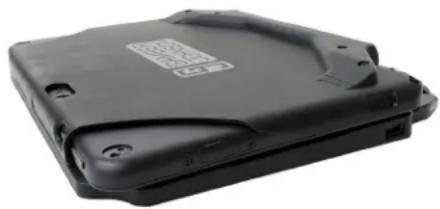
natural_image
Black hard drive with visible battery cover and mounting holes (no text or symbols)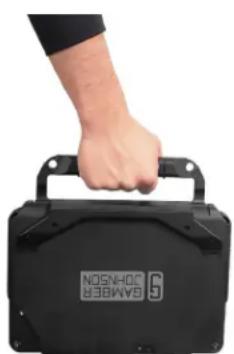
natural_image
Hand holding a black 64MBB8 device with visible model number 6, no text or symbols on the device itself.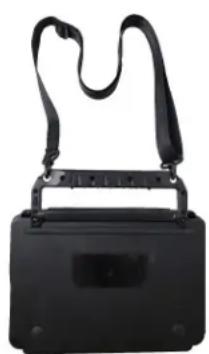
natural_image
Black rectangular device with attached black strap and handle, no visible text or symbolsDOCKING AND UNDOCKING THE TABLET
Docking the Tablet
Visit our website and YouTube channel for more information about the product.
-
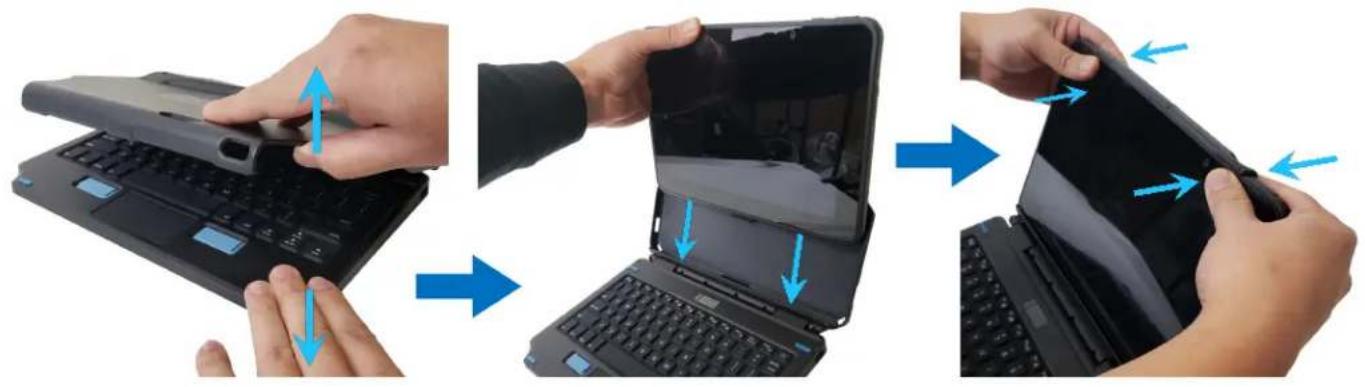
Open the Cover by holding down the keyboard and pulling up on the top. It will rotate at the hinge.
-
Position the tablet in the Cover by placing the bottom onto the Pogo Pin Connector. The Side Walls will guide the tablet into the correct location.
-
Rotate the tablet back into the Cover. Snap the Top Latch Ridge over the tablet by pressing on the back of the cover, near the corners.
natural_image
Three-step illustration showing hands assembling a laptop keyboard, with blue arrows indicating the process (no text or symbols present)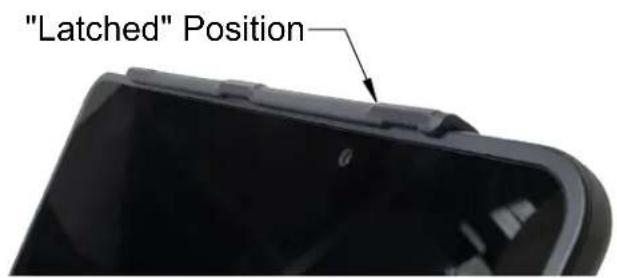
text_image
"Latched" Position
natural_image
Black hard disk device with visible branding and mounting holes (no readable text or symbols beyond branding)Undocking the Tablet
-
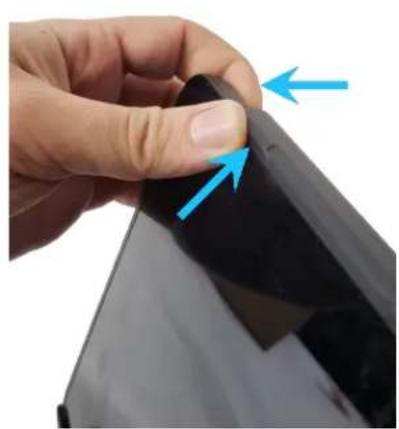
Using your thumb, push upward on the corner of the Top Latch Ridge. There is a slight platform to push on. At the same time, pry forward on the back corner of the tablet using your fingers. Do this on both sides at the same time.
-
Once the top edge of the tablet is free from the Top Latch Ridge, remove the tablet.
natural_image
Close-up of a finger pressing down on a black surface with blue arrows indicating direction (no text or symbols)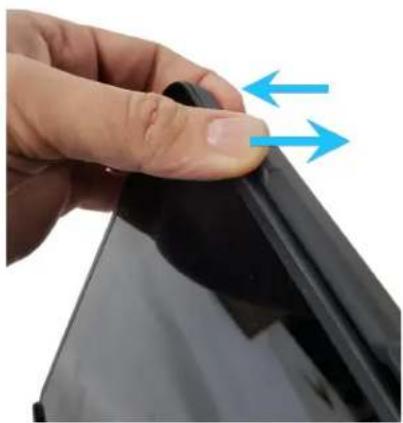
natural_image
Close-up of a hand holding a black object with blue arrows indicating direction (no text or symbols)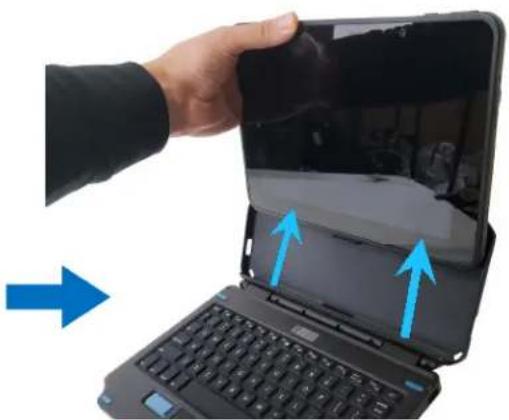
natural_image
Hand holding a tablet device with blue arrows pointing to the screen area, next to a laptop keyboard (no text or symbols visible)KEYBOARD DETAILS
SPECIFICATIONS
| Data Port | USB 2.0 type A, 500 mA |
| Charging Port | Use tablet USB-C port |
| Power | Keyboard uses power from the tablet |
| Dimensions | 274.1 mm (10.79") x 248.2 mm (9.77") x 50.1 mm (1.97") |
| Weight - Keyboard | 0.857 kg (1.89 lbs) |
| Weight - with Tablet | 1.610 kg (3.55 lbs) |
| Operating Temperature | -20°C to 50°C (-4°F to 122°F) |
| Storage Temperature | -40°C to 85°C (-40°F to 185°F) |
| Ingress - Keyboard | IP54 |
| Ingress - Adapter | IP65 |
| Drop - System * | 0.61 m (24.0") to wood |
| Drop - Adapter ** | 1.00 m (39.4") to concrete - matches tablet |
| Life Rating | 3,000 cycles inserting tablet, 30,000 cycles opening/closing |
| Speakers | Use tablet speakers |
| Mounting | None |
| Compatibility | Windows 10 and Android, ET51 and ET56 10.1" tablets |
| Warranty | 1 Year |
* The keyboard system is designed to be durable and survive minor drops and contact, but is not intended to be a fully rugged device.
** When attached to the tablet, the connector adapter will not compromise the drop rating of the tablet.
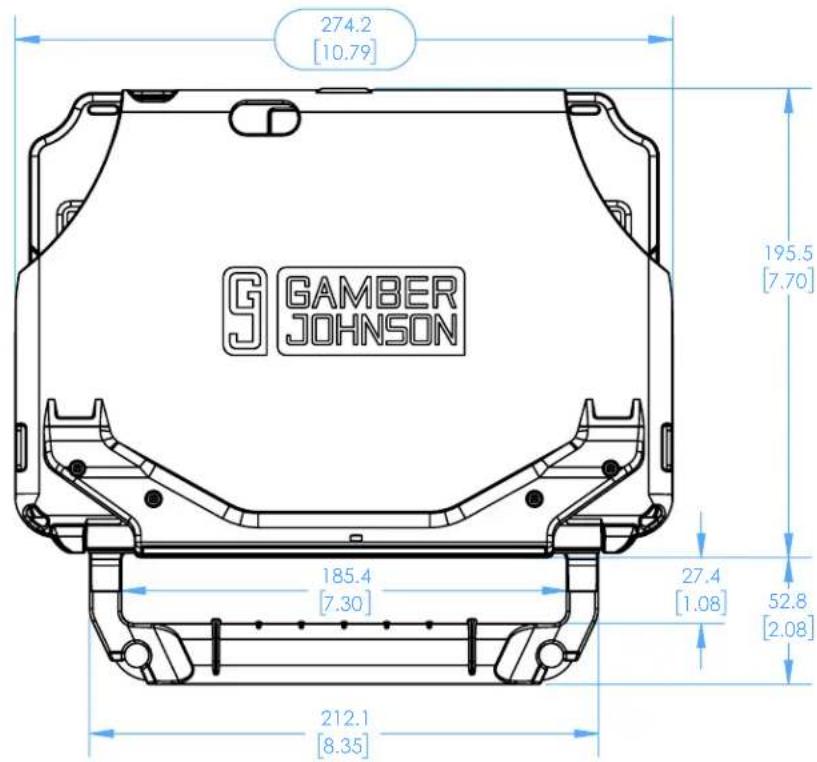
text_image
274.2 [10.79] G GAMBER JOHNSON 185.4 [7.30] 212.1 [8.35] 195.5 [7.70] 27.4 [1.08] 52.8 [2.08]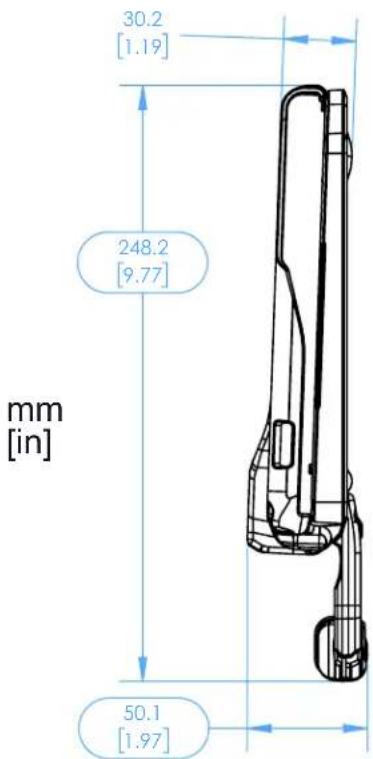
text_image
30.2 [1.19] 248.2 [9.77] mm [in] 50.1 [1.97]REGULATORY CERTIFICATION INFORMATION
Regulatory Model #: 7160-1585
GJ Part Numbers and Description:
| 7160-1585-00 | Keyboard, 2-in-1 Attach, ET5X 10", English (US) |
| 7160-1585-01 | Keyboard, 2-in-1 Attach, ET5X 10", English (UK) |
| 7160-1585-02 | Keyboard, 2-in-1 Attach, ET5X 10", German |
| 7160-1585-03 | Keyboard, 2-in-1 Attach, ET5X 10", French |
| 7160-1585-04 | Keyboard, 2-in-1 Attach, ET5X 10", Spanish |
| 7160-1585-05 | Keyboard, 2-in-1 Attach, ET5X 10", French (CA) |
| 7160-1585-06 | Keyboard, 2-in-1 Attach, ET5X 10", Thai |
Certifications:
• EN 55032: 2015+A11:2020 (Class B)
• EN 55035: 2017
• EN 62368-1
IEC 62368-1
- UL 62368-1
• IEC 60529: 2013, IP54 rated - Keyboard
• IEC 60529: 2013, IP65 rated - Connector Adapter + Tablet
This device complies with Part 15 of the FCC Rules. Operation is subject to the following two conditions: (1) This device may not cause harmful interference, and (2) this device must accept any interference received, including interference that may cause undesired operation.
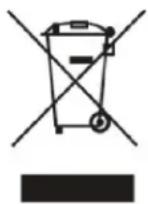
CAN ICES-003(B)/NMB-003(B)

CONFORMS TO UL STD.62368-1 CERTIFIED TO CSA STD.C22.2 No.62368-1
Intertek 4002722



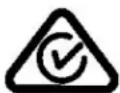

Gamber-Johnson LLC, 3001 Borham Ave., Stevens Point, WI, 54481, USA, 715-344-3482